


What Claude Code actually is
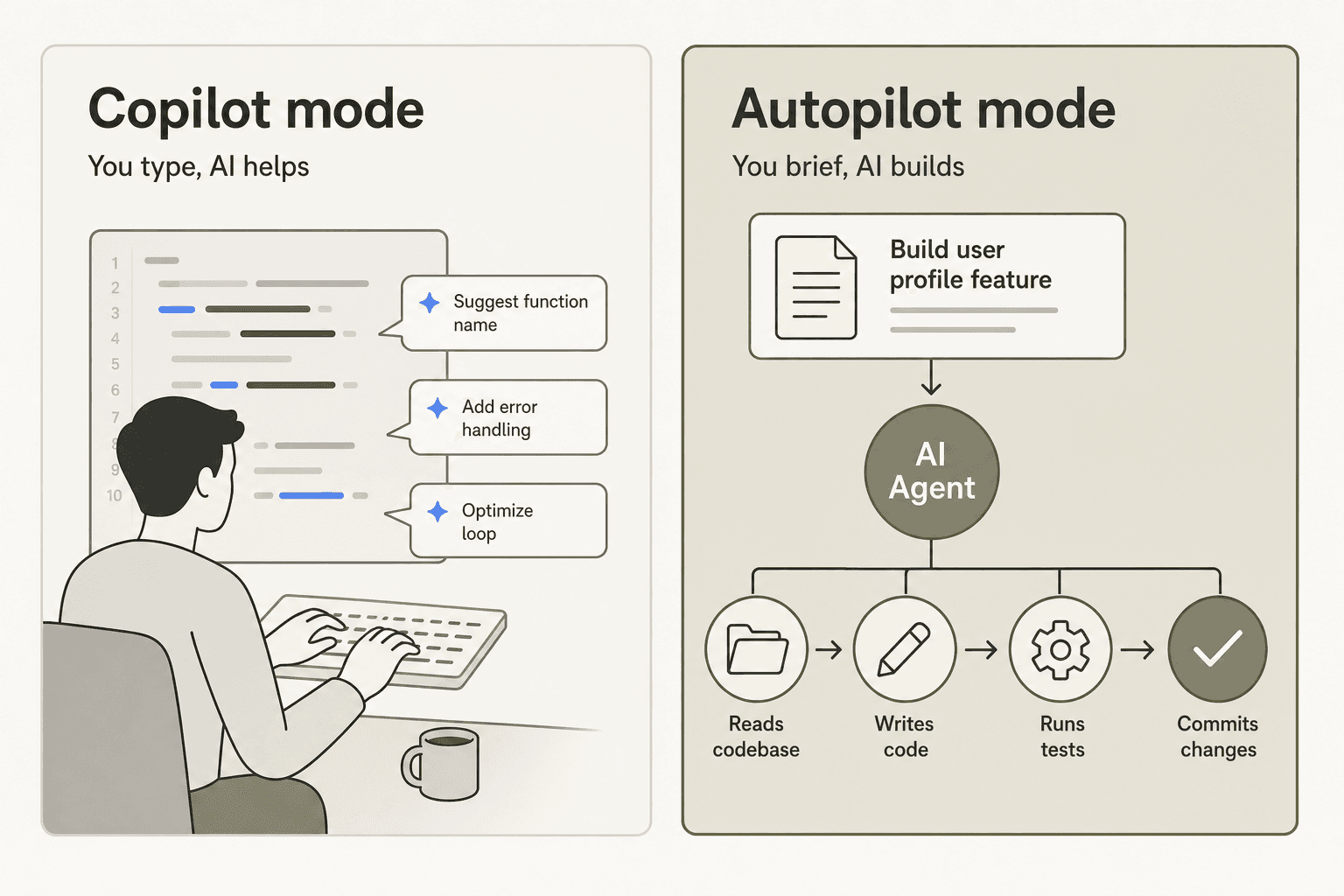
The framing that captures it well: Claude Code is a coding autopilot, not a copilot.
Santiago Valdarrama (@svpino), an AI educator with 600K+ followers who has tested both approaches extensively, described the distinction clearly:
"Claude Code and Codex are agentic coding tools. They are good at following instructions and generating a ton of code at once... A way to think about this: Mode 1: AI writes the code, and the human copilots. Mode 2: The human writes the code, and AI copilots. These two are very different. One doesn't replace the other. Professional developers use both. The IDE is still king."
Cursor and GitHub Copilot are Mode 2 -- they autocomplete and suggest while you type. Claude Code is Mode 1 -- you brief it, it builds. Understanding that distinction shapes everything about when to reach for it.
The clearest indicator that Claude Code has crossed the agentic threshold: Anthropic reports that 90% of Claude Code's own codebase is written by Claude Code itself, with engineers averaging 5 merged PRs per day -- a 67% increase in per-engineer PR throughput in the year since adoption. That's not a marketing stat -- it's internal dogfooding on the tool itself.
The public GitHub repository tells the pace of development: research preview in February 2025, v1.0.0 GA on May 22, 2025, and v2.1.162 on June 3, 2026, with daily commits. Major milestones include the redesigned desktop app, Auto mode (a safer alternative to fully-open permissions), and Dynamic Workflows for orchestrating hundreds of background subagents at once.
Getting started with Claude Code
Installation is a single command on macOS, Linux, and Windows Subsystem for Linux:
curl -fsSL https://claude.ai/install.sh | bash
Homebrew and WinGet are also supported. The old npm install path is deprecated since v2.1.113 -- the tool shifted to native platform binaries for better performance. Once installed, claude login handles authentication via your Claude subscription, a Console API key, or Amazon Bedrock / Google Vertex AI for enterprise deployments.
Running claude in any project directory opens an interactive session. Your first question can be exploratory -- "describe this codebase" -- and Claude Code will read your files, map the architecture, and orient itself before you ask it to change anything.
The VS Code extension is the recommended starting point for most developers. It ships the same engine with a cleaner diff-review UI. Install from the VS Code marketplace; the Spark icon appears in your editor toolbar. A popular hybrid: run the CLI inside the VS Code integrated terminal for full slash-command access while keeping the extension panel open for reviewing proposed changes.
The features that matter
Terminal and CLI
The CLI is where Claude Code's full capability lives. It supports environment variable configuration, Unix pipe composition (for example, git diff | claude -p "write a PR description for this"), flags for GitHub/GitLab integration, and access to the full slash-command library. The CLI reference has grown significantly -- it's a real tool at this point, not a thin API wrapper.
The most consistent community advice on effective use: one focused task per session, with /compact between tasks to keep the context window lean. The failure mode is asking Claude Code to handle 12 things at once -- the context blurs and the results degrade. Task-scoped sessions plus CLAUDE.md hygiene are what power users consistently cite as the foundation of a working setup.
VS Code and IDE integration
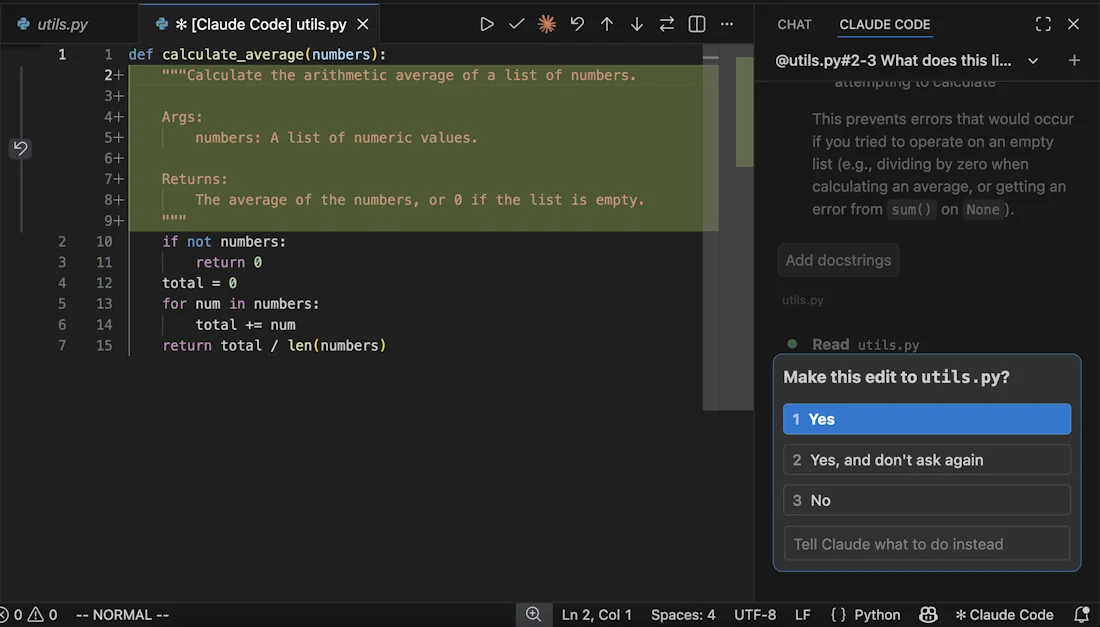
The VS Code extension opens a sidebar panel where you chat with Claude, reference specific files with @-mentions, and review proposed diffs before accepting them. The diff-review workflow is what most VS Code users cite as their reason for preferring it over raw terminal output.
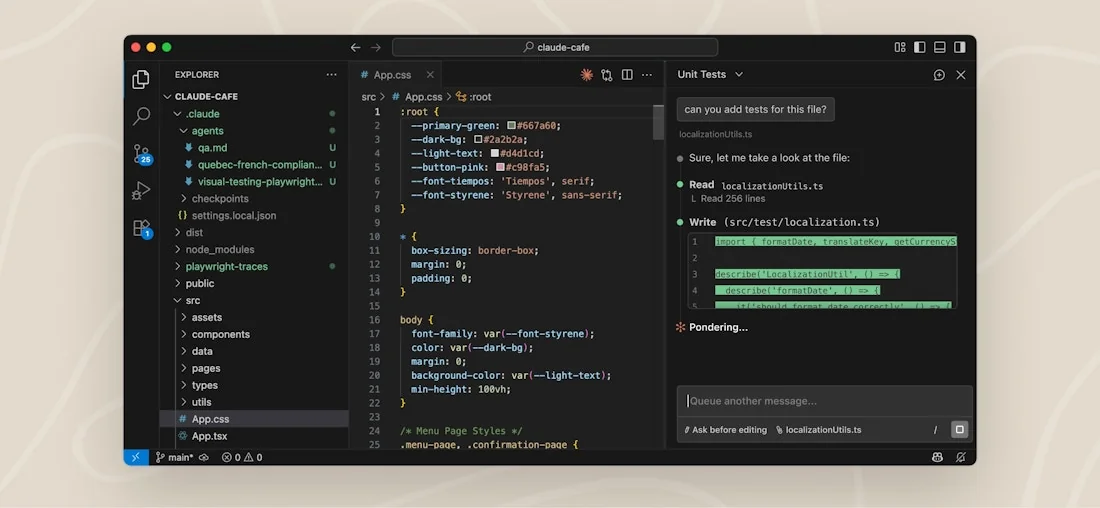
One honest nuance: the VS Code extension currently lags the CLI on features. New capabilities ship to the CLI first, and some advanced flags remain CLI-only. The overview of IDE plugins for Claude Code covers the tradeoffs. JetBrains support is available in beta (IntelliJ, PyCharm, WebStorm); the full IDE integration setup guide covers all surfaces.
GitHub integration
The GitHub integration is one of the highest-leverage features for teams. Point Claude Code at an open issue, and it reads the description, finds the relevant code, implements a fix, runs the test suite, and opens a PR -- without you touching anything. The --from-pr flag works with GitHub, GitLab, Bitbucket, and GitHub Enterprise, and Claude Code integrates with GitHub Actions and GitLab CI/CD for automated pipelines.
The productivity numbers from early adopters are striking. From a widely-shared April 2025 X thread by @petrusenko_max:
"We had to migrate 200+ API endpoints to a new auth system. We estimated two weeks of work. With Claude Code, we finished in two days."
And from the same thread: onboarding time at one engineering team dropped from 2-3 weeks to 3-4 days after Claude Code started generating codebase orientation documents automatically.
CLAUDE.md -- the persistent memory system
This is the feature most people miss, and the one power users cite most often as the highest-ROI configuration step.
CLAUDE.md is a plain-text file in your project root that Claude reads at the start of every session. You use it to define what Claude should always know: your coding standards, files it must never touch (authentication logic, payment flows), preferred libraries, testing requirements, and quality gates. Without it, every session starts cold -- and Claude Code is capable of "helpfully" refactoring your auth code while fixing an unrelated bug.
From r/ClaudeAI, a developer who switched from Cursor after three months:
"Without [CLAUDE.md no-touch zones], the agent would 'helpfully' refactor my auth code while fixing an unrelated bug. Ask me how I know."
u/Ok-Painter2695
The settings.json guide covers the full configuration surface alongside CLAUDE.md. The Claude Code best practices guide has worked examples for production projects. Budget 2-3 hours for initial CLAUDE.md setup; most developers report it paying back within a week.
The agentic loop
Before handing Claude Code anything consequential, it's worth understanding what actually happens when it runs a task.
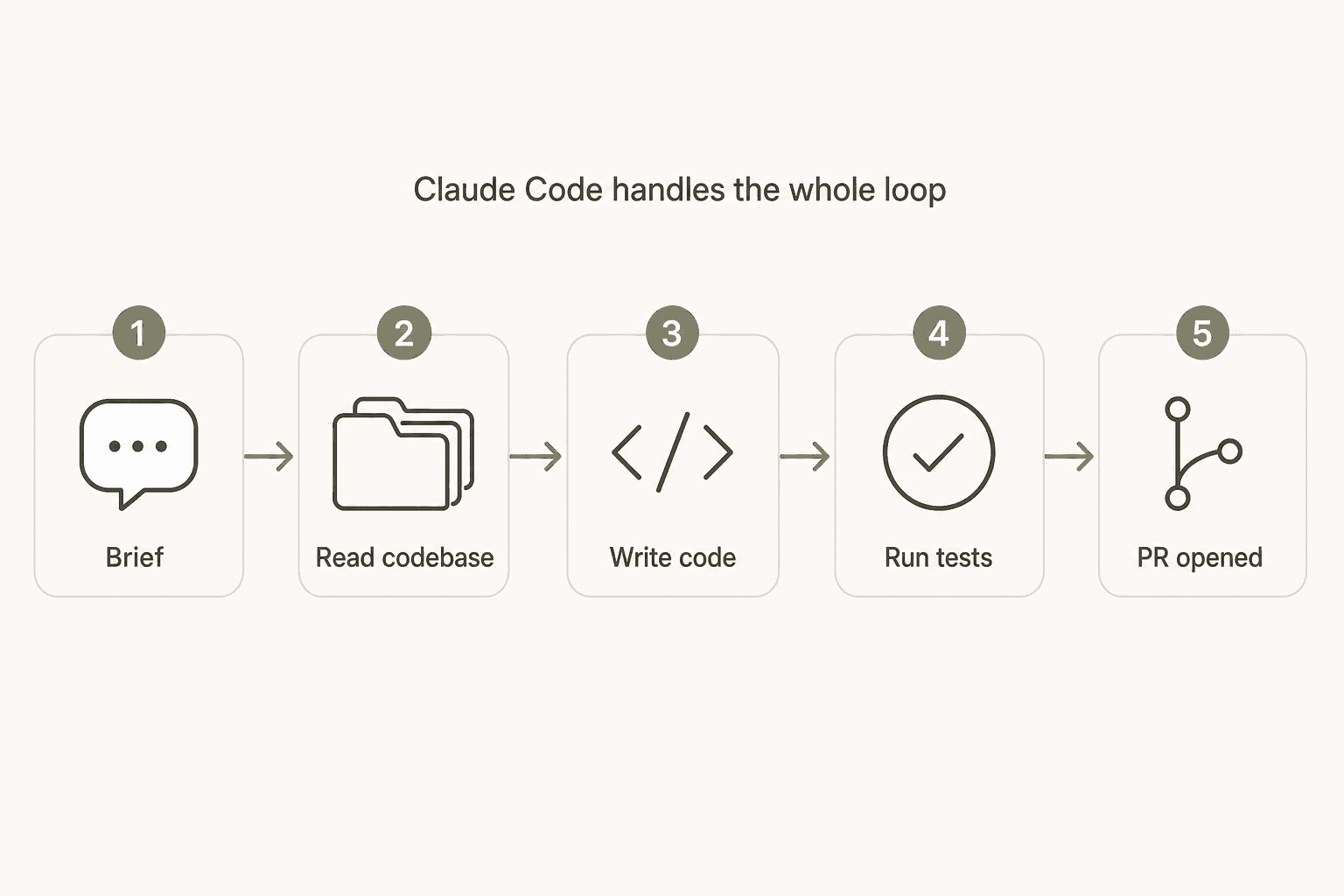
You provide a task description. Claude Code reads the relevant files, works out what needs to change, writes the code, runs your tests, inspects any failures, fixes them, and commits. If GitHub is connected, it opens the PR. For complex tasks, this loop can repeat dozens of times as Claude Code checks and corrects its own output.
The most important context window behavior to understand: Claude Code reads into its working context only the files it judges relevant to the task -- not your entire codebase. For large repos, explicit @-file references and well-structured CLAUDE.md entries steer it toward the right files. The /compact command shrinks the active context without ending the session -- essential for long debugging loops.
For complex multi-part work, multi-agent orchestration lets a lead Claude Code instance coordinate dozens of parallel subagents, each handling a slice of the problem. The Dynamic Workflows feature (launched in v2.1.154) extends this to hundreds of simultaneous background agents. The subagents guide covers orchestration in depth. This is overkill for most individual work, but significant for teams running automated CI pipelines.
Advanced capabilities
Hooks
Hooks are user-defined scripts that fire at lifecycle points during a session -- before a tool runs, after a file edit, at session start or end. You can use them to enforce file-change policies, post Slack notifications, run linting automatically, or log every tool call for compliance.
The hooks reference covers 28+ named events. Handlers accept shell commands, HTTP endpoints, LLM prompts, or MCP tool calls -- making hooks a genuinely flexible automation layer. For enterprise deployments, hooks are also how you add guardrails on top of Claude Code's native permissions system.
MCP tools
MCP (Model Context Protocol) tools let Claude Code reach into external systems mid-session. Install MCP servers for Notion, Sentry, Jira, PostgreSQL, Slack, Figma, and 100+ others -- Claude Code can then read from and act on those systems as part of any task. The MCP integration guide covers server installation across all three scope levels (local, project, user).
The community treated the official claude-code-setup plugin as a meaningful unlock. From the highest-engagement Claude Code thread on X in early 2026 (4.5K+ likes, 1.5M+ views, @Suryanshti777):
"Most people are using Claude Code completely vanilla... which is why their experience feels messy. The real power comes from the ecosystem around it."
The Claude Code plugin overview covers what's available and how to evaluate which plugins are worth adding for your workflow.
Slash commands and skills
Slash commands are reusable workflow definitions you invoke as /skill-name. Skills are markdown files that can inject dynamic context, spawn subagents, and carry per-skill tool permission sets. Anthropic ships a set of bundled skills; you can write your own and share them across a team through project-level configuration. The common workflows guide walks through practical use.
Routines
Routines let you schedule Claude Code tasks to run on a cron schedule, triggered by a GitHub event, or via API call -- on Anthropic-managed infrastructure that continues even when your machine is off. Practical examples: a nightly test run that auto-files GitHub issues for failures, a weekly dependency-update PR, or a CI step that generates release notes from the changelog diff.
Claude Code pricing (2026)
Claude Code is included in Claude's paid subscription plans -- there's no standalone pricing. You pay for Claude access, and Claude Code comes with it.
Consumer and individual plans
| Plan | Annual | Monthly | Claude Code | Usage |
|---|---|---|---|---|
| Free | - | $0 | Not included | - |
| Pro | $17/mo | $20/mo | Yes | Baseline |
| Max 5x | $100/mo | $100/mo | Yes | 5x Pro |
| Max 20x | ~$200/mo | ~$200/mo | Yes | 20x Pro |
Team and enterprise plans
| Plan | Annual per seat | Monthly per seat | Claude Code |
|---|---|---|---|
| Team Standard | $20/mo | $25/mo | Yes |
| Team Premium | $100/mo | $125/mo | Yes (5x Standard) |
| Enterprise | $20 + API usage | - | Yes |
The Claude pricing overview covers plan limits and differences in detail.
API token rates (Enterprise and API-access configurations)
| Model | Input | Output |
|---|---|---|
| Opus 4.8 | $5/MTok | $25/MTok |
| Sonnet 4.6 | $3/MTok | $15/MTok |
| Haiku 4.5 | $1/MTok | $5/MTok |
Active promotion: $1,000 in Claude Code and Cowork credits per seat that activates before July 2, 2026.
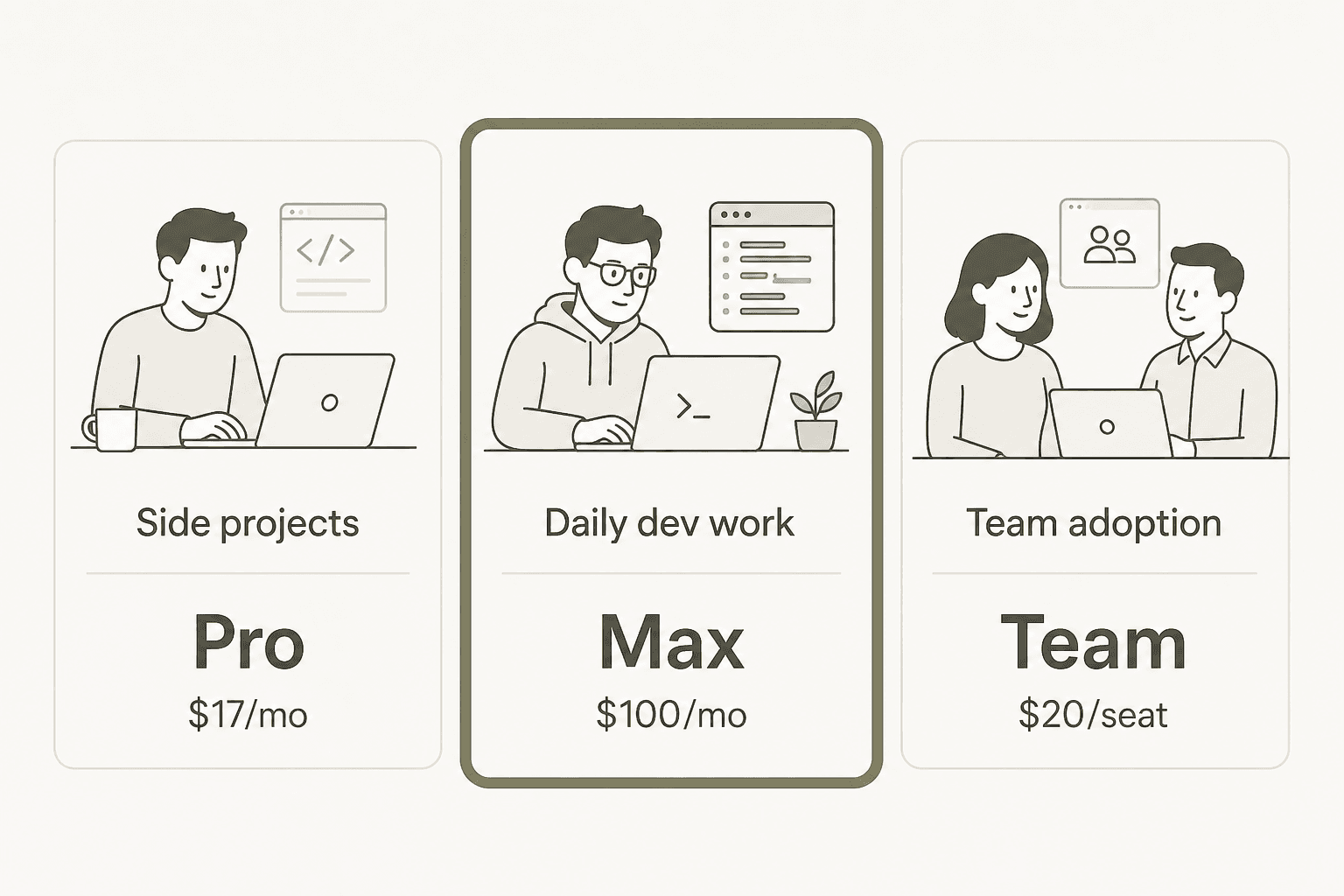
The honest pricing read: the $20 Pro plan is a legitimate entry point, not a daily-driver for intensive use. The most common complaint on r/ClaudeCode isn't about features -- it's about hitting session limits in minutes during peak hours on the Pro plan. That said, the plan works for developers who use it with discipline. From r/ClaudeCode:
"I use Opus 4.8 for planning the feature out, Sonnet to build it. I maintain a CLAUDE.md file I update after each session. I periodically use /compact to keep the context window smaller."
u/FederalDimension6022
That's two projects, full-time development, on the $20 plan -- through model selection by task type, CLAUDE.md hygiene, and compact discipline. The technique matters as much as the tier.
What real users say
G2 rates Claude Code 4.4/5 in the Winter 2026 Grid; Capterra shows 4.5/5 from 309 verified reviews. The most consistent signal: the capability on complex multi-file tasks is genuinely impressive, and rate limits on lower tiers are the dominant frustration.
The strongest corporate adoption data came from Gergely Orosz, who reported this quote from an engineering leader in a post with 2.4K+ likes and 433K+ views:
"Earlier, all devs used GitHub Copilot. 9 months ago, we rolled out Cursor to all devs. 1.5 weeks ago, we rolled out Claude Code to everyone, and cancelled our Copilot subscription."
A CTO at a company with 600 engineers. (As Orosz noted: "I hear this exact 'transition' story, a LOT!")
The "senior engineer who already read your whole codebase twice" framing -- from a thread on r/ClaudeCode comparing it to Gemini CLI -- is the most widely-used community description of what separates it from Windsurf and similar tools. The behavior being described: Claude Code grasps the broader codebase holistically, which leads to cleaner refactors, sharper edge-case spotting, and fewer "I fixed this but broke something else" regressions. You can see this in head-to-head comparisons like Claude vs Copilot, where the context-handling difference is consistent.
The recurring cautionary note from LinkedIn engineering managers is worth taking seriously. Multiple independent posts describe the same tradeoff: Claude Code ships features faster but can introduce technical debt -- duplicate methods instead of refactors, loose coupling where tighter was appropriate. The mitigation most commonly cited: treat Claude Code as a capable junior engineer you review, not an autonomous senior you defer to. Stay in the loop on architecture decisions. Usage analytics help catch runaway sessions before they burn through quota.
Our verdict
Claude Code earns the numbers. The model-harness integration -- running Claude models inside a purpose-built agentic shell -- produces meaningfully better results than running the same model in a generic editor. The CLAUDE.md system, hooks, MCP connections, and the skills ecosystem give it a configurability ceiling that most competitors haven't matched. The 130,000+ GitHub stars and daily commit pace suggest Anthropic is treating this as their flagship product, not a side project.
The rate limit frustration is real and proportionate to use intensity. The $20 Pro plan works for side projects and occasional use with session discipline. All-day intensive development needs Max at $100/month -- that's the real baseline for making this your primary coding environment. For teams, the $20/seat Team Standard plan is a solid entry point, and the current activation credit makes the timing good. Enterprise teams should factor in API token costs for the models they'll actually use at scale.
Where it falls short: the VS Code extension still trails the CLI on feature parity, CLAUDE.md setup takes real time, and the technical debt risk is worth actively managing rather than discovering six months later.
Who it's for: developers handling significant repetitive or implementation-heavy work -- migrations, refactors, test coverage, PR descriptions, boilerplate -- where supervising the output is cheaper than writing it manually. Teams thinking about company-wide adoption should look at the best AI coding assistant tools comparison alongside this review to understand the full landscape.
Who it's not for: interactive development where you want to stay in the driver's seat, or projects where the codebase context is too sensitive for cloud processing.
Try eesel
Claude Code solves the "autonomous AI worker for your codebase" problem. If your team also needs that model for customer support and business workflows -- without writing any code -- eesel is built on the same premise.
An eesel agent connects to your Zendesk, Slack, Freshdesk, Notion, or other tools, learns from your existing documentation and ticket history, and handles support tickets autonomously: composing replies, escalating edge cases, running automations. The same "brief it like a new employee, it handles it from there" setup -- deployed into the tools your team already uses. No seat fees, no platform fee, and 100 free credits to start (plans from $299/month for 500 credits).
