Claude Code isn't a chatbot, so stop prompting it like one
Most people come to Claude Code from a chat window, and they prompt it the same way: a vague request, a wall of back-and-forth, a lot of "no, not like that." It mostly works, and it's also the slowest way to use the tool.
The mental model is different. As Anthropic puts it in its best-practices guide, Claude Code "explores, plans, and implements" on its own: it reads files, runs commands, and works through a problem while you watch, redirect, or walk away. So your job stops being "type the answer" and becomes "set up the work." Sean Tierney, who's spent a year building real apps with the tool, frames it as learning "to act like the playmaker, not the quarterback."
That reframe is the whole post. Everything below is a concrete way to set up the work so Claude gets it right the first time instead of the fourth.
Be specific: describe the outcome, not the keystrokes
"The more precise your instructions, the fewer corrections you'll need," Anthropic notes. "Claude can infer intent, but it can't read your mind." This is the single highest-leverage change you can make, and it costs nothing.
The before-and-after in Anthropic's own guidance makes it obvious. Don't say "add tests for foo.py." Say: "write a test for foo.py covering the edge case where the user is logged out. avoid mocks." Don't say "fix the login bug." Say "users report that login fails after session timeout, check the auth flow in src/auth/, especially token refresh, write a failing test that reproduces the issue, then fix it."
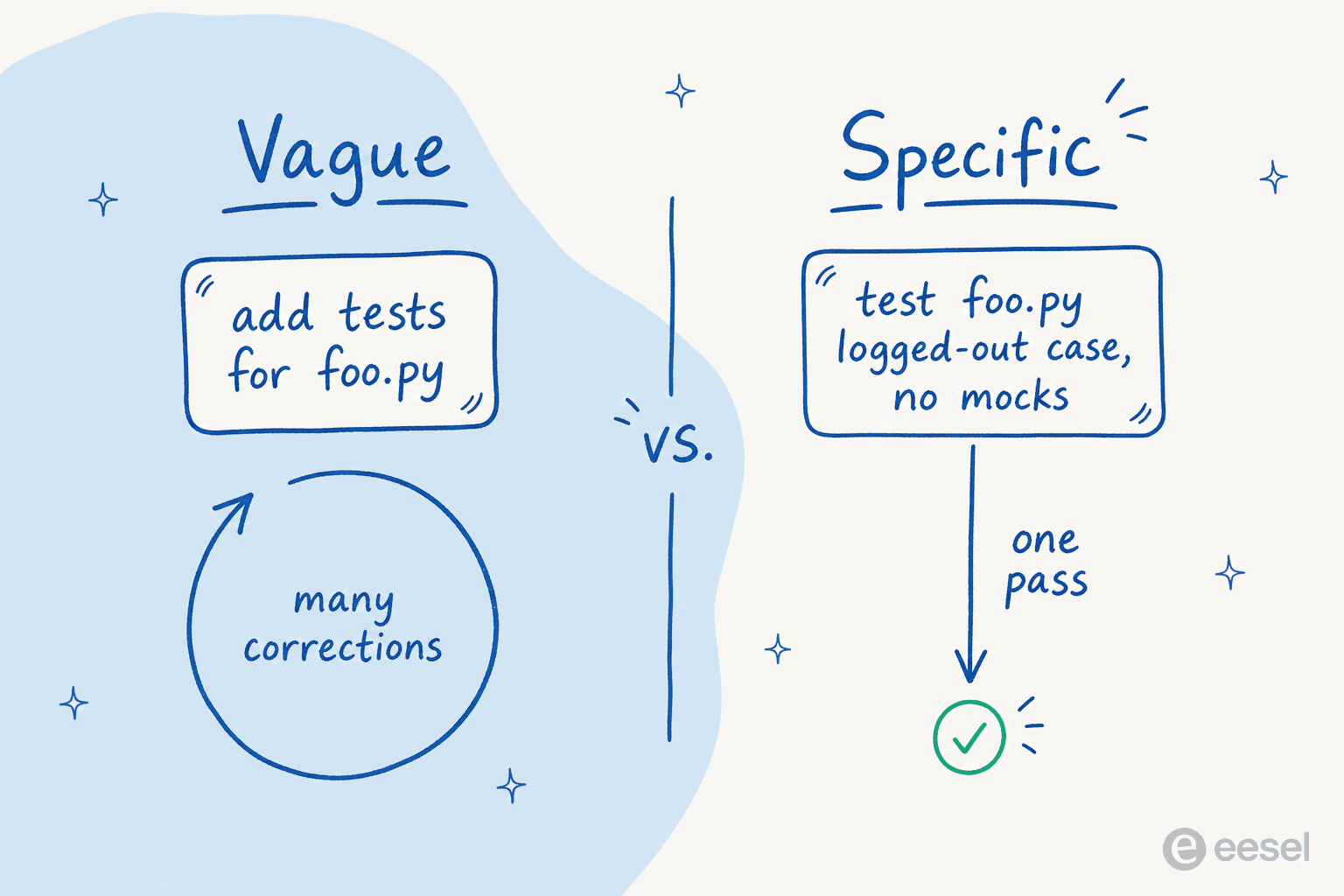
The trick is to state the outcome and the constraints, then let Claude find the where. Anthropic's help center calls it "State the outcome, not the steps": not "open userService.ts, find the validate function, add a null check on line 42," but "users with no email are crashing validation, make it handle that gracefully and add a test." You're not micromanaging the diff, you're describing the world you want to be true.
One caveat worth keeping: vague is fine when you're exploring. "What would you improve in this file?" is a great prompt precisely because it surfaces things you wouldn't think to ask. Specificity is for when you know what you want, not for poking around.
Give it the raw material: files, screenshots, URLs, piped logs
A precise prompt still needs raw material. Claude Code has several ways to pull context straight into the conversation, and using them beats describing things from memory:
- Reference files with
@. Typing@src/auth/login.tsmakes Claude read the file before it responds. When you already know the path, that's faster and cheaper than letting it search. This is also why a clean repo structure pays off, and why posts like navigating a codebase with Claude Code matter. - Paste images. Drag or paste a screenshot of a design or an error, then say "implement this design, take a screenshot of the result, and list the differences." Claude can see UI.
- Give it URLs. Point it at a docs page or an API reference. You can allowlist domains you use often with
/permissions. - Pipe data in.
cat error.log | claudesends the file straight in. This is the gateway to running Claude Code in the terminal as a composable Unix tool.
The help center has a blunt rule attached to this: give it the error, verbatim. Paste the full stack trace rather than summarizing it. The exact filename, line number, and message are what let Claude jump to the right code instead of guessing. For trickier sessions, our debugging with Claude Code guide goes deeper.
Make it plan before it writes a line of code
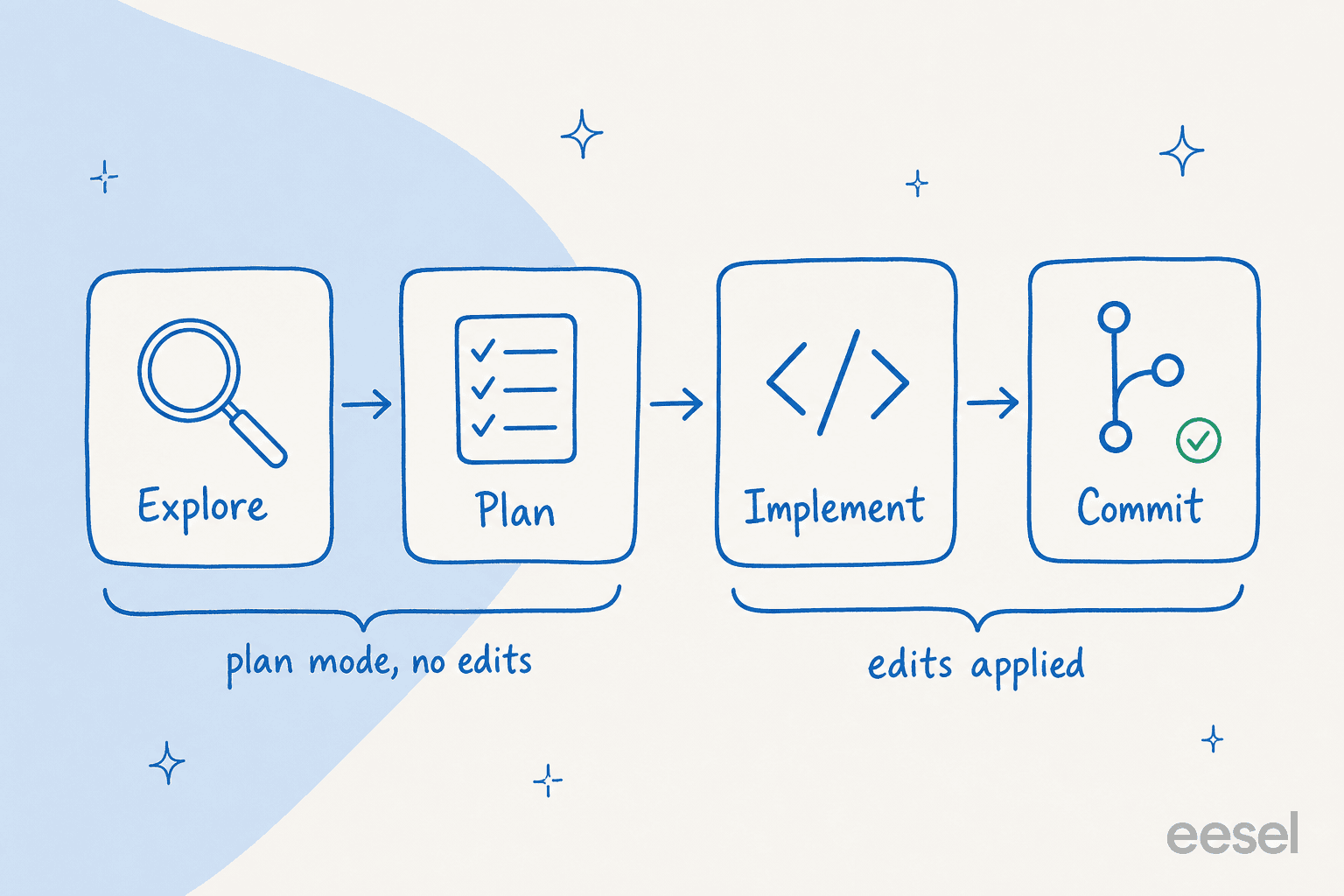
This is the one that separates people who like Claude Code from people who love it. "Letting Claude jump straight to coding can produce code that solves the wrong problem," Anthropic warns. The fix is a four-phase loop: explore, plan, implement, commit.
The first two phases happen in plan mode, where Claude reads files and proposes an approach but makes zero edits. You enter it with Shift+Tab (press it twice to reach plan mode), or start a session with claude --permission-mode plan. In VS Code, the plan opens as a markdown doc you can comment on inline; in the terminal, Ctrl+G opens the plan in your editor so you can edit it directly before Claude proceeds. You can read the full setup in our interactive mode guide.
The practitioner consensus is even stronger than Anthropic's. Here's Sean Tierney, who builds with the tool daily:
"Always start in Plan Mode. Resist the temptation to dive directly into implementation. You can give CC the exact same prompt but by starting first in plan mode and having it think through things up front it will give you a far better result every time by having to propose and defend a plan up front. This slightly-delayed gratification vs. rushing into implementation is well-worth the 2min wait."
When not to plan? Anthropic's rule of thumb is the one I use: if you could describe the diff in one sentence, skip the plan. A typo, a log line, a variable rename, just ask for it. Planning pays off when you're unsure of the approach, the change spans multiple files, or you don't know the code well yet.
Give Claude a way to check its own work
Here's the failure mode nobody warns you about: Claude stops when the work looks done. Without a runnable check, "looks done" is the only signal it has, which means you become the verification loop, re-reading every diff by hand.
The fix is to hand it something that returns pass or fail: a test suite, a build, a linter, a script that diffs output against a fixture, or a screenshot to compare against a design. "Give Claude a check it can run," Anthropic says. "It's the difference between a session you watch and one you walk away from." So the verification belongs in the prompt: "write a validateEmail function, example test cases: user@example.com is true, invalid is false, user@.com is false, run the tests after implementing."
This is also why test-driven prompting works so well. Ask Claude to write the tests first, confirm they fail, then implement until they pass. And ask it to show evidence rather than assert success: the test output, the command it ran, the screenshot. Reviewing the evidence is faster than re-running the check yourself. If you want this to gate harder, you can escalate it into a deterministic hook that fires when Claude tries to finish, which our hooks reference walks through.
Treat your context window like a budget
Almost every prompting problem in Claude Code traces back to one thing: the context window holds the entire session (every message, every file read, every command output) and model performance degrades as that window fills. A single debugging session can burn tens of thousands of tokens, and once it's crowded, Claude starts "forgetting" your earlier instructions.
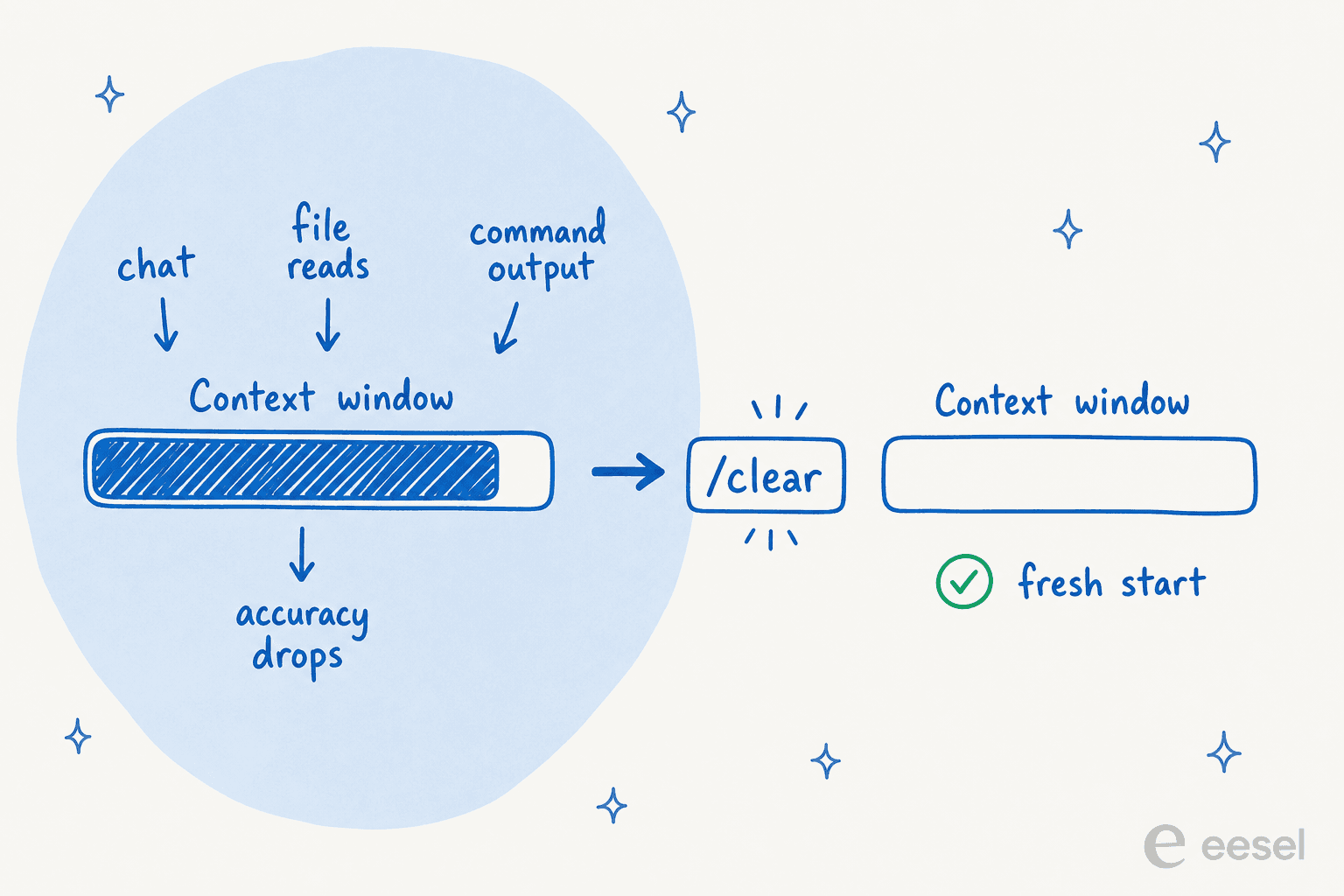
So manage it deliberately:
/clearbetween unrelated tasks. This is the big one. Tierney calls it the "nuclear option, use liberally between features." A fresh window with a sharp prompt beats a long one full of dead ends./compact <instructions>when you want to keep going but trim the fat, for example/compact focus on the API changes.- Delegate to subagents. Investigating a large codebase fills your window with file reads. A subagent does that reading in its own window and reports back only the summary. "Since context is your fundamental constraint, subagents are one of the most powerful tools available," Anthropic says. Just say "use a subagent to investigate how we handle token refresh." Our guide to Claude Code subagents you can build has more patterns.
If you want to see exactly what's eating your window, /context visualizes what's loaded, including which connected tools are the token hogs.
Course-correct fast, and know when to start over
Anthropic is clear that "the best results come from tight feedback loops." You don't wait for Claude to finish a wrong turn and then explain the whole thing again. The correction tools:
Escstops Claude mid-action. Context is preserved, so you can redirect on the spot.Esc Esc(or/rewind) opens the rewind menu to restore an earlier conversation or code state.- "Undo that" has Claude revert its own changes.
There's a tone note here that matters more than it sounds: correct it like a colleague, not a search engine. You don't re-type the whole request, you just say what's wrong, like "that changes the public API, keep the signature the same," and Claude adjusts only that. And the heuristic I lean on hardest: if you've corrected Claude more than twice on the same issue, the context is polluted with failed approaches. Run /clear and start fresh with a better prompt that bakes in what you just learned. A clean session almost always outperforms a long one carrying accumulated corrections.
Write a CLAUDE.md: the prompt you only write once
Everything so far is per-session. A CLAUDE.md file is the part of your prompt that persists. Claude reads it at the start of every conversation, so it's where your project's standing context lives: the build commands it can't guess, your code-style rules, repo etiquette, the dev-environment quirks, the gotchas. The help center calls it "the briefing you'd give a capable new teammate on their first morning."
Run /init to generate a starter from your project, then keep it lean. Anthropic's warning is emphatic: "Bloated CLAUDE.md files cause Claude to ignore your actual instructions." For each line, ask "would removing this cause Claude to make a mistake?" If not, cut it. Add a rule when Claude gets something wrong twice, prune it quarterly, and commit the file so the whole team contributes. The full config story, including where the file lives and how it merges across directories, is in our Claude Code configuration guide and the settings.json reference. For repeatable workflows, the same logic extends into slash commands.
The prompting habits that quietly waste your tokens
Most wasted sessions come from a handful of repeatable mistakes. Anthropic names five, and the fix for each is a prompting habit:
| Failure pattern | The fix |
|---|---|
| Kitchen-sink session: one task, then an unrelated one, then back, all in one window | /clear between unrelated tasks |
| Correcting over and over: context polluted with failed attempts | After two failed corrections, /clear and write a sharper prompt |
| Over-specified CLAUDE.md: so long Claude ignores half of it | Prune ruthlessly, convert standing rules into hooks |
| Trust-then-verify gap: plausible code that misses edge cases | Always give it a check; if you can't verify it, don't ship it |
| Infinite exploration: an unscoped "investigate" reads hundreds of files | Scope narrowly or push it to a subagent |
The meta-point Anthropic closes on is worth holding onto: these are starting points, not laws. Sometimes you should let context accumulate (when you're deep in one hard problem), skip the plan (exploratory work), or throw a vague prompt at it (to see how it interprets before you constrain). Notice what's happening when the output is great, and ask why when it struggles. That's how you build the intuition that no checklist replaces. If you're after a curated set, our roundup of Claude Code best practices collects the ones that survived contact with real projects.
What this has to do with AI that answers support tickets
Here's the thing I didn't expect when I started using Claude Code: the prompting discipline is the same discipline we use to put AI on a live support queue. Give the agent the right context. Scope what it's allowed to touch. Make it verify before it acts. Course-correct fast and capture the lesson.
I learned that order the hard way. Early on, we watched confident-sounding bots quietly hand customers wrong answers, which is why we now simulate every rollout against a company's historical tickets before a single live reply goes out. That's plan mode for support: read the world, propose how you'll handle it, get it approved, then act. When Gridwise ran it, the agent resolved 73% of their tier-1 requests in the first month, and the results showed up during a 7-day trial. The number came from the setup, not from a smarter model.
If you write content the same way, the parallel holds for AI writing too: the eesel AI blog writer is, under the hood, an agent you brief and verify rather than a chat box you wrestle.
Try eesel
eesel AI puts that same agentic discipline to work on your helpdesk. You connect your existing tools (Zendesk, Freshdesk, HubSpot, Gorgias, Slack, and 100+ more), and the agent learns from your past tickets and help docs on day one. The part that maps directly to everything above: you configure it in plain language and run it in simulation against thousands of your real past tickets before it ever replies to a customer, so you see exactly what it would have said and where it would have escalated.

It's the same lesson as prompting Claude Code, pointed at your support queue: the agent is only as good as the context and the guardrails you give it. You can Try eesel free, no credit card, and watch it run against your own history before you trust it with a customer.
Frequently Asked Questions
How do I write a good prompt for Claude Code?
@, paste the exact error, and give Claude a way to check its own work (a test or build to run). The single biggest upgrade to how you prompt Claude Code is being specific: 'write a test for foo.py covering the logged-out edge case, no mocks' beats 'add tests for foo.py' every time. See more in Claude Code best practices.What is a CLAUDE.md file and do I need one?
CLAUDE.md is a markdown file Claude reads at the start of every session: your build commands, code-style rules, and project gotchas. It's the part of your prompt you only write once. Run /init to generate a starter, keep it short, and commit it so the team shares it. The full mechanics are in our Claude Code settings.json guide and the configuration overview.Why does Claude Code get worse during a long session?
/clear between unrelated tasks to reset it. A clean session with a sharper prompt almost always beats a long one cluttered with failed attempts.Should I use plan mode for every Claude Code task?
Is prompting an AI coding agent the same as prompting an AI support agent?


Article by
Rama Adi Nugraha
Rama is a software engineer at eesel AI with two years of experience writing about B2B SaaS, AI tools, and customer support technology. Based in Bali, Indonesia, he brings a developer's perspective to product comparisons — cutting through marketing copy to what the integrations and APIs actually do.