Why people look for a Claude Motion alternative
Claude Motion launched on October 8, 2026, and the idea is good. You describe an animated explainer, Claude writes it as code with no video model involved, and you export an MP4. Change the Q3 figure and only the Q3 figure changes. My Claude Motion review covers what it does well.
Three things send people looking elsewhere:
- Plan access. Motion is a beta on Claude Team and Enterprise only. Free, Pro and Max don't get it, so someone paying $100 or $200 a month for Max is locked out while a $20 Team seat is in.
- No footage, no people. Motion animates text, charts and your own images. It doesn't generate video scenes or a presenter.
- No published per-animation cost. Motion draws on your plan's usage, and Anthropic doesn't publish what one clip costs. My Claude Motion pricing breakdown has the details.
The access complaint showed up within hours of launch, in replies under Anthropic's own post:
"why is motion not in max already?"
I build integrations and APIs at eesel, so I read these tools the way I'd read any connector: what does it actually produce, what can I change afterwards, and what does it hook into. On the eesel blog, every post ships with a generated banner, several infographics and animated screen recordings of the products it covers. That's why the "can I fix one number without starting over" question is the one I care about most here.
The one test that sorts every alternative
Before the list, here's the test I'd run on any tool: the Q3 number in your chart just changed. What do you do?
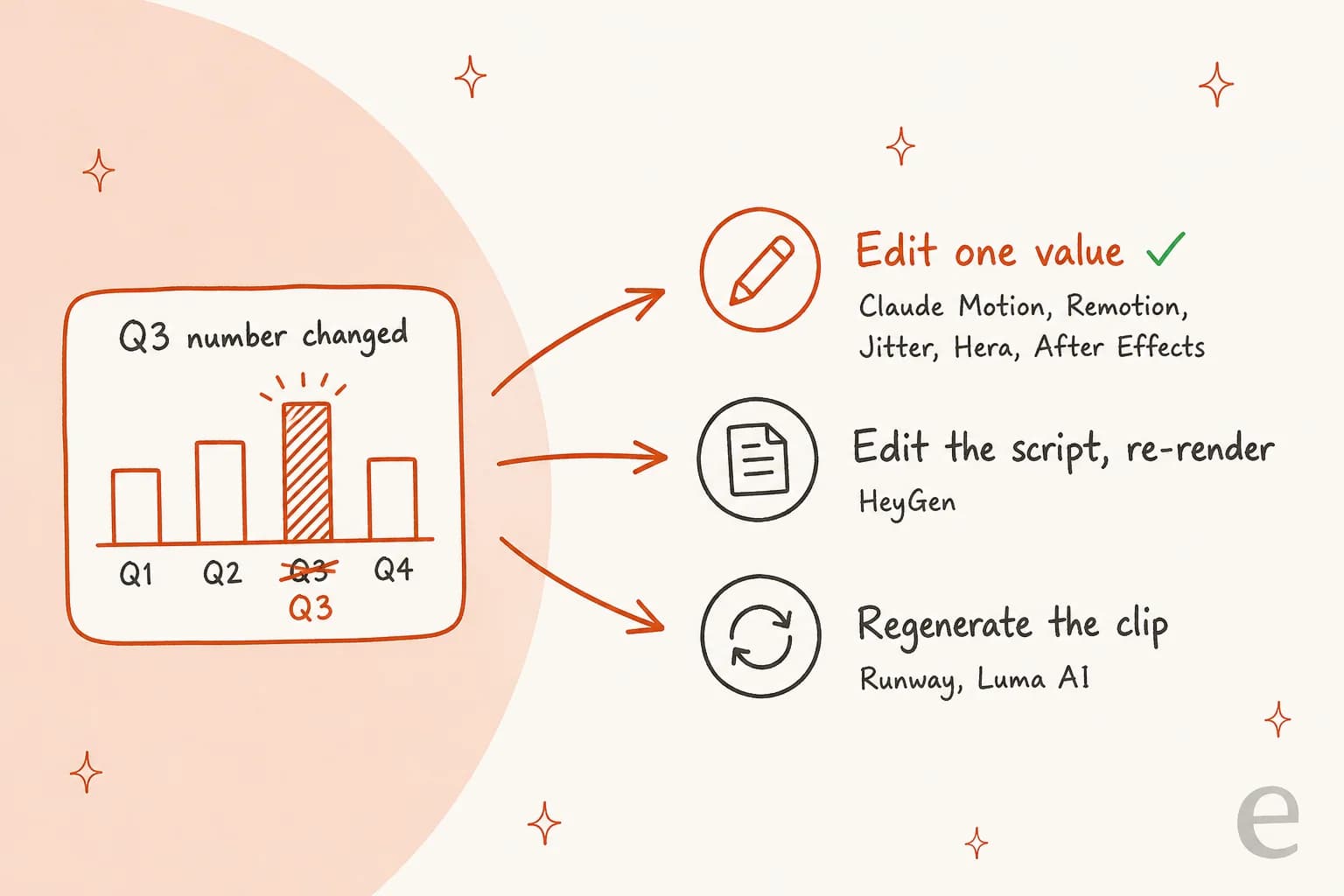
Tools that build animation as code or layers let you change the value and re-export. Tools that generate pixels make you prompt again and hope the rest of the clip comes back the same. Motion's other launch partners, like Descript and Higgsfield, sit on the finishing side too, per Anthropic's launch article. Neither side is wrong. They're different jobs, and most "Claude Motion alternatives" lists mix the two without saying so.
Claude Motion alternatives compared
| Tool | Best for | What it makes | Edit one detail later? | Cheapest paid plan | Free plan | Exports | Claude link | Works without Claude Team? |
|---|---|---|---|---|---|---|---|---|
| Remotion + Claude Code | Developers, data explainers | React video as code | Yes, edit code | Free up to 3 people, then $25/seat | Yes | MP4, stills, more | Claude Code skills | Yes, any plan with Claude Code |
| Hera | Marketers without a terminal | Code-built motion graphics | Yes, scene by scene | Not published | Yes | MP4, GIF, transparent MOV | MCP server | Yes |
| Jitter | Designers, product UI motion | Layered canvas animation | Yes, every layer | $15/editor | Yes | MP4, GIF, Lottie, ProRes | Runs on Claude Opus 5.5 | Yes |
| After Effects | Motion designers | Hand-built comps | Yes, every keyframe | $22.99/mo | 7-day trial | Everything | Adobe for Claude (not AE) | Yes |
| Canva | Quick social animations | Preset motion on designs | Yes, in the design | $144/yr | Yes | MP4, GIF | Canva connector | Yes |
| Runway | Generated footage | AI video | Regenerate | $12/mo | 125 one-time credits | MP4, ProRes on Max | Motion partner + MCP | Yes |
| Luma AI | Restyling, reframing | AI video | Regenerate | $25/mo | Trial credits | Up to 1080p, HDR, EXR | Motion partner | Yes |
| HeyGen | A presenter on screen | Avatar video | Edit script, re-render | $24/mo | 3 videos/mo | Up to 4K | Claude connector | Yes |
Prices are billed annually where the vendor offers it, checked on October 9, 2026.
How I picked these
I started from the job Motion does: a short animated explainer built from your own text, numbers and images. Then I read each vendor's pricing page, help docs, changelog and any Claude connector documentation, and pulled reviews from G2, Capterra, Trustpilot, Reddit and X. I left out tools I couldn't verify from the vendor's own pages.
Each tool below gets the same five parts: what it does, pros, cons, pricing and my verdict.
1. Remotion + Claude Code
Best for: anyone comfortable in a terminal who wants Motion's exact approach on a Pro or Max plan.
What it does
Remotion is an open-source React framework where every frame of a video is a function. Its docs say you can create videos just from prompting, with Claude Code, Codex, Kimi Code or OpenCode writing the components. Setup is four commands: create a blank project, run npx remotion skills add, start the preview, then start Claude Code in a second terminal.
The skills matter more than they sound. Remotion ships 12 agent skills, including remotion-render for exporting and remotion-interactivity, which makes the generated code editable in Remotion Studio. That second one is the closest thing to Motion's edit-in-place experience. As one developer put it after adding them:
"Before this, Claude would write Remotion code that technically ran but looked janky. Animations would stutter, timing would be weird. After adding the skills? Night and day."
Pros
- Same idea as Motion: animation as code, so one number changes and nothing else does.
- Works on any Claude plan that includes Claude Code, plus other coding agents.
- You own a normal React project, render it anywhere, and keep the videos after you cancel.
Cons
- Needs Node.js, a terminal and a few minutes of setup.
- Companies of 4 or more people need a paid license.
- The coding agent subscription is a separate cost.
Pricing
| Plan | Price | Who it's for |
|---|---|---|
| Free | $0 | Individuals and companies of up to 3 people, commercial use included |
| Creators | $25/month per seat | Teams of 4+ making videos by hand or with AI agents |
| Automators | $0.01 per render, $100/month minimum | Batch rendering and prompt-to-video apps |
| Enterprise | From $500/month | Includes the $600 Editor Starter template |
All figures are from Remotion's license page. Cloud rendering on Lambda runs about $0.017 to $0.021 per one-minute video in Remotion's Lambda cost examples, before storage. Add Claude Pro at $17 a month billed annually if you don't already have Claude Code.
Verdict
My take: this is the pick for Pro and Max users, and for developers who'd rather own the code. One G2 reviewer moved their chart animations here after trying an avatar tool for the same job, which says a lot about where code-built motion wins. Skip it if nobody on your team will open a terminal.
2. Hera
Best for: marketers who want Motion's editable output without installing anything.
What it does
Hera is the closest product to Motion that isn't Motion. Its own comparison post says it uses AI to generate code that renders into animations, so text, shapes, timing and easing stay editable. You prompt, then edit scene by scene or prompt again for a change. It takes images, SVGs, fonts and CSV data as inputs, and exports MP4, GIF or transparent MOV.
It also has an MCP server with install snippets for Claude Code and Claude Desktop, so Claude can call Hera directly.
Hera is a Y Combinator Summer 2025 company, founded by Peter Tribelhorn and Chia-Lun Wu, who built Vyond Studio before this.
The most common request I found is about handing off to pro tools:
"can it export to after effects? that's what I really need tbh, some form of cursor but for video editing so I can still do the fine tuning and such myself."
Pros
- Editable code underneath, like Motion, with no terminal.
- Transparent MOV export for overlays.
- API and MCP server for automating batches from Claude.
Cons
- Plan prices aren't published on Hera's website; you see them after signing in.
- No Lottie export, and no After Effects export yet.
- Few independent reviews so far for a company this young.
Pricing
Hera's terms confirm recurring subscription plans with free and paid credits, but the plan sheet sits inside the app. Sign up free and check the plan page before committing a team to it.
Verdict
My take: the best no-code match for Motion's approach. Pick it for launch videos and animated infographics when you want to skip setup. Hold off if you need published pricing for a procurement form.
3. Jitter
Best for: designers who live in Figma and want AI help on a real timeline.
What it does
Jitter is a browser-based motion design tool used by over 20,000 creative teams. Here's the detail that surprised me: as of October 1, Jitter AI runs on Claude Opus 5.5, per its own changelog. It builds the animation directly on the canvas, and "every layer, timing, easing, effect, and design element remains editable." So a Pro or Max user can get Claude-written motion today, just inside Jitter instead of inside Claude.
The Figma plugin copies a frame into Jitter in one click, and Bulk Create turns a CSV into one scene per row. Reviewers mostly praise how fast it is to learn:
"I really like how easy it is to animate for everyone"

Pros
- Claude Opus 5.5 inside, with every layer still editable.
- Lottie, GIF and MP4 on every plan, ProRes and WebM from Pro.
- Figma import is free, and 300+ templates come with it.
Cons
- AI credits are listed as multipliers, not numbers, so heavy use is hard to budget.
- Not a full After Effects replacement; one G2 reviewer missed pre-comps.
- Free plan caps you at 720p and 3 files.
Pricing
| Plan | Price (per editor/month, annual) | Key limits |
|---|---|---|
| Free | $0 | 720p 30fps, 3 files, limited AI credits |
| Pro | $15 | 1080p 60fps, ProRes and WebM, no watermark |
| Max | $35 | 4K 120fps, transparent and batch export, 2x Pro AI credits |
| Ultra | $59 | 3x Max AI credits |
| Enterprise | Custom | SSO, SCIM, custom AI effects |
Source: Jitter pricing.
Verdict
My take: the best pick for design teams, and the cheapest way for a non-developer to get Claude-written motion. It's rated 4.6/5 on G2, though from only 19 reviews. Skip it if your animations are mostly data charts from spreadsheets; Remotion or Hera handle those better.
4. Adobe After Effects
Best for: professional motion designers who need control over every frame.
What it does
After Effects is still the industry tool for motion graphics: layered compositions, keyframes, expressions and 3D. The September 2026 release (v26.5) added new guides and ACES 2.0 support, and Adobe now has a beta AI Assistant that organizes projects, writes expressions and generates footage through Firefly.
Adobe also has an Adobe for Claude connector with 67 tools across Photoshop, Premiere, Firefly and Express, including an animate_design tool. After Effects isn't one of the listed apps. Motion designers on Reddit already use Claude as a helper rather than a replacement:
"I made a MCP for AE where I can automate annoying and repetitive stuff. Changed the whole font in a old video was never faster. But it absolutely sucks when it needs to "come up with its own ideas" because AI is a tool not a brain."

Pros
- Total control over timing, easing, 3D and effects.
- Available to individuals, not just teams.
- Every other tool on this list can feed into it.
Cons
- Steep learning curve; it's the most-mentioned con on G2.
- Everything is built by hand unless you script it.
- Only 25 generative credits a month on the single-app plan.
Pricing
| Plan | Price | Includes |
|---|---|---|
| After Effects single app | US$22.99/mo, annual billed monthly | 25 generative credits, 100GB storage, Express Premium |
| Creative Cloud Pro | US$34.99/mo annual billed monthly (US$69.99 regular) | 20+ apps, 4,000 generative credits |
| Teams | US$99.99/mo per license | Creative Cloud Pro for business |
Source: After Effects pricing. There's a seven-day free trial.
Verdict
My take: the right answer when the clip is client-facing and needs a designer's polish. It's rated 4.6/5 from 1,094 reviews, and a Capterra reviewer warned that "beginners will probably spend a lot of time watching tutorials." If nobody on your team animates for a living, start with Jitter or Hera instead.
5. Canva
Best for: quick social animations from designs you already have in Canva.
What it does
Canva gives you three ways to add motion. Magic Animate picks an animation style and applies it to your whole design in seconds. The animation maker lets you draw motion paths by hand. And "Create a video clip" generates 8-second clips with audio or 6-second clips without, from an English prompt.
Canva's Claude connector can generate and export designs, but it doesn't list an animation or video tool. A Canva handoff from Motion is listed as coming soon. My Canva AI guide covers the wider feature set.
"I also think the AI features could give more consistent results when the instructions are more specific."
Pros
- Fastest route from an existing design to a moving one.
- Huge template library and brand kits.
- Cheapest paid plan on this list at $144 a year.
Cons
- Magic Animate applies presets; it doesn't build custom motion graphics.
- AI video clips are capped at about 20 a month on Pro.
- Data charts don't animate the way a coded chart does.
Pricing
| Plan | Price | AI allowance |
|---|---|---|
| Free | $0 | Up to 20 Standard or Premium AI uses, no Ultra tools |
| Pro | US$144/year | Up to 200 Premium or 20 Ultra AI uses a month |
| Business | US$250/year per person | Up to 400 Premium or 40 Ultra AI uses a month |
| Enterprise | Contact sales | Same allowance as Business |
Source: Canva pricing and AI access help. An AI Pass add-on costs $100 per person per month. More detail in my Canva AI pricing post.
Verdict
My take: the pick for social teams who need something moving by lunch. It's rated 4.7/5 from 7,726 reviews. Skip it for anything with real numbers that change, because a preset animation on a static chart isn't the same as a chart that redraws.
6. Runway
Best for: generated footage, either on its own or around a Motion clip.
What it does
Runway generates video from text and images. Its Gen-4.5 model makes 2 to 10 second clips at 720p, and Aleph 2.0 edits existing video by description. It's also a Claude Motion launch partner: you can export a Motion animation into Runway to add generated scenes, voiceover, music or a vertical cut.
Separately, the Runway MCP lets Claude generate Runway video from personal Claude plans as well as Team, billed to your Runway credits. Runway lists it on its Pro and Max plans. Credit burn is the most common complaint:
"You then ask it to correct the mistake, it charges another 750 credits, and very often it makes exactly the same mistake again."

Pros
- Real generated footage, which Motion doesn't make.
- Works with Claude through MCP, no Claude Team needed.
- One credit pool for video, images, audio and upscaling.
Cons
- A changed number means regenerating the clip.
- Standard credits don't roll over.
- Runway lists causal reasoning and object permanence errors as known Gen-4.5 limits.
Pricing
| Plan | Price (annual / monthly) | Credits | Gen-4.5 seconds |
|---|---|---|---|
| Free | $0 | 125 one-time | n/a |
| Standard | $12 / $15 | 625 a month | About 52 |
| Pro | $28 / $35 | 2,250 a month | About 187 |
| Max | $76 / $95 | 9,500 a month | About 791 |
| Enterprise | Contact sales | Custom | Custom |
Source: Runway pricing. Gen-4.5 costs 12 credits a second, so footage works out to roughly $0.10 to $0.23 a second depending on plan. My Runway pricing post walks through it.
Verdict
My take: pick Runway when the clip needs footage. Don't pick it to replace Motion for charts. If you're on Team, the strongest setup is both: Motion for the data, Runway for the scenes around it. Runway alternatives covers the rest of the field.
7. Luma AI
Best for: restyling and reframing an animation into new looks and aspect ratios.
What it does
Luma AI makes generated video with its Ray3.2 model: clips up to 20 seconds at 1080p, up to 16 keyframes, native HDR and EXR export, and Reframe for new aspect ratios. Luma calls the older "Dream Machine" name and Ray2 deprecated.
On launch day, Luma announced a Claude Motion handoff: add the Luma connector in Claude, and your Motion animation opens in Luma as a video. From there you can restyle the look while the motion holds, reframe to 9:16, 1:1, 4:3 or 21:9, or ask Luma's agent for variations. The trade-off shows up in reviews:
"Tried this tool and it is impossible to polish or improve a video past the initial prompt."
Pros
- HDR and EXR output for professional pipelines.
- Reframing to every common aspect ratio.
- Bundles third-party models like Veo 3.1 and Kling 3.0.
Cons
- No free plan, only trial credits.
- A 10-second top-tier clip uses about 1,200 credits, so Plus covers roughly 8.
- Generated output, so small edits mean new generations.
Pricing
| Plan | Price (monthly / yearly) | Credits a month |
|---|---|---|
| Plus | $30 / $300 | 10,000 |
| Pro | $90 / $900 | 40,000 |
| Ultra | $300 / $3,000 | 150,000 |
| Team | Contact sales | Shared |
| Enterprise | Contact sales | Custom |
Source: Luma pricing. HDR doubles the credit cost; HDR plus EXR triples it. See Luma AI pricing for worked examples.
Verdict
My take: Luma is a finisher, not a replacement. If you're on Team, it's the best way to turn one Motion clip into five social formats. If you're not, it won't build the animated chart for you. Luma AI alternatives covers similar video models.
8. HeyGen
Best for: explainers that need a person on screen.
What it does
HeyGen makes avatar videos: a digital presenter reads your script, in 175+ languages on paid plans. Its Video Agent turns a prompt into a full video, and its Claude integration works in Claude.ai, Claude Desktop and Claude Code at no extra cost beyond credits.
Where it struggles is exactly Motion's territory. One G2 reviewer who tried it for chart animations wrote:
"It took hours to generate a simple motion graphic. The output often had crooked line charts and graphs that I could not use. For programmatic motion graphics, an open-source option like Remotion (remotion-dev/remotion on GitHub) run through Claude Code is free, takes a fraction of the time, and is much faster to edit."
Pros
- The only tool here that puts a presenter on screen.
- Translation into 175+ languages and dialects.
- Works from inside Claude, Claude Desktop and Claude Code.
Cons
- Not built for animated charts or data.
- Credits run out fast when you test script variations.
- Watermark removal starts on Creator.
Pricing
| Plan | Price | Credits | Max length | Resolution |
|---|---|---|---|---|
| Free | $0 | 3 videos a month | 1 minute | Up to 1080p |
| Creator | $29/mo ($24 annual) | 600 | 30 minutes | 1080p |
| Pro | $49/mo and up | 1,000+ | 30 minutes | 4K |
| Business | $149/mo + $20/seat | 1,500 | 60 minutes | 4K |
| Enterprise | Contact sales | Custom | No max | 4K |
Source: HeyGen pricing. My HeyGen pricing post covers how credits map to minutes.
Verdict
My take: pick HeyGen when the explainer needs a face, like onboarding or training videos. It's rated 4.8/5 from 1,973 reviews. For charts, use something from the top half of this list. HeyGen alternatives and my Synthesia review cover other avatar tools.
What each alternative costs to get started
Motion isn't the cheapest way in, even though it has no fee of its own. The minimum Claude Team purchase is two Standard seats at $20 each billed annually, so $40 a month.
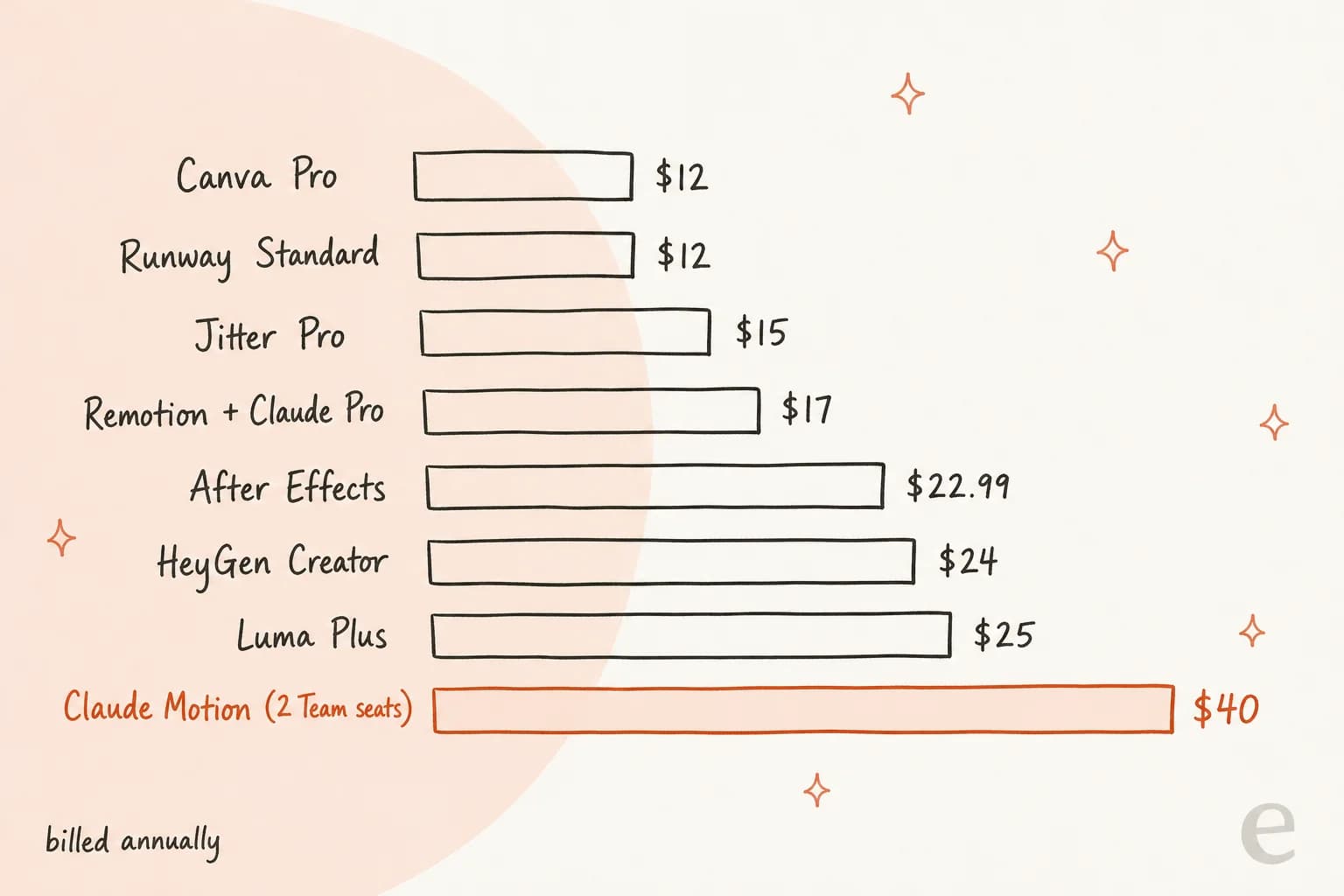
That $40 buys a lot more than animation, though: two full Claude seats with everything else the Team plan includes. If your team would use those anyway, Motion is effectively free. If you only want animated charts, $17 of Claude Pro plus free Remotion gets you the same approach for less than half, provided you're under four people. My Claude pricing guide breaks down every tier.
Which Claude Motion alternative should you pick?
Start from what the clip needs, not from the tool:
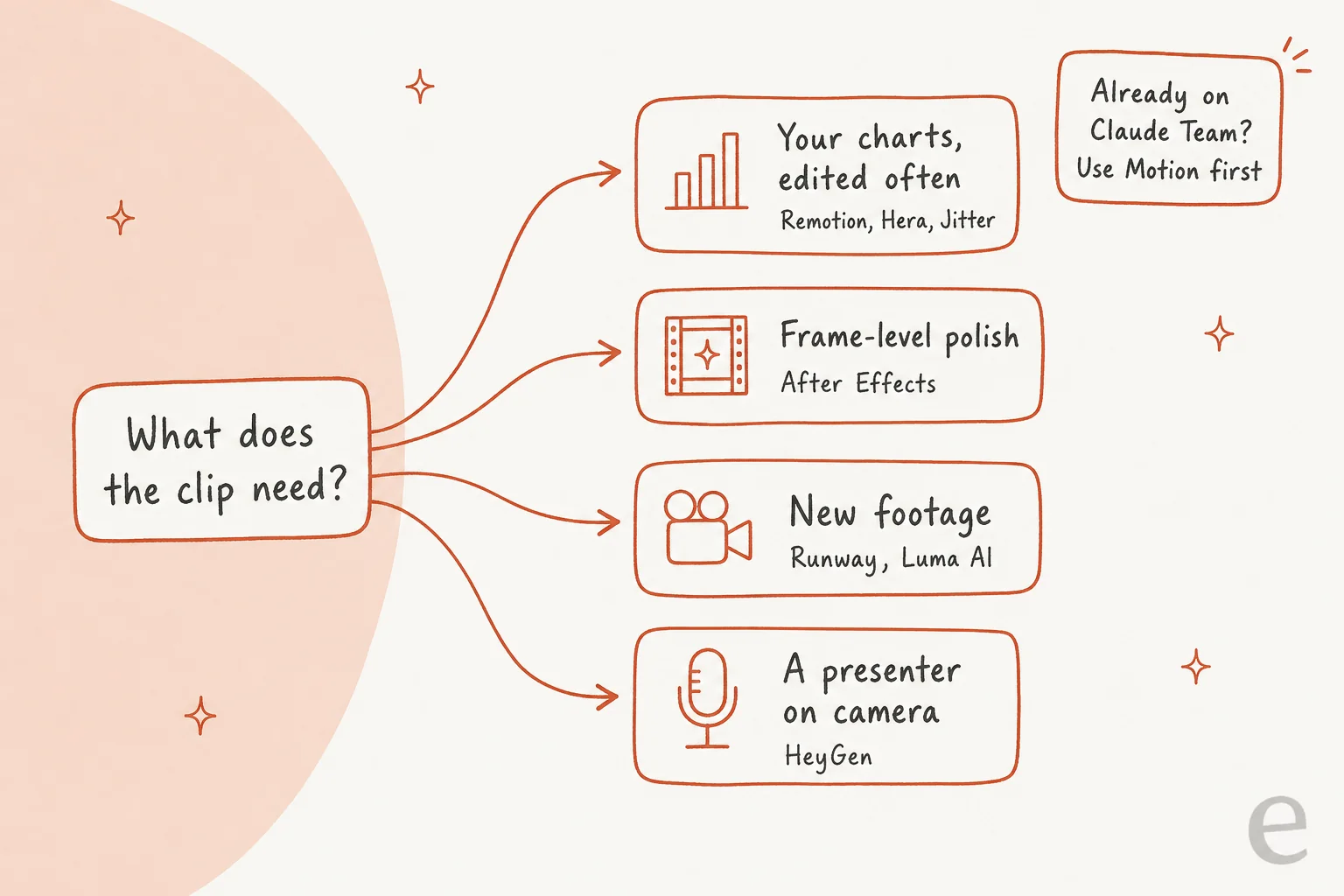
- You're on Claude Pro or Max and write code: Remotion with Claude Code.
- You're on Pro or Max and don't: Hera for prompts, Jitter if you design in Figma.
- You need it to look agency-made: After Effects, or Jitter with a designer driving.
- You need footage or a presenter: Runway, Luma AI or HeyGen, and if you're on Team, start in Motion and hand off.
- You're already on Claude Team: use Motion first. It's included, and launch partners like Runway and Luma AI can finish what it starts.
For the rest of Anthropic's new artifact tools, Claude Slides alternatives and Claude Dashboards alternatives apply the same lens, and Claude alternatives covers the assistant itself.
What people are saying about Claude Motion alternatives
It's early, and most reactions are about access and the code-first design. A day after launch, one reply under Anthropic's post summed up the design choice:
"wait so the animation is just code? ppl are gonna ship pitch decks that are 90% easing curves lol"
The other theme is that Claude could animate before Motion existed. Two weeks before launch, a post showing an Opus 5.5 animation built from a single prompt drew 813 likes:
"So I gave it a one sentence prompt, and it one shot this in 15 minutes."
That's the real story behind most of these alternatives. The model is good at animation on any plan; Motion is the packaged, in-app version for teams. Remotion, Hera and Jitter are other packages around the same skill.
Try eesel for the post your animation lives in
A Motion clip, a Remotion render or a Jitter export all end up somewhere, and for most teams that's a blog post or a landing page. That article is the part that has to ship every week, and none of the tools above write it.
The eesel AI blog writer does. Give it a keyword and your site, and it researches primary sources, writes in your brand voice, makes the hero banner and infographics, adds internal links and FAQs, and hands you a post ready to publish. One SEO content lead running it at 12 posts a day said "this is definitely the best seo tool I've used so far." Drop your MP4 into the draft (my guide on adding videos to blogs covers the embed) and the animation finally has a home.

If you're already building animations from Claude Code, the same habit carries over. The eesel CLI lets you run your eesel workspace from a terminal, and npx @eesel/cli mcp token prints a ready-to-paste claude mcp add command, so Claude Code can talk to eesel in the same session where it's writing your Remotion components. Try eesel free.
Frequently Asked Questions
What is the best alternative to Claude Motion?
For most people locked out of Claude Motion, the best alternative is Remotion run through Claude Code, because it builds animation as editable code the same way Motion does. If you don't use a terminal, Hera and Jitter are the closest no-code options. My Claude Code guide covers the setup side.
Can I use Claude Motion on a Claude Pro or Max plan?
No. Claude Motion is a beta on Team and Enterprise plans only, so Free, Pro and Max subscribers can't turn it on. The cheapest way in is two Team seats at $20 each billed annually, as my Claude Motion pricing breakdown shows. Remotion with Claude Code gives Pro and Max users a similar result today.
Is there a free Claude Motion alternative?
Remotion is free for individuals and companies of up to 3 people, though you still need a coding agent like Claude Code. Jitter and Canva both have free plans with lower export quality and AI limits. My Canva AI alternatives roundup lists more free design tools.
How is Claude Motion different from AI video generators like Runway?
Claude Motion writes animation as code, so you can change one number and nothing else moves. Runway, Luma AI and Kling AI generate pixels, so a change means a new generation. That's why Runway and Luma are Motion's launch partners for finishing clips rather than direct Claude Motion alternatives; my Runway review goes deeper.
Can Claude make animations without Claude Motion?
Yes. Claude Opus 5.5 can write animation code on any paid plan, and Claude Code can render it into video through Remotion. Jitter's AI also runs on Claude Opus 5.5 inside its own editor. See Claude Code artifacts for how Claude produces files like these.
Which Claude Motion alternative is best for training and onboarding videos?
HeyGen is the strongest pick when the video needs a presenter, with avatars and translation into 175+ languages. Claude Motion and the code-based alternatives don't generate people at all. My Synthesia alternatives and Descript alternatives posts cover other options for training video.
How do I use a Claude Motion animation in a blog post?
Export the animation as an MP4 and embed it like any other video; my video embedding guide walks through it. If you need the article around it too, the eesel AI blog writer drafts the post with banner, infographics and internal links, ready for your clip.


Article by
Rama Adi
Rama is a software engineer at eesel AI with two years of experience writing about B2B SaaS, AI tools, and customer support technology. Based in Bali, Indonesia, he brings a developer's perspective to product comparisons — cutting through marketing copy to what the integrations and APIs actually do.