

What an ecommerce AI chatbot actually is now
For years, a "chatbot" on a store meant a decision tree. It showed you three buttons, you picked one, it showed you three more, and if your question didn't fit the tree you got dumped into a contact form anyway. Shoppers learned to ignore them.
The thing people mean by an AI chatbot in 2026 is different in one specific way: it reads free-text questions and answers using a real language model, grounded in your content. You don't script "if customer says X, reply Y". You point it at your help center, your policies, and your past tickets, and it works out the answer. That shift, from scripted flows to a real AI agent, is the whole reason these tools stopped being a punchline.
For ecommerce specifically, that matters more than in most industries. A SaaS support bot mostly needs to know the docs. An ecommerce bot needs to know the docs and the live state of an order that was placed forty minutes ago. That's a higher bar, and it's why plugging into your actual store data is the part that makes or breaks the whole thing.
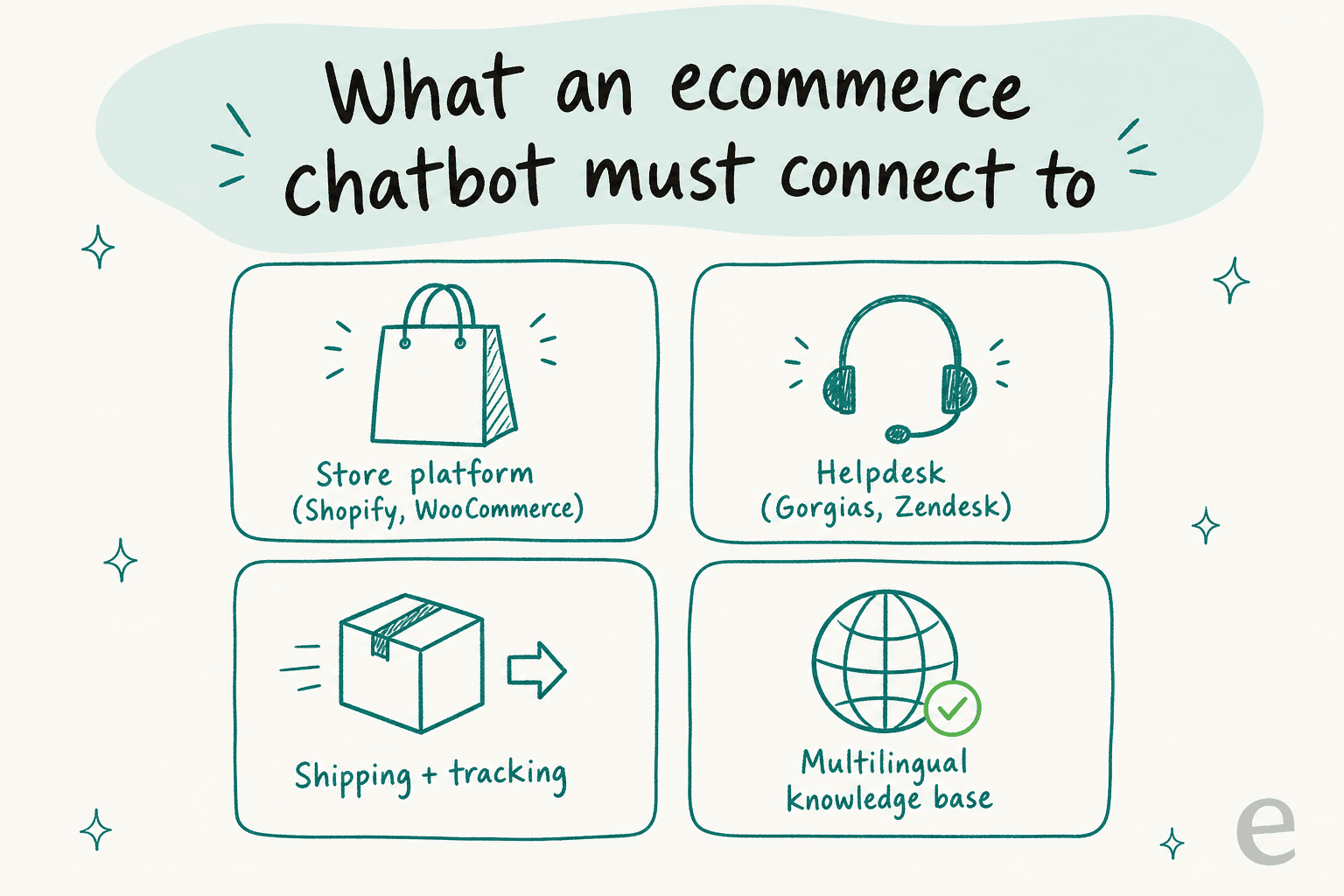
A bot that can only recite your returns policy is a glorified FAQ page. The useful ones connect to four things: your store platform (Shopify, WooCommerce, BigCommerce), your helpdesk, your shipping and tracking data, and a knowledge base it can read in whatever language the shopper wrote in.
The questions shoppers actually ask
If you've never read an ecommerce queue, here's the reality: the volume is boring and repetitive, which is exactly why it's automatable. Across most stores the same handful of intents dominate.
- "Where's my order?" (the classic WISMO ticket). By a wide margin the number one contact reason for most stores.
- Returns and exchanges. "How do I send this back?", "Where's my refund?", "Can I swap the size?"
- Product and sizing questions before purchase. "Will this fit?", "Is this in stock in navy?"
- Order changes. "Can I change my address?", "Cancel my order?"
- Discounts and promo codes that didn't apply at checkout.
The WISMO one is the poster child for automation because the answer is fully knowable from data the bot can fetch. Here's what that actually looks like when the bot is wired into your store.
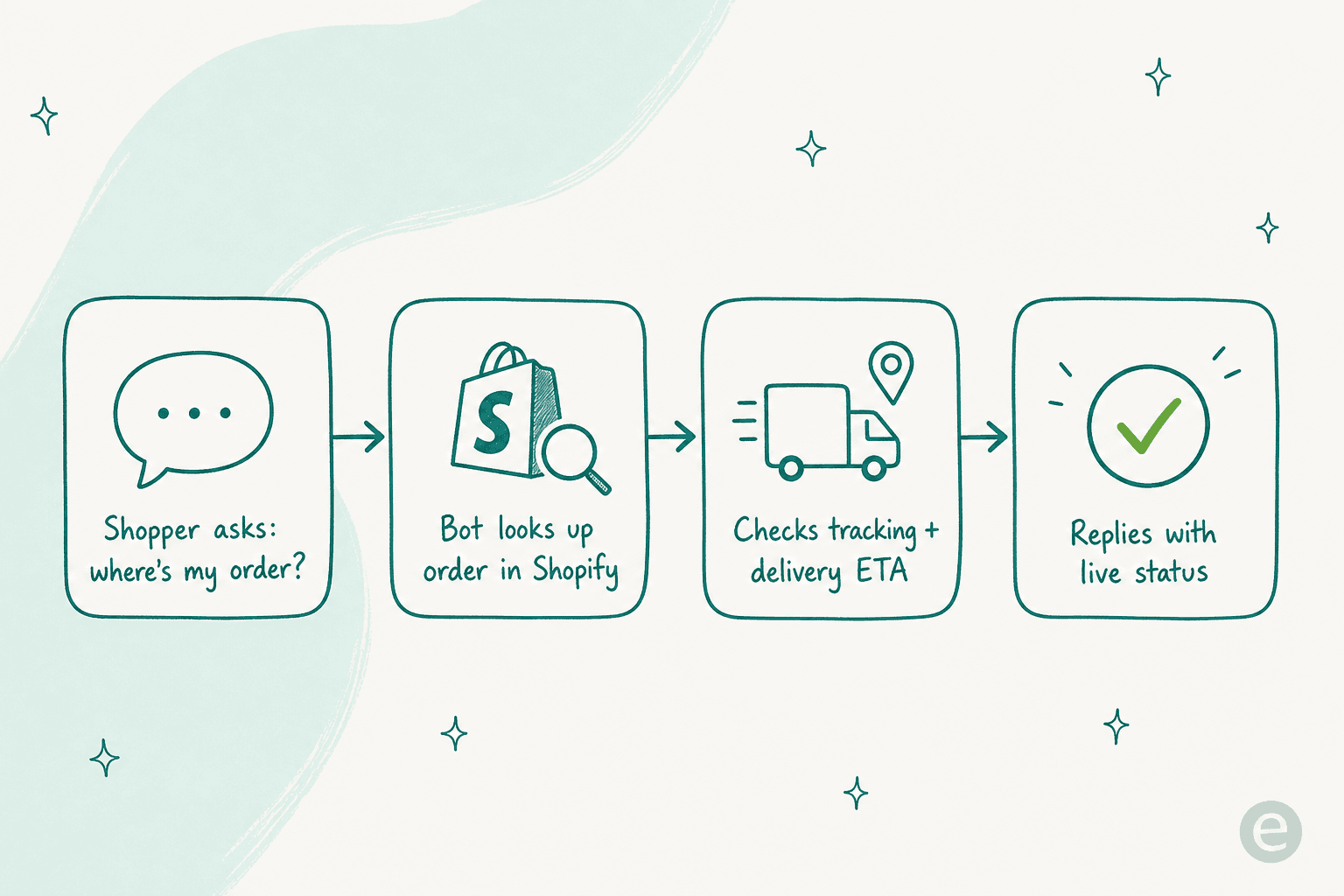
The shopper asks, the bot looks up the order, checks the tracking and the delivery window, and replies with the live status, all in the time it takes a human to even open the ticket. Do that for the 40% or so of your volume that's WISMO and returns, and your team gets to spend its day on the questions that actually need a person. That's the same pattern behind an AI shopping assistant working pre-purchase, just pointed at post-purchase questions.
The one setting that decides everything: automate vs escalate
Here's the part most "just add AI" guides skip. The failure mode isn't a bot that's too dumb. It's a bot that's too eager, one that answers a refund dispute it should have handed to a human, and does it with total confidence.
I've watched this happen. A confident-sounding bot that gives a wrong answer on a refund is worse than no bot at all, because now the shopper has a screenshot of your store promising something you won't honor. The teams that get real value do the opposite of "automate everything". They draw a hard line.
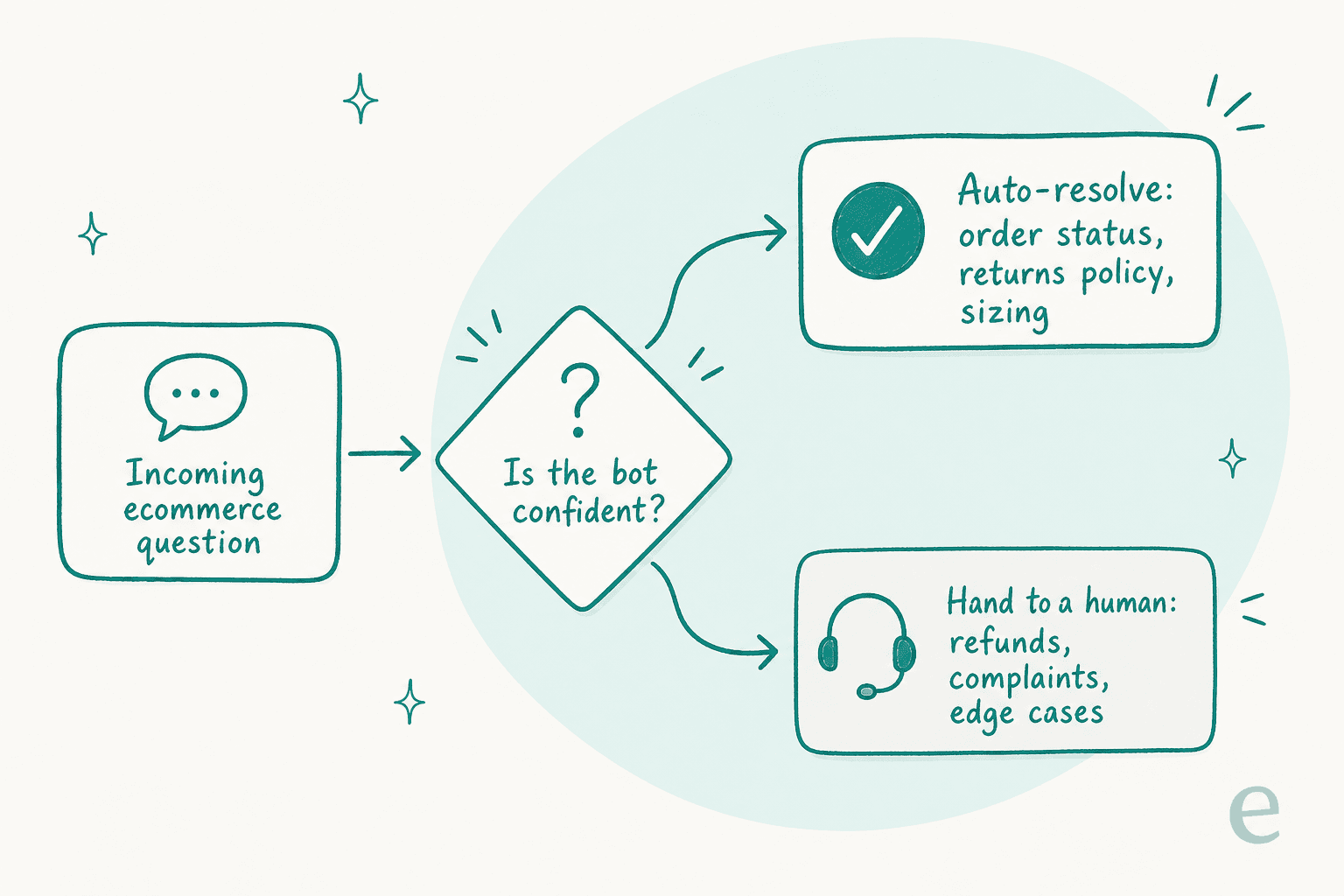
The rule that works: the bot only answers what it's confident about, and everything else goes to a person, cleanly. Order status, returns policy, sizing, stock checks, safe to auto-resolve. Refunds, complaints, anything with a whiff of an unhappy customer or a weird edge case, hand it off with the full context attached. One CX lead I heard from put the philosophy better than I could:
"The AI will never be able to answer 100% of the questions. I need an AI who is only handling the tickets that it's confident to handle, and all the other ones, leave them alone."
a DTC supplements CX lead
That's the whole thesis. A tool that lets you set that line precisely, by topic, by confidence, by ticket type, is doing the one thing that matters. A tool that only gives you an on/off switch is asking you to gamble your brand voice on it. When you're comparing AI customer service chatbots, this is the feature to grill them on.
How to actually set one up
Setting up an ecommerce chatbot is less work than it sounds, if you go in the right order. This is the sequence I'd follow.
- Connect your helpdesk and store first. Whatever you already run, Gorgias, Zendesk, Freshdesk, plus Shopify or WooCommerce. The bot needs to see live orders and to reply where your shoppers already are. Don't buy a tool that forces you off your current stack.
- Feed it your real knowledge. Point it at your help center, your policy pages, and, most importantly, your past tickets. Training on historical conversations is the single most requested capability I hear about, because it teaches the bot how your team actually phrases answers, not just what the policy PDF says.
- Set the automate-vs-escalate line. Pick the two or three topics you're most confident about (usually WISMO and returns) and turn those on. Leave everything else routed to humans for now.
- Test it on past tickets before it touches a customer. This is non-negotiable. Run the bot against a few hundred real historical tickets and read what it would have said. This is where you catch the embarrassing answers, in a sandbox, not in production. It's also how you get a real number for how much it'll deflect before you commit.
- Go live narrow, then widen. Launch on that small topic set, watch it for a week, then expand scope as you build trust. The AI customer service automation that lasts is the kind you grew into, not the kind you flipped on all at once.
That "test on your own history first" step is the one that separates a rollout that sticks from one that gets switched off in a panic three days later. If a vendor can't let you simulate before launch, that tells you something.
What it costs, and the pricing trap to dodge
Ecommerce support is spiky. You're quiet in February and drowning on Black Friday. That makes the pricing model matter as much as the sticker price.
Most ecommerce chatbots charge one of three ways: per resolution, per conversation, or per ticket. The trap to avoid is any model that charges you per message, because a single "where's my order?" chat can be six or seven messages of back-and-forth, and per-message billing turns a helpful conversation into a meter you're scared to run. A human agent costs roughly $2 to $5 per ticket fully loaded, so an AI ticket at a fraction of that is the whole economic case, but only if the bill is predictable.
The other gotcha is per-seat pricing bolted onto usage. If you have to buy a seat for every agent who might glance at the bot, your cost scales with your team instead of your automation. I'd steer toward tools that price on what the bot actually does.
This is genuinely where I think eesel has the cleanest answer: it bills per ticket the AI handles, with no per-seat fees and no charge for the back-and-forth inside a single conversation, so your Black Friday spike is just more tickets handled, not a surprise invoice. Whatever you pick, track the real numbers with a proper set of AI customer service metrics so you know what you're actually paying per resolved ticket.
Common mistakes I'd tell a friend to skip
A few things I see teams get wrong over and over:
- Automating everything on day one. Covered above, but it's the big one. Narrow scope, then widen.
- Skipping the past-tickets test. People are so keen to launch they don't simulate first, then get surprised by the answers. Ten minutes of testing saves a week of cleanup.
- Ignoring the handoff. A bot that escalates a ticket but drops all the context just makes the human's job worse. The handoff should carry the full conversation and what the bot already tried.
- Treating multilingual as optional. If you ship internationally, shoppers will write in their own language. A bot that only reads English quietly fails a chunk of your customers. Good ecommerce support chatbots handle this without you configuring a thing.
- Buying a walled-garden tool. If the chatbot only works inside one vendor's ecosystem, you've traded your flexibility for their roadmap. An AI chat bubble that layers over what you already run keeps you in control.
Try eesel for your store
If you run an online store and you want an AI chatbot that behaves like the sensible version above, eesel is built for exactly this. It plugs into Shopify and your helpdesk, whether that's Gorgias, Zendesk, or Freshdesk, learns from your past tickets, and answers WISMO, returns, and sizing questions on its own while cleanly handing the rest to your team.
The two things I'd flag as genuinely different: you set the automate-vs-escalate line yourself, down to the topic and confidence level, and you can simulate the whole thing against your real ticket history before a single customer sees it. One ecommerce-adjacent team, Gridwise, saw the bot resolve 73% of their tier-1 requests in the first month, and got that read during a 7-day trial rather than after a long contract.
It's free to try, it goes live in minutes on the stack you already have, and you can start with one topic and grow from there. That's the way I'd do it, and it's the way I'd tell a friend running a store to do it too.