


My verdict: 3.5 out of 5
I'm Rama, and I build integrations at eesel, which mostly means I spend my days reading other tools' docs and APIs to see what they do under the marketing copy. For this review I went through Formilla's pricing page, its product docs on the Formilla blog, and its listings on Shopify, WordPress.org, Wix, Capterra and G2. I haven't run Formilla on a production site for a year, so where I talk about day-to-day use, I lean on the reviewers who have.
| Area | Score | Why |
|---|---|---|
| Live chat basics | 4.5 / 5 | Clean agent dashboard, mobile and desktop apps, typing indicators, transfers, canned replies |
| Ease of setup | 4.5 / 5 | Plugin or one snippet; reviewers call it easy again and again |
| AI chatbot | 2.5 / 5 | Works, but trained by hand on Topics and crawled pages, with a 100-chat add-on and no order lookups |
| Pricing | 4 / 5 | Very cheap seats; AI and extra agents add up, and higher bot tiers aren't published |
| Freshness of reviews | 2.5 / 5 | Most written reviews are five to ten years old |
| Overall | 3.5 / 5 | A solid human live chat tool at a low price, with AI bolted on rather than built in |
What is Formilla?
Formilla calls itself "an AI-powered customer service platform for sales, marketing, and support teams" on its homepage, and claims 100,000 companies trust it. In practice, the core product is a classic website live chat widget with a lead-capture and marketing layer around it. The WordPress plugin was added to WordPress.org in November 2013 and the Shopify app launched on June 3, 2014, so this is a mature tool with a long tail of small-business users.
The WordPress plugin is still maintained: version 1.4 was updated in August 2026, is tested up to WordPress 7.1.3, and shows 2,000+ active installs with a 4.8 rating from 116 reviews on WordPress.org. On Shopify, the app is listed as "Formilla Live Chat + Chatbot" with a 5.0 rating from 21 reviews.
The Formilla team itself answers chats on its site from 7am to 2pm Pacific, Monday to Friday, which tells you something about the size of the company. It's a small, long-running vendor, not a fast-moving AI startup, and that shapes both what's good and what's dated about the product.
Formilla features
Formilla's feature list is long, but it splits into four jobs: talking to visitors live, watching who's on the site, automating answers with bots, and marketing to the contacts you collect. Here's how each one works.
Live chat dashboard and apps
The agent dashboard is where Formilla is strongest. Active chats sit on the left, the conversation in the middle, and visitor details on the right: pages viewed, country, region, operating system, browser and screen resolution. Agents can transfer a chat to a teammate, see when the visitor is typing, and fire off canned messages with hashtag shortcuts like "#hello".
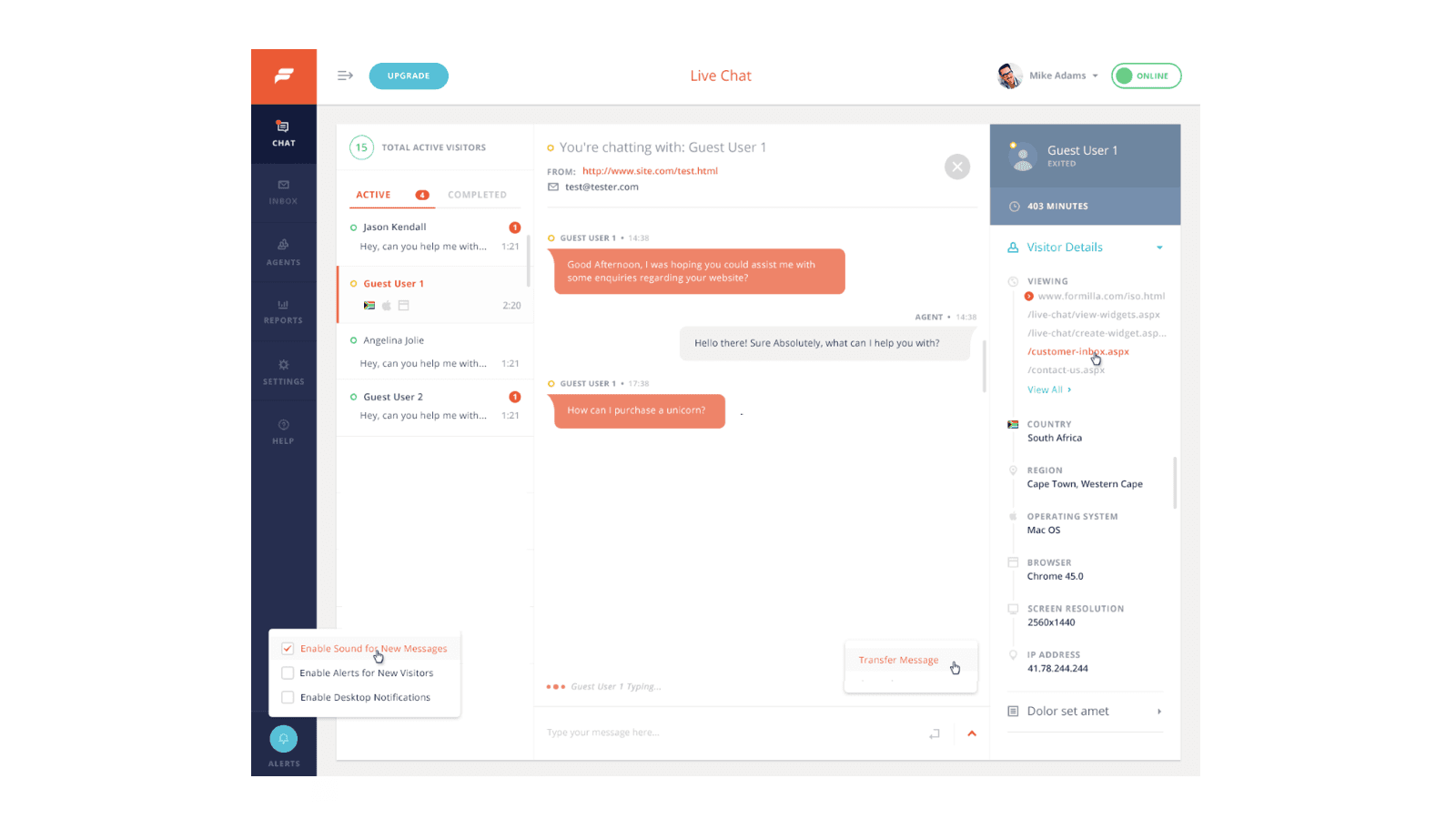
Every plan, including the free one, gets Windows and Mac desktop apps plus iPhone and Android apps. For a shop owner who is also the support team, that matters more than any AI feature: you can answer a pre-sales question from your phone while you pack orders. You also get sound and desktop alerts, auto-responses when nobody answers within a set time (60 seconds in Formilla's own example), offline messages by email, and chat transcripts. If you're new to the category, my rundown of live chat features covers which of these matter most.
Real-time visitor monitoring and proactive chat
Formilla shows the most active visitors on your site in real time, with the page they're on, the referring site and whether they're new or returning, and lets you invite any of them to chat. That's a Professional plan feature. Premium gets proactive chat, where the widget opens with a message after a set number of seconds, and Smart Messages, which trigger chats from custom events like a signup or a number of visits.
This is the "sales and support" side of Formilla in practice. A small team can spot someone lingering on the pricing page and start a conversation. My guide to live chat triggers has ideas for when that helps and when it annoys.
ChatGPT Bots and Copilot
Formilla's AI comes in two parts, both sold as one add-on. ChatGPT Bots answer visitor questions in the widget, and Copilot drafts replies for your agents inside the dashboard.
You train a ChatGPT Bot two ways, according to Formilla's setup guide. First, you write "Topics": a heading plus a block of text, like a return policy or a product feature list. Second, you add web pages or hosted documents for the bot to crawl, up to 250 URLs on paid plans. You can test answers in a side panel as you go.
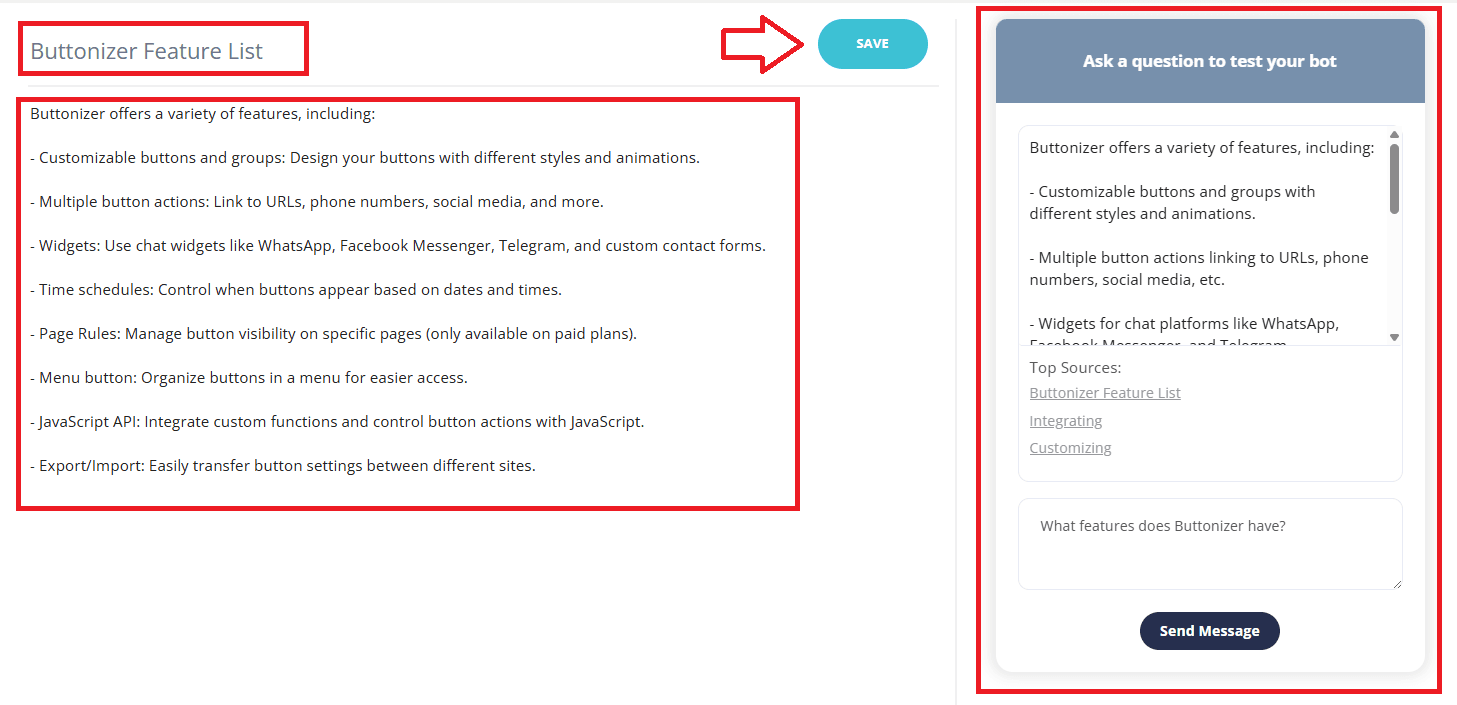
You choose whether the bot answers Always, only while agents are Online, or only when they're Offline. That last mode is a nice touch for small teams: humans by day, bot after hours. A "No Match Response" sets what the bot says when it can't find an answer, and a "Train my Bot" screen lists the messages it missed so you can add Topics for them. Formilla suggests reviewing that list "every few days" at first.
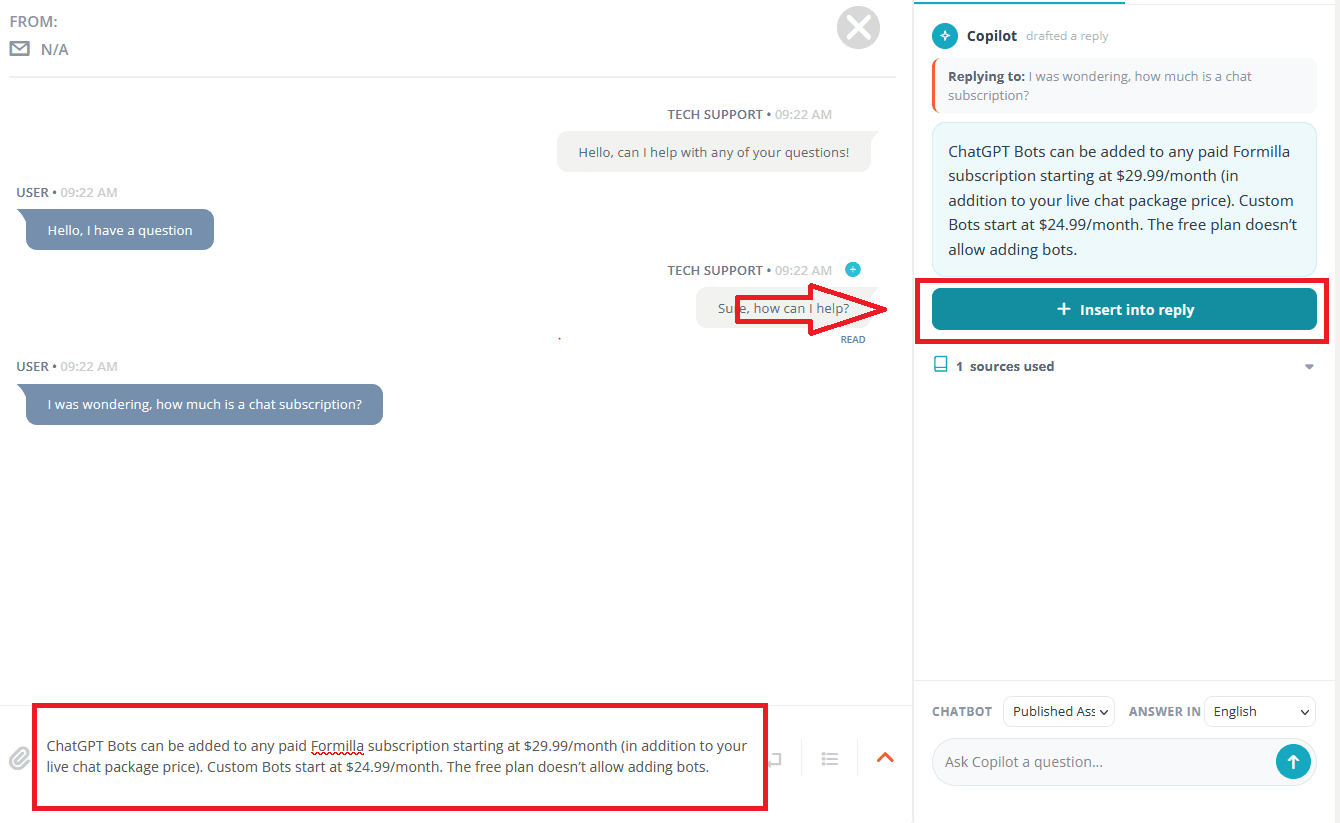
Copilot uses the same bot content to draft a reply when an agent clicks "Ask Copilot" next to a visitor's message, and the agent inserts and edits it before sending. You can even build an unpublished bot that only feeds Copilot, which is a sensible way to give agents internal answers without exposing them to visitors.
What the bot doesn't do is look things up. It answers from Topics and crawled pages, and Formilla doesn't list order lookups, refunds or any live actions in its bot docs. For a Shopify store, that means "where is my order?", the question that fills most ecommerce queues, still goes to a person. My guide to WISMO automation explains why that one question is worth solving properly.
Custom Bots
Custom Bots are the older, button-based flows: greet the visitor, offer buttons like "Track my order" or "Technical help", collect contact details, qualify leads, or show a Calendly calendar inside the chat, per Formilla's Custom Bots guide. They cost $24.99 a month extra with 200 chats included. The same guide notes the Wix app isn't supported for Custom Bots. If lead capture is your main goal, my list of lead generation chatbots is worth a look.
Popups, email and integrations
Every plan includes the popup builder (lightboxes, corner popups and website bars), with 5,000 views a month on Free, 50,000 on Premium and no cap above that. Enterprise adds unlimited email sends to up to 10,000 contacts from your own domain.
Integrations are thin and mostly go through Zapier, which connects Formilla to tools like Mailchimp, Pipedrive and Zendesk on paid plans. There's also a direct Infusionsoft link and Google Analytics events on every plan. The Enterprise plan adds "custom API integrations and webhooks" set up by Formilla's team. If you live in a helpdesk like Zendesk or Help Scout, expect chats to arrive there as Zapier-created tickets, not as a native two-way sync.
Formilla pricing
Formilla's pricing is low and simple on the surface. Here are the four plans from formilla.com/pricing, checked on October 21, 2026.
| Plan | Monthly | Billed yearly | Agents | What it adds |
|---|---|---|---|---|
| Standard | Free | Free | 1 | Unlimited chats, apps, branding, 5 canned messages, 60 days of chat history |
| Premium | $17.49/mo | $13.99/mo | 1 | Unlimited history, Zapier integrations, proactive chat, pre-chat form, departments, hours, bot add-ons |
| Professional | $49.99/mo | $39.99/mo | 2 | Real-time visitor monitoring, file sharing, up to 5 websites, branding removal |
| Enterprise | From $299.99/mo | Custom | Full team | Bots included, AI setup and training, AI reporting, custom integrations, SLA, account manager |
All paid plans come with a 15-day free trial with no card. The add-ons are where the real price lives:
- ChatGPT Bots + Copilot: +$29.99 a month on Premium and Professional, with 100 chats a month included. Higher tiers exist for more chats, but Formilla doesn't publish their prices.
- Custom Bots: +$24.99 a month with 200 chats included, with higher tiers on request.
- Extra agents: each one "will incur an additional fee depending on the package", with no number given on the pricing page.
- More than 250 crawled URLs for the bot: a quote from support.
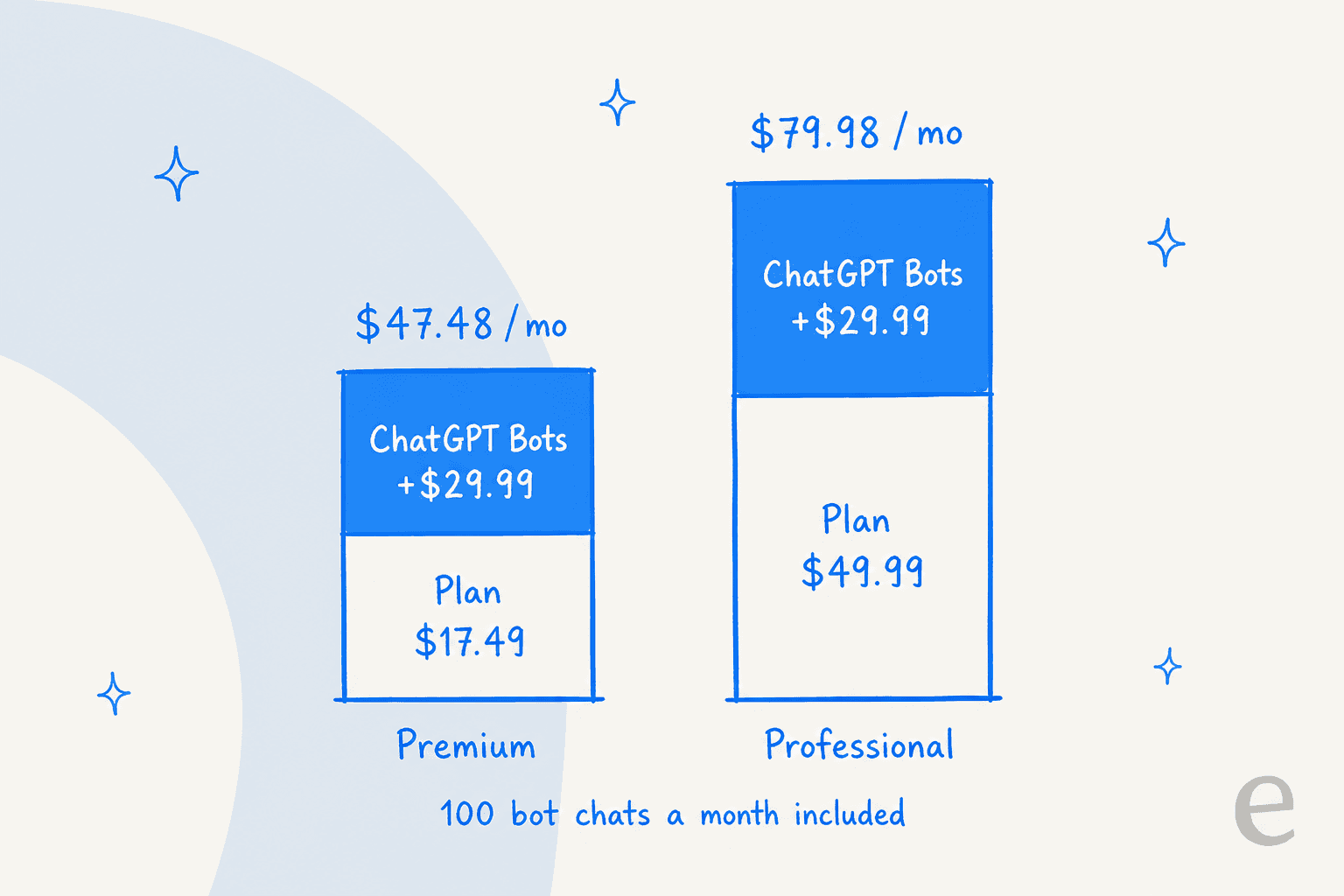
So the "$17.49" plan with an AI bot is $47.48 a month for 100 bot chats, or about 47 cents a chat if you use them all. That's still cheap compared with most AI chatbot pricing, but it means the free and Premium headline prices are for human chat only.
Pick a plan and add-ons below to see your monthly and yearly total.
Marketplace prices don't always match
The Shopify App Store listing matches the website: Free, Premium at $17.49 a month or $167.90 a year, Professional at $49.99 or $479.90 a year, and Enterprise at $299.99 a month or $3,599 a year, billed through Shopify.
The Wix App Market listing is different: a free plan and a Premium plan at $9.99 a month for up to 3 agents with visitor monitoring. It's cheaper because it's a smaller app. Replying to a 2024 Wix review, Formilla's team put the limits down to "many technical limitations with the early version of our Wix iframe app", and its Custom Bots guide says the Wix app isn't supported. G2's profile still shows older prices ($29.99 and $69.99 plans), so trust the vendor's own page over that one.
What reviewers say: pros and cons
Formilla's ratings look very different depending on where you check.
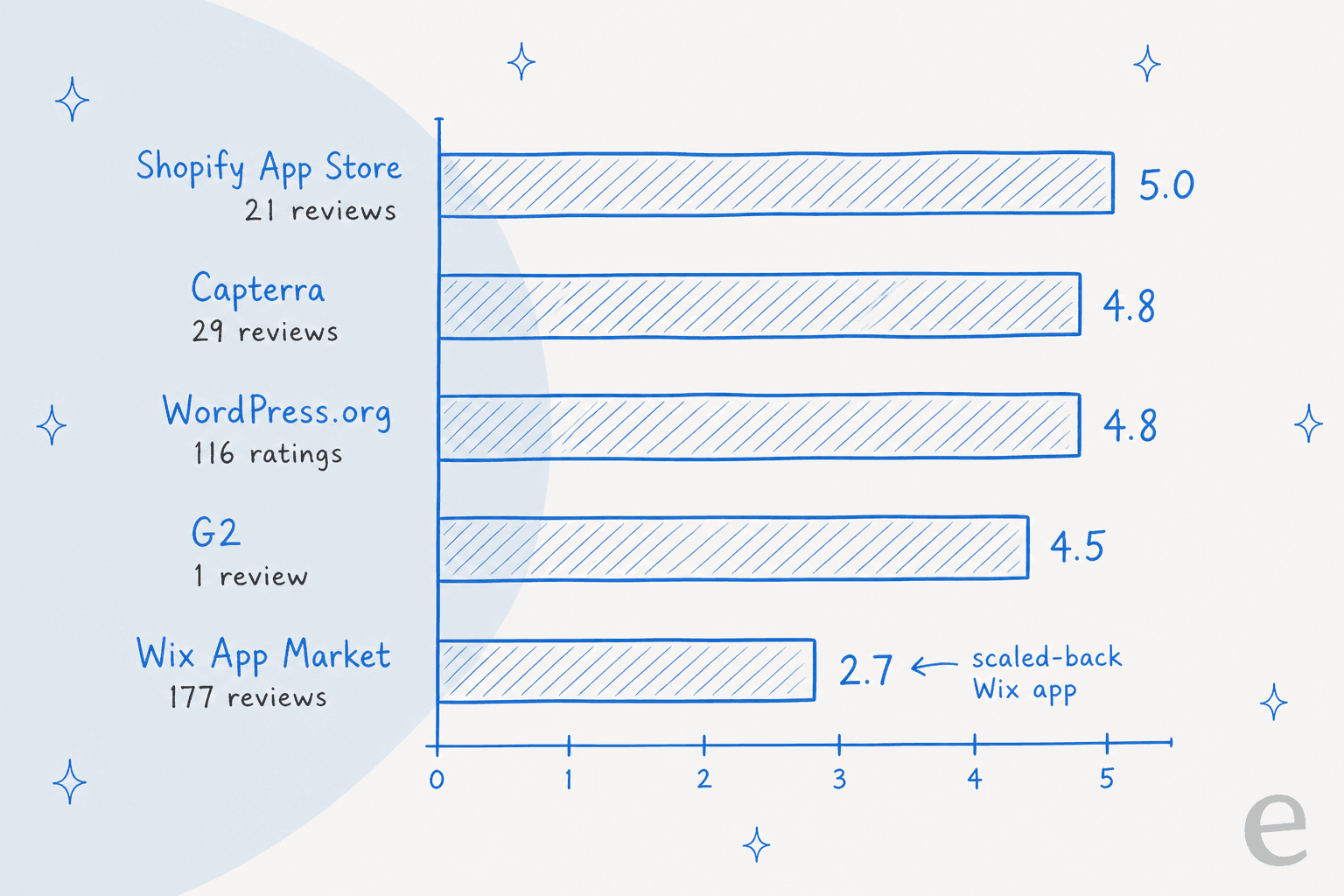
Two things stand out. First, the high scores rest on old reviews: the visible Shopify reviews are from 2015 to 2019, and the Capterra reviews run from 2017 to 2021. Second, the Wix score is a different product, the iframe app with fewer features, so don't read it as a verdict on the main platform.
What people like
The praise is consistent: easy setup, a clean dashboard, good mobile apps, and fast, human support from the Formilla team.
"I tried three other chat programs and none of them came close to what Formilla does. Their customer support is fantastic! Instead of canned responses, I got immediate answers to my questions."

Another long-time user, running Formilla across WordPress, Drupal and custom apps for a nonprofit software shop, said "Formilla has supported us extremely well for years." Ease of use scores 4.7 and customer service 4.9 on Capterra, which matches what I'd expect from a small vendor that still answers its own chat.
What people don't like
The complaints are small but specific, and most are about notifications and control rather than the chat itself.
"It seems like it lags a little in notifying you of a message - may 15-20 seconds - would like to see that be immediate."
"The software needs to have the ability to block individual pages on your site without having to paste code into each individual page."
A 2021 reviewer wished for "more integrations with other software", which lines up with the Zapier-first setup. Some of these notes are years old and may be fixed now (Formilla's pricing page now lists display rules and hours of operation), so treat them as a guide to what to test in your trial, not as current faults.
Where Formilla falls short
None of these are dealbreakers for a small site. They matter once support volume grows, or once you expect AI to carry part of the load.
- AI is an add-on with a low ceiling. 100 ChatGPT bot chats a month are included for $29.99. Past that you need a higher tier, and the prices aren't published, so you can't model your cost at scale without asking sales.
- The bot learns from what you write, not from your history. Training is Topics plus up to 250 crawled URLs. Past chats show up as "untrained messages" for you to turn into Topics by hand, and past helpdesk tickets aren't an input.
- No order lookups or actions. The bot answers from text. It doesn't check a Shopify order, a tracking number or stock, so the most common ecommerce question still lands on a person.
- Not a helpdesk. There's no ticket queue, SLA tracking or email inbox beyond offline messages and Copilot in conversation history. Once email and chat need one place, you'll add a helpdesk and connect it with Zapier.
- Free plan limits are tight. 60 days of chat history and contacts, five canned messages, five banned visitors and no bots.
- Support hours are short. Formilla's own chat is staffed 7am to 2pm Pacific on weekdays, with phone support from Premium up.
Who Formilla fits, and who it doesn't
I'd pick Formilla for a small business site where one to three people answer chats and want to do it cheaply from their phones. A local service business, a WordPress shop with a few hundred orders a month, or a B2B site that wants to catch visitors on the pricing page all fit well. The Offline-only bot mode is a good way to add after-hours answers without handing the whole chat to AI.
I'd skip it if any of these are true:
- You want AI to resolve real volume. Hundreds of bot chats a month, order lookups, or answers learned from past tickets need a different kind of tool.
- You run support from a helpdesk. If your team lives in Gorgias, Zendesk or Freshdesk, a chat tool that talks to it through Zapier will feel like a side door. Look at AI for Gorgias or Zendesk AI pricing instead.
- You're on Wix and need the full feature set. The Wix app is a different, smaller product.
If you're comparing other human-first chat tools, my Tidio review covers the closest rival, and the Chatra review covers a similar small-team pick.
At the premium end, LiveChat pricing shows what more money buys. For Shopify stores, my list of Shopify AI live chat apps goes wider, and my Chatway review covers a free-first option.
Formilla or eesel: which one fits?
These two tools solve different problems, so the honest answer is that some readers need both and some need only one. Formilla is a chat console for people. eesel is an AI teammate that does the answering: the AI helpdesk teammate works inside your helpdesk or on your site, and learns your business from your pages, docs and past tickets before it says a word.
On the website, eesel's chat bubble goes on any site with one script tag, including WordPress, Shopify and Wix. Connect your Shopify store and it can check the order, fulfilment status and stock before it answers, which is exactly the gap in Formilla's bot. When it can't help, or the visitor asks for a person, it hands the conversation to your team by email or through a connected helpdesk like Gorgias or Zendesk. In one real chat from our records, a visitor on an SEO tool's site got two answers from the docs, typed "Can I talk to a human?", and was handed straight to the team.
The clearest example of the order-lookup difference is STIL Classics, a planner and stationery brand on Shopify and Gorgias. Before eesel drafts a reply, it pulls the order, fulfilment status and line items from Shopify. In a month it prepared 320 Gorgias tickets, looked up 230 Shopify orders, and left 430 draft replies for a person to check and send. Nordbutiker, an electric vehicle retailer, runs one eesel bot per brand across 4 countries, each trained on that store's pages and solved Zendesk tickets, on the website chat bubble and inside Zendesk.
"Finally, AI software that suits our needs. Easy to connect to Shopify, easy to prompt, and it learns from our articles."
Mateusz Golda, Director at Tulipy, in a G2 review
Where Formilla wins is plain: live human chat and cost. eesel isn't a live chat console for agents to type into in real time, and at small volume Formilla is far cheaper. eesel's pricing is a free trial with 100 credits, then fixed monthly plans from $299 for 500 credits, where a ticket or chat is one credit. If you get 60 chats a month and enjoy answering them, keep Formilla. If you get 600 and half are order questions, that's the job an AI teammate is built for. My guides to AI vs live chat and chatbot ROI walk through that math.
| Formilla | eesel | |
|---|---|---|
| Main job | Live chat for people, with bots as add-ons | AI teammate that answers and drafts on chat and helpdesk |
| Learns from | Topics you write, up to 250 crawled URLs | Your site, docs, help center and past tickets |
| Shopify order lookups | Not in bot docs | Yes, with the Shopify integration |
| Where it works | Its own widget and dashboard | Chat bubble on any site, plus Gorgias, Zendesk, Freshdesk and more |
| Handoff | Agents online in the Formilla dashboard | Email or your connected helpdesk |
| Starting price | Free; AI from $47.48/mo for 100 bot chats | Free 100 credits; $299/mo for 500 credits |
Try eesel
If your Formilla bot keeps passing "where's my order?" to a person, eesel can take that question on. Add the eesel chat bubble to the same site, connect Shopify and your help pages, and test it against real questions before it goes live. Your team keeps the conversations that need a human, and the 100 free credits are enough to see how it handles your own chats. Try eesel.
Frequently Asked Questions
How much does Formilla cost?
On Formilla's pricing page, Standard is free, Premium is $17.49 a month ($13.99 billed yearly), Professional is $49.99 ($39.99 yearly), and Enterprise starts at $299.99 a month. ChatGPT Bots cost $29.99 a month extra and Custom Bots $24.99. My guide to chatbot costs puts those numbers in context.
Is Formilla free?
Yes. The Standard plan is free for one agent with unlimited chats, but it keeps chat history and contacts for 60 days, caps saved replies at five, and can't add AI bots. Paid plans come with a 15-day trial and no card. For other free picks, see my list of live chat alternatives.
Does Formilla have an AI chatbot?
Yes. ChatGPT Bots answer from Topics you write and up to 250 web pages it crawls, and Copilot drafts replies for your agents. Both come as a $29.99 a month add-on with 100 bot chats included on Premium and Professional. My post on AI chatbot vs live chat explains when each one helps.
Is the Formilla review score the same on every marketplace?
No. Formilla holds 5.0 on the Shopify App Store (21 reviews), 4.8 on Capterra and WordPress.org, and 2.7 on the Wix App Market from 177 reviews, where the app is a scaled-back version. Most written reviews date from 2015 to 2021. My Tidio review is a useful comparison point.
Does Formilla integrate with Shopify, Zendesk or Gorgias?
Formilla installs on Shopify, WordPress and Wix, and connects to tools like Zendesk, Pipedrive and Mailchimp through Zapier on paid plans. Its bot doesn't look up Shopify orders out of the box. If order questions fill your queue, an AI agent for Shopify that reads order data is the better fit.
Is Formilla good for a small business?
For a small site where one or two people answer chats, yes: it's cheap, quick to install, and the mobile apps keep you reachable. It fits less well once you need ticketing, order lookups or AI on high volume. My roundup of helpdesks for small business covers the next step up.
What is a good Formilla alternative?
Tidio, LiveChat, tawk.to, Crisp and Shopify Inbox are the usual comparisons for human live chat. If you mainly want AI that answers from your site and past tickets, eesel's AI chat bubble drops onto any site with one script. My list of tawk.to alternatives covers more.