


What is Chatra?
Chatra is a live chat and messaging app for websites and online stores. It launched on the Shopify App Store on October 29, 2015, where it is listed as "Chatra: Live Chat & Chatbot" by Roger Wilco LLC. The homepage says it is trusted by 45,000+ businesses and online stores, and it now carries a "by Brevo" badge after joining the CRM company Brevo, formerly Sendinblue.
| Chatra at a glance | |
|---|---|
| What it is | Live chat widget, chatbot, targeted messages, shared inbox |
| Platforms | Shopify, WordPress, WooCommerce, Ecwid, BigCommerce, any site with a code snippet |
| Owner | Brevo (Shopify developer listed as Roger Wilco LLC) |
| Shopify rating | 4.6 from 306 reviews: 281 five-star, 14 four, 1 three, 2 two, 8 one |
| G2 rating | 4.2 from 32 reviews |
| Price | Free for 1 agent and 5 chats; $31 or $41 per agent a month |
| Channels | Chat widget, email, Facebook Messenger, Instagram |
| Bot | Button-based scenarios and a contact form bot, no generative AI |
| Integrations | Slack, Help Scout, Zapier, REST API and webhooks (all Pro) |
| App languages | English, French, Spanish, Portuguese (Brazil), Russian on Shopify |
| Roadmap | No new features in Chatra, per its Brevo FAQ |
How Chatra works
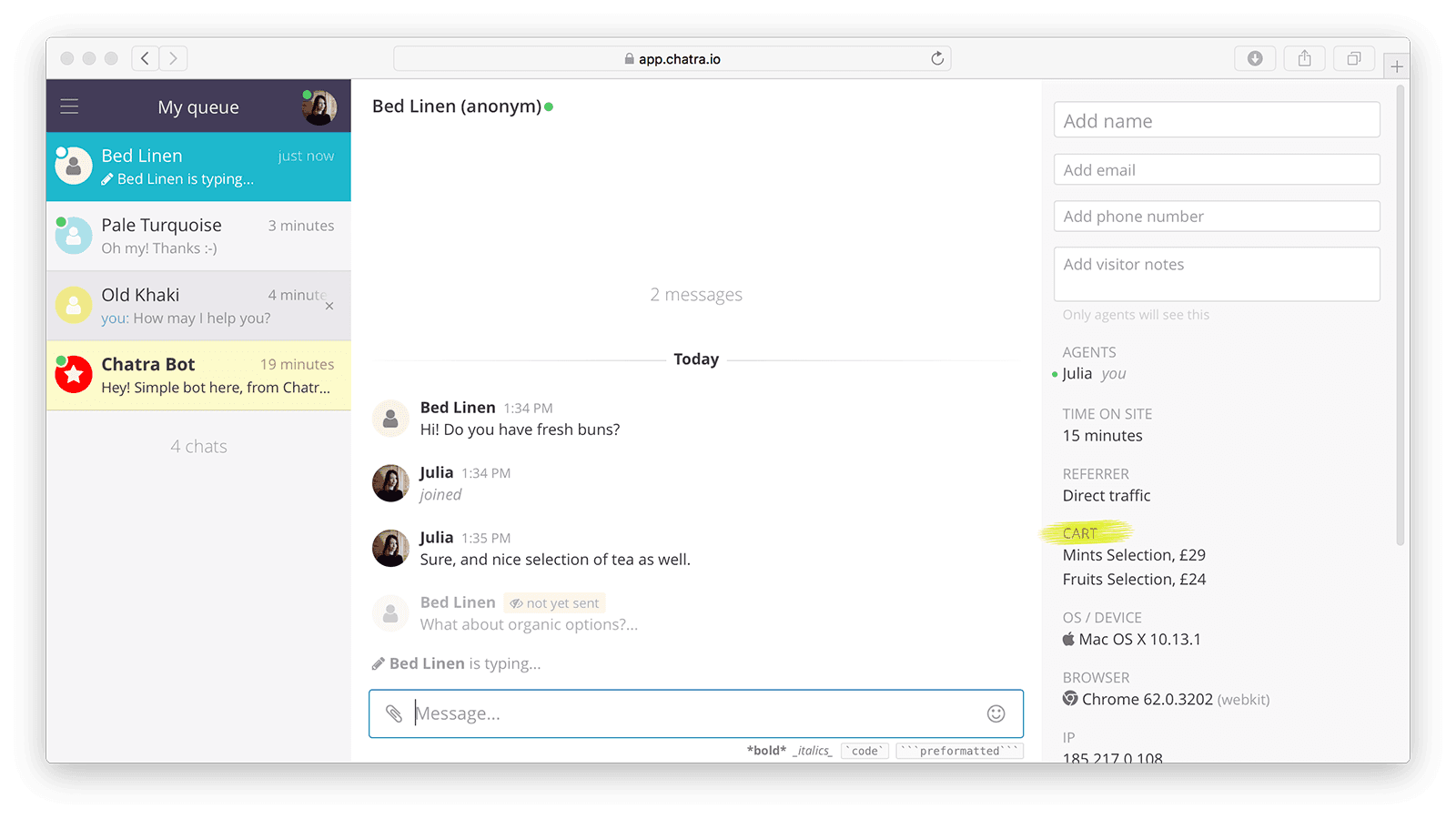
You install Chatra from the Shopify App Store or paste a code snippet into your site, and a chat widget appears on your pages. On Online Store 2.0 themes you also switch it on under App embeds, per Chatra's Shopify guide. From there, every chat, email, Messenger and Instagram message lands in one dashboard in the browser or the iOS and Android apps.
There are three moving parts, and it helps to keep them apart:
- Live chat and messenger mode. When an agent is online, the widget is a real-time chat. When everyone is offline or invisible, it switches to messenger mode, so visitors still leave a message and get a reply later in the widget or by email.
- Targeted chats and triggers (paid plans). You set a page and a delay, and Chatra opens a chat with a message you wrote, on the cart page or a confusing product page, for example. My guide to live chat triggers covers how to set these up without annoying shoppers.
- Bots (paid plans, except the offline form). A contact form bot collects a name, email and up to 5 custom fields, and a scenario chatbot walks visitors through reply buttons you build.
The chatbot is a button tree, not an AI
This is the part to understand before you buy. Per Chatra's help docs, the bot sends a message with reply options, the visitor picks one, and the bot sends the next message you wrote. It continues until the scenario ends or the visitor picks an option to talk to an agent. You build each branch by hand in the Automated answers tab.
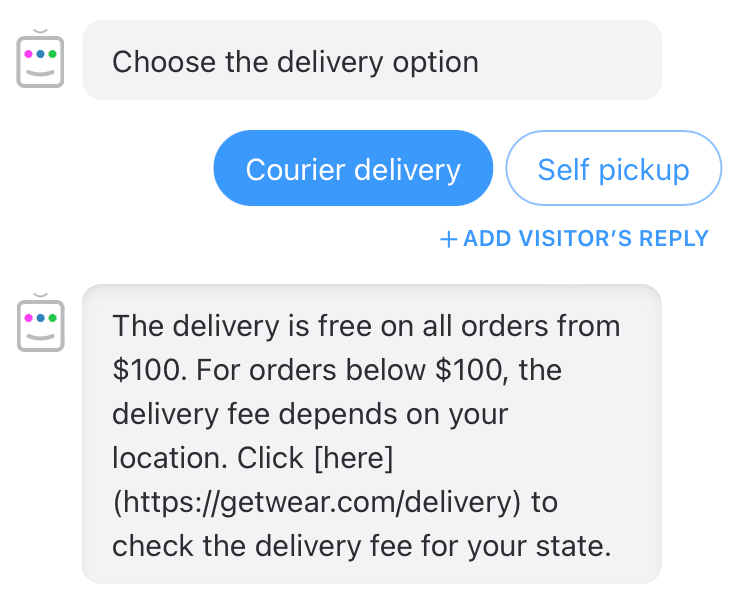
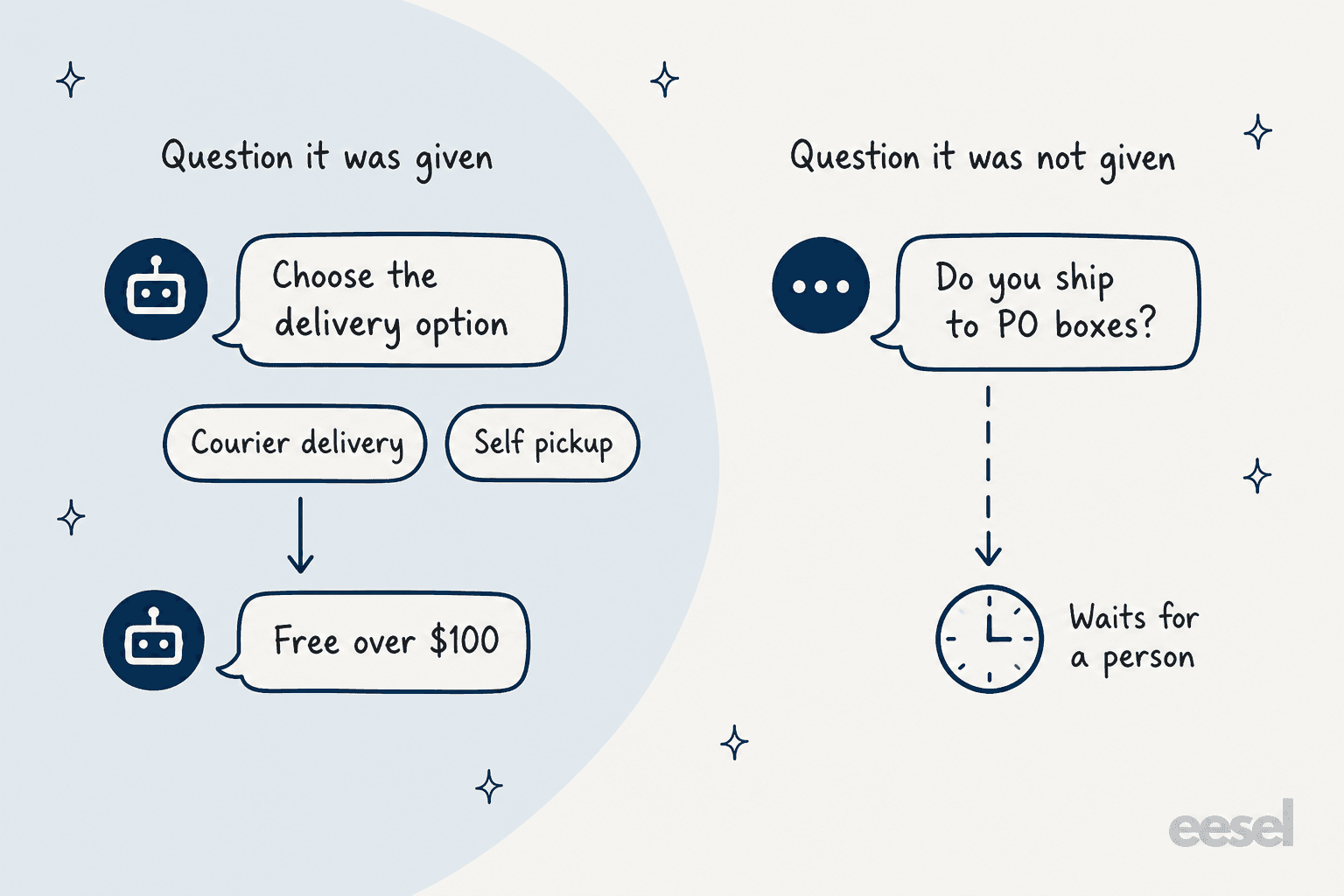
That works well for the five questions you already know shoppers ask. It does nothing for the sixth. A visitor who types "Do you ship to PO boxes?" instead of tapping a button waits for a person, because there is no model reading your help center or policies. A G2 reviewer named the trade-off:
"when the chatbot is not configured correctly with automated responses, it can give incorrect answers but it is only a matter of a well-done configuration"

If most of your chats are the same handful of questions, a button tree is cheap and predictable. If they are not, my explainer on AI chatbots vs live chat walks through where each one fits.
What Chatra does well
Chatra's strengths are the live chat basics, done in a light, friendly package that store owners keep for years.
Seeing the cart before you type
On paid plans, the real-time visitor list shows who is on your site, where they came from, which page they are on and, on Shopify, what is in their cart. You can start a chat with any of them. On Shopify the cart contents also sit next to the chat, so an agent sees "Mints Selection, £29" before answering a question about it. For pre-sale chat, that context is the whole job; my guide to AI for pre-purchase questions explains why those chats convert so well.
One limit to know: the list shows up to 10 visitors at the same time for each paid agent seat, per the plans page. A one-seat store sees 10 live visitors at once.
Triggers that open the right chat
Chatra ships templates for the triggers that matter most to a store: a front-page greeting, help on a complicated page, a chat on the contact page and a cart-saving message on the checkout page. You enter the URL, edit the text, and Chatra handles the delay so the chat does not pop up the second someone lands.
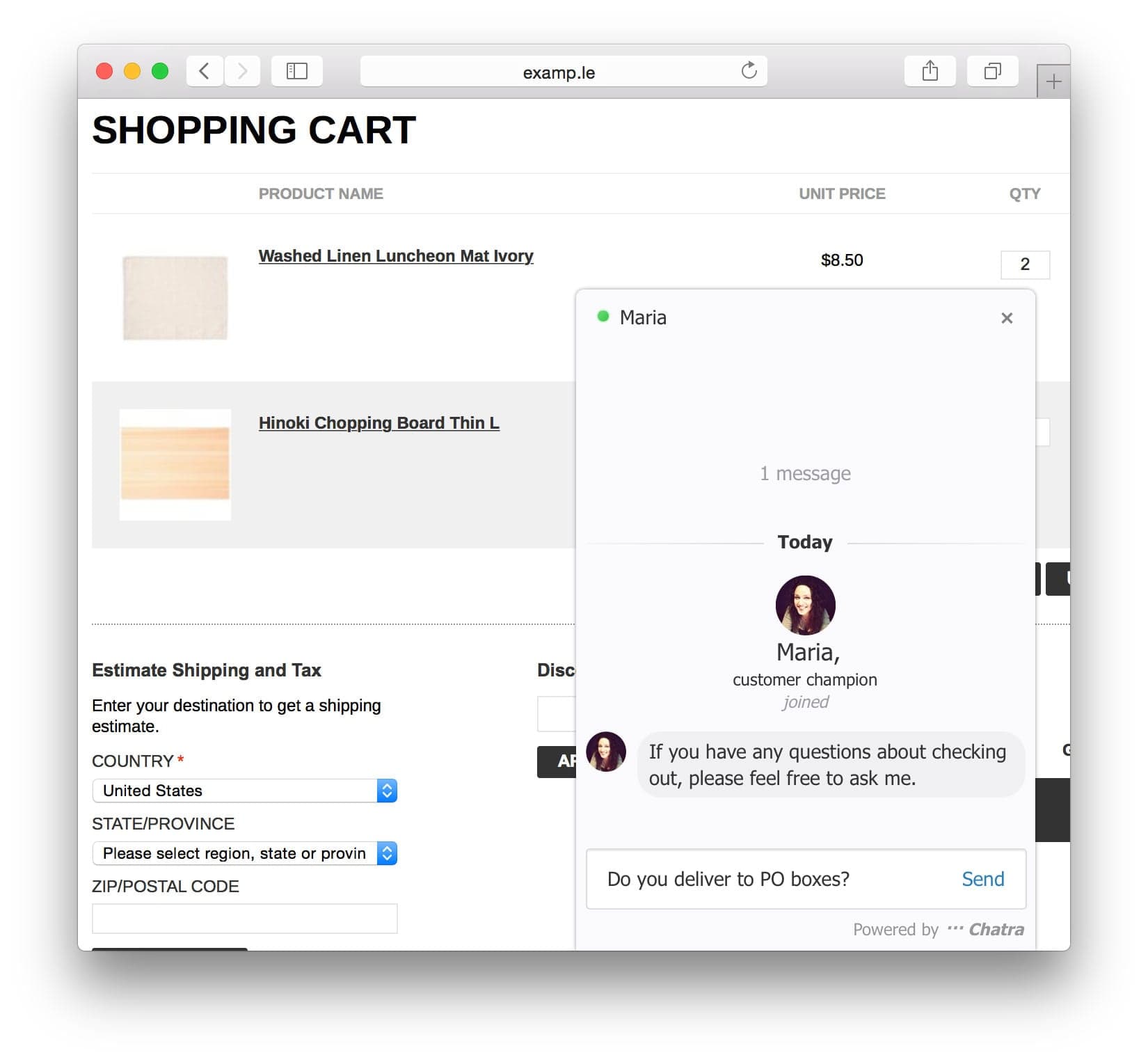
A merchant who has used it for almost five years put it well:
"The triggers are useful for engaging visitors at the right moment, and the live view helps us see how customers browse the store, including possible broken URLs or pages that need attention."

For more on this kind of outreach, see my guides to proactive chat and AI proactive support.
Simple enough to set up in an afternoon
Chatra is built for small teams, and it shows. Typing insights let you read a message before the visitor sends it, saved replies come up with a / shortcut, and chats that go unanswered move back into a shared queue. Agents can pull a colleague into a group chat or go invisible to finish their open chats without getting new ones. One merchant moving off a bigger helpdesk liked the trade:
"Switched to this from using zendesk for many years and this is by far such a nice and simplified online chat system for what we needed."
If your team mostly answers chats from a phone, the mobile apps are on every plan, including Free. My guide to live chat features lists what else to check in a small-team chat tool.
Lead capture when you are offline
When nobody is online, the contact form bot asks for a name and email, so you can reply later by email even if the shopper left. A G2 reviewer at a small business liked that it also routes to whoever is working:
"If it is after business hours, an email is sent to you instead so you can communicate with leads."
A support team people name
Of the 23 newest Shopify reviews I read, 9 thank a named Chatra rep, Anna or Julia. That matches what a long-time user wrote about a billing problem: the support team "took the time to carefully review my case," per Lunior's review.
Where Chatra falls short
None of these make Chatra a bad live chat. They are the things I would check before building a store's support around it for the next few years.
It will not get new features
This is the big one, and it sits on Chatra's own site. The Chatra joins Brevo page says Chatra keeps working as an independent app and the support team still answers by email, but "we will not be releasing any new features in Chatra. They will be released in Brevo Conversations only." The same FAQ says you cannot move your conversations and settings to Brevo for now.
So what you see today is what you get. If you need WhatsApp, which Chatra does not have, the Brevo page points you to Brevo. If you are choosing a chat tool you plan to keep for three years, that matters more than any single feature in the table.
No AI agent
Chatra has no generative AI. There is no agent that reads your help center, products or past chats, and nothing drafts replies for your team. In 2026 most chat tools at this price have added some AI, from Tidio's Lyro to the AI in Shopify-first apps like Willdesk and Chatty. With the feature freeze, Chatra will not catch up.
Per-agent pricing adds up
Every paid seat is a separate charge, so a team of five on Pro pays $205 a month on monthly billing. For a store with a part-time team, that surprises people:
"The platform operates on a per-seat licensing model, meaning each agent requires a separate subscription."
A G2 reviewer who liked the product said the same thing more gently: the subscription fee is "much higher compared to the market price," per Chowdary P. on G2.
The free plan shrank
Free now allows 5 chats a month. A merchant of more than two years noticed the change:
"Was a great free live chat for small businesses allowing 20 chats per month, however this has now been reduced to 5 which almost forces you into paying to upgrade."
Five chats is a trial, not a plan. Treat Free as a way to test the widget on your theme.
Reports, schedules and integrations sit on Pro
Essential covers the channels, bots and triggers, but chat ratings, chat reports, data export, operating hours, agent groups, Slack, Help Scout, Zapier, the REST API and outgoing webhooks are all Pro only. If you want to know your response times or send chats to Help Scout, budget for Pro from the start.
Billing and spam reports in the low reviews
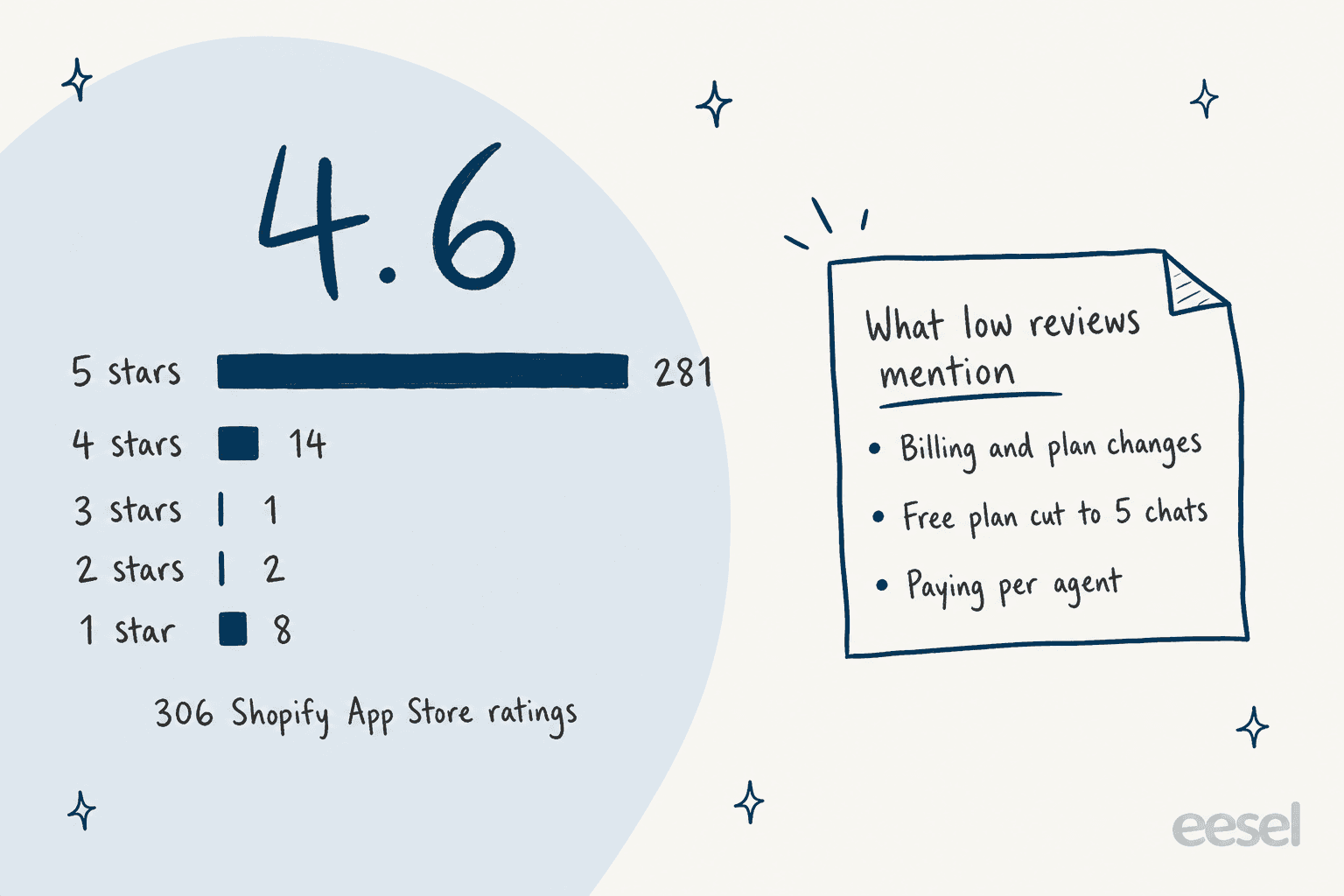
The low reviews are few, and most recent ones are about money and plans, not the chat itself. One store that had used Chatra since 2016 wrote in June 2026 that it was unenrolled after years of auto-billing and could not reach anyone for a few days:
"Installed the app in 2016 - 10 Years ago. They decided to "unenroll" us after 10 years of autobilling. Nobody around at "Chatra" over the past few days to figure it out / reply to our messages."
Another merchant said most of its chats were from bots and left after Chatra said the cause was outside its product; Chatra replied to that Railyard Fitness review. Single reviews are not a pattern, but both are worth knowing if you run a store on Chatra and depend on it daily.
Chatra pricing
Chatra prices by agent seat, with no limit on chats on paid plans. Here is the full ladder from chatra.com/plans, checked October 21, 2026. The Shopify listing adds that charges are billed in USD every 30 days.
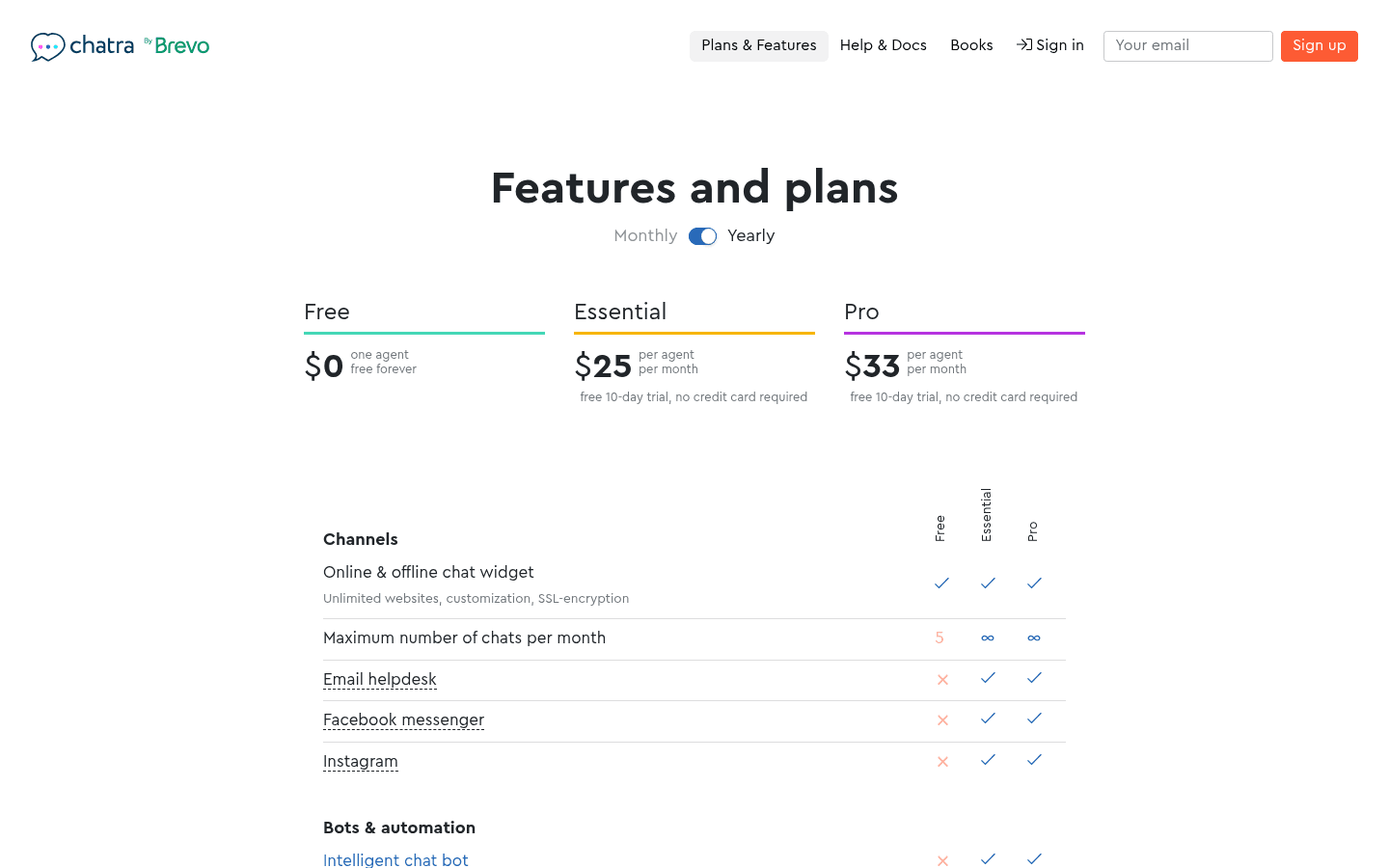
| Free | Essential | Pro | |
|---|---|---|---|
| Monthly billing | $0 | $31 per agent | $41 per agent |
| Yearly billing | $0 | $25 per agent a month ($300 a year) | $33 per agent a month ($396 a year) |
| Agents | 1 | Per seat | Per seat |
| Chats a month | 5 | Unlimited | Unlimited |
| Email, Messenger, Instagram | No | Yes | Yes |
| Chatbot, form bot, triggers | Offline form bot only | Yes | Yes |
| Visitor list and cart contents | Basic visitor info only | Yes, 10 visitors per seat | Yes, 10 visitors per seat |
| Saved replies, notes, team chats | No | Yes | Yes |
| Operating hours, agent groups | No | No | Yes |
| Chat ratings, reports, data export | No | No | Yes |
| Slack, Help Scout, Zapier | No | No | Yes |
| REST API, webhooks | No | No | Yes |
| Trial | None needed | 10 days, no card | 10 days, no card |
Yearly billing saves 19% on Essential and 20% on Pro, per the Shopify listing. A few things to price in:
- Every agent is a seat. Anyone who answers chats needs one, and the visitor list grows by 10 people per paid seat.
- No AI line. There is no AI add-on to buy, because there is no AI. If you add an AI chat tool later, that is a second bill on top of Chatra.
- Moving to Brevo starts from zero. Chatra's FAQ says Brevo Conversations costs less, but your chat history and settings do not come with you.
Pick what you need and how many people answer chats. The card shows the Chatra plan that covers it and what it costs.
Which Chatra plan do you need?
Two clicks: what your store needs, then how many people answer chats.
Free
Essential for 2 agents
Essential for 3 agents
Essential for 5 agents
Essential for 10 agents
Essential, 1 agent
Essential, 2 agents
Essential, 3 agents
Essential, 5 agents
Essential, 10 agents
Pro, 1 agent
Pro, 2 agents
Pro, 3 agents
Pro, 5 agents
Pro, 10 agents
Prices per agent from chatra.com/plans on 21 Oct 2026: Essential $31 monthly or $25 a month billed yearly, Pro $41 or $33. Billed in USD. Chatra has no AI add-on.
Pick your needs and team size to see the Chatra plan and per-agent bill, monthly and yearly.
Chatra pros and cons
| Pros | Cons |
|---|---|
| Simple, quick setup on Shopify and other store builders | No new features; they go to Brevo Conversations only |
| Cart contents and real-time visitor list for pre-sale chat | No generative AI; the bot answers only buttons you built |
| Ready-made triggers for cart and checkout pages | Every agent is a paid seat |
| Messenger mode keeps the widget useful when offline | Free plan now covers 5 chats a month |
| Mobile apps on every plan, including Free | Reports, hours, groups and integrations are Pro only |
| Support reps named in 9 of the 23 newest reviews | No WhatsApp channel |
| 4.6 from 306 Shopify reviews | Chat history cannot move to Brevo |
Chatra or eesel: which one fits?
There is no eesel integration for Chatra, so this is a choice between two approaches, not a pairing. Chatra is a tool for people to chat with shoppers. eesel is an AI teammate for support: its chat bubble answers visitors itself from your pages, help center and Shopify catalog, recommends products, checks stock, looks up orders, and hands a chat to your team by creating a ticket in your helpdesk. It can also hand off to Zendesk Messenger or Freshchat, but not to Chatra.
The price models are far apart, and I'd say so plainly. One Chatra seat on Essential is $31 a month, and eesel is one fixed monthly plan: free to try with 100 credits, then $299 a month for 500 credits or $499 for 1,000, where one chat or ticket is 1 credit however long it runs, with no per-seat fee. If you have someone free to answer chats during the day, Chatra is the cheaper buy by a mile. eesel earns its price when nobody is free, at night, on weekends, or when the same questions arrive 300 times a month.
Beautek, a B2B equipment supplier for beauty and tattoo studios, is the clearest example of the pre-sale job Chatra users care about. eesel runs as the chat on its site, answered 77 visitor chats live in German in a month, and turned 20 of them into Zendesk tickets for sales leads and questions that needed a person. ClutchLoop runs eesel on its website chat and Gorgias, where it answered 27 website chats in the customer's own language and made 76 live product lookups in Shopify for prices, colors and stock. Question Beauty does the same across Messenger, email and chat in Gorgias, with 290 Shopify orders looked up before answering.
If you want to try it without clicking through a dashboard, the eesel CLI sets up a chat bubble from a terminal, and coding agents like Claude Code can run the same commands; eesel status then shows the bubble on your agent. For a store already using a helpdesk, the AI helpdesk teammate works inside Gorgias or Help Scout too.
Chatra alternatives
If Chatra is not the right fit, the shortlist depends on why. For a live chat that is still adding AI, start with my Tidio review. My Tidio pricing breakdown shows what its AI adds to the bill, and Crisp pricing covers a similar tool.
For a Shopify-first app with AI built in, my Willdesk review covers a cheap helpdesk with a paid AI switch. The MooseDesk review covers one with unlimited AI replies on every plan.
If free is the priority, see my take on Shopify Inbox. The tawk.to alternatives list has more free options.
For a full helpdesk with live chat, the Gorgias live chat guide covers the Shopify favorite. My Re:amaze review covers another helpdesk built for stores.
For the wider field, my roundup of AI live chat apps ranks the main options. The list of live chat for ecommerce tools covers options without AI too.
Verdict: 3.5 out of 5 for small stores that want people on chat
Chatra earns 3.5 out of 5. As a live chat, it does the basics well and keeps them simple: a light widget, a messenger mode for when you are away, cart-aware triggers, a visitor list with cart contents, mobile apps on every plan and a support team merchants thank by name. For a small Shopify store where the owner or one or two people answer pre-sale questions during the day, $31 a seat is a fair price for that.
It loses points on where it is going. Chatra's own FAQ says new features go to Brevo Conversations, not Chatra, so there is no AI agent today and none coming. Every seat costs extra, reports and integrations wait on Pro, and the free plan now stops at 5 chats. If you already use Chatra and it works, there is no rush to leave. If you are choosing a chat tool today and want it to answer shoppers when nobody is online, pick one that is still being built.
Try eesel on your Shopify store
If Chatra's button bot left you answering the same shipping questions by hand, eesel answers them for you: it reads your store pages, help center and Shopify catalog, looks up the order, and passes the tricky chats to your team as a ticket. Beautek's chat answers product questions live in German and sends serious buyers straight to sales. Try eesel free with 100 credits and test it on last month's real questions before a shopper sees it.
Frequently Asked Questions
Is Chatra free?
Yes. Chatra's Free plan is $0 for one agent and up to 5 chats a month, with the chat widget, mobile apps and the offline contact form bot. Email, Messenger, Instagram and the chatbot need a paid plan. If 5 chats is too tight, my roundup of Shopify live chat apps has other free tiers.
How much does Chatra cost?
Chatra costs $31 per agent a month on Essential and $41 on Pro, or $25 and $33 per agent a month billed yearly, per Chatra's plans page. A three-person team on Pro pays $123 a month. My chatbot cost guide puts Chatra pricing next to usage-based tools.
Does Chatra have AI?
No generative AI. Chatra's chatbot runs scenarios you build from bot messages and reply buttons, and a contact form bot collects details when you are away. It does not read your help center or answer typed questions on its own. For that, see my list of AI live chat apps for Shopify.
Is Chatra still being updated?
Chatra keeps working and its support team still answers questions, but its own Brevo FAQ says no new features will be released in Chatra; they go to Brevo Conversations instead. Conversations and settings cannot be moved to Brevo for now. If you want a tool that is still adding features, my Tidio review covers one option.
Does Chatra work with Shopify?
Yes. Chatra installs from the Shopify App Store in one click and shows each visitor's cart contents next to the chat on paid plans. It also works with WordPress, WooCommerce, Ecwid and BigCommerce. For an AI that looks up the order itself, see eesel's Shopify integration.
Does Chatra support WhatsApp?
No. Chatra's channels are the website chat widget, email, Facebook Messenger and Instagram. Chatra's Brevo page lists WhatsApp as one of the things you get by moving to Brevo. My list of the best AI for WhatsApp covers tools that do.
Does eesel integrate with Chatra?
No, eesel does not connect to Chatra, and its chat bubble can only hand chats to Zendesk Messenger or Freshchat, or create a ticket in your helpdesk. So eesel replaces the Chatra widget rather than sitting inside it. If your chats already land in Help Scout, eesel's Help Scout integration works there.