Help Scout AI draft replies from past tickets: what works in 2026

Riellvriany Indriawan

Katelin Teen
Last edited November 20, 2026

Yes, Help Scout can already draft replies from your past tickets. AI Drafts learns from your previous replies and Docs articles, needs about 100 past replies before it switches on, and is included on Plus and Pro. The gap is timing and testing, not sources: a teammate clicks to generate each draft, and Help Scout's autonomous option, Scout on Envoy, bills $0.75 per resolution and is built around Docs and added sources. If you want drafts already waiting in the reply box, learned from past conversations plus Confluence, Notion or files, and checked against old tickets before launch, a third-party agent like eesel covers that in Help Scout.
With the eesel CLI, an AI coding agent can upload approved knowledge, like exported Docs articles and saved reply text, then ask test questions and check the answers before anything goes live. Connecting the Help Scout mailbox itself still needs a Help Scout admin or account owner to approve it.
Does Help Scout draft replies from past tickets?
I work eesel's support queue every day, so I read Help Scout's AI docs the way a support agent reads them: what does it look at, and what do I still have to do by hand? eesel has spent years putting AI agents on live support queues, and the lesson that keeps repeating is that the draft is the easy part. Knowing which sources it learned from, and whether it was tested on real tickets first, is what decides if a team trusts it.
The short answer to the buyer question is that Help Scout does draft from history. The more useful answer is in the details, and they differ from what the older AI for Help Scout guide could cover. I will keep this post to drafting. For the automatic-reply side, my Help Scout auto-reply guide goes deeper.
What Help Scout AI Drafts does today
Per Help Scout's AI Drafts documentation, the feature generates replies "in a draft state, learning from previous conversations and Docs articles in your Help Scout account." A teammate reviews, revises and sends it like any other draft.
Here is what the docs and the pricing page say, point by point:
- Past replies are a source. The AI Draft quick link only appears once there are about 100 conversation replies to index.
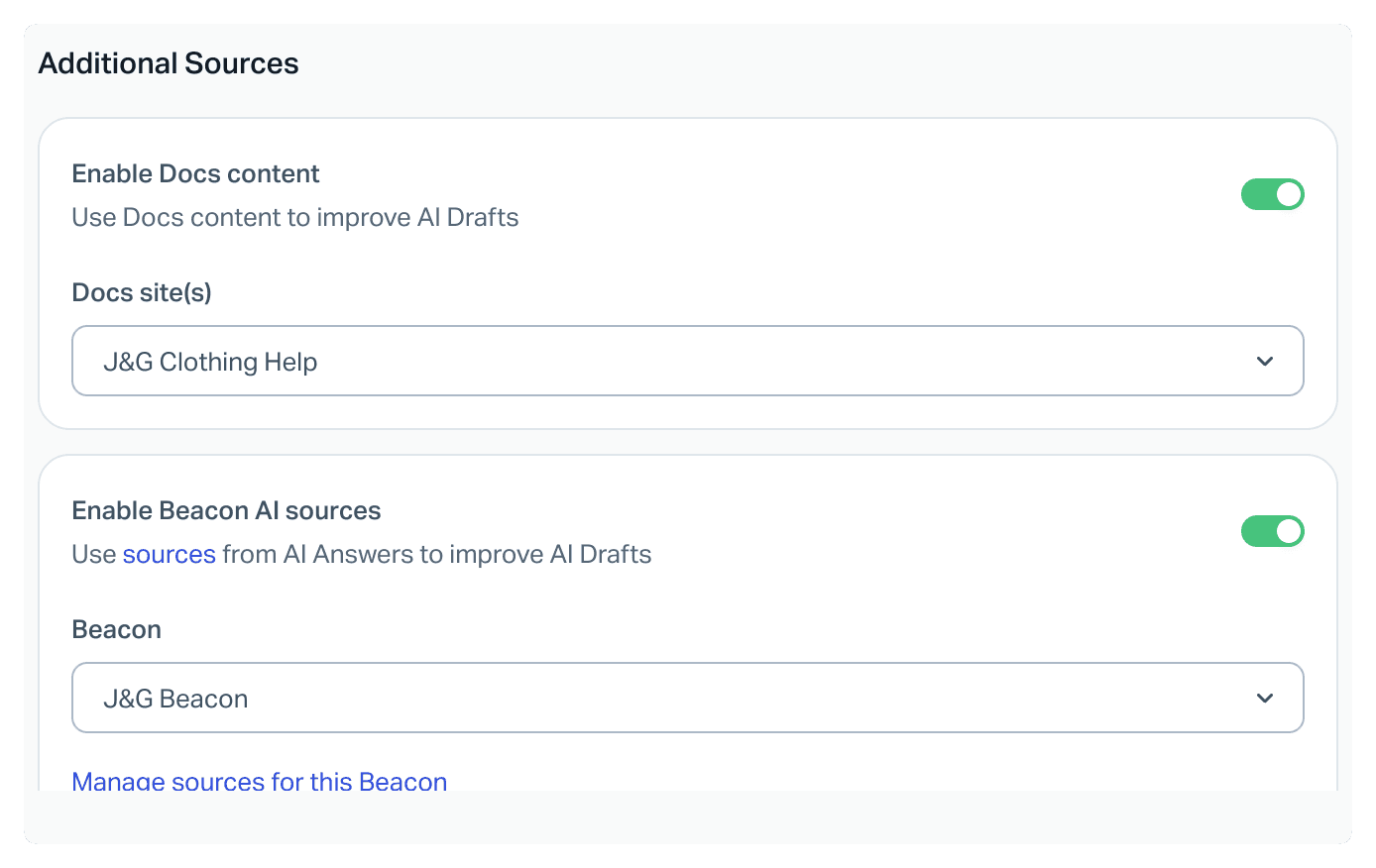
- Docs are an optional extra source. In each inbox you can toggle on Docs content and pick which Docs sites it may use.
- Beacon AI sources can be shared. A second toggle lets drafts use the same sources you set up for the Beacon chatbot.
- A person starts each draft. The docs describe clicking the AI Draft quick link in the reply box, then refining the result with a prompt such as "also ask" or "translate that."
- Tone is set per inbox. Greeting and closing can be Auto (chosen from past conversation data), a fixed option, or custom.
- Permissions apply. Users need the Reply to Conversation permission.
On cost, the pricing page lists Unlimited AI Drafts on Plus ($45 per user per month on the page's annual view) and Pro ($75), with Standard ($25) not including it. The docs add that legacy user-based accounts pay $50 per 100 conversations where a draft is created. My Help Scout pricing breakdown covers the seat math in full.
The draft is also one of the few places where saved replies matter less than you would expect. The docs name past replies and Docs as the sources, so a well-kept macro library still helps your team, but I did not find it listed as a draft source.

How Scout and Envoy differ from AI Drafts
Help Scout also sells a separate, autonomous product. Scout is the AI agent; Envoy is the add-on you pay for, and the docs say Scout "can reply to customers without a teammate reviewing each response first." It works in Beacon and email, hands sensitive or complex conversations to your team, and is billed at $0.75 per resolution, counted only when the customer does not ask for more help.
The sources differ too. Help Scout's Scout best practices say the AI draws from your Docs site or another knowledge base added as a source, plus public websites, PDFs, Word documents and spreadsheets. Non-Docs sources need a manual re-sync when content changes. I did not see past conversations listed there as a Scout source, so I would treat Scout as a knowledge-base agent and AI Drafts as the history-aware tool.
There is also an official route for outside assistants: Help Scout's MCP connector lets Claude, ChatGPT or Cursor search conversations and Docs. Access is read-only for new connections, so those tools can research a ticket but not leave a draft in your mailbox. I cover that in ChatGPT for Help Scout and Claude for Help Scout.
Where drafting from past tickets gets harder
None of this is a flaw in Help Scout's approach. It is a reasonable, bundled feature. A few real situations are where teams start looking elsewhere:
- Drafts that exist before anyone opens the ticket. With a click-to-generate flow, the work starts when an agent opens the conversation. Queues with a first-reply target care about that gap. See first response time.
- Knowledge that lives outside Help Scout. If your best answers sit in Confluence, Notion or shared files, you want those in the same draft.
- Proof before launch. A draft that sounds right is not the same as a draft that matches what your team would have sent. Testing on closed tickets answers that.
- Ticket actions. Tagging, assigning and closing in the same pass as the draft.
My Help Scout AI alternatives roundup and best AI for Help Scout list the third-party options side by side, and Help Scout's AI agent options explain how they connect.
How eesel drafts replies in Help Scout
eesel is an AI teammate platform whose ready-to-work helpdesk teammate joins your Help Scout mailbox. This section follows eesel's Help Scout documentation closely, because the details are what matter.
What it learns from. The Help Scout page in eesel has two sources you toggle on or off:
| Source | What it holds | Default behavior |
|---|---|---|
| Conversations | Your past Help Scout conversations | Closed conversations from the last 30 days in every mailbox; you can pick mailboxes, statuses and how far back to go |
| Help Center | Your public Help Scout Docs site | Crawled from the URL you save; locked until you add one |
Every other integration you connect is also a source, so one draft can draw on Confluence, Notion, your website and uploaded files together.
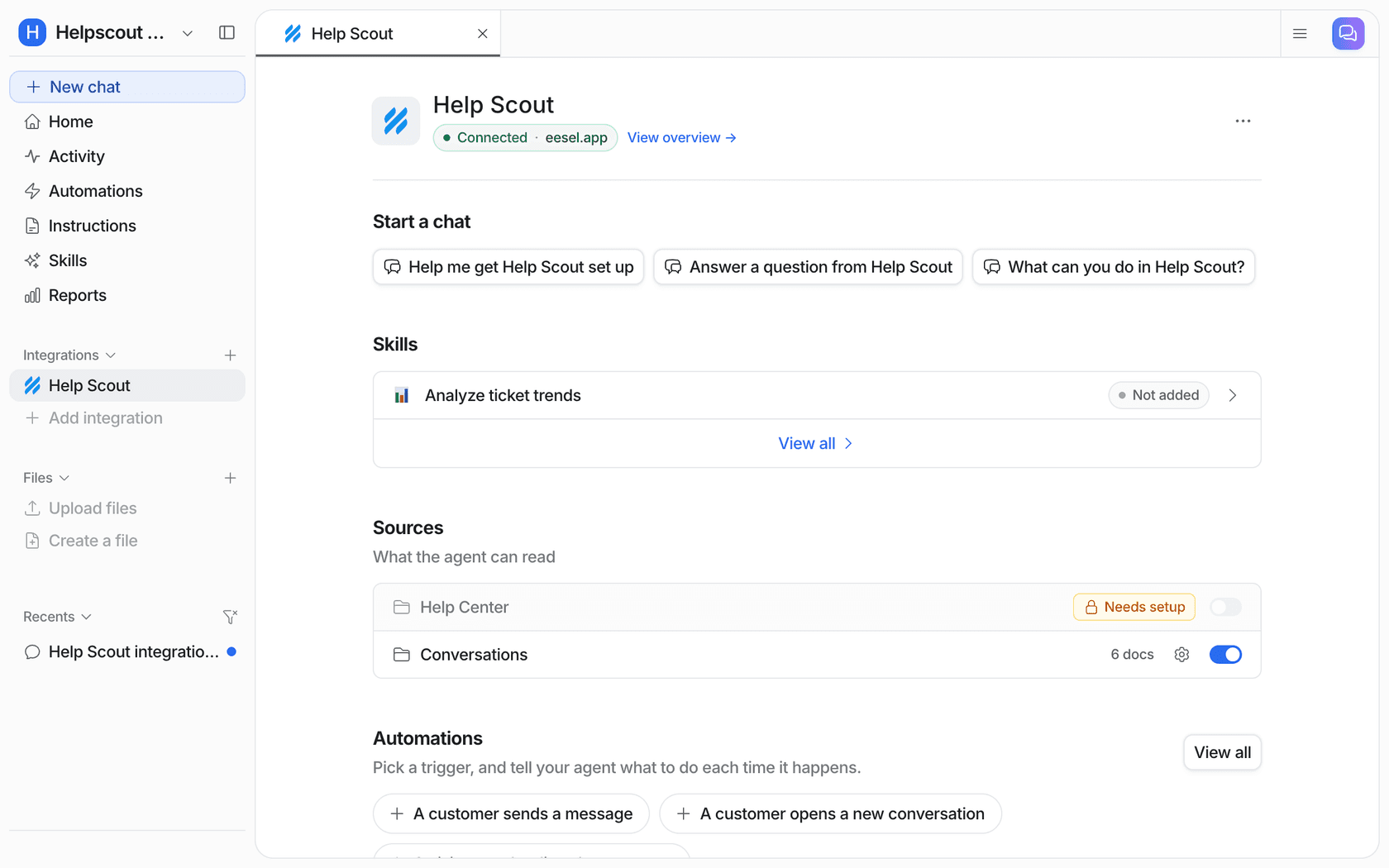
When it acts. An automation pairs a Help Scout trigger with plain-language instructions. "A customer opens a new conversation" is the one eesel's docs recommend for drafting a first reply, and "a customer sends a message" follows a thread through. So the draft is there when the teammate arrives.
What it can do with the draft. The Leave draft reply action saves a reply unsent in the conversation's reply box, marked as a draft, for a teammate to review, edit and send. Edit draft reply lets a rerun revise its own draft rather than stacking a second one. Notes, tags, status and assignee changes are separate actions, and each can run on its own, ask first, or stay off.
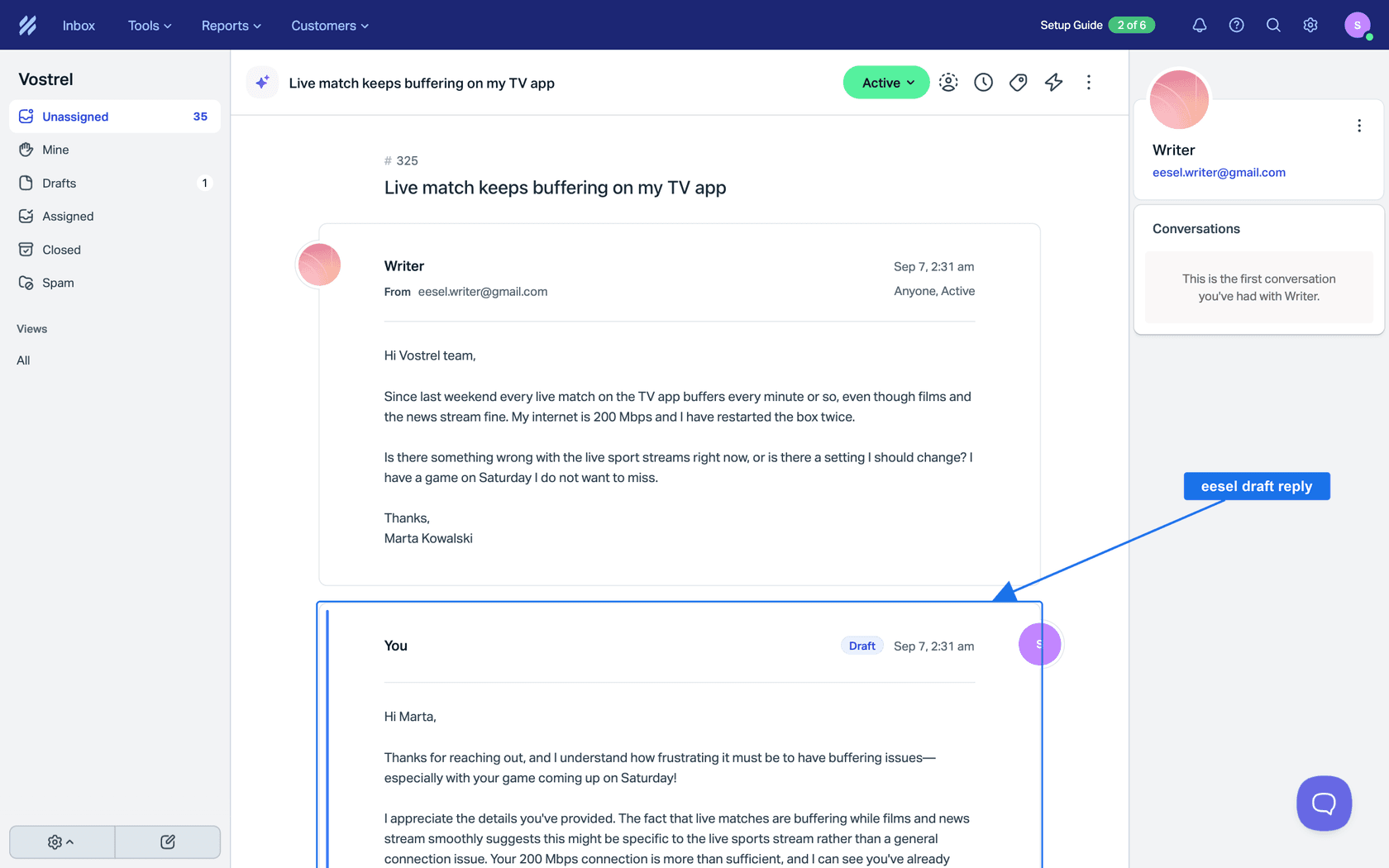
What it will not do by accident. The docs are blunt: Send reply always sends and cannot be recalled, so teams that want a person in the loop use draft-only. eesel acts as the Help Scout user who approves the connection, and many teams create a dedicated user so drafts are easy to tell apart. One limit worth knowing: at answer time it does not see customer properties such as plan.
For wider context on keeping a human in charge, see human in the loop and my notes on AI agent permissions.
How to test AI drafts on past tickets first
This is the part I push hardest, and it is where eesel's workflow differs from a switch you flip. eesel's AI helpdesk teammate lets you run simulations on your past tickets, so you see how it handles each theme, where it is strong and where the gaps are, then fill those gaps and run again. Low-confidence answers go out as drafts for review rather than live replies, per eesel's own FAQ.
My routine, in order:
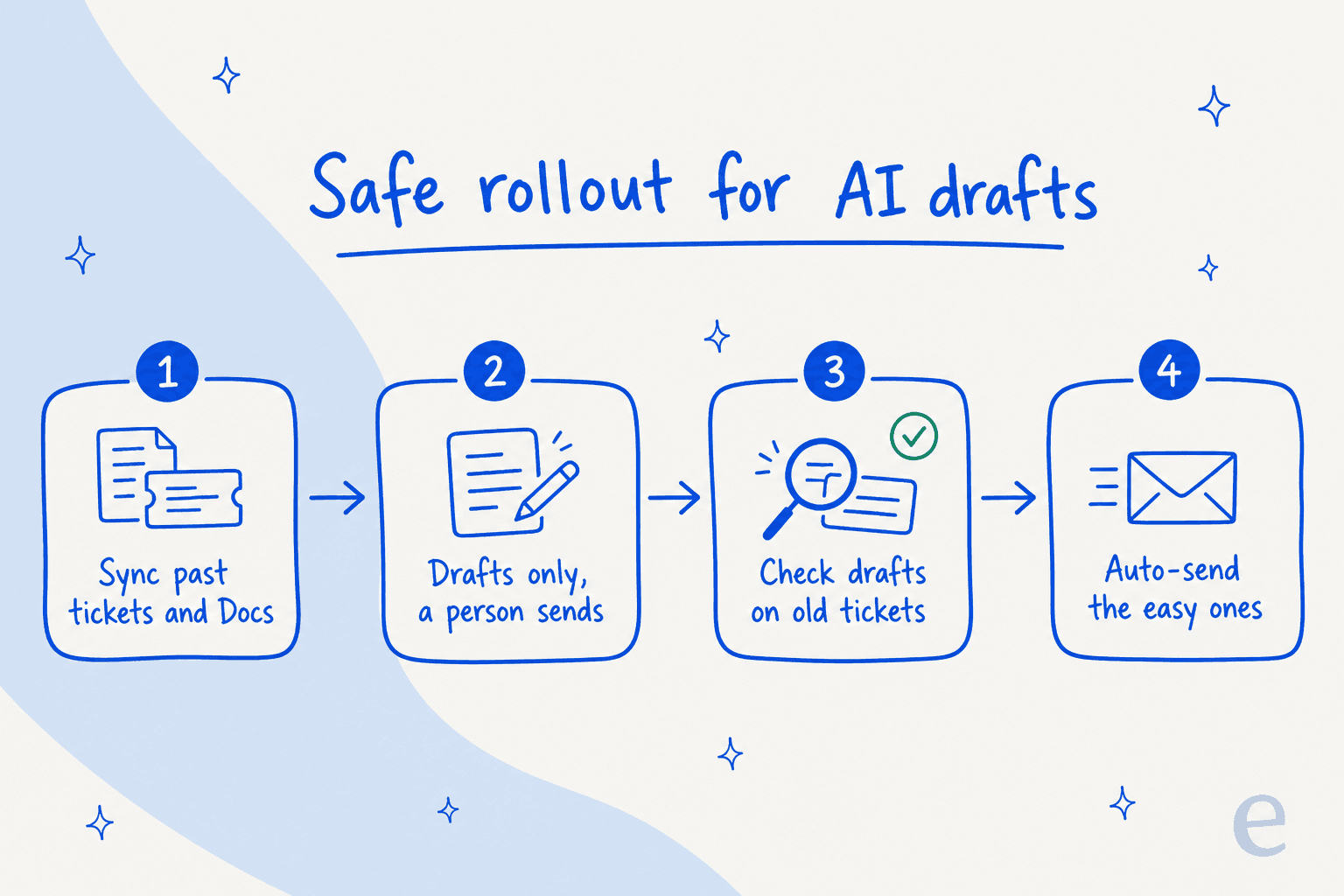
- Connect Help Scout and let Conversations and Help Center sync.
- Pick one mailbox and set the automation to draft only.
- Run a simulation on closed tickets and read the misses, not the average.
- Fix gaps by adding a Docs article or a short instruction, then re-run.
- Only after a few weeks of accepted drafts, consider auto-sending the plainest categories.
Reviewing outputs is a habit, not a one-off; reviewing AI conversations and AI agent observability show what I look at each week.
A confidence score and clear escalation rules keep the risky ones with people, and hallucinations are why that matters.
A real draft-only rollout from eesel customers
I do not have a published Help Scout story to quote, so here is the closest match: Timengo, a Danish secure-email software company running eesel on Freshdesk. Every new ticket gets a draft reply and an internal note, written from product docs and years of solved tickets, and a support engineer checks it and sends. eesel never replies on its own there.
In the month from 8 August to 8 September 2026, eesel prepared about 300 tickets, wrote about 180 draft replies, and learned from about 5,300 past tickets and help center articles. The shape is the same one I would use in Help Scout. smava runs a similar draft-first pattern on Zendesk, writing replies from a macro library before an advisor sees them.
AI Drafts, Scout and eesel side by side
| Help Scout AI Drafts | Scout on Envoy | eesel in Help Scout | |
|---|---|---|---|
| Starts when | A teammate clicks the quick link | Customer message in Beacon or email | New conversation or customer reply |
| Who sends | A teammate | The AI, when confident | A teammate (draft-only) or the AI if you allow it |
| Learns from | Past replies, optional Docs and Beacon sources | Docs and added sources | Past conversations, Docs, plus other connected sources |
| Test on history | Not described in the docs | Review resolutions in reports | Simulation on past tickets |
| Billing | Included on Plus and Pro | $0.75 per resolution | Credits; a ticket is 1 credit, no per-seat fee |
For the credit model, the eesel pricing page is the source of truth, and the docs say a new workspace gets a 7-day trial with 100 credits.
Which option fits your Help Scout team
- Small team on Plus or Pro, mostly Help Scout knowledge: switch on AI Drafts first. It is already paid for.
- Chat and email deflection from Docs: look at Scout, and read Help Scout ticket deflection for the trade-offs.
- Drafts ready at ticket open, wider sources, tested rollout: a third-party agent. The two are not exclusive; many teams keep AI Drafts on for agents and let another tool prepare first replies.
- Triage first: AI ticket triage and ticket tagging can come before drafting.
See also Help Scout AI response options, Help Scout features and the Help Scout API guide if you plan to build.
Try eesel for Help Scout
If you want drafts that appear in the reply box before your team opens the ticket, try eesel in one mailbox. Connect Help Scout, let it learn from your past conversations and Docs site, keep Leave draft reply as the only send path, and run a simulation on closed tickets before a customer sees anything. The free trial needs no card, and the security overview covers data handling.
