

AI support agent observability means you can open any conversation and see what the agent read, which tools it called and what they returned, what it did, and why it closed or handed off. That trace matters more than resolution rate, because most vendors count "resolved" as nobody stepping in for 72 hours. If you built the agent, tracing tools like LangSmith or Langfuse give you the trace. If you bought one inside your helpdesk, the vendor's own logs decide what you can see, so check them before you sign. eesel shows the sources, actions and reasoning on every run, and replays past tickets before go-live. With the eesel CLI, a coding agent can send it test questions and read its activity from the terminal.
What does observability mean for an AI support agent?
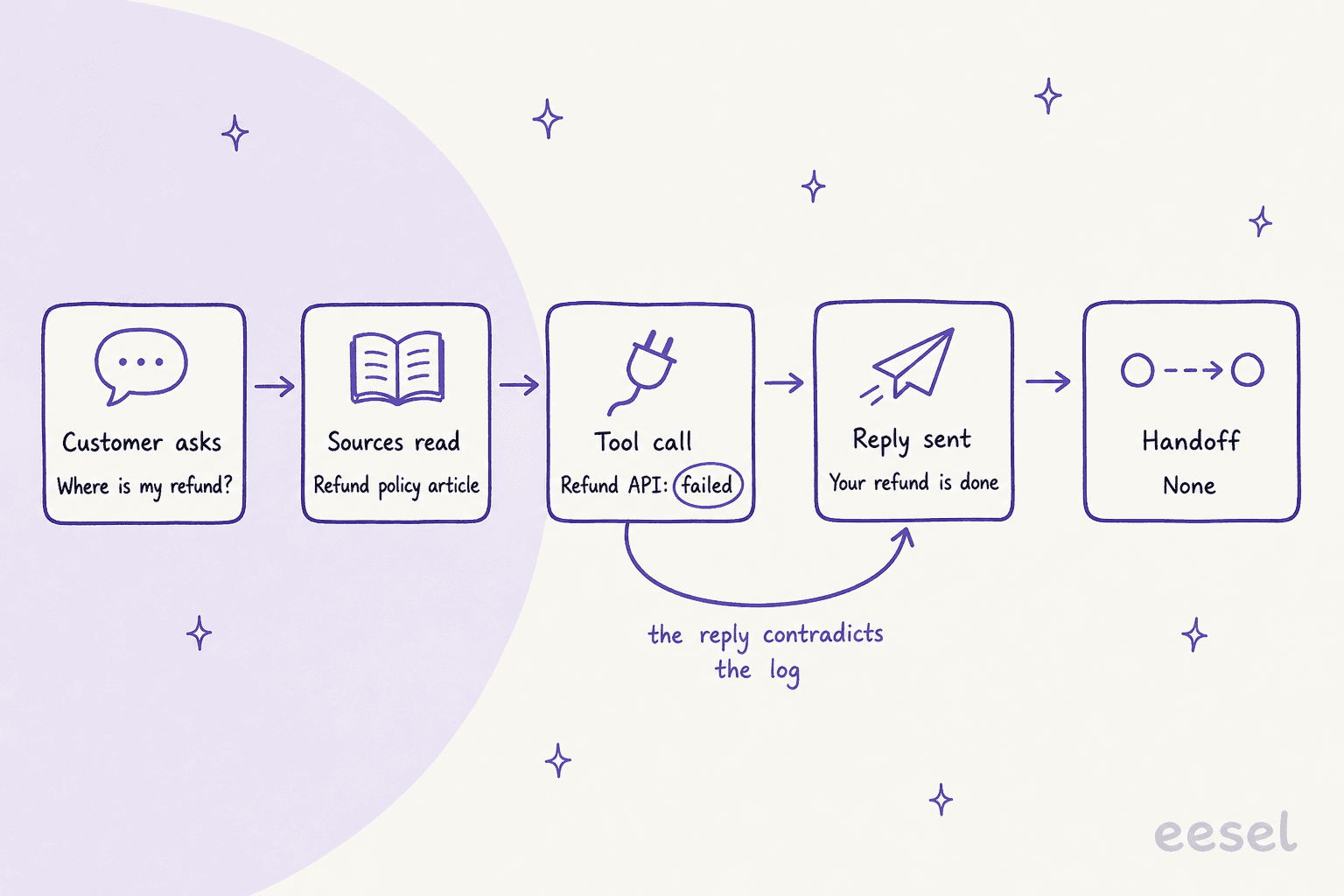
I build features for eesel's AI agents, so most of my week is spent reading what an agent did on a ticket and working out why. The biggest lesson from that work is simple: the agent's reply is the least reliable record of what happened. A reply can say "I've processed your refund" when the refund call failed. It can quote a policy the agent never actually found. The only way to know is to look at the steps underneath.
That's what observability means here. Not a dashboard with a resolution percentage, but a per-conversation record you can open and read like a receipt. Developers call it a trace. For a support agent, a useful trace answers six questions:
| Part of the trace | The question it answers | What goes wrong without it |
|---|---|---|
| The customer's message | What was actually asked? | You judge the reply against the wrong question |
| Sources searched and used | Which article, macro or past ticket did it rely on? | A wrong answer looks like a model problem when it's a content problem |
| Tool and API calls, with results | Did the order lookup or refund call succeed? | The reply claims success the system never confirmed |
| Actions taken | What did it change: tags, status, a refund, a reply? | Side effects happen with no record of who did them |
| Reasoning | Why did it choose this path? | You can't tell a bad rule from a bad guess |
| Handoff or close | Why did it stop, and was that right? | Late handoffs and silent closes stay invisible |
The tool-call row is the one I'd fight hardest for. The worst failure I've seen in eesel's own production data isn't a wrong answer. It's an agent describing work it never did, narrating searches it never ran. A developer on Hacker News put the general rule well after a coding agent wiped a production database:
"you can't trust anything it says, including its apologies, excuses, and explanations of past failure."

Support agents have the same weakness, which is why the trace has to record what the systems returned, not what the agent says they returned.
The same record catches the quieter failures too. Earlier this year, on a demo call, a B2B vehicle telematics team on Zendesk told eesel's team their bot had been confirming support for car models that weren't in their database. The knowledge base said "we support all models", so the bot did exactly what its source told it. Without the source in the trace, that looks like the AI making things up. With it, the fix is one sentence in one article. That pattern has a name, AI hallucination, and its usual cure is better AI grounding in sources you control.
Why isn't resolution rate the same as accuracy?
Because every vendor defines "resolved" as something that can be measured automatically, and accuracy can't be. A resolution usually means nobody asked for a human within a time window. A customer who got a wrong answer and gave up passes that test just as well as one who got the right answer.
A Reddit thread on measuring AI support laid out the problem better than any vendor page I've read:
"Like if a ticket is "deflected", it could mean: customer got the right answer, customer just gave up, customer came back later through another channel, bot gave a wrong answer confidently, bot should have escalated but didn't."

Here is how the four big helpdesk AI agents count it, straight from their own documentation. This matters twice over, because on three of them the definition is also what you pay for.
| Vendor | What counts as a success | Billing unit | The gap to know about |
|---|---|---|---|
| Zendesk AI agents | A verified resolution: after the conversation ends, an LLM reads it and confirms the request was resolved | $1.50 committed, $2.00 pay-as-you-go per resolution | The check is itself an AI's judgment of the transcript |
| HubSpot Customer Agent | Shared a source or ran an action, and no visitor-initiated handoff within 72 hours | $0.50 per resolved conversation, 50 HubSpot Credits | Manual or workflow assignment doesn't block a resolution, so a conversation can appear in Human handoffs and still count as resolved |
| Gorgias AI Agent | An automated interaction: no human involvement within 72 hours | Ticket fee plus an automation fee when the agent resolves without handover | A customer who stops replying counts the same as a happy one |
| Freshdesk Freddy AI Agent | Deflection rate: "resolved by the AI without human intervention" | $49 per 100 sessions, whatever the outcome | The Performance and Improve tabs cover chat agents only; email agents get Ticket logs |
None of these definitions are wrong. They're just answering "did a human have to step in?", not "was the answer correct?". Freshworks itself is candid about thresholds: its docs say a deflection rate below 60% on a high-volume topic is a red flag. For more on the difference, my piece on deflection vs resolution rate goes deeper, and the containment rate entry defines the third cousin.
The practical move is to make your own definition visible in your own helpdesk. SE Ranking did exactly that. When it put eesel on Zendesk live chat for three products, its team asked for an ai_handled tag on every ticket eesel touches, plus helpful and not helpful tags from a "Was this response helpful?" question, so containment is counted in Zendesk, not guessed. Across a month that covered about 4,650 conversations. That's a number they can audit, because every tagged ticket is one click away.
Did you build your AI support agent or buy it?
This is the question that decides which tools even apply, and it's the one most observability advice skips. Ask ChatGPT how to monitor an AI support agent and you'll get a list of developer tracing platforms. They're excellent, and they're mostly irrelevant if your agent lives inside Zendesk.
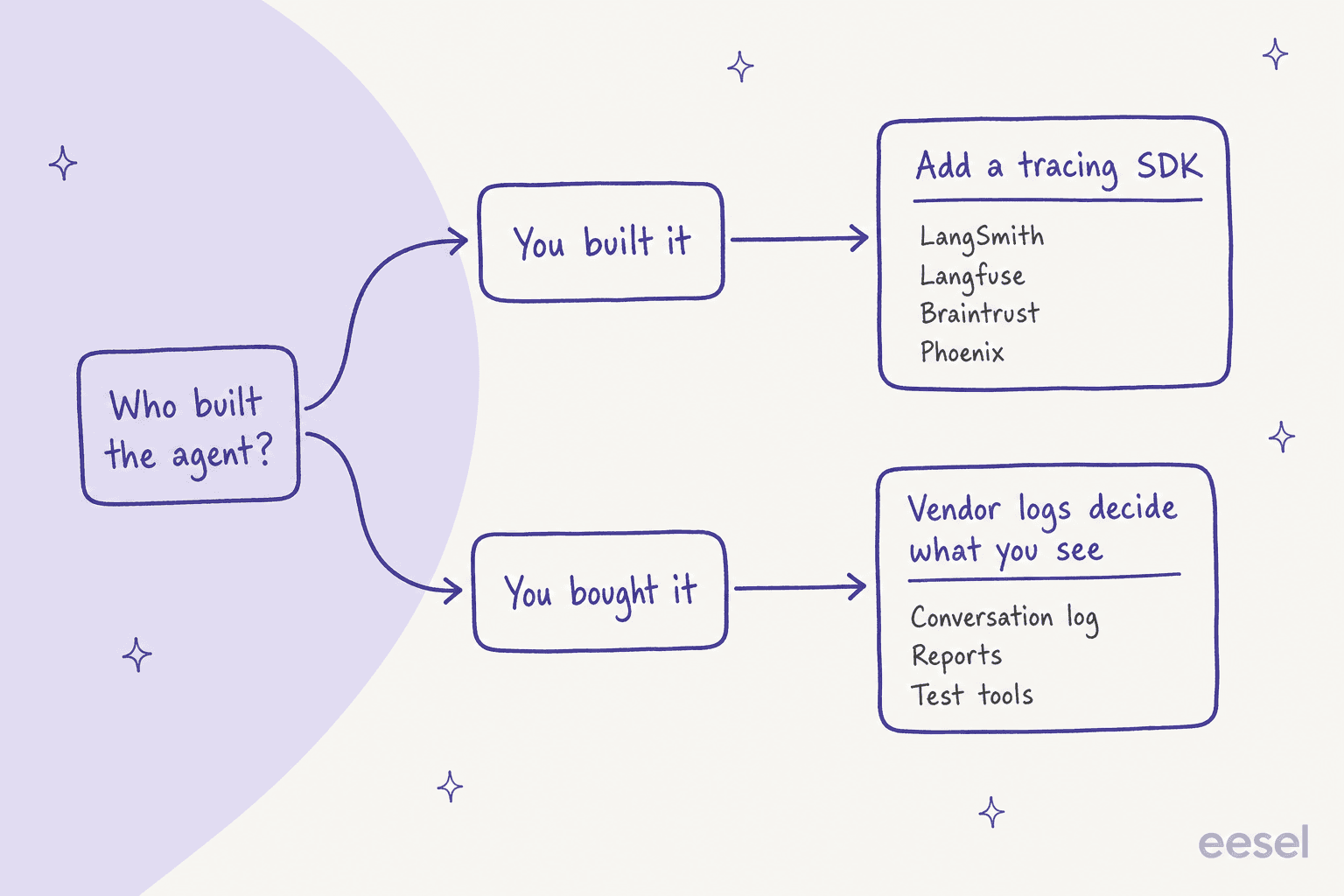
If you built it, a tracing platform is the right call. Every one of these works the same way underneath: you add their SDK or an OpenTelemetry exporter to your agent's code, and each model call, retrieval and tool call becomes a span with inputs, outputs, latency and cost. Here's what each offers, from their own pages:
| Tool | How it collects traces | AI grading of live traffic | Self-host | Free tier | First paid plan |
|---|---|---|---|---|---|
| LangSmith | SDKs, @traceable, OpenTelemetry | Yes, filtered and sampled, can grade whole threads | Enterprise add-on | 1 seat, 5k traces/mo | Plus, $39 per seat/mo |
| Langfuse | SDKs, OpenAI wrapper, OpenTelemetry | Yes, per step, filtered and sampled | Yes, open source | 50k units/mo | Core, $29/mo |
| Braintrust | SDKs, API, OpenTelemetry | Yes, "online scoring" | Data plane on Enterprise | 1 GB, 10k scores | Pro, $249/mo |
| Arize Phoenix | OpenTelemetry, auto-instrumentation | Docs point to the paid Arize AX | Yes, Elastic License 2.0 | Free to self-host | Arize AX Pro, $50/mo |
If you bought it, none of those can see inside. A hosted helpdesk agent doesn't hand you its code or an OpenTelemetry stream, so what you can observe is whatever the vendor chose to put in its conversation log, its reports and its test tools. That makes the log a buying criterion, not an afterthought. I'd put "show me the trace for one conversation where the agent called an API" into every demo. If you're mid-evaluation, my vendor evaluation checklist covers the rest.
What can you see inside your helpdesk's AI agent?
More than you might expect from some, less than you'd want from others, and the gaps are rarely in the marketing. Here's what each vendor's own documentation says you can open today.
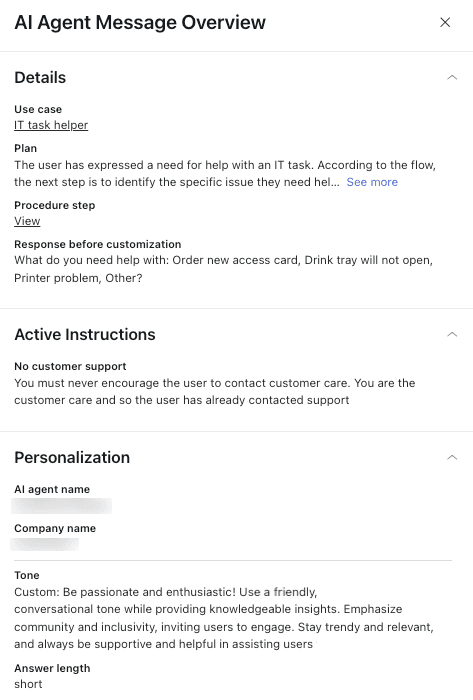
Zendesk has the most detailed log of the four. In conversation logs, a generative reply shows the agent's Plan (its reasoning), the procedure step and the active instructions. API calls open an Integration details panel with the inputs, outputs and any API error, with missing values highlighted in red, though legacy API integrations don't appear. The catch is sources: the log names the resource type ("Knowledge replies"), while the specific article shows up in the Knowledge sources report and the Data Export API. Testing is one conversation at a time in a test widget, which can't run CRM actions or restricted help center content. Automated scoring of every conversation needs the separate QA add-on, which I've covered in Zendesk QA for AI agents.
Gorgias has the best action log. Every AI Agent message has a Show reasoning link listing the skills, knowledge and actions it used, and each Action keeps an event log with the full HTTP request, response and error, including which step of a multi-step Action passed or failed. Failed actions also tag the ticket ai_failed_action, so you can route them with a rule. The Playground can re-run an existing ticket after you change something. One honest limit in Gorgias's own words: your conversation rating is sent to Gorgias and doesn't immediately change how AI Agent behaves. Only source ratings change future answers. My guide to Gorgias AI Agent actions has more on the action side.
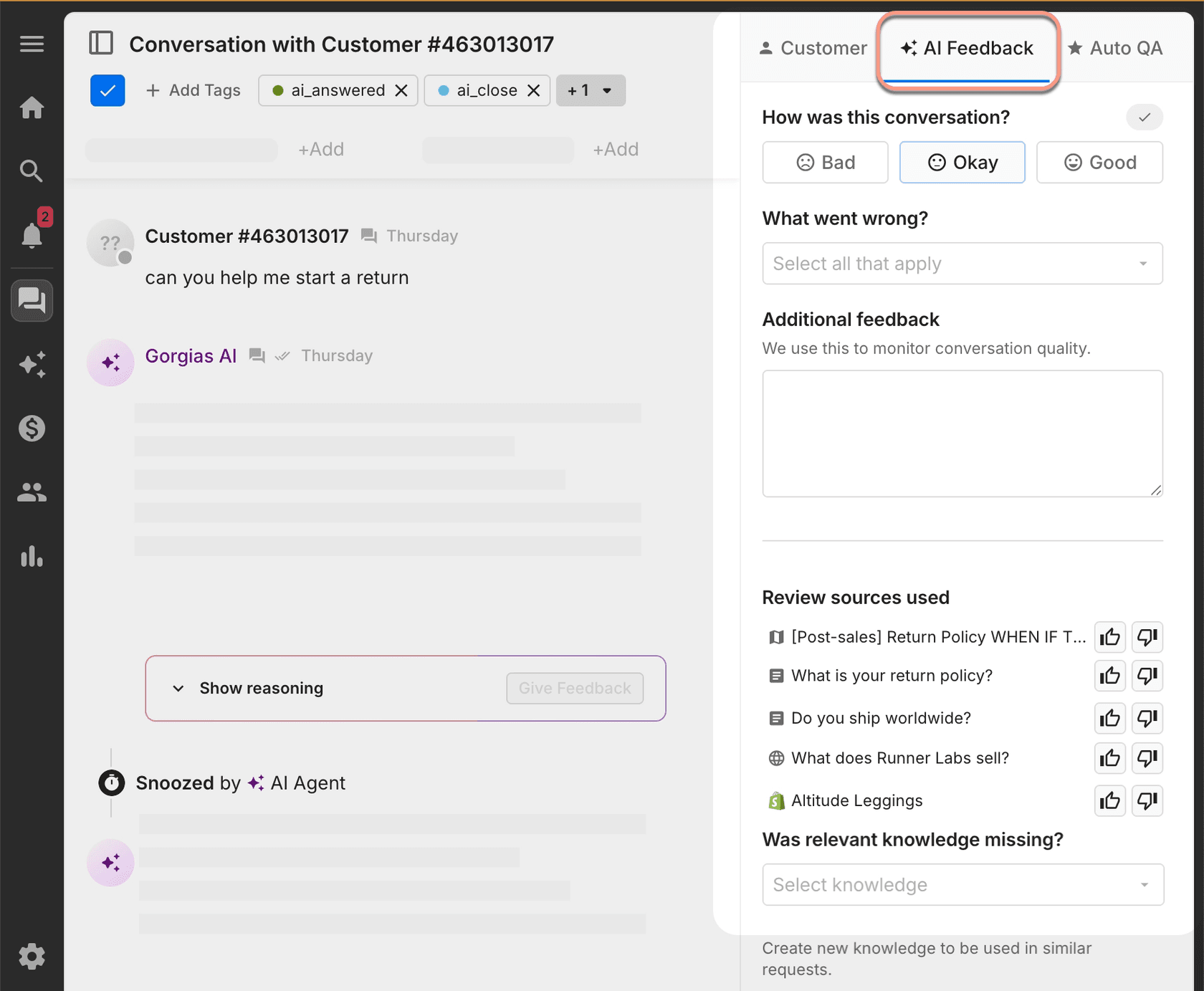
HubSpot puts it in Help Desk. Click the AI icon on a Customer Agent message and the agent insights show the sources it cited, the actions it triggered and any knowledge gaps, with a thumbs rating and a Coach agent button. Coaching opportunities flag knowledge gaps, conflicts, action gaps and, in beta, conversations with a CX score of 45 or below. Batch testing allows up to 8 test sets, generated from real conversations if you like, which I walk through in HubSpot batch testing. I couldn't find a per-call execution log like Gorgias's.
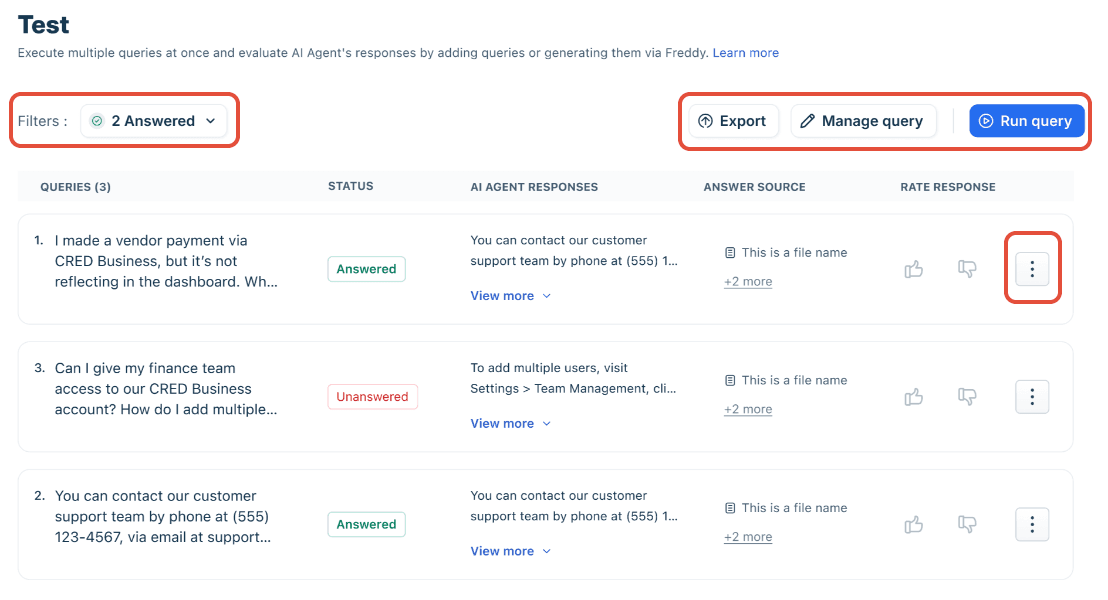
Freshdesk splits by channel. Chat agents get Performance and Improve tabs, with per-source citation counts that link to every conversation where a source was cited. Email agents get Ticket logs with drafts and outcomes, plus a useful shadow mode that writes drafts as private notes on real tickets without sending them. Bulk testing runs a batch of queries and shows the answer source for each. Two things to know: previews consume paid sessions even on an unpublished agent, and the workflow docs say ticket-dependent actions can show as completed in the log while they're still queued.
If you'd rather check your own setup than read four paragraphs, pick it below.
What can you see in your setup?
Pick where your AI agent runs. Each answer comes from that vendor's own documentation, checked November 2026.
| Sources per reply | Resource type in the log. The exact article is in the Knowledge sources report and the Data Export API. |
| Tool calls and results | Yes. Integration details shows inputs, outputs and API errors. Legacy API integrations are not shown. |
| Reasoning | Yes, the Plan on each generative reply. |
| Testing | Test widget, one conversation at a time. No CRM actions. |
| Automatic scoring | With the paid QA add-on. |
Watch for: the verified resolution you pay for is an LLM's check of the transcript.
| Sources per reply | Citation counts per source, linked to each conversation that cited it. |
| Tool calls and results | Workflow completion and handoff rates. No per-call request and response log documented. |
| Reasoning | Not documented in live logs. |
| Testing | Bulk evaluation runs with an answer source per query. Previews use paid sessions. |
| Automatic scoring | Customer thumbs only. No automatic quality score documented. |
Watch for: queued actions can show as completed in the log.
| Sources per reply | Not documented for email. |
| Tool calls and results | Not documented. |
| Reasoning | Not documented. |
| Testing | Shadow mode: drafts land as private notes on real tickets and are never sent. |
| Automatic scoring | Not documented. |
Watch for: the Performance and Improve tabs cover chat agents only. Email gets Ticket logs.
| Sources per reply | Yes, in Show reasoning, with a thumb per source. |
| Tool calls and results | Yes. Each Action's event log has the HTTP request, response and error. |
| Reasoning | Yes, under every AI Agent message. |
| Testing | Playground, including re-running an existing ticket. Actions off by default. |
| Automatic scoring | Conversation ratings go to Gorgias and don't change behavior right away. |
Watch for: no human within 72 hours counts as automated.
| Sources per reply | Yes, in agent insights in Help Desk. |
| Tool calls and results | Triggered actions shown. No execution log with request and response found. |
| Reasoning | In Testing Insights during preview. |
| Testing | Batch testing, up to 8 test sets. No credits used. |
| Automatic scoring | Coaching opportunities, including a beta low CX score flag. |
Watch for: manual and workflow assignment don't block a billed resolution.
| Sources per reply | Whatever you log as a retrieval span. |
| Tool calls and results | Yes, as tool spans with inputs and outputs. |
| Reasoning | If you record it. |
| Testing | Datasets and experiments in your tracing tool. |
| Automatic scoring | Online LLM-as-a-judge in LangSmith, Langfuse or Braintrust. |
Watch for: you own the instrumentation, so a step you never logged is a step you can't see.
How do you flag suspicious conversations automatically?
You can't read everything, so the job of automation is to decide what a person reads. I'd split the signals into two kinds: hard signals that need no judgment, and soft signals from an AI grader.
Hard signals are cheap and almost never wrong about something being worth a look:
- A tool or API call failed, but the reply was sent anyway
- The reply went out with no source behind it, or the agent logged a knowledge gap
- The customer came back within a few days on the same topic, the support version of reopen rate
- A thumbs-down, a low CSAT score, or a request for a human
- The topic is on your high-risk list (refunds, cancellations, legal, health)
A Reddit commenter described what happens when you only watch the headline number:
"the bot looks great on the dashboard while actually making angry customers angrier before a human ever sees them."
Soft signals come from an AI grader, often called LLM-as-a-judge: a second model reads the conversation against a rubric and scores it. It's useful, and the vendors who sell it are the first to warn you about it. Langfuse's docs say "A judge is a prompt you wrote", and tell you to check it against human labels before relying on it. LangSmith says judge scores need careful review and prompt tuning. Braintrust says to compare candidate judges against human-assigned scores, including ambiguous and failing cases.
The reason is plain arithmetic, which one Hacker News commenter described from their own evaluation work:
"The agent was about 80% correct, and the LLM judge about 80% accurate in assessing the agent."
So I treat a judge as a sorting tool, not a verdict. It decides which conversations a person reads first, and I track how often that person agrees with it. The same applies to eesel's own AI CSAT score: the Reports docs say plainly that it is not customer feedback, it's an AI's rating of your agent's answers, useful as an internal signal. For tool choices, my roundup of AI tools for support QA compares the options.
How should risk decide what you review?
Not every conversation deserves the same attention, and trying to review everything equally is how review routines die in week three. Sort by what's at stake if the agent gets it wrong.
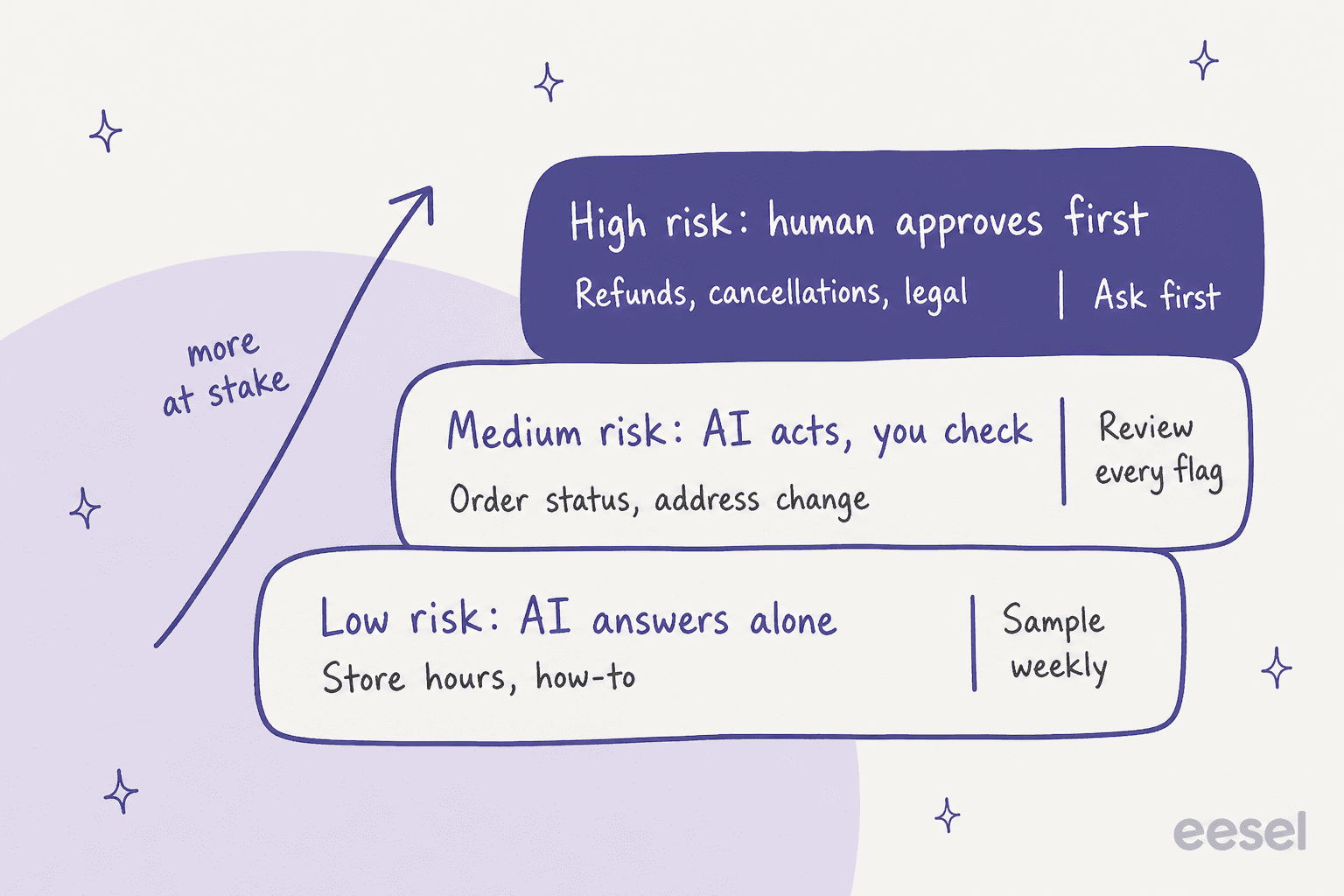
| Risk tier | Examples | What the agent may do | How you watch it |
|---|---|---|---|
| Low | Opening hours, how-to steps, plan features | Answer on its own | A random weekly sample |
| Medium | Order status, address changes, account questions | Act, with every action logged | Read every flagged conversation |
| High | Refunds, cancellations, legal, health, data deletion | Prepare the action, a person approves | Nothing runs without a decision |
The high tier isn't really an observability problem. It's a permissions one, and the cleanest version is that the agent can't do it alone at all. In eesel each action is set to On, Ask first or Off per agent, and the actions docs recommend keeping refunds, cancellations and anything that costs money behind an approval. My guide to AI agent permissions goes deeper, and the one on refund guardrails covers money specifically.
Original Bootcamp, an outdoor fitness company in Germany, shows the tiers working on Freshdesk. A filter lets eesel answer only tickets it can handle fully from the website and past tickets. Anything about a booking, a payment or a member's account goes to the team, and anything mentioning an injury or illness goes to a person even if the booking question could have been answered. eesel never claims to have changed a booking. Each weekday at 9am Berlin time, it reviews the workspace and emails a short note to the owner.
What does a weekly review and regression loop look like?
Observability only pays off if someone acts on what it shows. The loop I'd run is short: pull the flagged conversations and a random sample, find the root cause in each trace, fix it at the source, and replay the same tickets to prove the fix. My full routine, including which conversations to pull and how to label causes, lives in my conversation review guide, so here I'll focus on the two parts people skip.
Fix the source, not the reply. If the trace shows the agent quoted the right article and the article was wrong, editing the reply fixes one ticket. Editing the article fixes every future one. Qontro, an ERP company in New Zealand, runs eesel on Freshdesk this way. Every new ticket gets a draft reply as an internal note, grounded in the help center and about 9,800 past tickets and articles. The team compares each draft with the reply a person actually sent, and where the draft was wrong, that usually points to a missing or incomplete help article, or a rule that needs tightening. About one in ten drafts now goes out with little or no editing, and the share is rising slowly.
Keep a regression set. Every mistake you fix should become a test case you rerun after the next change to instructions, knowledge or model. A set of 50 to 100 real past tickets across your main topics is enough to start. That's what eesel's helpdesk simulation does before go-live: according to the skills docs, it drafts a reply to tickets your team recently resolved, puts each next to what your team sent, groups the results by theme, and says what to fix, while sending nothing to customers. In the docs' example run, 17 of 20 replies matched the team's. For the full method, see simulation testing. My guide to AI support agent testing covers the live-launch side.
Two cadence notes. Review daily in the first week after launch or after any big change, then weekly. And watch the trend, not just the batch: a rising count of knowledge gaps on one topic tells you which article to write next, as my AI customer service metrics guide explains.
See what your AI agent did with eesel
eesel is an AI helpdesk teammate that joins your existing queue in Zendesk, Freshdesk, Gorgias or HubSpot, and it's built so you never have to guess what it did. Its Activity page lists every run with where it happened, what triggered it, the sources it searched, every action and who approved it, its reasoning step by step, and whether it hit a knowledge gap. Skipped tickets are listed with the reason.
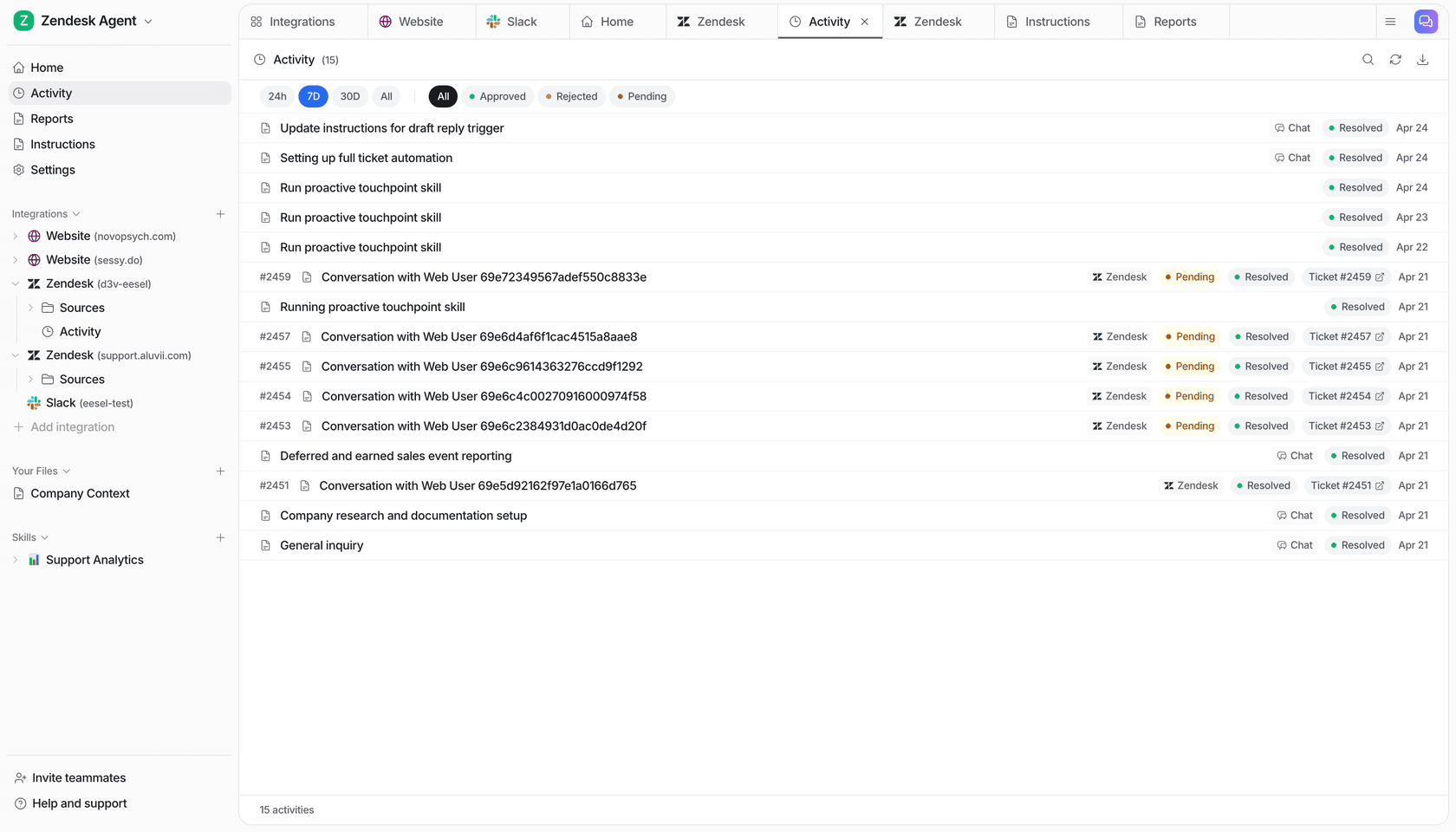
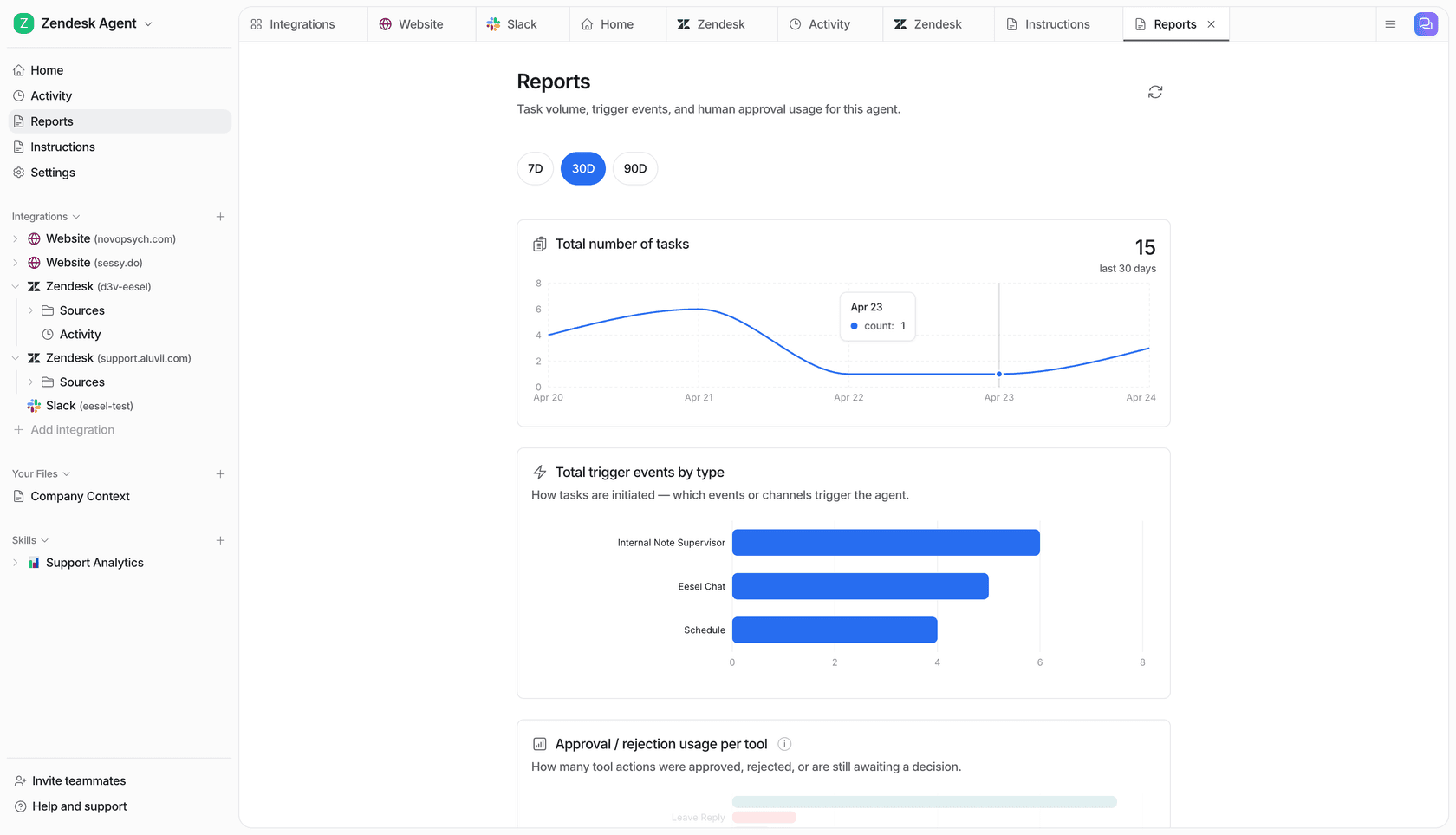
When an answer is wrong, you can point the agent at that run in chat and it walks through its reasoning, offers a fix and saves the rule to its instructions once you agree. The Reports page tracks volume, AI CSAT, knowledge gaps and approval patterns, and the docs give a useful reading: an action approved every time without edits is ready to run on its own, and one that keeps getting rejected needs an instructions fix. Before any of that, run a simulation on your own past tickets so you see its mistakes before a customer does.
If your team works from a terminal, eesel activity prints the same run history and eesel chat sends test questions, so a coding agent can check answers before you widen what the agent handles. Connecting the helpdesk still needs someone with admin access to approve it.