HubSpot Customer Agent batch testing: how it works and its limits

Rama Adi

Katelin Teen
Last edited November 8, 2026

HubSpot Customer Agent batch testing is a saved question set you run through the agent before it touches a customer. You need Professional or Enterprise on a qualifying hub, the Customer agent editor permission, and an assigned seat. You get up to 8 test sets, each built from questions you write or generated from live conversation themes. Every answer gets a Looks good or Looks bad mark, and a bad one can be coached on the spot. It tests questions, not your real ticket history, so I'd pair it with a replay of past tickets. eesel does that replay, and with the eesel CLI an AI coding agent can upload approved knowledge and ask test questions before launch, though someone with HubSpot admin access still approves the connection.
What is HubSpot Customer Agent batch testing?
It is a testing area inside the Customer Agent where admins run many questions at once and review each reply. HubSpot's batch testing article, last updated October 13, 2026, says admins can test the agent at scale before deploying it to live channels, and coach it from the results.
I haven't run this in a live HubSpot portal. Everything here comes from HubSpot's own docs, and I mark every spot where they go quiet. I read it as an integration builder would: what goes in, what comes out, and what the screen doesn't promise. If you want the product first, my HubSpot Customer Agent and HubSpot AI agent guides cover it, and the HubSpot review sets it inside Service Hub.
The simpler tool sits one level below it. HubSpot's setup article, updated October 26, 2026, describes a Test button that opens a single preview chat on email or live chat, and says previewing does not use HubSpot Credits. Batch testing is what you graduate to when one chat at a time stops being enough.
Which plan, seat, and permission do you need?
You need Professional or Enterprise on a qualifying hub, the Customer agent editor permission, and an assigned seat. All three come from HubSpot's batch testing article, which lists Marketing Hub, Sales Hub, Service Hub, Data Hub, Content Hub, and Smart CRM at Professional and Enterprise.
| Requirement | What HubSpot says |
|---|---|
| Subscription | Professional or Enterprise on Marketing, Sales, Service, Data, or Content Hub, or Smart CRM |
| Permission | Customer agent editor, which also covers coaching actions |
| Seat | An assigned seat to edit and manage the agent |
| Credits | Required to deploy to channels, consumed only on a resolution |
| Test sets | Up to 8 |
Source: HubSpot's batch testing article. For Service Hub, HubSpot's pricing page shows Professional at $90 per seat per month and Enterprise at $150, plus a required onboarding fee. My HubSpot pricing post walks through how seats and credits stack.
First-time setup has a gentler door. HubSpot says you can opt in to 14 days of free access the first time you set up the agent, and that credits aren't used during it. I'd run your first test sets inside that window.
How do you run a batch test, step by step?
You build a test set, click run, and review each answer. HubSpot's steps:
- In HubSpot, go to Service > Customer Agent (under More if you see it).
- In the left menu, click Test > Batch testing.
- Click + New test set and pick From live conversations or Blank test.
- For live conversations, tick the themes you want and click Generate questions. For a blank test, type each question and save it.
- If you've joined the Customer Agent Segments beta, click Add segment to test as a specific segment.
- Click Run test. The agent answers every question in the set.
The loop is the point. Test sets and results save automatically, so you can come back after you edit the agent and run the same questions again. That turns a one-off check into a regression check, which is the way I'd use it.
Where do the test questions come from?
They come from two places: questions you write, or questions HubSpot generates from your live conversations. The generator groups past visitor conversations into themes, and you tick the ones you want tested.
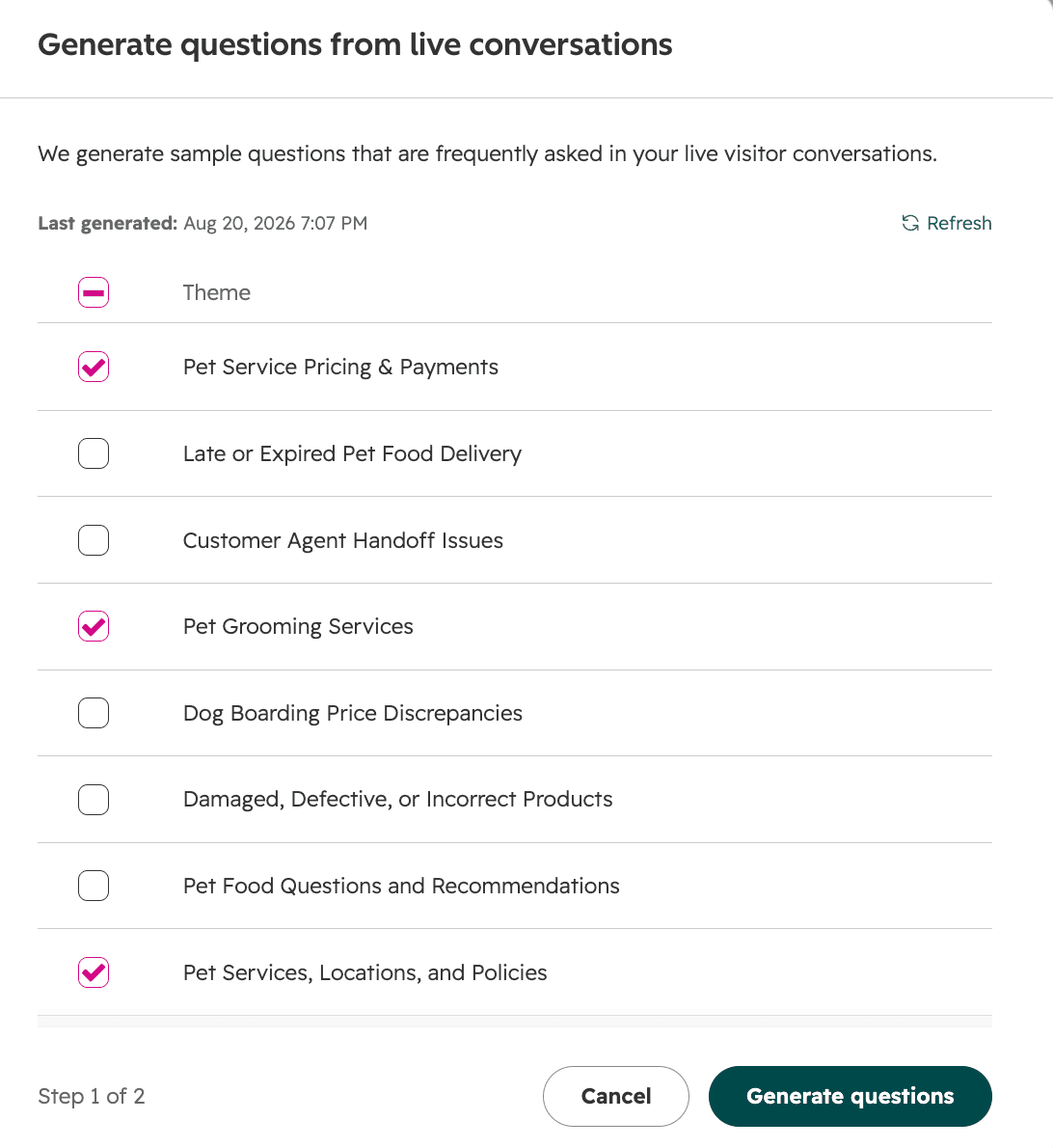
Two limits are written into HubSpot's article. A theme needs 5 or more conversations on a similar topic before it appears, so a rare question never becomes a theme. And the dialog is built on live visitor conversations, so the generator can only reflect what the agent has already been asked. A brand new agent has little to draw on, and that is when the blank test earns its keep.
My take: write your own questions for the ones that can hurt you, such as refund rules, pricing exceptions, and anything legal. The generated themes will cover the common questions well, but the risky ones are usually the uncommon ones. My AI agent testing guide and adversarial testing primer show how to write those.
How do you review answers and coach the agent?
You open each question, read the reply, and mark it Looks good or Looks bad. Answers start under Not reviewed, then move to a Looks good or Looks bad list as you mark them.
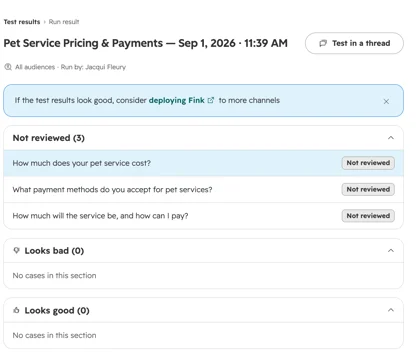
On a Looks bad answer, HubSpot gives you two moves. Write note records feedback for an admin, and HubSpot says a note does not update the agent. Coach agent opens a right-hand panel with Knowledge, Actions, Handoff, and Experience tabs, where you can add a handoff trigger or create a short answer.
That split matters for teams. A support lead can flag a bad answer in a note without needing the editor permission to change anything, and an admin can batch the notes into one coaching session. The permission rule works in your favor here: only editors change the agent.
The scoring is manual. I didn't see anything in HubSpot's docs about an automatic grade or a pass rate, so the Looks good and Looks bad counts are your own judgment. That is fine for 10 questions and tedious for 100, so budget reviewer time.
How do test sets get saved and rerun?
They save themselves, and you can rerun, duplicate, or delete any of them. In the Test sets tab, Run reruns a set, and the three dots offer Duplicate and Delete. Results sit under a separate Test results tab.
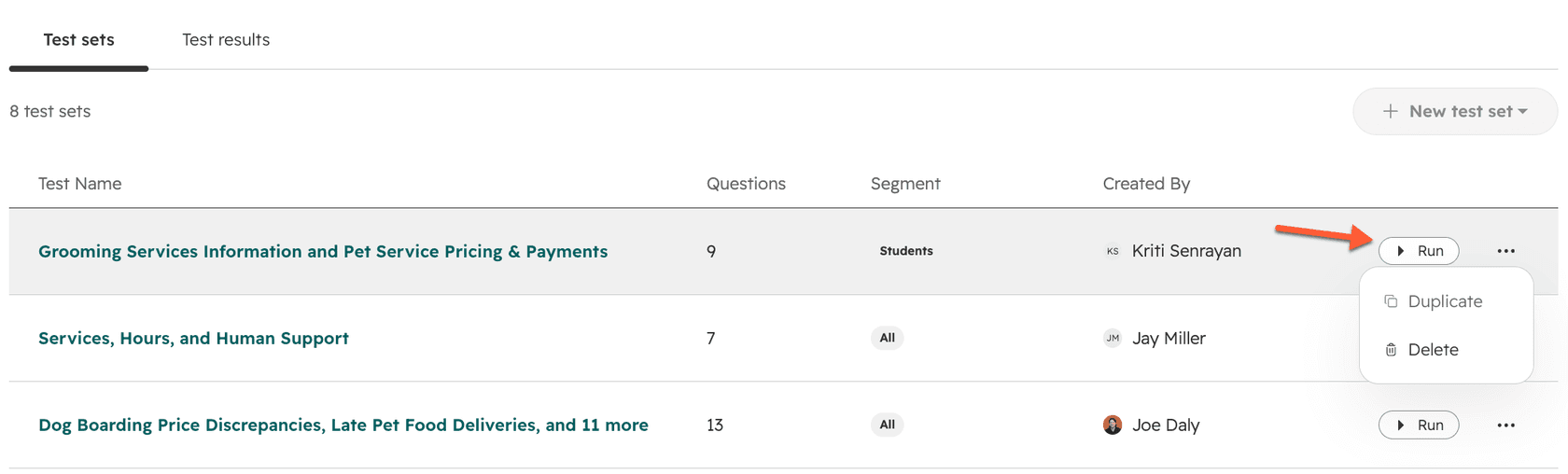
With only 8 sets allowed, I'd name them by risk, not by topic: one for pricing and billing, one for handoff triggers, one for the questions you got wrong last month, and so on. Duplicating a set before you change the agent gives you a before and after.
What does a test cost in credits?
HubSpot's pages say testing is free of credits, and that live deployment is billed per resolution. The setup guide says previewing and testing the customer agent does not use HubSpot Credits. The understanding article, updated September 16, 2026, says credits are consumed only when the agent delivers a resolution.
The catch is the 72-hour rule. A resolution is a reply that shares a content source or performs an action, with no visitor-initiated handoff, and the status is set 72 hours after the last visitor response. If your credits run out, HubSpot says the agent stops being assigned new conversations across all connected channels until the next reset. The batch testing article does not restate the no-credit line for batch runs specifically, so I'd confirm on your portal before you run a 100-question set.
"I don't know how many credits I'll need, so I'm less likely to test things, not more."

That quote, from a December 2025 thread on credit pricing, is why the free-to-test line matters. A team that fears the meter skips testing, and an untested agent is the expensive one. For the full credit maths, see my HubSpot AI agent pricing breakdown.
What does batch testing not cover?
It covers the questions in your set, and the docs leave several gaps. These are the ones I'd check before relying on it:
- No replay of past tickets. Themes come from live visitor conversations and the generator produces sample questions. HubSpot's pages don't describe replaying a specific past ticket and comparing the answer to what your team sent.
- No automatic score. Marking is manual, and I found no pass rate or trend view in the article.
- A note doesn't change the agent. Only the Coach agent route edits it, and only for editors.
- Eight sets is the stated cap. The article doesn't state a limit on questions per set.
- Credit use in batch runs isn't restated. The no-credit line sits in the setup article.
- Actions are tested in preview. The setup guide describes testing actions such as booking a meeting in the single preview chat, and the batch article doesn't mention them.
None of these are flaws so much as a description of the tool's job: a set of questions you control. That is useful for regression checks. It is a different job from asking, "would this agent have handled last quarter's tickets?"
How should you roll out a HubSpot Customer Agent safely?
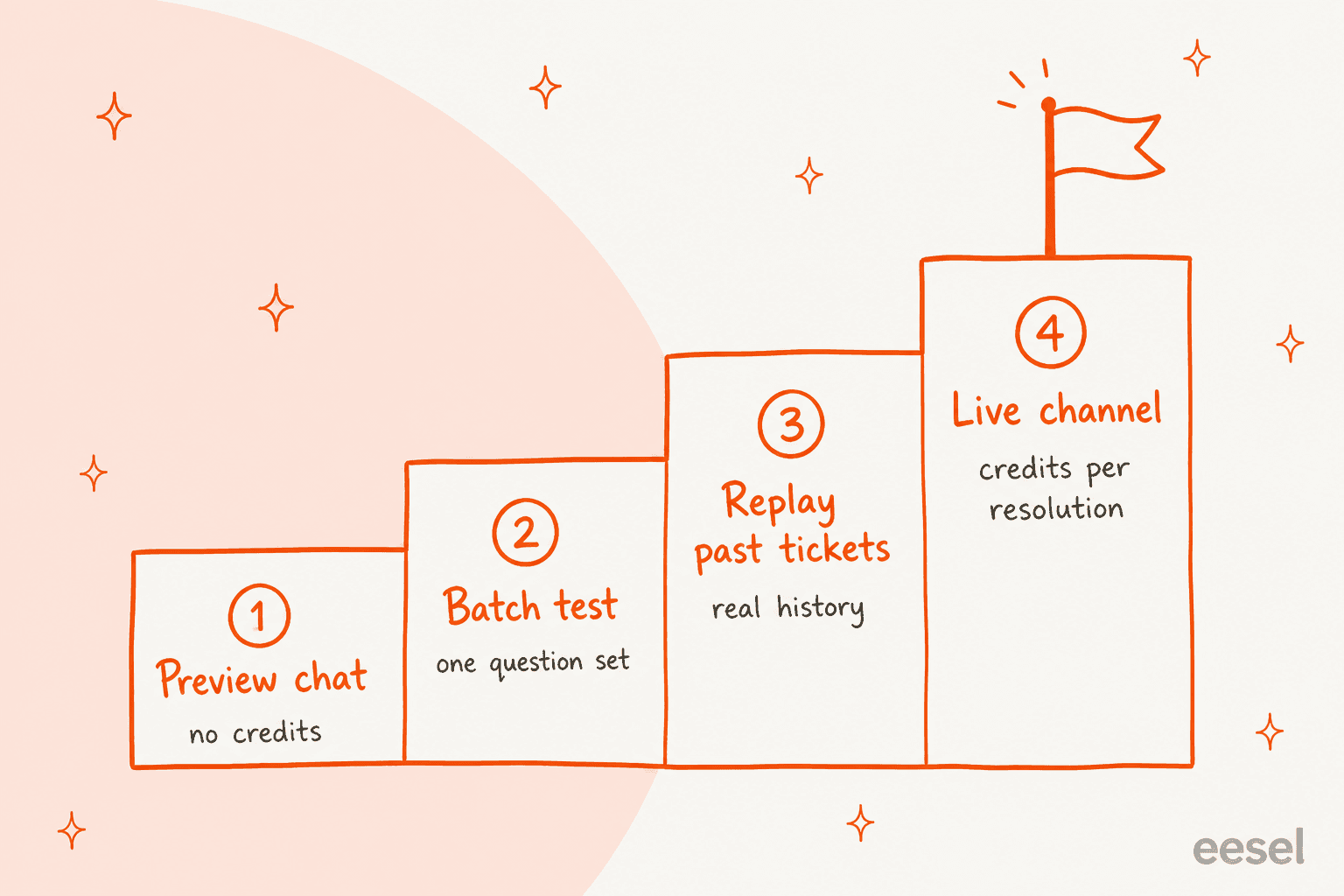
Move up four steps, and only climb when the one below is clean. This is the order I'd use, and the second half is my reasoning, not a HubSpot rule.
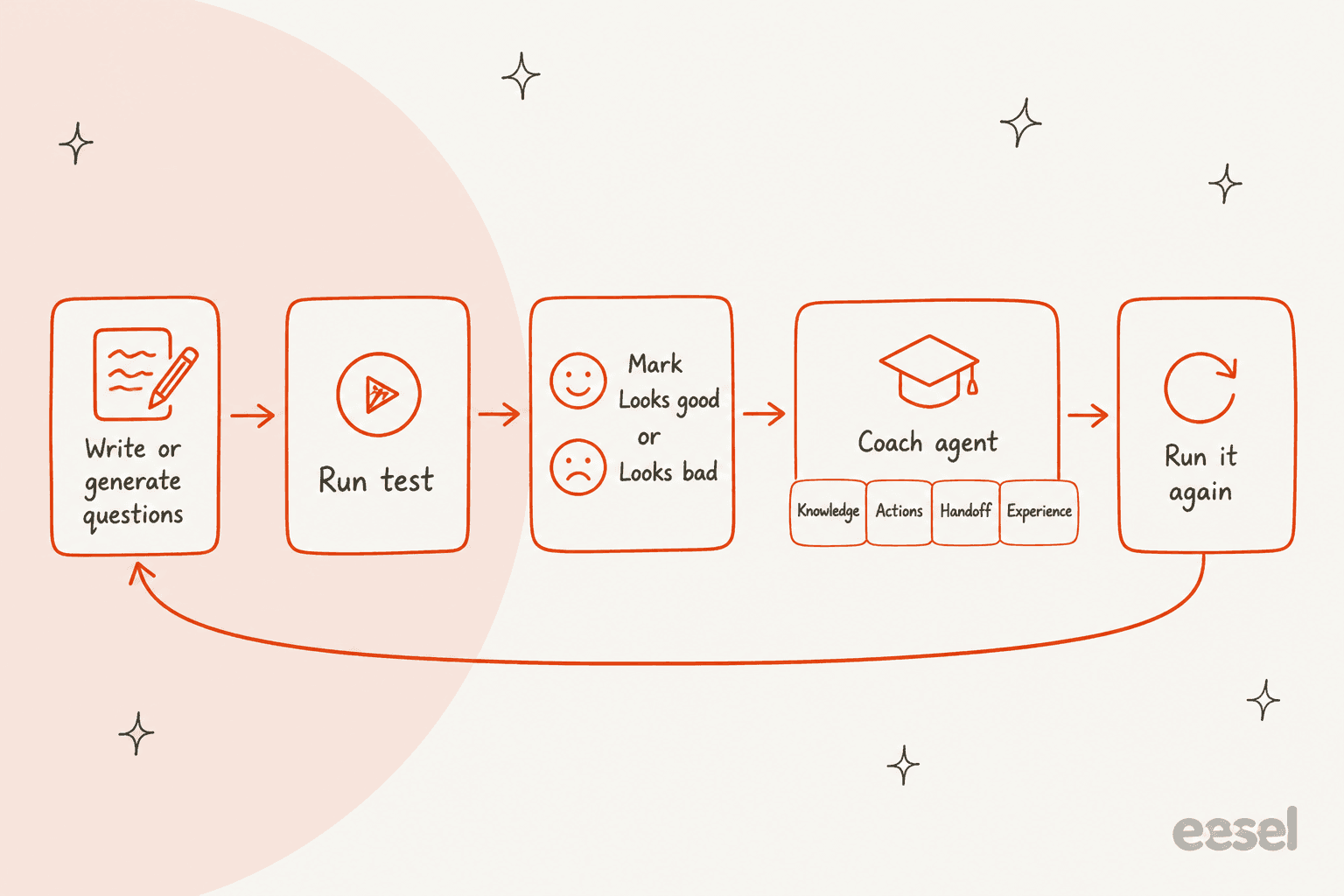
- Preview chat to check tone, sources, and the Testing Insights panel, which shows why the agent answered a certain way and what it cited.
- Batch test with a set of the questions your team answers every day, plus a set of the risky ones.
- A replay of real history, which batch testing doesn't do. This is where eesel fits, and I cover it below.
- A narrow live launch, starting with one channel. HubSpot's channel deployment article covers where the agent can run.
A Reddit commenter on the same credit thread described their rollout this way:
"I think the key for this working was that we started using customer agent in April, so by August, we had enough data to understand how many credits we needed, and we had already optimized our KB to be best suited for AI use."
They reported 40% of support inbounds handled at over 15,000 a month. That is one user's account, not a benchmark, but it shows the pattern: months of data, and a knowledge base tuned first. Both are the kind of thing a good test cycle surfaces, and my AI knowledge base and knowledge base management guides cover the second part.
How is replaying past tickets different from a test set?
A test set asks questions you chose, and a replay runs the agent on tickets your team already answered. The difference is where the questions come from and what the answer is judged against.
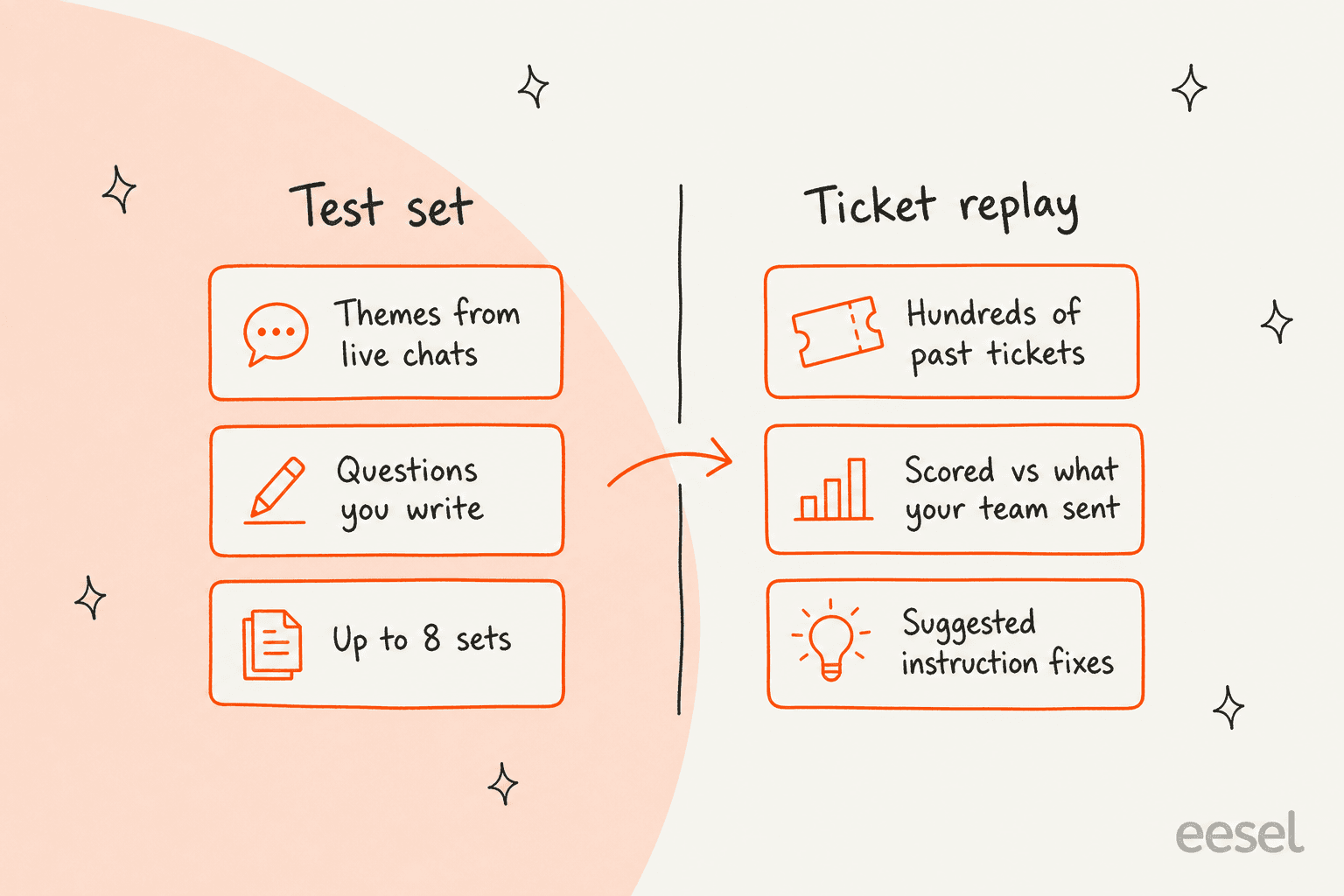
eesel's Simulation skill, per its skills docs, runs the agent against hundreds of your past tickets or generated test cases, scores each answer, and suggests instruction changes. It scores answers against what your team actually sent. It does not forecast a resolution rate or a cost, so it's a quality check, not a business case. My AI support simulation testing guide shows how I'd set one up.
Here is my fair read. HubSpot's version is native, sits next to the agent's settings, and lets you coach in the same screen, which is hard to beat for speed. A replay costs more setup, but it tests the messy, real phrasing that a generated sample question tends to smooth out. I'd run both: HubSpot's batch tests for the regression loop, and a replay once before launch. My AI hallucination prevention guide explains why real tickets catch what clean questions miss, and the AI hallucination glossary entry defines the term.
What does a draft-first rollout look like in practice?
It looks like MentorShow, a French online learning platform that runs its whole support team inside HubSpot and told eesel it gets between 5,000 and 13,000 tickets a month. Every new inbox conversation or ticket triggers eesel, which reads the thread and the member's HubSpot record, then leaves an internal note with an analysis and a draft reply in the member's language.
In the month from 8 August to 8 September 2026, eesel read about 1,200 HubSpot conversations and tickets and wrote 432 drafts, per the story. A person reads, edits, and sends each one, and refunds and billing checks are handed to a person straight away. The rules about which ticket types to skip, nine of them, were written in after cases came up.
That is not a batch test, and I won't call it one. It is a different safety net: the agent is live from day one, but nothing reaches a member without a person's review, so a wrong draft costs an edit instead of a bad reply. Teams that aren't ready for an autonomous launch can learn a lot from that mode. Related guides: AI agent handoff, escalation rate, and my resolution rate explainer.
Which questions should go into your first test sets?
Start with the ones your team answers daily, then add the ones that can cost money. Here is the split I'd use across the 8 sets:
| Set | What goes in | Why |
|---|---|---|
| Top questions | The themes HubSpot generates from live chats | Covers volume |
| Pricing and billing | Plan prices, renewals, refunds, discounts | Wrong answers cost money |
| Handoff | Angry customers, requests for a human, legal threats | Tests Handoff triggers |
| Edge cases | Policies with exceptions, multi-part questions | Tests knowledge depth |
| Out of scope | Questions the agent should decline | Tests guidelines |
| Last month's misses | Real questions the team had to fix | Regression set |
Re-run the miss set after every edit to the knowledge sources or handoff rules. My deflection vs resolution and containment rate guides cover the live metrics once you launch, and the knowledge base glossary entry explains why the source quality matters most.
What if you want a different tool altogether?
HubSpot's agent is built for teams already in the HubSpot ecosystem, and its batch testing reflects that. If you're weighing options, my HubSpot Breeze alternatives and HubSpot alternatives guides compare them, and AI customer support software alternatives goes wider. For HubSpot-specific add-ons, see AI for HubSpot Service Hub and adding AI to HubSpot.
Inside Service Hub, two other pieces affect how a tested agent behaves once live: capacity limits decide which human gets the handoff, and channel connections decide where the agent shows up. The HubSpot ticket deflection and knowledge base AI posts cover the rest of the stack.
Try eesel for your HubSpot help desk
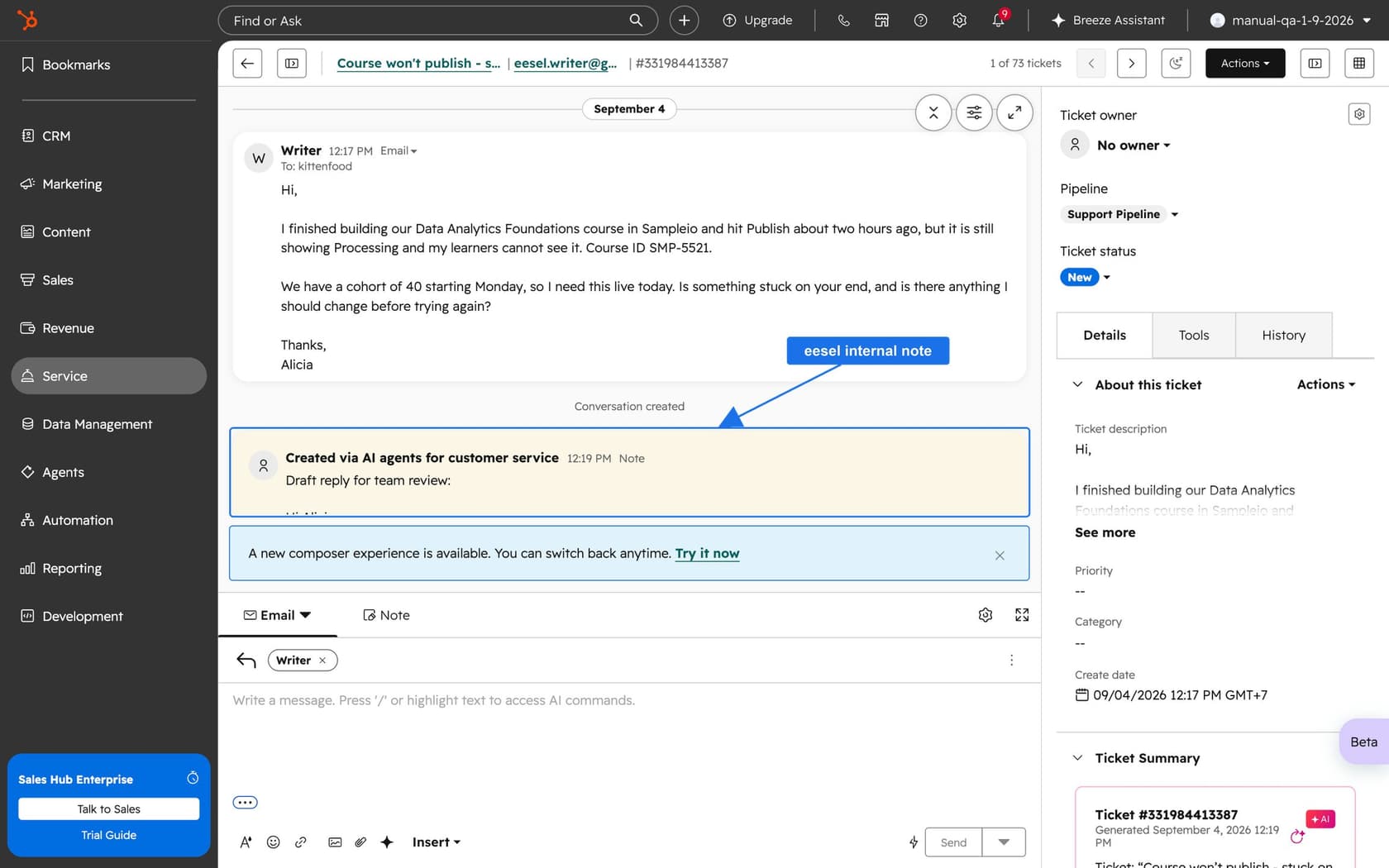
If you've batch tested the Customer Agent and still want proof against your real history, eesel for HubSpot works like a new teammate in Service Hub. It learns from your HubSpot knowledge base and past tickets, replays hundreds of those tickets against its own answers, and then reads each live ticket with the contact record and leaves an internal note with a draft reply for your team to review. Pricing is fixed monthly credit plans, from a free tier of 100 credits to $299 a month for 500 credits, where a ticket or chat handled is one credit, per eesel's pricing page.
I'd start with the free tier on a copy of your most common question themes, compare its scored answers with your HubSpot test results, and see where the two disagree. Connecting HubSpot itself still needs someone with admin access to approve it in the browser, and the answers get tested before anything goes live.