


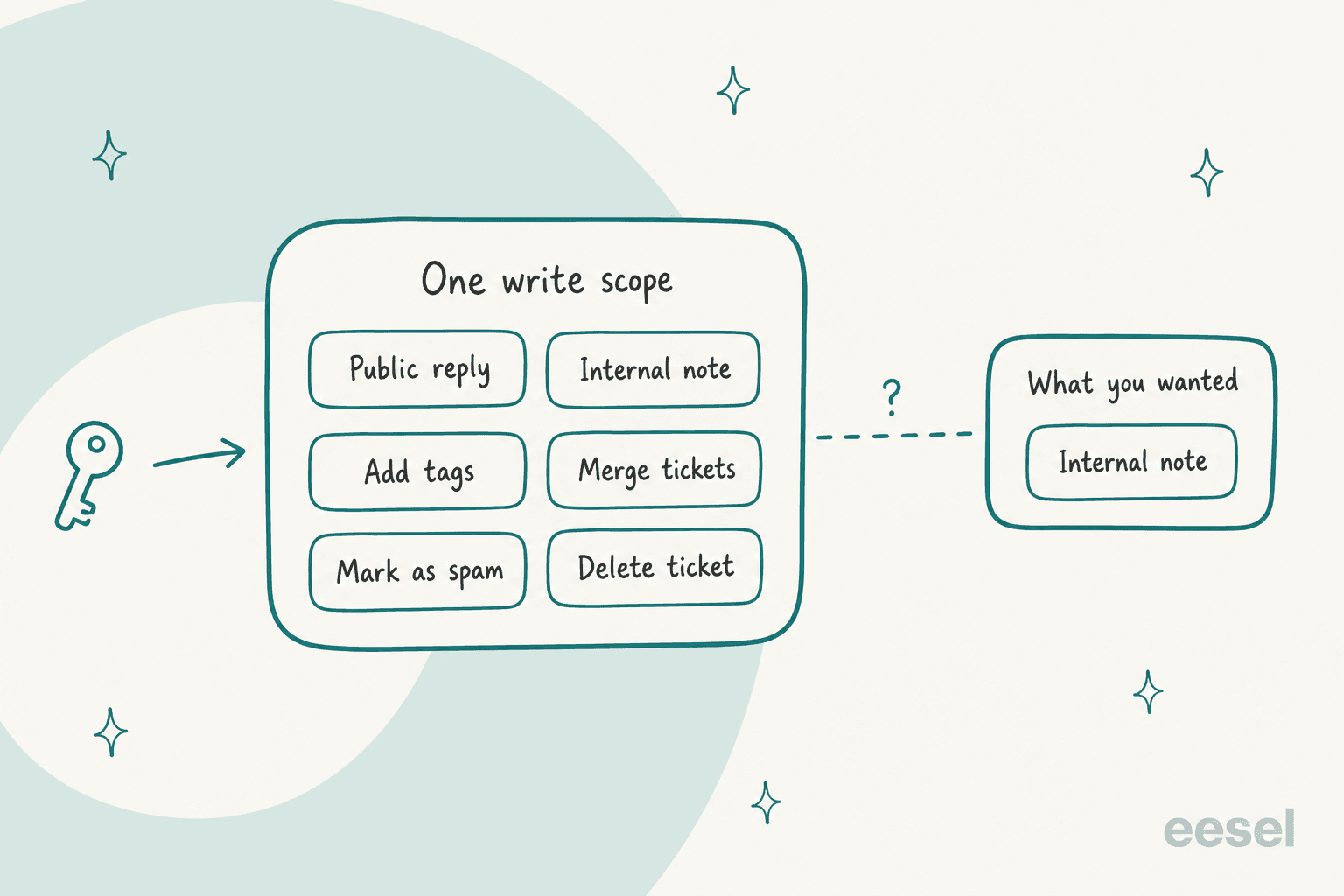
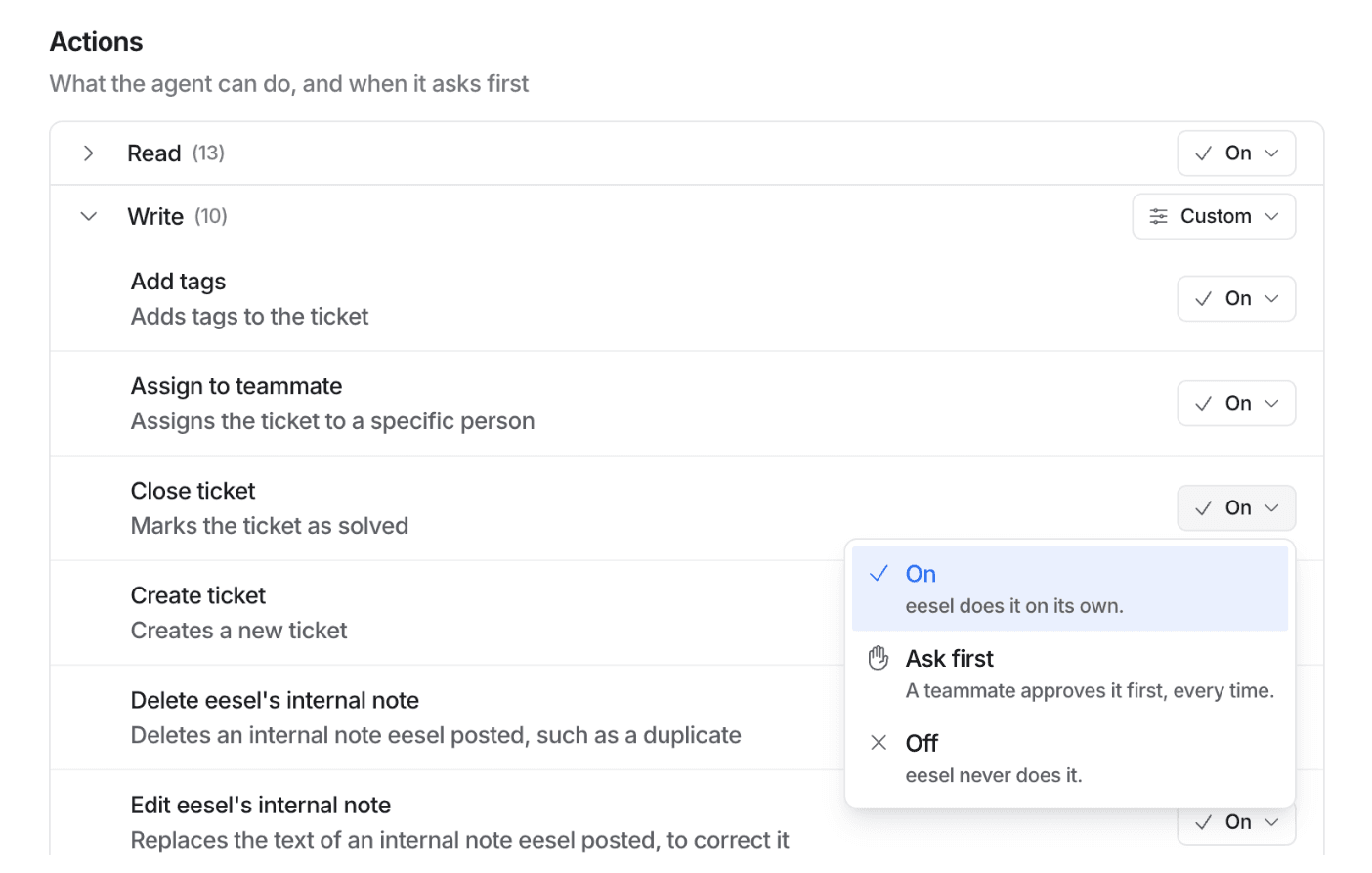
Give an AI support agent read access to what a customer could already be told, write access only to actions you would trust a new hire with, and an approval step for anything that moves money or cannot be undone. The catch is that helpdesk tokens are coarse: Zendesk's single write scope covers replies, internal notes and permanent deletes, so the real limit has to be a per-action setting. eesel gives each action On, Ask first or Off, per agent, after an admin approves the helpdesk connection. With the eesel CLI, a coding agent can change those settings and list pending approvals, but a person still decides them.
Why do AI agent permissions matter more than the prompt?
I work on eesel's integrations and APIs, so I spend a lot of time reading vendor scope tables. The pattern I keep seeing is that teams spend a week on the agent's instructions and ten minutes on its credentials. That's backwards. An instruction is a request the model can be talked out of. A credential is a fact: if the token can delete tickets, the agent can delete tickets, whatever the prompt says.
A developer on Hacker News described the problem from the other side, trying to give an agent read-only access to a hosting platform:
"If I want an agent to read logs or inspect env vars, I have to give it a token that also allows it to modify or delete things."

Support tools have the same shape. The helpdesk API was designed for a human agent, who is trusted, slow and accountable. An AI agent is fast, tireless and talks to strangers all day. So the question this guide answers is narrower than "is AI safe". It is: what exactly should this agent be able to read, what should it be able to do, and where is each limit enforced?
I'll cover reading, writing, what vendor tokens can and cannot restrict, a step-by-step grant, approvals and audit. If you only care about money, my guide to refund guardrails goes deeper on that one action. This post is the wider map around it, and it pairs with the AI guardrails basics if you want the term defined first.
What should an AI support agent be allowed to read?
Reading feels harmless, so people open it wide. I'd treat it as the more interesting half, because a customer-facing agent can repeat whatever it reads. Three kinds of reading matter.
The conversation and the customer record. The ticket thread, the customer's own order history, their plan. This is the job. Scope it to the customer who is asking, not the whole customer table.
Knowledge sources. Help center articles, macros, past tickets, internal docs. Here the question isn't "can it read this" but "may it say this to a stranger". A runbook that says "offer a 20% credit if they threaten to churn" is useful to your team and damaging in a customer's inbox.
Live lookups. Orders, subscriptions, payments. These are reads that return real personal data, so they deserve their own on and off switch, not a free pass because they are "just reads".
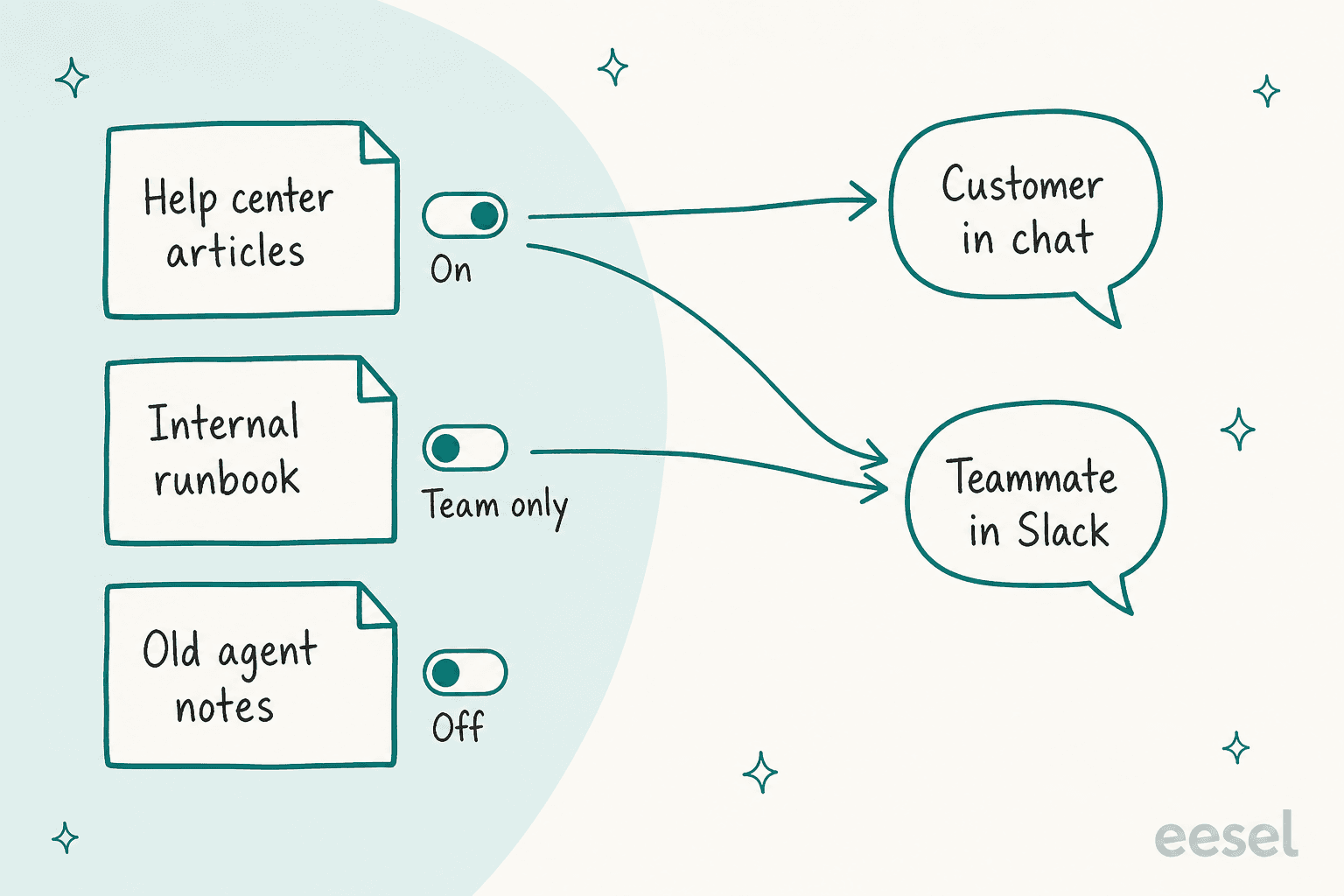
eesel handles this with per-agent source switches and a "Team only" setting. Each source on an integration page (help center articles, macros, past tickets) has its own switch, and turning one off stops that agent reading from it while your other agents keep their own setting. Files can be set to Team only, which means eesel uses them only when someone on your team asks and never sends the file or a link to it to people outside your team. The same logic applies to CRM data: in the HubSpot setup, contacts, companies and deals only reach an agent if the account granted those permissions and you switched them on for that agent, because being connected is not the same as agreeing it may answer from your CRM.
SamCart is a clean example of the public-only rule. Its agents answer from about 280 help center articles plus past Freshdesk tickets, and they are told to cite only public help center links, so older internal material can inform an answer without being sent to a seller. For more on cleaning up what an agent reads, see my knowledge base audit guide and the piece on making a AI-readable help center.
One more read-side habit: redact before you import. Card numbers and addresses in past tickets don't need to be in a knowledge source at all, and PII redaction removes them first. eesel's security documentation says data is used only for your own agent and never to train the underlying models, which is a floor, not a substitute for choosing sources.
What should it be allowed to do?
Actions are where mistakes cost something, so I sort them by how hard they are to undo. A tag is trivial to reverse. A sent email is not. A refund can't be un-sent at all.
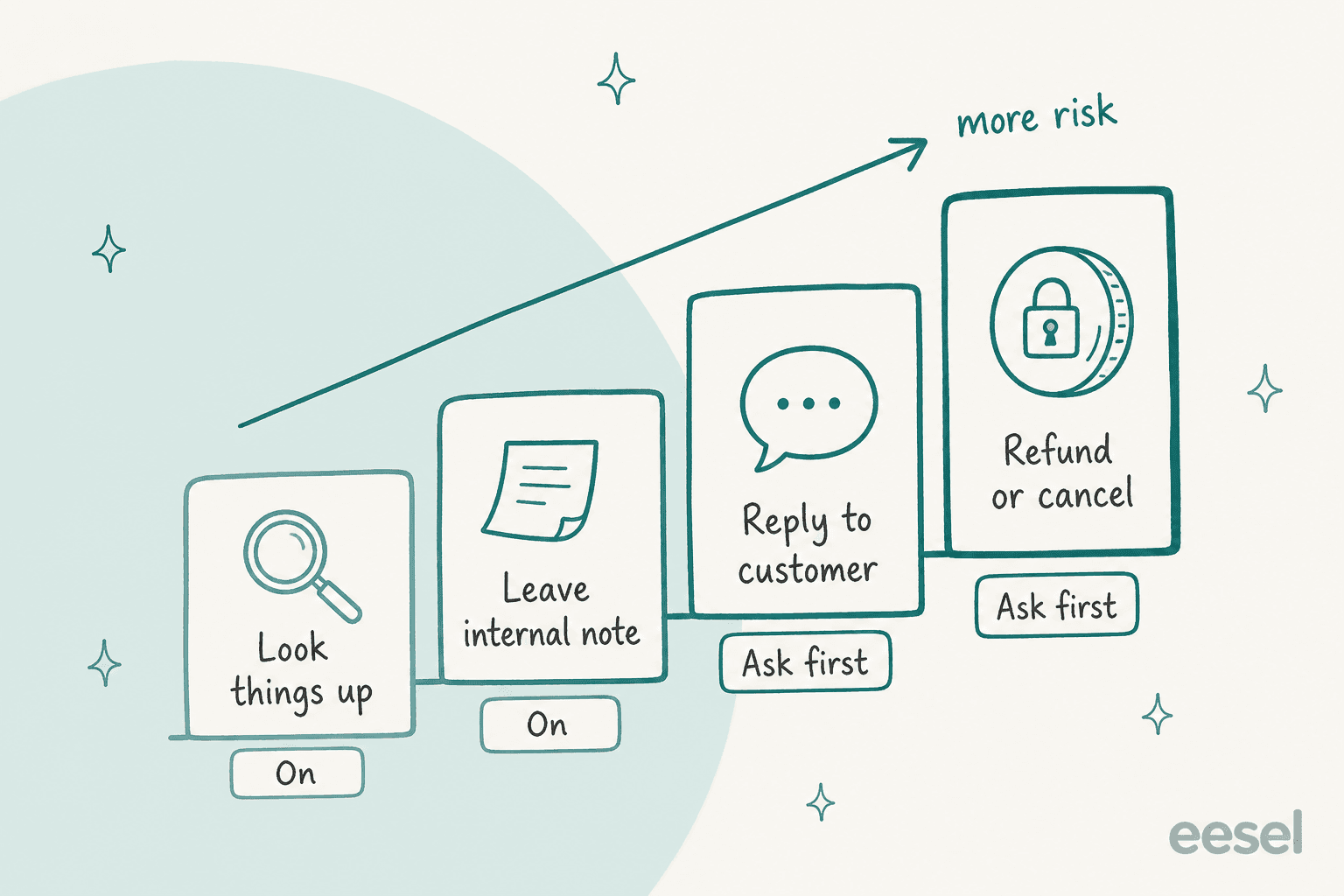
Here is the ladder I'd use for a new agent, with eesel's three settings as the vocabulary. eesel's action settings are On (it acts on its own), Ask first (a teammate approves every time) and Off (it never does it).
| Action | Reversible? | Start setting | Move to On when |
|---|---|---|---|
| Look up a ticket, order or article | Yes, no side effects | On | Day one |
| Leave an internal note | Yes, only your team sees it | On | Day one |
| Add a tag or assign a ticket | Mostly. Tags can trigger automations | On | You've checked what your triggers do with that tag |
| Reply to the customer | No, the customer has it | Ask first | Drafts are consistently right |
| Close a ticket | Reopens easily, but hides it from view | Ask first | A sample of closes looks right |
| Refund, cancel or change an order | No | Ask first, indefinitely | Rarely. Cap it in code first |
| Run scripts against an API | Depends entirely on the script | Off | Only for a named job |
eesel's own advice matches this: to supervise a new agent, set replies and anything irreversible to Ask first, and keep refunds, cancellations and anything that costs money behind an approval. One detail worth knowing: on most workspaces actions start On, with a safety check holding risky calls, so "supervised" is something you choose, not the default. On a HIPAA workspace there is no safety check and most write actions start on Ask first.
A few things behave differently. Live chat actions are always On, because nobody can pause a live chat to approve a message. Actions that edit the agent's own instructions or automations, or run scripts, carry a Team only tag and never run for someone outside your team.
If you'd rather click than read, the widget below applies the same ladder.
Which setting should this action get?
Pick what the action does. The setting uses eesel's On, Ask first and Off.
How much can a helpdesk token or role actually limit?
Less than you'd hope, and this is the part that changes how I'd set things up. Most helpdesks give you three levers: a user role, an API token or OAuth scope, and sometimes a per-resource permission. They're built for integrations that do one job, not for an agent that needs to read widely and write narrowly.
Here is what the vendors' own documentation says.
| Platform | Credential | How granular | The catch |
|---|---|---|---|
| Zendesk | OAuth with scopes such as tickets:read, tickets:write | Per resource, read or write | tickets:write also covers permanently deleting tickets |
| Freshdesk | API key of an agent | Inherits that agent's role | Freshworks MCP grants nothing beyond what the key's role allows |
| Gorgias | OAuth with read and write scopes | Per resource (tickets, customers, macros, rules, users) | The older write:all is deprecated, and tickets bundles messages, tags and assignees |
| HubSpot | Private app token | Scopes chosen per app | Created by a super admin. If the creator is removed, some calls fail |
| Front | API token | Features, namespaces, then read, write, delete, send | Company-level, admin-only, and the value is shown once |
| Shopify | Access scopes | read_orders or write_orders | write_orders includes read, and covers the last 60 days unless you add read_all_orders |
| Stripe | Restricted key | None, Read or Write per resource | Write implies read, so there's no step between them |
Three lessons stand out.
Scopes rarely distinguish "note" from "reply". In Zendesk, a comment carries a public flag: true for a public comment, false for an internal note. Both go through the same ticket-write call. A token with tickets:write can do either, so the line between "draft privately" and "email the customer" is an action setting on the agent's side, not a token property.
The credential carries the identity. Freshdesk's key inherits the agent's role, and Zendesk replies post as the user who approved the connection. So give the agent its own seat or service user with a role built for the job, rather than borrowing a person's login. The HubSpot note above is the reason: if the user who created a private app is removed, calls that depended on them can fail.
Front is the exception worth copying. It splits write from send: creating and sending messages needs a separate Send permission, and importing historical messages needs only Write. That's the shape of permission every helpdesk should offer. When a helpdesk doesn't, you build the separation yourself.
Stripe's setup guide for eesel states the limit plainly: Stripe has no setting between Write and Read, so Write on Customers also lets the key delete a customer. If the agent only needs to look customers up, set Customers to Read. Stripe itself says restricted keys are recommended for AI agents, because a restricted key limits the damage if the key is ever exposed.
For deeper role design on each platform, my guides go further:
- Zendesk: roles and permissions
- Freshdesk: roles and permissions
- Gorgias: roles and permissions
- HubSpot: send-from permissions
How do I grant access to an AI support agent, step by step?
This is the order I'd follow on any helpdesk. It takes about 30 minutes for the first agent.
- Write down the job in one sentence. "Drafts first replies to shipping questions on email tickets." Every permission you grant should trace back to that sentence. A permission that doesn't is a candidate for removal.
- Create a dedicated identity. A named seat, service user or app approval for the agent, never a shared admin login. That makes its actions attributable and its access revocable without touching a person.
- Pick the narrowest credential type the vendor offers. OAuth with scopes beats an API key. A restricted key beats a secret key. A custom role beats a built-in admin role. Use the tables above.
- Choose what to import before you approve. In eesel's Zendesk full connection, a Choose what to import step comes before the approval in Zendesk: untick Help Center, Macros or Past tickets and eesel never downloads that source. Check the list Zendesk shows of what the app can read and do before you click allow.
- Start with a quick start where there is one. eesel's Zendesk quick start reads only your public help center with no sign-in. It has no tickets, macros, triggers or actions, which is a fine place to test answer quality.
- Set actions to the ladder. Notes On, replies Ask first, money Ask first, scripts Off. With a terminal, the setting for one action is a single command,
eesel integrations <app> actions set <key> --access ask-first. - Set where approvals arrive before you switch them on. An eesel agent starts on In-app only, so a held action waits on the dashboard and nothing is sent to anyone. Pick Email or Slack in the agent's settings and choose who receives them.
- Connect an automation last. Connecting alone does not start the agent. It needs a trigger plus instructions about which tickets to handle, and you can scope it by channel.
- Test on past tickets, then a small live slice. My guides to simulation testing and testing support agents show how.
Admin approval is a feature here, not friction. eesel's Zendesk, Gorgias and Shopify connections each need a person with the right rights to approve in the vendor's own screen: a Zendesk admin, a Gorgias admin, a store owner or a staff member with app permissions. HubSpot's approver needs the App Marketplace Access permission, which super admins have by default. The agent can ask for the connection, but a human with authority grants it.
How should risky actions get approved?
An approval is a pause, so design it like one. When an eesel action set to Ask first comes up, the agent stops, saves what it wants to do, and waits. The approver sees the exact action and its details (the reply text, the refund amount, the tag) and chooses Approve or Deny.
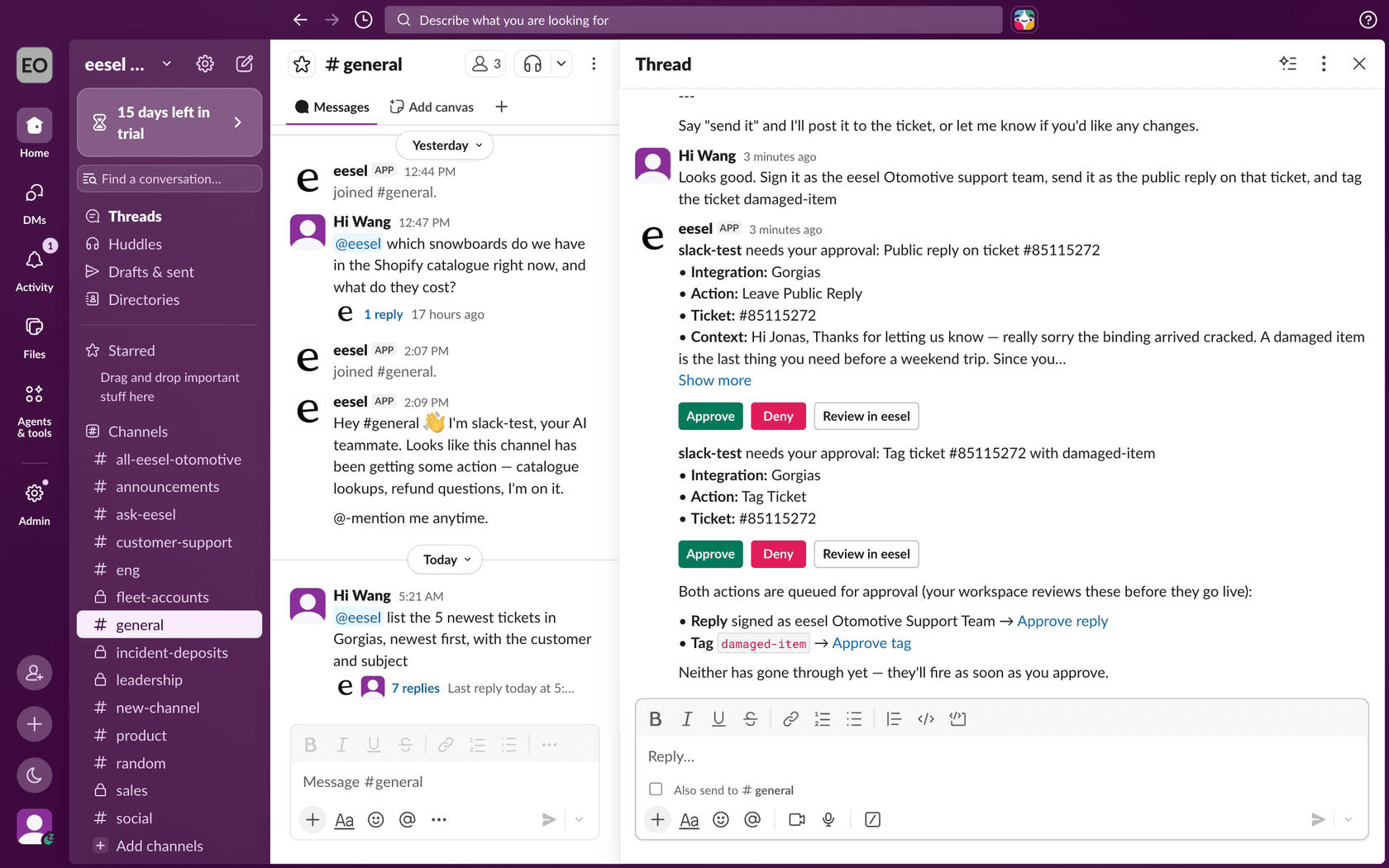
The rules around it are what make it trustworthy, and they are worth checking in any tool you evaluate:
- Who can decide. In eesel, only the owner and Editors can approve. Viewers see approvals but cannot decide them. In Slack, the person who clicks is matched to a workspace editor by profile email, and if the emails don't match the click does nothing.
- Where it arrives. Dashboard, Slack, email or terminal. A hold does not appear in the helpdesk ticket it came from, so a team watching only the ticket sees nothing. That's the reason step 7 above matters.
- What happens on silence. The action stays pending for 72 hours and expires, and it never runs on its own after a timeout.
- Partial approval. You can leave an action On and ask the agent in its instructions to hold specific cases, such as anything about refunds.
The same rules apply to coding agents. CLI and MCP requests keep the workspace role and action approval rules, an MCP token carries your role at the time it was minted, and eesel's documentation says a coding agent must leave approval decisions to the authorized person unless the user has explicitly authorized it to decide. That's the right default: the agent that asks for permission shouldn't be the one that grants it.
For handoffs, the same thinking applies. Decide in advance which topics skip the agent altogether. My notes on AI handoff best practices and human-in-the-loop cover this, and so does prompt injection, the reason a customer's message should never be what unlocks an action.
How do I audit what the agent did?
Two records beat one. The agent's own log tells you why it acted. The helpdesk's log tells you what actually changed.
In eesel, the Activity page lists every ticket the agent handled, what it searched, each action it took, who approved it and its reasoning, and eesel activity prints the same from a terminal. Skipped tickets are listed with the reason. The helpdesk side is a second source: Freshworks says MCP actions are logged like API and UI operations and appear in activity history. Check your own platform's equivalent too; I've written up the Zendesk audit log and the Gorgias audit log.
Then actually look. I'd read a sample weekly: five approved actions, five denied, five that ran without approval. My guide to reviewing AI support conversations has a routine you can copy. A denial pattern is a signal too: if the same action gets denied three times, the instruction is wrong or the setting is.
What does this look like on real helpdesks?
Three published eesel customers show different points on the ladder.
STIL Classics runs eesel on Gorgias and Shopify, and its agent is deliberately narrow on the write side. It looks up the order in Shopify first, then leaves a draft as an internal note. Per its customer story, the team processes any refund, edits the draft and sends it, and eesel never sends and never changes an order. That is the first rung of the ladder held on purpose: read broadly, write only a note.
smava shows the other principle, one job per agent. On one Zendesk shared by two brands, a categorisation agent only tags the language, checks a ticket field and writes a category, and touches nothing else. A separate drafting agent's only output is a draft with Approve and Reject buttons. In one month eesel handled about 27,000 tickets there, and the agent that waits for a person ran on about 12,200 of them. Splitting the permissions by agent is cheaper than trying to restrict one agent per ticket.
SamCart uses permission by situation. Its Freshdesk agent replies only while no person is assigned, steps back once a teammate picks the ticket up, and tags the ticket for handoff when a seller asks for a person. It also cites only public help center articles.
Notice what none of them did: none gave the agent admin rights and told it to behave.
Try eesel
eesel is the AI helpdesk teammate that works the way this guide describes: a person approves the helpdesk connection, every action is On, Ask first or Off per agent, and risky calls wait for an approver in the dashboard, Slack, email or terminal. If you run Zendesk, Freshdesk, Gorgias, HubSpot or Front, start with internal notes, review the first batch, and widen from there. Shopify stores get the same controls on order lookups and refunds. Connecting the helpdesk still needs someone with admin access to approve it, and uploaded knowledge should be tested before it faces customers.
Try eesel and set every write action to Ask first on day one. You'll see what it wants to do before it does it.