

To make your help center readable by AI agents, fix the articles before the files: one question per article, answered in plain text in the first two sentences, sections that make sense read alone, and a date on anything that changes. Then allow the AI search bots you want in robots.txt and keep sign-in walls where you mean them. llms.txt and MCP come last: on 17 November 2026, Zendesk's and Help Scout's own help centers still returned 404 for /llms.txt.
The reader that matters most is your own support AI. eesel's AI helpdesk teammate answers from your help center and past tickets, and every draft your team corrects points to an article to fix. With the eesel CLI, a coding agent can check what the help center sync holds and run test questions before go-live; an admin still approves the helpdesk connection.
Who is reading your help center now?
I'm a software engineer at eesel with two years of SEO work behind me, and the question I get from support and docs leads has changed. It used to be "why doesn't this article rank?" Now it's "why did ChatGPT tell a customer our refund window is 14 days when it's 30?" The short answer is that your help center has three new readers, and each one reads it a different way.
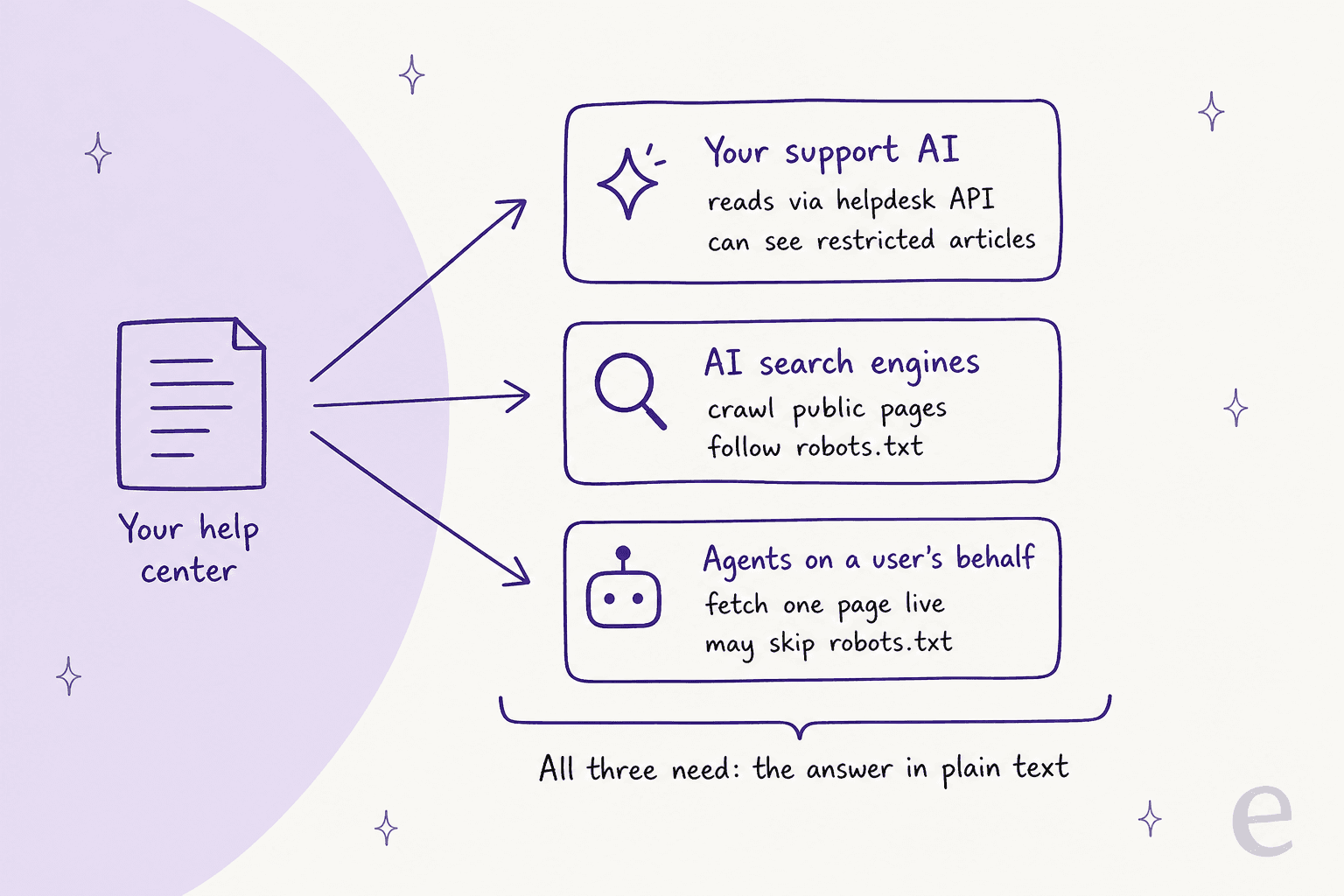
- Your own support AI. The bot or copilot you trained on your knowledge base usually syncs articles through the helpdesk API on a schedule. It doesn't care about robots.txt, and it can read restricted articles if you let it.
- AI search engines. ChatGPT search, Claude, Perplexity and Google's AI Overviews crawl your public pages ahead of time, the same way AI search engines build any index. They follow robots.txt, one rule per bot.
- Agents acting for one user. When someone asks ChatGPT about your product, it may fetch your page live as
ChatGPT-User. A coding agent may pull your docs as markdown, and an MCP client may query them as a tool.
Here's how they differ on the things you control:
| Reader | How it gets in | Follows robots.txt? | Sees sign-in-only articles? | Runs JavaScript? |
|---|---|---|---|---|
| Your support AI | Helpdesk API sync or connector | No, it uses your API access | Yes, if the connection has permission | Not needed, it reads the article body |
| AI search crawlers (OAI-SearchBot, Claude-SearchBot, PerplexityBot) | Crawls public URLs | Yes | No | ChatGPT's and Claude's crawlers did not in Vercel's test; Gemini does |
| User-triggered fetchers (ChatGPT-User, Claude-User, Perplexity-User) | Fetches one URL during a chat | Not always, see step 4 | No | Treat it as no |
| Coding agents and MCP clients | llms.txt, markdown pages, MCP tools | Depends on the client | Only with credentials | Not needed |
The column that should worry you is the last one. Vercel's analysis of AI crawler traffic found that ChatGPT's and Claude's crawlers fetch JavaScript files but don't execute them, so anything rendered client-side is invisible to them. Every reader in the table can read plain text that's in the page or the API response. That's why the first three steps below are about the articles themselves, and why they pay off for all four readers at once. How the support AI then picks a passage is a retrieval question, but it can only pick from what it could read.
How AI-readable is your help center right now?
Before the steps, run the audit. It takes ten minutes with one article open in a browser tab and your helpdesk admin in another.
Tick what's already true; the score counts up as you go. Items you can't tick map to the steps below.
Step 1: Write one question per article, answered in the first lines
An AI reader rarely uses your whole article. Search engines and support bots split pages into passages, pull the two or three that look closest to the question, and write an answer from those. So the unit you're writing for is the passage, not the page.
GitBook says it plainly in its LLM-ready docs guide: "GitBook handles the delivery layer. Your writing shapes the quality of AI answers." Its checklist is short: give each page a clear purpose, use descriptive headings and short sections, state constraints, defaults and requirements directly, include exact values, and update content when the product changes.
In practice, that means three edits to most help centers:
- Titles are questions customers ask. "How do I change my billing email?" beats "Billing settings overview". It's the same advice I give for writing knowledge base articles, and it also tends to match what people type into search.
- The answer goes first. One or two sentences that resolve the question, then the steps, then the edge cases. If a passage gets pulled alone, the first sentence is the one that has to survive.
- Every section stands alone. Repeat the noun. "Turn it on" means nothing in a passage that lost its heading.
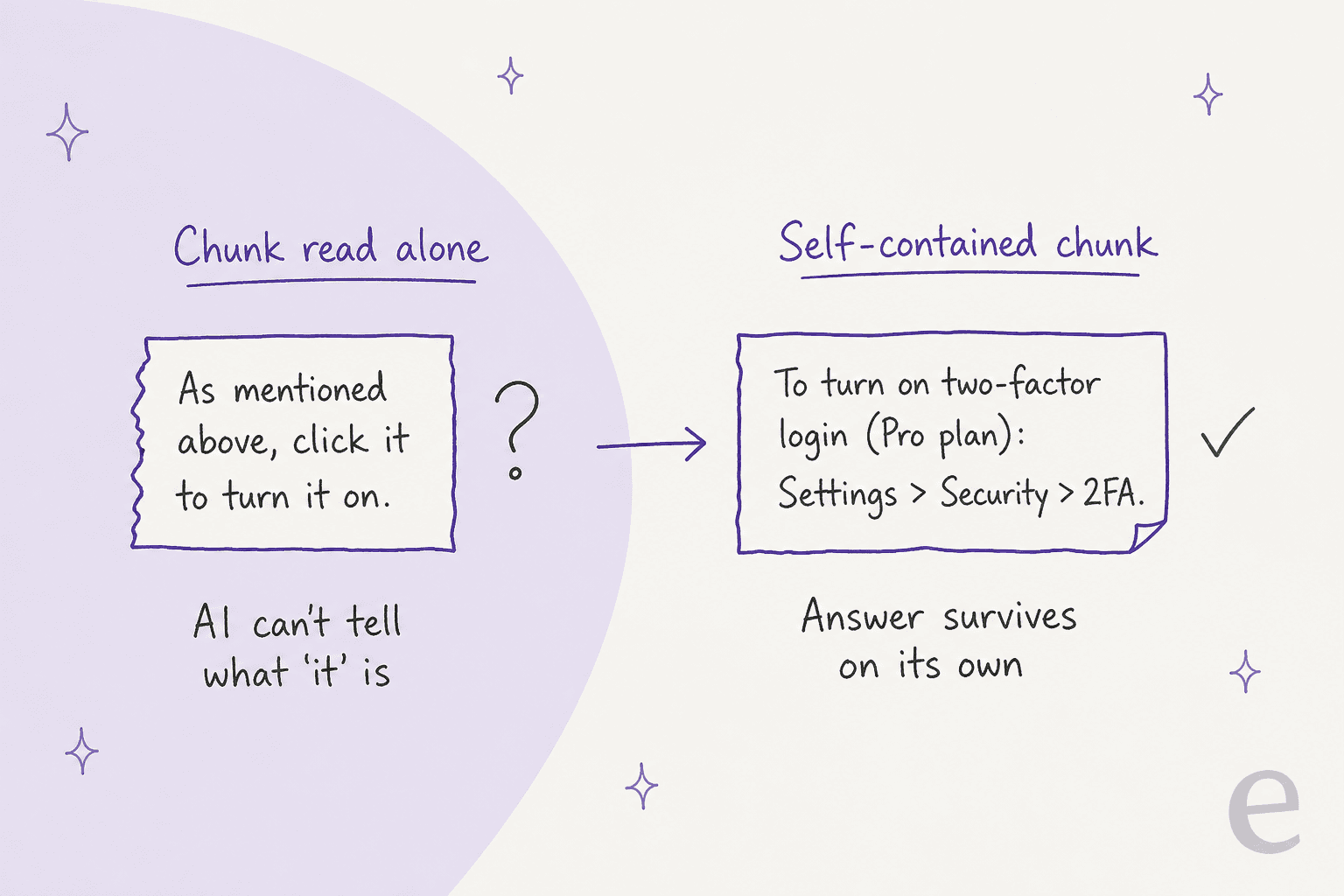
One article per question also stops a quiet failure. A long "Account FAQ" with 25 answers on one page gets split into passages that all share one title, so the AI can't tell which answer belongs to which question. Splitting the big FAQ pages first is the fastest win I know for deflecting FAQs with AI.
If you're on Document360, there's a second reason to write good summaries: its generated llms.txt uses each article's "AI & search description", and per Document360's llms.txt docs, content without one "is included in llms.txt by title only."
Step 2: Get answers out of images, videos, PDFs and click-to-open widgets
This is the step that breaks the most AI answers I see. A help article says "go to the settings shown below", and the only place the path appears is a screenshot. The person reading sees it. Most AI readers don't.
Google's own AI features guidance lists "making sure that important content is available in textual form" as one of the basics for appearing in AI Overviews and AI Mode. The same applies to your support AI: a sync that pulls the article body gets the text and the image URL, not what's drawn in the image.
Where the answer usually hides, and what to do about it:
| Where the answer hides | What AI readers get | Fix |
|---|---|---|
| Screenshot of a settings page | An image URL and maybe alt text | Write the menu path in text: Settings > Security > 2FA. Keep the screenshot as backup (formatting tips) |
| Embedded video walkthrough | A player embed, no steps | Add the steps or a transcript under the video (video embeds) |
| PDF or slide attachment | Often skipped, or read without structure | Move the content into the article (attachments) |
| Tabs or accordions loaded by a script | Nothing, if the text arrives after JavaScript runs | Keep the text in the HTML. A plain <details> block is fine because the text is already there |
| Pricing or limits in an embedded widget | Nothing | State the number in a sentence with a date |
This matters for your own bot too, not just for public search. At SE Ranking, eesel answers live chats for three products from about 14,100 help center pages, and its instructions say it never describes a menu or button it did not find in the knowledge. That's the right rule for a support agent. It also means a menu path that lives only in a screenshot is a path the agent won't give, so the customer gets handed to a person for something your help center already covers.
A quick test for any article: view the page source (or the API response) and search for the key step. If it isn't in the text, assume no AI reader has it.
Step 3: Date your facts and retire old articles properly
An AI reader is confident by default. If an old article says the refund window is 14 days and a newer one says 30, the model may quote either, and it won't add "but check the date". Stale content does more damage in an AI answer than on a page, because the customer never sees the "last updated 2023" footer.
Three habits fix most of it:
- Put the date next to the fact. "Refunds are available for 30 days after purchase (policy as of October 2026)" survives being pulled into a passage. A page footer doesn't.
- Delete or merge duplicates. Two articles answering the same question with different numbers is the most common cause of a wrong AI answer I see. Run a pass for outdated help center content before anything else.
- Redirect, don't 404. In Vercel's crawler data, ChatGPT spent 34.82% of its fetches on 404 pages and another 14.36% following redirects. When you move an article, set up the redirect so AI search engines land on the current version.
Your own support AI needs a rule for conflicts too. OroSoft runs eesel as a Freshdesk copilot that treats the help center as the source of truth for policy, and when the help center and past tickets disagree, it follows the more recent. Its help center re-syncs every Monday. That's the loop every team needs, whatever tool they use:
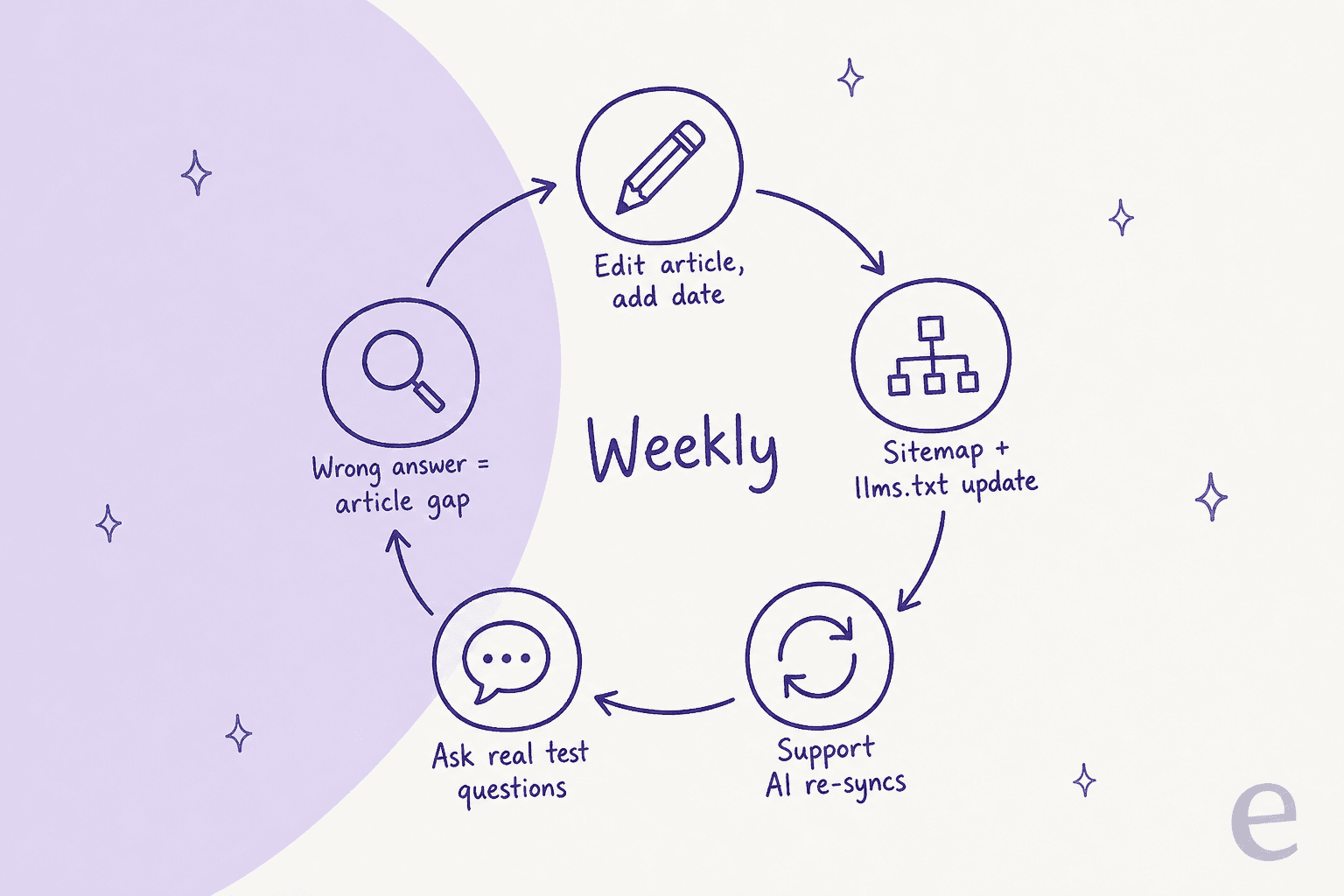
Zendesk regenerates its help center sitemap every two hours, per its help center SEO article, so the public side mostly takes care of itself. Your bot's sync schedule is the one to check. If it syncs monthly, a policy change is wrong in AI answers for up to a month. A self-updating knowledge base helps with the other direction: catching answers that never made it into an article.
Step 4: Decide which AI bots may read it
Most AI companies now split their bots by job: one for model training, one for search, one for fetches a user asks for. You can allow one and block another. This is where I see support teams accidentally hide their help center, usually after someone pastes a "block all AI bots" robots.txt snippet.
| Company | Training crawler | Search crawler | User-triggered fetcher |
|---|---|---|---|
| OpenAI | GPTBot | OAI-SearchBot | ChatGPT-User ("robots.txt rules may not apply") |
| Anthropic | ClaudeBot | Claude-SearchBot | Claude-User (blocking it stops user-directed retrieval) |
| Perplexity | none listed | PerplexityBot | Perplexity-User ("generally ignores robots.txt rules") |
| Google-Extended (a control token, not a separate bot) | Googlebot | not covered here |
Each company name links to its own crawler documentation.
The rule for a public help center is simple: allow the search crawlers. OpenAI says sites that opt out of OAI-SearchBot "will not be shown in ChatGPT search answers", and Anthropic says blocking Claude-SearchBot "may reduce your site's visibility and accuracy in user search results". Whether you let training crawlers in is a separate call for your legal and marketing teams.
A help center robots.txt that keeps AI search access while opting out of training looks like this:
# AI search: let these index the help center
User-agent: OAI-SearchBot
Allow: /

User-agent: Claude-SearchBot
Allow: /

User-agent: PerplexityBot
Allow: /

# Model training: a policy choice, not an answers choice
User-agent: GPTBot
Disallow: /

User-agent: ClaudeBot
Disallow: /
Three details that trip people up:
- Google-Extended does more than training. Google says it also controls grounding in Gemini Apps and Vertex AI, so blocking it can keep your articles out of Gemini answers, while it "does not impact a site's inclusion in Google Search".
- Changes aren't instant. OpenAI says it can take about 24 hours after a robots.txt change for its search systems to adjust.
- robots.txt only covers the domain it sits on. Anthropic's instructions say to repeat the rules for every subdomain, which matters if your help center lives on
help.orsupport.
If you want to see how often AI engines actually cite you after this, that's an answer engine optimization question, and those tools cover the tracking side.
Step 5: Put the sign-in wall where you mean it
Every public AI reader stops at a login page. Zendesk is direct about it: if your help center requires sign-in, "the sitemap will not be automatically generated. Web crawlers cannot access closed or restricted help centers." Mintlify's llms.txt docs say the same for its generated files: on fully authenticated sites, "AI tools that cannot authenticate cannot access them."
That's correct behavior. The mistake is putting public answers behind the wall by accident, often because a whole category was restricted to one user segment for one sensitive article. Audit restrictions article by article, and restrict by segment only what has to be private.
Then plan two lanes:
- Public lane: everything a prospect or customer could ask before logging in. This is what AI search engines and ChatGPT-style fetchers will quote.
- Private lane: account-specific, partner-only or internal articles. Only your own support AI should read these, through an API connection with permission, like the Zendesk Guide API or the Freshdesk knowledge base API.
This gets more specific than people expect. On one eesel sales call, an enterprise logistics team needed two agents off one Zendesk: one for anonymous users that answers only from public articles, and one for registered users that also reads a subset of restricted ones. That's the right instinct. Decide which audience each AI reader serves, then give it exactly that content.
Step 6: Add llms.txt and markdown versions
Now the part most guides start with. llms.txt is a proposed standard: a markdown file at /llms.txt that lists your key pages with one-line descriptions, plus clean markdown versions of each page at the same URL with .md added. The idea is to save an agent from parsing navigation, scripts and cookie banners to find one answer.
Where things stand in November 2026:
- Coding agents and AI clients use it. The spec says llms.txt files are "used most heavily for software documentation, where coding agents follow them to find API references and tutorials." Zendesk added llms.txt and markdown pages to its developer docs on 4 November 2026, and its announcement tells developers to give their agent
developer.zendesk.com/llms.txtas a search index. - Search engines don't need it. Google says AI Overviews and AI Mode have "no additional technical requirements" beyond normal Search eligibility. Chrome's Lighthouse llms.txt audit marks a missing file as not applicable, "as providing the file is optional at the moment."
- Customer help centers mostly don't have one yet. On 17 November 2026 I requested
/llms.txton support.zendesk.com, docs.helpscout.com and support.freshdesk.com. All three returned 404. The same companies' help centers rank and get cited fine, which tells you where llms.txt sits on the priority list.
The developer community is split on how much it matters, and both sides have a point:
"LLMs are not reading llms.txt nor AGENTS.md files from servers. We analyzed this on different websites/platforms, and except for random crawlers, no one from the big LLM companies actually requests them, so it's useless."

"llms.txt files have nothing to do with crawlers or big LLM companies. They are for individual client agents to use. I have my clients set up to always use them when they're available, and since I did that they've been way faster and more token efficient when using sites that have llms.txt files."
The second comment is from the account of Jeremy Howard, who wrote the llms.txt proposal, and it matches what the spec says: llms.txt is for agents that come looking, not for crawlers building an index. If your help center is read by developers' coding agents (API products, dev tools, anything with an SDK), it's worth it. For a consumer help center, it's cheap insurance, not a ranking lever.
If your platform does it for you, turn it on and move on:
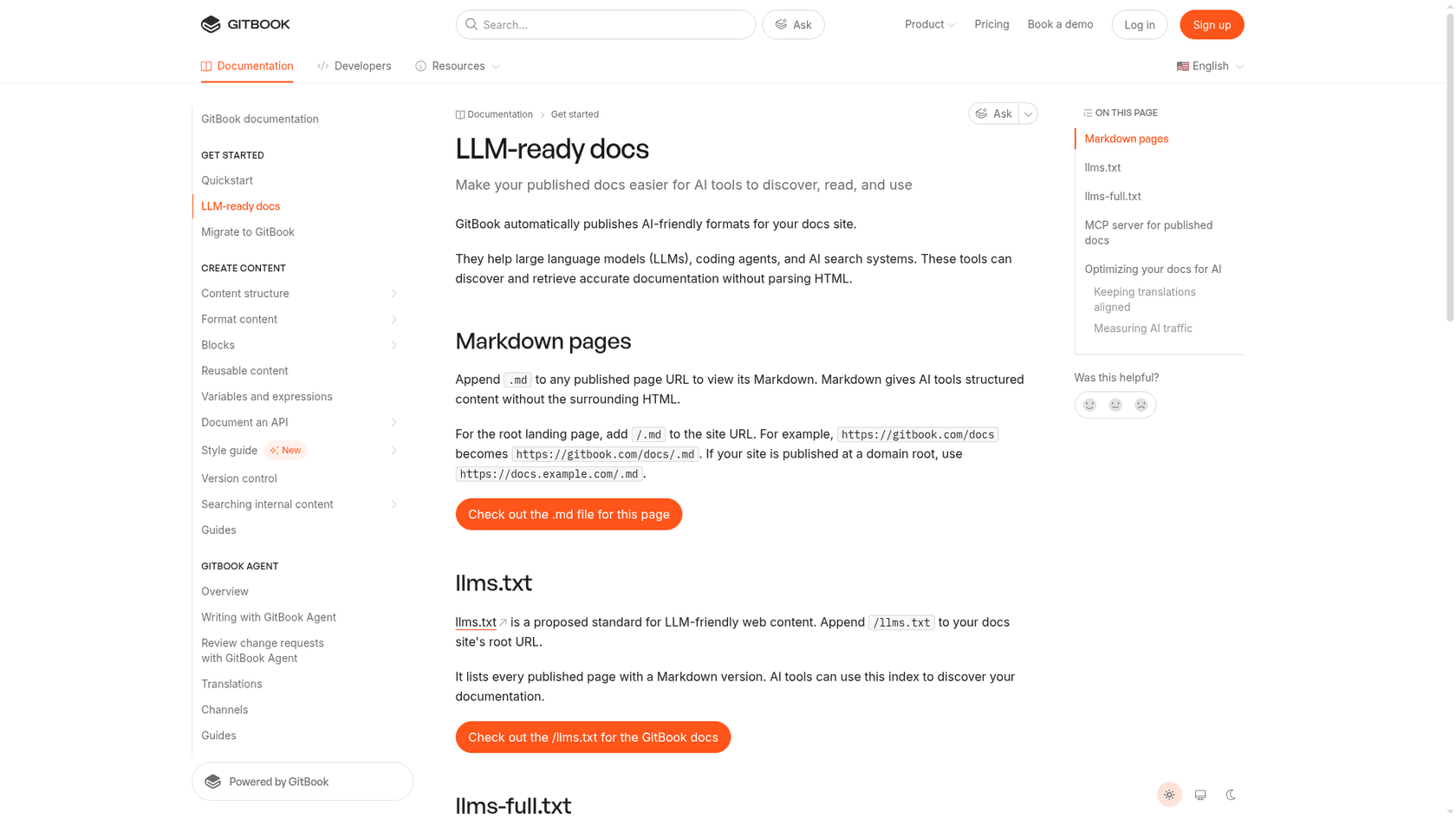
| Platform | llms.txt | Markdown pages | Watch out for |
|---|---|---|---|
| GitBook | Automatic, plus llms-full.txt | Append .md to any page | Hidden pages are still included in llms-full.txt and the MCP server |
| Mintlify | Automatic, also at /.well-known/llms.txt | Append .md; HTML pages link their markdown version | The "Don't index project" setting returns 404 for llms.txt but not llms-full.txt |
| Document360 | Automatic, updated on every publish | Pages offer "View as Markdown" | Only public content is included; articles without a description appear by title only |
| Zendesk help center | No built-in option I could find; the KnowledgeBridge Marketplace app generates both files | Via the app, or your own help center export | You host and refresh the output |
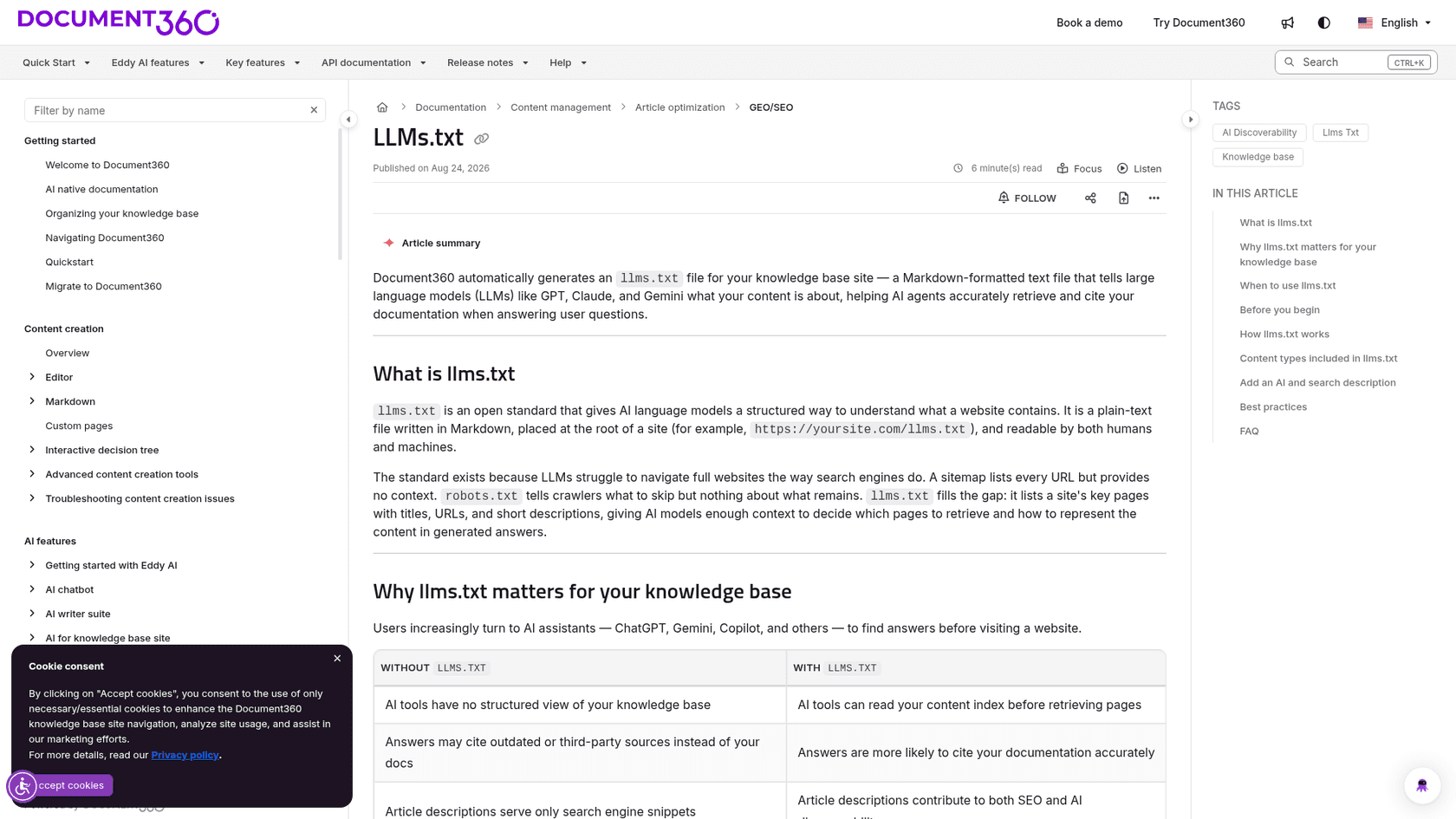
The GitBook row deserves a second look. Per GitBook's own docs, "Hiding a page only removes it from the published table of contents." If you hid an outdated or internal page instead of unpublishing it, agents can still read it.
Step 7: Offer an MCP server, and know which kind you're offering
MCP (Model Context Protocol) lets an AI app call your help center as a tool: search it, read a page, get markdown back, instead of scraping HTML. There are two very different kinds, and support teams mix them up.
Public docs MCP servers are for anyone's AI. GitBook "exposes a Model Context Protocol (MCP) server for every published docs site" at /~gitbook/mcp. Mintlify's search MCP server gives agents three tools: search, a read-only docs filesystem, and a submit-feedback tool that "reports a documentation issue back to your team when an agent finds a page that is incorrect, outdated, confusing, or incomplete." That last tool is the idea I'd copy first: the agent reading your docs files the bug report on them.
Account MCP servers are for your team's own AI tools, with your permissions:
- Help Scout's MCP connects Claude, ChatGPT or Cursor to conversations, customers and Docs content. It needs API access (Standard, Plus and Pro plans) and a Docs API key for the knowledge base tools, and AI agents "only access data that your specific user account is permitted to see." It's a different job from Help Scout's self-service tools for customers.
- Zendesk Bridge, in early access, lets external agents such as Claude, ChatGPT, Copilot or Gemini search your help center and work tickets through a governed MCP connection, per Zendesk's EAP article. It's separate from Zendesk's own MCP client, which goes the other way and lets Zendesk call other tools.
- Document360's MCP connects ChatGPT and Claude to your knowledge base to search and manage articles.
Neither kind replaces steps 1 to 3. An MCP server returns your article faster and cleaner; it can't make a stale article right. If you want the background on how agents use these servers, my post on AI agent MCP servers covers it, and Zendesk's ChatGPT channel early access program shows where this is heading: "generative answers" in ChatGPT "directly from your account's Help Center content", next to its conversational help center.
How do you test whether AI agents read it correctly?
Ask them. That sounds obvious, and almost nobody does it on a schedule. Take ten real questions from last month's tickets, the specific ones with numbers in the answer, and run them in three places:
- ChatGPT, Claude and Perplexity with search on. Check whether they cite your help center, and whether the number is current.
- A raw fetch.
curl -A "OAI-SearchBot" https://help.yoursite.com/your-articleand search the output for the key sentence. If it's missing, a crawler that doesn't run JavaScript can't see it. - Your own support AI, before customers see it. At eesel, every rollout gets tested against historical tickets first, because a bot that sounds confident and is wrong costs more trust than no bot at all.
For developer docs, Chrome's Lighthouse agentic browsing category (Chrome 150 or later, still experimental) checks llms.txt, layout stability and whether the accessibility tree is sound, which it calls the "machine-eye view" of your page.
The best testing loop I've seen is the one that runs on every ticket. Qontro, an ERP company, connected Freshdesk to eesel and loaded its help center, support forums and about 9,800 past tickets. Every new ticket gets a draft reply as an internal note with the help articles linked. The team compares each draft with the reply a person actually sent, and where the draft was wrong, "that usually points to a missing or incomplete help article, or a rule that needs tightening." The help center re-syncs every Friday. About one in ten drafts now goes out with little or no editing, and the bigger win so far is what the drafts reveal about the gaps.
That's knowledge gap analysis without a separate project. Innr uses the same honesty rule from the other direction: if the help center doesn't cover a question, eesel says so and hands over rather than guessing. Each handover is a missing article, which you can also find by mapping search queries to gaps.
What mistakes make a help center harder for AI to read?
The ones I see most, roughly in order of damage:
- Shipping llms.txt before fixing the articles. It lists your pages faster; it doesn't make them right.
- A copied "block all AI bots" robots.txt. It usually blocks OAI-SearchBot and Claude-SearchBot along with the training crawlers, which takes your help center out of AI search answers.
- Hiding instead of unpublishing. On GitBook, hidden pages stay in
llms-full.txtand the MCP server. - Answers in screenshots. The most common reason an AI says "I couldn't find that" about something you documented.
- Two live answers to one question. The AI will quote whichever passage looks closest, not whichever is newer.
- A monthly bot sync. Public search catches up in hours; a slow sync leaves your own bot behind the help center.
eesel: let your help center train a support teammate
If the main AI reading your help center is your own support bot, the fastest way to make it readable is to watch it read. eesel's AI helpdesk teammate joins your helpdesk, learns from your help center, macros and past tickets, and drafts or sends replies with the source article linked. Every draft your team edits shows you an article that needs a clearer answer, a date or a merge, the way it did for Qontro.
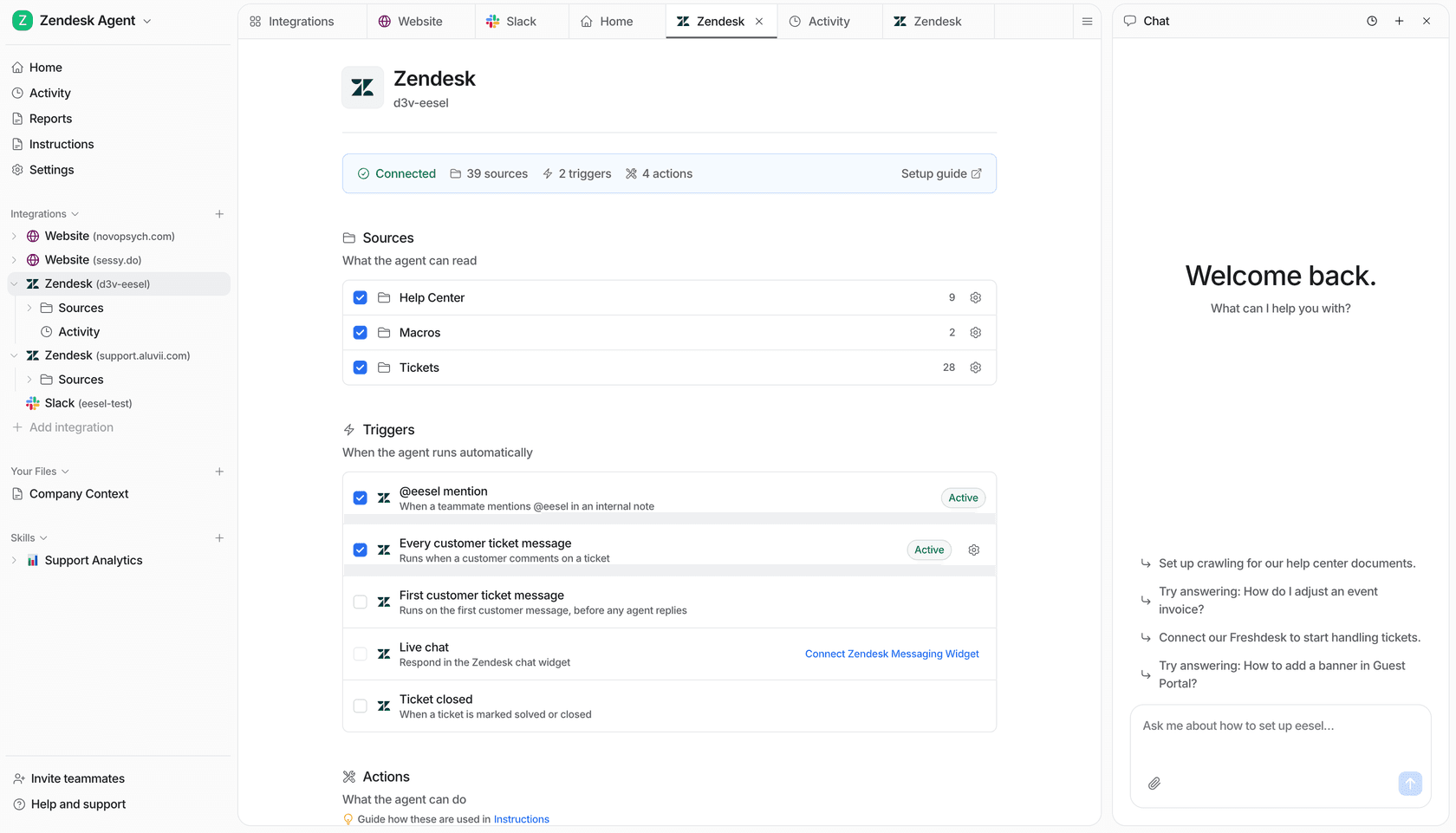
From a terminal, a coding agent can run eesel integrations sources zendesk to see what the help center sync actually holds, upload an approved policy file, and fire test questions with eesel chat before anything reaches a customer. Connecting the helpdesk itself still needs a person with admin access to approve it. Try eesel free and run your last ten tickets through it.