Zendesk MCP client: plans, setup, limits, and cost in 2026

Riellvriany Indriawan

Katelin Teen
Last edited November 12, 2026
The Zendesk MCP client lets an admin connect the account to outside MCP servers and use their tools as steps in action flows, so AI features can fetch data and take actions without custom API work. It has been generally available since August 10, 2026, on Suite Growth and up and Support Team and up. Zendesk lists no separate fee, so you pay your plan plus $1.50 per automated resolution. Know the limits first: OAuth only, HTTP only, 250 tools, 30-second calls. eesel takes the other route: it works from your tickets, and you can link MCP servers to it in chat.
What is the Zendesk MCP client?
It is Zendesk acting as the caller. The Model Context Protocol (MCP) is an open standard for letting AI tools discover and use another system's actions. Zendesk's setup article says that in the client role, Zendesk connects to external MCP servers, discovers the tools they expose, and uses them in action flows, advanced action flows and AI agents.
That is the opposite of the question most people type into Google. Many readers want Claude or ChatGPT to reach into Zendesk tickets. That is the server direction, and Zendesk's article treats it as a separate role. I wrote about that side in my Claude for Zendesk guide. This post is only about the client. If you are new to the platform, start with my Zendesk AI agent review and the Advanced vs Essential comparison.
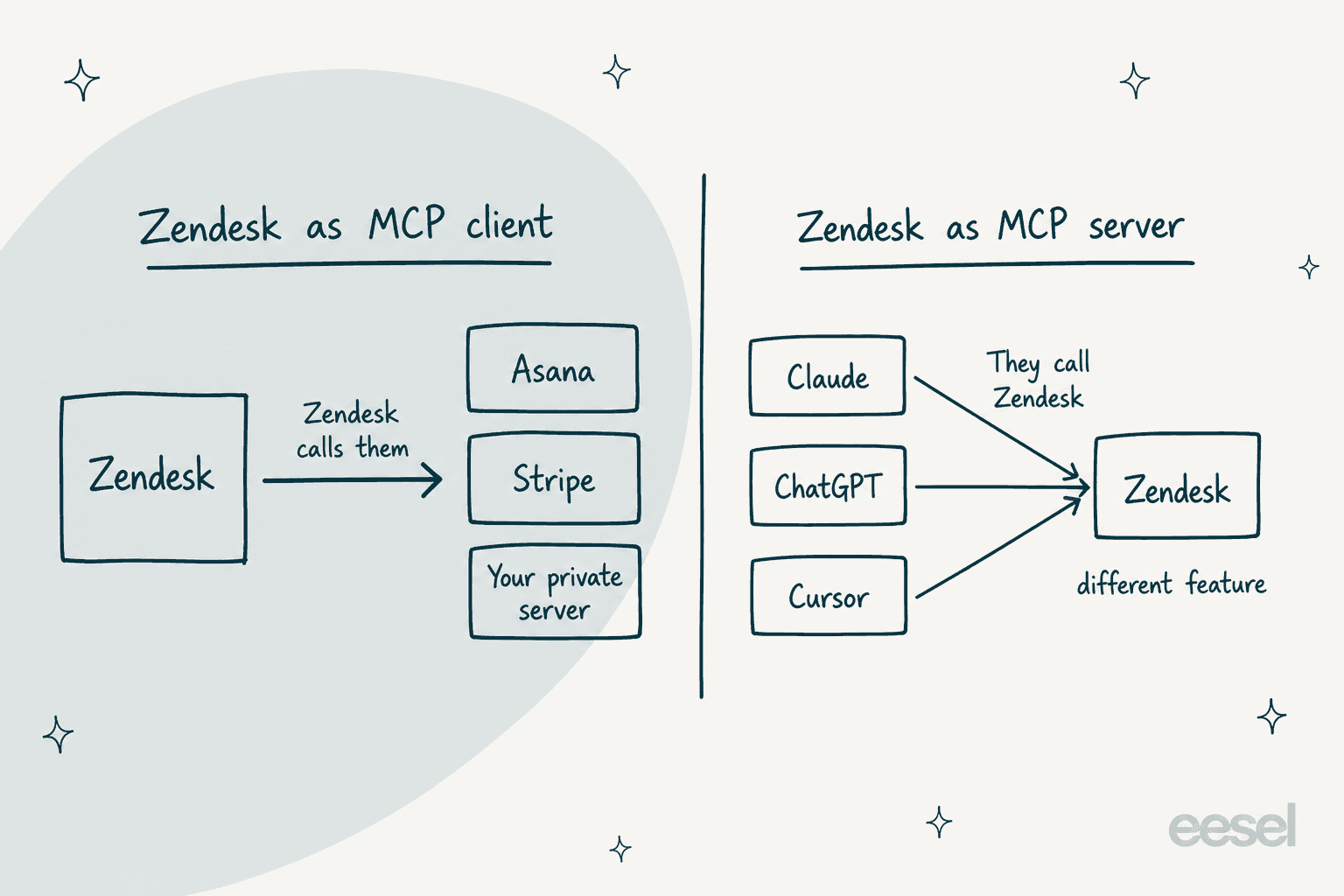
The reason Zendesk built it is plain in the general availability notice: traditional API integrations mean separate connections for each Zendesk feature and an API wrapper for each endpoint. With MCP you reuse one connection across many features, and the server describes its own tools.
A correction to older coverage, including eesel's own earlier posts: Zendesk's MCP client is not a "bring your own model" connector. It connects to tool servers, not to language models.
Which plans include it, and when did it ship?
The help center says it is available on Suite Growth, Professional, Enterprise or Enterprise Plus, and on Support Team, Professional or Enterprise. Here is the timeline from Zendesk's own pages:
| Date | What happened | Source |
|---|---|---|
| May 19, 2026 | Announced at Relate as "early access now" | Zendesk newsroom |
| June 11, 2026 | Early access program opened for sign-up | Zendesk community |
| August 10, 2026 | Generally available | Help center notice |
| November 11, 2026 | Setup article last edited | Setup article |
The newest piece in the same rollout, the AI agent launchpad, is a separate feature. Admins from the early access program keep their connections and flows. They now manage them from the Connections page in Admin Center, per the same notice.
What does the Zendesk MCP client cost?
I found no separate MCP charge. The Marketplace listing labels it a "Free integration" built by Zendesk, and Zendesk's docs mention no fee. What you do pay for is the AI that calls the tools. Per Zendesk's pricing page, AI agents bill per automated resolution: $1.50 committed or $2.00 pay-as-you-go, with plan allowances of 5 resolutions per agent per month on Support Team and Suite Team, and 10 on Suite Professional.
| Cost item | Amount | Source |
|---|---|---|
| MCP client connector | Listed as free | Marketplace |
| Committed automated resolution | $1.50 | Pricing page |
| Pay-as-you-go resolution | $2.00 | Pricing page |
| Suite Team / Professional, per agent per month, billed yearly | $55 / $115 | Pricing page |
The deeper math is in my Zendesk AI pricing and outcome-based pricing guides. If you track what counts, start with automated resolution metrics.
How do I connect Zendesk to an MCP server?
You need to be a Zendesk admin. The steps below come from the setup article, and you do them in Admin Center.
- Go to Apps and integrations, then Connections, then Connections.
- Click Add connection, choose Connect to an MCP server, and click Next.
- Enter a name and description, then the server's URL.
- Click Test URL to validate the server.
- Enter OAuth client details if the server asks (client ID, secret, endpoints). Some servers need none, like Stripe's.
- Finish the OAuth popup. If the external service wants a redirect URL, use the one Zendesk gives:
https://zis.zendesk.com/api/services/zis/connections/oauth/callback. - Save, then tick which of the discovered tools to expose.
Zendesk's examples are a good sanity check for what a working server looks like, and eesel has its own Asana and GitHub integrations if you want those systems on the eesel side:
| Server | URL | Client details |
|---|---|---|
| Asana | https://mcp.asana.com/v2/mcp | Create an OAuth app, copy ID and secret |
| Stripe | https://mcp.stripe.com | Not required, detected on test |
| GitHub | https://api.githubcopilot.com/mcp/ | Create an OAuth app, copy ID and secret |
MCP is not the only way to reach outside systems: webhooks and the API channel still work, and OAuth scopes matter when you build your own server. If you want a hands-on feel for the protocol, my MCP for customer support and AI agent MCP server explainers cover the basics.
What are the limits of the Zendesk MCP client?
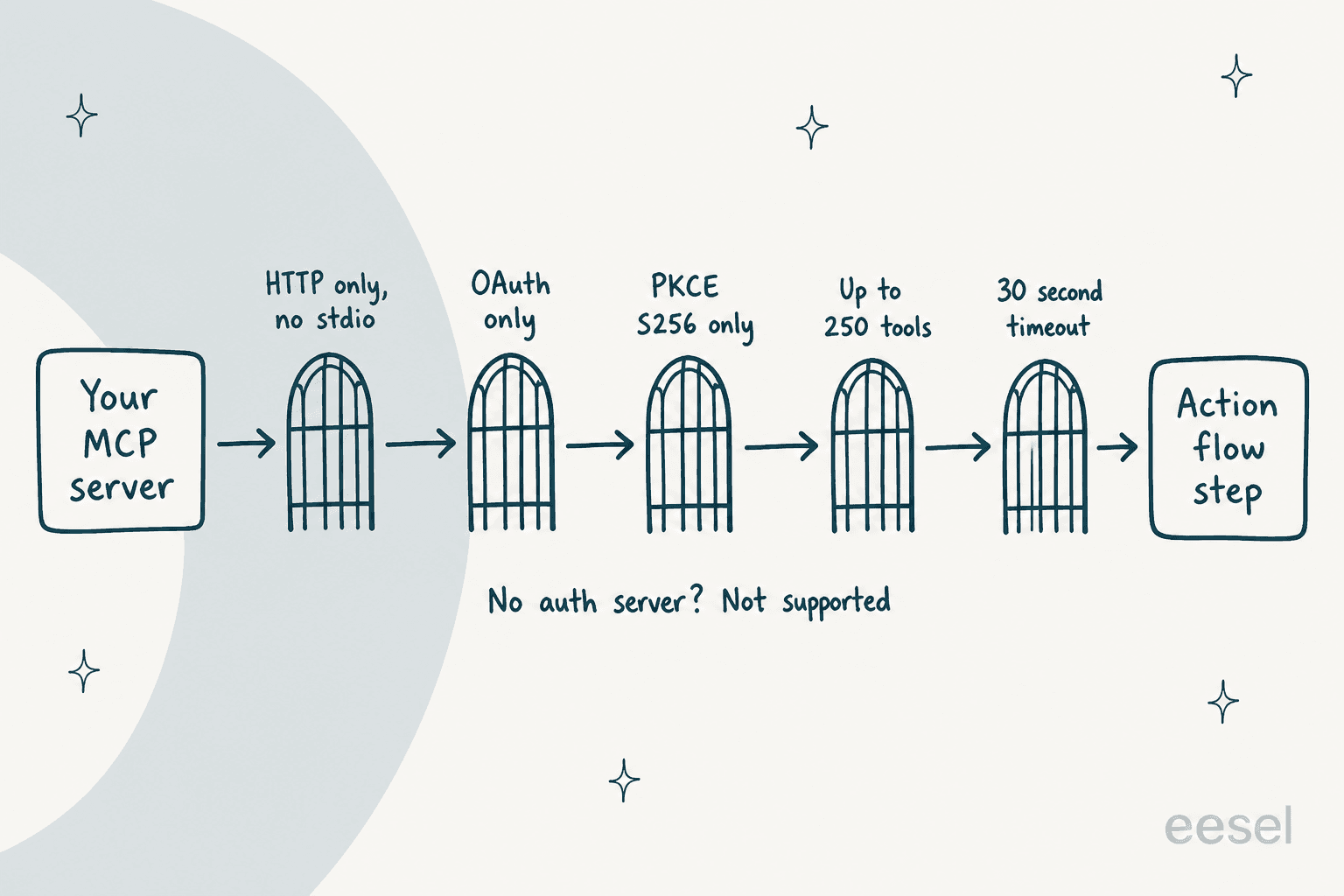
This is where I would slow down. The connector is quick to click through but strict about what it accepts. Zendesk's docs spell out a short list of gates, and your server has to clear all of them. Test in a sandbox first, and read Zendesk's notes on security and compliance and AI agent data privacy before sending ticket data to a third party.
| Limit | What Zendesk says |
|---|---|
| Transport | HTTP servers only; stdio isn't supported |
| Authentication | OAuth only; servers with no authentication aren't supported |
| PKCE | S256 is supported; servers that only support the plain method aren't |
| Tool count | Action builder paginates and retrieves up to 250 tools per server |
| Timeout | MCP tool calls have a 30-second timeout |
| Restricted servers | Servers that restrict access by client aren't supported, though the owner may allowlist Zendesk |
| Data | External calls may transmit data outside your selected region; step outputs are retained for 7 days |
| Server count | No limit on the number of connected servers |
Source: Zendesk's setup article. Two details deserve a second look. First, tool outputs only become structured data if you map an output schema; otherwise Zendesk treats the result as one string, and you need a custom code step to pull fields out. Second, when a server changes a tool, existing flows keep using the old version until you remove and re-add the step. That is a quiet way for a flow to drift, so retest after every tool refresh.
How do I use MCP tools in action flows and AI agents?
Once a connection exists, the tools show up in the action builder under External actions, tagged MCP. You add one as a step, fill its inputs, and Zendesk calls the tool on the external server when the flow runs. From there Zendesk says the flow can power auto assist, AI agents, and custom agents (still EAP). For the agent side, my guide to Zendesk AI agents and the Copilot comparison show where those flows plug in.
Advanced action flows can use MCP tools too, but you prompt them in words. Zendesk's example: when a ticket gets the order status tag, use the named connection and tool to look up the order by order_ID, then add the status as an internal note. Always review the generated code and flowchart before publishing. A flow that fails should still hand off cleanly, so pair it with sensible escalation rules and the conversation flow builder.
One idea I'd keep from the Hacker News crowd: more tools is not more capability.
"It's because the broader the set of 'tools' the worse the model gets at utilizing them effectively. By constraining the use you ensure a much higher % of correct usage."

Zendesk's tool checkboxes are the right response. (The same idea shows up in Freshworks' MCP gateway and ServiceNow's MCP integration.) Expose only the three or four tools a flow truly needs, not all 250.
Where do Zendesk's own pages disagree?
Three conflicts I found, so you can check before you buy or plan a rollout:
- Plan names. The help center lists Suite Growth and up, but the current pricing page sells Suite Team, Professional and Enterprise, with no Growth tier. A Suite Team buyer should confirm the feature is included.
- Plan scope. The Marketplace listing says the connector is available on any Suite or Support plan, while the help center names Growth and Team as the floor.
- Dates. Zendesk's MCP client blog post shows "Last updated September 16, 2025", yet it says the client is now generally available, and the help center puts GA at August 10, 2026. I trust the dated help-center notice.
What I could not confirm is the other half. At Relate on May 19, 2026, Zendesk also announced a Zendesk MCP server, listed as early access that summer. I found no help-center article for it, so I would not plan around it yet.
How does eesel relate to the Zendesk MCP client?
I work the eesel support queue, so I see this from the ticket side. The Zendesk MCP client solves one problem: your own Zendesk workflows can reach tools in other systems. It doesn't read your past tickets, draft replies from your macros, or decide when to hand over to a person. That is the job of an AI teammate.
eesel connects to Zendesk directly and works from help center articles, macros and tickets. smava runs three eesel agents on one Zendesk shared by two brands: one categorises every ticket, one drafts the reply from the macro library, and one prepares the customer-ready answer for each brand. In a month it handled about 27,000 tickets, with people approving the drafts. SE Ranking puts three product agents on three Zendesk connections, so each live chat reaches the agent for that product.
MCP shows up on the eesel side in two ways, and the diagram below shows how the directions differ.
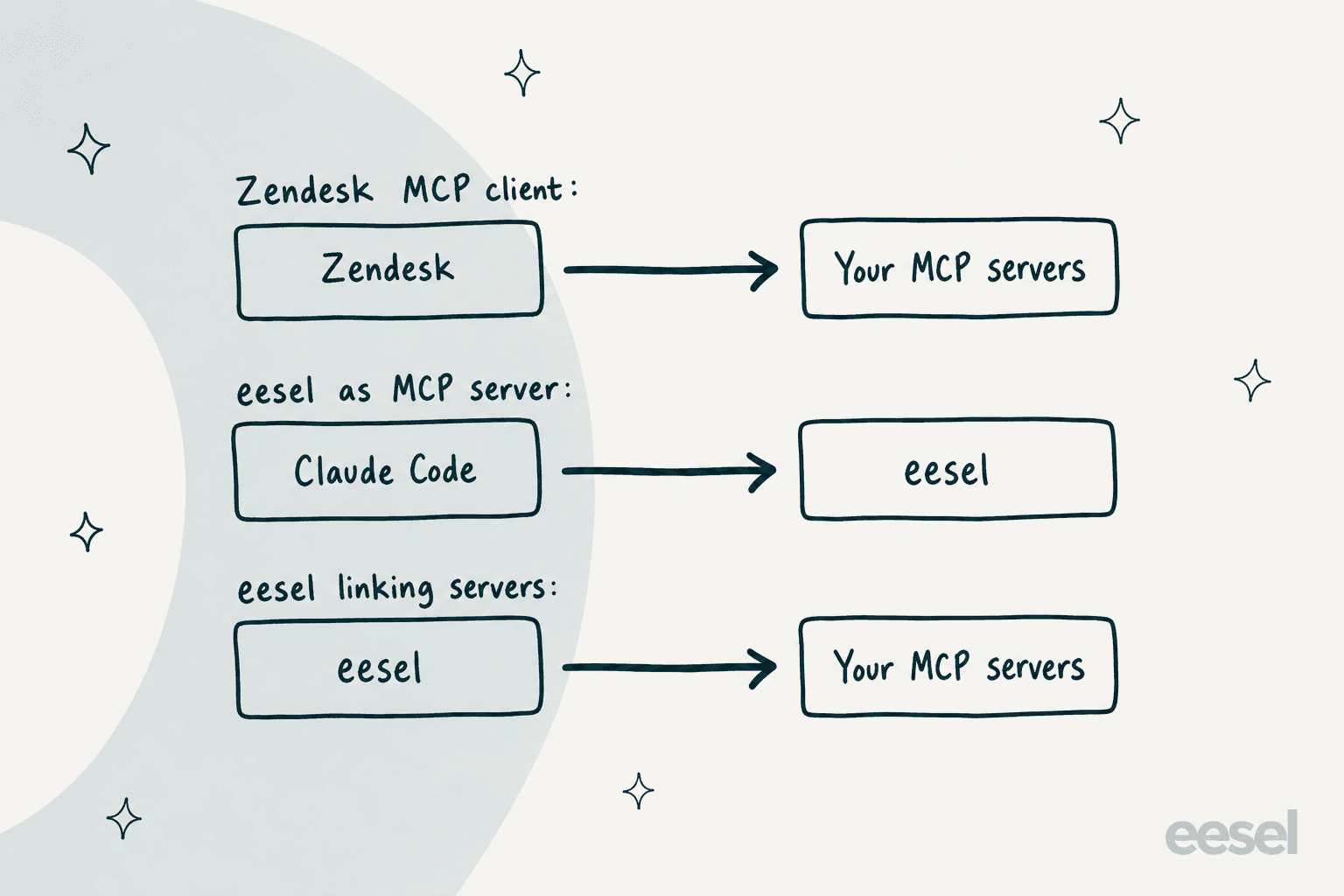
- Your workspace is an MCP server.
npx @eesel/cli mcp tokenprints a URL, a token that lasts 30 days, and a ready-madeclaude mcp addline. Claude Code or Cursor can then chat with your agent, check activity and switch automations on or off, per the eesel MCP docs. - eesel can link your MCP servers. Ask in chat, for example
eesel chat "link the MCP server at https://mcp.example.com/mcp". A server that needs a key or OAuth gets a private form; one that needs none waits for a person to approve it.
With the eesel CLI, an AI coding agent can upload approved knowledge such as exported macros and help articles, adjust instructions, and ask test questions to check answers before going live. A person with admin access still approves the Zendesk connection itself.
A support manager at a bus-tracking service once told eesel's team on a sales call that they wanted to "create an application that will be able to handle 60% of the incoming zendesk tickets and know when to pull a real person in for better analysis and resolution." That is the gap I see between a tool connector and a teammate: the connector moves data, and the teammate owns the ticket until it knows to escalate. For more, compare eesel vs Zendesk AI or read my take on Zendesk AI alternatives.
If you run your own server, the helpdesk API and support agent API guides cover the build side, and Claude Code MCP tools shows the coding-agent angle. For terminal workflows, see CLI for customer support. Two honest limits on my side. eesel doesn't replace the Zendesk MCP client if your goal is a no-code flow inside Zendesk's action builder. And an MCP link is only as safe as its scope: as one developer put it, treat the model-to-computer interface as untrusted until proven otherwise.
"We should view the whole LLM <> computer interface as untrusted, until proven otherwise... unfortunately many of them provide direct access to your machine and/or the internet, making them ripe as an attack vector."
Try eesel on your Zendesk
Want an AI for Zendesk that works from your own tickets instead of a toolbox? eesel plugs into Zendesk, learns your help center and macros, and drafts replies your team approves. If you also run MCP servers, ask it to link them. Check eesel pricing and start with a small queue.
Frequently Asked Questions
What is the Zendesk MCP client?
It is a feature that lets a Zendesk admin connect the account to external MCP servers, such as Asana, Stripe or GitHub, and use their tools as steps in action flows. Zendesk's setup article describes Zendesk as the client that calls other systems.
Is the Zendesk MCP client the same as a Zendesk MCP server?
No. The client makes Zendesk call out to other servers. A server would let tools like Claude or ChatGPT call into Zendesk. For that second direction, see my guide to Claude for Zendesk and ChatGPT for Zendesk.
Which Zendesk plans include the MCP client?
Zendesk's help center lists Suite Growth, Professional, Enterprise and Enterprise Plus, plus Support Team, Professional and Enterprise. The Marketplace listing says any Suite or Support plan, so confirm your plan with Zendesk. My Zendesk Suite pricing breakdown covers the tiers.
How much does the Zendesk MCP client cost?
The Marketplace page calls it a free integration, and I found no separate MCP fee in Zendesk's docs. AI agents that use it still bill per automated resolution, $1.50 committed or $2.00 pay-as-you-go on the pricing page. See Zendesk AI pricing for the full math.
Can I connect an MCP server that has no login?
Not in Zendesk. The help center says servers that require no authentication aren't supported, and OAuth is the only method. Stdio servers aren't supported either, only HTTP. eesel can link a no-key server, but a person approves the link first, as the eesel CLI docs describe.
Can Zendesk AI agents use MCP tools?
Yes, through action flows. Zendesk says MCP tools can power auto assist, AI agents and custom agents, which are still an early access program. See how auto assist actions work for the Copilot side.
Is there a way to use MCP with Zendesk without building flows?
Yes. eesel connects to Zendesk directly, and you can ask it in chat to link an MCP server. It is worth a look if you want an AI for Zendesk that works from your tickets and macros first.