ChatGPT for Zendesk: the four routes in, and what each actually does

Rama Adi

Katelin Teen
Last edited September 4, 2026
The two things people mean by "ChatGPT for Zendesk"
I build integrations for a living, and this is the question that trips people up before any code gets written. When someone asks to "add ChatGPT to Zendesk," they almost always mean one of two jobs, and the jobs are not the same.
Job one is better replies for the human agent: a model that drafts, summarises, and rewrites inside the ticket while a person stays in the seat. Job two is an AI that talks to the customer directly and closes the ticket without anyone touching it, which is the difference between an AI agent and a chatbot. Zendesk has native features for both, and it calls them different things, which is where the confusion starts.
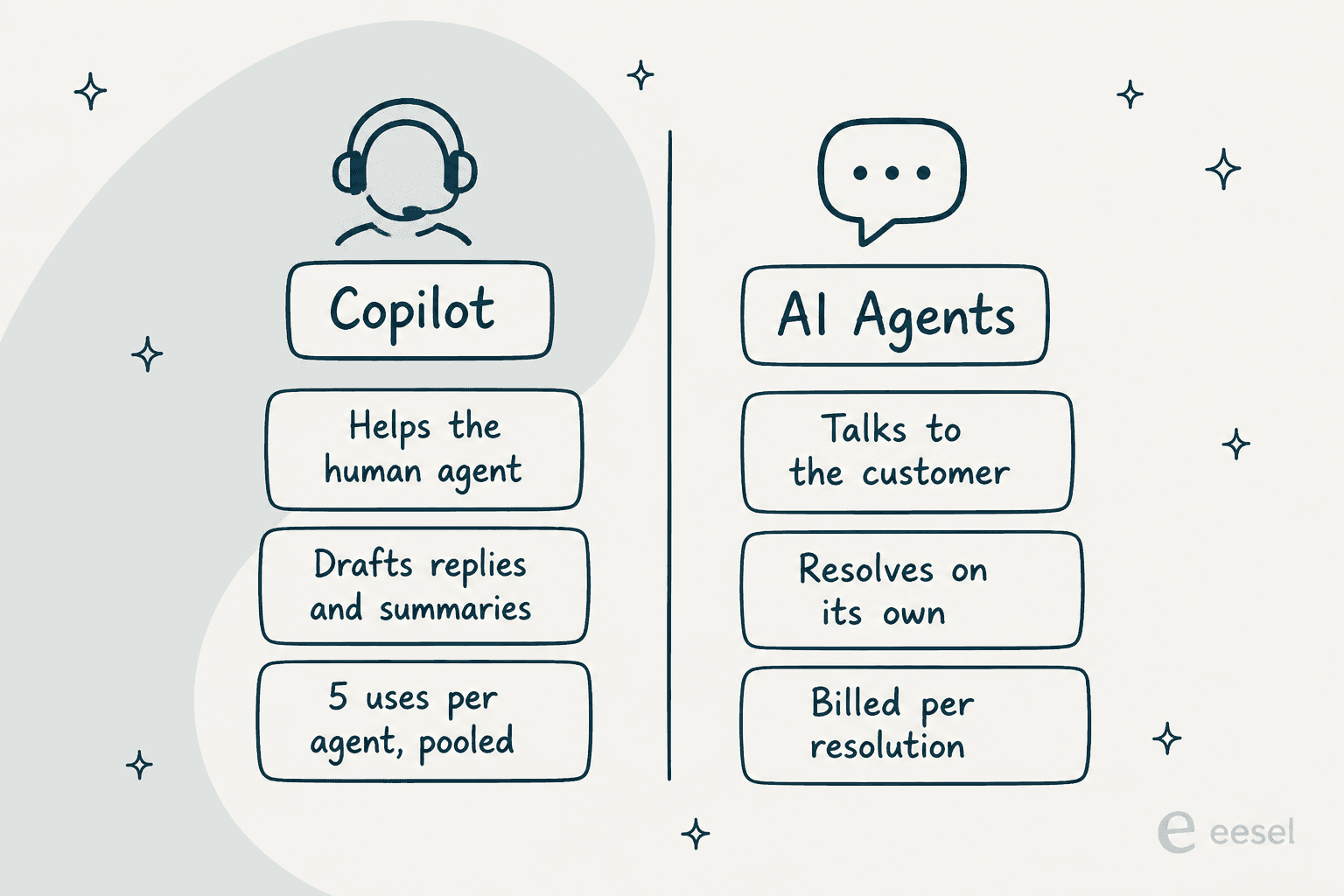
Keep that split in your head as you read the routes. Copilot is agent-assist. AI Agents are customer-facing. "ChatGPT" can plug into either lane, and the cost and effort are wildly different depending on which one you actually need.
Route 1: turn on the OpenAI that's already inside Zendesk
Here is the fact most "connect ChatGPT to Zendesk" guides skip: you may not need to connect anything. Per Zendesk's own AI page, its generative features are "powered by OpenAI (using zero data retention endpoints)," alongside models it hosts on Azure, Bedrock and Google Cloud. OpenAI confirms the relationship from its side too, with a Zendesk case study describing agents built on GPT-4o, tested against newer models like o3-mini, across a platform that handles more than 4.6 billion resolutions a year and targets 80% automation.
So the OpenAI you want is already there. On the agent-assist side, Zendesk Copilot drafts a suggested reply and proposes the next action, and you approve or edit it.
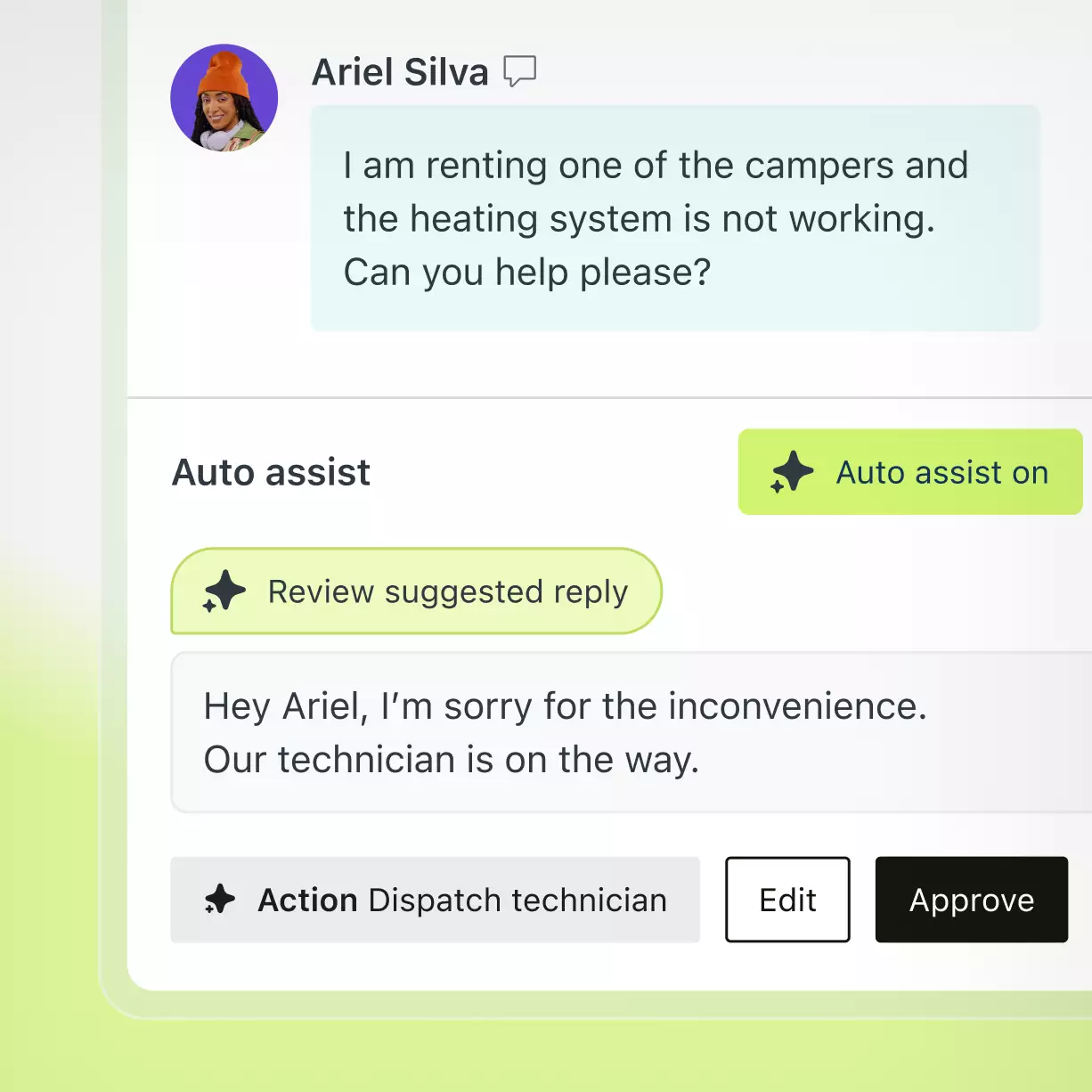
On the customer-facing side, Zendesk AI agents can answer a ticket to completion. Both are covered in depth in my Zendesk AI breakdown and the guide to Zendesk AI agents.
What Route 1 costs
This is where you need to read the Zendesk pricing page carefully, because the two lanes bill in completely different ways.
- Copilot (agent-assist) is a $50 per agent, per month add-on, paid annually and available on Suite Professional and higher. Its writing tools and ticket summaries are metered: five uses per agent per month, pooled across the team, and capped at 500 per instance regardless of headcount.
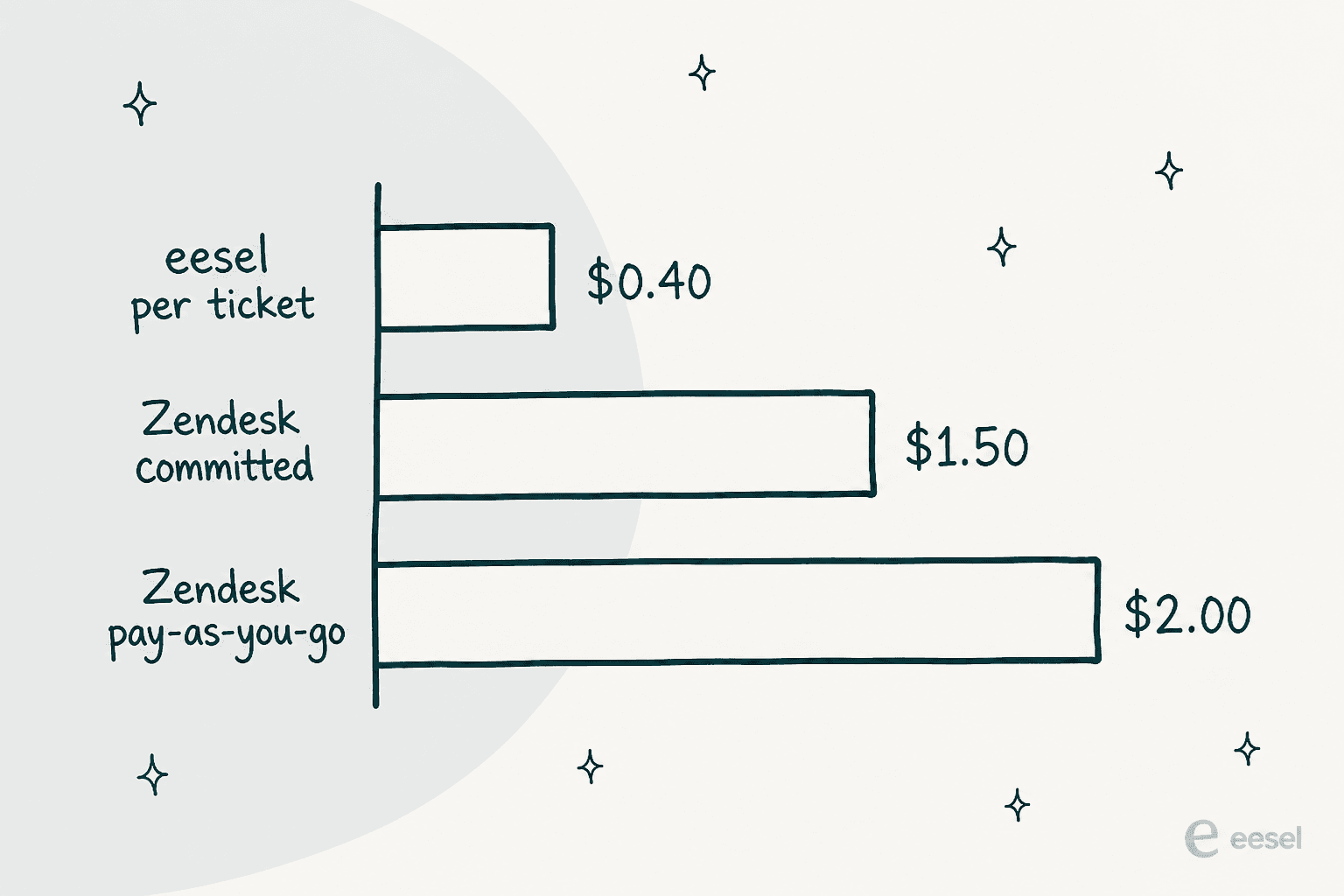
- AI agents (customer-facing) are billed per automated resolution, meaning a request the AI closed with no human escalation. The published rate is $1.50 committed, or $2.00 pay-as-you-go, flat across the self-serve plans, with a small included allowance (5 to 10 per agent, capped at 10,000 a year).
And that sits on top of a seat. Zendesk's published plans start at $19 for Support Team, $55 for Suite Team, and $115 for Suite Professional per agent per month on annual billing. If you want the exact ladder and the gotchas, my Zendesk review walks through it.
Route 1 is the fastest path to "GPT inside Zendesk" because it is a toggle, not a build. The trade-off is the per-resolution meter and the pooled Copilot allowance, which get expensive at volume.
Route 2: connect ChatGPT as a client over Zendesk's MCP
This is the route people actually mean when they say "connect ChatGPT to Zendesk": open ChatGPT, ask it about your tickets, and let it act on your Zendesk data. As of 2026 there is a sanctioned way to do it.
At Relate 2026, Zendesk announced native Model Context Protocol support in both directions. The MCP Server exposes your tickets, knowledge and other data to external AI "in a trusted and governed way," and the MCP Client lets Zendesk's own agents reach out to external systems. The announcement is explicit that Zendesk AI agents now operate "across AI platforms like ChatGPT and Gemini," and Zendesk says the MCP Client reached general availability on August 10, 2026.
Model Context Protocol is just an open standard for letting an AI app talk to an external tool, so once the Zendesk MCP Server is connected, ChatGPT can read a ticket, summarise a backlog, or draft a response using real Zendesk context. It is a good copilot for an admin or a lead.
But here is the catch, and it is the same one I flagged in the ChatGPT for Zoho Desk and ChatGPT for Front guides: the MCP client only moves when you type. It is a chat window. Nothing fires when a customer opens a ticket at 2am, because there is no human at the keyboard to prompt it. This route makes you faster; it does not make the queue self-service.
Route 3: the third-party bridge, or build it yourself
If you do not want to wait on Zendesk's own MCP, there are two do-it-yourself paths, and I have shipped code down both.
The lighter one is a Marketplace app. The Zendesk Marketplace lists a free MCP Server app by Swifteq that "connects Zendesk to any MCP compatible AI assistant," names Claude Desktop and Cursor, and fetches data on request rather than storing it. It is a third-party partner build, not an official Zendesk or OpenAI product, but it does the bridging job for you.
The heavier one is the classic API pattern, and it is worth knowing because it is what every "AI in Zendesk" product is doing under the covers. Zendesk supports webhooks that fire on account activity and POST to a URL you own, wired to Support triggers and automations, with signed, authenticated payloads. So the build is: a trigger fires on a new ticket, a webhook POSTs it to your service, your service calls the OpenAI API, and you write the reply back through the Zendesk REST API. It is the same loop behind any automated ticketing system.
That works, and unlike Route 1 it needs no AI add-on because triggers and webhooks are core platform features. The honest cost is engineering: you own the prompt, the retrieval from your help center, the escalation logic, the retries, the monitoring, and every model bill from OpenAI. It is a real project, not a weekend. For most teams this is the route that looks cheap on paper and turns into a maintained internal product six months later.
Route 4: put a platform in front that answers on its own
The three routes above each leave one job undone. Route 1 bills per resolution and pools Copilot uses. Route 2 only moves when you type. Route 3 is yours to build and maintain. If what you actually want is GPT resolving tickets in your Zendesk queue, tested before it touches a customer, that is a fourth route: a platform that sits in front of Zendesk and does the answering.
This is what eesel does, and since it is the product I work on I will be specific about how it plugs in rather than hand-wave. eesel joins as a real AI agent inside Zendesk over OAuth, not a separate chat widget or a second inbox. It reads tickets, drafts and sends replies, adds internal notes, updates fields, and routes to groups, working inside Zendesk exactly like a human agent would.

Three things make it a different answer from the routes above:
- It trains on your actual history. It imports your help center, macros and past resolved tickets automatically, so the drafts sound like your team, not a generic bot reading a public FAQ.
- It fires on a trigger, not a prompt. You choose when it runs (any customer message, first message only for triage, or when a teammate mentions @eesel), so it covers the 2am ticket that Route 2 cannot.
- It simulates before it goes live. This is the part I would not ship a support bot without. I have watched confident-sounding bots quietly give wrong answers, which is why eesel runs against your past Zendesk tickets first and shows you per-topic coverage and gaps before a single customer sees it.
On cost, eesel is one fixed monthly price, from $299 a month for 500 credits (1 credit per ticket it actually handles), with no per-seat fee and no per-resolution surcharge on top of a seat. Against Zendesk's $1.50 to $2.00 per automated resolution, the gap is the difference between a predictable line item and a meter that climbs with volume.
What real Zendesk teams say about the AI
Sentiment on Zendesk's native AI is warm but grounded, which matches what I hear on sales calls. The drafts are good, not magic, and people ease into automation rather than flipping it all on:
"AI drafted responses are good - but not mind blowing. Macros still rule!"

"I've had good results with Advanced AI and Generative Replies. In my opinion Intents is key, but also not over engineering."
The most common piece of advice, and the one I agree with, is to start in draft mode and only automate the boring, repetitive categories once quality holds:
"Start in copilot/notes mode (agents review drafts), then turn on direct replies only for boring, repetitive categories once quality is stable."
That "draft first, automate the safe stuff" instinct is exactly why simulating on your own history matters. It is the fast version of that same caution.
All four routes, side by side
| Route | What it is | Answers customers on its own? | What it costs |
|---|---|---|---|
| 1. Native Zendesk AI | OpenAI-powered Copilot + AI agents, built in | AI agents yes; Copilot is agent-assist | $50/agent/mo Copilot add-on; $1.50-$2.00 per resolution |
| 2. ChatGPT over MCP | Official Zendesk MCP Server feeds ChatGPT | No, only when you type | Your ChatGPT plan; MCP is part of the platform |
| 3. Swifteq or DIY API | Marketplace bridge, or webhooks + your OpenAI key | Only if you build the trigger loop yourself | Swifteq free; DIY = OpenAI tokens + dev time |
| 4. A platform in front | eesel joins as an AI agent, trained + simulated | Yes, fires on a trigger | From $299/mo (500 credits) |
What I would actually do
If you already pay for Suite Professional and your volume is modest, start with Route 1: turn on the native AI, keep it in draft mode, and automate a couple of safe categories. It is the least work and the OpenAI models are already there.
If you are an admin who wants a smart assistant for yourself, Route 2 over the official MCP is a real upgrade, just do not mistake it for queue automation.
But if the goal is GPT resolving a real share of your Zendesk tickets, with your team's voice, tested before it goes live, and a bill you can predict, I would go straight to Route 4. That is the version of "ChatGPT for Zendesk" that actually takes work off the queue instead of just making one person faster. Our Zendesk AI alternatives piece has the wider field, and Claude for Zendesk covers the same setup if you would rather run Anthropic's model.
Try eesel for Zendesk
If you want the customer-facing lane without the per-resolution meter or a six-month build, eesel for Zendesk is the shortest path. It plugs into Zendesk over OAuth in under 30 minutes, trains itself on your help center and past tickets, and lets you simulate it on real ticket history before it ever replies to a customer, so you launch only when the coverage is where you want it. It is free to try with 100 credits, no credit card, and paid plans start at $299 a month for 500 credits (1 credit per ticket it handles).