Hermes Agent for Zendesk: how to connect it safely (2026)

Rama Adi

Katelin Teen
Last edited October 11, 2026
Why I looked at Hermes on Zendesk
My job at eesel is building integrations, and Zendesk is the helpdesk which I spent the most time inside. That is not by accident: the Zendesk marketplace was one of eesel's first growth channels, and we've been putting AI on live Zendesk queues for years. The lesson that keeps coming back is that the model is the easy part. The hard part is deciding what the AI may touch, then also proving it is ready before some customer find out it isn't.
Hermes Agent is the open-source, self-hosted agent from Nous Research, sitting at 252,613 GitHub stars under an MIT license. I covered the general question in Hermes Agent for customer support and the Freshdesk version in Hermes Agent for Freshdesk. Zendesk gets an own post, because its answer is shaped by a deadline that the other helpdesks don't have.
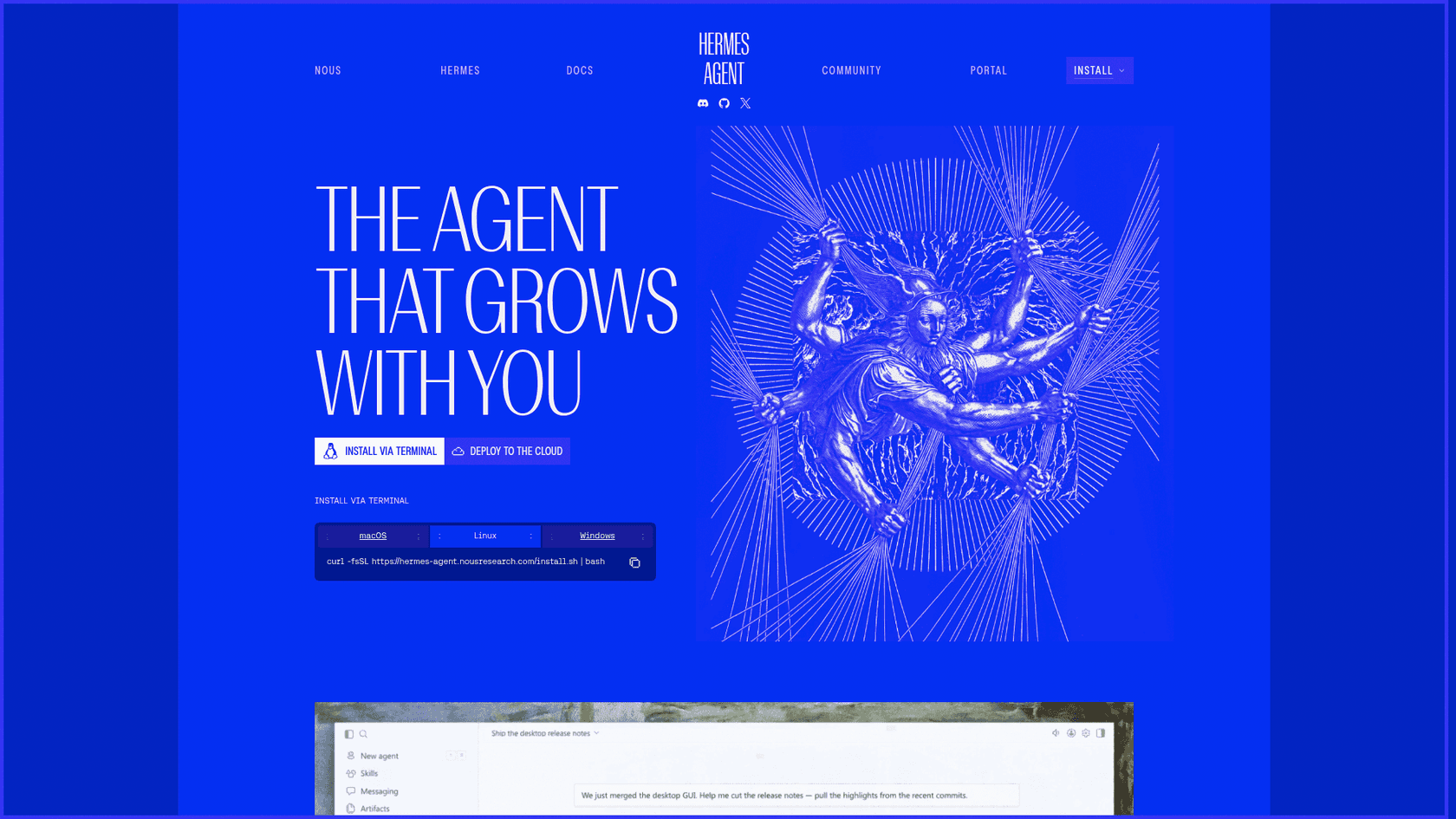
Hermes ships nothing Zendesk-specific. Its curated catalog of 68 MCP servers has no Zendesk entry, and I couldn't find anyone on Hacker News, Reddit or X describing a Hermes plus Zendesk setup. Everything below I assembled from the docs of the two vendors and the community code, which is anyway how you would have to build it.
The Zendesk deadline that shapes every setup
Most Hermes-to-helpdesk tutorials start with "paste your API key into .env." On Zendesk that advice has now an expiry date. Zendesk's OAuth migration guide opens with it: "Zendesk API tokens will be permanently deactivated on April 30, 2027."
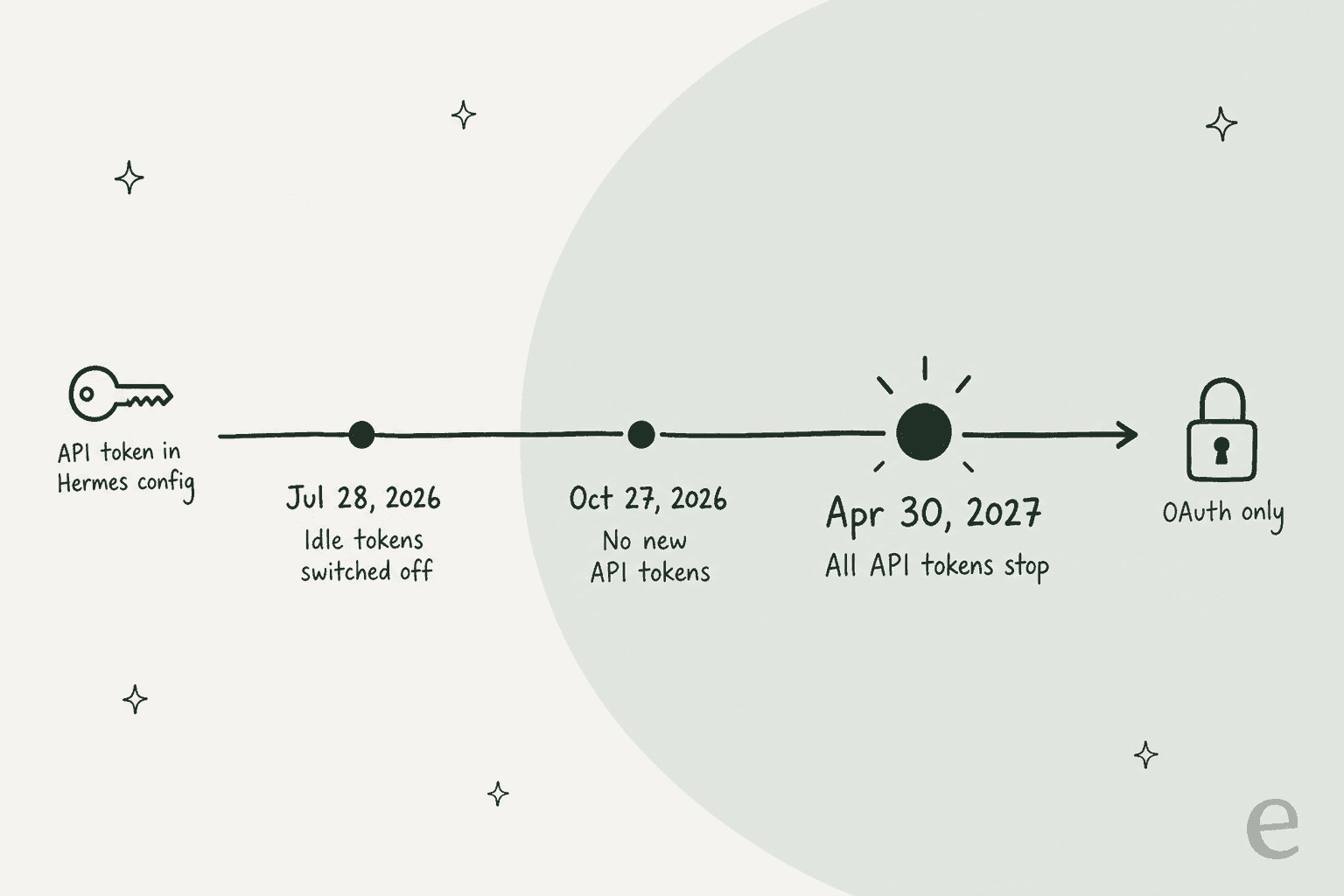
The three phases, all from that guide:
- July 28, 2026. Any token unused for 30 days is switched off automatically, and accounts created after this date can't use tokens at all.
- October 27, 2026. No account can create a new API token, through the UI or the API.
- April 30, 2027. Every remaining token stops working.
The 30-day rule is the sneaky one for an agent, a Hermes cron job you pause over the holidays can come back to a dead token. And Zendesk's reasons for retiring tokens are exactly the risks of handing one to an agent: "No expiry", "No scope restrictions", and the auth reference adds that a token "can be used to impersonate anyone in the account, including admins."
OAuth fixes that, but it changes the plumbing quite a lot. Access tokens last 30 minutes by default and 48 hours at most, so a static Authorization header in Hermes' config.yaml won't survive. Something has to refresh the token. Hermes can do OAuth itself with auth: oauth, but only for remote MCP servers, and Zendesk doesn't run one you can point it at yet. In practice the refreshing happens inside of the Zendesk MCP server you choose, and picking that server well is most of the job, and my Zendesk API authentication guide covers the token types in more depth.
Four ways to connect Hermes to Zendesk
Here's every route I found, and who holds your Zendesk credentials in each:
| Route | How Hermes uses it | Auth | Holds your credentials |
|---|---|---|---|
| reminia/zendesk-mcp-server | Local stdio process under mcp_servers | OAuth with PKCE, per user | A token file on your server (124 stars, Apache-2.0) |
| Swifteq MCP Server | Hosted MCP endpoint | Marketplace app install | Swifteq's service |
| skills.sh skills | hermes skills install | Varies by skill | The skill author's setup (top one: 4,102 installs) |
| Zendesk trigger + Hermes webhook | Ticket event POSTs to a Hermes route | Webhook auth header | A route secret, plus one of the above to write back |
And the one you might be waiting for: the Zendesk MCP Server. Zendesk announced it at Relate on May 19, 2026, with a footnote reading "Early access this summer." I found no general availability notice in Zendesk's September 2026 release notes or its early access list. Don't confuse it with the MCP client that went GA on August 10, 2026, which lets Zendesk's own AI call out to other servers and does nothing for Hermes.
Today I'd pick reminia's server. It was rewritten for OAuth before the token deadline and refreshes tokens on its own. Its README also makes a point which I agree with: each operator authorizes "with their own Zendesk login," so Zendesk applies exactly the permissions it applies in the UI. Swifteq is the easiest if you don't want to host anything, with 500 free MCP calls a month per account, then 49 EUR a month from October 1, 2026, but your ticket data then flows through a third party. The webhook route is less a fourth option and more like a trigger: it tells Hermes a ticket arrived, and Hermes still needs one of the others to act on it.
How to set it up safely
This is the order I'd go in. The steps looks fussy, but each one is there because of a specific Zendesk or Hermes default that bites if you leave it alone.
1. Give Hermes its own light agent user
This step matters more than any of the others. reminia's create_ticket_comment tool takes a public flag, and in its source code that flag defaults to True. If the model forgets to pass public: false, the "draft" goes to the customer as a reply and gets emailed. Hermes' tool filter can hide a tool, but it can't pin an argument, so the filter alone is not going to save you.
Zendesk's role system can. Per Zendesk's light agent docs, "Ticket comments by light agents are private, including the first comment of any tickets they create." So if Hermes authenticates as a light agent, Zendesk turns every comment into an internal note, no matter what the model sends.
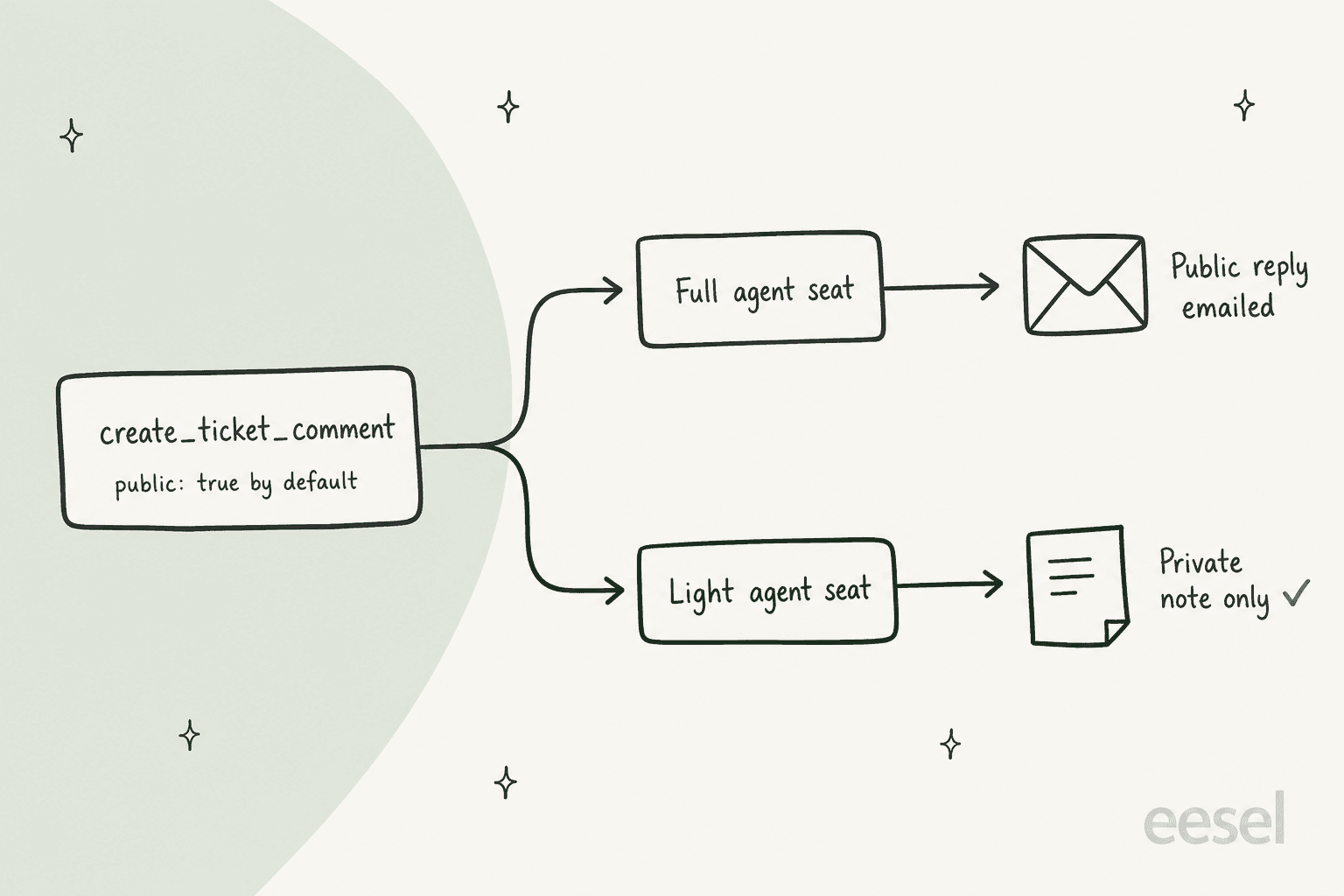
Create a user named something like "Hermes (draft only)", give it the light agent role, and let it view all tickets (or just the groups it should draft for). Light agent seats are included on most Suite plans: up to 50 on Growth, 100 on Professional, 1,000 on Enterprise, and an add-on on Team. Two caveats. Zendesk prohibits using the API to give light agents more than they get in the UI, which this setup doesn't do. And since a seat is normally a person's login, I'd confirm with your Zendesk account rep that a bot user on one is fine; if not, budget a full seat and lean harder on step 3. Zendesk's roles and permissions covers the rest of the role setup.
2. Register an OAuth client with narrow scopes
In Admin Center, go to Apps and integrations > APIs > OAuth clients and create a public client, since reminia's server uses PKCE rather than a stored secret. Set Allowed scopes, which Zendesk describes as a ceiling: "no token issued by this client can exceed these scopes." For a drafting bot, tickets:read tickets:write users:read hc:read is enough. If you skip scopes, Zendesk defaults to full read write.
Then sign in as the Hermes light agent and run uv run zendesk-auth once. That's the one browser step. After it the server refreshes tokens by itself, it rotates the refresh token each time and keeps the file at 0600 permissions. A second reason to prefer this flow, straight from reminia's README: client credentials tokens "are attributed to the Zendesk user who created the OAuth client," usually an admin, so every note would look like your admin wrote it. My Zendesk OAuth app walkthrough has screenshots of the client form.
3. Add the server and filter its tools
Hermes keeps MCP servers under mcp_servers in ~/.hermes/config.yaml, and tools.include whitelists tools per server (Hermes MCP docs). Here's my assembly of reminia's README and Hermes' syntax. It's not an official example from either project:
mcp_servers:
  zendesk:
    command: "uv"
    args: ["--directory", "/opt/zendesk-mcp-server", "run", "zendesk"]
    env:
      ZENDESK_SUBDOMAIN: "yourcompany"
      ZENDESK_CLIENT_ID: "${ZENDESK_CLIENT_ID}"
      ZENDESK_OAUTH_SCOPES: "tickets:read tickets:write users:read hc:read"
    tools:
      include:
        - get_ticket
        - get_ticket_comments
        - get_tickets
        - create_ticket_comment
Leaving out update_ticket and create_ticket means Hermes can't change status or reassign, and it can't open new tickets either, none of which a drafting bot has reason to do. Hermes also has a per-server trust key. On an untrusted server, "every write-capable tool call... requires user approval" (MCP config reference), but the default is full. If someone is watching Hermes in Slack, untrusted gives you a second check on each note.
4. Pick a trigger: chat, cron or webhook
Hermes needs to know when to look at a ticket:
- On request. An agent pastes a ticket number into Slack and asks for a draft. A human stays in the loop the whole time.
- Cron poll. Hermes' scheduler ticks every 60 seconds, and a pre-check script can print
{"wakeAgent": false}so the model only runs when there's something new (cron docs). - Webhook. A Zendesk trigger fires a webhook at a route like
https://your-server:8644/webhooks/zendesk.
The webhook is the fastest one and also the fiddliest, because both sides sign requests differently. Zendesk sends X-Zendesk-Webhook-Signature, a base64 HMAC of the timestamp plus the body (Zendesk docs). Hermes rejects any request without "a recognized signature header," and its list is GitHub's, GitLab's, Standard Webhooks, or its own hex-encoded X-Webhook-Signature-V2 (webhook docs). None of them match Zendesk's format.
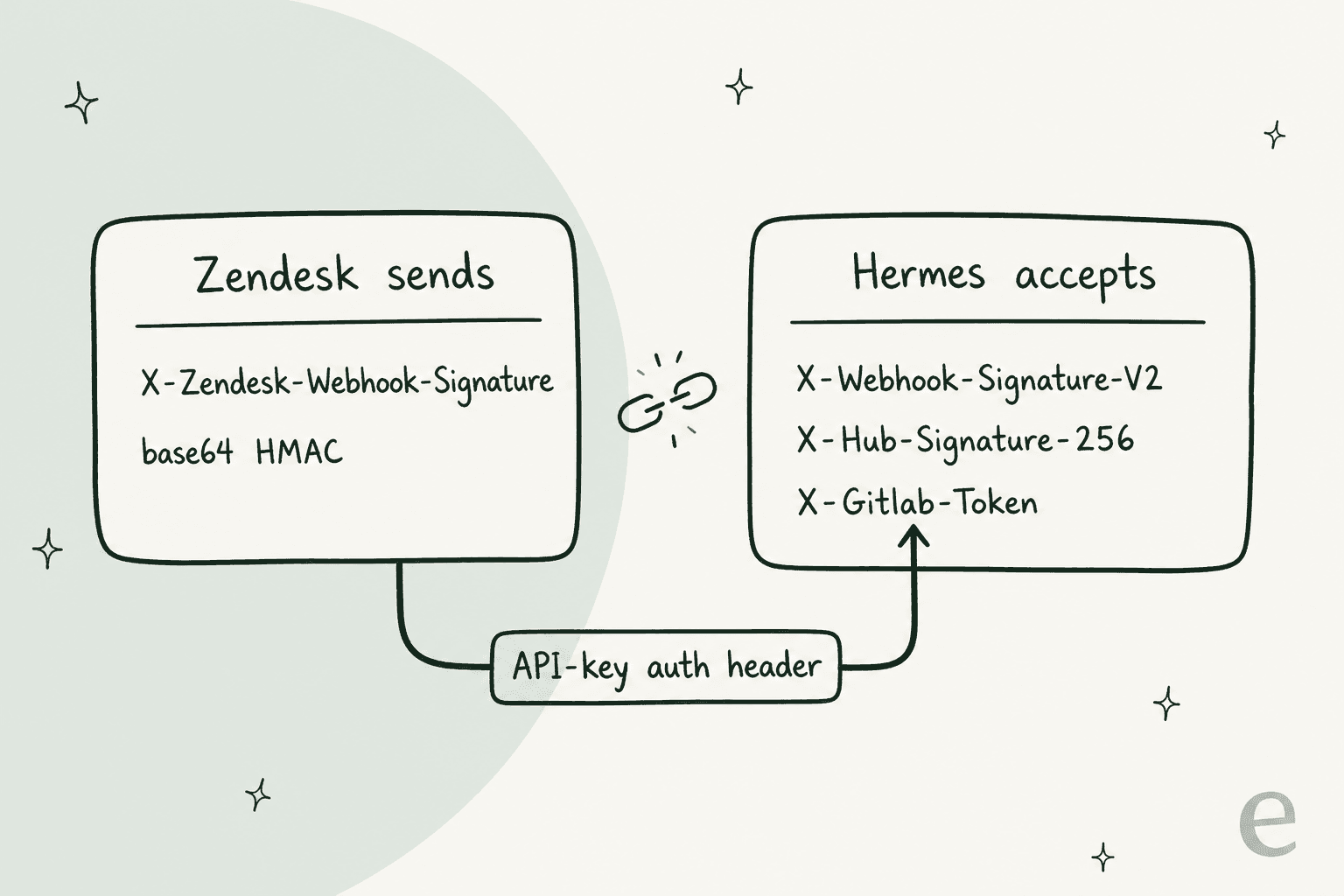
There is a bridge, though I haven't run it end to end, so treat it as my reading of the both docs. Zendesk webhooks support API key authentication, which sends a header name and value you choose. Hermes' GitLab scheme is a plain secret match on X-Gitlab-Token. Set the Zendesk webhook's API key header to X-Gitlab-Token with your route secret as the value, and Hermes should accept it. It's weaker than an HMAC (no replay protection), so keep the route behind HTTPS.
Two more details. Webhook runs start with a narrow default toolset, so the route needs a manual toolsets: ["mcp-zendesk"] grant before it can read tickets. And Zendesk gives each webhook a 12-second timeout and retries timeouts up to five times (webhook docs), so a slow Hermes host can see the same ticket more than once. Hermes' route-level coalesce setting, which debounces repeated events for the same ticket into one run, helps here.
5. Test on old tickets before you trust it
This is where I would spend the most time, and it's also where Hermes helps the least. It has no replay mode for running last month's tickets and scoring drafts against what your team actually sent.
You can build one: pull solved tickets through the incremental export API, run Hermes over them in a sandbox profile, and compare. Incremental exports are capped at 10 requests a minute (rate limits), so worth to pull the dataset once and cache it. For what "good enough" looks like, see my guide on how to train AI on a knowledge base.
Before you go live, run through this. It's the list I'd want ticked before a bot touches a real queue:
What Hermes on Zendesk actually costs
The license is free. Everything around of it isn't.
The bot's seat. A light agent seat if your plan includes one, otherwise a full agent seat. Zendesk's pricing page lists Support Team at $19, Suite Team at $55 and Suite Professional at $115 per agent per month on annual billing. My Zendesk pricing breakdown covers the other tiers.
API headroom. Hermes shares your account's rate limit with every other integration. A useful draft is about four calls: the ticket, its comments, similar tickets, then the note.
| Plan | Support API requests/min | Light agents included |
|---|---|---|
| Suite Team | 200 | Add-on |
| Suite Growth | 400 | Up to 50 |
| Suite Professional | 400 | Up to 100 |
| Suite Enterprise | 700 | Up to 1,000 |
| Suite Enterprise Plus | 2,500 | Up to 5,000 |
Limits come from Zendesk's rate limits page. At drafting volumes you won't hit them, though the Update Ticket endpoint have its own cap of 100 requests a minute per account, and a busy Zendesk API integration elsewhere can eat into Hermes' share.
Model tokens and a server. Bring your own provider key or use a Nous Portal subscription, plus a small VPS to run the gateway and the MCP server.
The build. This is the one people skip. A support manager at a bus-tracking company running about 200 Zendesk tickets a month described the goal to us on a sales call like this:
"create an application that will be able to handle 60% of the incoming zendesk tickets and know when to pull a real person in for better analysis and resolution."
That sentence is a whole product. There is the handling and the escalation logic, and then the "know when" part, which is the hardest. With Hermes you're building it, and paying in engineer hours on top of tokens and seats. My build vs buy breakdown puts numbers on that.
Where Hermes on Zendesk stops working
Everything above assumes the drafting shape. Once you point Hermes at Zendesk customers directly, you run into the same walls I hit in the general support review:
- Memory is per profile, not per requester. Built-in memory is
MEMORY.md(2,200 characters) andUSER.md(1,375), loaded into every session the profile runs (memory docs). Whatever it saves from one customer's ticket sits in the prompt for the next. - No Zendesk delivery target. A webhook run's
deliveroptions are chat platforms, email or a log. Getting the answer back into the ticket always goes through a tool call. - No rehearsal. Covered above, and it's the gap I'd weigh most.
- The native bot already exists. Zendesk AI agents are included in every Suite plan, with 5 automated resolutions per agent a month on Team and 10 on Professional, then $1.50 committed or $2.00 pay-as-you-go. If you want a customer-facing bot inside Zendesk, Hermes would be rebuilding what the helpdesk already sells.
The most honest description of the drafting build I found came from someone doing it on another helpdesk:
"My current set up…Hermes agent logs into front with write only API token and reads whole context of customer thread. Then tries to look in our software for answers. (Unreliable right now). Then writes draft. This has been way harder than I expected. Been a side project for a while. Really focused on it right now. Goal - save CSR 80% of email writing time."
Note the shape of it: read and look things up, then draft, with a human doing the sending. That is the setup I'd defend on Zendesk too. The "way harder than I expected" part is the retrieval and the quality bar, not the wiring.
Hermes vs Zendesk AI vs eesel on Zendesk
| Hermes Agent | Zendesk AI agents + Copilot | eesel | |
|---|---|---|---|
| What it is | General self-hosted agent | Zendesk's native AI | AI helpdesk teammate |
| Connects to Zendesk | You wire MCP or webhooks | Built in | One approval link |
| Survives the token retirement | Only if you move to OAuth | Yes | Yes, no API token used |
| Customer-facing replies | Possible, not recommended | Yes | Yes, or drafts only |
| Internal-note drafts | Yes, as a light agent | Copilot suggestions, add-on on Professional and up | Yes, plus replay on past tickets |
| Pricing unit | Tokens + server + seat | $1.50 to $2.00 per automated resolution | 1 credit per ticket |
| Who maintains it | You | Zendesk | eesel |
For the wider field, my best AI for Zendesk roundup and the Zendesk AI alternatives list go deeper, while Hermes Agent alternatives covers general agents. If you're weighing other model-first setups, Claude for Zendesk and ChatGPT for Zendesk hit the same wiring questions.
Should you run Hermes on your Zendesk queue?
After reading both sets of docs plus the community code, here is where I land.
Yes, if you have an engineer who enjoys this, the job is drafting internal notes for agents who review them, and you're happy to own an OAuth client and an eval harness. reminia's server, a light agent seat and a four-tool include list is a setup you can defend. Hermes is also a good fit as an internal support chatbot your own team queries in Slack.
No, if you want AI answering customers, or you need a record of every AI action that a support manager can read without SSH. Same answer if nobody can maintain a YAML file through the token migration. The Zendesk security review you'd run on any vendor becomes one you're running on your own server.
The wiring is a weekend of work. What is left after it is the AI hallucination problem, plus the rehearsal and guardrails around it, and that's the real work of putting AI on a queue.
eesel for Zendesk
If you looked at Hermes because you want AI working your Zendesk tickets, eesel is the teammate that is built for exactly that. You connect Zendesk through an approval link signed in as an agent, so there's no API token for you to migrate, and it learns from your help center, macros and past tickets (eesel docs).

Here's how it maps onto the gaps above:
- Rehearsal first. The Simulation skill replays past Zendesk tickets and scores the gap before it replies to anyone.
- You choose the write level. Leave an internal note, hold a draft for approval in the dashboard, or send. It can also tag, assign to a person or team, and close, which covers Zendesk ticket triage too.
- Zendesk triggers built in. Run on every customer message, only the first one, when a ticket closes, or when a teammate types @eesel in a note.
- Simple pricing. A ticket is 1 credit however long the thread runs. Plans start at $299 a month for 500 credits, and the free plan includes 100 credits.

And if half of the Hermes appeal was the terminal, eesel has that too. The eesel CLI drives the same teammate you see in the dashboard, so anything set up in one shows up in the other. eesel integrations connect zendesk starts the connection (a person still approves it in the browser), eesel integrations download start zendesk copies in your help center, macros and tickets, and eesel automations lists and switches on what the agent does per trigger. eesel integrations zendesk actions shows every action with its approval setting, so you can see from a terminal whether it's allowed to send or only draft. Every command prints JSON, which means Claude Code, Cursor or Codex can run the whole Zendesk setup for you. There's more in my CLI for customer support post.
Keep Hermes for the jobs it's great at. For the Zendesk queue, try eesel on your real tickets first.
Frequently Asked Questions
Can I connect Hermes Agent to Zendesk?
mcp_servers in config.yaml, install a skills.sh skill, or point a Zendesk trigger at a Hermes webhook route. My MCP for customer support guide covers what a support MCP server should expose.Does Zendesk have an official MCP server for Hermes Agent?
Will my Hermes Agent Zendesk setup break when API tokens are retired?
How much does it cost to run Hermes Agent on Zendesk?
Can Hermes Agent reply to Zendesk customers automatically?
create_ticket_comment tool posts public comments unless the model passes public: false. Zendesk comments can't be edited after posting, only redacted. I run the bot as a light agent so Zendesk forces every comment to be an internal note.Is Hermes Agent safe to use with Zendesk ticket data?
Hermes Agent vs Zendesk AI agents: which should a Zendesk team use?
What is the best Hermes Agent alternative for Zendesk?



Article by
Rama Adi
Rama is a software engineer at eesel AI with two years of experience writing about B2B SaaS, AI tools, and customer support technology. Based in Bali, Indonesia, he brings a developer's perspective to product comparisons — cutting through marketing copy to what the integrations and APIs actually do.