Hermes Agent for Freshdesk: how to connect it safely (2026)

Rama Adi

Katelin Teen
Last edited October 6, 2026

Why I looked at Hermes on Freshdesk
My day job at eesel is building integrations, and Freshdesk's API is one I've spent enough time inside to hold opinions about its rate limits. eesel has been running AI on live support queues for years now, and the same lesson keeps coming back: the model is the easy bit. What's hard is deciding what the AI may touch, and knowing it's ready before some customer is the one who finds out it isn't.
Hermes Agent is the open-source, self-hosted agent from Nous Research, sitting at 251,479 GitHub stars under an MIT license. The general question I already worked through in Hermes Agent for customer support. What you're reading now is the Freshdesk version of it, and it needed its own post because Freshdesk changed the answer last month.

Worth saying up front that Hermes ships nothing Freshdesk-specific. Its curated catalog of 68 MCP servers has no Freshdesk entry, and when I searched Hacker News, Reddit and X, nobody was describing a Hermes plus Freshdesk setup either. So everything below I pieced together from the two vendors' docs, which is pretty much how you'd have to build it yourself anyway.
What changed: Freshdesk now has its own MCP server
Up until recently, if you wanted an outside agent on Freshdesk, it was community code or a wrapper you wrote yourself around the Freshdesk API v2. Now Freshdesk runs a server of its own. Per its MCP article, "Starting September 10, 2026, the Freshworks MCP integration is generally available."
The headline facts, which all come from Freshdesk's MCP FAQs and that same article:
- Plans: Growth, Pro and Enterprise, on the 2021 Standalone or Omni 2026 versions only. Legacy accounts aren't supported.
- Endpoint:
https://<subdomain>.freshdesk.com/mcp. Custom domains don't work. - Auth: API key only, and calls follow that user's role permissions.
- Tools: 37, covering tickets, conversations, contacts, agents, groups, companies and help center articles. No delete or merge tools.
- On by default. An admin can switch it off under Admin Settings > Apps & Integrations > MCP.
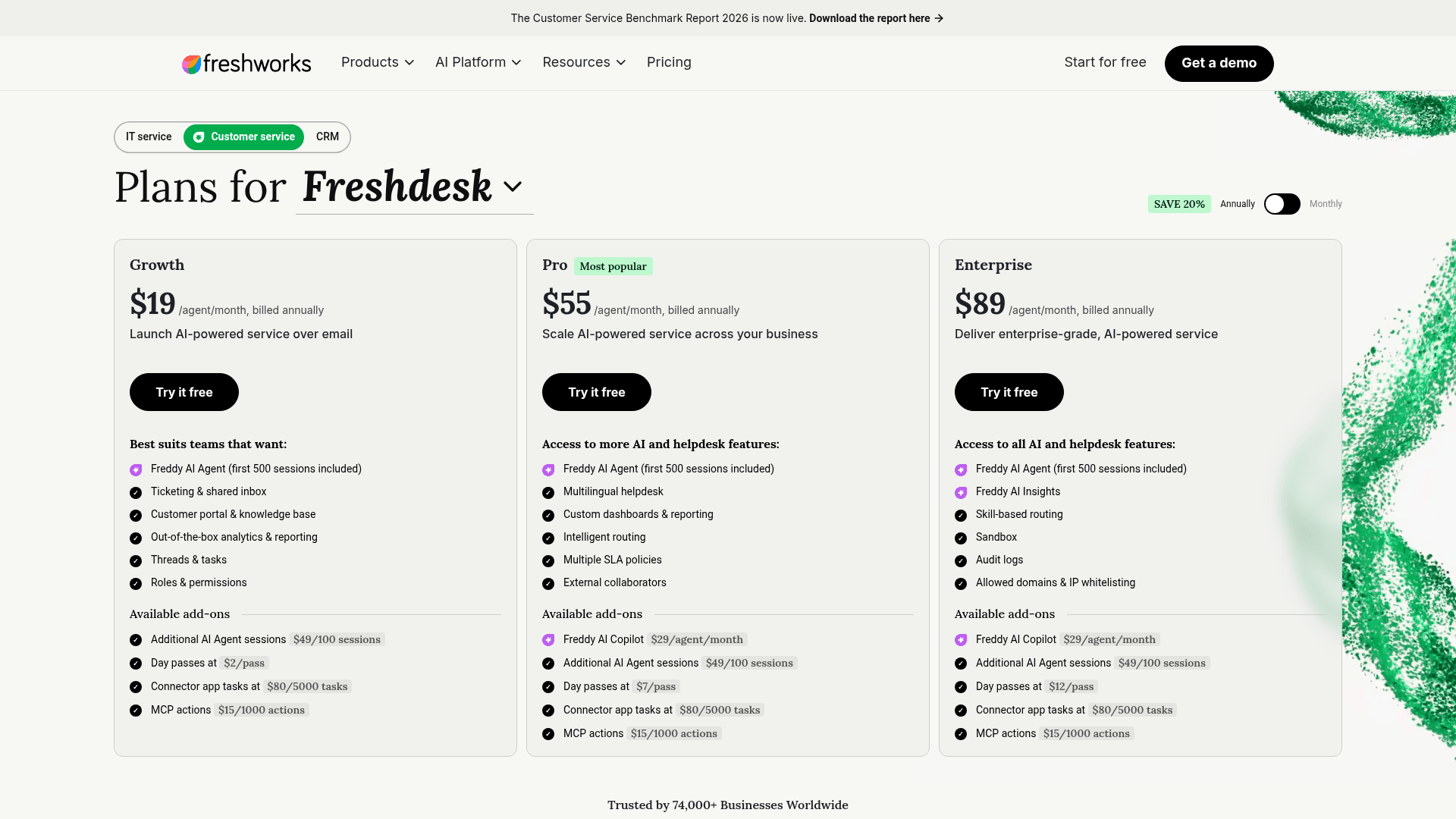
It's also metered, and that part is new for Freshdesk. The line item shows up right on every plan card:
Freshdesk documents Claude Code, Claude Desktop, Cursor, Copilot Studio and VS Code as clients, and adds that "any AI tool that provides MCP support" works. Since Hermes speaks MCP over HTTP, it falls under that. For anyone who already read my Claude for Freshdesk post, this is the same server, just out of early access now and available on cheaper plans.
Four ways to connect Hermes to Freshdesk
Below is every route I could find, plus who reviewed the code that ends up holding your API key:
| Route | How Hermes uses it | Holds your credentials | Reviewed by |
|---|---|---|---|
| Freshdesk's official MCP server | Remote url under mcp_servers | Your Freshdesk API key, in a header | Freshworks |
| effytech/freshdesk_mcp | Local uvx freshdesk-mcp process | API key in env vars | Community (70 stars, MIT) |
| Membrane Freshdesk skill | hermes skills install from skills.sh | Membrane's cloud, via browser login | Community (652 installs, Snyk "Warn") |
| Freshdesk automation rule + Hermes webhook | Ticket event POSTs to a Hermes route | Webhook secret, plus one of the above to write back | You |
Today I'd go with the first one. The vendor whose data it touches is the one maintaining it, and your helpdesk credentials don't take a detour through a third party. It also covers help center articles, which effytech's server doesn't (it has no solution-article tools). As for the webhook route, it's less a fourth alternative and more of a trigger: it tells Hermes a ticket arrived, and Hermes still needs one of the other three to actually read or write it.
How to set it up safely
This is the order I'd go in. Most of these steps are only here because of a single sentence in Freshdesk's FAQ: "tool-level access management is not available. All supported MCP tools are available by default to any user who connects using a valid API key."
1. Give Hermes its own agent seat
The MCP server acts as whichever agent the API key belongs to. Paste in your own key and Hermes can do anything you can do, with every note it writes looking like you wrote it.
What I'd do is create a dedicated agent for the bot, give it a narrow role, and name it something like "Hermes (draft only)". On Freshdesk that means a paid seat, from $19/agent/month on Growth billed annually. Of everything in this setup it's the cheapest safety feature, since role permissions are the only limit Freshdesk enforces on the server side.
2. Add the server and filter its tools
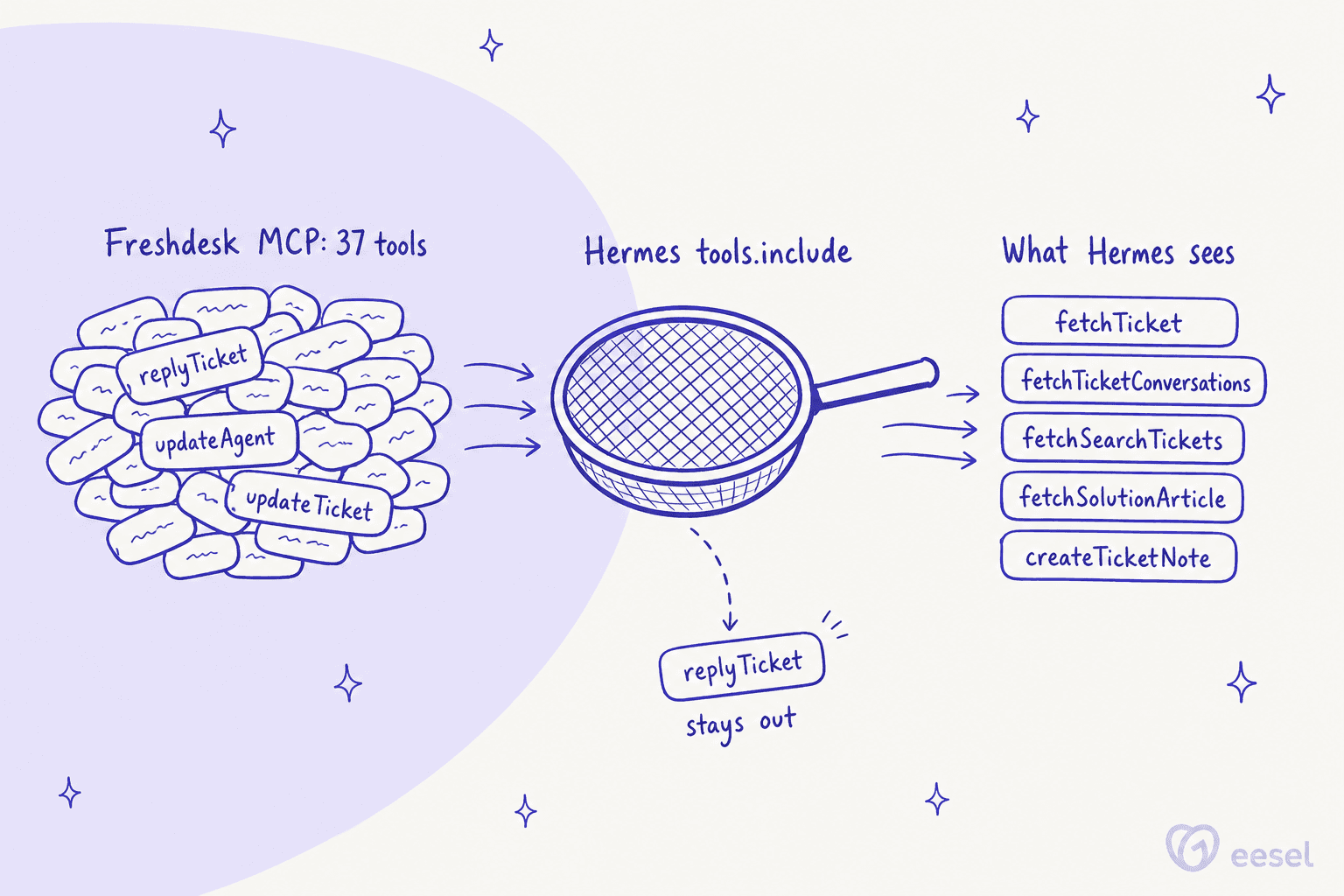
Hermes keeps MCP servers under mcp_servers in ~/.hermes/config.yaml and resolves ${VAR} placeholders from ~/.hermes/.env. It also lets you whitelist tools per server (Hermes MCP docs). Put that together with Freshdesk's endpoint and auth header and you get the config below, which is my own assembly of the two docs and not an official example:
mcp_servers:
  freshdesk:
    url: "https://yourcompany.freshdesk.com/mcp"
    headers:
      Authorization: "${FRESHDESK_API_KEY}"
    tools:
      include:
        - fetchTicket
        - fetchTicketConversations
        - fetchSearchTickets
        - fetchSolutionArticle
        - createTicketNote
Once include is set, the Hermes docs say "Only those MCP server tools are registered." So that one short list ends up doing the job Freshdesk's permissions can't do.
There's also a per-server trust setting in Hermes. On an untrusted server, "every write-capable tool call... requires user approval through the standard approval surface before it runs" (MCP config reference). The default is full. In case you run Hermes from a Slack or Telegram chat with a person watching, switching to untrusted gives you a second check on each note.
3. Write private notes, never replies
Freshdesk keeps the two apart at the API level. A note you add through /notes is private by default, and "Private notes are for collaboration between agents and are not visible to the customer." The update endpoint, on the other hand, says "Only public & private notes can be edited" (Freshdesk API). Once a reply is sent, it stays sent.
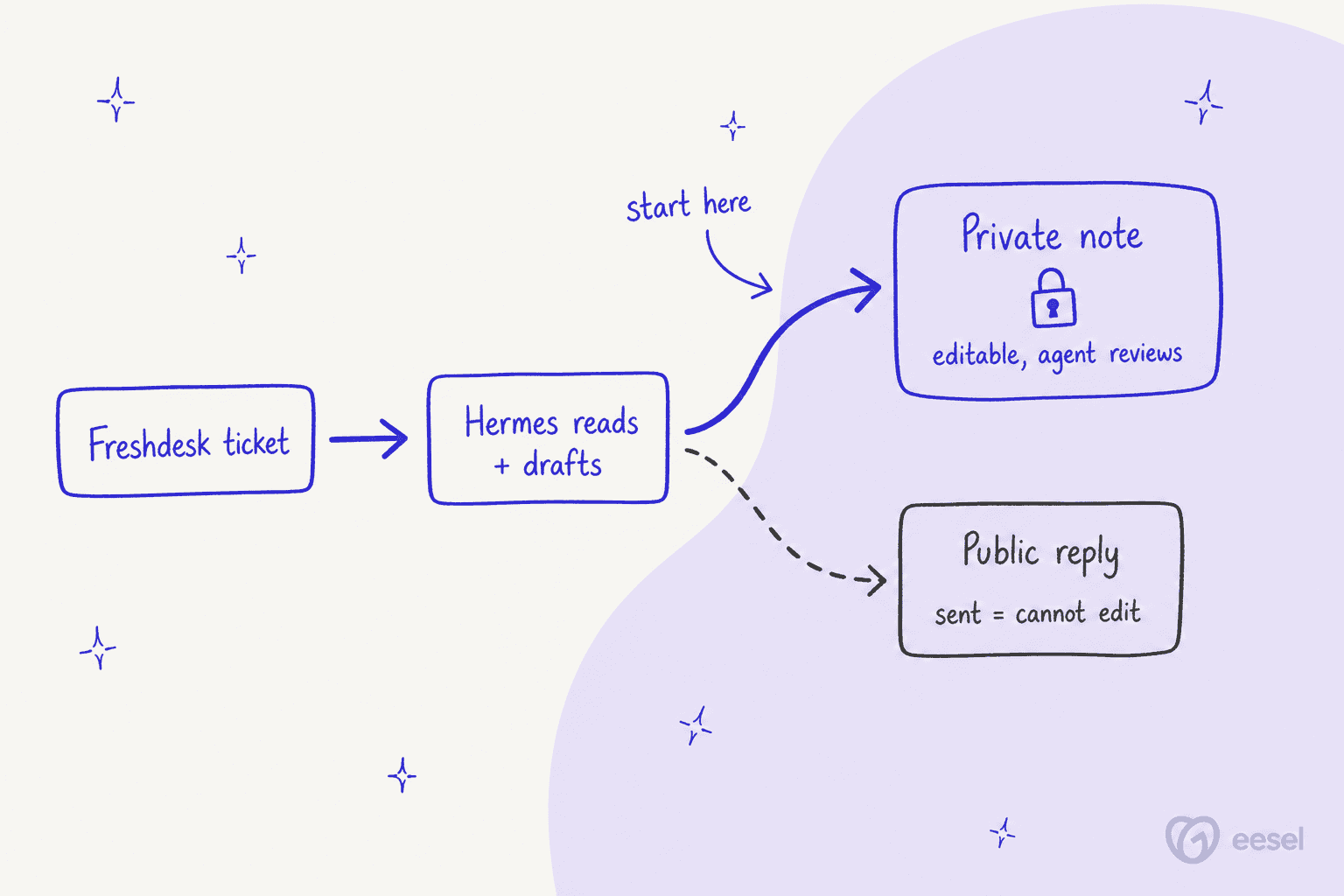
So the flow goes like this: Hermes drafts into a private note, an agent reads it over, and that agent sends the reply under their own name. Freshdesk's own AI draft replies work in the same shape, and so does every agent assist tool. My rule is to keep it there until the misses get boring.
4. Pick a trigger: chat, cron or webhook
Hermes has to know when it should look at a ticket, and there are three options for that:
- On request. An agent pastes a ticket number into Slack and asks Hermes for a draft. It's the simplest one, and a human stays in the loop the whole time.
- Cron poll. Hermes' scheduler ticks every 60 seconds, and a pre-check script can print
{"wakeAgent": false}so "cron skips the agent run entirely" when nothing changed (cron docs). Good for "every 5 minutes, draft notes on new tickets in this group." - Webhook. A Freshdesk automation rule on ticket creation fires "Trigger webhook" at a Hermes route like
http://your-server:8644/webhooks/freshdesk.
Of the three, webhooks are the most real-time and also the most fiddly. Hermes wants a secret on every route, and it rejects any request without "a recognized signature header" (webhook docs). Freshdesk's rule can add custom headers, but I couldn't find an option to sign the body, so before relying on it, test which of Hermes' accepted schemes your rule is actually able to satisfy. On failure Freshdesk retries every 30 minutes, 48 times, and webhooks are capped at 1,000 calls an hour (Freshdesk help).
A couple more webhook details are worth knowing. Webhook runs start with a narrow default toolset, which means the route needs a manual toolsets: ["mcp-freshdesk"] grant before it can touch any tickets. The docs also warn: "HMAC validation authenticates the sender, not the content." Since a customer writes the ticket body, treat it as untrusted text, and that's one more reason for the only write tool to be a private note.
5. Test on old tickets before you trust it
Here is where I'd put in the most time, and it's also where Hermes helps you the least. It has no replay mode for running over last month's tickets and scoring the drafts against what your team actually sent.
You can build one yourself: pull resolved tickets, run Hermes over them inside a sandbox profile, then compare. There are two Freshdesk gotchas to watch for. List Tickets "by default" only returns tickets "created within the past 30 days" unless you pass updated_since, and the search endpoint tops out around 300 results (Freshdesk API). On top of that, every read during the eval counts against your MCP allowance, so it makes more sense to run the eval through the REST API. For what "good enough" looks like, my guide to training AI on a knowledge base goes into it.
What Hermes on Freshdesk actually costs
The license costs nothing. The other four things on the bill do cost something.
MCP actions. "Any call to an MCP server counts as one action, regardless of whether it reads or writes data" (MCP FAQs). The allowance is set per account and per year, and it doesn't roll over:
| Plan | Price (per agent/month, annual) | Included MCP actions/year | MCP rate limit | REST API rate limit |
|---|---|---|---|---|
| Growth | $19 ($23 monthly) | 1,200 | 25/min | 100/min |
| Pro | $55 ($66 monthly) | 6,000 | 50/min | 400/min |
| Enterprise | $89 ($107 monthly) | 12,000 | 100/min | 700/min |
Anything beyond that is $15 per 1,000, per the pricing page. The REST limits come from the API docs, and they're shared account-wide with every other integration you run.
A useful draft takes more than a single call. Hermes reads the ticket, then the thread, searches similar tickets and pulls a help article before it writes the note:
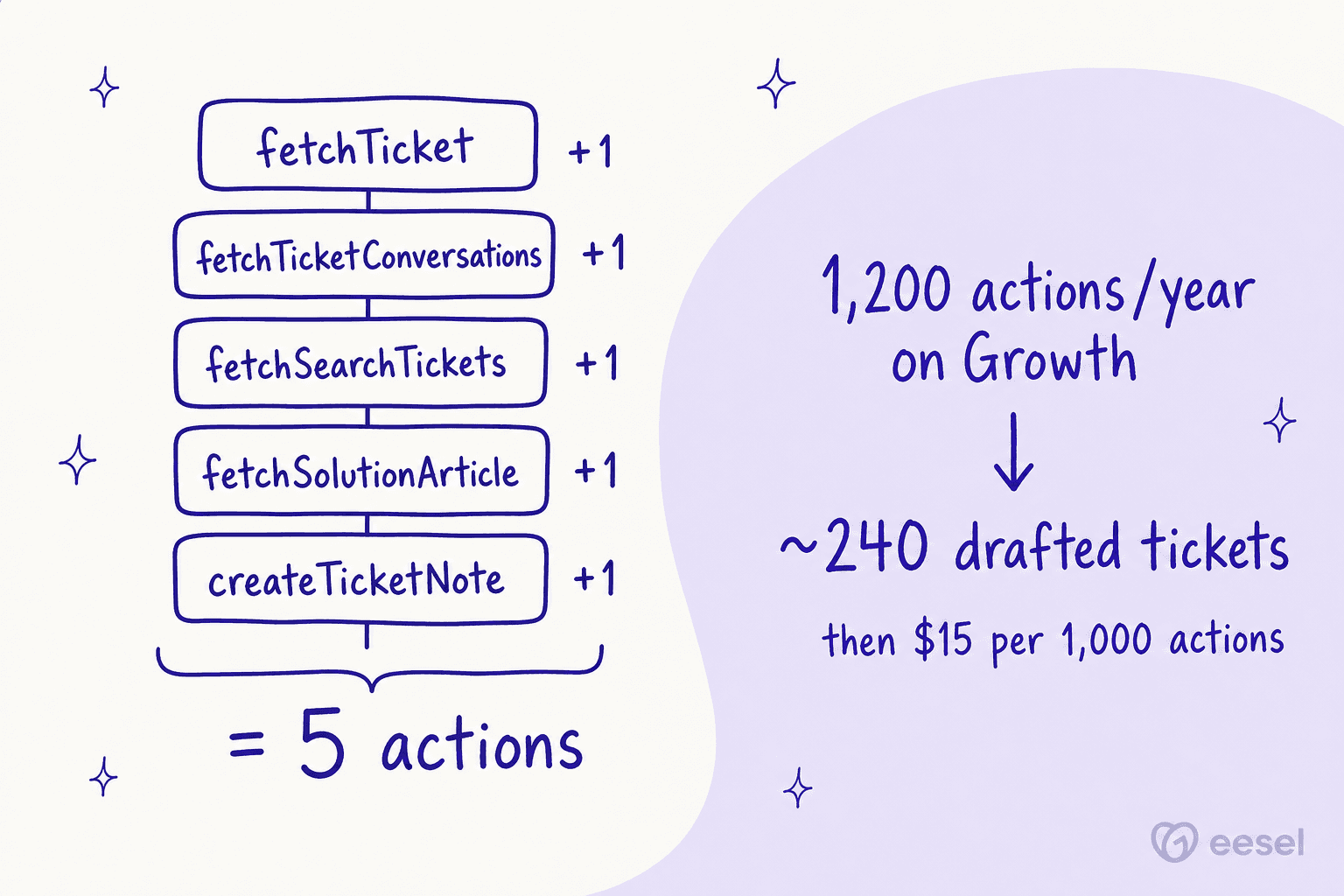
At five actions a ticket, Growth covers about 240 drafts a year, roughly 20 a month. After that it works out to 7.5 cents a ticket in actions, which looks cheap per ticket but is easy to underestimate in total. Agents retry and explore as well, so treat five as the floor rather than the average. You can plug in your own numbers here:
Model tokens. Nous Portal Plus is $20/month for $22 of credit, Super is $100 and Ultra $200. Another option is to connect an eligible ChatGPT plan and use that for inference.
The bot's seat. Anywhere from $19 to $89 a month, depending on which plan you're on.
The build. This is the one people tend to skip. One Freshdesk buyer on eesel's sales calls, an email-security company scaling toward 20,000 tickets a year, went through 200 interactions in a single test day, and the first thing they asked was what that would look like at 9,000 a month. With metered AI, volume becomes the first question a support lead has, and Hermes has you metering three things at the same time: tokens and MCP actions, and then engineer hours on top. For that last one, my build vs buy breakdown puts numbers on it.
Where Hermes on Freshdesk stops working
All of the above assumes the drafting shape. Once you point Hermes at Freshdesk customers directly, you run into the same walls I hit in the general support review:
- Memory is per profile, not per requester. Built-in memory is
MEMORY.md(2,200 characters) andUSER.md(1,375), loaded into every session the profile runs (memory docs). Whatever it saves from one customer's ticket then sits in the prompt for the next one. - No Freshdesk delivery target. A webhook run's
deliveroptions are chat platforms, email or a log. To get the answer back into the ticket, you always go through a tool call. - No rehearsal. I covered this above, and it's the gap I'd give the most weight.
- The native bot already exists. Freshdesk's Freddy AI Agent is on every plan with 500 one-time sessions, then $49 per 100. If what you want is a customer-facing bot inside Freshdesk, Hermes would be rebuilding something the helpdesk already sells.
There is one Hacker News user who does run a Hermes-based helpdesk, and that thread sums up the tradeoff well:
"We replaced our helpdesk with Hermes. It has long term memory about our business. When a customer messages us, Hermes gets all the relevant details about the customer and creates a Pi session using Gemma 4 running locally and customer talks to that agent."

The first reply asked whether that risks "one customer's data leaking to another" (dezgeg, Hacker News). Look at the design, though. Hermes isn't the agent the customer talks to; it spins up a separate local session for each customer instead. It's a sensible architecture, and also a lot of architecture.
Hermes vs Freddy AI vs eesel on Freshdesk
| Hermes Agent | Freddy AI Agent | eesel | |
|---|---|---|---|
| What it is | General self-hosted agent | Freshdesk's native AI bot | AI helpdesk teammate |
| Connects to Freshdesk | You wire MCP or webhooks | Built in | Subdomain + API key |
| Customer-facing replies | Possible, not recommended | Yes | Yes, or drafts only |
| Private-note drafts | Yes, via createTicketNote | Copilot is a separate $29/agent add-on on Pro+ | Yes |
| Pricing unit | Tokens + MCP actions + seat | $49 per 100 sessions after 500 | 1 credit per ticket |
| Who maintains it | You | Freshworks | eesel |
For the wider comparison, my best AI for Freshdesk roundup and the Freshdesk AI alternatives list go deeper, while Hermes Agent alternatives covers the general-agent side.
Should you run Hermes on your Freshdesk queue?
After reading both sets of docs, this is where I end up.
Yes, if you have an engineer who enjoys this kind of work and the job is drafting notes for agents who review them, as long as your volume fits inside the action allowance. The official MCP server with a five-tool include list is a tidy setup you can defend, and on top of it Hermes' cron and webhook features give you real automation. It also fits well as an internal support chatbot that answers your own team from Freshdesk history.
No, if you want AI answering customers, or you need a record of every AI action that a support manager can read without SSH. Same answer if nobody can be spared to maintain a YAML file and an eval harness. And the Freshdesk security review you'd run on any vendor turns into one you're now running on your own server.
The honest version is that Freshdesk just turned the wiring into the easy part. What remains is the AI hallucination problem plus the rehearsal and guardrails around it, and that's the actual work of putting AI on a queue.
eesel for Freshdesk
If the reason you looked at Hermes was wanting AI to work your Freshdesk tickets, eesel is the teammate built for exactly that job. It connects with your Freshdesk subdomain and an API key, no app to install, and it learns from your help center and canned responses as well as your resolved tickets (eesel docs).
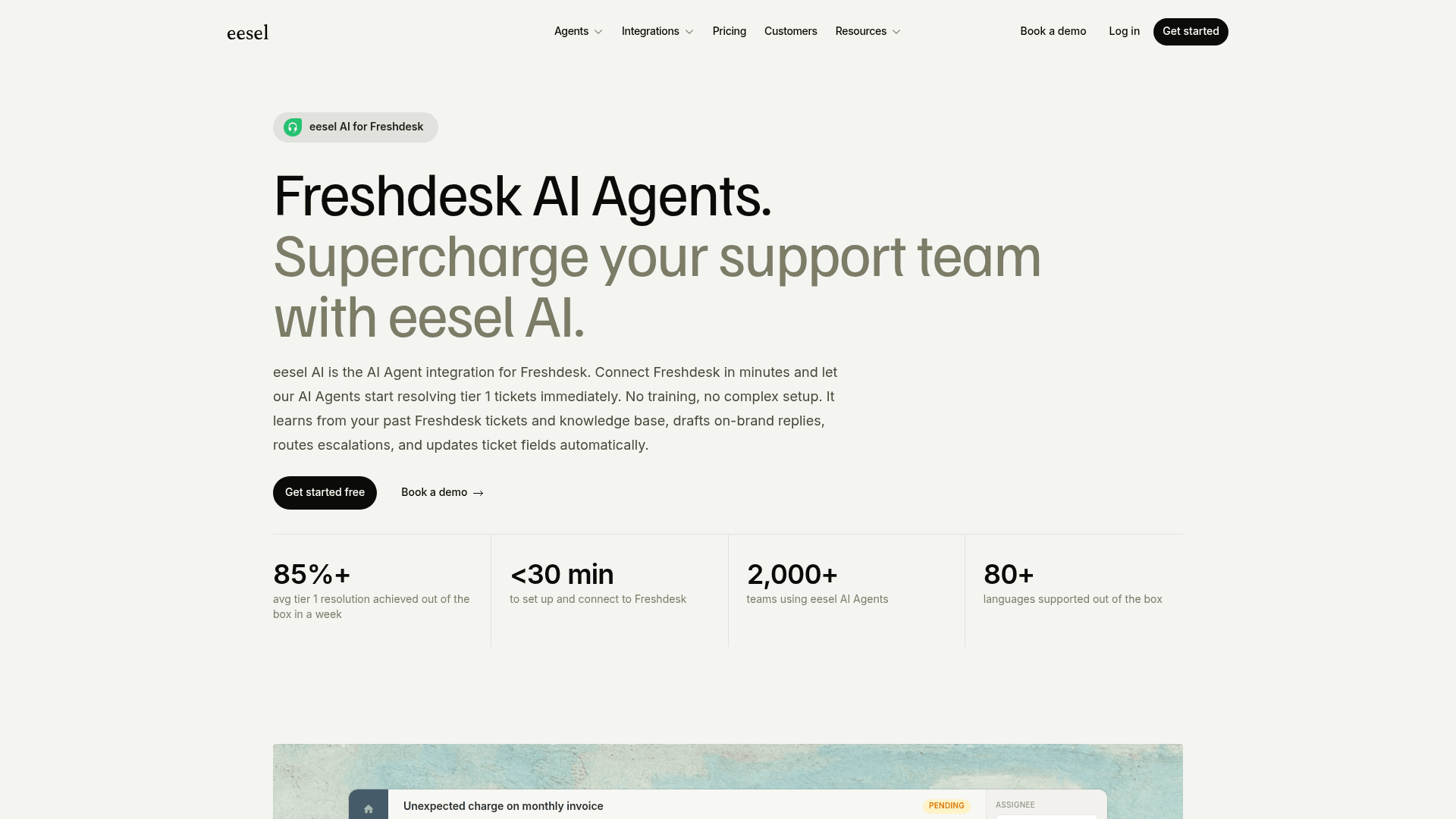
Here's how it maps onto the gaps above:
- Rehearsal first. It simulates on your past Freshdesk tickets before it replies to a single customer.
- You choose the write level. It can leave internal notes, hold draft replies for approval, or send. Tagging and assigning are in there too, along with setting status and updating fields, which covers Freshdesk auto triage as well.
- No per-call metering. A ticket costs 1 credit no matter how many replies go back and forth. Plans start at $299 for 500 credits, and the free plan comes with 100 credits.
- Freshchat included. The same connection also covers Freshdesk chat as well, so there's no second setup.

And if half the appeal of Hermes was the terminal, eesel has one of those too. The eesel CLI drives the same teammate: eesel integrations connect freshdesk links the account, eesel integrations download start pulls ticket history, and eesel automations sets what it does on each trigger. Because commands print JSON, a script or a coding agent like Claude Code can run your Freshdesk setup from start to finish. There's more on that in my CLI for customer support post.
Keep Hermes for the jobs it's great at. For the Freshdesk queue, though, try eesel on your real tickets first.
Frequently Asked Questions
Can I connect Hermes Agent to Freshdesk?
https://yourcompany.freshdesk.com/mcp, which went generally available on September 10, 2026 and works on Growth, Pro and Enterprise. Hermes adds it under mcp_servers in config.yaml with your API key as a header. My MCP for customer support guide covers what a support MCP server should expose.Does Hermes Agent have a Freshdesk integration?
How much does it cost to run Hermes Agent on Freshdesk?
Can Hermes Agent reply to Freshdesk customers automatically?
replyTicket tool and gives every API key all 37 tools. I wouldn't start there. A sent Freshdesk reply can't be edited, so I keep Hermes on private notes and filter replyTicket out with tools.include.Is Hermes Agent safe to use with Freshdesk ticket data?
Hermes Agent vs Freddy AI: which should a Freshdesk team use?
Can Hermes Agent test itself on old Freshdesk tickets?
updated_since. You'd build the eval yourself. eesel simulates on past Freshdesk tickets before go-live, which is the step I'd never skip; see how to train a Freshdesk AI.What is the best Hermes Agent alternative for Freshdesk?



Article by
Rama Adi
Rama is a software engineer at eesel AI with two years of experience writing about B2B SaaS, AI tools, and customer support technology. Based in Bali, Indonesia, he brings a developer's perspective to product comparisons — cutting through marketing copy to what the integrations and APIs actually do.