Freshdesk AI draft replies: how to set them up in 2026

Riellvriany Indriawan

Katelin Teen
Last edited October 14, 2026

There are two different things people mean by "Freshdesk AI draft replies," and they cost very differently. Freddy AI Copilot is the agent-side one: it drafts a suggested reply for a human to review and send, it is a $29 per agent per month add-on on the Omni Pro and Enterprise plans, and you pay it only for the agents you assign. The customer-facing Freddy AI Agent is the autonomous one, billed per session at $49 per 100 sessions.
To turn Copilot on: be on Omni Pro or Enterprise, add the Copilot add-on, assign it to the agents you want, and it starts suggesting replies in the ticket editor. The main limit worth knowing up front is that Copilot drafts from your published knowledge base and the live thread, not from how your team has actually answered similar tickets before.
If you want drafts that sound like your team because they were trained on your own past Freshdesk tickets, and a confidence dial so you can start in draft-only mode and add automation gradually, that is where a layer like eesel AI for Freshdesk fits. Either way, start in drafting mode with a human reviewing, and only widen from there.
What "AI draft replies" actually means in Freshdesk
Before you touch a setting, it is worth being precise, because Freshworks sells two AI products that both "reply," and mixing them up is how teams end up on the wrong plan.
Freddy AI is split into three products, and only two of them write replies:
- Freddy AI Copilot sits next to your agents inside the ticket workspace. It reads the conversation, drafts a suggested reply, can summarize a long thread, rewrite tone, and translate. A human always reviews and sends. This is the "draft replies" most support managers are actually asking about.
- Freddy AI Agent is the customer-facing bot. It resolves queries end to end on chat, messaging, and email with no agent in the loop, and there is a dedicated Email AI Agent that answers inbound support email autonomously.
- Freddy AI Insights is for leaders and does not write replies at all; it surfaces CSAT dips and SLA trends.
The distinction matters because the two get billed on completely different meters. Copilot is per agent. The AI Agent is per session, where an email session is a 72-hour window from the customer's first message. So "AI draft replies in Freshdesk" almost always means Copilot, and that is what most of this guide is about.
Freddy AI Copilot: the built-in way to draft replies
Copilot is the natural first step because it keeps a person in charge. The agent stays the author; the AI just gets them to a good first draft faster instead of starting from a blank box.
Under the hood, the flow is simple and it is the same shape for almost every agent-assist tool:
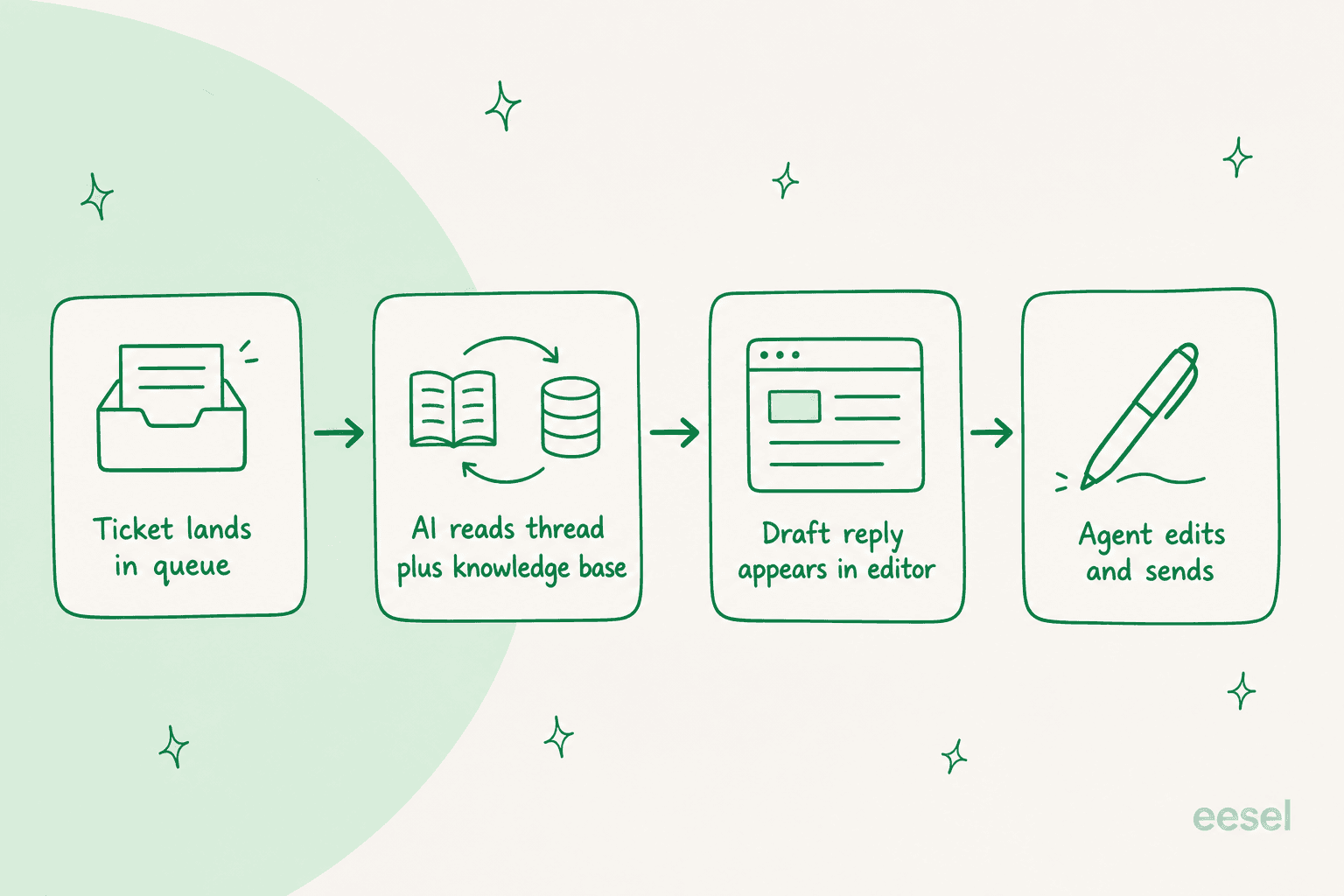
Freshworks quotes a 60% lift in agent productivity with Copilot, and the customer stories back the idea that the win is speed and consistency rather than head-count cuts. One Freshworks customer put it this way about the quality change:
"With Freddy AI, they've gained so much confidence, and the quality of emails they're sending now is remarkable."
What Copilot costs
Copilot is an add-on, not a plan feature. Here is the shape of it against the plans that unlock it:
| Item | Price | Notes |
|---|---|---|
| Freshdesk Omni Pro | $79 / agent / month | Minimum plan where Copilot is available |
| Freshdesk Omni Enterprise | $119 / agent / month | Copilot also available here |
| Freddy AI Copilot add-on | $29 / agent / month | Assign to any number of agents, not all of them |
| Freddy AI Agent (separate) | $49 / 100 sessions | Customer-facing, first 500 sessions free once per account on Growth, Pro and Enterprise |
The one genuinely nice thing here: you do not have to buy Copilot for every seat. If only your tier-1 team needs drafting help, you assign it to them and leave the rest. On a Pro plan, a team of ten agents all using Copilot works out to $79 + $29 per seat, so $1,080 a month before you add any customer-facing AI sessions on top.
How to turn on AI draft replies in Freshdesk
If you are on the right plan, switching Copilot on is quick. The steps:
- Confirm your plan. Copilot only unlocks on Freshdesk Omni Pro or Enterprise. If you are on standalone Freshdesk Growth or a lower Omni tier, you will need to upgrade first (standalone Freshdesk Pro and Enterprise also offer Copilot, at $55 and $89 per agent).
- Add the Copilot add-on from your account's plans and billing area. It is listed as "Freddy AI Copilot, $29/agent."
- Assign it to agents. Pick which agents get Copilot. You control this per seat, so start with the team that handles the highest ticket volume.
- Point Freddy at your knowledge base. Copilot drafts from your published solution articles, so the quality of your drafts tracks the quality of your knowledge base. Thin docs, thin drafts.
- Open a ticket and use the suggestion. In the reply editor, Copilot offers a draft you can accept, edit, or ignore. Agents review, adjust tone, and send.
That last point is the whole philosophy of drafting mode: nothing goes to a customer without a human seeing it first. It is the lowest-risk way to get AI into your Freshdesk workflow.
The three ways to draft (and send) AI replies
Zoom out and there are really three models for getting an AI reply into a Freshdesk ticket, and the right one depends on how much control you want to keep.
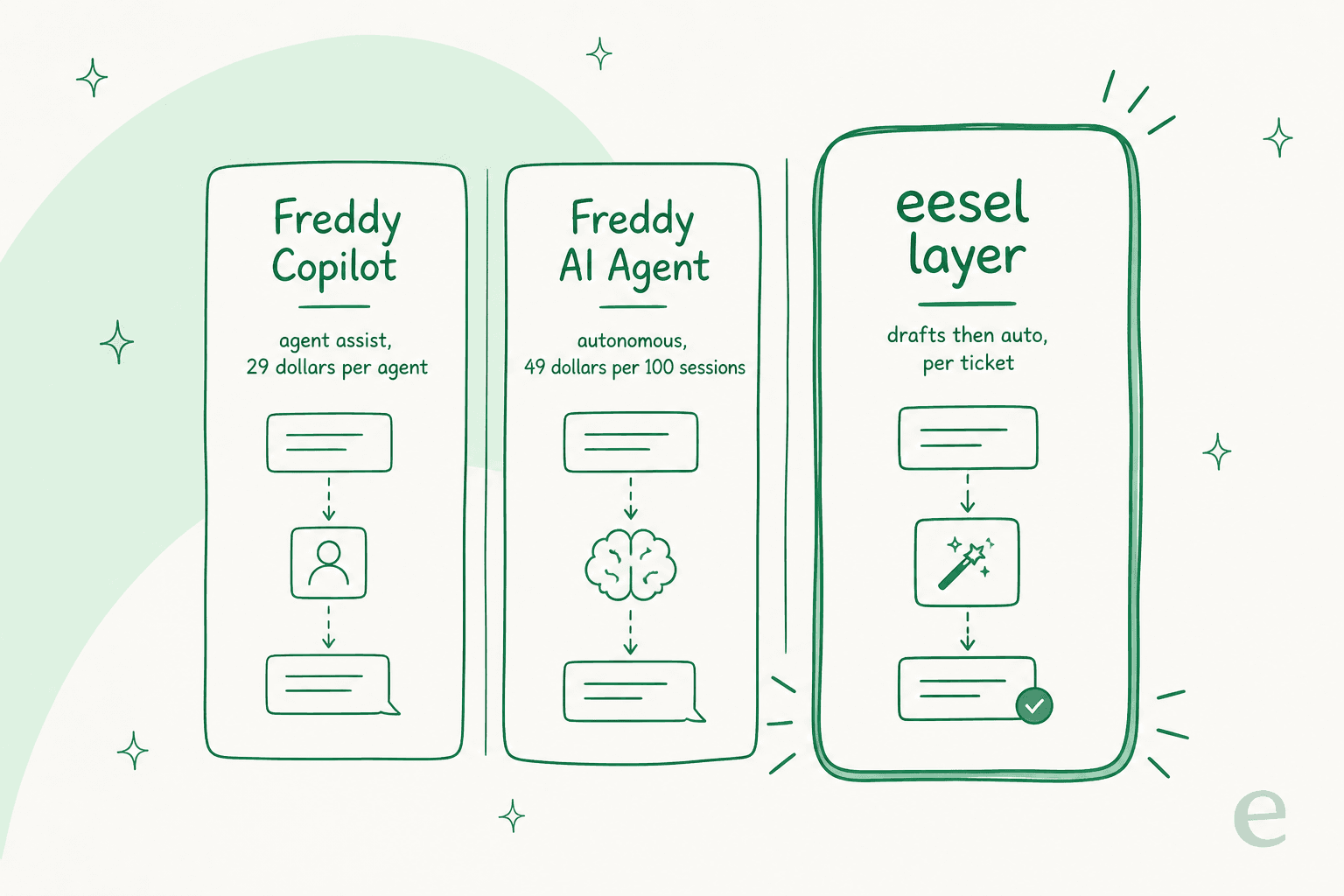
| Approach | Who sends | Billing unit | Best for |
|---|---|---|---|
| Freddy AI Copilot | Agent reviews and sends | $29 per agent / month | Teams that want drafting help but a human on every reply |
| Freddy AI Agent | AI sends autonomously | $49 per 100 sessions | Deflecting repetitive, well-documented queries |
| eesel AI layer | Draft first, then auto on confident tickets | Per ticket, trained on past tickets | Teams that want to start drafting and graduate to automation on their own terms |
Most teams I talk to want to walk that path in order: drafts first, automation later, once they trust it. That "copilot first, full automation later" pattern is the single most common adoption story in support AI right now, and it is worth choosing a setup that lets you move along it without re-buying everything.
Where Freddy's drafting stops short
Copilot is a solid, low-risk starting point, and for teams already deep in the Freshworks suite it is the obvious first thing to try. Two honest limits are worth knowing before you commit, though, because they are the reasons teams look for a layer on top.
It drafts from your knowledge base, not your ticket history. Copilot works off your published solution articles and the current thread. It does not learn from the thousands of replies your agents have already written, so the draft is only as good as your docs, and the tone is generic Freddy tone rather than your team's voice. For a lot of teams, the best answer to a tricky question does not live in a help article at all; it lives in how a senior agent phrased it on a similar ticket last month.
Testing is limited. There is no built-in way to run Copilot over a batch of your own past tickets and see how it would have answered before you roll it out. You turn it on and find out live.
These are not dealbreakers, they are just the gap. Which is exactly the gap a past-ticket-trained layer is built to fill.
Drafting with eesel, trained on your own tickets
This is where I will be upfront that I work on eesel AI, so take the pitch with that in mind, but the mechanism is the part worth your attention.
eesel AI for Freshdesk joins as a native AI agent inside Freshdesk, in the same ticket editor your team already uses. The difference from Copilot is what it learns from: it imports your past Freshdesk tickets, solution articles, and canned responses, so the drafts sound like your team wrote them, not like a generic assistant. Teams describe the change in workload terms:
"Our agents can instantly draft replies to customers. We don't have to look through all our documentation on Notion, Google Docs or our help center anymore because eesel AI does it for us."
Anonymized: a support team at a meeting-productivity SaaS whose agents draft replies instead of digging through scattered docs
Instead of a settings-and-rules engine, you tune the AI by talking to it in plain language: what tickets it should handle, how it should write, when it should escalate.

The two Freddy gaps close directly here. On testing, you can simulate the AI on your own past tickets before it touches a live customer, which also surfaces knowledge gaps (for example, that a chunk of last week's tickets asked about pro-rated refunds your docs never covered). And on the copilot-to-automation path, you get a confidence dial: start in draft-only mode with agents reviewing every reply, then let the AI auto-reply on the simple, well-understood topics, and widen from there.
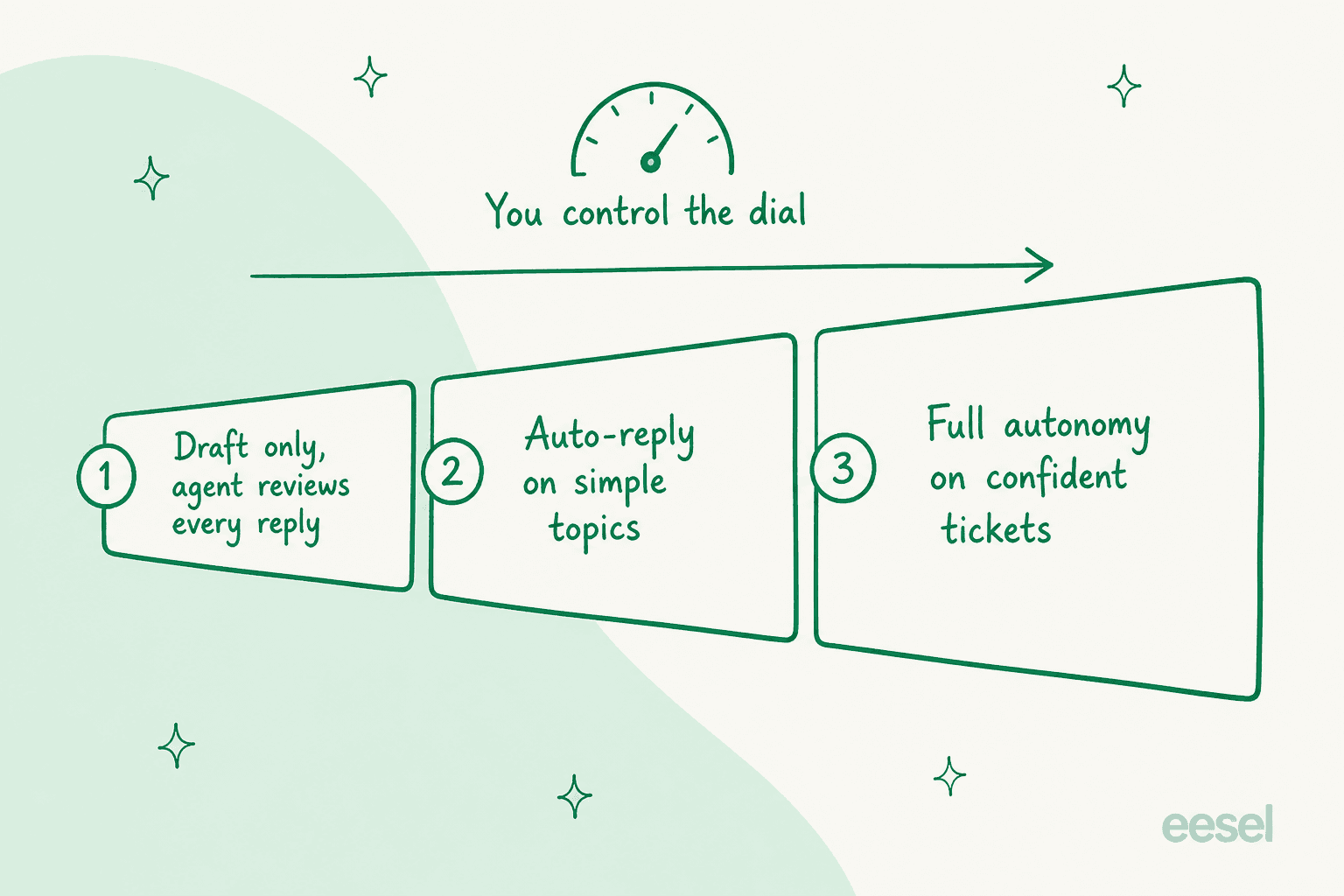
That control is not a nice-to-have, it is the actual objection most support leads raise. As one CX lead put it:
"The AI will never be able to answer 100% of the questions... I need an AI who is only handling the tickets that it's confident to handle and all the other ones, leave them alone."
Anonymized: a DTC supplements CX lead
The results, when the training data is your own tickets, tend to show up fast. One team on a seven-day trial reported eesel AI resolving 73% of their tier-1 requests in the first month.
Try eesel for Freshdesk
If you want AI draft replies in Freshdesk that actually sound like your team, eesel AI plugs into your Freshdesk, trains on your past tickets and help center, and drafts inside the ticket your agents already work in. You can simulate it on your historical tickets first to see exactly how it would answer, then start in draft-only mode and turn up the automation on your own terms. It goes live in minutes, and it is free to try.