Freshdesk knowledge base examples: 10 real help centers

Kurnia Kharisma

Katelin Teen
Last edited October 14, 2026

Search engines are useless for finding real Freshdesk knowledge base examples. I found that out the slow way. So instead I swept a few hundred DNS records looking for hostnames that point at Freshdesk load balancers, and thirteen of them came back live. The good ones all sit between 4 and 14 top-level categories. The broken ones sit at 1, or at 24 to 27. Not the theme. Not budget, and not company size either. That one number predicted quality better than any of them.
One more thing that is worth to know before you copy anybody. The knowledge base itself ships on every Freshdesk plan. Almost nothing you need for running one does. Versioning, templates, analytics, and then even changing the portal's colors, all of that starts at Pro, $55 per agent per month. Approval workflows and nested folders sit further up again, at Enterprise, $89. On Growth at $19 you get three levels and a text editor.
If you already have the articles and customers still cannot find them, then what you have is a retrieval problem. The writing is not the issue there. eesel plugs into Freshdesk and reads the solution articles you already wrote, along with your past tickets, then drafts or auto-answers from them. And you can simulate the whole thing against your own ticket history first, before it ever touches a live queue.
What a Freshdesk knowledge base actually is
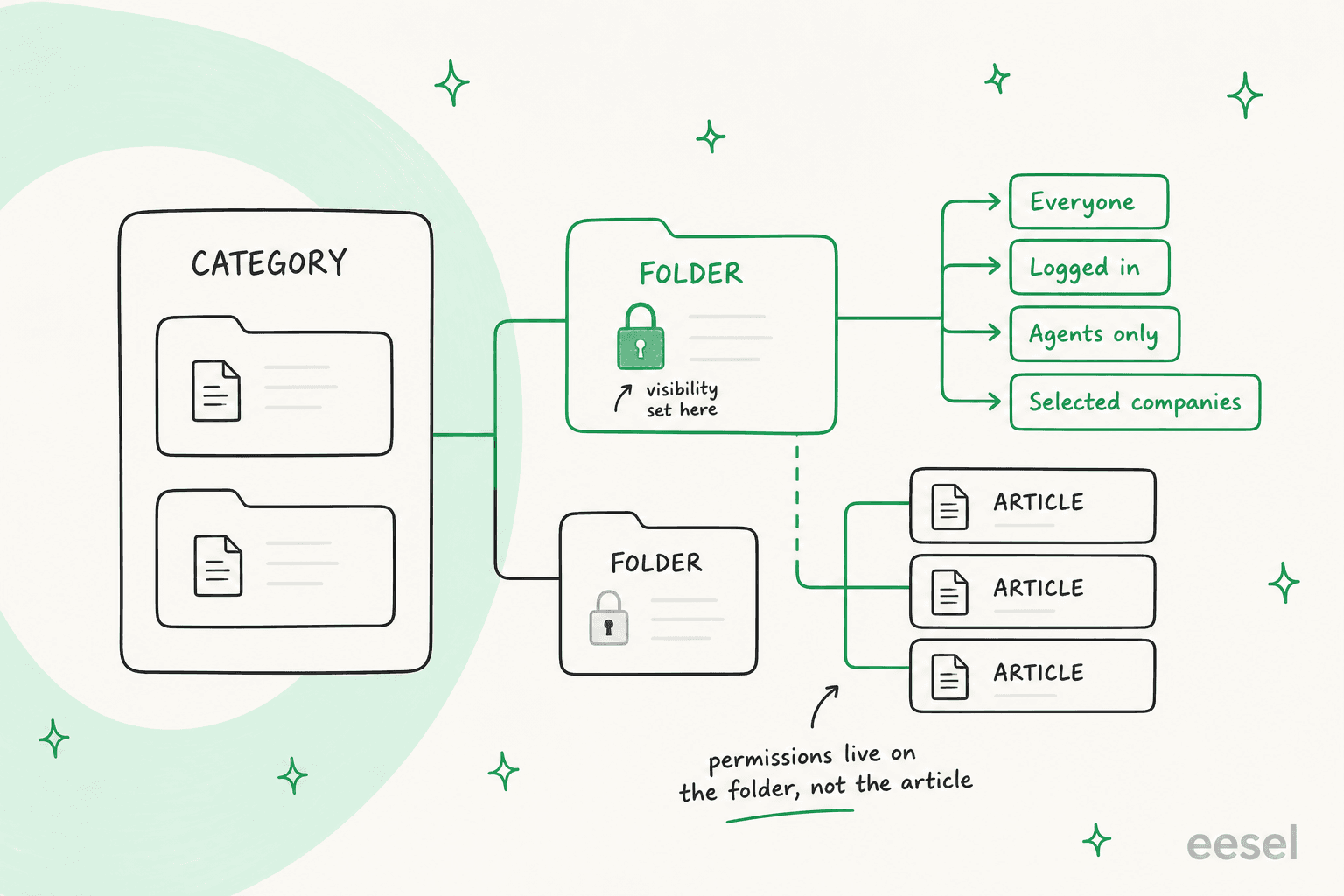
Inside the agent view it lives under the Solutions tab, and Freshdesk uses "Solutions" and "Knowledge Base" interchangeably in its own docs. The structure is three named building blocks and nothing else:
- Category, which Freshdesk defines as "a broader classification or top-level hierarchy". Its own worked example for an ecommerce store: Orders, Refunds & Returns, Pricing.
- Folder, "a sub-category or a secondary hierarchy within a category". Inside Orders you would get Order Creation, Order Management.
- Article, the thing the customer reads.
There is two behaviours that catch people out. A category or a folder stays invisible on the customer portal until you publish at least one article inside it, so a half-built taxonomy simply does not render at all. And for moving an article into a different category, that destination category has to already contain a folder, which turns a simple reshuffle into a two-step job.
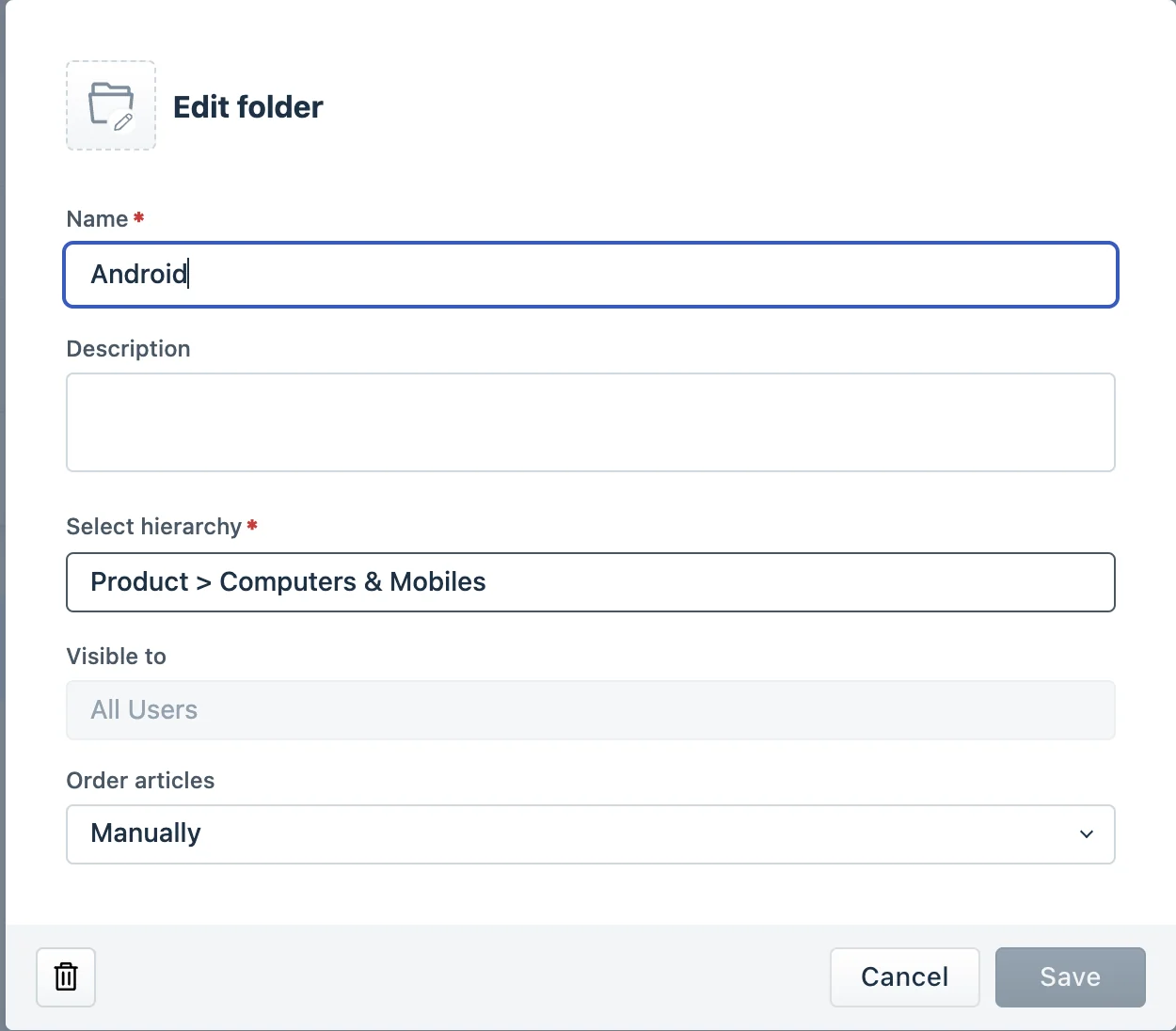
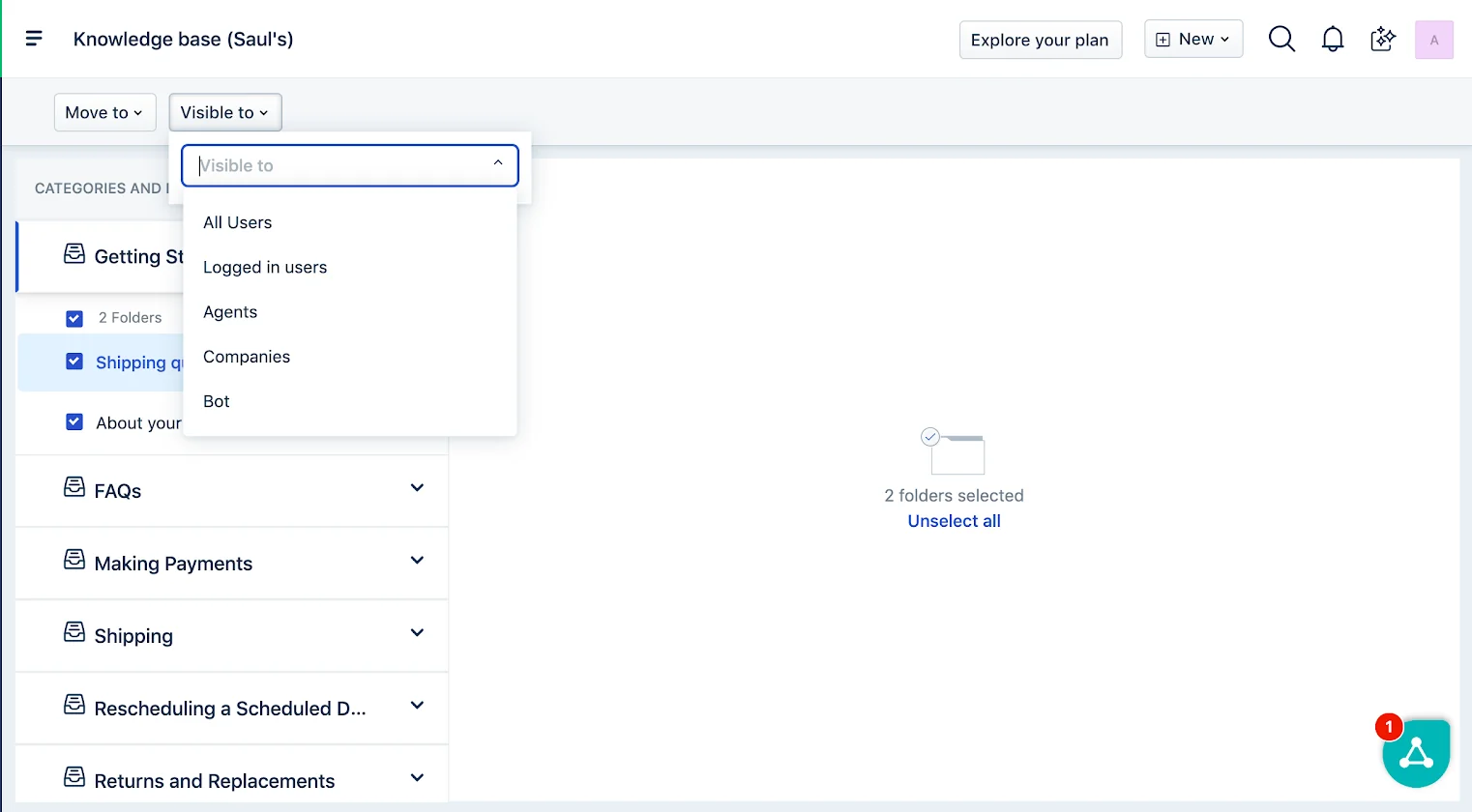
Visibility is set on the folder, and Freshdesk gives you seven options: all users, all agents, logged in users, Freshchat bots, named companies, contact segments, and company segments. You can bulk-change visibility on articles too, but the folder is where the decision normally lives. If you are building a private, agent-only tier alongside the public one, that is closer to an internal knowledge base problem and worth planning separately.
Three levels is the ceiling on Free, Growth and Pro. Freshdesk says it in a callout on its own Create and Organize doc: "Multi-level or flexible hierarchies is available only on the Enterprise plan. If you are on other plans, you can organize your knowledge base up to 3 levels." Enterprise unlocks six levels, one category plus folders and sub-folders up to five deep.
That gate matters more than how it sounds, because plenty of the enterprise help centers that people hold up as models are shaped by a hierarchy most readers cannot actually buy.
What your plan actually lets you build
Before the examples, it is worth being blunt about what you can copy on the plan you are on. Freshdesk publishes a feature-by-plan table for the knowledge base, and only one row is ticked on every tier. We break the tiers down in full in our Freshdesk Pro plan pricing piece.
What your Freshdesk plan actually lets you build
The knowledge base ships on every plan. The tools for running one do not. Pick your tier to see the structure you can copy today, and the one you cannot.
no longer soldThree levels, manual everything
- Email to knowledge base (BCC kbase@)
- Manual folder reordering
- Per-article SEO title, description, keywords
- Auto-suggest solutions
- Article versioning
- Article templates
- Multilingual knowledge base
- Knowledge base analytics
$19/agent/moThree levels, plus auto-suggest
- Email to knowledge base (BCC kbase@)
- Auto-suggest solutions
- Automatic folder reordering
- Per-article SEO fields
- Article versioning
- Article templates
- Bulk actions and list filters
- Portal theming (colors, fonts, logo)
- Multilingual knowledge base
- Automatic sitemap generation
- Knowledge base analytics
$55/agent/moThree levels, one workspace per product
- Everything on Growth
- Article versioning with green and red diffs
- Article templates (max 30 per account)
- Multi-product content management
- Multilingual knowledge base (47 languages)
- Bulk actions, tags, list filters
- Portal theming and CSS customization
- Automatic sitemap generation
- Knowledge base analytics
- Approval workflow (In Review, Approved)
- Multi-level nested folders
$89/agent/moSix levels, with a review gate
- Everything on Pro
- Flexible multi-level hierarchy (6 levels)
- Approval workflow: Draft, In Review, Approved, Published
- Reviewer assignment and bulk approve
The one row ticked everywhere is email to knowledge base. Everything else that makes a knowledge base maintainable rather than merely existent sits at Pro or above. If that gating is what pushed you here, our roundup of Freshdesk AI alternatives covers the escape routes, and help desk knowledge base software compares the gates across vendors.
10 Freshdesk knowledge base examples
Every portal below was fetched on 31 July 2026 and returned real category and article content. I confirmed each is Freshdesk-hosted either by the fixed /support/solutions route or by a DNS record pointing at a Freshdesk load balancer, for instance support.hover.com resolving to efc245f4d8c525a4a0e9c5df527a4f59.freshdesk.com.
Worth to say out loud: roughly 40% of the candidates I tested came back dead, or login-gated, or just pointing at nothing. Freshdesk portals rot quietly, so check any example you find in a listicle before you plan anything around it.
| # | Help center | Sector | Top-level categories | Theme | Custom domain | The one move to copy |
|---|---|---|---|---|---|---|
| 1 | Freshworks | Helpdesk SaaS | 14 | Custom | Yes | A description line on every category |
| 2 | Hover | Domain registrar | 4 | Custom | Yes | "Before you begin" checklists |
| 3 | TeamViewer | Remote access | Product tabs | Custom | Yes | Three links, then "See more" |
| 4 | Chargebee | Billing SaaS | 24 | Stock | Yes | Article titles as literal questions |
| 5 | Exotel | Cloud telephony | 14 | Stock | Yes | A category named "Start here" |
| 6 | cult.fit | Consumer fitness | 12 | Custom | Yes | Folders split by journey moment |
| 7 | Noise | D2C electronics | 8 | Custom | Yes | Transactional shortcuts above the KB |
| 8 | Portronics | D2C electronics | Per device class | Stock | Yes | Titles written as pure symptoms |
| 9 | Shiprocket | Ecommerce logistics | 27 | Stock | Yes | Category names that mirror app screens |
| 10 | Unacademy | Consumer edtech | 1 | Stock | Yes | Publishing the penalty rules openly |
1. Freshworks, the reference implementation
Best for: anyone who wants the vendor's own opinion on how its product should be used.
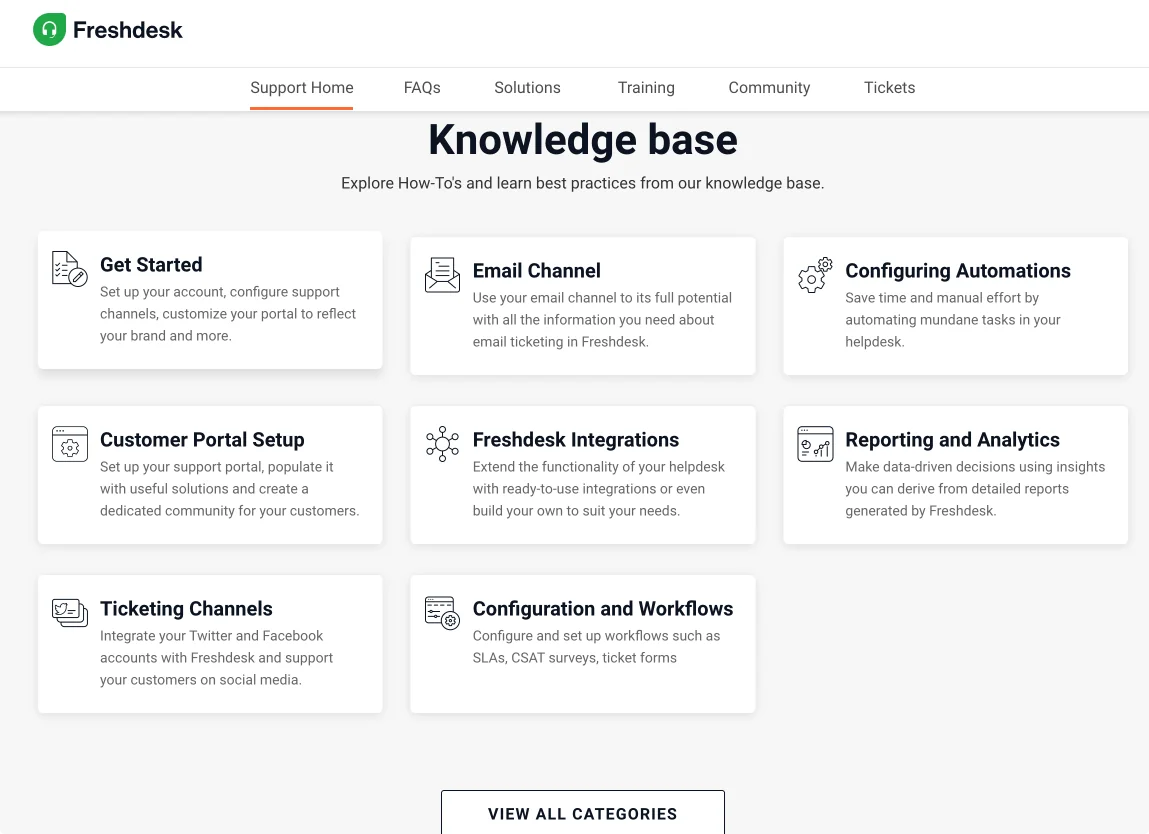
Freshdesk runs its own help center on Freshdesk, which makes support.freshdesk.com the closest thing to an official reference. Fourteen flat categories: Onboarding and Setup, Ticket Management, Freddy AI for Ticketing, Workflows and Automations, Ticketing Channels, Knowledge Base Management, Portal Setup and Customization, Reporting and Analytics, Freshdesk Integrations, The Freshdesk Mobile App, Policies and Data Protection, Freddy AI and Chatbots (Legacy), Field Service Management, Freshdesk FAQ.
Copy this: every category carries its own one-line description, and that description says what you will do there rather than what it contains. "Set up your Freshdesk account, configure support channels, customize your portal to reflect your brand" beats "Setup articles" every time. The home page only surfaces six of the fourteen with a View all categories link underneath, so the landing page stays scannable while the full index stays one click away.
Watch out: Freddy AI and Chatbots (Legacy) sits at the same visual weight as the live Freddy AI for Ticketing category. A reader searching for AI setup gets a coin flip between current and deprecated docs. Deprecated content belongs in a folder inside the live category, not as a peer at the top level.
2. Hover, the best-executed custom theme here
Best for: teams with a small product surface who want the taxonomy to fit above the fold.
Hover, the Tucows-owned domain registrar, runs four categories and that is the entire taxonomy.
| Category | Folders |
|---|---|
| Getting Started | Migrated Customer Resources, Connecting Your Domain to a Website, Support & Help Center |
| Hover Domains | Renewals, Managing your registration, Domain Policies, Transfers, and two more |
| Hover Email | Troubleshooting email, Using Hover Webmail, Setting up your mail client, Getting Started |
| Account & Billing | Account Security & Privacy, Billing |
Copy this: the categories are named after whichever product surface the customer is standing on, and Getting Started gets pinned first. But the single most copyable thing in this whole roundup is Hover's article opener. The Vistaprint migration article begins with a plain-English summary of what changed, then a bolded Before you begin block listing exactly what the reader needs in hand: their Hover welcome email, access to the original account email inbox. It kills the most common help center failure, which is a reader getting four steps in and discovering they are missing a credential.
Hover also writes Note: callouts for the edge cases that would otherwise become tickets, like a domain that moved to Exact Hosting rather than Hover. Each of those notes is a ticket nobody files.
Watch out: only one of the four categories has a description line. Freshdesk offers that field on every category and Hover fills it in one of four.
3. TeamViewer, the portal as a router
Best for: companies whose articles live on the marketing site and who want Freshdesk purely for navigation and ticketing.
TeamViewer does not use Freshdesk categories for its knowledge base at all. /support/home is a routing hub organised by product line first, then by task. Under TeamViewer Remote you get Download and installation, Remote session, Device management. Every link goes out to teamviewer.com/global/support/knowledge-base/, not to a Freshdesk article.
Copy this: the repeated three-links-then-"See more" block. It commits to showing the three most-requested articles per task area instead of dumping a folder listing, and it repeats identically for every product line, so a reader who learns the pattern once can scan five products in fifteen seconds. The scheduled-maintenance banner wired to the status page is the other good move: the "is it me or is it them" question gets answered before anybody searches.
Watch out: and this one is real. support.teamviewer.com/support/solutions returns "You must be logged in to access this page." The category index, which is exactly where a reader lands from a Google result, is gated while the home page is public. Splitting the knowledge base across two systems also means the portal's search has to ask "Where would you like to search?" before it can do anything. Making a reader pick a search index is a tax on every single query, and it is one of the quieter ways a customer support portal leaks traffic.
4. Chargebee, question-shaped titles at scale
Best for: technical products where customers arrive with a specific, phraseable question.
Chargebee runs the stock Freshdesk theme and 24 flat categories, which is too many. But it does one thing better than anybody else here.
Copy this: Chargebee titles nearly all of its articles as the literal question that a customer types, question mark included. "What is an SPF Record and how do I add it?" "How can I change my Chargebee account password?" "Does Chargebee support recurring billing?" That is the highest-leverage move available for search, both in Freshdesk's own search box and in Google, because the title is already an exact match for the query. It also solves the migration-doc problem: a whole folder of "PC 1.0 to PC 2.0" questions reads as an FAQ rather than a spec.
Chargebee also splits integrations into four separate categories, General, E-Commerce, Accounting and CRM, rather than one 200-article bucket. If your integration catalogue is large, split by the kind of system the customer already runs. The same instinct shows up in good ecommerce FAQ examples, where the split follows the customer's context rather than your internal org.
Watch out: two problems, and the second is worse. Twenty-four flat categories with no grouping makes the index a wall; nothing tells a reader whether Framework or Transfer Configuration is for them. And there is a publicly listed category called Internal Repo sitting on the customer-facing index. Whatever is in it, its presence tells every reader that internal and customer content share a tree, and it is a one-click reminder to go audit your own folder visibility settings.
5. Exotel, an instruction instead of a noun
Best for: technical products with a vocabulary the buyer has not learned yet.
Exotel is a cloud telephony platform running 14 categories on the stock theme.
Copy this: the first category is called Start here. Two words, and it is an instruction rather than a noun, so it removes all the ambiguity about where a new user begins in a way that Getting Started sitting fourth down an alphabetical list never manages. Inside it: Getting Started (39 articles), Cloud telephony (6), Trial account (17), Dashboard (6). Note that the on-ramp covers concepts as well as mechanics, with articles like "How is cloud telephony different from internet telephony, VOIP, and services like Skype?" For a technical product where the buyer may not know the category exists, that concept folder is what stops the sales team answering the same question fifty times.
Data Security as its own top-level category is the other steal for any B2B tool. Procurement and security reviewers arrive with a fixed list of questions, and a category means they never open a ticket. That is ticket deflection done with nothing but information architecture.
Watch out: Other Frequently Asked Questions is a junk drawer, and having both it and a Start here folder means the same question can plausibly live in either. Several later categories, AgentStream, vSIP, Legs Platform, are named after internal codenames a customer cannot recognise.
6. cult.fit, folders as moments in time
Best for: consumer services where the customer's question depends on where they are in a journey.
cult.fit runs 12 categories, one per product line, each with its own hand-drawn icon, and heads the index Frequently asked questions rather than Freshdesk's default Knowledge base.
Copy this: under the cult category alone there are 17 folders, and the split is by the moment in the customer's journey, in order: Booking cult classes then Attending cult classes then Class cancellation or Dropout feature then No Show policy. Three separate folders for three separate points in time, rather than one 40-article Classes folder. Someone standing outside a gym at 6am with a booking problem does not have to read past the booking articles to find the attending ones. Every folder also shows a live article count, so a reader can see where the depth is.
Watch out: COVID-19 Precautions is still a live folder with nine articles in 2026, and there are two smartwatch categories, cult.sport smartwatch and Cult Smartwatch. Category names also mix casing arbitrarily.
7. Noise, a knowledge base organised by SKU
Best for: hardware brands where the customer knows their model number and not much else.
Noise sells wearables and audio, and its portal is fully re-skinned to match the Shopify storefront. Eight categories split by product form factor, with folders inside Smart Wearables named after individual models: NoiseFit Endure (25 articles), ColorFit Pro 2 (29), Noise Colorfit NAV (29), and more.
Copy this: two moves. The /support/home page opens with a five-icon action row that is not articles at all: Track Your Order, Raise Your Complaint, Track Your Complaint, Service Center, Warranty Registration. Those are the five things a hardware customer actually arrives to do, and putting them above the knowledge base stops the articles competing with a transactional need.
Second, article titles inside the model folders are written as symptoms with the model appended: "Frequent disconnection / audio cutting / short range - ALT Buds S", "Only one earbud working (TWS pairing) - ALT Buds S". A customer describes a symptom, not a cause, so their words match the title. Noise also keeps a User Manual folder of 101 articles and an International User Manual folder for the Japanese market, which is a cheap way to serve a second locale without translating the whole knowledge base. That matters here, because Freshdesk does zero machine translation of solution articles at any price, a gap Zendesk's multi-language help center handles differently and one I come back to below.
Watch out: a per-SKU taxonomy grows forever, with no archive path for discontinued products. And General and Generic FAQs as two separate top-level categories is a distinction no customer will ever parse.
8. Portronics, symptom-first on the stock theme
Best for: anyone who wants to prove that content beats theming.
Portronics runs the completely unmodified stock Freshdesk theme, and its content is still better organised than several custom-themed portals here. Categories are named as troubleshooting guides per device class, like Troubleshooting Guide - Audio Devices, which then splits into folders by product type.
Copy this: the article titles are pure symptom statements in the customer's own voice. "Speaker is not turning on." "Speaker gets warm during use or charging." No feature names, no jargon, no "Troubleshooting power issues in the XYZ series". If your product generates a repeatable list of complaints, the title is the complaint. It is the cheapest search win available and it costs nothing to implement. Naming the category Troubleshooting Guide - Audio Devices rather than Audio Devices also sets expectations: this is where you go when something is broken, not where you go to learn features.
Watch out: zero branding means the help center looks nothing like the storefront that sent the customer there, and the home page is Freshdesk's default two-tile layout with no featured or popular articles.
9. Shiprocket, the cautionary tale
Best for: studying what happens when a re-architecture ships without a cleanup pass.
Shiprocket has genuine strengths. Its first category is Home, its first folder is Getting Started, and the first two articles are "How do I sign up for a Shiprocket account?" and "What is Shiprocket and how does it work?" That is a real zero-knowledge on-ramp for a product with steep vocabulary. Category names after that map to screens in the product, Orders, Shipments, Billing, Settings, Mobile App, so a stuck user navigates the help center with the same mental map they use in the app. There is even an article called "Important Terms All Shiprocket Users Should Know", which is the right answer for any product with domain jargon.
Watch out: now read the category list. Billing and Billing. with a trailing period. Settings and Setting. Mobile App, Shiprocket Mobile App, and myShiprocket Mobile App. Shiprocket Fulfillment and Shiprocket Fulfilment, two spellings. The article IDs give it away: the 152000000xxx block is the new taxonomy and the 43000xxx block is the old one, and both are live on the same index. Twenty-seven top-level categories, several of them duplicates.
This is what a Freshdesk knowledge base looks like when a rebuild ships without a delete-and-redirect pass, and duplicate categories do more than look sloppy. They split search relevance between two copies of the same answer, which means neither one ranks and the AI layer reading your content has two competing sources for the same question. That ambiguity is a known failure mode when you train AI on a help center: the retrieval step cannot tell you which duplicate is current.
10. Unacademy, the "who is this for?" failure
Best for: the argument you need when someone says "we will put a help center up and fill it later."
Unacademy is a consumer edtech platform with millions of learners. Its public help center has exactly one category, Educator Support, two folders, and seven articles total.
Copy this: the small thing it gets right is honest scoping. The articles it does have are the highest-frequency educator-side failures, and there is a policy folder publishing the actual rules, "Penalty rules for Unacademy Educators" and "Raising penalty waiver request", rather than hiding them behind support. If you run a two-sided marketplace, publishing penalty and waiver rules openly is worth copying.
Watch out: a platform with millions of learners runs a help center that serves only educators. A learner landing there from a search finds seven articles, none of them about them. Seven articles is also below the threshold where a knowledge base does anything at all: Freshdesk's search, the category index, and any AI deflection layer all need content to work with. Thin content is the single most common reason self-service projects stall.
The patterns that separate the good ones from the walls
Reading all thirteen of them back to back, five things kept on repeating.
Category count predicts quality. Hover at 4, cult.fit at 12, Exotel and Freshworks at 14 are all navigable. Chargebee at 24 and Shiprocket at 27 are walls. Unacademy, Mamaearth and greytHR at 1 are not taxonomies at all. If you are outside the 4 to 14 band, that is the first thing to fix, and it is the core of any real knowledge base management practice.
The title is the query. Every strong example writes titles as questions or symptoms in the customer's own words. Every weak one writes internal topic labels. This is the one rule I would carry into writing knowledge base articles with or without AI.
Category descriptions are the most-skipped free win. Freshdesk gives you a one-line description on every category. Freshworks fills all 14. Hover fills 1 of 4. Most of the rest fill zero.
Duplicate and legacy categories are the number one visible rot. Shiprocket's four duplicate pairs, cult.fit's two smartwatch categories, Freshworks leaving a Legacy AI category at top level. If you re-architect, delete and redirect in the same pass.
Transactional shortcuts belong above the knowledge base. Noise's Track Order row and Hover's Submit a Ticket row both answer "what did you actually come here to do?" before offering articles.
And then there is the failure none of the structure fixes.
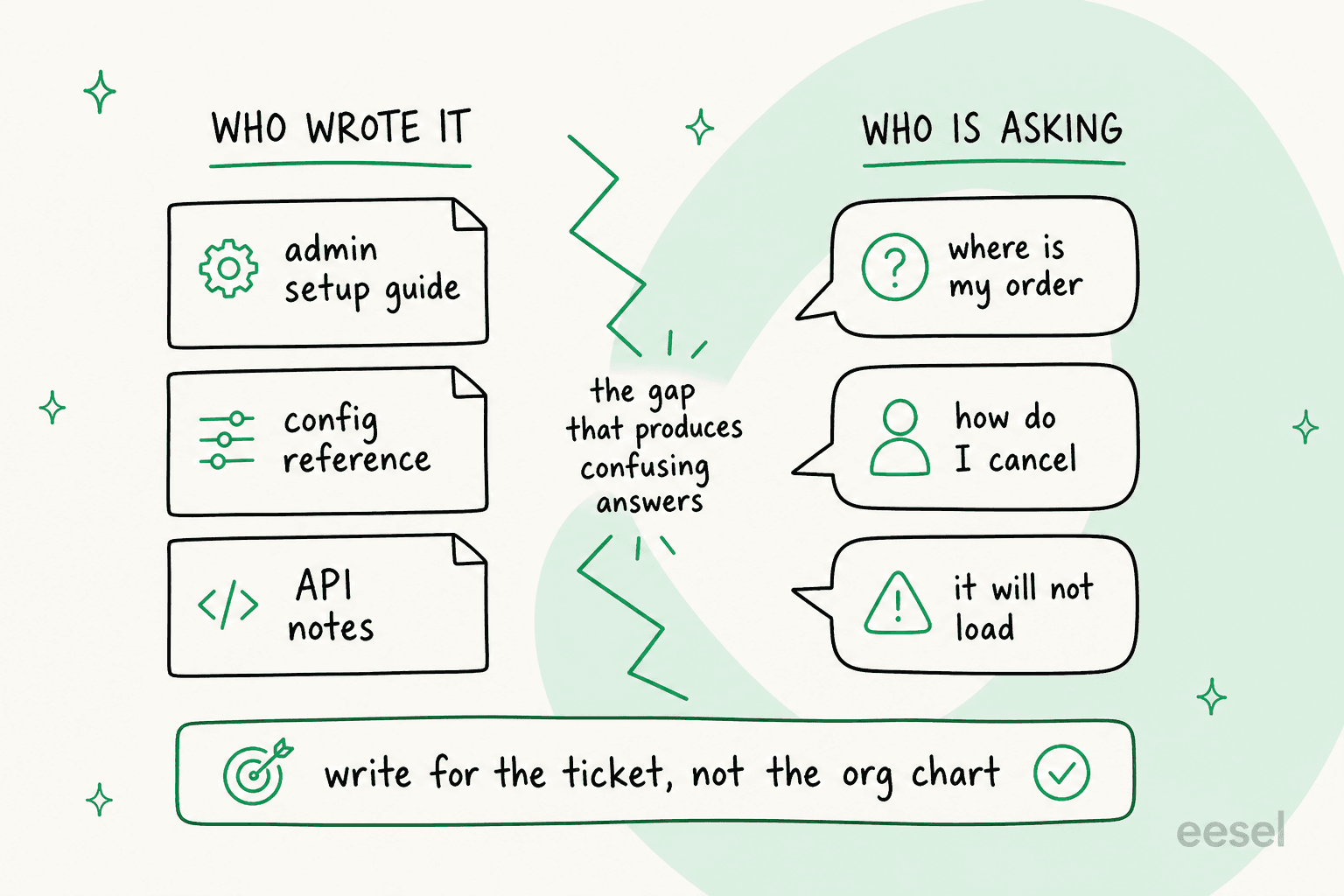
I have been putting AI agents on live support queues for a while now, and the single most common thing I find when a help center underperforms has nothing to do with taxonomy. On one call, a support manager at a transit-tracking company running 200 to 250 tickets a month walked me through a knowledge base that was, in its entirety, written for administrators. Every ticket came from riders. The articles were accurate, well organised, and answering a question nobody had asked. No amount of category restructuring fixes that; you have to rewrite for the person filing the ticket.
The version of this that bites hardest is a single sentence. A B2B vehicle telematics team found their bot confidently telling customers "yes, we support your car model" for brands that were not in their database, because one knowledge base article said "we support all models". Once an AI reads your help center, the wording of every article becomes load-bearing in a way it never was when only humans read it. That is the mechanism behind most AI hallucinations in support, and it is a content problem rather than a model one.
Five article shapes you can copy from Freshdesk's own help center
Freshdesk does not publish the contents of its How-to, User guide or FAQ templates. But it runs its own portal on the product, so the shapes are readable straight off the page. I pulled four real published articles apart.
Every article carries the same chrome. Breadcrumb, then H1 title, then a visible Modified on: stamp and a plan-availability matrix, then the body, an attachments card with file size, a "Did you find it helpful?" widget, and finally a view-tracking pixel. The date stamps are honest to a fault. The article on versioning still reads Modified on: Fri, 6 Mar, 2020.
The how-to shape. A one-line scope sentence, then a "see also" pointer, then a User Requirements: line, then a This article contains: block of same-page anchor links. A horizontal rule before each top-level section. Numbered steps, one action each, bolding the literal UI label, with a screenshot after most individual steps rather than batched at the end. Grey Note: and Tip: callouts. A closing "Learn more" list of two or three related articles.
The FAQ shape. This one is almost aggressively minimal. Title is the customer's question verbatim, question mark included. No table of contents, no headings, no screenshots. The body is two sentences: what happens, then what you do about it, with the exact button name bolded. That is the entire article.
The troubleshooting shape. A "Why..." title, one paragraph of context, a pivot sentence into the checklist, named likely causes as bullets, then a numbered list of checks each starting with "Check if". It closes with an explicit escalation step naming the exact artefacts to attach: a screenshot of the error, the mail headers, and the support address. That last part is what most troubleshooting articles omit, and it is why they generate follow-up tickets asking for the same three things.
The release-note shape. Freshdesk keeps a Product Announcements folder, and its upcoming changes article is the shape to steal. A "Why are we making these changes?" section, a Rollout plan with bolded Date and timeline: and Intended audience: lines, then one section per change. Each change section carries a two-column table headed What's available today? | What's new? followed by a benefits list and a before-and-after screenshot pair. That two-column table is the single most copyable artefact in the whole portal.
The home page shape. Search hero, six category cards each with a one-line "what's inside" description, a View all categories link, a Quick links row pointing at community and system status, and a CTA band.
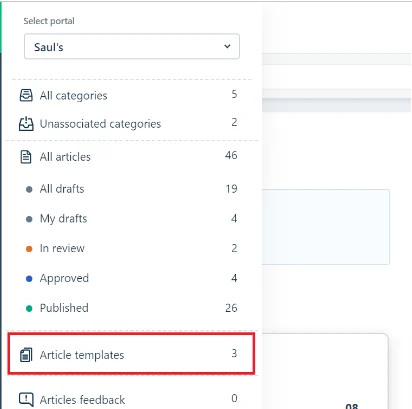
If you want to enforce any of these, Freshdesk has a real template object, not just guidance. Templates live under Solutions, then the Quick views menu, then Article templates. You can mark one as default so it auto-loads on every new article, which is how you stop twelve agents inventing twelve shapes. Two limits worth knowing: a hard cap of 30 templates per account, and templates are Pro and above. Teams that want the shape applied automatically usually pair this with an AI knowledge base article writer rather than policing it by hand.
The editor itself is rich text plus an HTML view, with no markdown. It supports H1 through H4 only and strips <script>, <style>, <form>, <input>, <select>, and event attributes like onclick. So no interactive widgets in a Freshdesk article, at any price. Inline images cap at 5.2 MB, attachments at 25 MB each and 100 MB cumulative.
Turning tickets into articles
Every knowledge base that I have seen actually work was fed by the ticket queue, not by a documentation sprint. Freshdesk's path for this is called Email-to-KBase, and it is the one knowledge base feature ticked on every plan including Growth. It is also the closest native equivalent to what Zoho Desk's Zia and Zendesk Knowledge (formerly Guide) do at the same step.
Compose the reply to a ticket, add kbase@yourcompany.freshdesk.com to the BCC field, and send. A draft appears under the Drafts section.
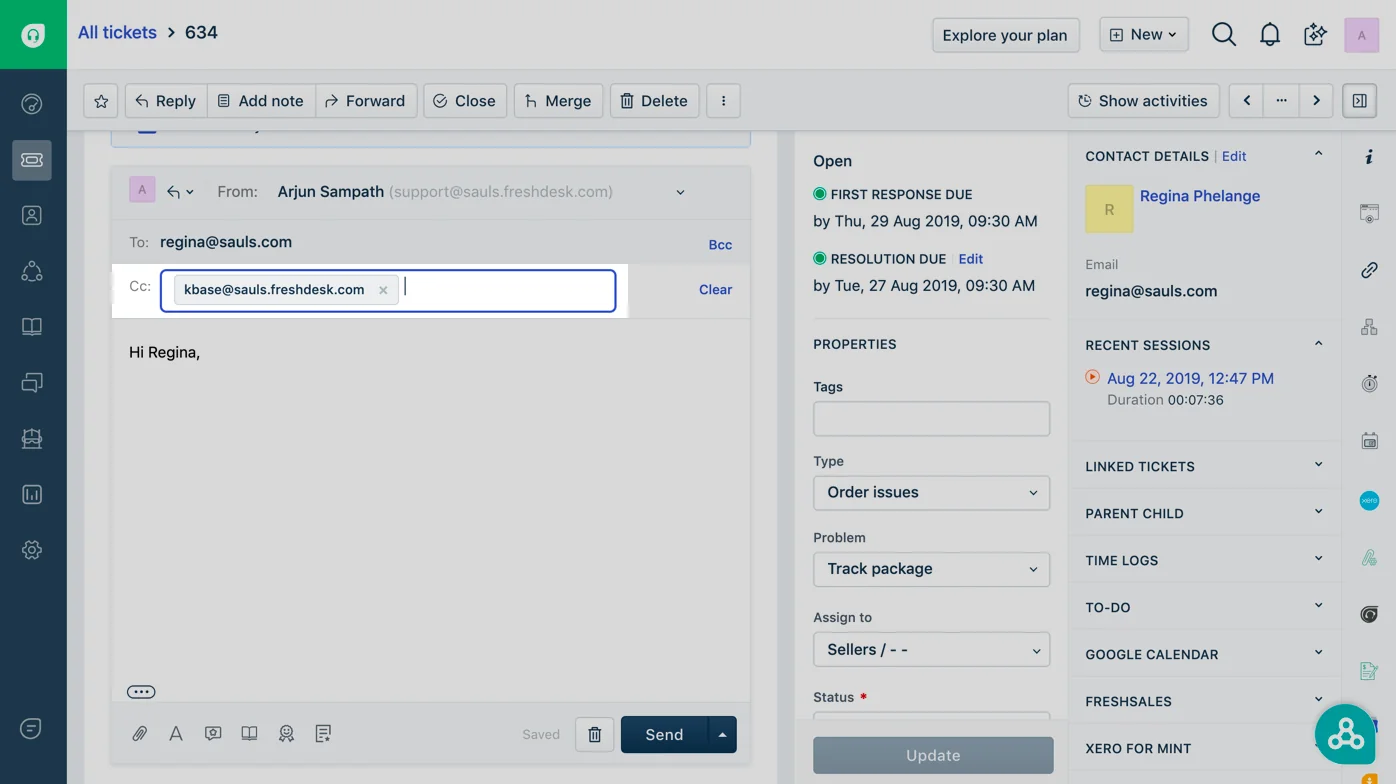
Two conditions the docs are firm about: the mail has to come from a registered agent email address, and that agent needs Solutions publish permission under Admin, Team, Roles. Emails from customers to the kbase address get rejected automatically. It also works on old mail outside a ticket, so forwarding a long-running email thread into the knowledge base is a legitimate way to seed one.
The honest limitation is that the draft arrives as raw email text. Somebody still has to give it a title, a folder, and a shape. That gap is exactly where the Solution Article Generator is meant to sit, and it is worth being clear about what it costs. Freshdesk's own doc says it plainly: it is a Freddy AI Copilot add-on, "accessible to Pro and Enterprise plans through your account manager". Copilot is $29 per agent per month on top of a Pro seat, which puts the real floor at $84 per agent per month and a sales conversation before an AI writes a single article for you. Our Freddy AI knowledge base breakdown goes deeper on what it does once you have it.
The customer-facing side is metered separately. Freddy AI Agent runs at $49 per 100 sessions, so $0.49 each, and a session is defined as all interactions with one end user in a 24-hour window, not a resolution. You pay for the attempt either way. The "first 500 sessions included" line on the pricing cards is a one-time grant on plan purchase, not a monthly allowance, which is worth catching before you build a forecast on it. The full unit economics are in our Freshdesk Freddy AI pricing post, and there is a separate write-up on session consumption if you are trying to forecast it.
Worth noting that Freshdesk will also suggest solution articles inside an agent reply, which is the agent-side half of the same loop.
The measurement gap
Here is the place where I think most Freshdesk knowledge bases quietly stall. Knowledge base analytics only start at Pro, and even then Freshdesk's own docs are still labelling the feature as beta. What you get is per-article Views, Helpful, Not helpful, and a Suggested count, which tracks how often an article was pushed into an agent reply. Suggested is the closest thing Freshdesk offers to native deflection attribution.
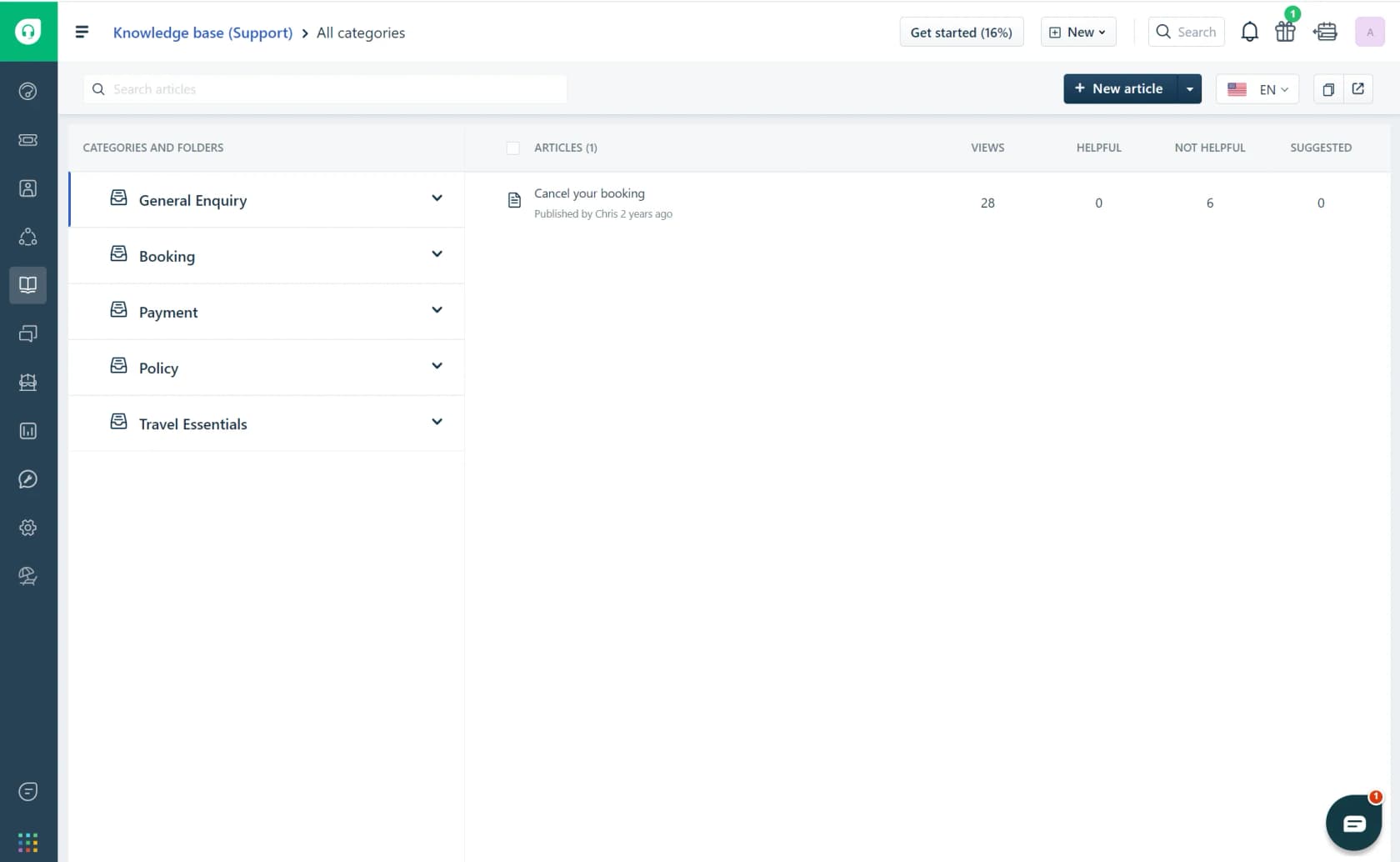
Look at the row in that screenshot: 28 views, 0 helpful, 6 not helpful. That is an article people are finding and rejecting, which is a very different problem from an article nobody finds. Freshdesk will tell you the first thing.
What it will not tell you is what people searched for and did not find. Freshdesk has no failed-search report, and its docs point you at Google Analytics instead. Zendesk has "Searches with no results" with 390-day retention, Zoho Desk splits popular from failed keywords, Help Scout ships a dedicated failed-searches table. Freshdesk's answer is to go set up a third-party analytics tool.
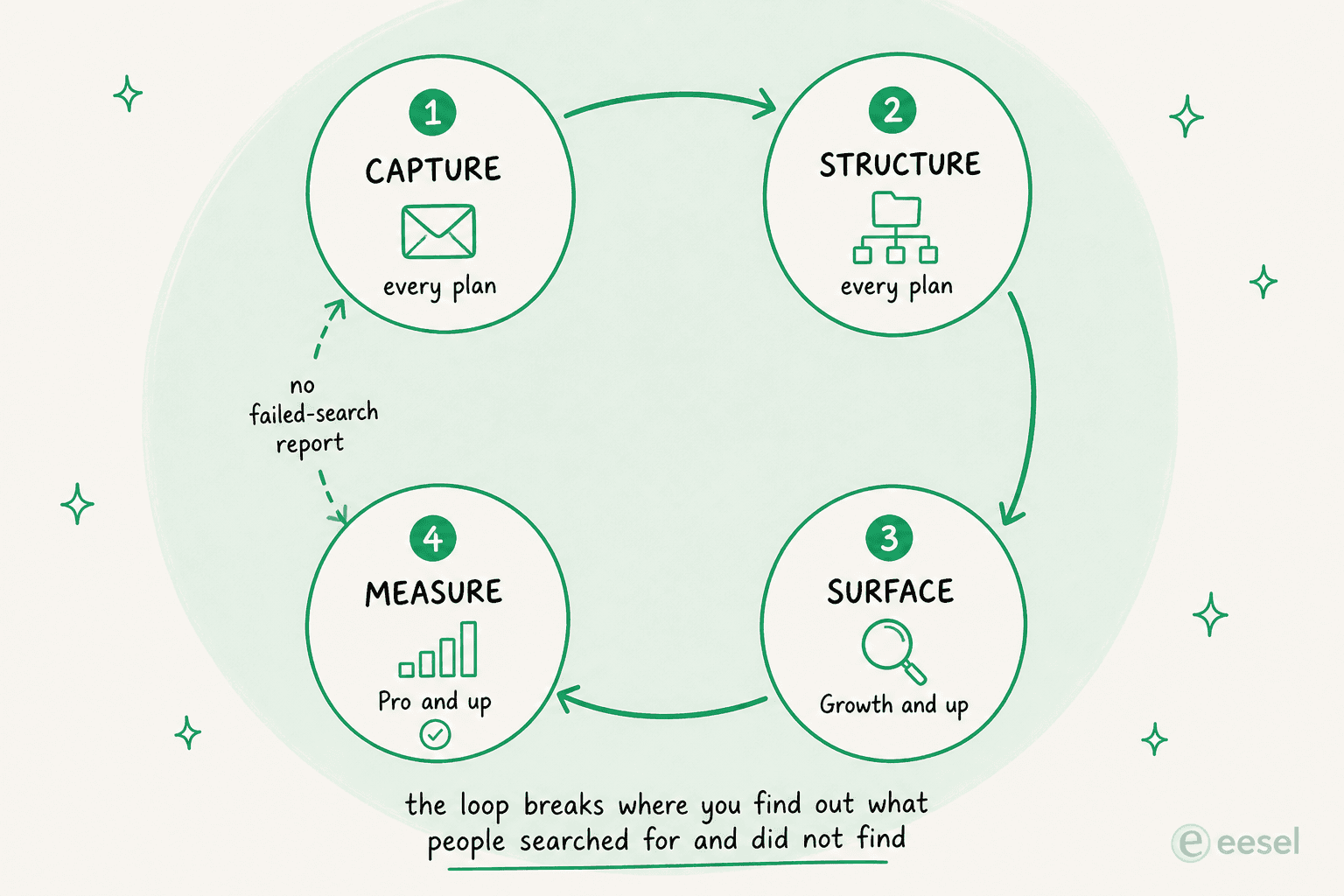
The break matters, because failed searches are the cheapest article backlog that you will ever get. They are literally a list of questions your customers have, in their own words, that you have not answered. Without it, your content roadmap comes from whatever your team happens to notice. There is a whole method for mapping search queries to content gaps, and it starts with having the queries.
Rot control is similarly thin. There is no expiry field and no review reminder. The only automatic staleness flag is "Mark other translations as outdated", which covers translations only. The nearest thing to a review queue is manually filtering on Last modified at, and that filter is Pro and above. Versioning with green and red diffs and a restore button is real, and also Pro.
The SEO problem nobody warns you about
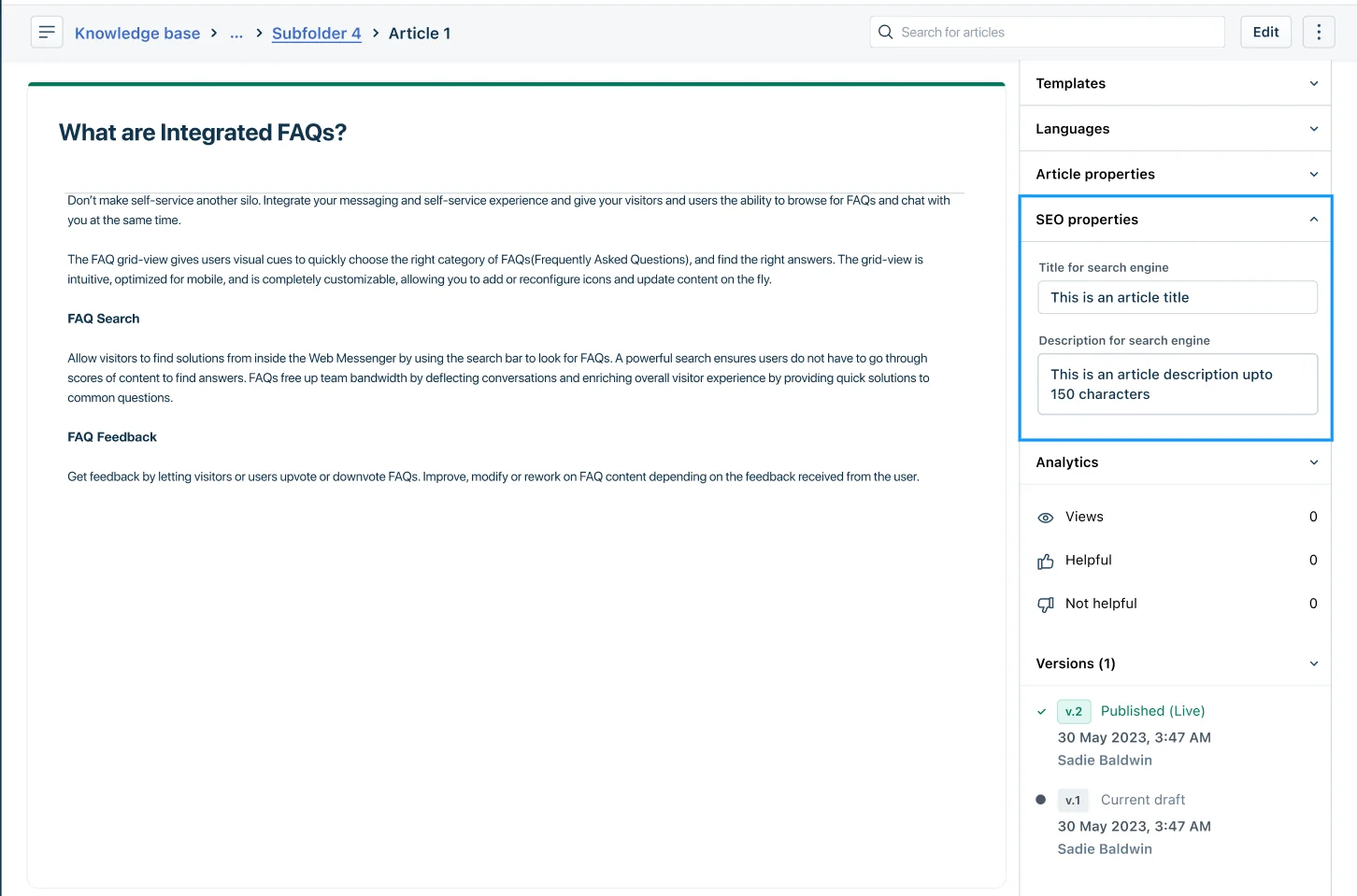
Per-article SEO fields exist on every plan: title, description, keywords, with Freshdesk recommending 50 to 60 characters for the title and 150 to 160 for the description, and a counter that turns red when you go over. Good.
The URLs are where the problem is. A Freshdesk article lives at /support/solutions/articles/<numeric-id>-<slug>, and it is the numeric ID that is canonical. Freshdesk's own internal links routinely drop the slug entirely and still resolve, which tells you the slug is cosmetic. You do not get a clean keyword path.
If you need to move that content somewhere you control, the Freshdesk knowledge base API is the practical route out.
Then there is the domain. Freshdesk portals sit on a subdomain, and marketers notice:
"Hi, I work with freshdesk and they have their own, "help center", which is in their own url, and I can't SEO/GEO optimize it. The thing is we have +70 articules posted there and I want to used them for SEO/GEO. So can I add in my site map their url?"

The answer they got was the correct one, and it is not what anybody wants to hear:
"You can't add external URLs to your sitemap and have Google attribute that authority to your domain. The content needs to live on your domain to benefit your SEO."
There is a reasonable counterargument that a help center mostly earns branded traffic anyway, so a subdomain does not really cost you. I lean toward that view for consumer brands and against it for B2B SaaS, where a good troubleshooting article can rank for a category term. Either way, use a custom domain. Ten of the thirteen portals I checked do; greytHR and Worksy do not, and it shows in the URL bar. Setting one up is covered in Freshdesk customer portal setup, and the theming side in portal customization.
One more thing worth planning for before you commit: automatic sitemap generation is Pro and above, and exporting your content is awkward. The Export button only produces a CSV of the article list and properties. To get the actual article bodies out, you have to export your whole helpdesk data and dig the Solutions XML file out of it. Deletion, meanwhile, is irreversible and asks you to retype the exact name to confirm.
What Freshdesk users actually say
The cleanest summary of the whole situation came from one Capterra reviewer whose pros and cons contradict each other in the most useful way. The pros:
"After building our knowledge base, we noticed many customers started resolving common issues on their own before contacting support. This reduced ticket volume while allowing agents to dedicate more attention to complex cases."

And the cons, same review:
"Although the knowledge base is useful, finding the right article isn't always seamless for end users. Improving search relevance and content recommendations would make self-service even more effective."
That is the tension in two sentences. The knowledge base deflects. The retrieval is the weak link, which is the whole argument for putting a knowledge base chatbot in front of content you have already written.
Portal customization is the other recurring theme, and the strongest quote on it is recent and non-incentivized:
"For the cost, FreshDesk is a great ticketing platform. Once fully configured it works well and the support portal you can build for your end users is a great feature to have. Their market place for integrations is pretty good as well with all the common/popular apps. There is a lack in what you can customize though (specifically with the support portal and workflow builders)."
Some people hit the editor ceiling and go around it:
"The gui used to deploy the solution articles could be a little more friendly to use. Formatting the solution articles can sometimes be difficult and I find myself directly editing the HTML to get the desired look."
And one worth taking seriously before you invest three years of writing into the portal:
"Freshdesk. Can't exit because: we could get off the ticketing system, but the knowledge base is hosted here as well, and that's publicly accessible."

A team migrating away found the same thing, from the other side:
"I was able to export all of it to .json from Freshdesk. Still, the issue is that HubSpot is only able to import via two options: either by a CSV or by providing them with the link to the current FreshDesk Knowledge base. It will auto-import it. The issue with number 2 is that it skipped a lot of articles, and they were not correctly categorised."
To be fair to Freshdesk, plenty of reviewers rate the knowledge base above the rest of the product. One IT support analyst put it as "Our admin did a good job of integrating the KB with the ticketing systems so the KB was a very reliable point of reference while troubleshooting during a call", with cons that were entirely about the ticketing side. The knowledge base is not the weak part of Freshdesk. It is just a knowledge base, and the plan gates decide how much of one you get. If you are still choosing, Zendesk vs Freshdesk and our best AI knowledge base tools roundup both compare this layer directly.
The multilingual gap, briefly
If you serve more than one language, know this before you plan: Freshdesk supports 47 languages in the knowledge base, four of which are knowledge-base-only. It also does zero machine translation of solution articles at any plan level. Every translation is typed by a human. Freddy's Live Translate handles ticket conversations in real time; it does not touch your articles.
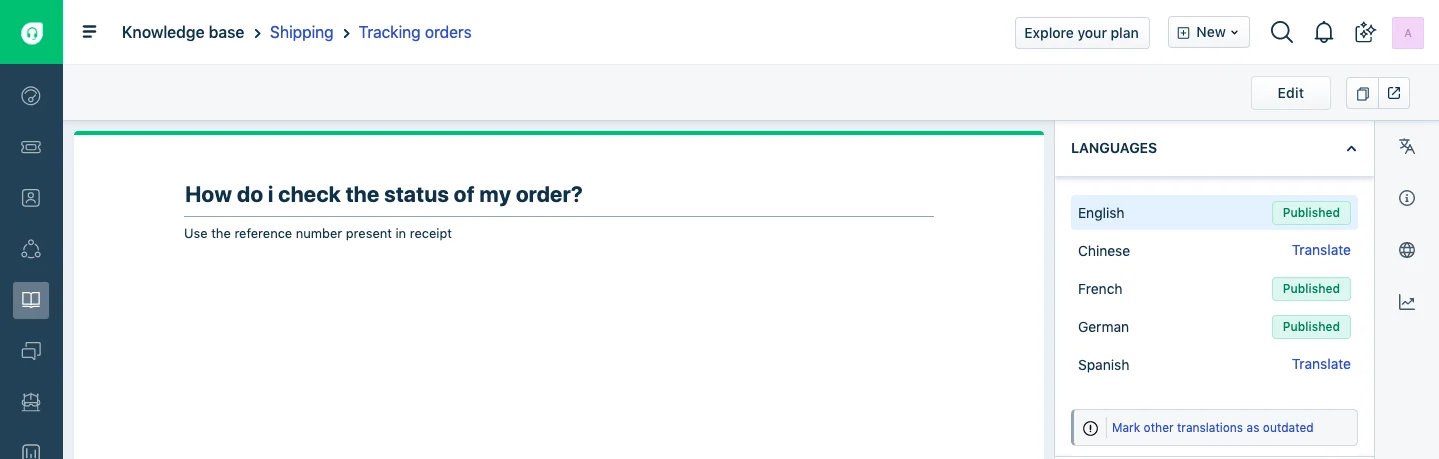
Propagation is manual too. When you edit the master version, you click Mark other translations as outdated yourself. And the whole multilingual knowledge base is gated at Pro, $55 per agent per month. That is worth pricing honestly against Noise's approach of keeping a separate International User Manual folder in English, which costs nothing. For live conversations rather than articles, multilingual live chat is a separate problem with separate tooling.
eesel for Freshdesk
If you have already done the hard part, and the articles exist but customers still open tickets that your help center answers, the gap is retrieval rather than content. That is the problem eesel was built for.
eesel connects to Freshdesk, reads the solution articles you have already written along with your past tickets and macros, and either drafts replies for agents or answers customers directly. Three things about it are specific to the problem this post has been circling:
It simulates against your own ticket history before it goes live. I built that because of a failure, not a roadmap. A paying customer's bot once fabricated subscription claims and sent them to real people because the knowledge base had no matching answer. Running a rollout against thousands of historical tickets first tells you what the AI would have said, on your actual content, before any customer sees it. That is also how you get an honest AI resolution rate number instead of a vendor estimate.
It surfaces the gaps. The questions the AI could not answer from your existing articles are exactly the failed-search report Freshdesk does not give you. That is your article backlog, generated from real tickets.
It does not need a rebuild. No re-categorising, no migration off the Freshdesk portal, no waiting for a Pro upgrade to get started. It reads what is there, which is the practical difference between retrieval and fine-tuning for a help center. If your Freshdesk knowledge base is three levels deep and lives on Growth, that is fine.
You can try it free. The Freshdesk integration page covers how the connection works, and there is a step-by-step on adding AI to Freshdesk if you want to see the setup first.
Where I would start
If you are building from scratch, copy Hover. Four to six categories named after the product surface, Getting Started pinned at the front, a description line on each category, and then a Before you begin block on every article. That is a weekend of work, and it beats most of what I found.
If you already have a knowledge base and it is not deflecting: do not restructure first. Open your ticket queue, read fifty recent tickets, and check whether your articles are written for the person who filed them. The transit company I mentioned had a well-organised knowledge base that was answering the wrong audience entirely, and no amount of category work would have fixed it. That audit is the cheapest step in any plan to improve self-service with AI.
If you are on Growth and frustrated: the honest read is that Freshdesk's $19 tier gives you a knowledge base and almost no way to run one. Before you jump to Pro at $55 for versioning and analytics, work out whether the actual problem is that customers cannot find your articles. If it is, an AI layer over your existing content is a cheaper fix than a 189% plan increase, and our roundup of the best AI for Freshdesk covers the options.
Frequently Asked Questions
What are some good Freshdesk knowledge base examples to copy?
How do you structure a Freshdesk knowledge base?
Is the Freshdesk knowledge base free?
Can Freshdesk turn tickets into knowledge base articles?
kbase@yourcompany.freshdesk.com on a ticket reply and Freshdesk creates a draft article from it. The catch is that the draft arrives unformatted, so somebody still has to shape it. Teams that want this to happen without the manual pass usually look at adding AI to Freshdesk.