Data-driven customer support isn't optional anymore. If you're running a support team, you need to know what's happening in your queue, why tickets are backing up, and whether your customers are actually satisfied. Freshdesk has built an analytics foundation to help with this, and their AI layer, Freddy AI Insights, adds proactive monitoring and natural language querying.
But native analytics only tell part of the story. In this guide, we will break down what Freshdesk AI analytics can do, where it fits in your workflow, and how tools like eesel AI can help you turn those insights into action.
What is Freshdesk AI analytics?
Freshdesk AI analytics refers to the combination of Freshdesk's built-in reporting capabilities and its AI-powered analytics layer, Freddy AI Insights. Together, they give support teams visibility into performance metrics, anomaly detection, and conversational querying of support data.
At its core, Freshdesk provides two types of reporting:
-
Curated reports: Pre-built dashboards that track common metrics like ticket volume, resolution times, and CSAT scores. These are available on all plans and give you a quick overview without any setup.
-
Custom reports: Build-your-own analytics with specific metrics, filters, and visualizations. These require the Pro plan or higher but let you dig into the exact data your team needs.
The AI component, Freddy AI Insights, adds proactive monitoring and natural language querying on top of this foundation. Instead of manually checking dashboards, you get alerts when something changes and can ask questions like "What was our resolution time last week?" to get instant answers.
For teams looking to go beyond reporting, eesel AI works alongside Freshdesk to automate responses based on the patterns your analytics reveal.
Freshdesk's native analytics capabilities
Before diving into the AI features, let us look at what you get out of the box with Freshdesk's standard analytics.
Curated reports vs custom reports
Freshdesk splits its reporting into two categories based on your plan and needs.
Curated reports are the plug-and-play option. They come pre-configured to track the metrics most support teams care about: ticket volume trends, agent performance, resolution times, and customer satisfaction. You can filter by date range, agent, group, or channel, but the structure is fixed. This is perfect for teams that want insights without spending time building reports.
Custom reports give you full control. You pick the metrics, set the filters, choose the visualization type, and arrange everything in a dashboard that makes sense for your workflow. Want to track first response time specifically for VIP customers in the Enterprise segment? Custom reports can do that. This feature unlocks on the Pro plan.
Here's how they compare:
| Feature | Curated Reports | Custom Reports |
|---|---|---|
| Ease of use | High (pre-built) | Medium (requires setup) |
| Customization | Standard filters | Full control over metrics and visuals |
| Best for | Daily/weekly check-ins | Deep dives into specific issues |
| Plan availability | All plans | Pro and Enterprise only |
Core metrics you can track
Freshdesk covers the essential support metrics across a few key categories:
Ticket metrics show you what's happening in your queue. You can track tickets created, resolved, and reopened over time. The "unresolved ticket age" metric helps you spot tickets that have been sitting too long.
Performance metrics measure speed and reliability. First response time tells you how quickly agents are getting back to customers. Average resolution time shows how long it takes to fully solve issues. SLA compliance tracking ensures you're hitting your promised service levels.
Agent productivity focuses on team performance. You can see replies per agent, notes added for internal collaboration, and how workload is distributed across your team.
Customer satisfaction comes from built-in CSAT surveys. Freshdesk can automatically send surveys after ticket resolution and track scores over time.
These metrics give you a baseline for understanding your support operation. But they're historical by nature: they tell you what already happened, not necessarily what to do next.
Freddy AI Insights explained
This is where Freddy AI Insights comes in. It's Freshdesk's AI-powered analytics layer designed to move you from reactive reporting to proactive decision-making.
What makes Freddy AI Insights different
Traditional analytics require you to check dashboards and interpret data yourself. Freddy AI Insights flips that model:
Anomaly detection monitors your core metrics automatically and sends alerts when something changes. If your CSAT score drops suddenly or resolution times spike, you'll know immediately instead of discovering it in next week's report.
Conversational interface lets you ask questions in plain English. Instead of building a custom report to check last week's resolution times, you just ask "What was our average resolution time last week?" and get an instant visualized answer.
Real-time tracking pulls data across all your channels and teams continuously. You're not waiting for reports to refresh; the insights are current as of the last interaction.
Use cases for Freddy AI Insights
Freddy AI Insights is designed around four main use cases:
Staffing and automation decisions: By tracking operational load in real time, you can see when you need more agents online or where automation might help reduce volume.
Measuring impact from changes: Launching a new product or running a promotion? Track how support volumes and categories shift during these periods.
SLA compliance monitoring: Get ahead of SLA breaches by monitoring trends before they become violations.
Early issue detection: Spot problems before they escalate. A sudden spike in tickets tagged with a specific issue, or a drop in sentiment, can alert you to product bugs or service problems.
Freddy AI Insights is available on Pro and Enterprise plans, with limited functionality on lower tiers.
AI Agent performance analytics
If you are using Freshdesk's AI Agent (part of the Freddy AI suite), you get dedicated analytics to measure how it is performing alongside your human team.
AI vs Human Agent Comparison Report
Freshdesk provides a specialized report that breaks down performance by agent type. This lets you see how your AI agent stacks up against human agents using the same metrics.
Key metrics tracked include:
-
Resolution rate: The percentage of conversations the AI agent resolves without human intervention. Higher is generally better, though some escalation is expected for complex issues.
-
Agent transfer rate: How often the AI hands off to a human. A high transfer rate might mean the AI needs more training on common questions.
-
First response time: How quickly the AI sends its first reply. This is typically much faster than human agents.
-
Handover time: How long the AI works on an issue before escalating. Short handovers might indicate the AI is giving up too quickly; long handovers might mean customers are getting frustrated before reaching a human.
Performance Summary dashboard
The Performance Summary gives you a snapshot of your AI agent's health:
- Conversations: Total interactions initiated with the AI agent
- Resolution rate: Percentage resolved without human help
- Agent transfer rate: Percentage escalated to humans
Below these metrics, you can drill into knowledge source usage to see which help articles and FAQs the AI is using most, plus how often users mark responses as helpful or not helpful. This helps you identify gaps in your knowledge base that might be hurting AI performance.
Freshdesk analytics pricing
Analytics features are distributed across Freshdesk's pricing tiers. Here's what you get at each level:
| Feature | Free | Growth ($19/agent/mo) | Pro ($55/agent/mo) | Enterprise ($89/agent/mo) |
|---|---|---|---|---|
| Curated Reports | Yes | Yes | Yes | Yes |
| Custom Reporting | No | No | Yes | Yes |
| Freddy AI Insights | Limited | Limited | Yes | Yes |
| AI Agent Sessions | None | None | 500 included | 500 included |
| Scheduling Reports | No | No | Yes | Yes |
| Data Export | No | No | Yes | Yes |
| Advanced Dashboards | No | No | Yes | Yes |
Additional AI Agent sessions: $49 per 100 sessions beyond the included 500.
Free trial: 14 days of Enterprise plan access, no credit card required.
Which plan is right for you?
Free/Growth: Best for small teams just getting started. You get the curated reports and basic metrics, which is enough to track volume and CSAT.
Pro: The sweet spot for most growing teams. You unlock custom reporting, Freddy AI Insights, and 500 AI Agent sessions to experiment with automation.
Enterprise: For larger organizations with complex needs. Adds audit logs, approval workflows, skills-based routing, and enhanced security features.
Enhancing Freshdesk analytics with AI tools
Freshdesk's analytics are capable, but they have natural limitations. The data is limited to what's inside Freshdesk, and the focus is on reporting what happened rather than helping you act on it.
This is where third-party AI tools come in.
Monterey AI for feedback analysis
Monterey AI integrates with Freshdesk to analyze your support data alongside feedback from other channels. It specializes in aggregating and triaging user feedback at scale, processing data from tickets, conversations, surveys, and transcripts to identify patterns.
Key capabilities include:
- Enhanced ticket analysis: Identify patterns in Freshdesk ticket data that might not be obvious in standard reports
- Automated feedback processing: Streamline how you aggregate and analyze customer feedback
- Knowledge base optimization: Use insights to improve your self-service resources
- Proactive support improvement: Identify emerging trends before they become major issues
Monterey AI uses custom pricing based on feedback volume, with enterprise features including SSO, custom integrations, and dedicated support.
eesel AI: From insights to action
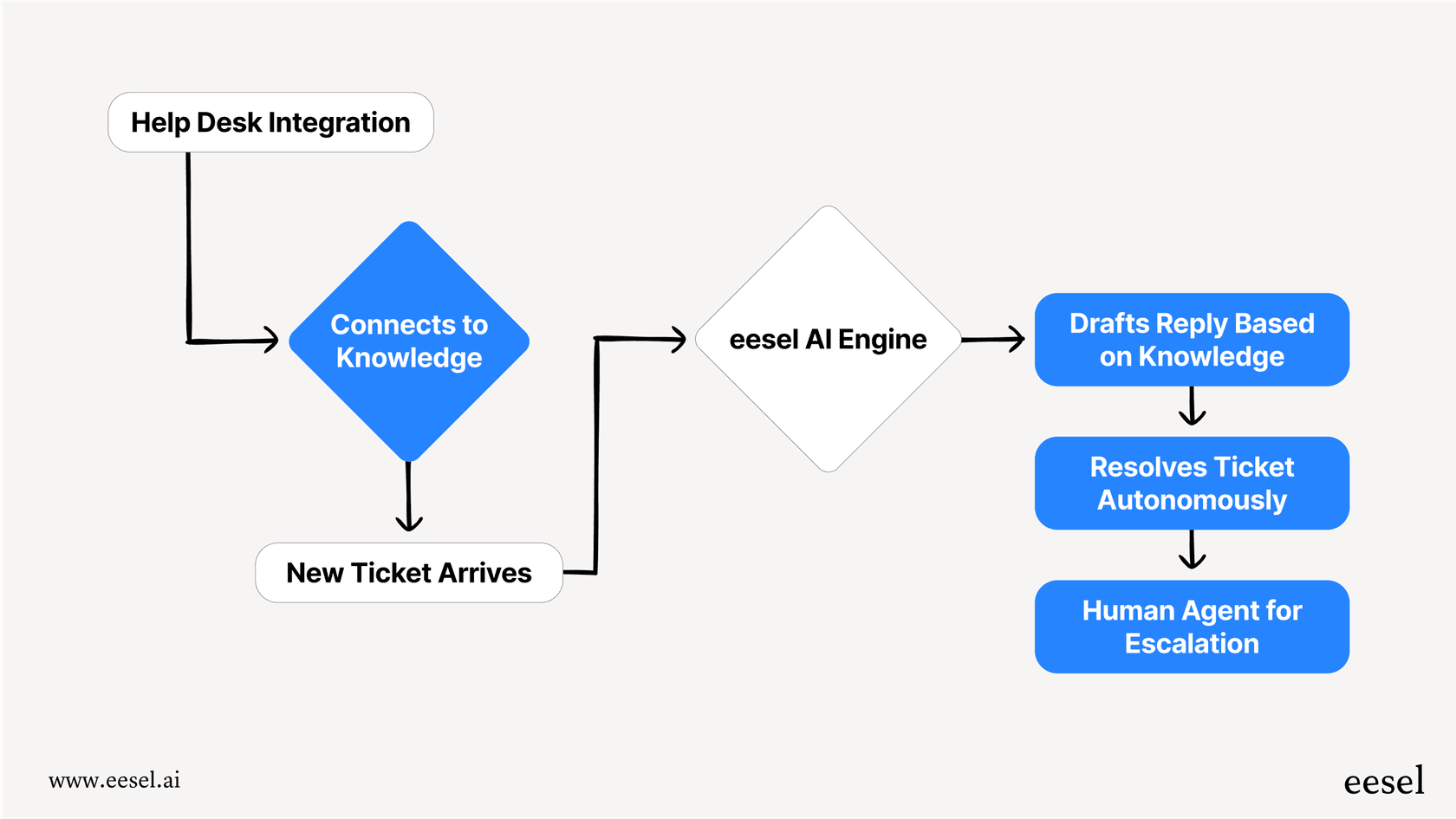
While analytics tools tell you what is happening, eesel AI helps you do something about it. eesel AI works alongside Freshdesk as an AI teammate that learns from your help center, past tickets, and connected knowledge sources.
Here's how it complements Freshdesk analytics:
Analytics identifies the problem: Your Freshdesk reports show you're getting flooded with "how do I reset my password?" tickets.
eesel AI solves it: Set up eesel AI to handle those specific queries automatically. It learns from your existing documentation and past resolutions to provide accurate answers without human intervention.
Measure the impact: Freshdesk analytics then shows you the reduction in ticket volume and improved resolution times.
The key difference is that eesel AI turns insights into automated action. Instead of just knowing you have a problem, you can deploy an AI agent to handle it.
eesel AI also connects to your broader knowledge ecosystem (Confluence, Google Docs, Notion, Slack) so it can answer questions using information that lives outside Freshdesk. This addresses one of the main limitations of native analytics: the siloed view of just Freshdesk data.
Getting the most from your Freshdesk AI analytics
Whether you're using native Freshdesk analytics or augmenting with third-party tools, here are some practical tips:
Start with curated reports to establish your baseline. Before building custom dashboards, understand what the standard reports tell you about your current performance. This gives you a reference point for measuring improvement.
Set up custom dashboards for team-specific needs. Different teams care about different metrics. Your tier 1 support team might focus on first response time, while your technical support team tracks resolution time for complex issues. Build dashboards that match each team's priorities.
Use anomaly alerts to catch issues early. Configure Freddy AI Insights to alert you on the metrics that matter most. A sudden spike in ticket volume or drop in CSAT is much easier to address when you catch it in hours rather than days.
Connect insights to action. The best analytics program is useless if you don't act on what you learn. When your data shows a trend (like a common question type), have a process to address it (like updating documentation or setting up automation).
Consider the full ecosystem. Freshdesk analytics is focused on Freshdesk data. For a complete picture, consider how tools like eesel AI can connect your helpdesk insights with knowledge from other parts of your organization.
Take your Freshdesk analytics further with eesel AI

Freshdesk gives you the data. eesel AI helps you act on it.
While Freshdesk analytics shows you what is happening in your support queue, eesel AI works as an AI teammate that learns from your help center, past tickets, and connected knowledge sources to handle repetitive queries automatically.
The combination is powerful: Freshdesk analytics identifies trends and opportunities, then eesel AI deploys automation to address them. You get the visibility of comprehensive analytics plus the efficiency of AI-powered support.
If you're ready to move beyond reporting and start automating based on what your data is telling you, check out how eesel AI integrates with Freshdesk.