Zendesk AI agent launchpad: how it works, plans, cost

Kira

Katelin Teen
Last edited November 12, 2026
Zendesk's AI agent launchpad reads your ticket history, drafts the help center articles and procedures an AI agent is missing, and tests the agent on likely scenarios before you switch it on. Zendesk says it rolls out November 5 to 30, 2026, to accounts on its latest AI agent infrastructure. I found no separate fee, so it bills like any AI agent: per automated resolution, $1.50 committed or $2.00 pay-as-you-go. Review every draft yourself. eesel works from past tickets too, and with the eesel CLI a coding agent can upload approved knowledge and test answers before anything goes live, though an admin still approves the helpdesk connection.
What is the Zendesk AI agent launchpad?
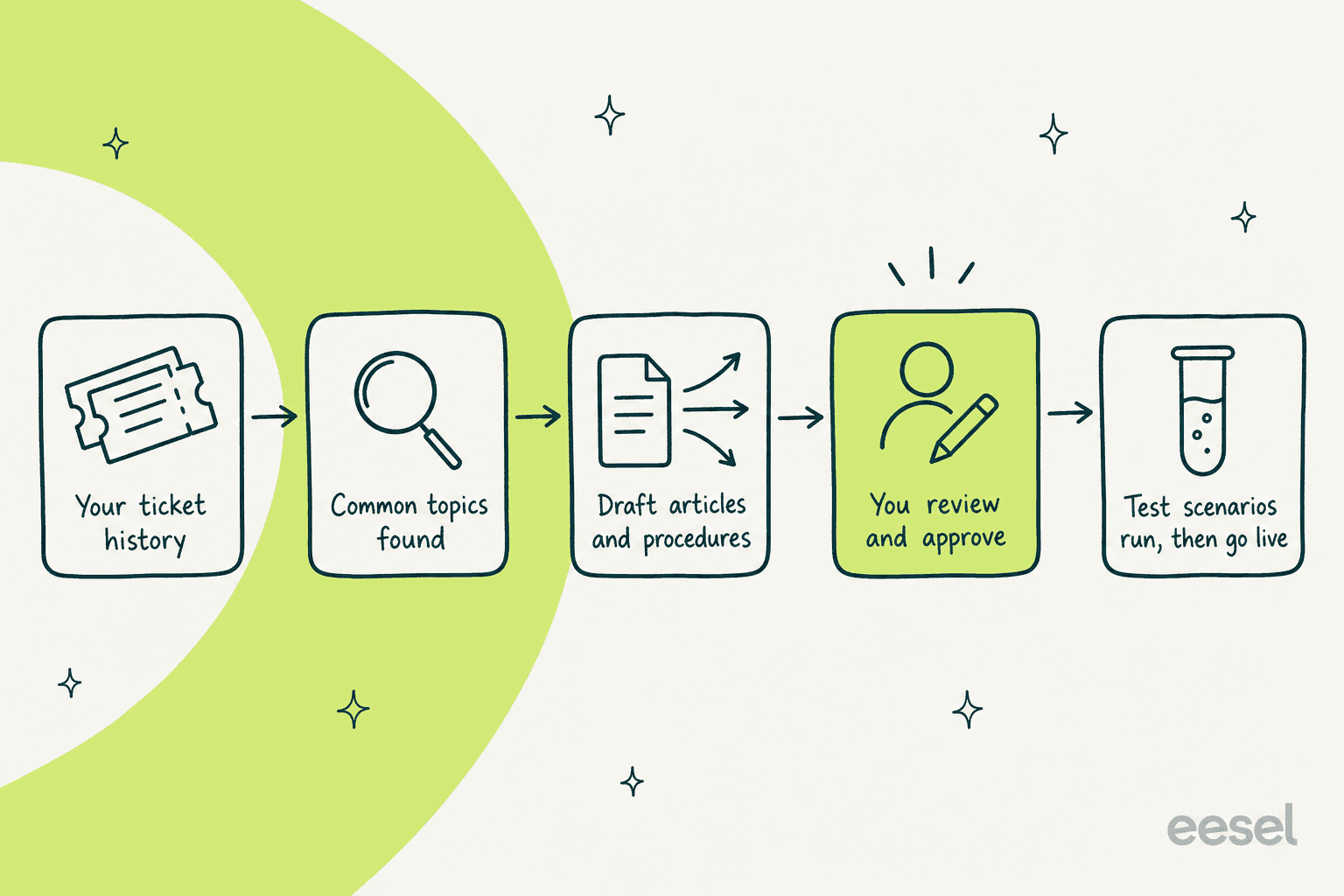
It is a guided way to build and tune a Zendesk AI agent from your own ticket data instead of a blank screen. Zendesk's announcement says it analyzes your ticket history to detect common customer topics, proposes procedures and help center articles, then tests the agent on high-impact scenarios before go-live. Zendesk also describes it in its Outcome AI launch post as a way to "discover automation opportunities from past conversations", with people reviewing and approving changes before they go live.
Three pieces make it up:
- AI-guided onboarding for new messaging and email AI agents.
- An agent overview page with automated resolutions, conversations and understood conversations for one agent.
- Tailored recommendations for new articles and generative procedures, refreshed weekly.
I haven't run it on a live account. Everything below comes from Zendesk's own docs and announcements, and I flag where they disagree.
The name causes confusion, so here is the split. Zendesk already had a Launchpad in Admin Center, and the new AI agent launchpad is a different thing.
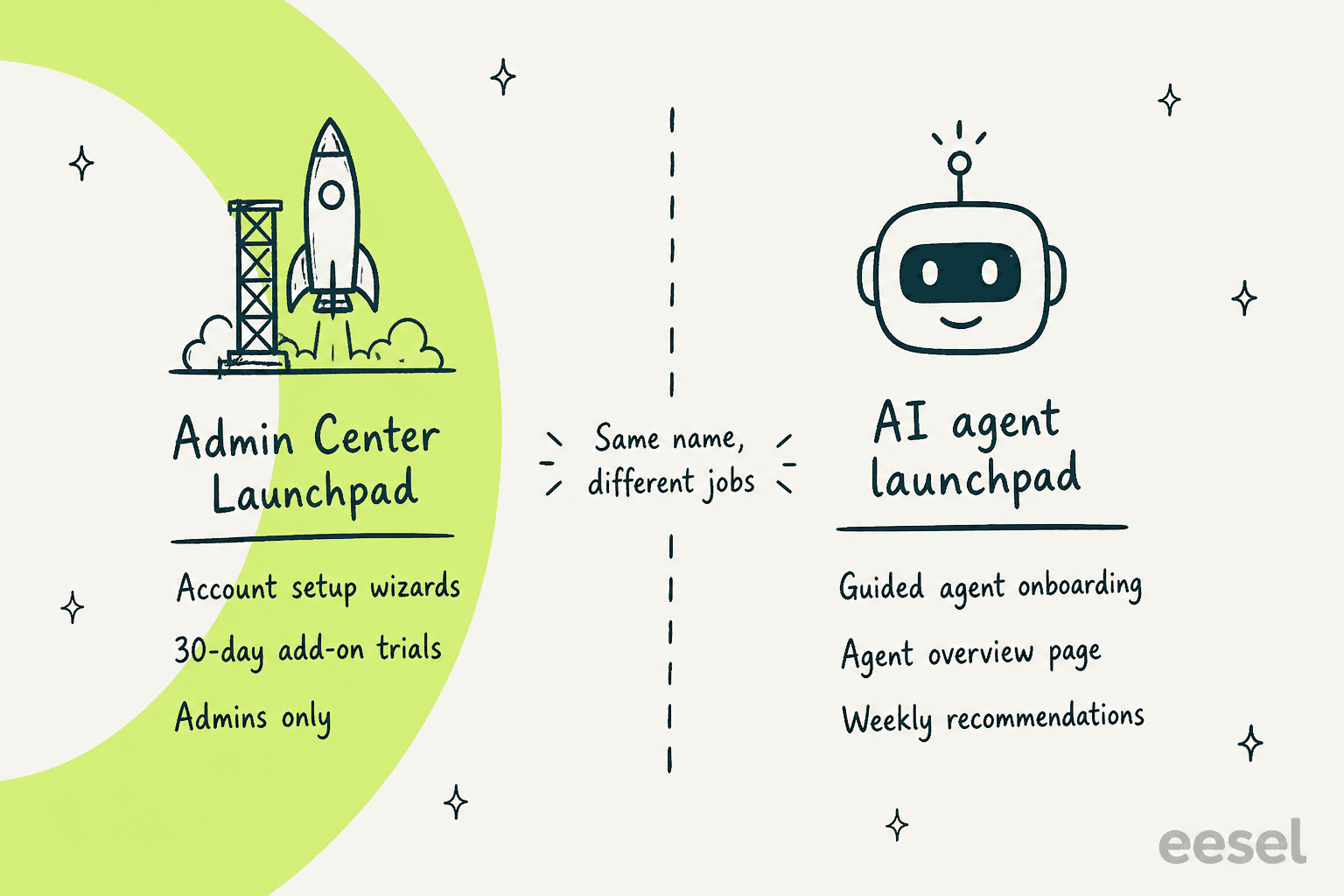
The older one, per its help article, gives admins step-by-step setup wizards and 30-day free trials of add-ons, and only admins can open it.
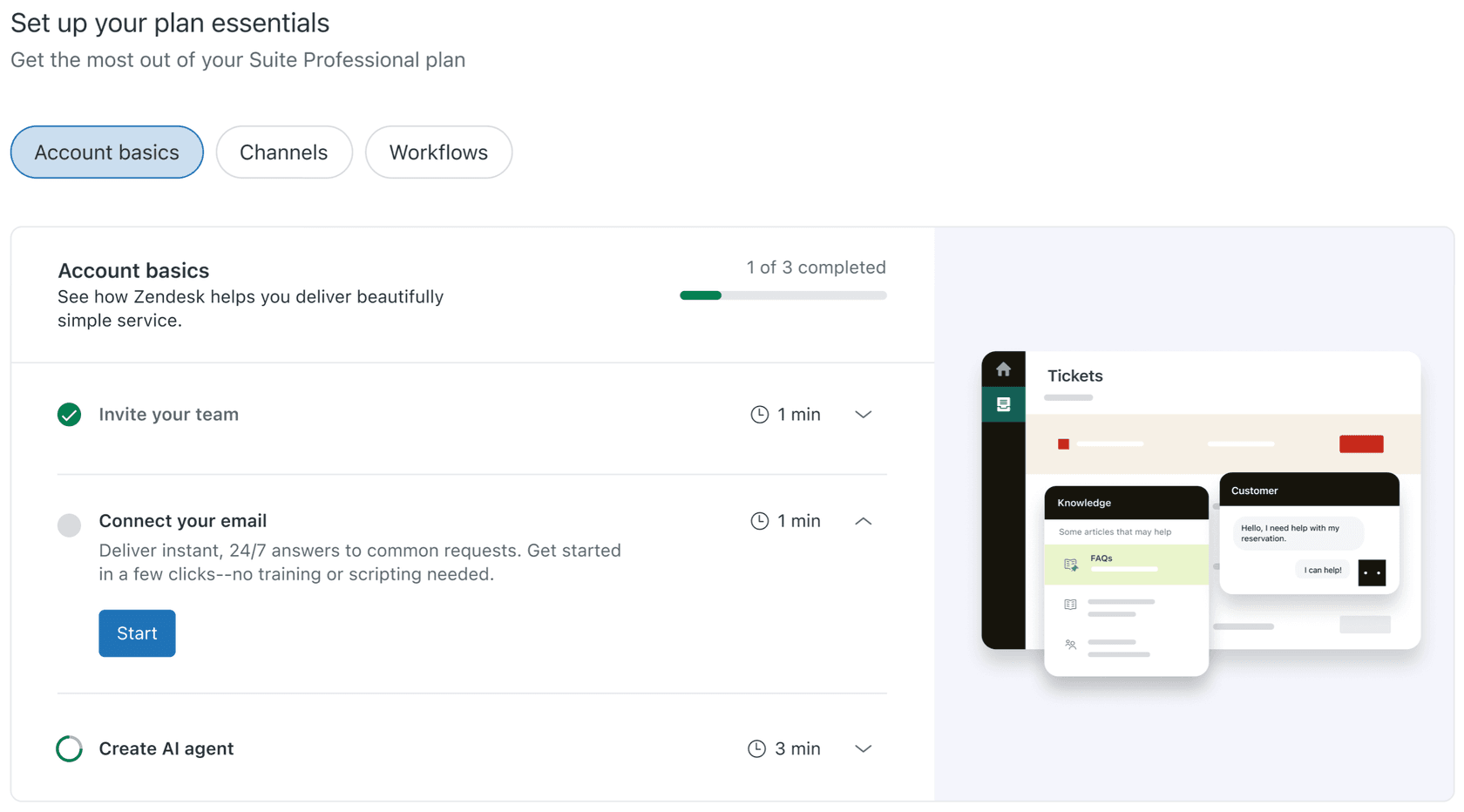
That one has a track record in Zendesk's own comments. In November 2025 an admin wrote that the older Launchpad showed features as "not started" even though their team used them heavily, and a Zendesk staffer replied that the team would verify whether triggers, automations and macros exist before marking a card complete. Keep that history in mind: it is a setup hub, not the new agent-tuning tool.
How does the guided onboarding work?
It adds two steps to the AI agent creation flow, Automate support topics and Test your AI agent. According to Zendesk's creation guide, after you pick a knowledge base and set language, tone and system replies, the flow analyzes your existing tickets and shows you what it found.
The analysis returns an automation rate, a count of automated conversations, and recommendations to create specific articles or generative procedures. Zendesk's own example screen is an IT help desk showing up to 21% automation, 1,417 automated conversations out of 6,737 analyzed, and two recommendations.
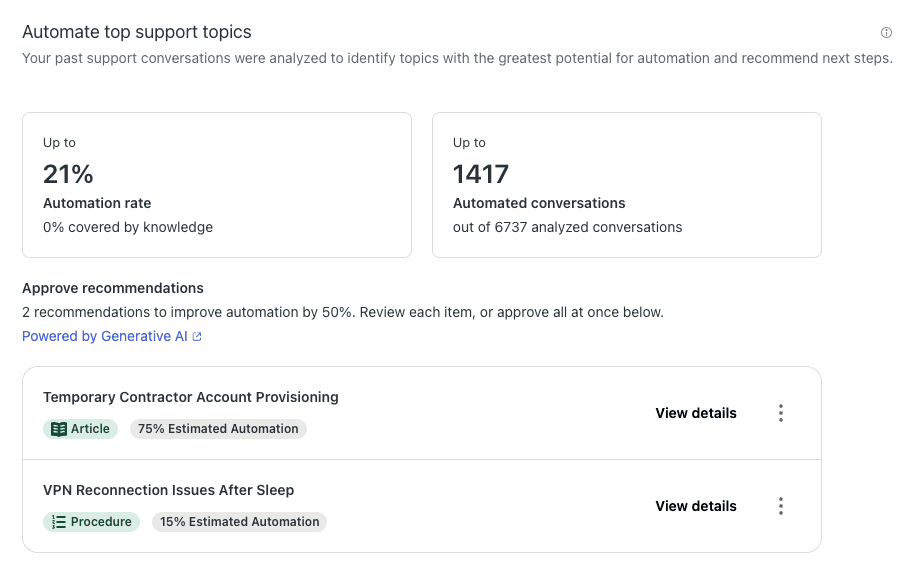
For each recommendation you can open the details, see example tickets that the content could resolve, preview an editable draft, then Approve or Decline. For articles you can also change the placement and viewing permissions. Approve is a person's click, not an automatic step, and that is the safeguard I would lean on.
Then comes testing. The flow runs scenarios against the agent and reports how many passed. Each scenario has an AI-written summary, a persona, and several runs, and Zendesk says the scenario passes as long as the majority of runs pass.
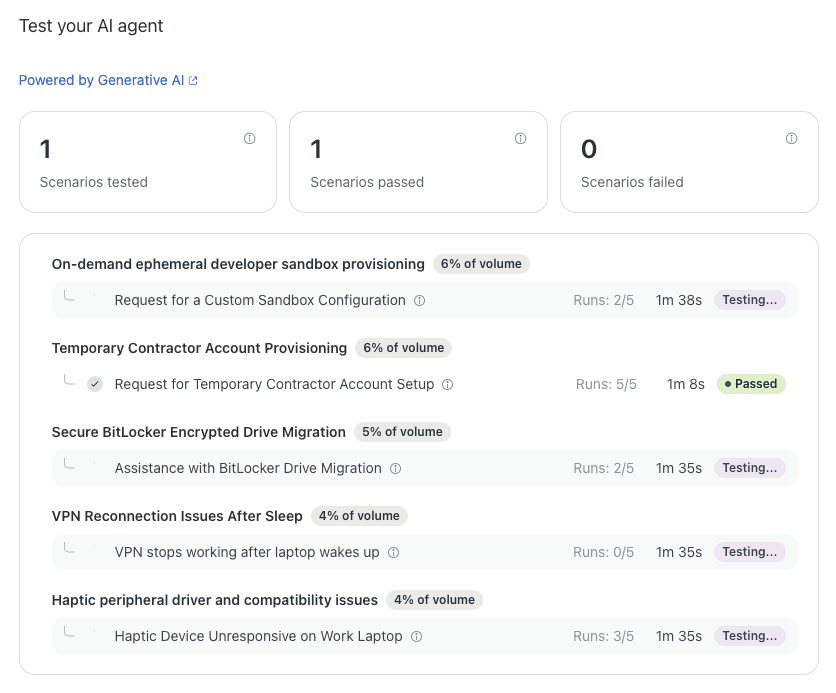
A scenario that passes on a majority is a sensible bar, but it isn't zero failures. Open the conversation behind each run, as the docs suggest, and treat a 3-of-5 pass as a prompt to read the transcript, not a green light.
Two cautions from the same article. Recommendations are generated only if you have enough ticket history and enough similar conversations to group into topics. If none can be generated, the Automate support topics and Test pages are skipped. And once you leave the creation flow, you can't return to it for that agent.
What do the agent overview and recommendations add?
They turn launch into a loop. The agent overview sits under Optimize in the AI agents workspace and shows one agent's automated resolution rate, conversation count and understood conversations over 24 hours, 7 days or 30 days.
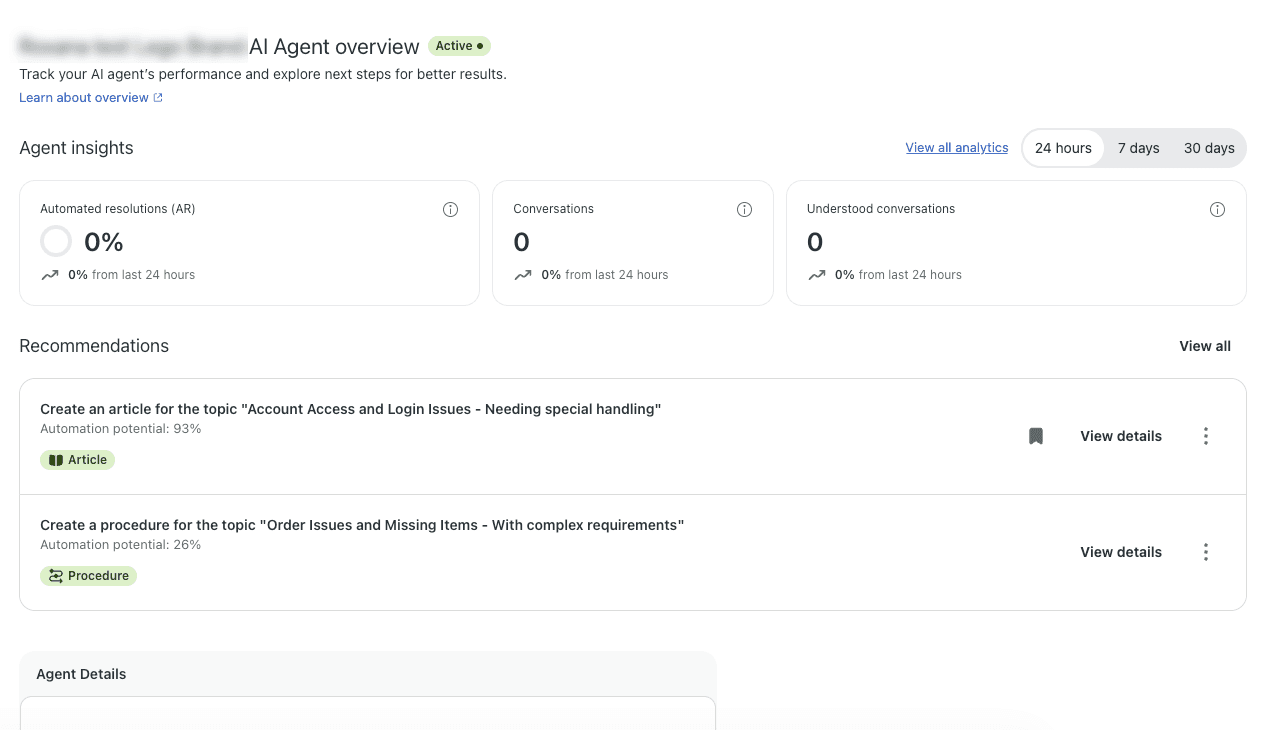
Zendesk defines an understood conversation as one where an answer came from a knowledge source, a use case was triggered, or the conversation was escalated directly without either. For agents with agentic AI the metric excludes small talk and escalations through the Escalation system reply, so it can read lower than on other agents. Don't compare it across agent types without that footnote. For the broader metric set, see my guides to resolution rate and automated resolution metrics.
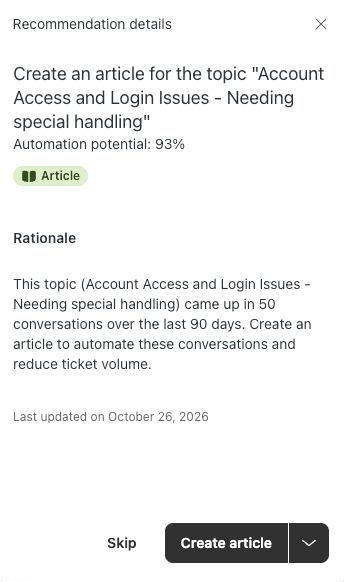
The Recommendations page lists suggestions to create an article or a generative procedure, with a filter, a Saved tab and an archive.
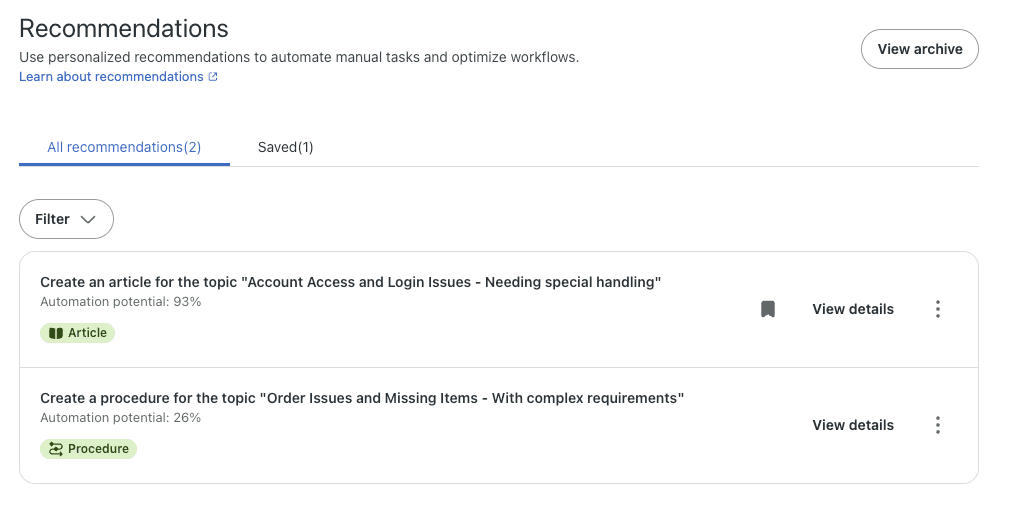
Each one carries an automation potential, an article or procedure label, a rationale and a last-updated date. Zendesk describes automation potential as an estimate from a tuned large language model that scores ticket topics for automatability, complexity and agent effort. It's an estimate of the share of tickets, not a promise.
The loop is simple, and the human step in the middle is the point.
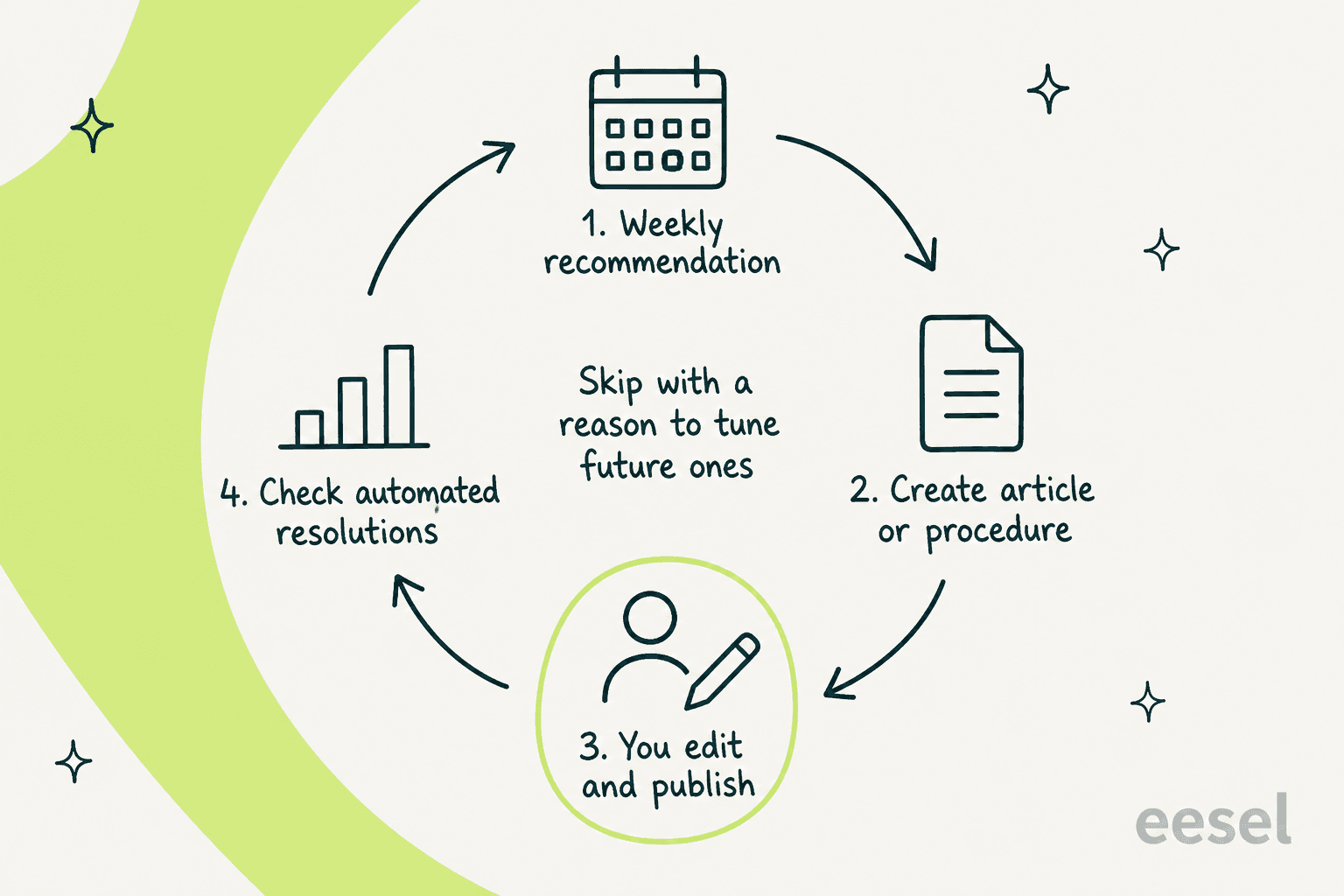
You can skip a recommendation with a reason: unclear rationale, already implemented, seen too often, not applicable, or something else. Zendesk says that feedback refines future suggestions. Pair this with an audit of your own help content, since it is where the quality comes from. My knowledge base audit guide and AI knowledge base overview cover that groundwork.
Which accounts, plans and rollout dates apply?
The rollout is November 5 to November 30, 2026, and only for the latest AI agent infrastructure. Pick the line that matches you.
On plans, Zendesk's launchpad articles list all Suites (Team, Growth, Professional, Enterprise, Enterprise Plus) and Support Team, Professional and Enterprise. Each AI agent covers one channel type, so a messaging agent and an email agent are two agents, and a client admin role is needed to create one. If you work across channels, see my guides to email channel, web form, API and voice AI agents.
Does the Zendesk AI agent launchpad cost extra?
I found no launchpad line item. The pricing page says AI agents are included in every Suite and Support plan, priced on outcomes, and Zendesk's docs say the unit is the automated resolution. The price you plan around is the resolution, not the launchpad.
| Item | Support Team | Suite Team | Suite Professional |
|---|---|---|---|
| Seat price, billed yearly | $19 | $55 | $115 |
| Included automated resolutions | 5 per agent per month | 5 per agent per month | 10 per agent per month |
| Committed resolutions | $1.50 each | $1.50 each | $1.50 each |
| Pay-as-you-go resolutions | $2.00 each | $2.00 each | $2.00 each |
Included resolutions are capped at 10,000 per year, per the pricing page. A worked example: a 10-seat Suite Professional account gets 100 included resolutions a month. If its AI agent resolves 1,000 conversations in a month, 900 sit above the allowance, which is $1,350 at the committed rate or $1,800 pay-as-you-go. That is my arithmetic from Zendesk's published rates. Whether the allowance works this way depends on which resolution platform your account is on, covered next.
Zendesk's docs don't agree on the platform, so I'd confirm with your account team:
- The older resolutions article lists 15 per agent per month for Enterprise, 10 for Professional and Growth, and 5 for Team, and says committed usage needs 100 or more resolutions bought ahead.
- The tiers article, for the platform introduced May 18, 2026, groups resolutions into Assisted escalation, Contained and Verified, and says the first two don't count against your allowance. It publishes no per-tier prices.
- On November 10, Zendesk's Outcome AI post announced outcome-based pricing with unlimited seats and an Outcome Budget. I couldn't find the price list or the date it applies to existing accounts, so I haven't priced it.
The docs also don't say whether the onboarding test scenarios consume resolutions. In the legacy article, testing in Admin Center doesn't count. Verify before you run a large test on a paid account. For plan-by-plan costs, my setup and cost guide and pricing guide go deeper.
What should you check before approving its drafts?
Check four things: where an article lands, who can see it, what the procedure tells the agent to do, and whether the test passes reflect real conversations. The reason is a cautionary report on an earlier Launchpad flow. An admin wrote in the Launchpad help article's comments, in December 2025:
"Zendesk took the details they provided, and created a help article from it (as documented)... then published this article to the public domain in a new category and section it created on its own."
The same commenter said the help center was then set to signed-in users only. That predates the November 2026 flow, which is a different build, and I haven't tested it. The current docs say a recommended article opens as a draft you publish yourself, and a procedure has a separate Publish procedure button. Still, the docs don't spell out what Approve does to publishing during onboarding, so sandbox it and read the details panel for placement and permissions.
Then keep the standard guardrails on. Write a clear fallback message, decide when to hand off with the transfer-to-human setup and escalation rules, and check the advanced settings. Ticket history is also your customers' data, so run data privacy and GDPR questions past your security team before you point it at a large archive.
What does the launchpad not do?
It doesn't do everything the name suggests. Here are the limits I'd plan around.
- It builds for one channel at a time. An AI agent interacts on messaging, email or voice, not several at once.
- It needs history. Thin ticket data means no recommendations and no testing step.
- It sits on the latest infrastructure only. Older Advanced customers are migrating through the end of 2026, per Zendesk's migration notice.
- The docs overlap in timing. The creation guide says the creation flow is being updated between September 30 and October 31, 2026, and that some steps may not be in your account yet. The announcement says the rollout runs to November 30. I'd expect staggered arrival and check your own sidebar.
- It tunes answers, not policy. It can draft an article, but it won't decide whether a refund is allowed. For that, use conversation flows, event triggers or data capture, and see the agentic AI overview for how newer agents reason.
If you use Copilot too, the agent versus Copilot comparison and the Zendesk Copilot guide cover where each one fits.
How does eesel approach the same job on Zendesk?
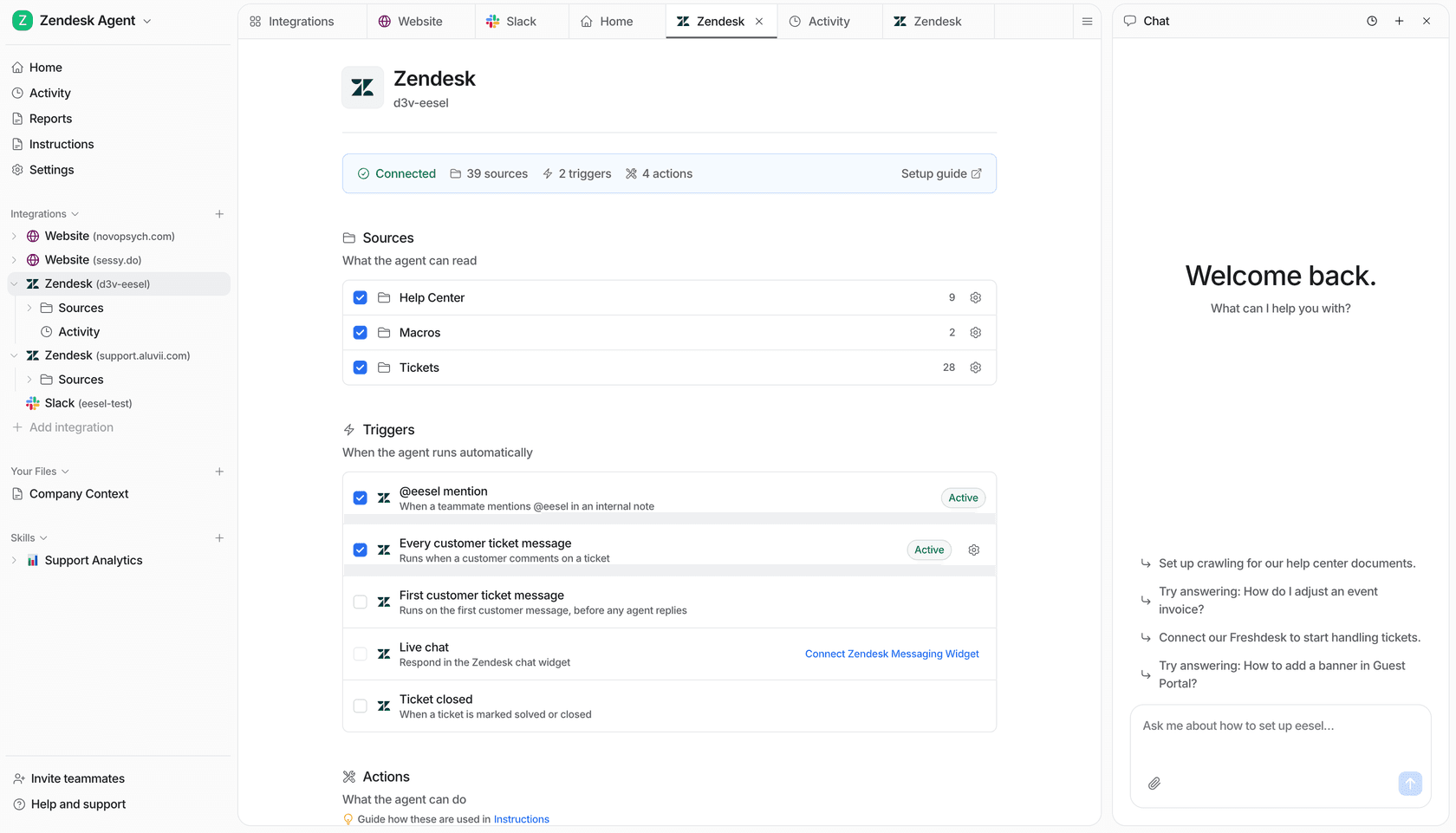
From the same raw material, past tickets, but without a separate onboarding report. On eesel sales calls, training on the customer's own past tickets is the most-requested capability, and one B2B SaaS team asked specifically for new articles to be drafted from the knowledge gaps it finds. eesel's Zendesk integration imports your help center, macros and past tickets (you choose which before an admin approves), and every draft names the sources it used. It doesn't produce a launchpad-style topic and automation-rate report that I can point to, and that is a real difference if you want the topic map first.
The proof I'd point to is in customer stories. Dokument 24 runs eesel on Zendesk, reading about 1,900 pages from its website and 640 Zendesk tickets and articles. Over 8 August to 8 September 2026 it prepared about 680 tickets, left about 670 internal notes with Danish draft replies, and tagged about 430 tickets by product. If nothing in its knowledge covers a question, the agent says it doesn't have the information. That matches the launchpad's spirit of "approve before it ships", but the review happens per ticket, not per article. Norden-Frisia, a ferry line, says the thing that decided its subscription was training on past tickets: during a trial week it pulled in its macros and last three months of tickets and signed up within days.
For anyone driving this from a terminal, the eesel CLI lets Claude Code, Codex or Cursor connect integrations, add website knowledge and files, and chat with the agent to test an answer. Connecting Zendesk still needs an admin approval, and uploading knowledge isn't the same as ready, so test the answers first. My AI agent CLI guide covers the commands, and handoff best practices and testing AI support agents cover what to check. To compare vendors fairly, read Zendesk AI vs eesel, the Zendesk new AI agent guide and my customer service statistics.
Try eesel for Zendesk
If you want the launchpad's idea, an agent grounded in your own tickets, without waiting for rollout, eesel works inside your Zendesk like a new hire. It learns your help center, macros and past tickets, drafts replies for a person to approve, and shows its sources, so you can start on drafts and decide later what it sends alone. See the eesel pricing page, my guide to AI for Zendesk, or the AI helpdesk agent overview, and read the security page before you connect an archive. Try eesel on a sandbox queue first.
Frequently Asked Questions
What is the Zendesk AI agent launchpad?
It is a guided setup and tuning experience for Zendesk AI agents. Zendesk's announcement lists three parts: AI-guided onboarding from your ticket history, an agent overview page, and tailored recommendations. See my Zendesk AI agent review for how the agents themselves perform.
When does the Zendesk AI agent launchpad roll out?
Zendesk says the rollout starts November 5, 2026 and ends November 30, 2026. It is available to accounts on the latest AI agent infrastructure, so customers who bought AI agents - Advanced before March 10, 2026 may need to wait for their infrastructure migration. My Advanced vs Essential guide explains the older split.
Does the Zendesk AI agent launchpad cost extra?
I found no separate launchpad fee in Zendesk's articles or on its pricing page. AI agent usage is billed per automated resolution, at $1.50 committed or $2.00 pay-as-you-go. For the full cost picture, read my Zendesk AI pricing guide.
How do I open the agent overview and recommendations?
In the AI agents workspace, select the AI agent, click Optimize in the sidebar, then choose Agent overview or Recommendations. The overview isn't available for agents with a Setup incomplete status. Track what the numbers mean with my resolution rate guide.
Does the launchpad publish articles on its own?
Zendesk's recommendations page says a generated article opens as a draft in the editor, and a procedure opens for review with a separate Publish procedure button. The onboarding article doesn't spell out what Approve does to publishing, so check article placement and permissions in the details panel and test on a sandbox. Review your conversation logs after go-live.
Is the AI agent launchpad the same as Launchpad in Admin Center?
No. Launchpad in Admin Center is an account-wide setup hub for admins, with wizards and 30-day trials of add-ons, per Zendesk's Launchpad article. The AI agent launchpad lives in the AI agents workspace and focuses on one agent. For the rest of the admin tooling, see my Admin Center guide.
Can eesel build knowledge from past Zendesk tickets like the launchpad does?
eesel's Zendesk integration reads your help center, macros and past tickets as knowledge, so it answers the way your team already does, and every draft names its sources. It doesn't have a launchpad-style topic report that I can point to, so compare it in my Zendesk AI vs eesel guide.