HubSpot Customer Agent handoff: how it works across channels

Kira

Katelin Teen
Last edited November 9, 2026

HubSpot's Customer Agent hands a conversation to a person when it can't answer, the visitor asks for one, or the agent is paused, and you choose the handoff style separately for chat and email: live, async, or keep answering. You need Professional or Enterprise on a qualifying hub, the Customer agent editor permission, an assigned seat, and HubSpot Credits. The catch I'd flag: only a visitor-initiated handoff stops a conversation counting as resolved, so a workflow reassignment can still count as a resolution. With the eesel CLI, an AI coding agent can upload approved knowledge, like refund and cancellation policies, and ask test questions about handoff cases before anything goes live, though connecting HubSpot still needs someone with admin access to approve it.
What does HubSpot Customer Agent handoff actually do?
It moves a conversation from the AI agent to a human rep, using rules you set once for the whole agent. HubSpot's handoff process article, last updated October 26, 2026, says you can manage how and when the agent hands off "across all channels from one centralized location".
I haven't run this in a live HubSpot portal, so everything below comes from HubSpot's own documentation and screenshots, and I say so whenever the docs go quiet. I read it like someone who builds integrations: what goes in, where the conversation lands, and what the rep sees. If you want the product overview first, my HubSpot AI agent guide and the HubSpot Customer Agent explainer cover it, and batch testing is the pre-launch step that comes before any of this.
What triggers a handoff?
Three things trigger one by default, and you can add your own. HubSpot says the agent hands off when it can't answer the question, when the visitor asks for a human, or when the agent is paused.
The custom part is where the control is. Under Train > Human handoff > + Create guidelines, you name a guideline, apply it to All customers or one segment, and write instructions in plain language. HubSpot's own example is a visitor mentioning cancellation, refund, or being unable to log in.
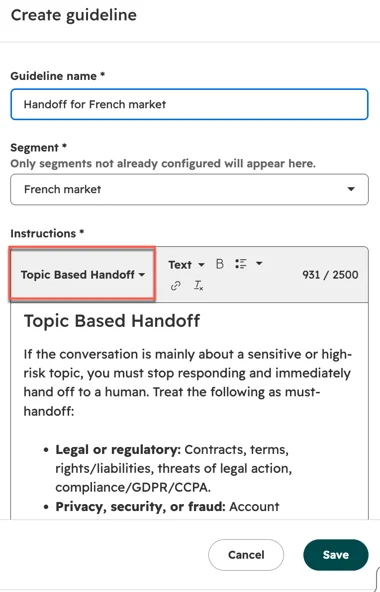
The screenshot shows the Insert template dropdown with a Topic Based Handoff template, which lists must-handoff topics such as legal or regulatory threats and privacy or fraud. The instructions box carries a 2,500-character counter. HubSpot's scale 24/7 support guide gives a sample split: the agent handles order status, shipping, and return policy questions, and hands off lost orders, refunds outside policy, billing disputes, sensitive account changes, and frustrated customers.
Segments add a second layer. HubSpot's audience segments article, updated October 29, 2026, says each segment can customize knowledge sources, guidelines, and the human handoff process. You can configure up to 25 segments per agent, and only one applies to a conversation at a time, with the highest-priority match winning.
My take: write handoff triggers as topics, not keywords. A visitor saying "I want my money back" never uses the word refund. The guideline field takes instructions, so describe the situation. My AI escalation management and conversation design for handoff guides show how.
How do you configure handoff for chat and email?
You configure each channel type on its own tab and pick one of three handoff styles. In HubSpot, go to Service > Customer Agent > Train > Human handoff, open the Chat or Email tab, and click Edit handoff process.
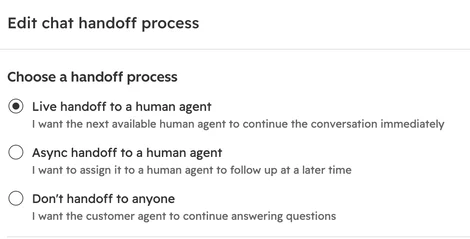
| Option | What HubSpot says it does |
|---|---|
| Live handoff to a human agent | Assigns the conversation to the next available human immediately |
| Async handoff to a human agent | Assigns it to a human to follow up at a later time |
| Don't handoff to anyone | Customer agent keeps answering questions |
Source: HubSpot's handoff process article.
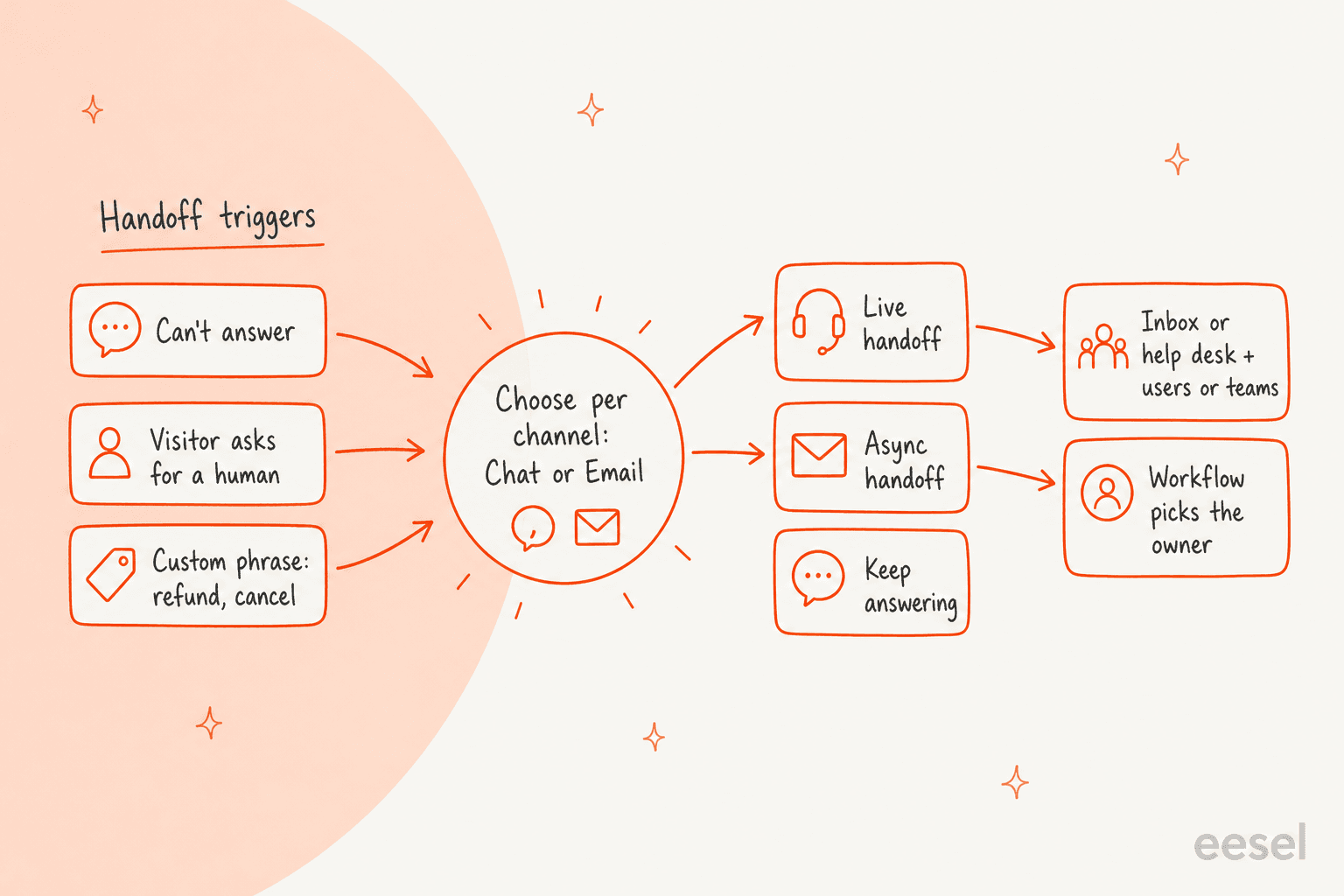
After you choose a human option, you decide where the conversation goes. There are two routes. I want to hand off all issues to the same users or teams sends everything to one inbox or help desk with a ticket assignment. I want to hand off issues to different users or teams based on a set of conditions hands the choice to a workflow: a ticket-based workflow for help desk channels, which creates a ticket and moves it into help desk, or a conversation-based workflow for inbox channels.
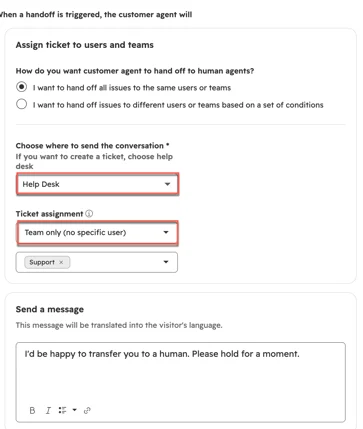
Three details matter here:
- Seats limit who can receive handoffs. Only users with an assigned Sales or Service Seat can be in your routing rules.
- Availability means user availability. HubSpot says the agent assigns by user availability and does not take chat widget availability into account.
- Team only ignores availability. If you pick it, the agent hands off even when nobody is free. HubSpot suggests the Specific users and teams option to avoid that.
HubSpot also ships a Reassign Tickets for Customer Agent Handoff workflow template, which rotates the ticket owner based on the originating channel. If your queue is already shaped by skill-based routing or capacity limits, a workflow is the way to keep the AI from bypassing them.
What do visitors see when the handoff happens?
They see the message you wrote, in their own language. The panel has one message for when your team is available and one for when it isn't, and HubSpot says handoff messages are automatically translated based on the visitor's language.
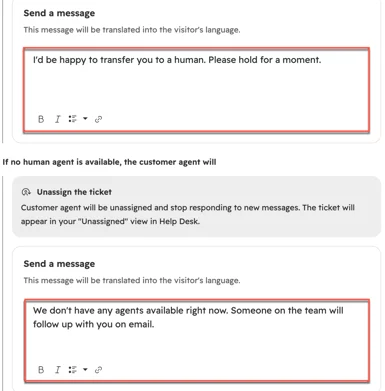
When no human is free, the fallback is to unassign the ticket. The agent stops responding to new messages and the ticket appears in the Unassigned view in help desk. For a live handoff that ends up unassigned through a workflow, you also choose whether to keep the chat open or close it. For email, you switch on a Send a message toggle first.
What changes on WhatsApp, Facebook, and phone calls?
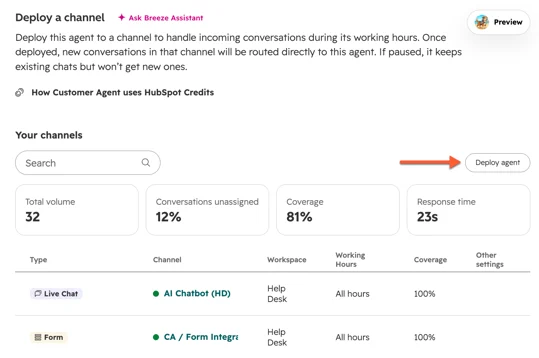
The handoff rules are shared, but the channel decides where you configure them and how the transfer behaves. HubSpot's deployment article, updated October 5, 2026, says you can assign the agent to Facebook, WhatsApp, calling (beta), live chat, form, or email channels, plus custom channels if you've joined that beta.
| Channel | Where handoff is set | What the docs say |
|---|---|---|
| Live chat | Chat tab under Human handoff | Live, async, or keep answering; messages auto-translated |
| Email tab under Human handoff | Needs the Send a message toggle; contact lists can include or exclude senders at deploy | |
| WhatsApp, Facebook | Not stated | Deployable; the handoff article names only Chat and Email tabs |
| Form | Not stated | Needs a Customer agent reply email at deploy |
| Calling (beta) | Your calling channel settings | No async handoff; voicemail or IVR if nobody is free |
Sources: HubSpot's deployment and handoff articles, and the Customer Agent Voice guide.
The WhatsApp and Facebook rows are the gap I'd check first. HubSpot's deployment article also says that if you've joined the Human handoff routing by channel type beta, you can configure separate settings for chat and email. It doesn't say which one a WhatsApp or Messenger conversation falls under, so test it on a trial portal before promising a messaging team a particular routing. My guides on WhatsApp ticket deflection and Messenger support cover the channel side.
Each deployment also carries its own controls. You pick All hours, During specific hours, or Only outside specific hours, set assignment rules for the periods when the agent isn't responding, and enter a Conversation coverage percentage. HubSpot suggests starting with one channel or a small percentage, then reviewing escalations before you expand. One conflict to know about: if a chatflow uses the Conversation Routing fallback to Customer Agent option, HubSpot says you can't configure that channel's deployment options from the agent's settings.
How does handoff work on phone calls?
It works differently, because a call can't wait. HubSpot's Customer Agent Voice guide, updated September 17, 2026, says voice calls are synchronous, so a handoff either happens during the call or it doesn't. There is no async handoff.
The agent routes a transfer using the teams and reps assigned to your calling channel and that channel's hours. If no live agent is available, the call goes to the voicemail you configured, and transfers into an existing IVR tree are supported. HubSpot lists "transfer summaries" among the beta's capabilities. The page also says the Actions and Handoff settings don't apply to calling channels, so a voice transfer is configured in the calling channel, not under Human handoff. My AI voice agent guide compares the wider options.
Can a chatbot hand over to the agent instead?
Yes, and that is the reverse direction. HubSpot's Send to Customer Agent action lets a rule-based chatflow pass a chat to the agent, which can pick up from the most recent question, send a fixed message, or follow instructions you write.
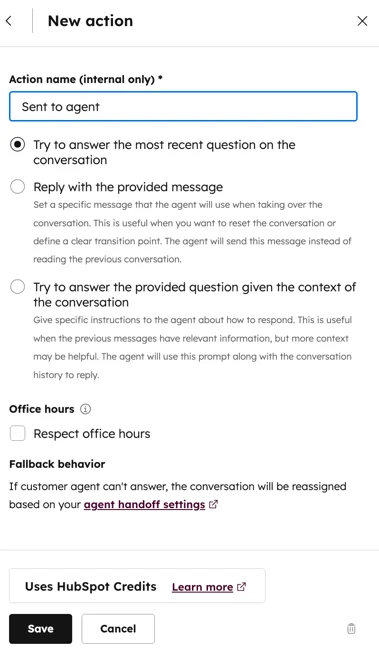
The panel's fallback note ties the loop together: if the agent can't answer, the conversation is reassigned based on the agent's handoff settings. So a visitor can move from bot to agent to human, and the last hop always follows the rules above. My HubSpot chatbot guide covers the rule-based side.
What does the rep see after a handoff?
The rep sees the conversation in the inbox or help desk, and HubSpot tracks where each ticket is in the handoff with a status property. I did not find a documented written handoff summary for chat or email, so don't assume the rep gets one.
What the docs do describe:
- Where it lands. Once deployed, conversations assigned to the agent appear in the conversations inbox or help desk. HubSpot's help desk views article describes a Customer agent view for open tickets assigned to or escalated by the agent.
- Status. A handoff updates the Customer Agent ticket status property automatically.
- No suggested replies after. Per HubSpot's reply recommendations article, they aren't generated once the agent has handed off the conversation.
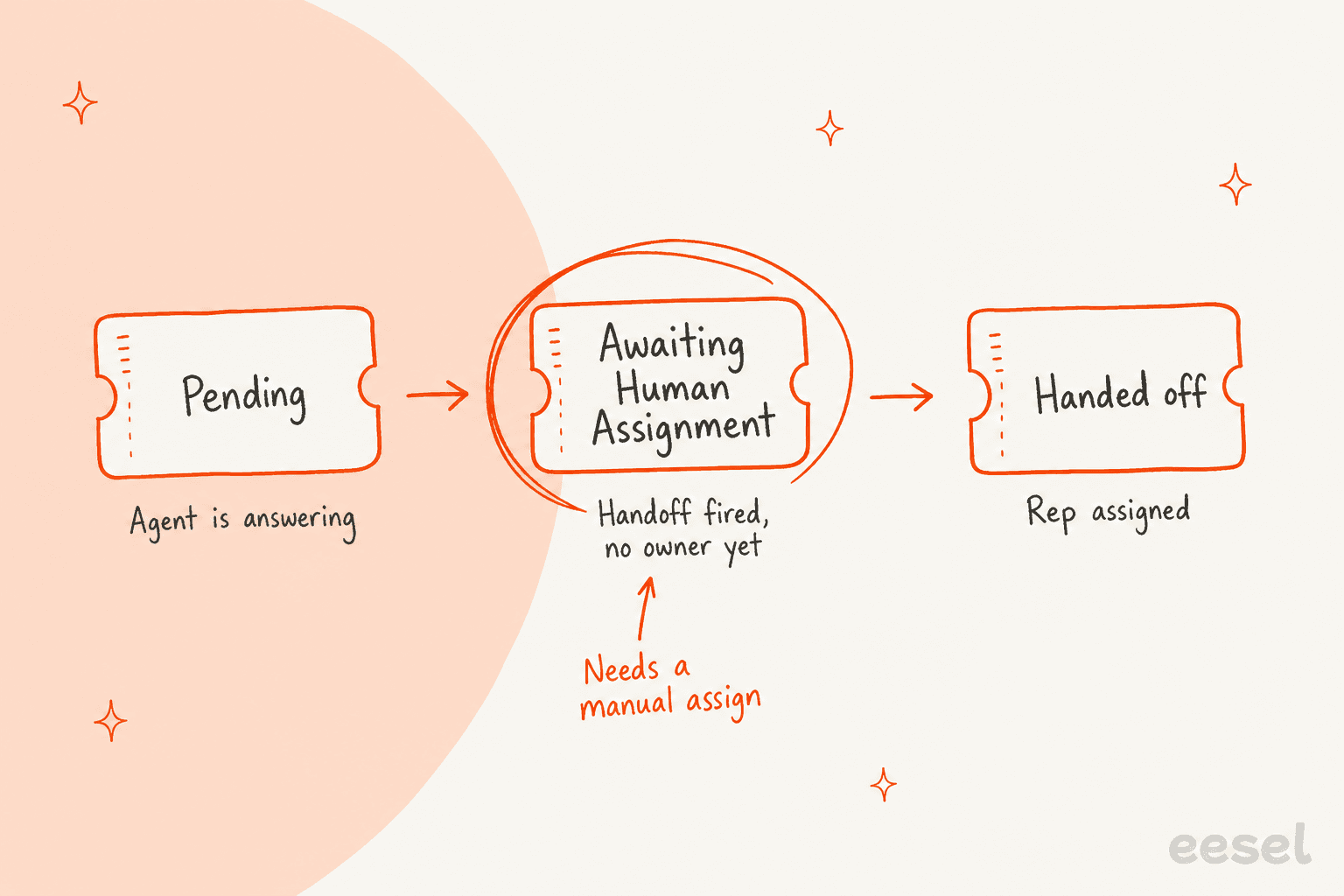
The three statuses are Pending (the agent is handling it and no handoff has fired), Awaiting Human Assignment (a handoff fired but no rep is assigned, which HubSpot says may need a manual assign), and Handed off (a rep is assigned). I'd build a help desk view on Awaiting Human Assignment first, because that is the status where a customer is waiting and nobody owns the ticket. My custom views post shows how to build one, and HubSpot's summaries are a way to give reps context.
Which plan, seat, and credits do you need?
You need Professional or Enterprise on a qualifying hub, two permissions, and credits. These come from the handoff and deployment articles, plus the Service Hub pricing page.
| Requirement | What HubSpot says |
|---|---|
| Subscription | Professional or Enterprise on Marketing, Sales, Service, Data, or Content Hub, Smart CRM, or Revenue Hub |
| Permission | Customer agent editor to set up and edit handoff |
| Seat | An assigned seat to edit; routing targets need an assigned Sales or Service Seat |
| Ticket routing edits | Also Account Access or Super Admin permissions |
| Credits | Required to deploy; 50 credits per resolved text conversation |
| Voice (beta) | 50 credits per minute of voice conversation |
Per HubSpot's credits catalog, extra credits cost $0.010 each, so 50 credits is $0.50 per resolved text conversation once you're past your monthly allowance. Service Hub Professional starts at $90 per seat per month and lists 3,000 credits, which covers 60 resolutions if nothing else draws on them. Enterprise starts at $150 per seat and lists 5,000. My HubSpot credits and HubSpot AI agent pricing guides walk through the maths, and HubSpot offers 14 days of free access when you buy a Professional or Enterprise Service seat.
If credits run out, HubSpot says the agent stops being assigned to new conversations across all connected channels until your reset date, and new conversations follow your handoff process instead.
When does a handoff stop a conversation counting as resolved?
Only when the visitor causes it. HubSpot's analytics article, updated September 25, 2026, says only visitor-initiated handoffs, such as asking for a human or hitting a configured handoff phrase, count as qualifying. Manual assignment, including assignment through workflows, does not by itself stop a conversation being counted as resolved.
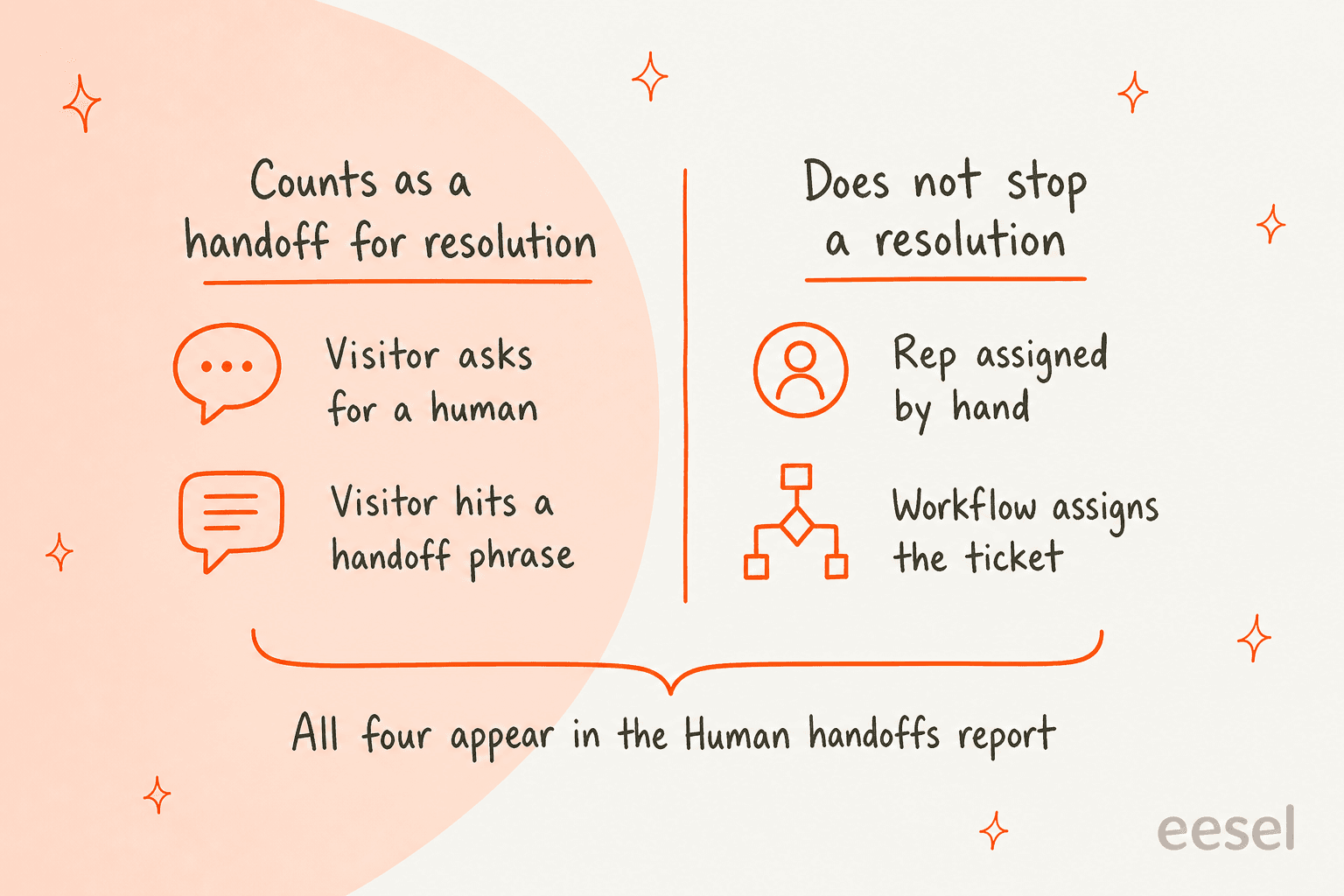
A resolution means the agent shared a content source or performed an action, with no qualifying handoff within 72 hours of the last visitor response. HubSpot sets that status 72 hours after the last visitor message, and later live agent messages don't change it.
So a workflow that quietly moves a ticket to a rep after the agent has answered can still leave you with a billed resolution. That is the most useful thing in the docs for anyone budgeting credits, and it cuts against the instinct that a handoff always means the AI failed. The Human handoffs report counts every transfer, including manual ones and automation-triggered ones, so its numbers will not match your resolution count. My deflection vs resolution and AI resolution rate guides explain why those two metrics drift.
Voice differs. HubSpot says you're charged for the minutes the agent is active, including the part before a transfer, and stop being charged once a live rep takes the call.
What do real HubSpot users say about the handoff?
The loudest feedback I found is from users who wanted more control, and it dates from December 2025. Two threads on HubSpot's own community forum stand out.
"For instance, someone entering into a conversation in French should only be assigned to our French marketer when the Customer Agent cannot answer their question."
That user objected to handoff moving from each chatflow to one global setting, which they feared would route to "anyone who is available". Another poster raised a language problem:
"However, the handoff message is configured at the Customer Agent level, not at the chatflow level."
HubSpot's current docs speak to part of this. Handoff messages are now translated into the visitor's language, and segments can carry their own handoff process. Whether segments fully replace per-chatflow routing for a multi-language team is something I couldn't confirm from the docs. A third community idea post asks for handoff to a department-selection step, and the poster says their only option is forwarding everything to one front-desk team. Treat these as one team's experience each, not a benchmark.
Where does the handoff setup fall short?
It is thorough on routing and thinner on context. These are the limits I'd check before relying on it:
- WhatsApp and Facebook tab assignment isn't stated. The handoff article names Chat and Email only.
- No documented handoff summary for chat or email. Only the voice beta mentions transfer summaries.
- Segments cap at
25per agent, one at a time. A visitor matching two segments gets only the higher-priority one. - Only users with a Sales or Service Seat can receive handoffs. That is a seat cost on every rep in the rotation.
- Handoff doesn't carry across to voice. Calls follow the calling channel's hours and teams, with no async option.
- Metrics disagree by design. The Human handoffs report counts manual and workflow reassignments, resolution rate doesn't.
None of this makes the feature weak. It is a routing system, and it does that job clearly. The question is how much of a rep's first minute goes to reading a thread instead of answering it.
How do you tune handoffs after launch?
Start narrow, watch the reports, and change one rule at a time. HubSpot's guide says to deploy to a single channel or a small percentage of conversations, then review escalations before expanding.
The Analyze > Reports page shows Human handoffs, Handoff rate over time, deflection, and resolution rate. Its Coaching opportunities table has a Handoff reason for conversations the agent handed off under your configured process or where a handoff-related issue was found. HubSpot's scale 24/7 guide lists a sample target of a handoff rate of 50% or lower, which it calculates as 100% minus resolution rate, and a deflection target of 70%+. Those are HubSpot's starting points, not a promise for your queue.
My rollout order would be: one channel, a 20% conversation coverage, two or three custom triggers, then check the Awaiting Human Assignment view daily for a week. My guides on measuring escalation quality and the escalation rate definition show which numbers to watch, and testing before launch covers the dry run.
What does the same handoff look like with an eesel teammate?
It looks like a draft-first setup, where the human is part of every reply. MentorShow is a French online learning platform that runs its support team entirely inside HubSpot and told eesel it gets between 5,000 and 13,000 tickets a month. To be clear, MentorShow uses eesel, not HubSpot's Customer Agent.
Every new inbox conversation or ticket triggers eesel, which reads the thread and the member's HubSpot record, then leaves an internal note with an analysis and a draft reply in the member's language. From 8 August to 8 September 2026 it read about 1,200 conversations and tickets and wrote 432 drafts, per the story. Refunds, billing checks, account changes, legal threats, and anything touching a member's wellbeing go straight to a person, and the agent never quotes a price or promises a refund.
I'd contrast the two designs plainly. HubSpot's agent answers customers first and routes the hard cases to a rep through the handoff you configure. eesel drafts first and a person sends, so the handoff is built into every ticket, with nine ticket types skipped on purpose. If your team is nervous about an autonomous first reply, that is a gentler start. My agent vs human cost comparison and human-in-the-loop entry cover the tradeoff, and AI for HubSpot Service Hub lists the other add-ons.
Other helpdesks solve handoff their own way. If you're comparing, my Zendesk AI agent transfer and Gorgias handover control posts are fair side-by-sides, and HubSpot Customer Agent alternatives goes wider.
Try eesel for your HubSpot help desk
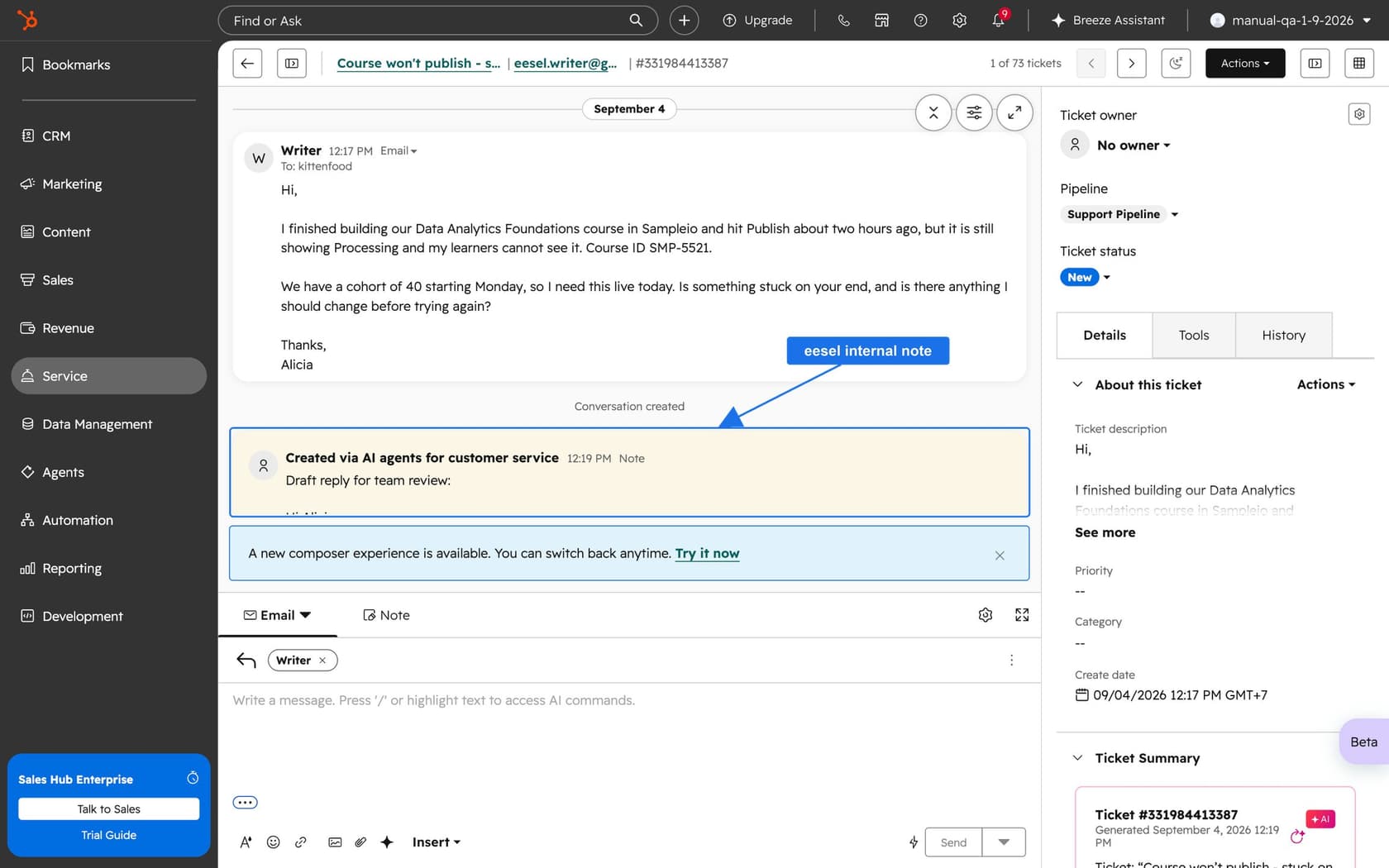
If your Customer Agent handoffs leave reps reading long threads cold, eesel for HubSpot works like a new teammate in Service Hub. It learns from your HubSpot knowledge base and past tickets, reads each live ticket with the contact record, and leaves an internal note with a draft reply for your team to review, handing refunds and billing questions to a person right away. Pricing is fixed monthly credit plans, from a free tier of 100 credits to $299 a month for 500 credits, where a ticket or chat handled is one credit, per eesel's pricing page.
I'd start with the free tier on your hardest handoff topics, the refunds and cancellations, and compare its drafts with what your agent hands to reps today. Connecting HubSpot still needs someone with admin access to approve it in the browser, and the answers get tested before anything goes live.