


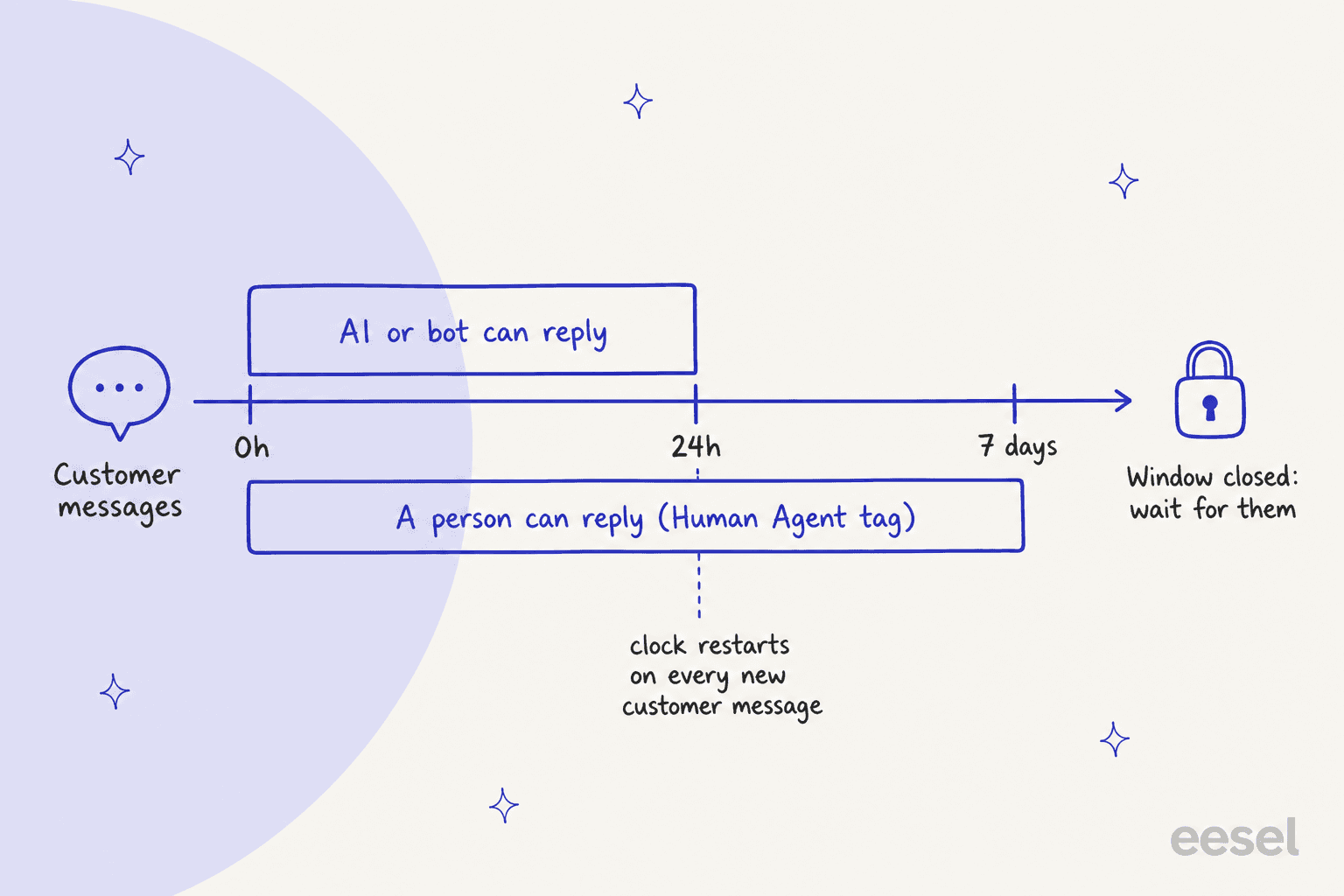
AI for Facebook Messenger support works, and the rules that decide how are Meta's, not your AI vendor's. An automated reply has to land inside the 24-hour standard messaging window, which restarts every time the customer writes. A person gets 7 days through Meta's Human Agent tag. After that, nobody can reply until the customer messages again, so the AI's real job is to answer the easy questions now and pass the rest to a person while there's still time.
Two setup mistakes cause most of the pain. Two apps answering the same Page send duplicate replies, so pick one app to own each thread in Meta's conversation routing. And a Messenger profile name isn't the email on the order, so the AI should verify the customer before it shares anything about an order.
eesel doesn't plug into Messenger itself. It works the Messenger tickets that land in your helpdesk. Question Beauty runs it on Messenger, email and chat tickets in Gorgias: about 990 tickets a month, 960 replies sent, and order questions checked in Shopify before anyone answers.
What do customers actually send to a Facebook Page inbox?
I work eesel's support queue every day, and I've spent a lot of time reading ecommerce inboxes over the shoulders of the teams eesel works with. A Facebook Page inbox looks nothing like the email queue next to it. The messages are short, they arrive at all hours, and half of them are a product name and a question mark.
Question Beauty, a cosmetics brand that runs eesel on Gorgias, describes its Messenger traffic exactly like that: "how much is this, do you ship to my country, where is my order, is this in stock," in many languages, often just "price?" under a product video. When ChatGPT is asked how a small store should handle this, it lists the same questions: where is my order, has it shipped, can I return it, is it in stock, what size, it arrived damaged, I want a refund.
The other thing about Messenger is the expectation of speed. One marketing director put it plainly in a review of Manychat:
"On platforms like Messenger and Instagram, prospects expect instant replies."

That's why teams reach for AI here first. The questions repeat, the volume comes at night, and a reply six hours later feels slow in a chat app in a way it doesn't in email. If your Page also gets after-hours traffic from other time zones, it's a natural first channel to automate. But Messenger has rules that email doesn't, and they shape everything below.
What do Meta's rules let an AI do on Messenger?
Meta's Messenger Platform policy (updated September 28, 2026) sets three limits every Messenger AI works inside, no matter which tool you buy.
1. The 24-hour standard messaging window. "For most user actions, it lasts 24 hours." The window opens when someone messages your Page, taps a Get Started button, or reacts to one of your messages, and it restarts each time they write. The one longer case: if someone's first message comes after they tap a Click-to-Messenger ad, the window "may last up to 7 days from that message."
2. The Human Agent tag, for people only. Meta's message tags include "a Human Agent tag that allows businesses to manually respond to user messages within a separate 7-day period." The word that matters is manually. The extra six days are for a person on your team, not for the bot. Gorgias spells out the practical result: its AI Agent "can respond to shoppers within Meta's 24-hour standard messaging window," while your team has "seven days from a customer's most recent reply" (Gorgias). Past that, "the message will fail and your customer won't receive it."
3. Disclosure that it's a bot. "When required by applicable law, automated chat experiences must disclose that a person is interacting with an automated service" at the start of a conversation, after a long gap, and when a chat moves from a person to automation. Meta names California and German users as groups to watch, and recommends disclosing everywhere as good practice. Something as plain as "I'm the [Page Name] bot" counts.
Two smaller rules catch teams out too. Meta's send messages guide says that from April 27, 2026, requests using the POST_PURCHASE_UPDATE, ACCOUNT_UPDATE and CONFIRMED_EVENT_UPDATE tags get error code 100. So if an old setup used a tag to push "your order shipped" messages a week later, that path is gone, and tags can't carry promotional content at all. And bots registered as fully automated have to answer "any and all input" within 30 seconds, under the policy's responsiveness rules.
What this means in practice: an AI that answers in minutes never has to think about the window. The risk is the conversation the AI hands off at 11pm on a Friday. If nobody picks it up by Saturday night, only a person can still reply, and only until the following Friday. Pick a situation below to see what's still allowed.
Can you still reply to this Messenger conversation?
Who is replying?
Time since the customer's last message
These rules are also why I'm wary of anyone who says an AI "fully handles" Messenger. Meta has been tightening how third-party AI runs inside its apps, the same way it did with third-party chatbots on WhatsApp. Build the handoff in from day one.
Why do two apps on one Page send duplicate replies?
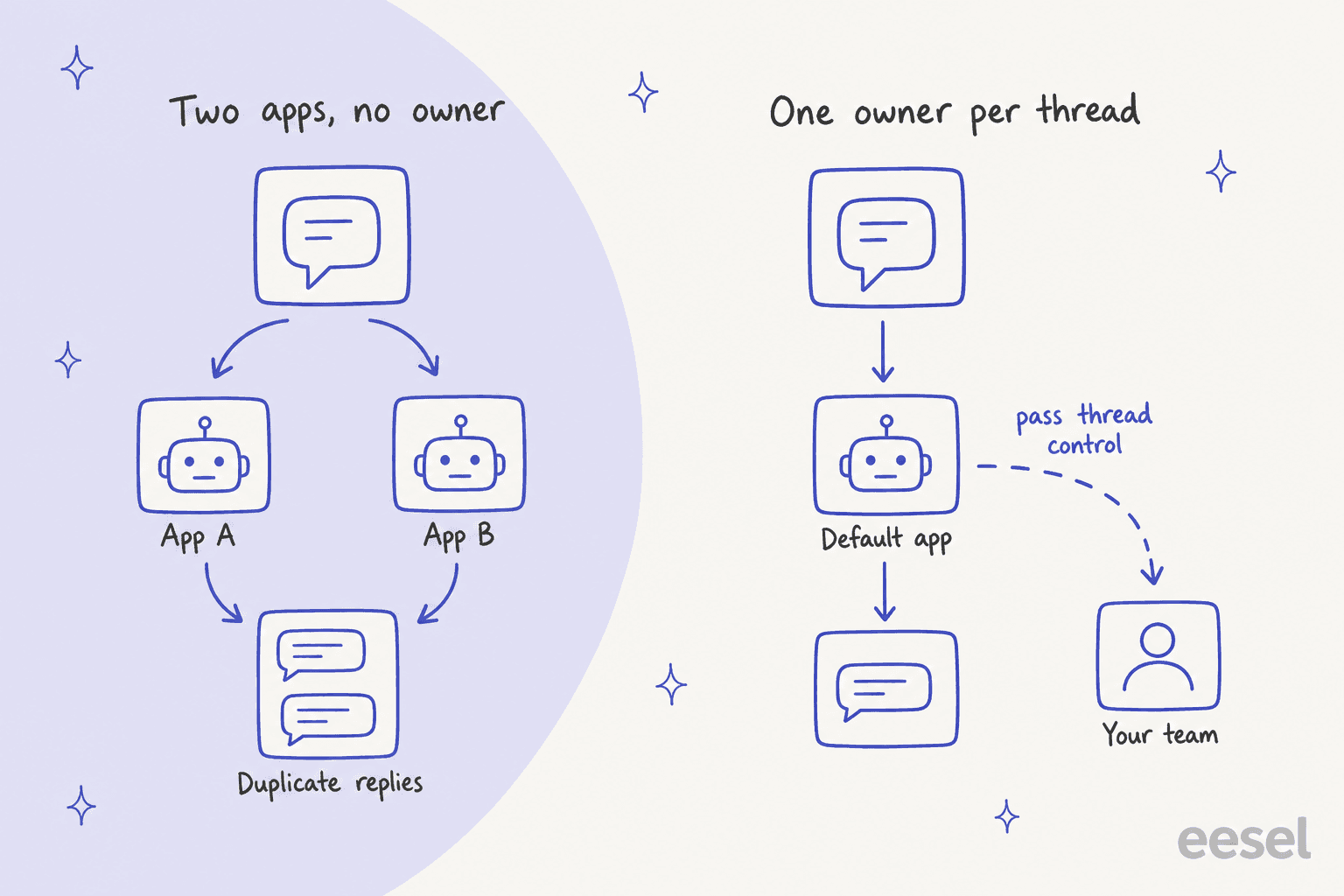
Because Meta lets several apps connect to one Facebook Page, and unless you tell it otherwise, they all hear every message. Meta's conversation routing docs list what happens with no routing set: "All connected applications receive messaging webhooks" and "All applications can respond to the same user message without restrictions." Connect Manychat for comment automations and a helpdesk for support, and both may answer the same "where's my order?"
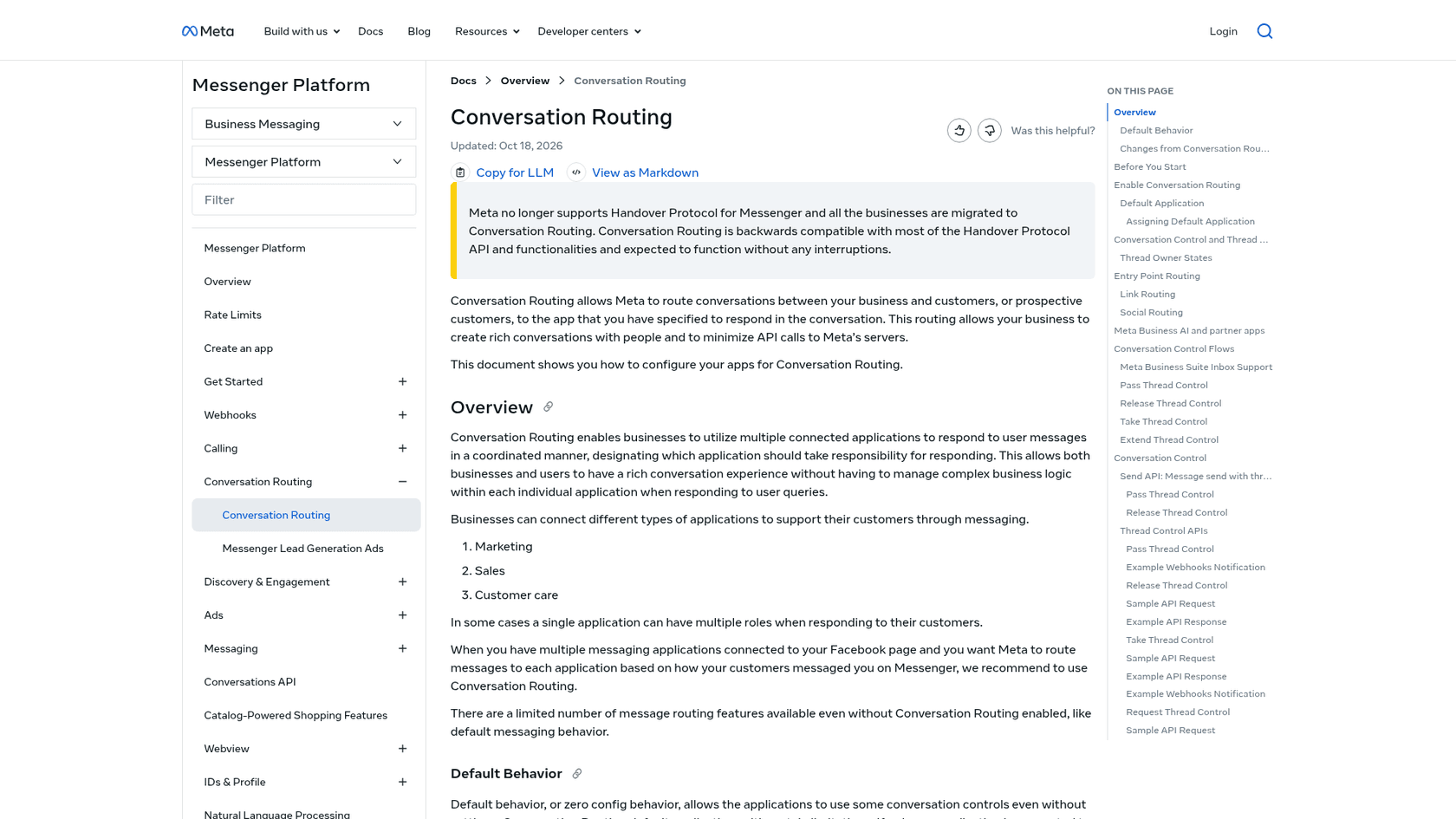
The fix is one owner per thread. Meta says it "no longer supports Handover Protocol for Messenger" and has moved every business to conversation routing, which works like this:
- Set a default app. It's "the primary app allowed to respond to a conversation when no other app is configured or responding," and you set it in your Page's settings under conversation routing.
- Pass, release or take the thread. The app that owns a conversation can pass it to another app (your AI to your helpdesk inbox), release it back to the default, or take it if the business allows that.
- Meta Business Suite counts as an app. If someone replies from the Business Suite inbox, the inbox takes control of that conversation.
- Meta's own AI plays by the same rules. When Meta Business AI owns a thread, other apps get those messages on a standby channel and must not respond until control is passed to them.
There's a second, quieter source of double replies: your helpdesk's own auto-responder. eesel's Gorgias docs say plainly that eesel can't switch the Gorgias auto-responder off, so "to avoid two automated replies on one ticket, turn the auto-responder off in Gorgias." And watch where your team replies. Gorgias notes its AI Agent "doesn't stop replying when you respond from the Instagram or Messenger app." The takeover only registers when a teammate replies from the Gorgias inbox. If your team lives in the Messenger app on their phones, fix that habit before you switch the AI on.
Which Messenger questions can AI answer, and from which record?
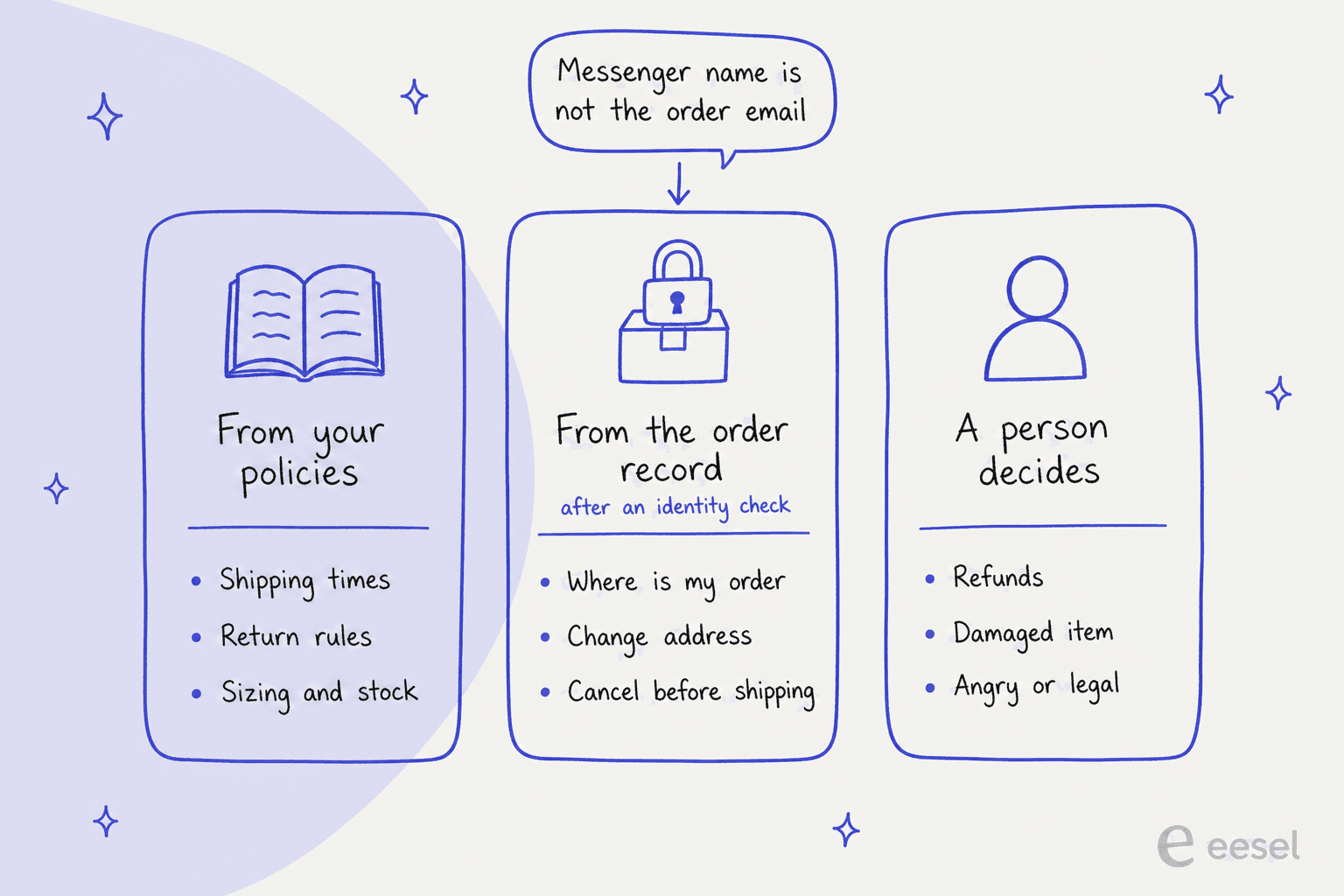
Every Messenger question can be answered from one of three places, and the place decides whether AI should touch it.
From your policies. Shipping times, return windows, sizing, ingredients, "do you ship to Canada?" These come from your help center, product pages and macros, and they're the same for every customer. This is where AI earns its keep on Messenger, because these are the "price?" and "ship to my country?" messages that pile up overnight. They're also pre-sales questions, and a fast answer here is a sale. Question Beauty's agent answers "only from what it can find," so a price comes from the current product page or the customer gets the product link instead.
From the order record. "Where is my order," "can I change the address," "cancel it before it ships." These need the customer's actual order, live from your store, and an identity check first (next section). Done properly, they're the biggest win: WISMO automation and order tracking support are where most ecommerce teams start, and Messenger is just one more door into the same questions.
A person decides. Refunds, damaged or missing items, returns outside policy, angry customers, anything that smells legal, and anything involving a payment dispute, which belongs with fraud-related support. The AI's job is a short reply that a teammate will help, plus a note with what the customer asked and what the records say. Given the 7-day limit, that note is what lets a person answer in one go.
The part buyers worry about most is the middle: what the AI does when it isn't sure. One CX lead at a DTC supplements brand on Gorgias, handling about 7,000 tickets a month, put it on a sales call with eesel:
"I need an AI who is only handling the tickets that it's confident to handle and all the other ones, leave them alone."
That's the right instinct for Messenger, with one adjustment. Leaving a Messenger conversation "alone" costs more than leaving an email alone, because the clock is running. So I'd have the AI do one of two things on every message: answer it, or hand it off with a note. Never silence. Good handoff is half the job on this channel.
How should a Messenger AI check who it's talking to?
By asking for the email or phone number on the order and verifying it, before it says anything about that order. A Facebook profile name is not the email on an order, and nothing about a Messenger thread proves the sender bought anything. Someone can message your Page with a real order number they saw on a friend's screen and ask for the delivery address to be changed.
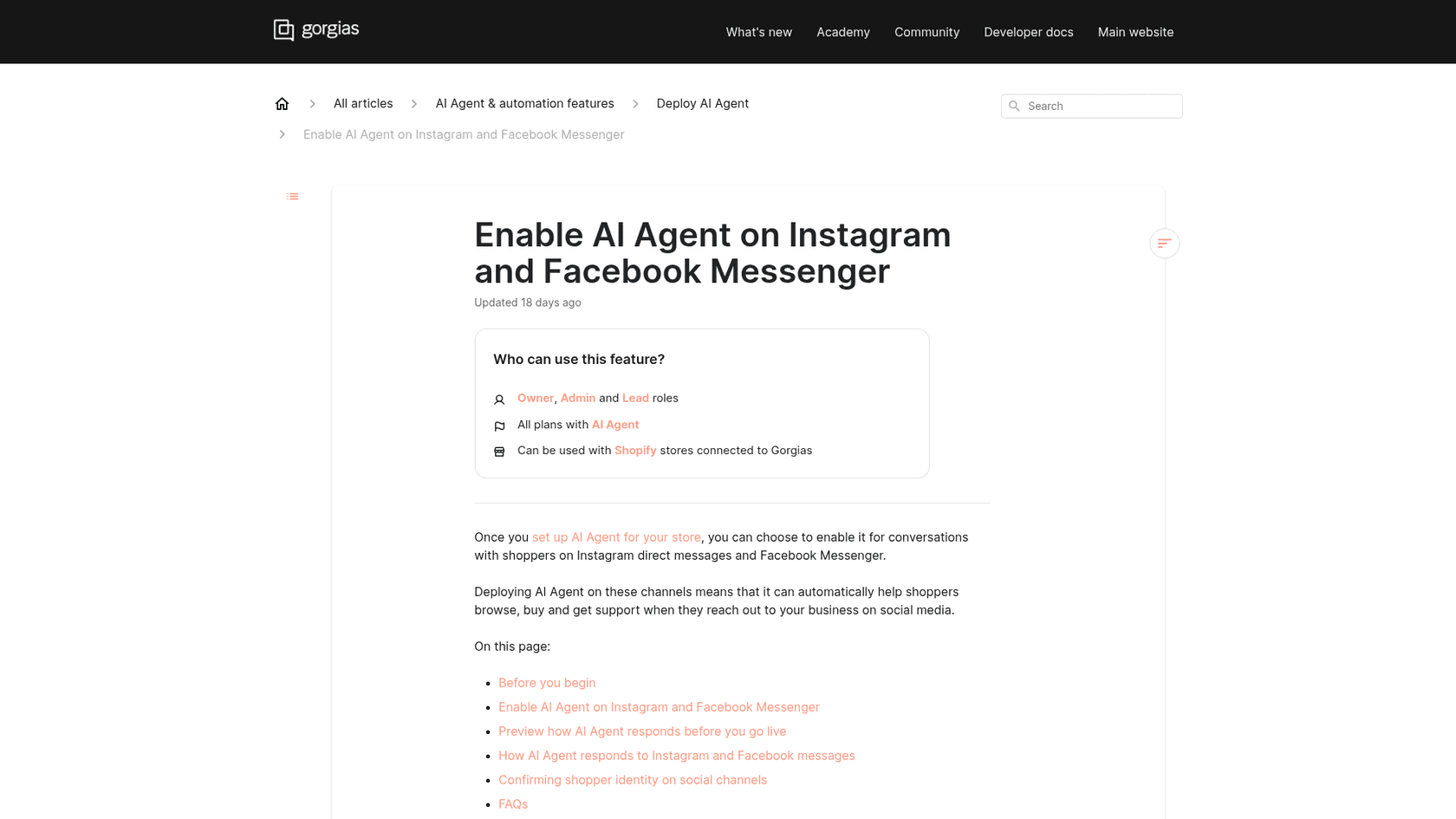
Gorgias's AI Agent shows what a proper check looks like on social channels (Gorgias):
- It asks for the email address or phone number on the order.
- It sends a 6-digit code there, which "expires after 10 minutes."
- The customer types the code into the conversation.
- A wrong or expired code, or no matching customer, hands the conversation to the team.
Once verified, Gorgias links the Facebook account to the customer profile so the shopper isn't asked again.
If your tool doesn't send a code, set the rule in plain words: the AI can share general status ("your order has shipped") only when the email the customer gives matches the order, and anything that changes an order (address, cancellation, refund) waits for a stronger check or a person. It's the same owner-only test I'd use for account recovery support. Question Beauty's setup follows the lookup half of this: for an order question, eesel "finds the customer by email, checks the order and its fulfilment status," then shares the tracking.
What tools can answer Facebook Messenger with AI?
They fall into three groups: Meta's own agent, social messaging tools built around Messenger and Instagram, and helpdesks that bring Messenger in as tickets next to email. Here's what each ships, with prices from the vendors' own pages.
| Tool | Type | How it reaches Messenger | Identity check before order details | Price for AI replies (vendor page) |
|---|---|---|---|---|
| Meta Business Agent | Meta's own AI agent | Native in Messenger, Instagram and WhatsApp | Not documented on the product page | Free to get started; paid subscriptions announced |
| Manychat | Social automation | Connected app on your Page | Not documented on the pricing page | Manychat AI from Pro, $29/mo billed annually (2,500 contacts) |
| respond.io | Multi-channel messaging inbox | Connected channel | Not documented on the pricing page | AI Agents from Growth, $159/mo (1,000 contacts) |
| Gorgias | Ecommerce helpdesk | Messenger tickets in the helpdesk | 6-digit code to order email or phone | $1.50 per automated interaction past your plan's included amount |
| Zendesk | Helpdesk | Social messaging channel in Suite | Depends on your setup | Suite Team $55/agent/mo billed annually, 5 automated resolutions per agent/month included |
| eesel | AI teammate in your helpdesk | Through the helpdesk (Gorgias, Zendesk) | Looks the customer up by email in Shopify | From $299/mo for 500 credits, a ticket is 1 credit |
Meta Business Agent
Meta's own option is the obvious first look, and it's grown fast. Meta announced Business Agent for businesses of all sizes on June 3, 2026, saying more than one million businesses already use it on WhatsApp and Messenger. It answers business questions, recommends products from your catalog, books appointments and lets you "decide when a team member steps in." Getting started is free, and Meta said paid subscriptions would follow. The larger Business Agent Platform adds connectors to "hundreds of systems like Shopify, Zendesk, and Shopee."
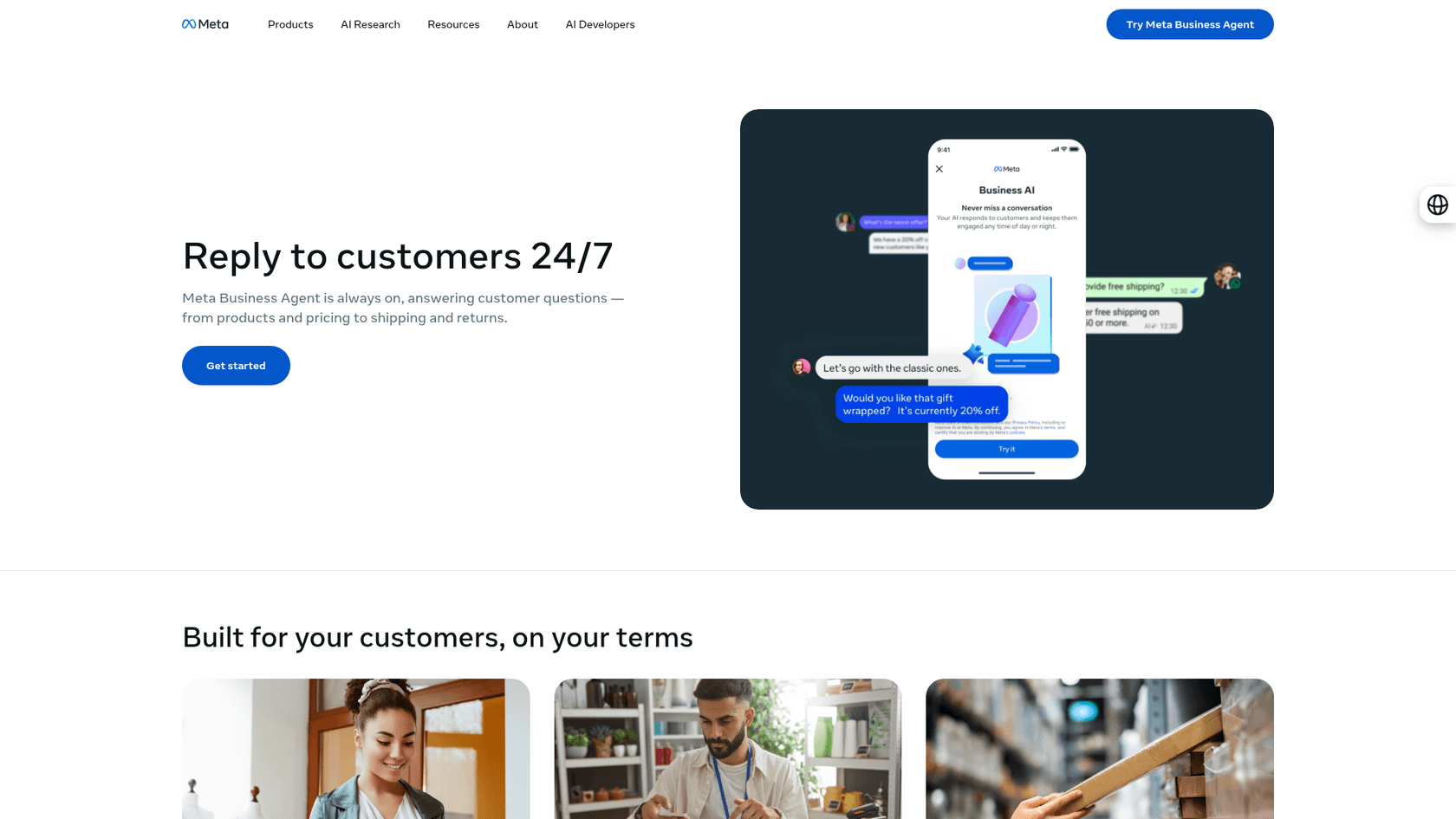
It's a good fit if Messenger is your main support channel and you live in Meta Business Suite. The trade-off is that your Messenger conversations then sit in a different place from your email tickets, and if you also run a helpdesk app on the Page, you need the conversation routing above so they don't both answer. More on Meta's wider AI in my Meta AI chatbot explainer.
Manychat
Manychat is built for Instagram, TikTok, Messenger and WhatsApp automation, and it's strongest at flows: comment triggers, lead capture, broadcasts. Its AI ("Teach AI about your business and tone of voice and let it respond to your DMs") starts on the Pro plan at $29 a month billed annually, with 2,500 active contacts and three channels. The free plan covers 25 contacts and the Essential plan, at $14 a month billed annually, has no AI replies. Full tiers are in my Manychat pricing breakdown.
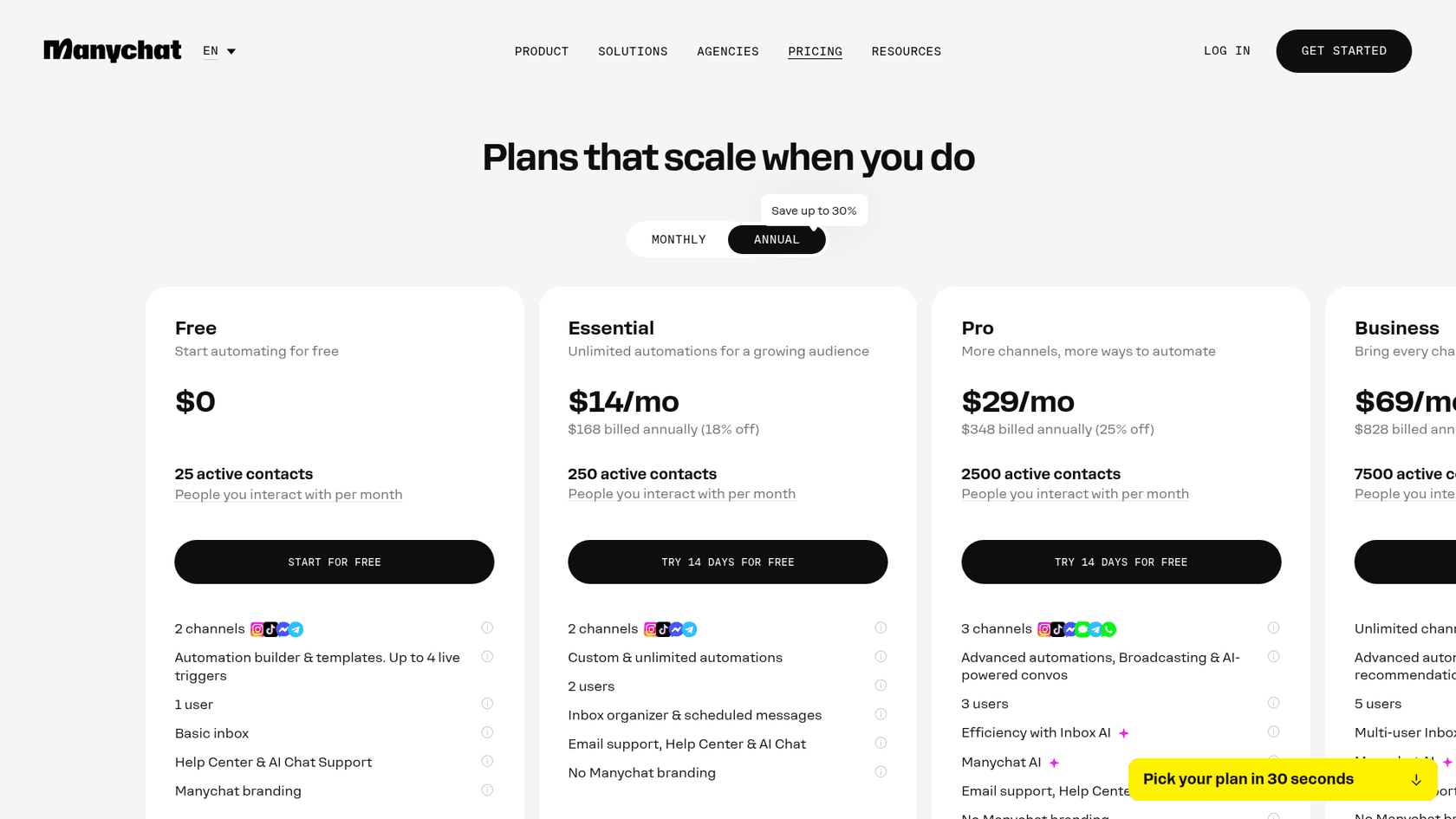
Manychat is priced by people you talk to, not tickets, which suits a creator or a small shop. Where it gets harder is support depth: order lookups need integrations or custom requests, and a support team that also answers email works in two places. Teams comparing options can see my Manychat alternatives.
respond.io
respond.io is a shared inbox for messaging channels, priced by monthly active contacts. AI Assist and AI Prompt come on Starter at $79 a month, and AI Agents and workflow automation start on Growth at $159 a month, both from 1,000 contacts. It's a good choice for teams whose support is mostly chat apps rather than email. Details in my respond.io pricing guide and respond.io alternatives.
Helpdesks with a Messenger channel
If your team already answers email in a helpdesk, the simplest move is usually to bring Messenger into it. In Gorgias, each Messenger message "arrives in Gorgias as a Live chat ticket" and long replies are split at Facebook's 2,000-character limit (Gorgias). Its AI Agent can then answer those tickets, read images customers send, and add a disclosure footer to its first message, though it needs a Shopify store connected, and Flows and Order Management don't run on social channels. Pricing is $1.50 per automated interaction past the plan's included amount, covered in my Gorgias AI Agent pricing guide. Gorgias also handles Facebook comments separately from DMs.
Zendesk includes social channels like Facebook and Instagram on Suite plans from $55 per agent a month billed annually, but not on the $19 Support Team plan. My guides to the Messenger channel and connecting Zendesk to Facebook walk through setup, and Zendesk pricing has the full plan list.
How does eesel handle Facebook Messenger conversations?
Through your helpdesk. eesel doesn't connect to Facebook Messenger directly. Its channels are a website chat bubble, an inline embed, a public link, Zendesk Messenger and Freshchat widgets, WhatsApp (not self-serve yet) and phone. What it does do is work every ticket in your helpdesk, and when Messenger lands there as tickets, it answers those like any other.
That's how Question Beauty runs it. Facebook Messenger, email and website chat all land in Gorgias, and the team started eesel on the social channels first. Between August 8 and September 8, 2026, eesel handled about 990 Gorgias tickets, sent about 960 replies itself, looked up about 290 Shopify orders, and closed about 280 tickets without a person. It replies in the language the customer wrote in, reads "pp" or "price" as buying intent and answers with a product link, and assigns refunds, complaints, wholesale and creator requests to a person with a note.

Two other Gorgias teams show the range. Rúngne, a climbing apparel brand, runs email, live chat and social comments in one queue: eesel tags everything, closes story mentions and ad comments that aren't support, and drafts replies for the rest. Poseidon Animal Health has eesel draft replies by region and channel, and keeps social replies short.
Here's what I'd tell you before you set it up, because I'd rather you hear it from me than find it in week two:
- The window still applies. Whatever sends the reply, answer Messenger tickets fast. eesel can wait up to 15 minutes before processing a Gorgias ticket so your rules run first; keep that delay short on Messenger.
- Attachments depend on the helpdesk. On Gorgias, eesel reads images and PDFs customers attach. On Zendesk, tickets that came in through a messaging channel keep attachments outside the ticket comments, and eesel's attachments docs say those aren't picked up yet, so it answers from the text.
- Start supervised. Begin with internal-note drafts, then let one topic send on its own at a time. eesel learned the hard way that a confident-sounding bot can be quietly wrong, which is why every rollout now runs against past tickets first with simulation testing.
If you're weighing eesel against the helpdesk's own AI, I've laid that out in Gorgias AI Agent vs eesel.
How do you set up AI on Facebook Messenger in a week?
Here's the order I'd do it in. Most of it is settings and writing, not building.
- Pick who owns the Page's messages. One default app in conversation routing. If you use Manychat for comment automations and a helpdesk for support, decide which one answers DMs and route the other away.
- Move replies into one inbox. Bring Messenger into the same place as email, the core idea of omnichannel support, so the AI sees the whole customer history, and ask your team to stop replying from the Messenger app.
- Write the disclosure line. One sentence at the start of the AI's first message, such as "I'm the [Store] AI assistant, a person can step in any time." Required in some places, and good manners everywhere.
- Give the AI your policies and products. Help center, return policy, shipping table, product pages. Most Messenger questions are answered here.
- Connect the order record, with an identity rule. Shopify or your store, plus the rule that order details need the order email or phone first.
- Turn off overlapping auto-replies. Your helpdesk's auto-responder and Page instant replies, if the AI now gives the first answer.
- Test on last month's messages, then go live by topic. Shipping and stock questions first, order status next, and keep refunds with people.
Then watch one number for the first month: Messenger conversations a person picked up after the AI handed off, and how long they waited. If that wait creeps past a day, the AI is doing its job and the handoff isn't. A fast first response time on the human side matters as much as the bot's.
Try eesel for Messenger tickets in your helpdesk
If your Facebook Messenger conversations already land in Gorgias or Zendesk, eesel can start on them this week. It joins your helpdesk like a new teammate, learns from your help center, macros and past tickets, checks the order in Shopify before it answers "where is my order," and hands refunds and complaints to your team with a note, inside the window. Question Beauty went from demo to answering Messenger tickets this way, in the customer's own language.
Set it up through the Gorgias integration or Zendesk integration, start with drafts, and plans start at $299 a month. Try eesel free with 100 credits, no card.