ManyChat pricing at a glance
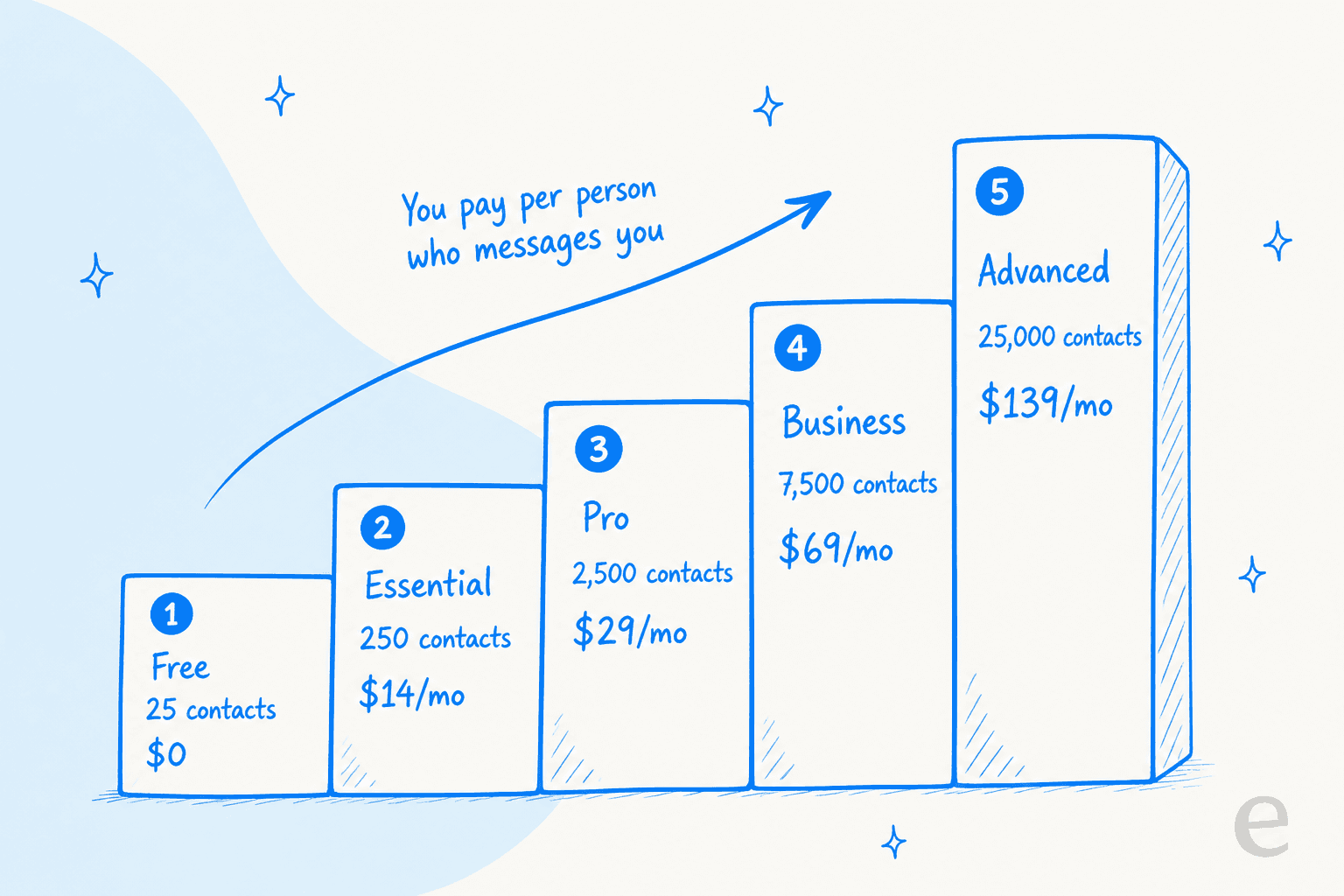
Here is every published plan. One important note before you read the numbers: the figures below are the annual-equivalent monthly rates pulled from the ManyChat pricing page in its default annual view. Month-to-month sticker prices sit behind the billing toggle and run higher (ManyChat advertises "save up to 30%" on annual), so treat these as the discounted rates.
| Plan | Annual-equiv. /mo | Billed annually | Included active contacts | Overage per extra contact | AI | |
|---|---|---|---|---|---|---|
| Free | $0 | - | 25 | none | no | no |
| Essential | $14/mo | $168 (18% off) | 250 | $0.10 | no | no |
| Pro | $29/mo | $348 (25% off) | 2,500 | $0.05 | yes | yes |
| Business | $69/mo | $828 (30% off) | 7,500 | $0.025 | yes | yes |
| Advanced | $139/mo | $1,668 (30% off) | 25,000 | $0.004 | yes | yes |
A few things jump out. There is no Enterprise or contact-sales tier, Advanced is the ceiling. Seats are capped per plan too (1 user on Free, up to 10 on Advanced), and the built-in inbox seats are even tighter (1 to 5). And look at the overage column: the per-contact rate falls from $0.10 on Essential to $0.004 on Advanced, a 25x drop. Which tier you sit on matters far more to your effective cost than how much volume you push inside it.
What you are actually paying for: the active-contact model
This is the part that trips people up, so it is worth slowing down. ManyChat does not bill by messages, by automations triggered, or by resolutions. It bills by active contact, and the definition is broad. In ManyChat's own words from the pricing FAQ: "An Active Contact is a real person you interact with during a monthly billing period... It doesn't matter how many messages you exchange. One person = one Active Contact for the month."
A contact counts as active the moment a message is "sent or received through Manychat, via automations, AI, Broadcasts, or the Inbox." So an organic DM you never automated, a broadcast recipient, and yes, a story reaction that drops into your inbox, all tick the meter. That is the mechanism behind the loudest review complaint:
"Your 'contact' numbers get way out of control even with a medium sized page making billing unsustainable. Even someone reacting to a story counts as a contact."

To be fair to ManyChat, the model has guardrails. You can set an overage threshold to control whether overages are allowed at all and how many extra contacts you'll pay for, so you're not exposed to an uncapped bill. Going over doesn't shut your automations off, it just charges the per-contact rate. And there's a genuinely nice detail: if you exceed your limit and upgrade mid-cycle, the overage fees you already racked up are forgiven and those contacts roll into your new plan's allowance.
The honest read is that this pricing rewards steady, predictable audiences and punishes spiky ones. If your DM volume is flat month to month, you can size a plan and forget it. If a single post can 10x your inbound in a week, the meter is working against you, and the reviewers who feel burned are almost always the ones who grew fast.
Where AI kicks in (Pro and up)
If AI is why you're evaluating ManyChat, note the gate: the Manychat AI badge appears only on Pro, Business, and Advanced. Free and Essential carry no AI features at all. There's no separately priced AI add-on and no per-reply meter, AI is simply bundled into the plan once you're on Pro ($29/mo) or higher.
What you get is a set of discrete tools rather than one general agent. AI Replies answers DMs and comments, Intention Recognition groups differently-worded questions ("price?", "how much?", "cost") so they route to the same answer, and a Flow Builder Assistant drafts automations from a text description. The important limitation for anyone comparing support tools: AI Replies answers from a knowledge library you paste in yourself, up to 250,000 characters. It is not a website crawler or a doc-ingestion system that learns from your existing help center or past tickets, you supply the content by hand, and you preview recommended replies before they go live.
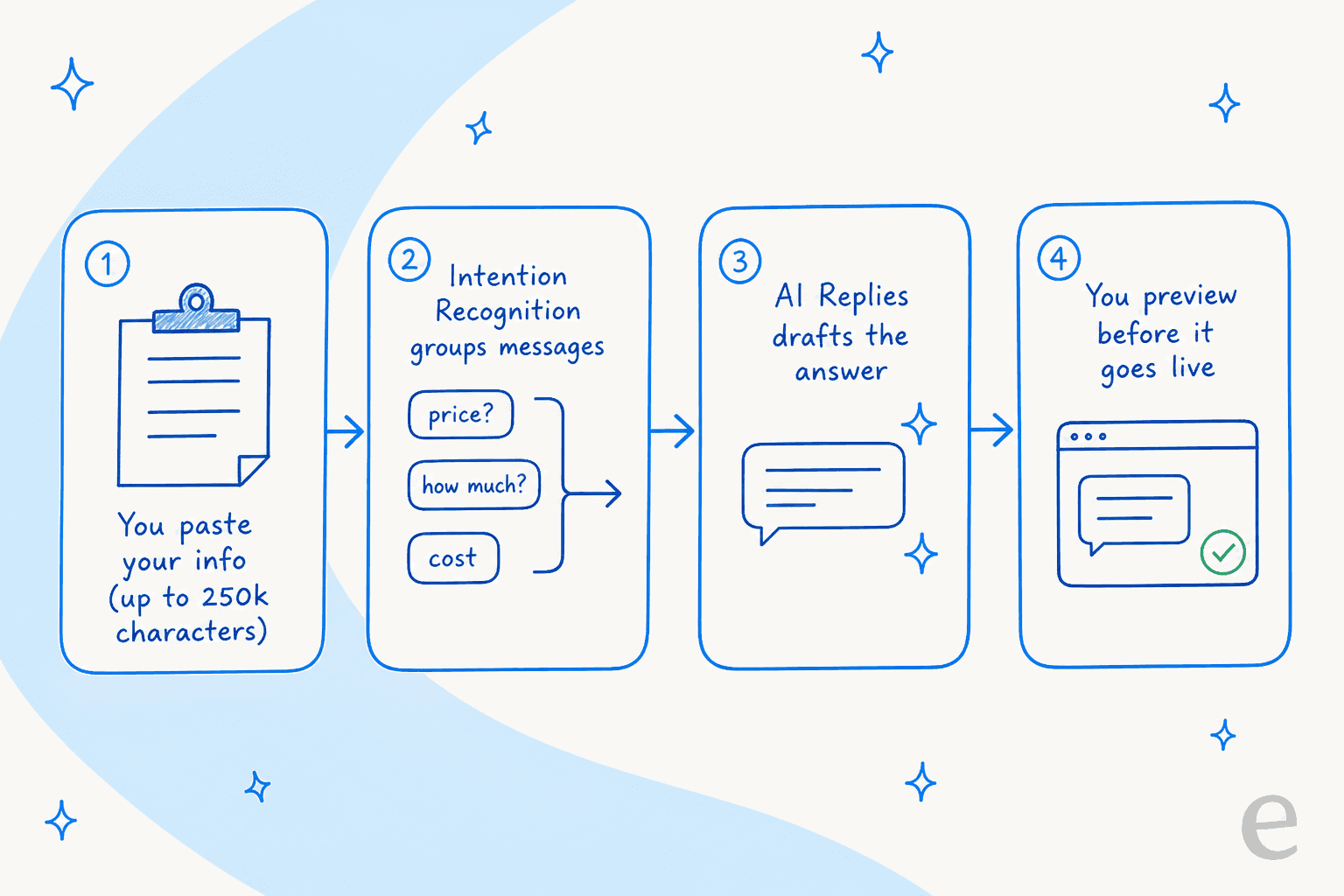
That's a sensible design for a creator answering FAQ-style questions on Instagram. It's a different thing from a support AI that trains on your ticket history and simulates its answers against what your team actually sent before you turn it on, which is the gap I'll come back to.
The WhatsApp cost nobody puts on the pricing page
Here's a real gotcha. WhatsApp is gated to Pro and up, and ManyChat lists no separate WhatsApp fee, it's just one of the eligible channels once you're on Pro. Easy to read that as "WhatsApp is included in my $29."
It isn't all-in. WhatsApp runs on Meta's WhatsApp Business Platform, and Meta charges its own per-conversation fees that flow through your Meta Wallet, entirely separate from what you pay ManyChat. Those charges do not appear anywhere on the ManyChat pricing page. On top of that, WhatsApp business-initiated messages need Meta-approved templates and respect a 24-hour session window, and US Marketing templates have been paused since April 1, 2025.
None of this is ManyChat being sneaky, it's how every WhatsApp Business tool works, the fees belong to Meta. But if you're budgeting for a WhatsApp funnel, add a line item for Meta's conversation charges. The ManyChat subscription is the floor, not the ceiling.
What real users say about the bill
ManyChat's ratings tell two different stories depending on where you look, and the split is the most useful signal in the whole review picture.
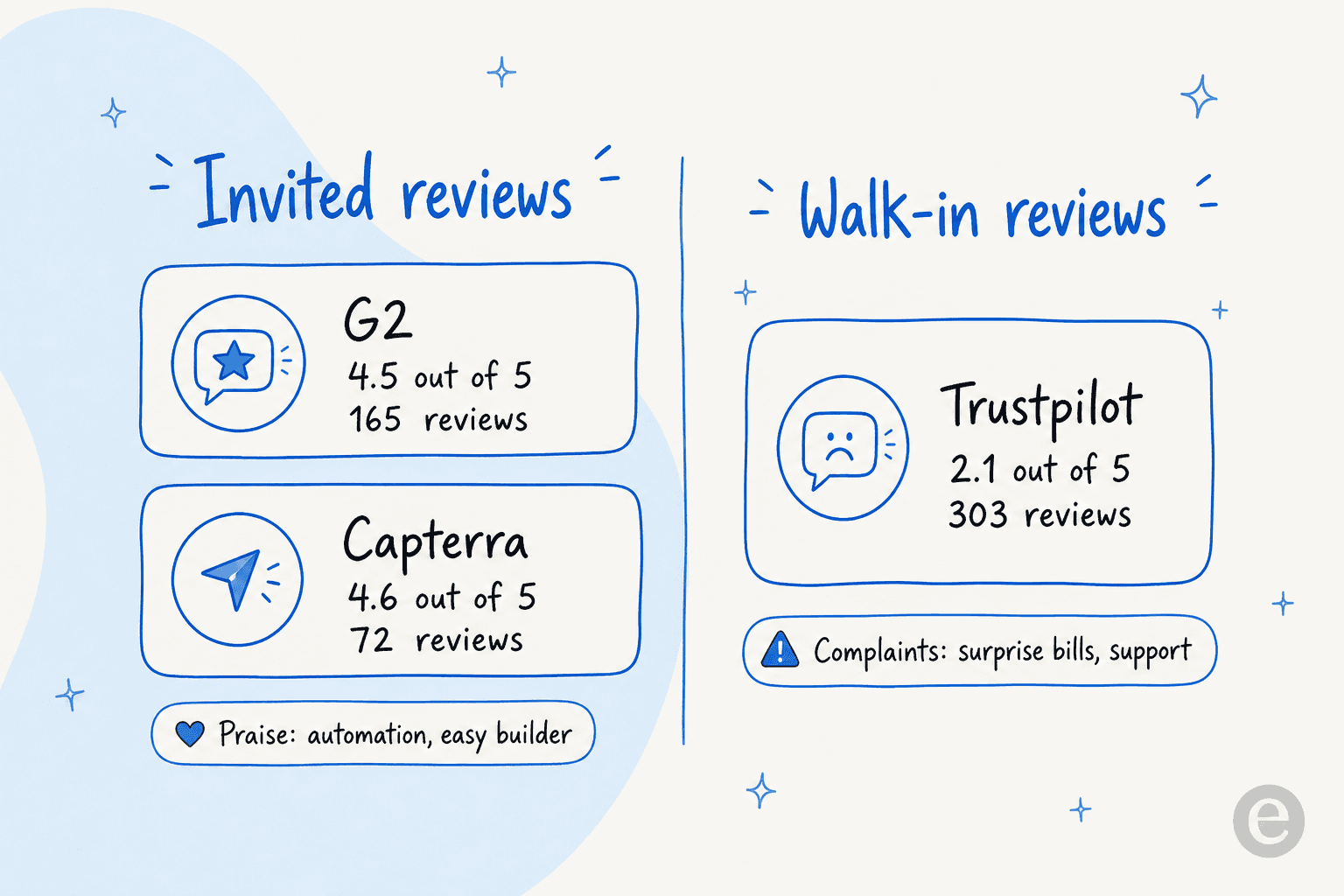
On the invited review sites, ManyChat scores well: 4.5 out of 5 across 165 reviews on G2 and 4.6 across 72 on Capterra. Power users who master the flow builder genuinely love it:
"I love how Manychat allows me to automate DMs to my Instagram followers... It's really easy to use, especially the duplicating feature, which lets me create automations in less than five minutes, saving me hours each week."

On Trustpilot, where reviews are unsolicited, ManyChat sits at 2.1 out of 5 across 303 reviews, rated "Poor." Trustpilot's own editorial summary points straight at the money: reviewers "pointed out severe problems with billing practices, unexpected card charges, and confusing subscription models that made stopping recurring payments extremely difficult." A G2 reviewer who otherwise likes the product put the active-contact confusion plainly:
"I assumed an 'active contact' meant someone I reached through an automation I built. In practice, a contact counts as 'active' any time a message is sent or received... one post that drives a wave of DMs can push you over before you notice."
The takeaway isn't "ManyChat is a rip-off." It's that the tool does what it says, and the billing model surprises people who didn't read the fine print on what "active contact" means. Read it up front and you avoid the trap.
Worked examples: what you'd actually pay
Sticker prices lie a little, so here are two realistic cases.
A creator on Essential. You're on the $14/mo Essential plan (250 included contacts). A Reel takes off and drives 1,000 people into your DMs that month. That's 1,000 active contacts, 750 over your allowance, at $0.10 each: $75 in overage on top of $14, so roughly $89 that month. The fix ManyChat nudges you toward is upgrading to Pro mid-cycle, which forgives that overage and folds the contacts into Pro's 2,500 allowance for $29. Good months and bad months swing your bill hard on Essential.
A small brand on Pro. You run a steady 2,500 conversations a month across Instagram and WhatsApp. Pro's $29/mo covers it exactly, and you get AI and WhatsApp. Push to 4,000 contacts and you're 1,500 over at $0.05: $75 overage, so $104, or you jump to Business at $69 for 7,500 included. Because the overage rate keeps dropping as you climb, the "right" plan is usually one tier above your typical volume, not at it.
The pattern: ManyChat is cheap and predictable when your volume is flat and you've sized the plan correctly, and unpredictable when you grow in bursts. That's the real cost model, not the sticker.
Try eesel for AI support with a bill you can predict
If you landed on ManyChat pricing because you want AI that actually answers customer questions, it's worth naming where ManyChat stops. It's a chat-marketing tool built for social DM funnels, its AI answers from context you paste in by hand, and its bill is set by a contact meter that surprises people who grow fast. For a creator running Instagram lead capture, that's a fine fit.
For a support team, the shape is different. eesel is an AI teammate platform, and the AI helpdesk teammate joins your existing queue and trains on your real history, past tickets, help docs, and order data, instead of a knowledge library you assemble by hand. Before it answers a live customer, you can simulate it against hundreds of your past tickets and see exactly how it would have replied, which is a step beyond ManyChat's preview-only check.

The pricing is built to be the opposite of a surprise. eesel plans are fixed monthly credit batches (a free tier at 100 credits, then 500 credits for $299 and up), where one ticket or chat is one credit regardless of how many messages it takes, with an optional spend cap so you never get a shock invoice. No per-active-contact meter, no story reaction quietly ticking your bill. You can try eesel free and run a simulation on your own tickets before you commit.
Frequently Asked Questions
How much does ManyChat cost per month?
Is ManyChat really free?
What is an active contact in ManyChat pricing?
Does ManyChat charge extra for WhatsApp?
Which ManyChat plan includes AI?


Article by
Kurnia Kharisma Agung Samiadjie
Kurnia is a software engineer and writer at eesel AI with two years of SEO experience, writing about AI tools, helpdesk software, and customer support. He pairs a developer's understanding of how these products are built with search-driven research into what actually ranks and resonates with the people searching for them.