


How much does AI Puffer cost?
AI Puffer (formerly AI Power) is a free WordPress plugin with 10,000+ active installs. Paid plans are sold through Freemius, the vendor's reseller, in US dollars before tax. Here is the full grid as listed today.
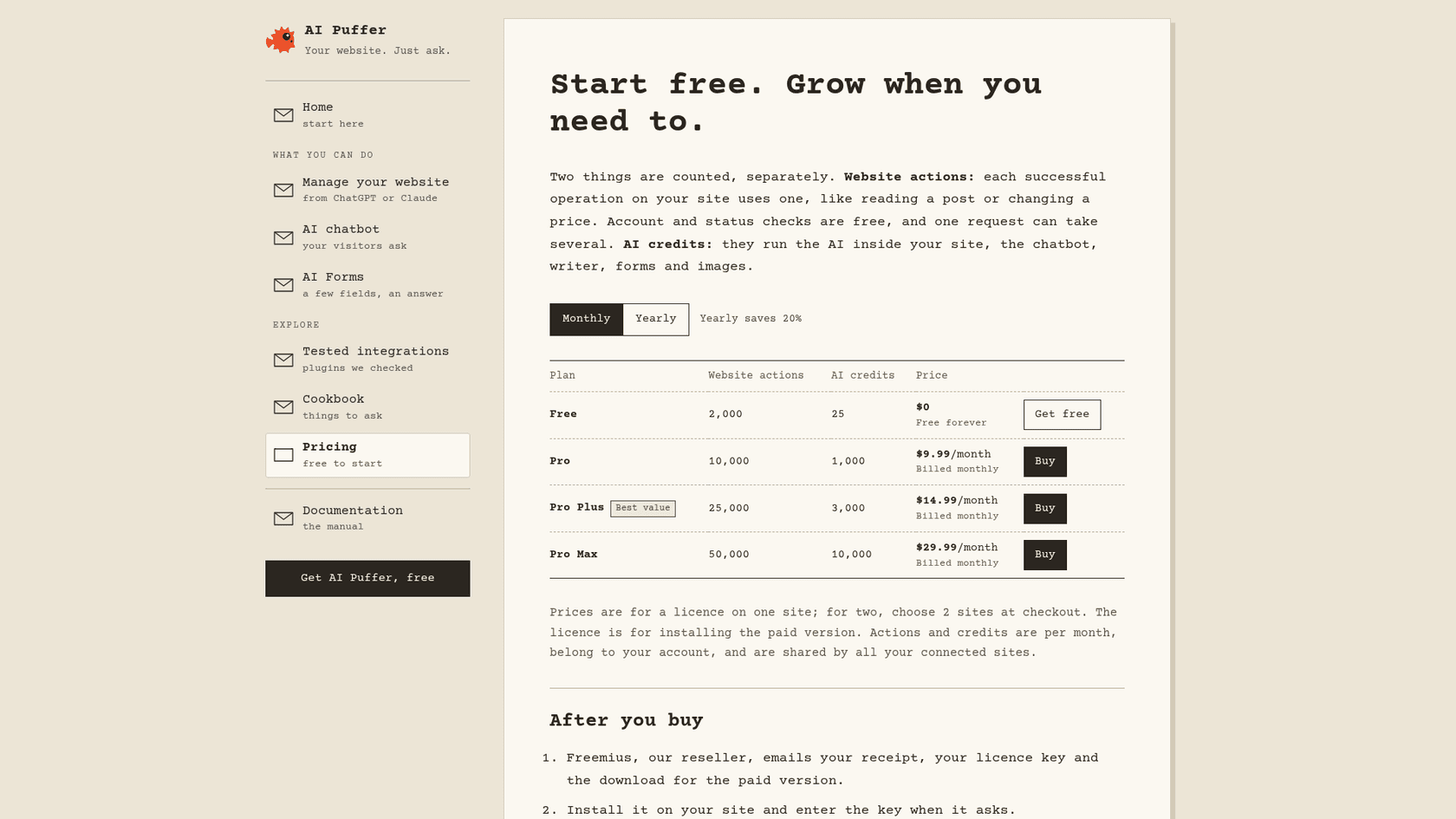
| Plan | Website actions a month | AI credits a month | Monthly, 1 site | Yearly, 1 site (per month) | Yearly total, 1 site |
|---|---|---|---|---|---|
| Free | 2,000 | 25 | $0 | $0 | $0 |
| Pro | 10,000 | 1,000 | $9.99 | $7.99 | $95.88 |
| Pro Plus | 25,000 | 3,000 | $14.99 | $11.99 | $143.88 |
| Pro Max | 50,000 | 10,000 | $29.99 | $23.99 | $287.88 |
What every paid plan includes, per the WordPress.org listing and the pricing page:
- The same features on every tier. File uploads for knowledge, chatbot Rules, external embeds for Shopify or Wix, RSS and Google Sheets sources, realtime voice, Ollama, theme drafts and reading PDFs all come with Pro. Pro Plus and Pro Max only add allowance.
- Free credits need a verified email. The 25 free AI credits need a verified AI Puffer Cloud account; credits you buy work without one.
- Your ChatGPT or Claude subscription is separate. If an assistant manages your site, you still pay OpenAI or Anthropic for that account yourself.
- Old lifetime licences keep plugin access but do not include the monthly allowances.
The free plan is unusually generous for a WordPress AI plugin. It includes the chatbot, the writer, topic and CSV automations, forms, images and website management. One reviewer called it a plugin that "offers tremendous versatility even in the free version." The catch on free is the 25 credits, not the features. If you are comparing with other plugins, my list of AI WordPress plugins and the AI Engine pricing breakdown are the closest reference points.
What do website actions and AI credits actually measure?
The plan card shows two numbers per tier, and they do not measure the same thing. The plans and usage chapter defines both:
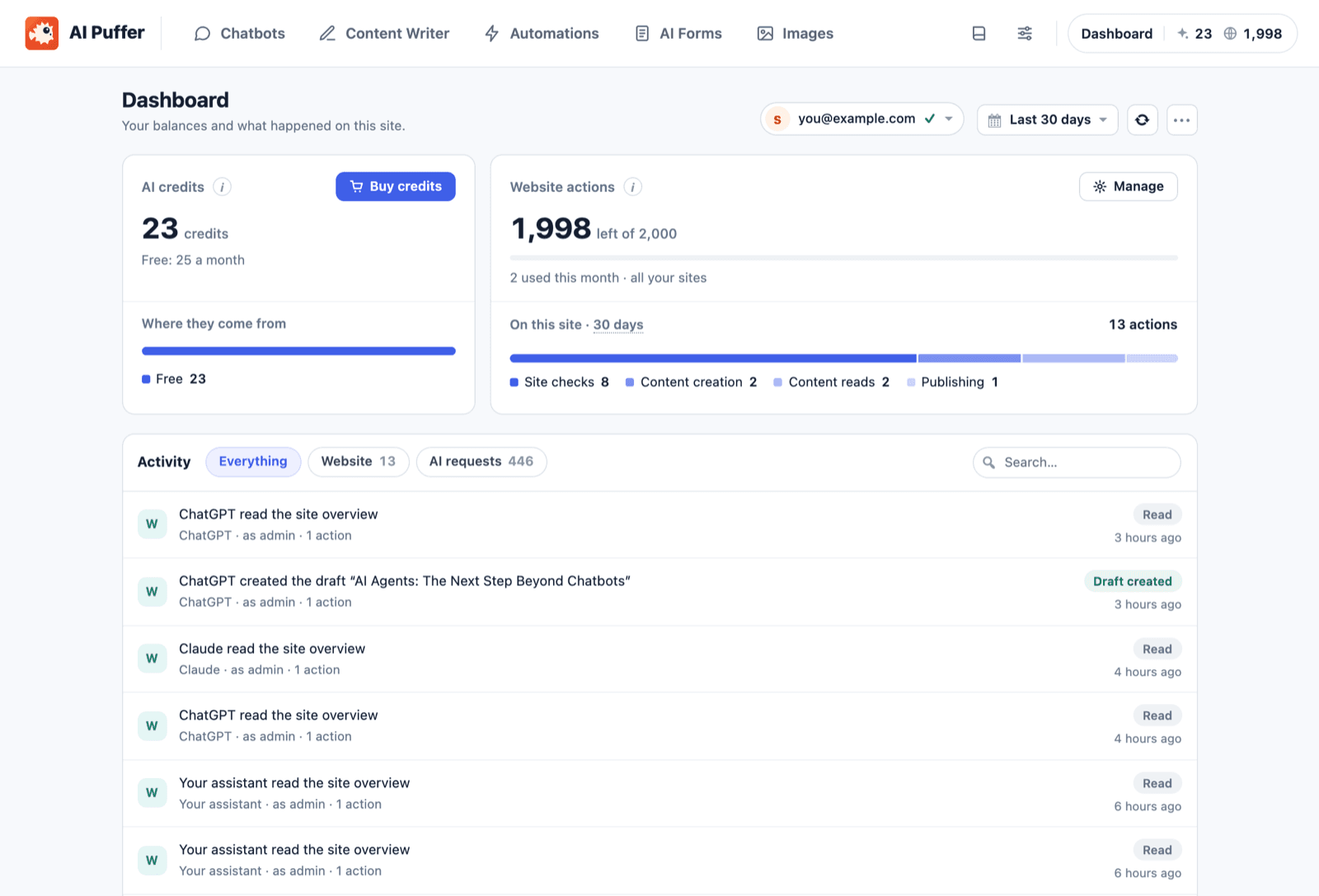
- Website actions are what ChatGPT, Claude, Cursor or Claude Code spend when they work on your site over the Model Context Protocol. Each successful operation uses one. Reading a post, creating a draft and publishing it are three. Account and status checks are free.
- AI credits run the AI inside your site: the chatbot, content writer, forms and images, on AI Puffer Cloud models from OpenAI, Anthropic, Google and others, with no API key.
The big numbers on the plan card are website actions, and a chatbot does not use them. Free's 2,000 actions is enough for an assistant to draft and publish roughly 660 posts a month. Free's 25 credits is a test allowance. If you are buying AI Puffer for a support chat, read the credits column and ignore the other one.
The Cloud docs spell out how credits are spent. Free credits go first, then the ones included with your plan, then any you bought. Included credits reset monthly and do not roll over; bought credits never expire. And when the balance runs out, the Cloud chapter says "tools using Cloud stop answering until your free credits renew or you buy more."
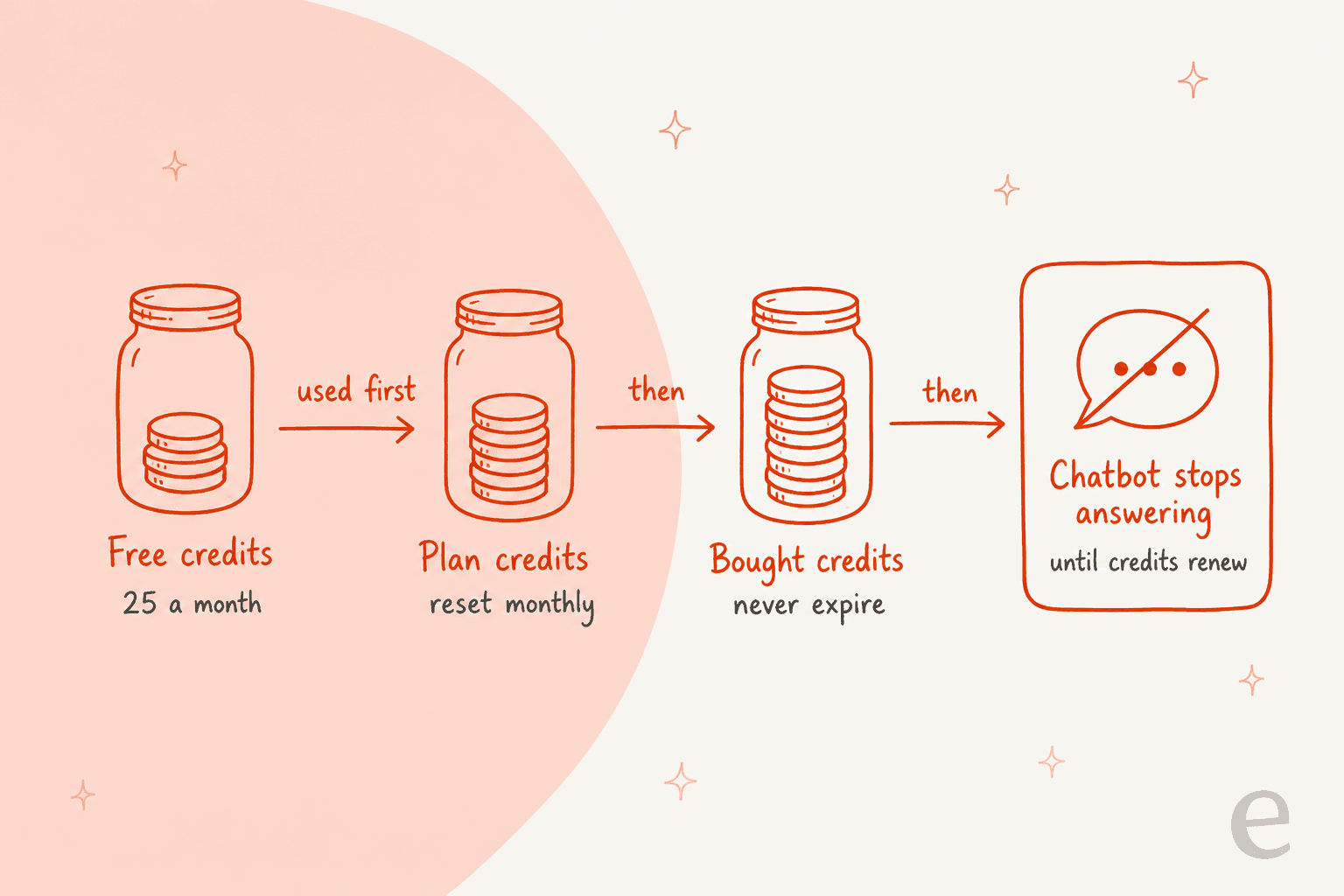
That last line is the one a support team should underline. On a usage-metered plan, a busy week does not get you a bigger bill. It gets you a silent chat window until the first of the month, unless someone notices the low-balance warning and tops up.
How fast does a support chatbot burn AI credits?
The vendor is upfront that one credit is not one message: "longer answers, more context and images cost more," and there is a minimum per text request. It does not publish a per-chat estimate, and I am not going to invent one. A credit's cost depends on the model you pick and how many tokens each request carries.
What I can do is turn the allowances into a budget. If your site gets 500 chatbot conversations a month, each plan gives every conversation this many credits to spend:
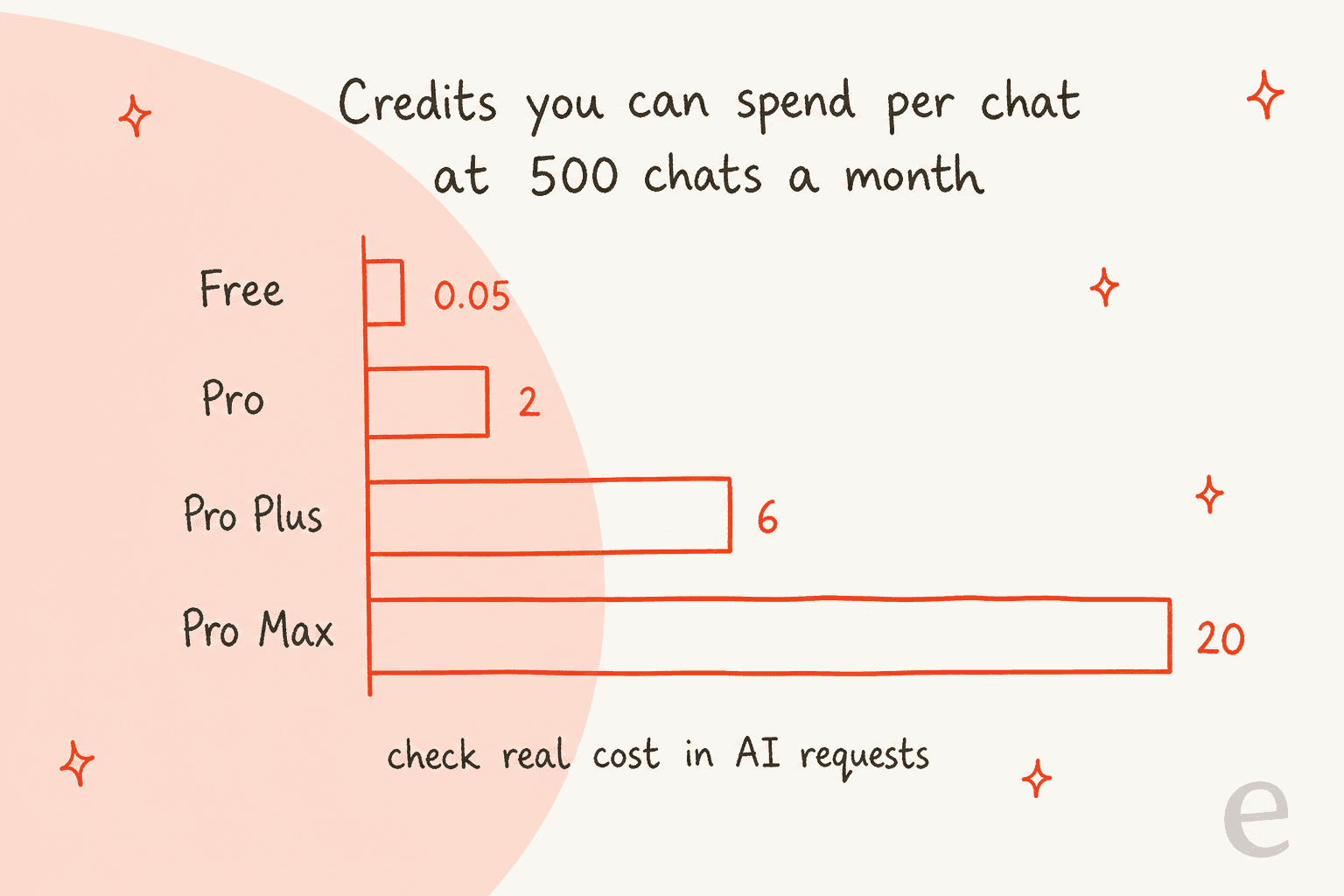
Then open AI Puffer › Dashboard › AI requests, which lists every request with what it cost, and compare. Three things push a support chat's cost up, all from how the chatbot works:
- Knowledge lookups add context. The bot answers from your pages, products and Q&A using retrieval, and the matched pieces travel with the question as context.
- Longer conversations cost more per chat. A visitor who asks four follow-ups is four requests, each carrying the history.
- Your testing counts. Preview chats run on the same model as live ones. Plan your first week's test questions on Pro, not on the free 25.
The chatbot has a guard for runaway use. Under Publish › Usage limits, the limits chapter lets you cap guests, logged-in users or each WordPress role, resetting daily, weekly or monthly, "so a busy day or a misuse doesn't spend all your credits." I would set a guest limit before launch. If your bot is on Shopify or Wix through an external embed, list the allowed websites too: the publish docs warn that until you do, "any website can use it, and your credits."
Use the calculator below with your own measured number once you have one.
If your numbers land on Pro Max plus extra credits, that is a sign the chatbot has become a real channel. The price of extra credits is not listed on the pricing page; you see it from the Buy credits button on the dashboard.
Monthly or yearly: is the 20% discount worth it?
The pricing page says "Yearly saves 20%," and the checkout confirms it. Here is what that comes to for one site:
| Plan | 12 months paid monthly | Paid yearly | You save |
|---|---|---|---|
| Pro | $119.88 | $95.88 | $24 |
| Pro Plus | $179.88 | $143.88 | $36 |
| Pro Max | $359.88 | $287.88 | $72 |
Two details decide whether yearly makes sense. First, yearly plans still reset the allowance every month. Paying upfront does not give you 12,000 credits to spend in a busy December; it gives you 1,000 a month on Pro, same as monthly. Second, the Freemius checkout shows a 7-day money-back guarantee, which applies when "you experience an issue that makes the product unusable" and the vendor cannot fix it. That is a short window, so I would run a month on monthly billing, read the AI requests view, and switch to yearly once you know which tier you need.
The amounts are small either way. The bigger yearly question is the one-developer risk I covered in the review: a lot changes quickly in this plugin, and a year upfront is a bet that the plan still fits after those changes.
What does a second site cost?
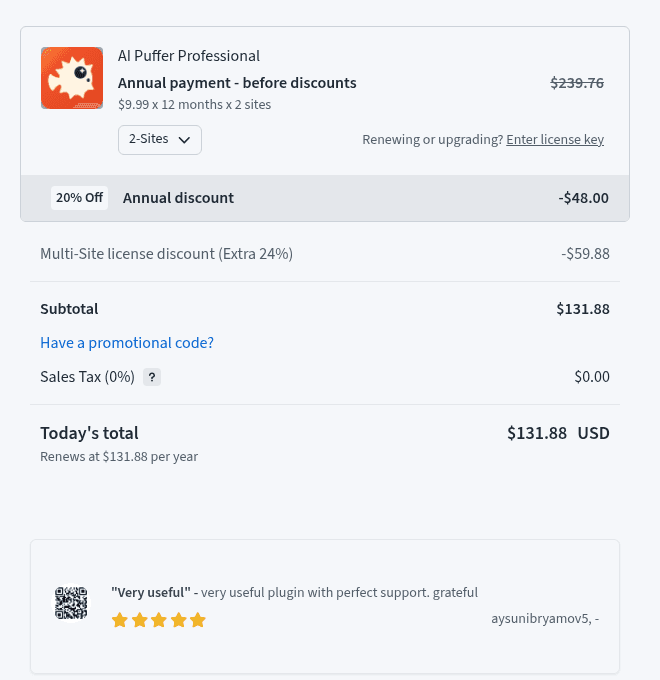
This is the part of AI Puffer pricing I had not seen covered anywhere. The pricing page says prices are "for a licence on one site; for two, choose 2 sites at checkout," and that allowances "belong to your account, and are shared by all your connected sites." The WordPress.org listing is blunter: allowances are "shared across an account's sites, not multiplied by the number of licensed sites."
I walked the checkout for each plan at 2 sites. Freemius applies a multi-site discount on top of the yearly one:
| Plan | Monthly, 1 site | Monthly, 2 sites | Yearly, 1 site | Yearly, 2 sites | Allowance at 2 sites |
|---|---|---|---|---|---|
| Pro | $9.99 | $13.99 | $95.88 | $131.88 | 10,000 actions, 1,000 credits |
| Pro Plus | $14.99 | $16.99 | $143.88 | $167.88 | 25,000 actions, 3,000 credits |
| Pro Max | $29.99 | $33.99 | $287.88 | $323.88 | 50,000 actions, 10,000 credits |
So a second site adds $2 to $4 a month, which is cheap. But a second licence buys install rights, not more AI. Two sites on Pro share one pool of 1,000 credits.
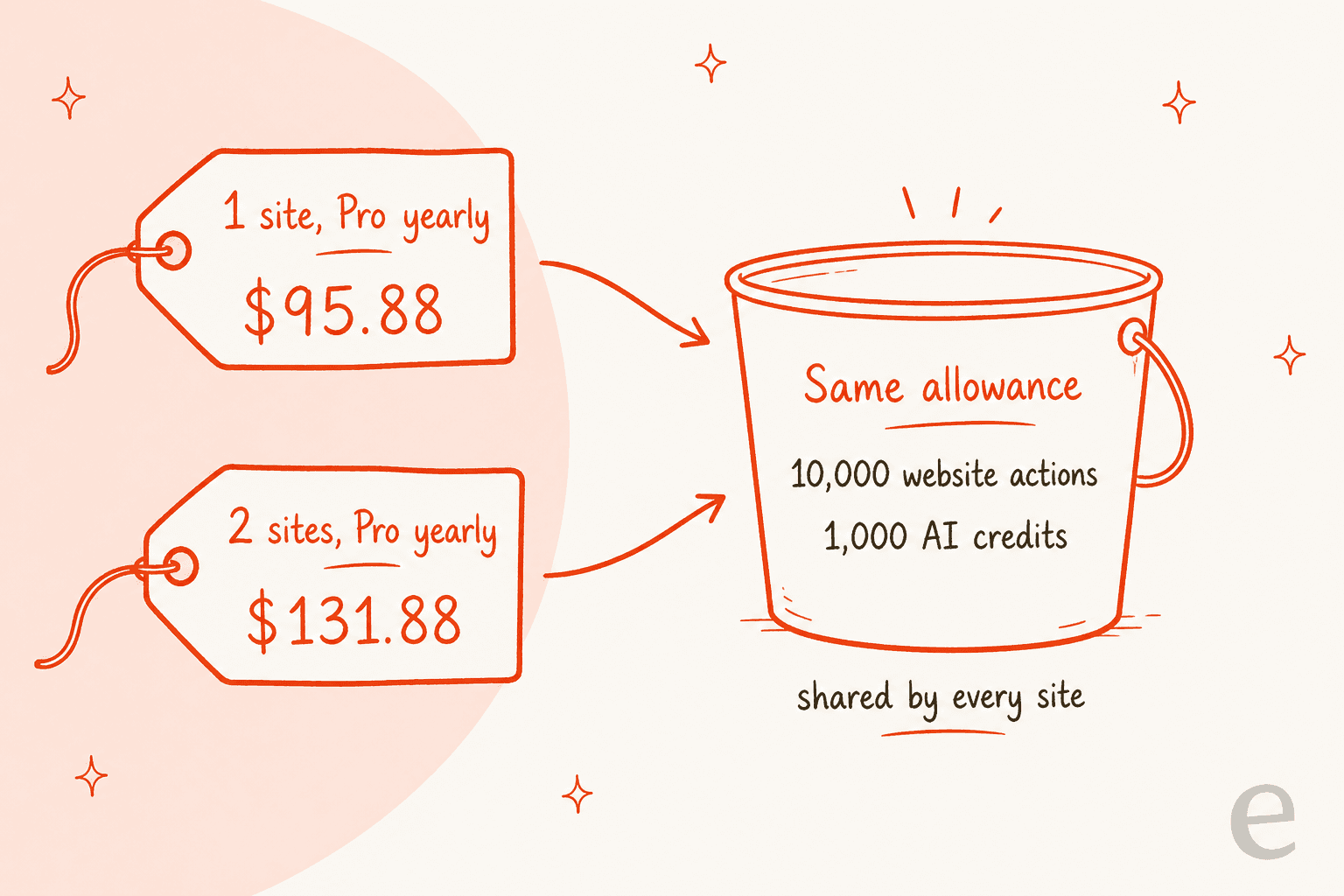
The practical read: if you run two sites with busy chatbots, price for the credits first. Pro Plus at 2 sites ($16.99 a month) gives you three times Pro's credits for $3 more than Pro at 2 sites. For an agency running client sites, the shared pool means one client's busy month can drain the bot on another client's site.
What hidden costs come with AI Puffer?
The plan price is not the whole bill. Five costs sit next to it.
1. Your own model API key, if you go that way. You can skip credits entirely and paste your own OpenAI, Anthropic, Google, xAI, DeepSeek, OpenRouter or Azure OpenAI key, which the listing says your provider bills directly. Token prices are often low for a support bot. On Anthropic's pricing page, Claude Haiku 5.5 is $0.10 per million input tokens and $0.50 per million output tokens for prompts up to 100,000 tokens. A chat request with 3,000 tokens of question and retrieved context and a 300-token answer would cost about $0.00045 at those rates (my arithmetic, not a vendor estimate), so 500 of them is about 23 cents.
My guides to Anthropic API pricing and OpenAI API pricing cover other models.
One reviewer is happy with that route:
"OpenRouter also works perfectly."
That line comes from the same July 2026 review quoted above. The trade-off is a second bill to watch, and a key to keep safe.
2. Some features need a key anyway. Cloud models do not do web search, and live voice needs your own OpenAI key, per the Cloud docs. Image editing and Google Veo video also run on your own provider accounts. Ollama, for running local models, is a paid feature.
3. Knowledge stores outside WordPress. The built-in store keeps knowledge in your WordPress database and needs an embedding model, such as AI Puffer Cloud's. Per the knowledge base docs, an OpenAI store needs your OpenAI key and OpenAI does the embeddings; Google needs your Google key; Pinecone, Qdrant and Chroma are your own vector databases, with their own bills.
4. The free plan's limits push you to Pro quickly for support. File uploads, chatbot Rules (asking for contact details, sending a chat to a webhook) and connected apps like Slack or HubSpot are all paid. One short one-star review from August 2025 was simply this:
"“File Upload is a Pro feature”. What else to add?"
5. Your time on the handoff. This is the one that matters most for a support team, and it has no price tag. AI Puffer's chatbot has no ticket queue, assignment or live takeover in its docs. Rules can send a chat to Slack or a webhook, but somebody still has to see it and reply from another tool. My chatbot cost guide counts these hours, and the chatbot ROI guide shows how they change the math.
Which AI Puffer plan fits you?
With identical features on every paid tier, the choice is only about volume. This is how I would pick, using the vendor's allowances:
| You are | Plan I would start on | Why |
|---|---|---|
| Testing the plugin or running a tiny FAQ bot | Free | 25 credits shows you the cost per chat before you pay |
| A service business with a chatbot on one site | Pro, monthly | 1,000 credits, file knowledge and Rules; switch to yearly after a month |
| A WooCommerce store with steady chat traffic | Pro Plus | Three times Pro's credits for $5 more a month |
| Two sites, both with chatbots | Pro Plus at 2 sites | One shared pool, so buy credits, not licences |
| Mainly using ChatGPT or Claude to edit the site | Free or Pro | Actions are generous; 2,000 covers about 660 published posts |
| A busy chatbot that hits Pro Max | Pro Max, or your own key | Bought credits never expire, or let the provider bill tokens |
If you are on WooCommerce and weighing chat tools more broadly, my guide to an AI chatbot for WooCommerce lists what order questions need.
If you are comparing pricing models across chat tools, Tidio pricing, Chatbase pricing and 3CX Live Chat pricing show three different ways the same job gets billed.
When does a support team outgrow AI Puffer?
Not on price. Even Pro Max at 2 sites is $33.99 a month. A support team outgrows AI Puffer when the chat window becomes a channel somebody is accountable for, and three signs show up:
- Customers ask for a person. The bot can collect details and post to Slack, but nobody takes the conversation over inside the chat. My notes on human handoff in chat list what a full handoff carries over.
- Wrong answers cost money. The listing's FAQ says the model "can still use its general knowledge or make mistakes." That is fine for a blog FAQ and risky for refund policy. My guide on AI hallucinations in support covers how to test for it.
- The chat has to share a queue with email. If chats and tickets are answered by the same people, a plugin that keeps conversations in the WordPress database leaves them in two places.
At eesel, every rollout is simulated against historical tickets before a customer sees it, because the questions that cause trouble are the ones nobody thought to put in a test. AI Puffer gives you a live preview, which is good for checking tone and a few known questions. My guide to testing an AI agent shows the fuller method.
AI Puffer vs eesel on cost
eesel is an AI teammate platform, and for this job the relevant teammate is the AI helpdesk teammate: it answers on your website and in your helpdesk, and hands cases to people. It is priced differently from AI Puffer, and on cash it is far more expensive for one site's chat. The two bills measure different things.
| AI Puffer | eesel | |
|---|---|---|
| Free plan | 25 AI credits a month, chatbot included | 100 credits to try every feature |
| Entry paid price | $9.99 a month (Pro, one site) | $299 a month for 500 credits |
| What one unit buys | A credit; cost varies by model and request size | One chat or one ticket, however long it runs |
| Model costs | In credits, or your own key billed by the provider | Included |
| At zero balance | Cloud tools stop answering until renewal or top-up | Agents pause, or optional overage at $0.80 per credit with your cap |
| Handoff to people | Rules post to Slack, HubSpot or a webhook (paid) | Creates or updates tickets in your helpdesk |
| Yearly discount | 20% | Two months free |
The eesel side comes from its pricing page today: free with 100 credits, then $299 a month for 500 credits up to $1,749 for 5,000. At 500 chats a month that is $299, against $14.99 for AI Puffer Pro Plus. If your chatbot is a FAQ helper on a service site, that gap is the answer, and AI Puffer is the right buy.
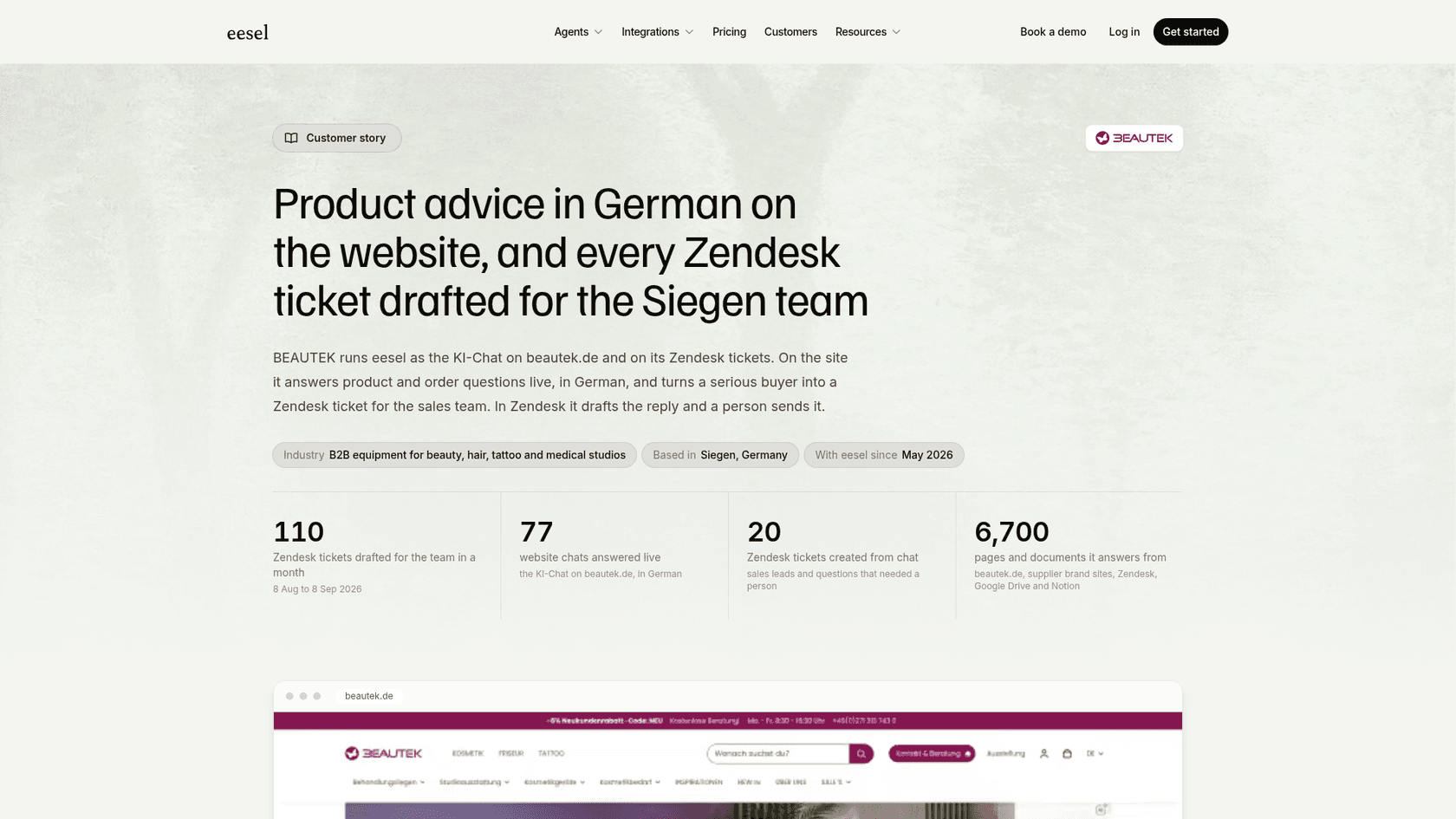
The gap closes when the chat is a support channel. BEAUTEK, a German supplier of studio equipment, shows the work that sits inside one eesel chat: from August 8 to September 8, 2026, eesel answered 77 website chats live in German and created 20 Zendesk tickets from them, mostly sales leads and questions that needed a person, and drafted 110 Zendesk tickets for the team. Rúngne, a Norwegian climbing apparel brand, shows the handover itself: when a customer on live chat asks for a person, the agent says the team will take over, asks for an email if there is none, and stops.
And when the volume is real, the per-chat unit keeps the bill predictable. Question Beauty had eesel handle 990 Gorgias tickets across Messenger, email and chat in a month, with 280 closed without a person. On a fixed credit plan, a long conversation costs the same as a short one, which is the part AI Puffer's credit system cannot tell you in advance.
You can also run both: AI Puffer for site edits and the AI blog writer or AI Puffer's own writer for content, and eesel on the support chat. For a store on WooCommerce, that split is the one I would pick.
Try eesel for WordPress support chat
If you landed on AI Puffer pricing because you want an AI chat on your WordPress site that real customers rely on, eesel's chat bubble goes on with one script tag, answers from your help content in 80+ languages, and passes the cases it should not handle to your helpdesk with the conversation attached. Each chat is one credit however many messages it takes, so a long refund question costs the same as a short one. Try eesel free with 100 credits and run it on your real questions before it talks to a customer.
Frequently Asked Questions
How much does AI Puffer cost?
AI Puffer is free with 2,000 website actions and 25 AI credits a month. Pro is $9.99 a month, Pro Plus $14.99 and Pro Max $29.99 for one site, per the AI Puffer pricing page. Every paid plan has the same features; only the allowances differ. My AI Puffer review covers what you get.
Is AI Puffer pricing cheaper if I pay yearly?
Yes, by 20%: $7.99, $11.99 and $23.99 a month, or $95.88, $143.88 and $287.88 a year for one site. The allowance still resets every month on yearly plans, so you do not get a year of credits to spend at once. My guide to chatbot cost shows how to budget the rest.
How many chats do AI Puffer credits cover?
AI Puffer does not publish a per-chat figure, because a credit is not a message: longer answers, more context and images cost more. At 500 chats a month, Pro allows 2 credits per chat and Pro Max 20. Check the AI requests view, and read up on tokens to see what drives the cost.
Does AI Puffer cost more for two websites?
A 2-site licence costs a little more, for example $13.99 a month for Pro or $131.88 a year, per the Freemius checkout. The allowance is shared across your sites, not doubled, so two busy chatbots split one pool of credits. If you manage several WordPress sites, my list of AI WordPress plugins compares other licensing models.
Can I use AI Puffer with my own OpenAI or Claude API key?
Yes. You can paste your own OpenAI, Anthropic, Google, xAI, DeepSeek, OpenRouter or Azure OpenAI key, and your provider bills you directly instead of using credits. Web search and live voice need your own key anyway. My OpenAI API pricing guide lists token rates.
What happens when AI Puffer runs out of credits?
Tools that use AI Puffer Cloud, including the chatbot, stop answering until your free credits renew or you buy more. Bought credits never expire. For a support chat, set usage limits and watch the low-balance warning, or plan a chatbot escalation path for when it goes quiet.
Is AI Puffer Pro worth it for customer support?
For a FAQ bot on a service site, yes: $9.99 a month adds file knowledge, Rules and 1,000 credits. For a team that answers customers for a living, the missing ticket queue and live handoff cost more than the plan. A ready-made AI helpdesk teammate covers that part, at one credit per chat.
What are cheaper or better AI Puffer alternatives?
AI Engine is the closest WordPress plugin, and my AI Engine alternatives list covers more. For hosted chatbots, compare Botpress pricing and other AI chatbot builders.