

How much does AI Engine cost?
I build integrations at eesel, which mostly means I spend my days reading other people's APIs and the bills they produce. So when I priced AI Engine, I wanted the number a WordPress site owner actually pays, not the sticker. Here's the plugin first, so you know what the money buys.
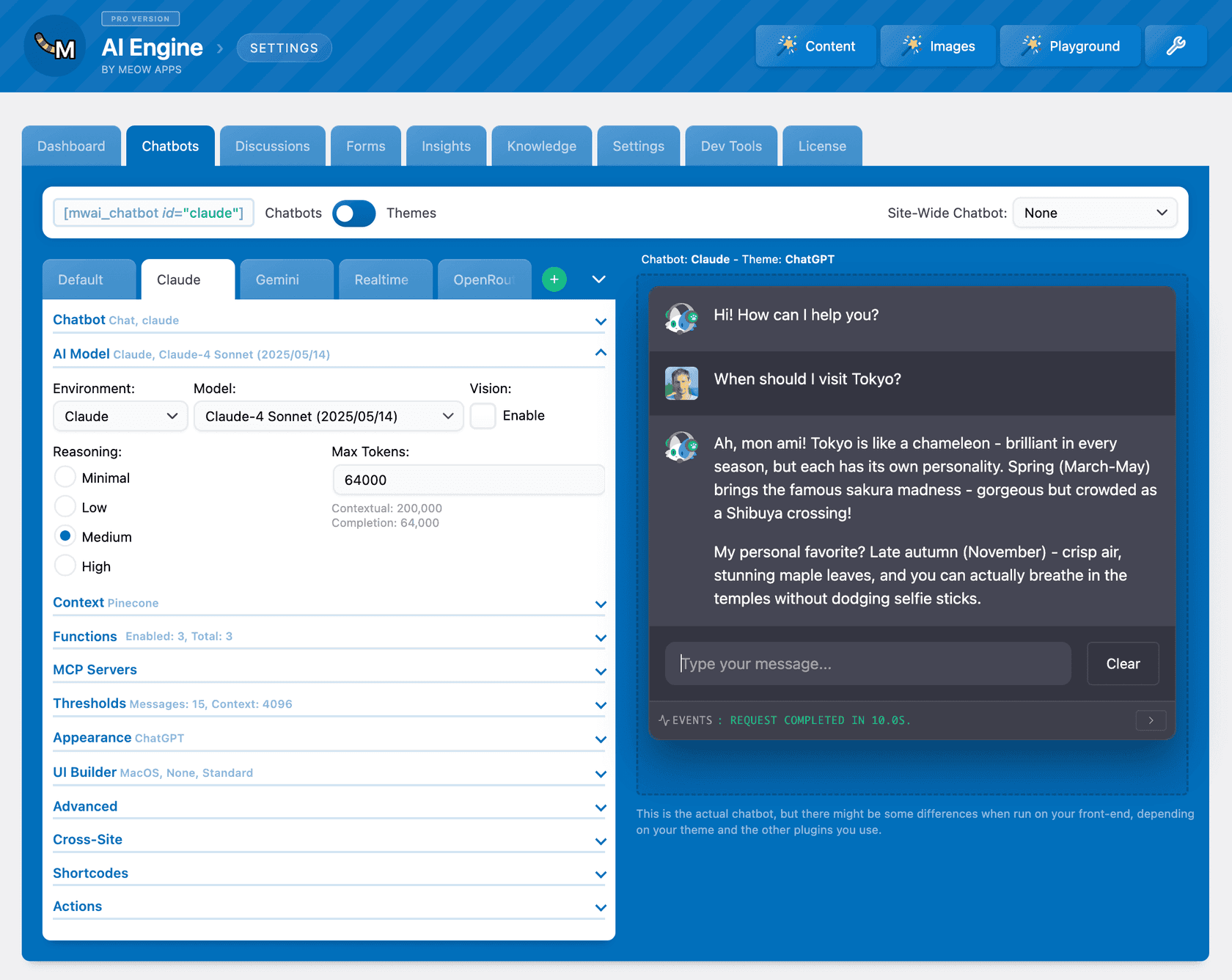
AI Engine is the WordPress plugin from Meow Apps, built by Jordy Meow in Tokyo. It has 90,000+ active installs and a 4.9 rating from 871 reviews on its WordPress.org listing. It does far more than chat: a content generator, an editor copilot, AI Forms, embeddings, an MCP server that lets Claude or ChatGPT manage your site, and a full-screen Workspace app inside wp-admin.
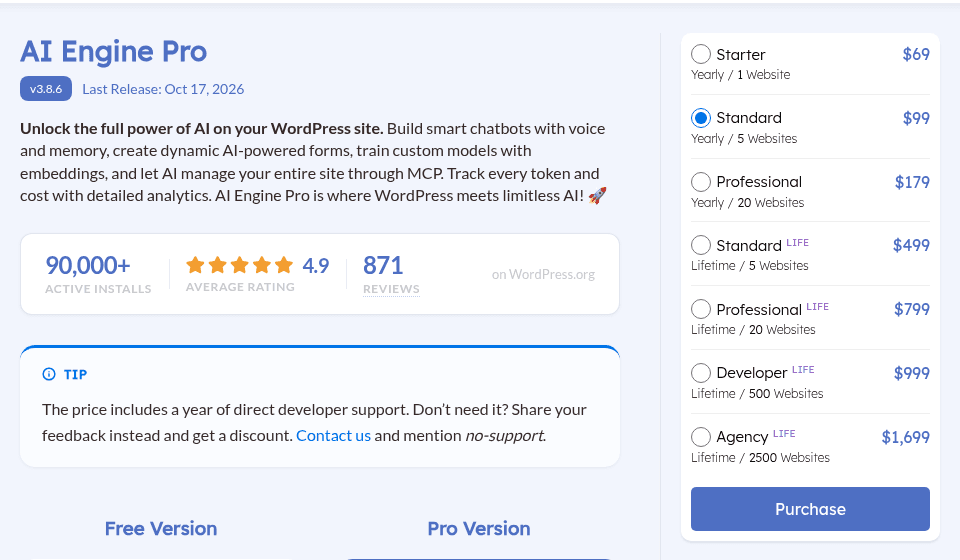
The Pro license comes in seven sizes. Every price below is from the AI Engine Pro page on October 21, 2026.
| License | Billing | Websites | Price | Support |
|---|---|---|---|---|
| Free | Free | Any | $0 | WordPress.org forum |
| Starter | Yearly | 1 | $69 / year | While the license is active |
| Standard | Yearly | 5 | $99 / year | While the license is active |
| Professional | Yearly | 20 | $179 / year | While the license is active |
| Standard Life | One payment | 5 | $499 | First year only |
| Professional Life | One payment | 20 | $799 | First year only |
| Developer Life | One payment | 500 | $999 | First year only |
| Agency Life | One payment | 2,500 | $1,699 | First year only |
Three small print items matter more than they look:
- The price includes a year of developer support. Meow Apps offers a discount if you skip it: the page says to contact them and mention "no-support".
- There are no trials. Refunds are given when asked within 2 weeks, per the same page.
- WordPress.org forums can't discuss Pro. Jordy points out in a pricing support thread that WordPress doesn't allow Pro pricing talk there, so Pro questions go through Meow Apps support.
For context, $69 a year works out to $5.75 a month, which is cheap next to hosted chatbot tools. My Chatbase pricing and Tidio AI pricing breakdowns show what those charge, and they bundle the AI usage in. AI Engine doesn't, which is the whole story of this post.
What does the free plugin include, and what needs Pro?
The free plugin is more generous than most WordPress freemium tools. You get a working chatbot without paying anything to Meow Apps. Pro adds the pieces that turn a demo chatbot into one that knows your business.
| Feature | Free | Pro |
|---|---|---|
| Chatbots with themes and shortcode builder | Yes | Yes |
| Content generator, image AI, editor copilot | Yes | Yes |
| Fine-tuning interface and AI Playground | Yes | Yes |
| REST API and WordPress MCP server | Yes | Yes |
| Embeddings and knowledge base from posts and PDFs | No | Yes |
| Function calling (WordPress functions, WooCommerce, custom APIs) | No | Yes |
| AI Forms | No | Yes |
| Cross-site chatbots on external websites | No | Yes |
| Realtime audio chatbot | No | Yes |
| Advanced MCP tools (WooCommerce, database, themes, plugins) | No | Yes |
| Usage Insights and limits | No | Yes |
| AI Assistants | No | Yes |
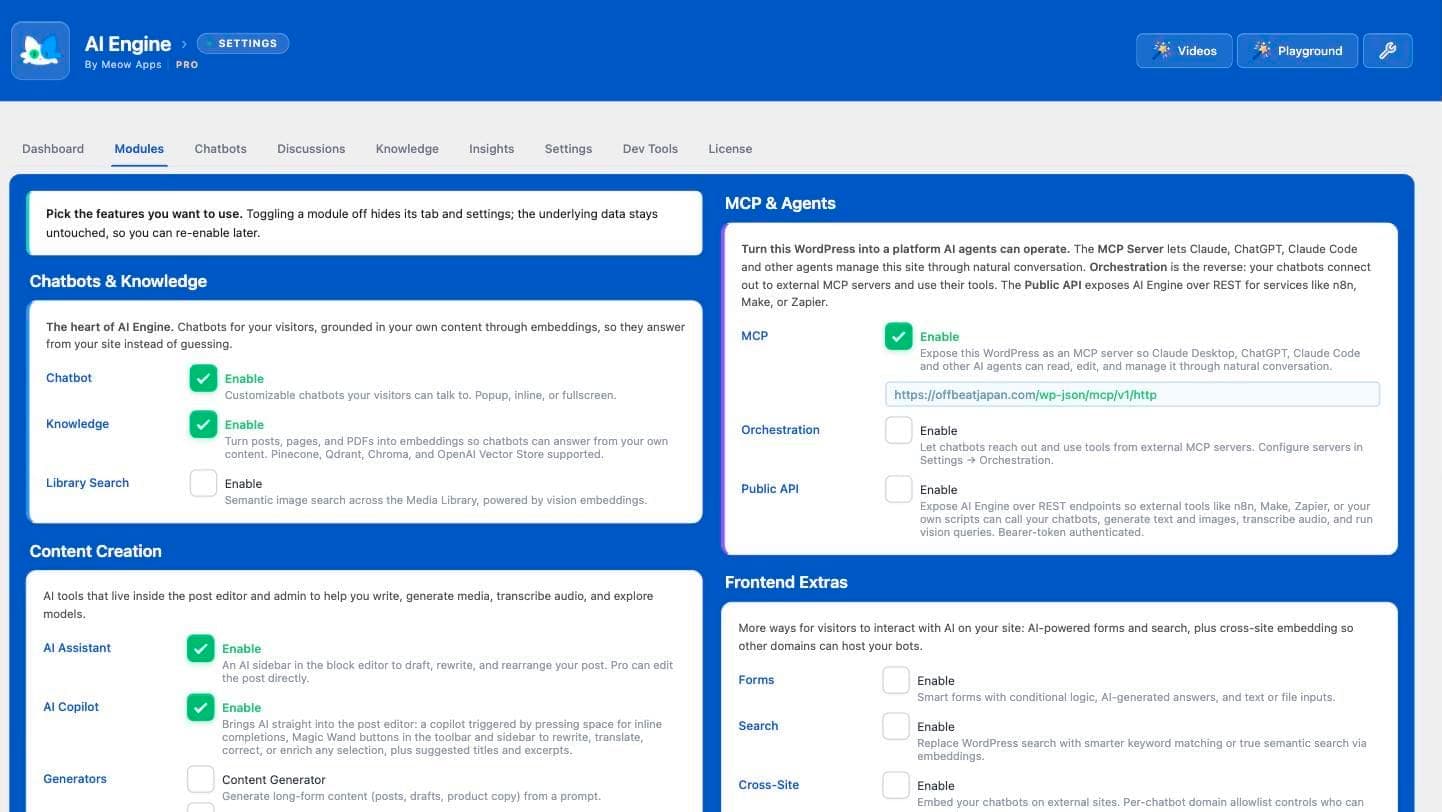
All rows come from the AI Engine feature list. The line that matters for support is embeddings. Without them, the bot answers from the model's general knowledge plus whatever you paste into the prompt, which is how a chatbot ends up guessing about your return policy. If you want answers grounded in your own pages, budget for Pro. My explainer on RAG vs vector databases covers why that grounding step decides answer quality.
Function calling is the other Pro feature support teams reach for, since it's how a bot looks up an order. Jordy explains in a WordPress.org reply that keeping function calling working is too much ongoing work to give away, which is a fair reason and an honest one.
Should you buy the yearly or lifetime license?
Meow Apps recommends yearly on its Pro page: a yearly license keeps working with support for as long as it stays active, while a lifetime license keeps working with updates forever but includes support for the first year only.
The math backs the recommendation. Standard Life is $499 for 5 sites against $99 a year for Standard, so the yearly plan is still cheaper after five years ($495 paid) and only passes the lifetime price in year six.
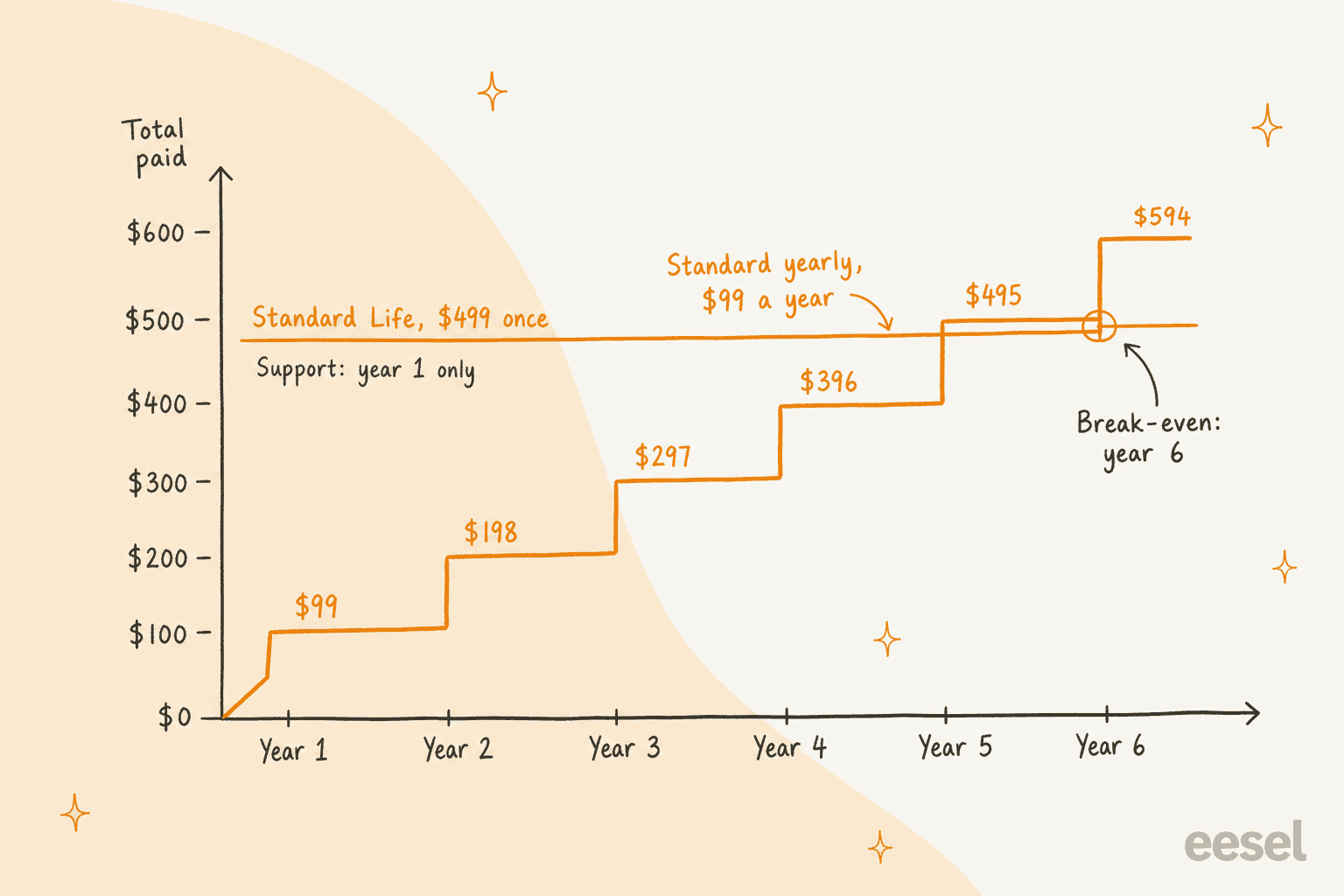
Professional Life ($799) against Professional yearly ($179) breaks even a little sooner, in year five. Either way, a lifetime license is a bet that you'll still run this plugin, on this many sites, five years from now. AI tools change fast enough that I wouldn't take that bet for a support chatbot. The lifetime tiers make the most sense for agencies on the Developer ($999, 500 sites) or Agency ($1,699, 2,500 sites) plans, where the per-site cost drops below a few dollars.
What do the AI Engine add-ons cost?
Some of the most useful support features sit outside Pro as separate add-ons. There are 11 in the AI add-ons catalog, and every one I checked uses the same price card.
| Add-on license | Billing | Websites | Price |
|---|---|---|---|
| Starter | Yearly | 1 | $9 / year |
| Standard | Yearly | 5 | $19 / year |
| Professional | Yearly | 20 | $29 / year |
| Standard Life | One payment | 5 | $69 |
| Professional Life | One payment | 20 | $99 |
| Developer Life | One payment | 500 | $149 |
| Agency Life | One payment | 2,500 | $199 |
The ones a support team would look at first:
- Woo Basics turns the chatbot into a WooCommerce assistant with order tracking and product search.
- Visitor Form asks for a name and email before the chat starts, with email alerts on submission.
- Notifications emails you the full transcript of each conversation, with keyword triggers.
- Web Search lets the bot search Google or Tavily for current information.
- Ollama connects to models you run on your own server, which removes the per-token bill (you pay in hardware and upkeep instead).
The others are User Memory, DeepSeek, Content Parser, Quick Actions, Dynamic Keys and Better Links. A WooCommerce store that wants order tracking, a lead form and transcript emails is at three add-ons, so $27 a year on one site. Small money, but it adds up next to the $69 license. One more catch: the Neko Pass bundle of every Meow Apps plugin says plainly that the AI Engine add-ons aren't included.
The second bill: what you pay OpenAI, Anthropic or Google
This is where most of the cost lives. AI Engine's own page is upfront about it: it always uses your own API keys, with no markup on tokens and nobody taking a cut. That's a great design for control and price. It also means your chatbot has two invoices from two companies, and only one of them is fixed.
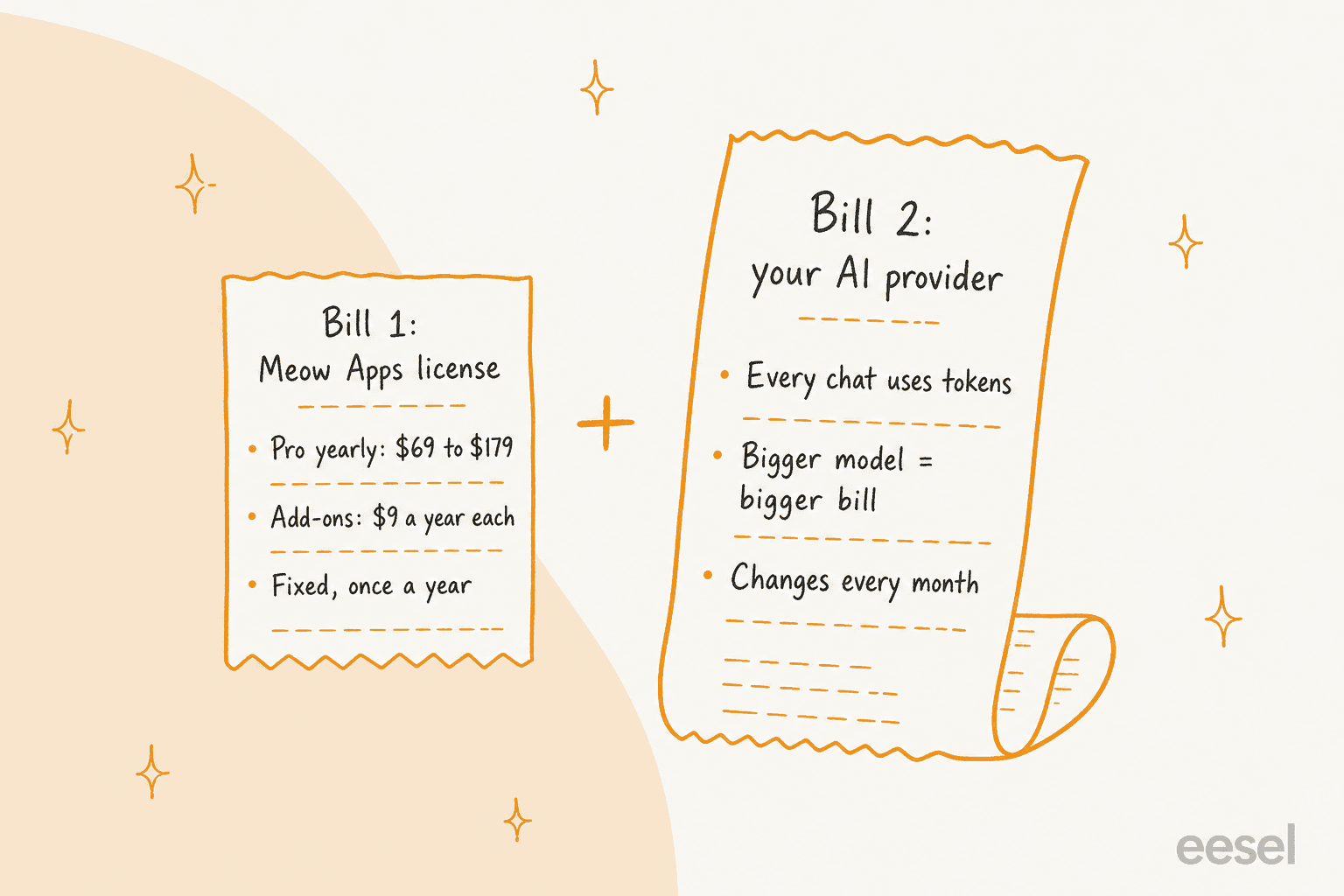
Here are the models you'd most likely pick for a support chatbot, at standard rates per million tokens, straight from each provider's pricing page:
| Model | Provider | Input / 1M tokens | Output / 1M tokens | Source |
|---|---|---|---|---|
| GPT-6 Luna | OpenAI | $0.10 | $0.50 | OpenAI pricing |
| Claude Haiku 5.5 | Anthropic | $0.10 (prompts up to 100K) | $0.50 | Claude pricing |
| Gemini 3.8 Flash | $0.75 | $3.75 | Gemini pricing | |
| GPT-6.1 Sol | OpenAI | $2.00 | $10.00 | OpenAI pricing |
| Claude Sonnet 5.5 | Anthropic | $2.00 | $10.00 | Claude pricing |
| Claude Fable 5.1 | Anthropic | $10.00 | $50.00 | Claude pricing |
| GPT-6 Astra | OpenAI | $10.00 | $50.00 | OpenAI pricing |
One date to put in your calendar: Google's page lists Gemini 3.8 Flash at $0.75 / $3.75 through December 31, 2026, doubling to $1.50 / $7.50 on January 1, 2027. If you pick it for the price, your bill doubles with no change on your side.
To turn per-token rates into per-chat costs, I used one assumption: a four-turn support chat sends about 12,000 input tokens (your instructions, the retrieved knowledge and the growing conversation, resent each turn) and gets about 1,000 output tokens back. Your numbers will differ, and the calculator below lets you change them. At that size, here's what 1,000 chats a month cost on the API alone:
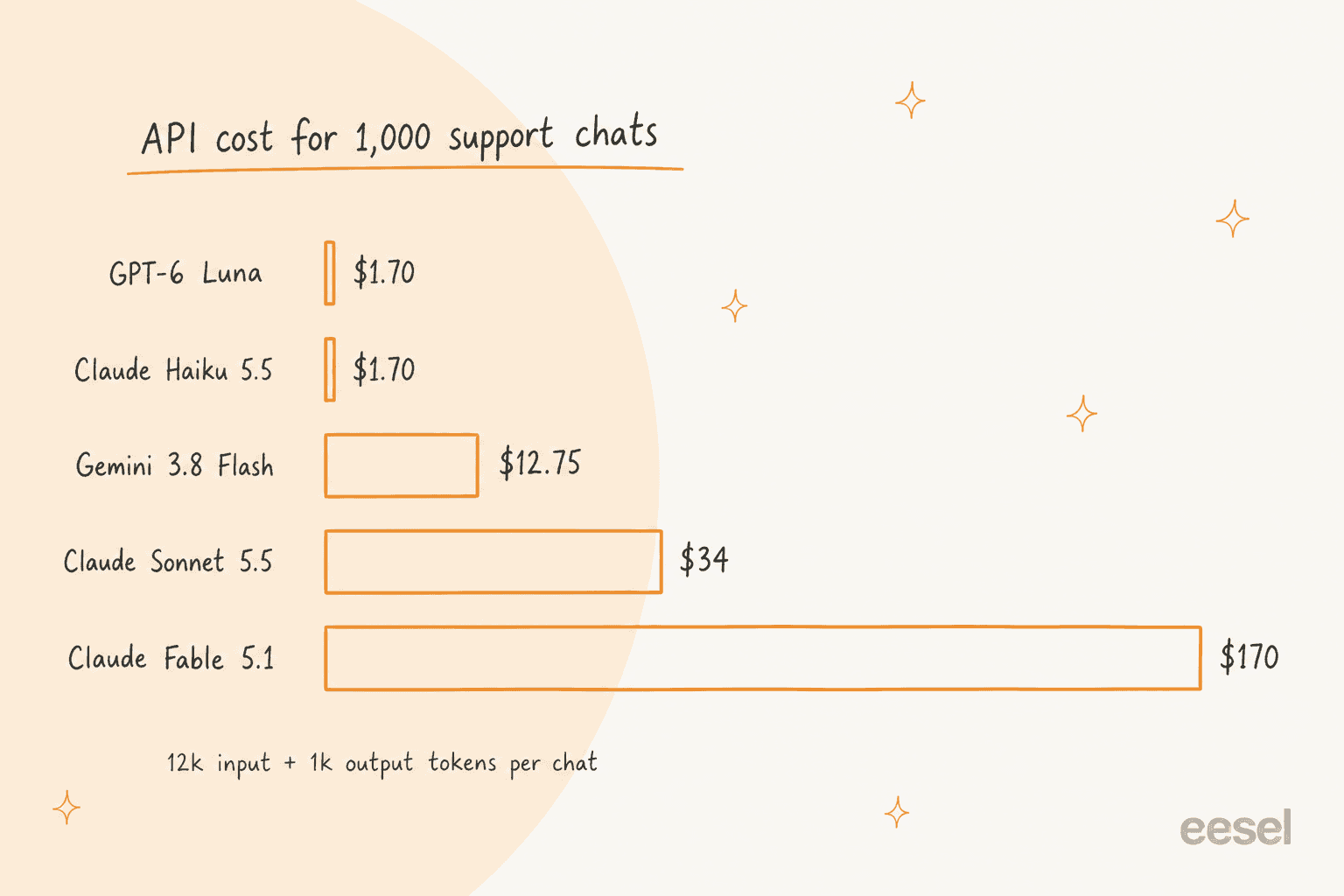
That's a 100x spread from the same plugin and the same license. For most store FAQs a small model is plenty, and you can test a bigger one on a few chatbots first. My API comparison of OpenAI, Anthropic and Gemini is a good next read if you're choosing.
AI Engine Pro helps you watch this. The dashboard shows queries, providers and average cost, and on Meow Apps' own demo site it reads $0.009 per query across 424 queries in a week.
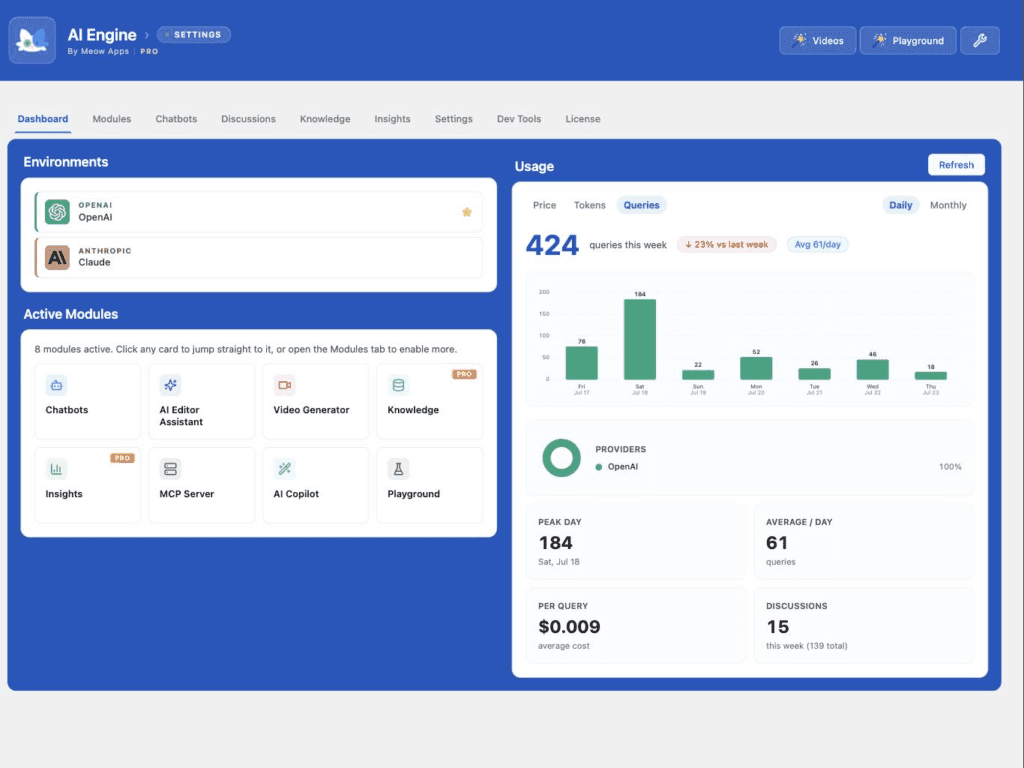
Treat those cost figures as a guide, not your invoice. When a user found the estimate off for some OpenRouter models, Meow Apps support replied in the same thread that the price values are "for information only". Your provider's dashboard is the source of truth. OpenAI's pricing FAQ lets you set a monthly budget, but it also warns that enforcement can lag and that you're responsible for any overage, so set an alert below your real limit.
What will you pay each month?
Plug in your own chat volume and model. The license and add-ons are spread over 12 months so you can see them next to the API bill. Add-on prices follow your license size ($9, $19 or $29 a year).
Two worked examples, both at my 12,000-in, 1,000-out chat size:
| Scenario | License | Add-ons | Model | Chats / month | API / month | Total / month |
|---|---|---|---|---|---|---|
| Small WooCommerce store | Starter $69/yr | 2 at $9/yr | GPT-6 Luna | 1,000 | $1.70 | about $9 |
| Busy store, smarter model | Starter $69/yr | 2 at $9/yr | Claude Sonnet 5.5 | 1,000 | $34 | about $41 |
| Agency, 20 client sites | Professional $179/yr | 3 at $29/yr | Claude Sonnet 5.5 | 5,000 | $170 | about $192 |
The license is the rounding error. The API and your time are the budget. For a sense of whether $0.04 a chat is good value, my cost per ticket benchmarks put it next to what a human reply costs.
What do users say about AI Engine's cost?
The plugin's WordPress.org listing shows a 4.9 rating from 871 reviews, and the complaints that do come up mostly land on the second bill or the Pro paywall, not the license price. New users are often surprised that the free plugin still needs paid credit with OpenAI or Anthropic before the chatbot answers anything.
To be fair to Meow Apps, that's a provider cost, and Jordy has pushed back on reviews that blame the plugin for it, comparing it in one reply to reviewing a car on the fuel price. He's right. The point for a buyer is simply to budget for the fuel. Over on Reddit, the sentiment from people who did is warm:
"Without fanboying too much, it's actually one of the best Wordpress-plugins I've come across ever - to the point where I dropped money for a five-site license after testing it for just a couple of hours."

Hidden costs to budget for
Beyond the license, add-ons and tokens, these are the costs I'd plan for before putting AI Engine on a support queue:
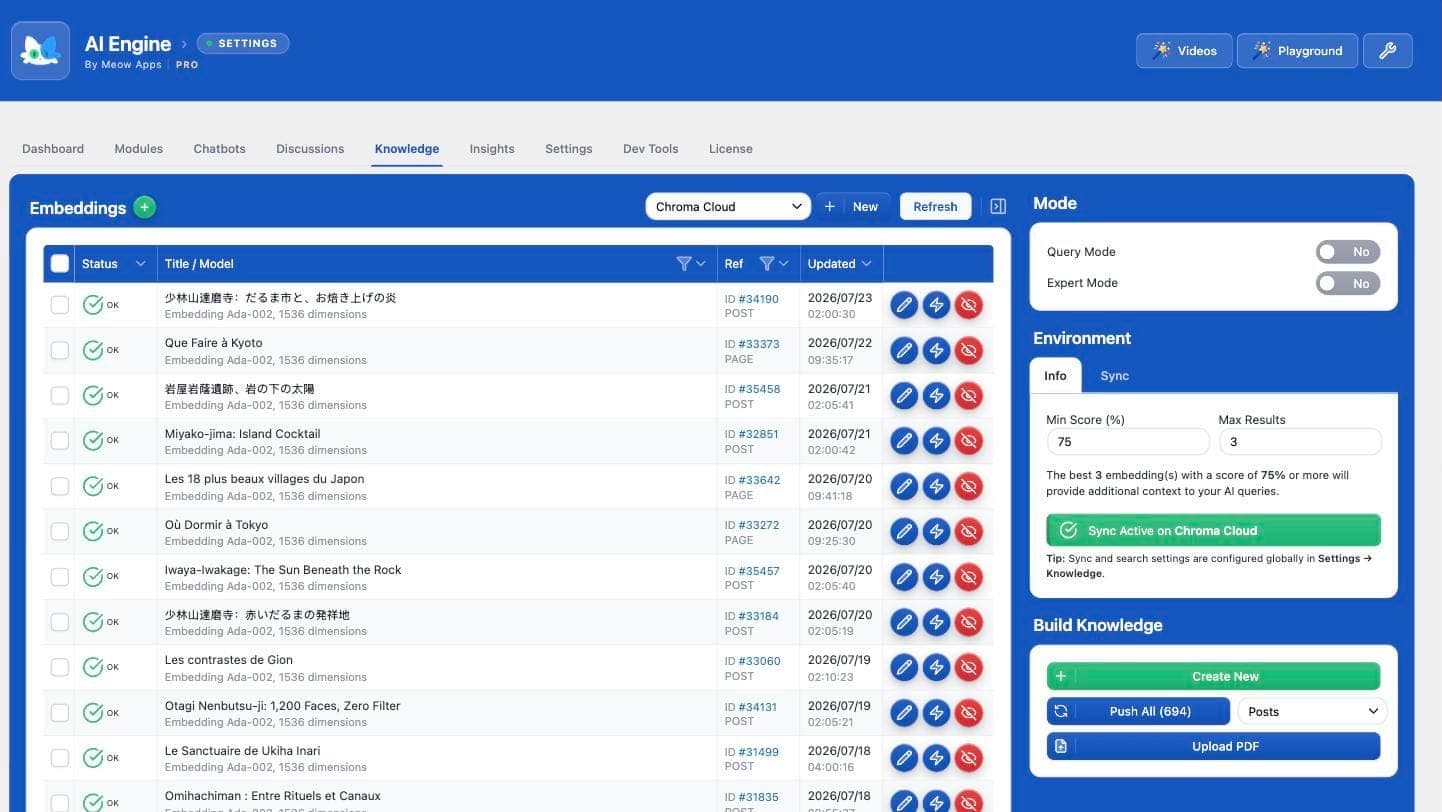
- A vector database. Embeddings need somewhere to live. AI Engine supports Pinecone, Qdrant, Chroma and the OpenAI Vector Store, per its Modules screen, and each is billed by that provider. One long-time user on WordPress.org notes the Pinecone connection takes some setup time up front.
- Embedding tokens. Pushing your posts and PDFs into the index uses an embedding model. Google's Gemini Embedding 2 is $0.20 per million text tokens, so this is small, but it repeats every time content changes.
- Your time. You write the instructions, pick thresholds, read the Discussions log and fix what the bot got wrong. That's the real cost of any DIY setup, and my build vs buy guide puts hours on it.
- Support after year one on lifetime. Lifetime licenses keep updating but stop including support after 12 months.
- The no-trial gap. You can test the free plugin, but Pro features like embeddings can only be tried by buying, with the 2-week refund as your safety net.
Is AI Engine worth it for customer support?
For a lot of WordPress sites, yes. If you're comfortable in wp-admin, want to pick your own model, and your chatbot mostly answers questions about your content, AI Engine at $69 a year plus a small model is close to the cheapest serious setup there is. Its MCP server and Workspace are a bonus if you also want AI to help run the site, and if blog writing is your main goal, my lists of WordPress AI plugins and AI WordPress writers cover that side.
Where it gets harder is when the chatbot becomes part of your support team. A support chat isn't done when the bot replies. Someone has to decide which questions it should never answer, catch the wrong answers, and pass the rest to a person with context. In AI Engine, that's you: the Notifications add-on emails you transcripts, and the Visitor Form add-on collects an email, but neither the Pro feature list nor the add-on catalog lists a handoff into a helpdesk like Zendesk or Gorgias.
That gap comes up on eesel's sales calls. Here's how one CX lead at a DTC supplements brand, handling about 7,000 tickets a month on Gorgias, put it to the eesel team:
"I need an AI who is only handling the tickets that it's confident to handle and all the other ones, leave them alone."
That's the right instinct. I've seen paying eesel customers' bots answer confidently from nothing when the knowledge base came up empty, which is why I now treat testing on past conversations as part of the setup, not an afterthought. My guides on preventing AI hallucinations and training AI on past tickets go through how. And if you're judging a bot by its numbers, know the difference between deflection and resolution rate before you trust either.
eesel for WordPress and WooCommerce support chat
If your AI Engine chatbot has turned into a support channel and you'd rather not run the model, the prompts and the escalations yourself, eesel works as an AI helpdesk teammate you hire for that job. Its chat bubble goes on a WordPress site through the theme's footer or custom-code setting, per the chat bubble docs, answers from your own pages and help center, and links the page it used.
Connect WooCommerce and it checks stock and looks up orders, the job I covered in my WISMO automation guide.
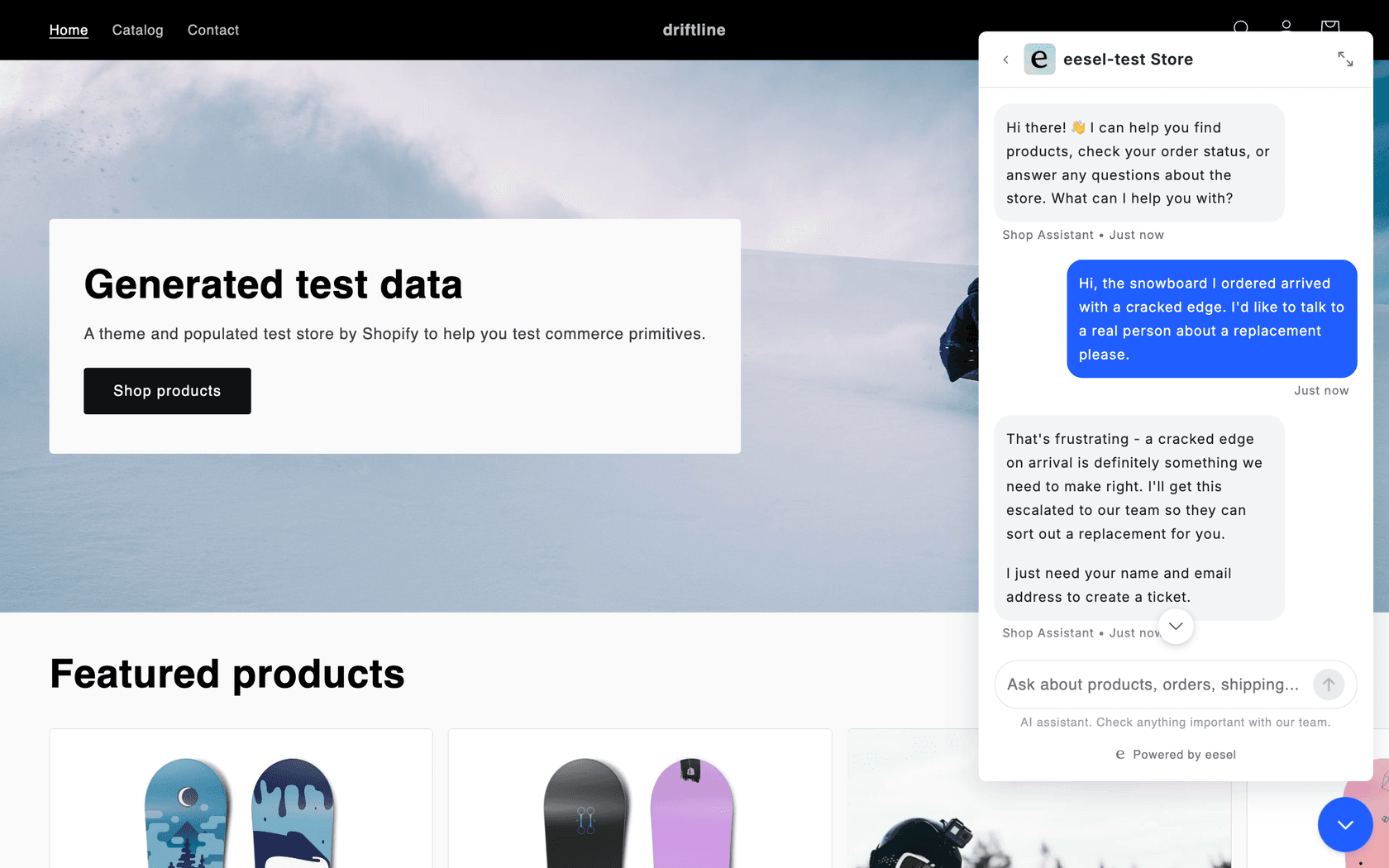
The handoff is the part AI Engine leaves to you. When a visitor asks for a person, eesel asks for a name and email, creates a ticket in your helpdesk with a conversation summary and a handover tag, and tells the visitor the ticket number. That's how BEAUTEK, a German supplier of studio equipment, runs it: the chat on beautek.de answered 77 website chats live in German in a month, from 6,700 pages and documents, and turned 20 of them into Zendesk tickets for the sales team. Nordbutiker runs one bot per brand across four countries, with each store's chat bubble answering from that store's own pages. If you work from a terminal, the eesel CLI drives the same agent, so you or a coding agent like Claude Code can check that the chat bubble is live with eesel status instead of clicking through the dashboard.
The pricing is one line instead of two. eesel pricing is a fixed monthly batch of credits where a chat is 1 credit however long it runs: 500 chats for $299 a month, 1,000 for $499, with model costs, every integration and unlimited seats included, and 100 free credits to try it with no card. That's more than AI Engine plus a small model, and it should be: you're paying for someone to run the chatbot, on top of the plumbing. The AI blog writer is a separate teammate if content was why you looked at AI Engine in the first place.
Try eesel on your WordPress site with the free credits and see it answer your real questions before you pay anything.
Frequently Asked Questions
How much does Meow AI Engine Pro cost?
AI Engine Pro costs $69 a year for 1 website, $99 a year for 5 and $179 a year for 20, per the AI Engine Pro page. Lifetime licenses run $499 (5 sites), $799 (20), $999 (500) and $1,699 (2,500). For how that compares with other chatbot tools, see my guide to chatbot cost.
Is AI Engine free to use?
The plugin is free on WordPress.org and includes chatbots, the content generator, the editor copilot and the MCP server. AI Engine pricing for Pro adds embeddings, function calling, AI Forms and usage limits. Either way you need your own API key, so the AI itself is never free. My roundup of the best AI WordPress plugins covers free options side by side.
Do I pay OpenAI or Claude separately with AI Engine?
Yes. AI Engine always uses your own API keys and adds no markup, so the provider bills you directly per token. A support chat on GPT-6 Luna costs a fraction of a cent, while the same chat on Claude Fable 5.1 costs about 17 cents. The OpenAI API pricing and Anthropic API pricing breakdowns go deeper.
Is the AI Engine lifetime license worth it?
Only if you'll run the plugin for more than five years. Standard Life is $499 against $99 a year for Standard, so you break even in year six, and lifetime support ends after the first year. Most teams are better off on yearly. If the chatbot is for support, it's also worth reading my take on build vs buy first.
How much does an AI Engine chatbot cost per month?
With a Starter license, two add-ons and 1,000 support chats a month on Claude Sonnet 5.5, I land at about $41 a month, of which $34 is the API bill. On GPT-6 Luna the same volume is under $9. The calculator in this post runs your numbers, and my cost per ticket benchmarks help you judge the result.
Does AI Engine Pro have a free trial or refunds?
There is no trial. Meow Apps says refunds are given when asked within 2 weeks of purchase. The free plugin is the practical way to test the chatbot before paying for Pro. If you want a tool you can test on your own past tickets first, see how I test AI agents before launch.
Is AI Engine or a managed AI chatbot cheaper for customer support?
On the invoice, AI Engine is cheaper: under $50 a month covers a small store. A managed tool like eesel starts at $299 a month for 500 chats, with model costs, helpdesk handoff and integrations included. The difference is who tunes, monitors and escalates. My AI customer service cost guide walks through the full math.