
GPT-6.1 Sol pricing at a glance
GPT-6.1 Sol launched at OpenAI's DevDay on 29 September 2026, and on the API pricing page it simply took GPT-6 Sol's row. I build integrations at eesel. Whenever a model ships, I'm the one who ends up rebuilding the same cost spreadsheet for some customer, so this time I just wrote the spreadsheet out as a post.
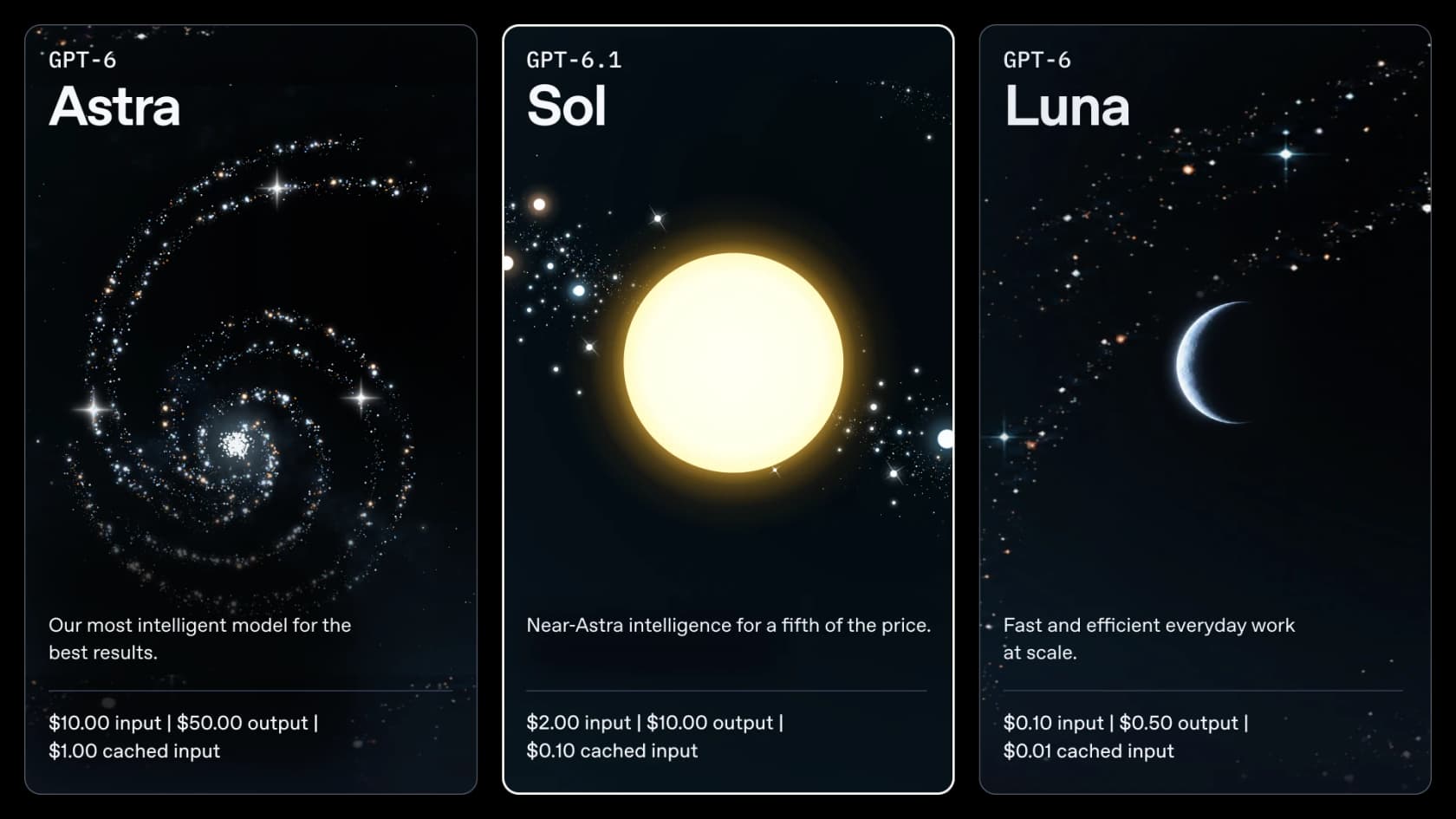
Below is the full standard-tier rate card, with both context bands:
| Standard tier (per 1M tokens) | Short context (up to 272K input) | Long context (over 272K input) |
|---|---|---|
| Input | $2.00 | $4.00 |
| Cached input | $0.10 | $0.20 |
| Cache writes | $2.50 | $5.00 |
| Output (includes reasoning) | $10.00 | $15.00 |
Source: OpenAI API pricing, re-checked on 1 October 2026. The model page spells out the ratios behind those numbers: cached input is 5% of the uncached rate, cache writes are 1.25x, and long prompts cost "2x input and cache rates and 1.5x output for the full request."
It's the middle model in the OpenAI model lineup, and a handful of spec details matter once you start budgeting. The model id is gpt-6.1-sol, with a 1,050,000-token context window and 128,000 max output tokens. The API has no free tier, so Tier 1 (500 requests and 500,000 tokens per minute) is the floor.
What changed from GPT-6 Sol pricing
On paper, not much at all. This is the whole diff:
| Line item | GPT-6 Sol | GPT-6.1 Sol |
|---|---|---|
| Input (per 1M) | $2.00 | $2.00 |
| Cached input | $0.20 | $0.10 |
| Output | $10.00 | $10.00 |
| Lowest reasoning effort | none | low |
| Output tokens per task (AA, max) | 31.1K | 38.1K |
| Cost per task (AA, max) | $1.05 | $0.72 |
Sources: OpenAI API pricing, Artificial Analysis. The GPT-6 Sol pricing post covers last week's full picture.
Two of these numbers pull against each other. GPT-6.1 Sol writes more output. Artificial Analysis measured "~10-30% more output tokens than GPT-6 Sol" across effort levels. Even so, it came out 31% cheaper per task at max effort, since it finishes the work in fewer failed runs, and its cached input costs half as much. Per-token parity isn't per-task parity. Here, at least, the per-task number moved in your favour.
The change that can actually push a bill up is the reasoning floor. GPT-6 Sol let you run with none effort, and that meant zero reasoning tokens. On 6.1 Sol, the model page says none and minimal "are not supported," so low is the cheapest setting. Say you had a high-volume classifier on none. It'll now bill some reasoning output on every single call, so I'd test that before swapping the model id.
The cached-input cut is the real price change
This is the part of GPT-6.1 Sol pricing that should have been the headline, and people on the launch-day thread spotted it right away:
"This is the actual big announcement. 50% cheaper cache than GPT-6 Sol will get you far more mileage on Codex."

The reason is simple. Agents resend the same material on every call, meaning the system prompt and tool definitions, plus a conversation history that keeps growing. That repeated prefix gets cached. For a long-running agent, most of the input then bills at the cached rate instead of the $2 sticker. So your real input price is a blend, and what sets the blend is mostly your cache hit share.
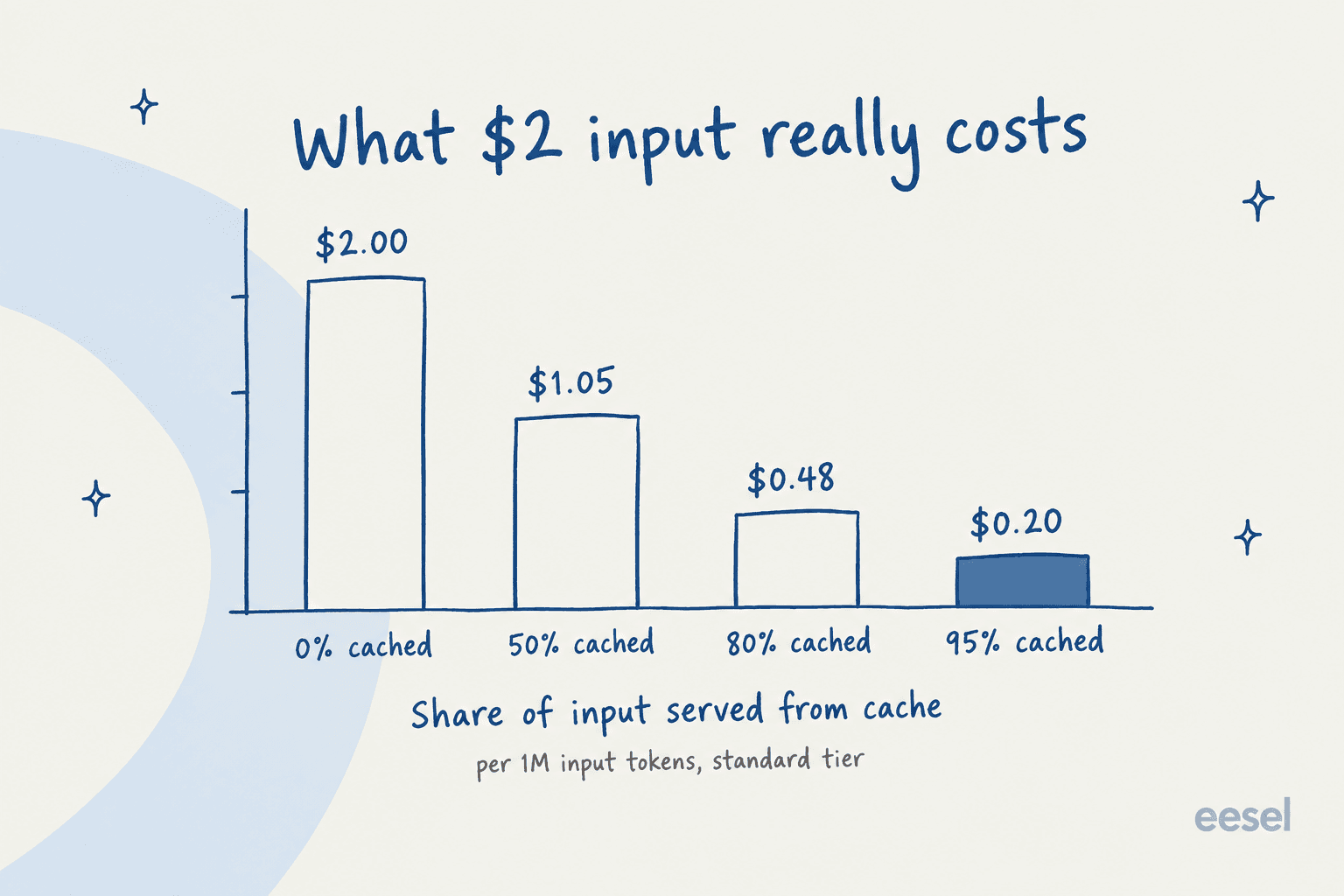
Run the same maths across the family and you can see how far the cache cut widened the gap to the flagship:
| Share of input cached | GPT-6.1 Sol | GPT-6 Sol | GPT-6 Astra |
|---|---|---|---|
| 0% | $2.00 | $2.00 | $10.00 |
| 50% | $1.05 | $1.10 | $5.50 |
| 80% | $0.48 | $0.56 | $2.80 |
| 95% | $0.20 | $0.29 | $1.45 |
Effective input price per 1M tokens, standard tier, computed from OpenAI's rate card. At an 80% cache hit share, GPT-6.1 Sol input costs about a sixth of Astra's, and the GPT-6 Astra pricing post has the flagship's full card. There are two caveats, though. Cache writes cost $2.50 per million, 1.25x the normal input rate, which means the first call that stores a prefix costs slightly more than an uncached one would. Caching also only helps while the prefix stays byte-identical. Put a timestamp at the top of your system prompt and the discount quietly drops to zero.
Service tiers: Batch, Flex, Fast, and the missing Ultrafast
It's one model with four prices, and the tier you pick moves the bill more than any prompt tweak will:
| Tier (per 1M, short context) | Input | Cached input | Cache writes | Output | Long-context input / output |
|---|---|---|---|---|---|
| Batch | $1.00 | $0.05 | $1.25 | $5.00 | $2.00 / $7.50 |
| Flex | $1.00 | $0.05 | $1.25 | $5.00 | $2.00 / $7.50 |
| Standard | $2.00 | $0.10 | $2.50 | $10.00 | $4.00 / $15.00 |
| Fast | $4.00 | $0.20 | $5.00 | $20.00 | $8.00 / $30.00 |
| Ultrafast | Coming soon |
Source: OpenAI API pricing. What each one means in practice:
- Batch and Flex both cost half of standard. Batch is for jobs you submit and collect later; Flex is for requests you're happy to let run slower. If a job doesn't need an answer within seconds, it belongs here.
- Fast doubles the price for lower latency. The pricing page notes that priority processing "was renamed Fast mode on July 30, 2026."
- Ultrafast isn't live for Sol. The DevDay recap says "GPT-6.1 Sol Ultrafast is coming soon." Today only GPT-6 Astra has an Ultrafast price, at $60/$300 per million.
- Data residency adds 10%. Regional processing endpoints carry a 10% uplift for models released after 5 March 2026, and the model page adds that Fast mode is unavailable with EU data residency.
Stacking is where the savings really add up. A batchable job with a big cached prefix runs at $1 input, $0.05 cached, and $5 output. Compared with Astra's standard rate, that's a 90% cut on output by itself.
The 272K cliff
The long-context rule is the easiest line on the rate card to miss. It's also the priciest one to trip over. When a prompt goes past 272K input tokens, the entire request bills at the long rate, not only the tokens beyond the line.
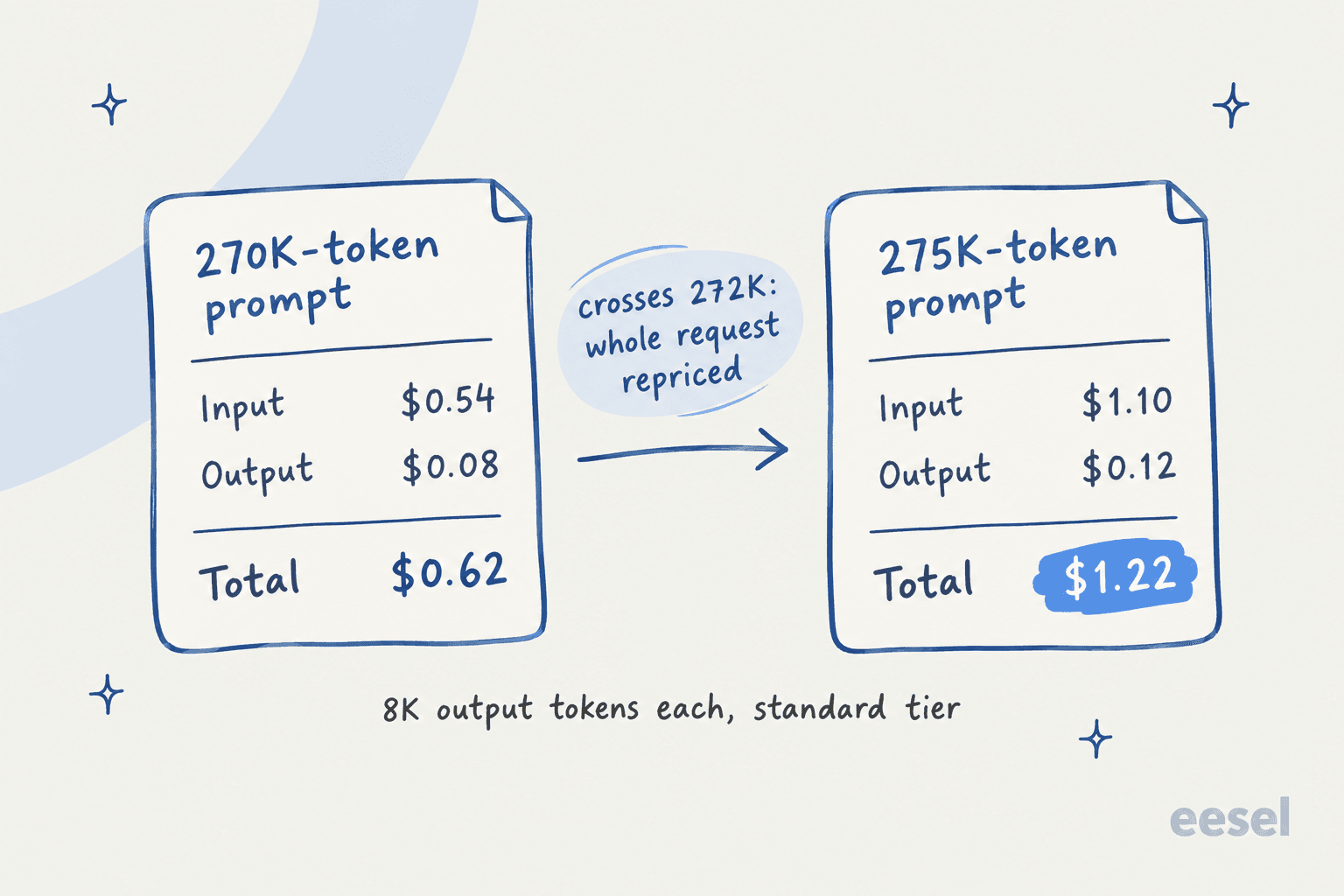
That picture is the whole trap: 5,000 extra input tokens nearly double the request, from $0.62 to $1.22. The 1,050,000-token window is real. It just has a price step about a quarter of the way in. Anyone running document analysis or repo-wide coding tasks should check where their prompts land. Splitting one 400K job into two 200K calls often beats sending it whole. Retrieval that only sends the relevant chunks beats both.
Cost per task: the number that actually matters
A token rate gives you the price of fuel. It won't tell you how much fuel the trip needs. With reasoning models that second number can swing by more than 5x depending on effort, which is why I budget from it.
Artificial Analysis ran its full Intelligence Index once per effort level:
| Effort | Intelligence Index | Cost per task | Output tokens per task | Time per task |
|---|---|---|---|---|
| low | 42.1 | $0.13 | 4.0K | 56s |
| medium | 47.8 | $0.21 | 8.1K | 131s |
| high | 50.2 | $0.32 | 13.2K | 205s |
| xhigh | 51.0 | $0.39 | 17.6K | 271s |
| max | 51.8 | $0.72 | 38.1K | 569s |
Source: Artificial Analysis. Near the top, the curve goes almost flat. Moving from xhigh to max nearly doubles the cost, and you get 0.8 points for it.
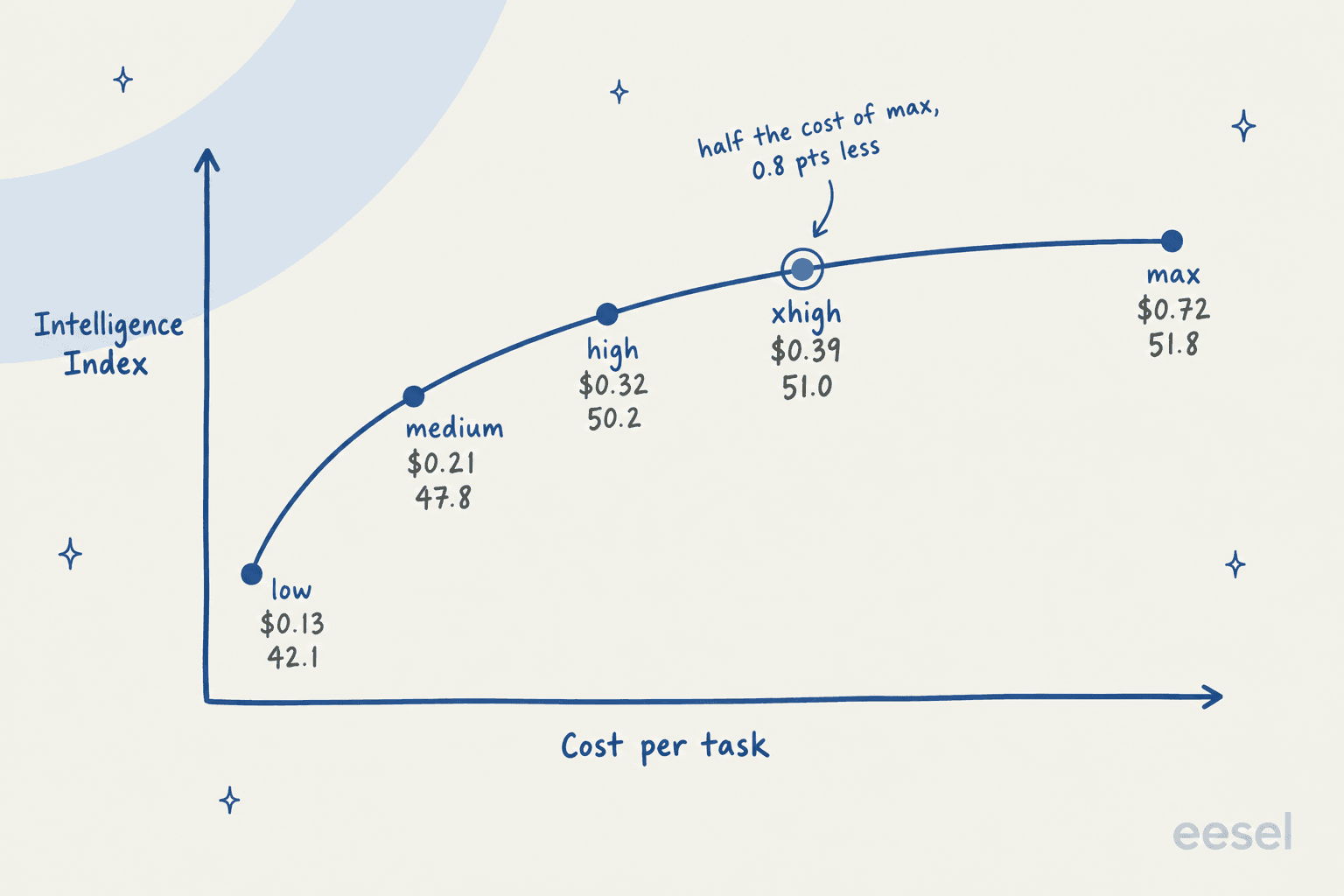
For coding, xhigh looks even better. Artificial Analysis reported that xhigh beat max by 3 points on its Coding Agent Index, landing 1 point above GPT-6 Astra "for less than 15% of the Cost per Task." My starting default is medium for everyday work and xhigh for coding agents. I'd only reach for max when a test shows it's worth the extra cost.
Looking per task also reshuffles how the cheap-looking models compare. One developer on the launch thread made that point using Artificial Analysis numbers:
"Chinese models are cheap and fast by token, but they generate oceans of thinking tokens in order to accomplish the same result GPT-6.1-Sol accomplishes in, comparatively, two drops of thinking tokens, making the Chinese models come out costlier and slower per actual task performed end-to-end."
I checked the figures in that comment against Artificial Analysis, and they hold up: 6.1 Sol at medium runs $0.21 per task with 8.1K output tokens, while the commenter cites DeepSeek V4.1 Flash at max as $0.27 with 89K tokens generated.
The line items that aren't on the rate card
Some costs live outside the per-token table, and every one of them turns up on real invoices:
- Reasoning tokens are output. Every reasoning token bills at the $10 output rate. At
max, Artificial Analysis measured 38.1K output tokens per task, and most of it is thinking rather than the answer. - Built-in tools have their own prices. On the pricing page, web search is $10 per 1,000 calls plus search content tokens at model rates, file search tool calls are $2.50 per 1,000, and hosted shell or code interpreter containers run from $0.03 per 20-minute session (1 GB) up to $1.92 (64 GB).
- Tool calling needs the Responses API. The model page says Chat Completions works "without tool calling." That's not a line on the invoice, but moving older agent code over still costs engineering time.
- Cloud marketplaces bill separately. If you run OpenAI models through Amazon Bedrock or Microsoft Azure, those services set and bill the rate, per OpenAI's pricing page.
Estimate your GPT-6.1 Sol bill
Plug in your own traffic shape here, from requests per month and tokens per request to your cache hit share and tier. If a request crosses 272K, the estimator switches to the long-context rate on its own. It also shows what the same traffic would cost on GPT-6 Astra and GPT-6 Luna.
Out of the box, the defaults model a coding agent with a big cached prefix. Drag the cache slider down to zero and the input line jumps. Next, set output tokens to 20,000 and you'll see what a max effort habit costs. Most of the time, output is where the money goes. For image, audio, and older models, the OpenAI API pricing guide has the rest of the catalog.
Worked examples at three sizes
Sticker rates make more sense once a real traffic shape is attached. These are three I run into a lot, all worked out from the rate card. The token counts are my assumptions for illustration, not measurements, so put your own numbers into the estimator above.
| Workload | Traffic shape | GPT-6.1 Sol | Comparison |
|---|---|---|---|
| Coding agent loop | 30,000 calls/mo, 60K input (50K cached), 3K output, standard | $1,650/mo | Astra: $9,000. GPT-6 Sol: $1,800 |
| Nightly document extraction | 20,000 docs/mo, 40K input (none cached), 2K output, Batch | $1,000/mo | Same job on standard: $2,000 |
| Support ticket triage | 100,000 tickets/mo, 2.5K input (2K cached), 600 output, standard | $720/mo | Luna: $37. Astra: $3,700 |
A few things jump out of this table:
- The coding agent is mostly an output bill. Of the $1,650, $900 is output and only $150 is the 1.5 billion cached input tokens. Against GPT-6 Sol, the cache cut saved $150 a month. The rest comes down to the effort setting.
- Batch is the cheapest line you'll ever change. Switch one parameter and the extraction job costs half, with no change in quality.
- Triage is a Luna job. For short, low-stakes labels at volume, GPT-6 Luna does the same shape for about 5% of the price. I'd keep Sol for the replies that have to be right. The GPT-6 Luna pricing post has its full rate card.
GPT-6.1 Sol pricing in ChatGPT and Codex
Using GPT-6.1 Sol through a subscription instead of the API works differently: you pay a flat monthly price and draw down an allowance. OpenAI says it's available "to all Plus, Pro, Business, Enterprise, and Edu users in ChatGPT Work and Codex," and "not yet available in Chat."
| Plan | Monthly price | GPT-6.1 Sol | Notes |
|---|---|---|---|
| Free | $0 | No | GPT-5.6 Luna for everyday chat |
| Go | $8 | No | May include ads |
| Plus | $20 | Yes | Expanded Codex usage |
| Pro 100 | $100 | Expanded | No Ultrafast |
| Pro 200 | $200 | Expanded | More usage than Pro 100 |
| Pro 500 | $500 | Expanded | Highest allowance, includes Ultrafast |
| Business / Enterprise / Edu | Per seat | Yes | In ChatGPT Work and Codex |
Sources: ChatGPT pricing, About ChatGPT Pro tiers, and the launch post. The ChatGPT pricing guide covers every plan, ChatGPT Work pricing goes deeper on Work, and ChatGPT Enterprise covers seat deals.
Subscriptions come with a catch that the API doesn't have. OpenAI's Pro help page says new Pro 200 subscriptions "include a lower usage allowance than previously offered," with existing subscribers keeping the old allowance only through 29 October 2026. The DevDay recap puts Pro 500 at "25 times the ChatGPT Plus allowance." Once you hit the limit, the same help page says eligible Codex and ChatGPT Work usage can draw on purchased credits.
Some early users worked out what that means for Codex:
"They have also cut allowances for subscriptions in half. So even in the best case scenario it's about 2.5 times cheaper for Codex users."
That's one user's estimate, not an OpenAI figure. Still, it's a fair warning. A model that's 5x cheaper than Astra on the API doesn't turn into 5x more work inside a plan. If you live in Codex, I'd watch your own usage meter for a week before counting on the savings.
How GPT-6.1 Sol pricing compares
On sticker price, GPT-6.1 Sol matches Claude Sonnet 5.5 exactly and sits well below everything above it:
| Model | Input / Output (per 1M) | Cache hit | Cost per task (AA) | Intelligence Index (AA) |
|---|---|---|---|---|
| GPT-6 Luna | $0.10 / $0.50 | $0.01 | n/a | n/a |
| GPT-6.1 Sol (medium) | $2 / $10 | $0.10 | $0.21 | 47.8 |
| GPT-6.1 Sol (max) | $2 / $10 | $0.10 | $0.72 | 51.8 |
| Claude Sonnet 5.5 (high) | $2 / $10 | $0.20 | $1.08 | 47 |
| Claude Opus 5.5 (medium) | $4 / $20 | $0.20 | $1.34 | 51 |
| GPT-6 Astra (max) | $10 / $50 | $1.00 | $3.26 | 52.7 |
| Claude Opus 5.5 (max) | $4 / $20 | $0.20 | $5.98 | 58 |
Sources: OpenAI pricing, Anthropic pricing, and Artificial Analysis for cost per task and scores.
My read comes in two parts. At a matched score, GPT-6.1 Sol is far cheaper per task: 47.8 for $0.21 against Sonnet 5.5's 47 for $1.08, and 51.8 at max for about half what Opus 5.5 charges at medium for 51. Artificial Analysis put it plainly: "for a given level of intelligence, there is no cheaper model."
What it doesn't do is reach the top. Opus 5.5 and Sonnet 5.5 at max score higher, and in one hands-on comparison on the launch thread, a developer found Opus 5.5 "executes a bit better" on final polish. That makes the choice about the score you need, not the sticker. If 48 to 52 on this index covers your job, GPT-6.1 Sol is the cheapest way to get there. Need the top of the chart? You'll pay for it somewhere else. The OpenAI vs Anthropic API comparison digs further into that trade-off.
What GPT-6.1 Sol pricing means for a support team
This part runs against intuition. In a support queue, a cheaper model is the smallest line in the project, while the token bill is the hardest one to predict.
Think about what drives the numbers above: prompt length, cache hit share, reasoning effort, retries, tool calls, and whether a prompt crossed 272K. Not one of those maps to "tickets handled." A support lead can't hand finance a budget that says "somewhere between $400 and $2,000 depending on how chatty the model is." It comes up in real eesel evaluations. One buyer on Freshdesk hit 200 interactions in a single test day and right away started projecting the cost at 9,000 a month. What worried them wasn't the rate. It was not knowing the total.
Then there's the pull to build it yourself, which gets stronger each time a model gets cheaper. A churned mid-market customer, who left for a cheaper tool after a broken integration, put it this way in a reply to eesel's founder:
"We switched to a system [...] that is working well at half the cost. But long term we will just build our own, which is so possible now with AI."
It's a fair plan, and GPT-6.1 Sol at $2/$10 does make the model part cheap. The model was never the expensive part, though. The work is the layer around it: training on your past tickets, connecting the helpdesk you already run, safe actions, and testing answers against real history before go-live. If hallucinations are the worry, the fix sits in that layer as well, not in the rate card. That's also why the best AI agents for support are model-flexible: when a cheaper model ships, you inherit it instead of rebuilding. The AI agent cost breakdown shows where that money actually goes.
Try eesel
If the thing you really want from GPT-6.1 Sol is fewer tickets in the queue, you don't need to price tokens at all. eesel is an AI teammate platform, and the AI helpdesk teammate is the one for this job. GPT-6.1 Sol is infrastructure; eesel is the employee. It learns from your past tickets and help center, plugs into Zendesk, Freshdesk, Gorgias and the other helpdesks you already use, and runs a simulation on your real past tickets so you can compare its answers with what your team actually sent.

Billing works the opposite way to a token meter. eesel pricing is a fixed monthly credit plan, starting at $299 for 500 credits, where one ticket or chat handled is one credit. Every feature and unlimited seats are included, and a free plan gives you 100 credits with no card. Whatever model runs underneath, your support automation bill stays the same number every month.
Since this is a developer pricing post, there's one more thing I'd point out. The eesel CLI operates the same teammate and workspace the dashboard does, from a terminal. You can connect a helpdesk with eesel integrations connect, read back every run with eesel activity, and gate risky actions behind eesel approvals. Every command prints JSON, and --dry-run shows the exact call a write would make before it sends. Every workspace is also an MCP server, so a Codex session running GPT-6.1 Sol can drive your support teammate as a tool, the same pattern as any MCP for support setup. You get the scripting control you'd want from a build-it-yourself agent, with the ticket-level billing you can actually put in a budget.
Frequently Asked Questions
How much does GPT-6.1 Sol cost on the API?
Is GPT-6.1 Sol more expensive than GPT-6 Sol?
What is the GPT-6.1 Sol long-context price?
Is GPT-6.1 Sol free in ChatGPT?
How much does GPT-6.1 Sol cost in Codex?
What does GPT-6.1 Sol cost per task?
Is GPT-6.1 Sol cheaper than Claude Sonnet 5.5?
What does GPT-6.1 Sol pricing mean for a support team?


Article by
Rama Adi
Rama is a software engineer at eesel AI with two years of experience writing about B2B SaaS, AI tools, and customer support technology. Based in Bali, Indonesia, he brings a developer's perspective to product comparisons — cutting through marketing copy to what the integrations and APIs actually do.