

Why I'm reviewing Voiceflow this way
I build features and AI agents at eesel, and our team has spent years putting AI on live support queues across thousands of real tickets. The pattern I see most is simple. The tool that demos best is not always the one a busy team can keep running six months later. One of our customers, an engineering lead at a crypto-hardware company, put the build-it-yourself trade-off better than I can:
"We could try to write our own LLM application but we didn't want to invest our time into that. We wanted something that we would not have to maintain."
Voiceflow sits right on that line. It is far easier than writing your own LLM app, but it is still something you build and maintain. So this review reads Voiceflow's docs, changelog and billing tables for how the runtime actually works and bills, and pairs that with what real users say on G2, Trustpilot and Reddit. If you want the raw plan numbers only, the Voiceflow pricing breakdown goes deeper.
What is Voiceflow?
Voiceflow calls itself an AI agent platform for customer experience. You design an agent on a visual canvas, connect it to your knowledge and tools, and deploy it across web chat, voice and the API. Its own loop is "Build. Launch. Iterate."
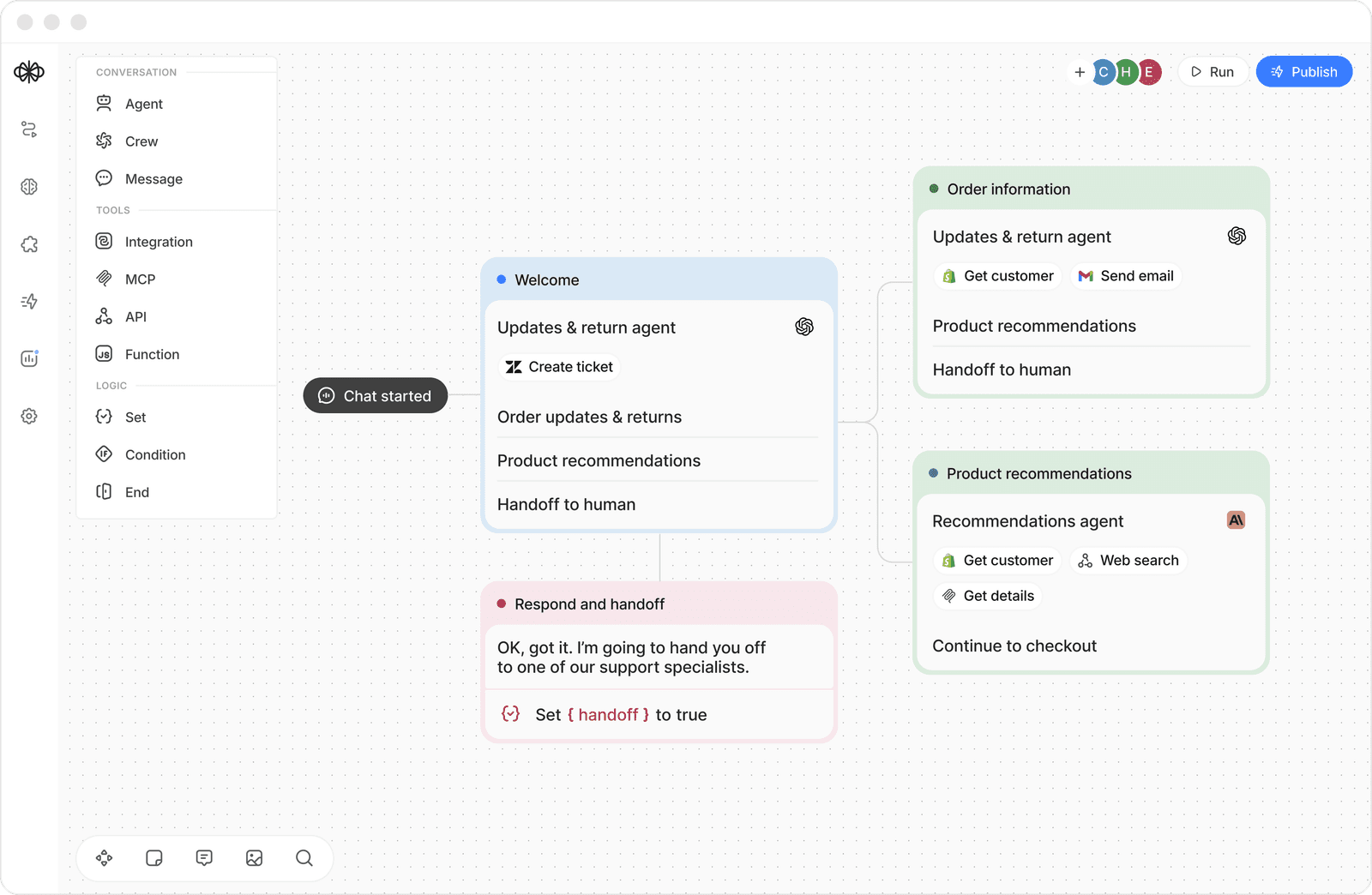
The 2026 product is built on the V4 framework, which went live for every user on March 25, 2026. V4 made the agent the router: you write Playbooks for open-ended, goal-driven conversations and Workflows for deterministic steps like a refund check, and a layered context engine sits underneath. That mix is the most interesting design choice in the product, and it's why Voiceflow competes with enterprise platforms like Kore.ai and Cognigy rather than with simple FAQ bots.
Voiceflow's case studies show where it lands well. Trilogy automated about 60% of support across 90 products in 12 weeks, and Turo built a multilingual chatbot in about two months at 82% user satisfaction. Note the timelines: weeks to months, with a team behind them.
How does Voiceflow work under the hood?
This is the part most reviews skip, and it's where you learn whether the tool fits your team. Voiceflow has five layers you'll touch.
The agent and its global instructions
Every agent starts with a global role and goal, written like a system prompt, plus context variables (for example whether the user is logged in) and a tools panel. You toggle the knowledge base and UI elements like buttons, cards and forms per agent.
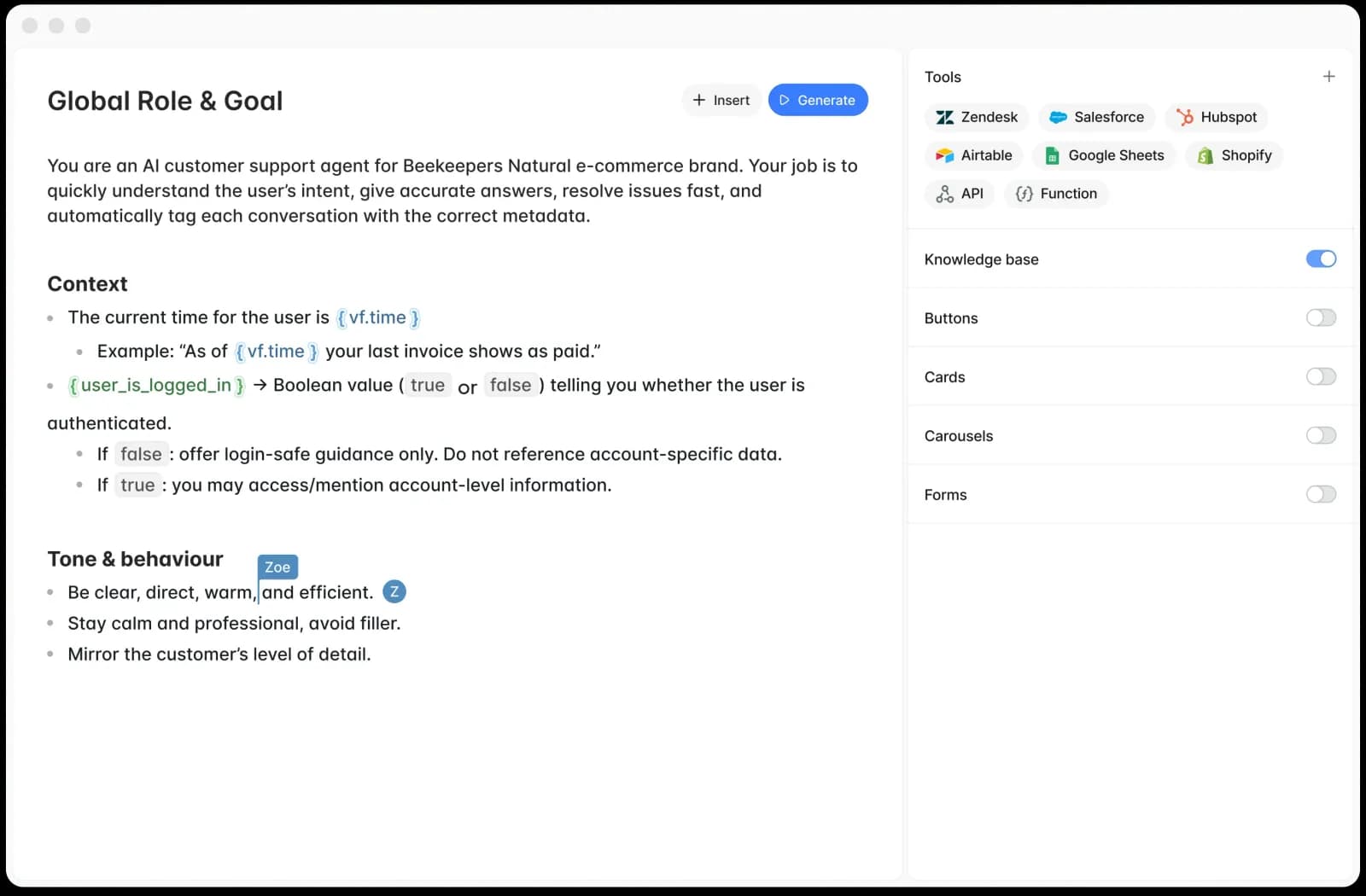
A detail I liked as an engineer: since September 10, 2026, agent instructions can be patched line by line through the API, so you can change one line in a 20,000-line prompt without resending it. That tells you who Voiceflow is building for. Teams with long, versioned prompts and a deploy pipeline, not someone editing a FAQ on a Friday afternoon.
Knowledge base
You add sources by URL, sitemap, file upload (PDF, TXT, DOCX), plain text, or from Zendesk, Salesforce and Shopify, and there's a Knowledge API for programmatic syncs. Each source can carry metadata and a refresh schedule.
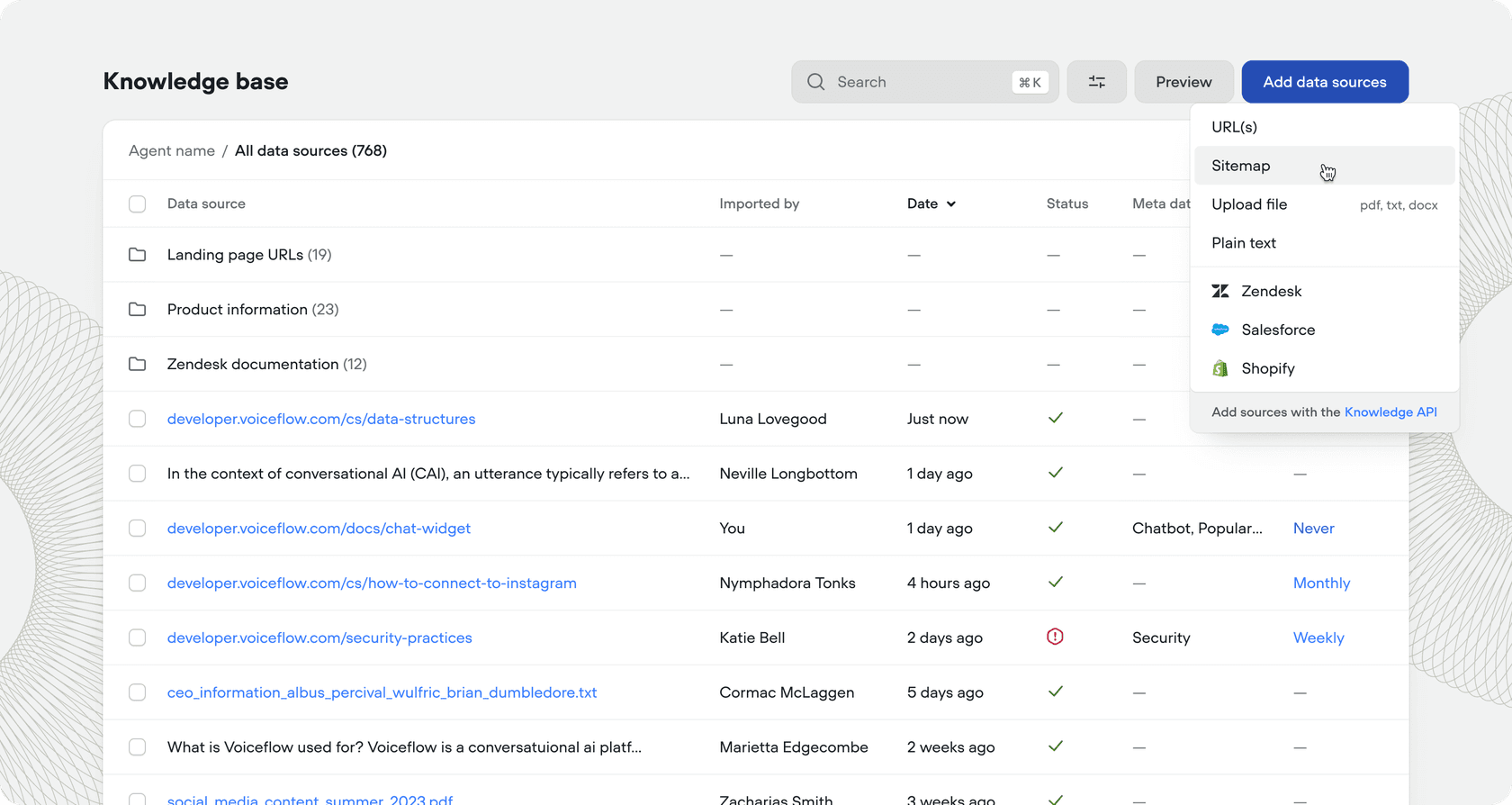
What it does not learn from is your ticket history. The knowledge base is what you put in it, so the usual knowledge base training work still applies: if your help center is written for admins and your tickets come from end users, the agent inherits that gap.
Tools and integrations
The integrations page lists eight native integrations: Zendesk, Salesforce, HubSpot, Shopify, Airtable, Google Sheets, Gmail and Twilio. Beyond those, agents can call any REST API, run custom JavaScript functions, and use MCP tools. The Zendesk tool covers the actions you'd expect.
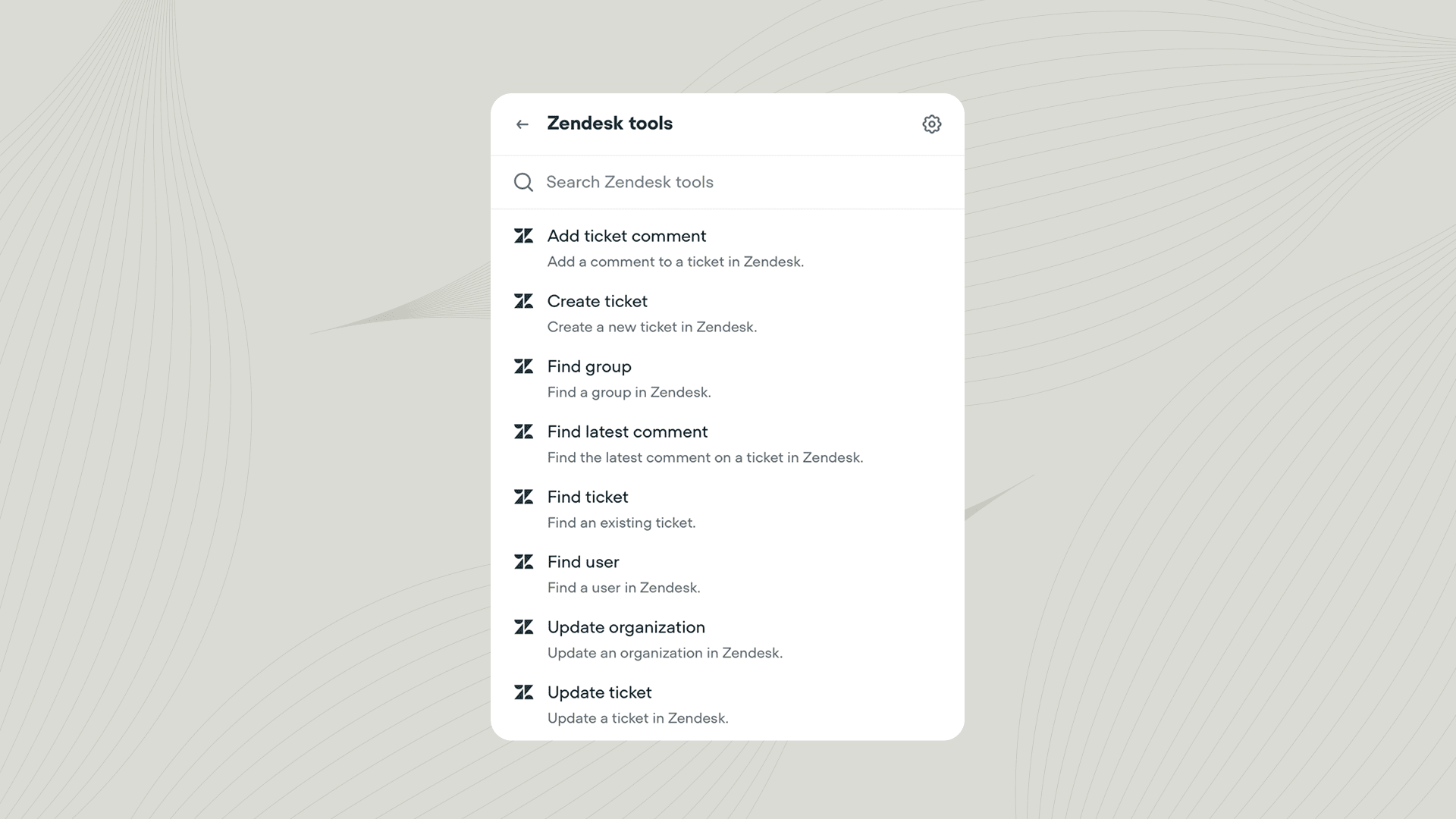
Read those carefully if you run Zendesk AI today. These are actions an agent takes from inside a Voiceflow conversation. Nothing in the docs puts Voiceflow inside your email ticket queue, drafting replies to the tickets that land there. If that's your main volume, you'd want a tool built for the Zendesk integration side of the job instead.
Channels and handoff
Web chat, voice (inbound and outbound calls), SMS and the API all run from the same agent. Live agent handoff opened to all plans on September 24, 2026, with native providers Ujet, Genesys, Kustomer, Dixa and Sunshine Conversations for Zendesk, plus custom providers. If you're designing these transfers, the AI handoff best practices guide is a good companion.
Evaluations and Atlas
Voiceflow's observability suite covers transcripts, LLM-scored evaluations and analytics. You can define an evaluation like resolution rate and track its pass percentage over time, alongside cost per conversation.
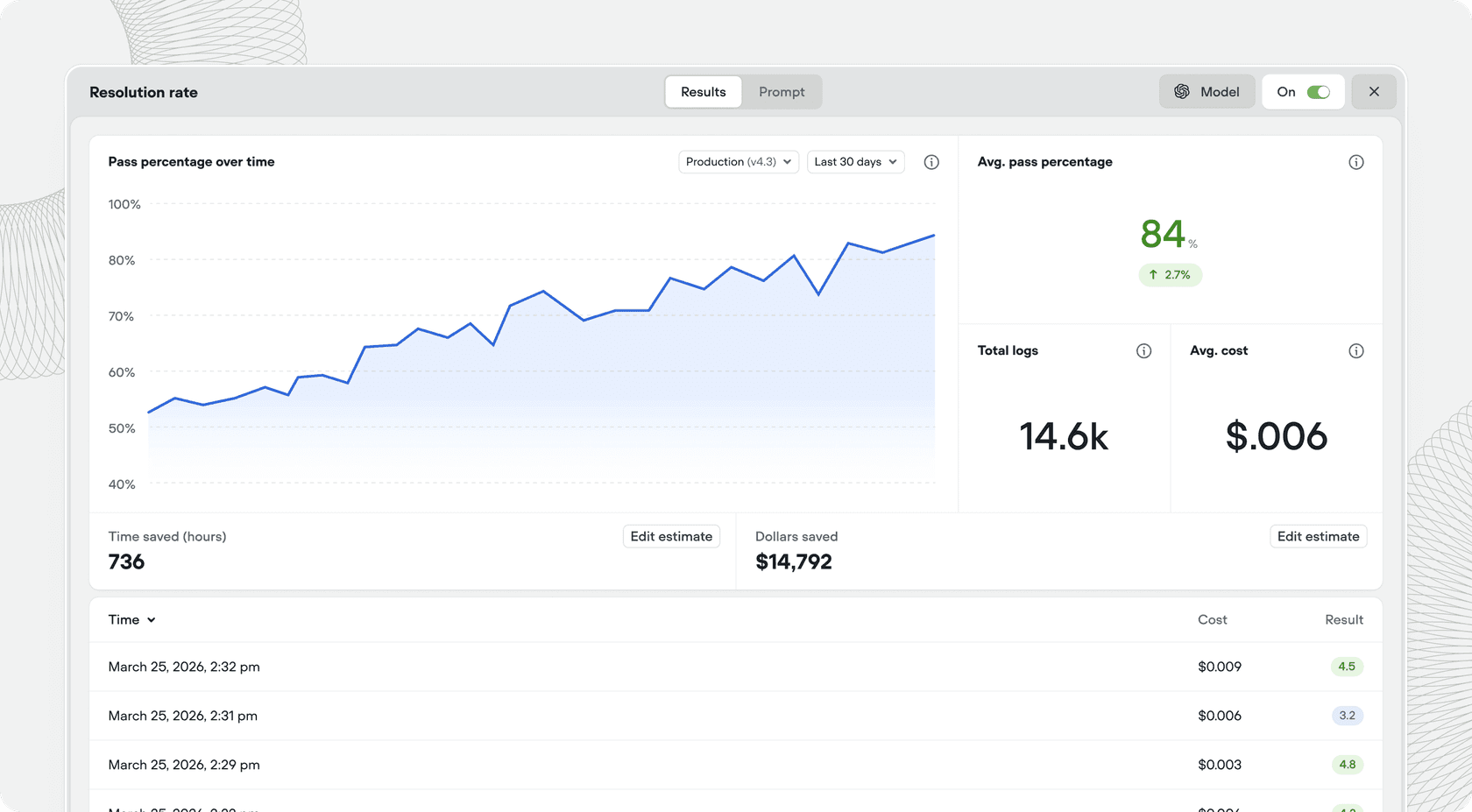
Since September 2, 2026, resolution and conversion rates count published traffic only by default, so test chats no longer inflate them. That's a thoughtful fix. Remember, though, that a "resolution" here is whatever your evaluation prompt says it is, which is why vendor resolution rates rarely compare cleanly.
The newest layer is Atlas, an in-app copilot that launched in beta on August 26, 2026. You ask it to change the agent, write tests, or review conversations in bulk, and it does the edit.
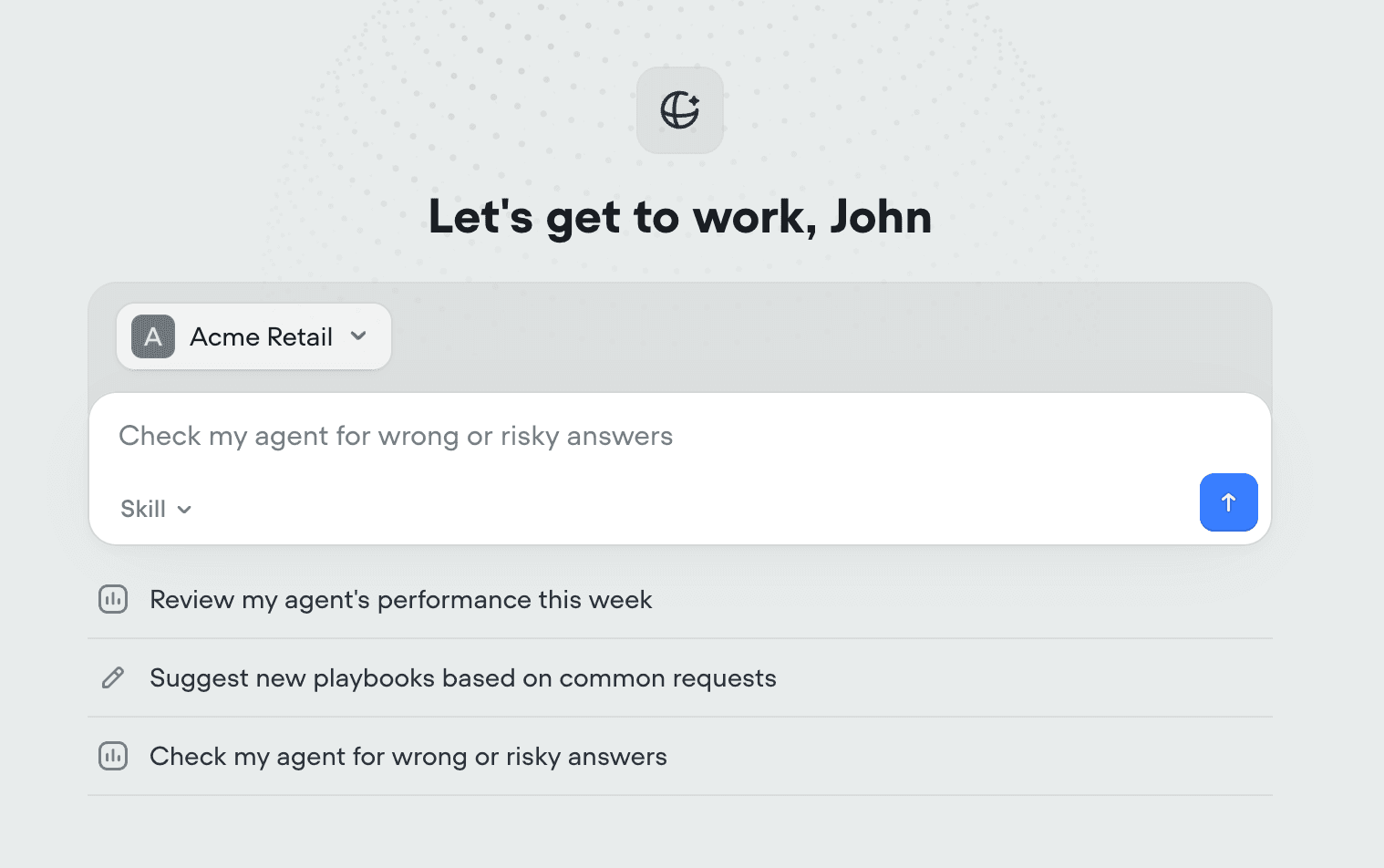
Atlas is Voiceflow admitting that the canvas has a learning curve, and it's a good answer to it. It's still beta and only on agentic projects, so I'd treat it as a helper for a builder rather than a replacement for one.
How much does Voiceflow cost?
Voiceflow's pricing page shows no numbers today. It splits into an agency track (free trial, usage-based billing) and a business track ("Book a demo / Request pricing"). The billing docs confirm the plan names and structure: a monthly plan fee, add-ons like editor seats and phone numbers, and credit-based usage, billed at the organization level.
The last published dollar prices come from Voiceflow's credits announcement (April 2025), and G2's listing still shows Pro at $60 and Business at $150. Treat them as list prices to confirm in the app.
| Plan | Monthly price | Credits per month | Who it's for (Voiceflow's words) | Notable limits |
|---|---|---|---|---|
| Free | $0 | One-time grant, does not renew | Trying out Voiceflow | "Isn't suitable for production usage" |
| Pro | $60 / $90 / $120 | 10,000 / 15,000 / 20,000 | Individual builders | All LLM models; two editor seats per a G2 reviewer |
| Business | $150 / $250 / $500 | 30,000 / 50,000 / 100,000 | Growing teams | Adds LLM fallback models, priority support |
| Enterprise | Custom | Custom allotments | Large-scale or regulated | Unlimited usage, SSO, private cloud hosting |
| Add-ons | $50 per extra editor seat | Auto top-ups when you hit zero | All paid plans | Viewers free; credits don't roll over monthly |
Annual billing is 10% off. Credits are where it gets interesting. Per the credits pricing table, one credit is $0.005, and:
- Each chat message (or Conversations API request) costs 1 credit.
- Each phone minute costs 10 credits (
$0.05), before speech-to-text and text-to-speech. - Model tokens are billed on top, at each model's rate in credits.
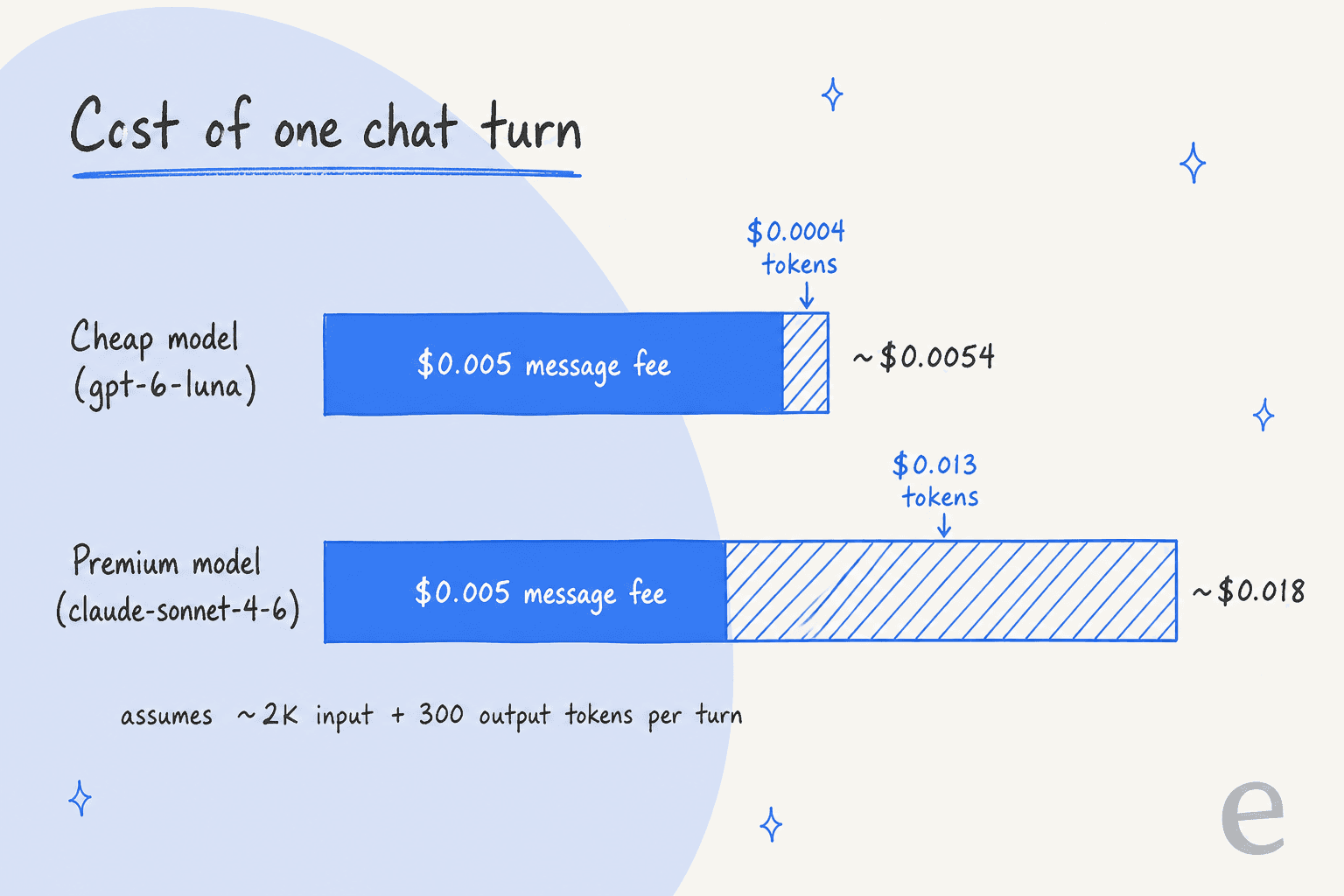
That chart is the thing I'd want a buyer to see. On a cheap model, the message fee is over 90% of what a chat turn costs, so switching models barely moves your bill. On a premium model, tokens dominate and the model choice matters a lot. A five-message conversation lands somewhere around $0.03 to $0.09 before voice. Voiceflow has added real guardrails here: a cost limit per conversation and a max call duration, both since July 30, 2026.
Want to check your own volume? Plug your numbers in below.
For a wider view of how per-message, per-resolution and per-ticket billing stack up across vendors, the AI customer service cost guide and the cost per resolution maths are worth a read.
What do Voiceflow users like?
The praise is consistent and specific. G2 tags "Ease of Use" in 89 reviews, and its Botpress comparison scores Voiceflow 8.8 on ease of use and 8.8 on ease of setup, ahead of Botpress on both. The visual builder is the reason.
"The visual flow builder is straightforward to understand, and it helps me prototype quickly and iterate on changes without much friction."

Non-developers can reach surprisingly far, too:
"I have no code experience and was still able to utilize webhooks and api calls without issue."
And it holds onto the customers who invest in it:
"Easy to use and powerful. We've been using it for five years now, and we have no plans to switch."
The other strengths I'd add from the docs:
- Model freedom. Pick per agent from OpenAI, Anthropic, Google, Meta, xAI and Voiceflow's own Core models, with LLM fallback models on Business. A G2 reviewer uses that to "choose more complex AI models for complex answers and simple ones for simple answers to save token costs."
- Voice that's taken seriously. Phone agents, call forwarding, a choice of speech providers, and a max call duration. It belongs on any shortlist of AI voice agents for support.
- Security paperwork in place. The security page lists SOC 2 Type II, ISO 27001, GDPR and HIPAA, and says customer data isn't used to train models.
- A fast release cadence. The changelog shipped Atlas, Core 4.2, handoff on all plans and a tool execution API in roughly five weeks.
What do Voiceflow users dislike?
The complaints cluster around four things, and they're fair. G2's own cons tags lead with "Missing Features" (25) and "Usage Limitations" (24).
1. Price and seats for small teams. The entry plan is aimed at one builder, and it shows:
"I would like if Voiceflow would add more seats for the pricing. Currently, they're only issuing two seats for the lowest price of $60."
2. Token usage. This one has a history. A 2024 Reddit thread opened with a builder seeing 2,700 tokens for a simple conversation, and a Voiceflow employee replied with a fix (a knowledge base step that retrieves chunks without spending tokens) and a line on the business model:
"we make our revenue on the subscription to the platform, not on tokens."

That chunk retrieval helps. But a September 2026 G2 reviewer still notes "the model tokens sometimes get used up too quickly," so watch the premium models.
3. A learning curve on bigger builds. The canvas is friendly at ten blocks and harder at two hundred. One G2 reviewer wrote that "when flows get very large, the workspace can feel a bit cluttered, and debugging complex paths takes extra time." Another found "the integration between the knowledge base and the agent somewhat challenging." Atlas is Voiceflow's answer, and it's still in beta.
4. Support at launch time. Most support feedback is good (G2 Quality of Support is 8.5), but the worst reviews cluster around go-live:
"Ran into lots of issues when we pushed our Voiceflow chat to production and it impacted a live session we had which caused a lot of frustration with our users and impacted our session NPS. And we had to wait for 4 days for their support team to respond."
That review is the main reason the G2 score slipped from 4.6 to 4.5 this autumn. On Trustpilot, Voiceflow sits at 4.1 from just 15 reviews, split between "Great support team" and "Terrible Support when launching the Agent." My read: if you're on Pro, plan your launch with buffer, because priority support is a Business feature.
Who should pick Voiceflow (and who shouldn't)?
Here's how I'd decide, based on two questions: what channels you need, and whether someone on your team will own the build.
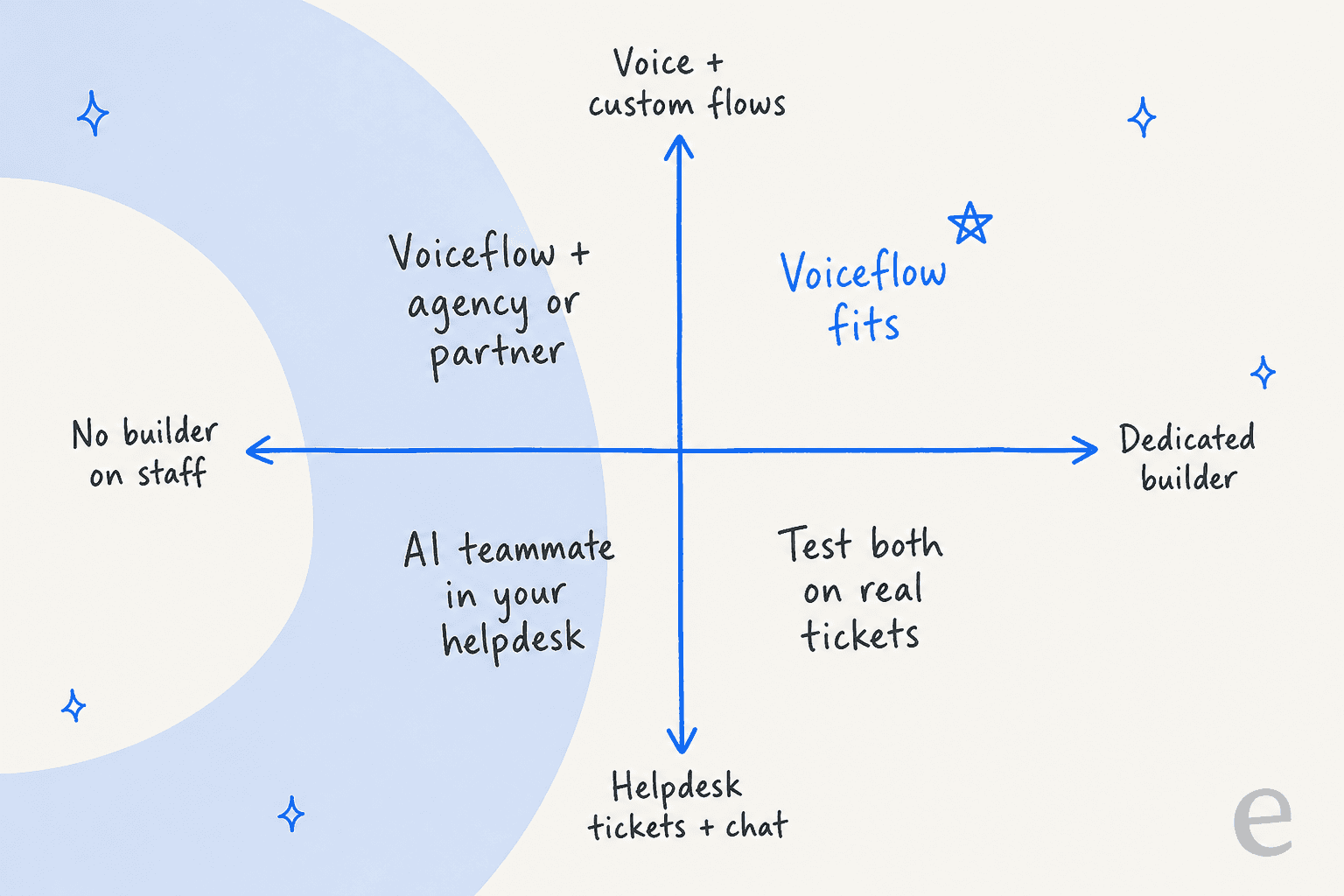
Pick Voiceflow if:
- You need a phone agent or an agent inside your own app, not just your helpdesk.
- You have a conversation designer, developer or agency who will own it. Voiceflow's agency track exists for exactly this.
- You want control over every step, model and prompt, and you're happy to maintain it.
Look elsewhere if:
- Your support volume is email and chat tickets in Zendesk, Freshdesk or Gorgias, and nobody has time to run a build. Built-in options like Gorgias AI or Freshdesk AI are less setup, and a helpdesk teammate goes further.
- You want something live this week. Voiceflow's own case studies talk in months.
- You're a small team watching seat costs. Simpler builders in our Chatbase review and no-code agent builder roundup start cheaper.
If you're torn, the build vs buy guide walks through the trade-off, and our checklist on choosing an AI support agent covers what to test first.
How does Voiceflow compare to the alternatives?
Voiceflow's closest peers are other builder platforms. The enterprise CX vendors sit a tier up in price and hand-holding.
| Tool | Type | Best for | Pricing model |
|---|---|---|---|
| Voiceflow | Visual agent builder | Teams with a builder, voice and custom flows | Plan fee + seats + credits |
| Botpress | Developer-leaning agent builder | Engineers who want code-level control | Plan fee + AI spend |
| Chatbase | Simple chatbot builder | Small teams shipping a website bot fast | Plan fee + message credits |
| Sierra | Managed enterprise agent | Large brands wanting a vendor-built agent | Outcome-based, sales-led |
| Decagon | Managed enterprise agent | High-volume support orgs | Sales-led |
| Ada | Enterprise AI agent | Enterprise CX teams | Sales-led |
| eesel | AI helpdesk teammate | Teams on Zendesk, Freshdesk, Gorgias | $299/month for 500 credits |
For the full field, see the conversational AI platforms roundup and our list of the best AI helpdesk software.
Want an AI agent in your helpdesk without building one? Try eesel
Here's the honest framing. Voiceflow gives you a workshop to build an agent. eesel gives you an AI helpdesk teammate that's ready to work: you connect Zendesk, Freshdesk or Gorgias, it reads your past tickets, help center and docs, and it starts drafting or replying inside the queue your team already uses. There's no canvas to design. You tell it what to do in plain English, and it updates its own instructions.

The step I'd point a Voiceflow evaluator to is testing. Before eesel talks to a customer, you can run a simulation over hundreds of your past tickets and compare its answers to what your team actually sent. Gridwise (G2 review) reported eesel resolving 73% of its tier-1 requests in the first month. Pricing is simple: $299/month for 500 credits, where one ticket or one chat is one credit however many replies it takes, with no per-seat fees and a free tier of 100 credits.
And if you liked Voiceflow's API and MCP surface, eesel has one too. The eesel CLI (@eesel/cli) runs the same teammate and workspace as the dashboard from a terminal: connect integrations, read and edit instructions, approve or deny pending actions, and review activity as JSON. Coding agents like Claude Code, Codex and Cursor can drive it, and every workspace is also an MCP server. It's a builder-friendly way in, without the build project. Try eesel on your own tickets and see what it would have answered.