


What WPBot actually is (and which one this is)
There are a few WordPress plugins with "chatbot" in the name, so it's worth pinning down. This post is about WPBot by QuantumCloud, the plugin listed as WPBot on WordPress.org under the slug chatbot, with a paid upgrade sold at wpbot.pro. It's a native plugin: the bot runs inside your WordPress install, saves chat sessions to your own database, and calls an AI provider only when you connect one.
I build integrations for a living at eesel, which mostly means reading API docs and wiring up other people's keys and webhooks. So when I priced WPBot I paid as much attention to where the API calls go as to the plan grid. That's where the real cost of a bring-your-own-key plugin hides.
The numbers on the free side are solid. Per the WordPress.org plugin API, WPBot has 5,000+ active installs, a 4.7 out of 5 rating from 124 reviews (114 five-star, 7 one-star), and version 8.8.6 shipped on October 19, 2026. It's been on WordPress.org since August 2018.
WPBot pricing at a glance
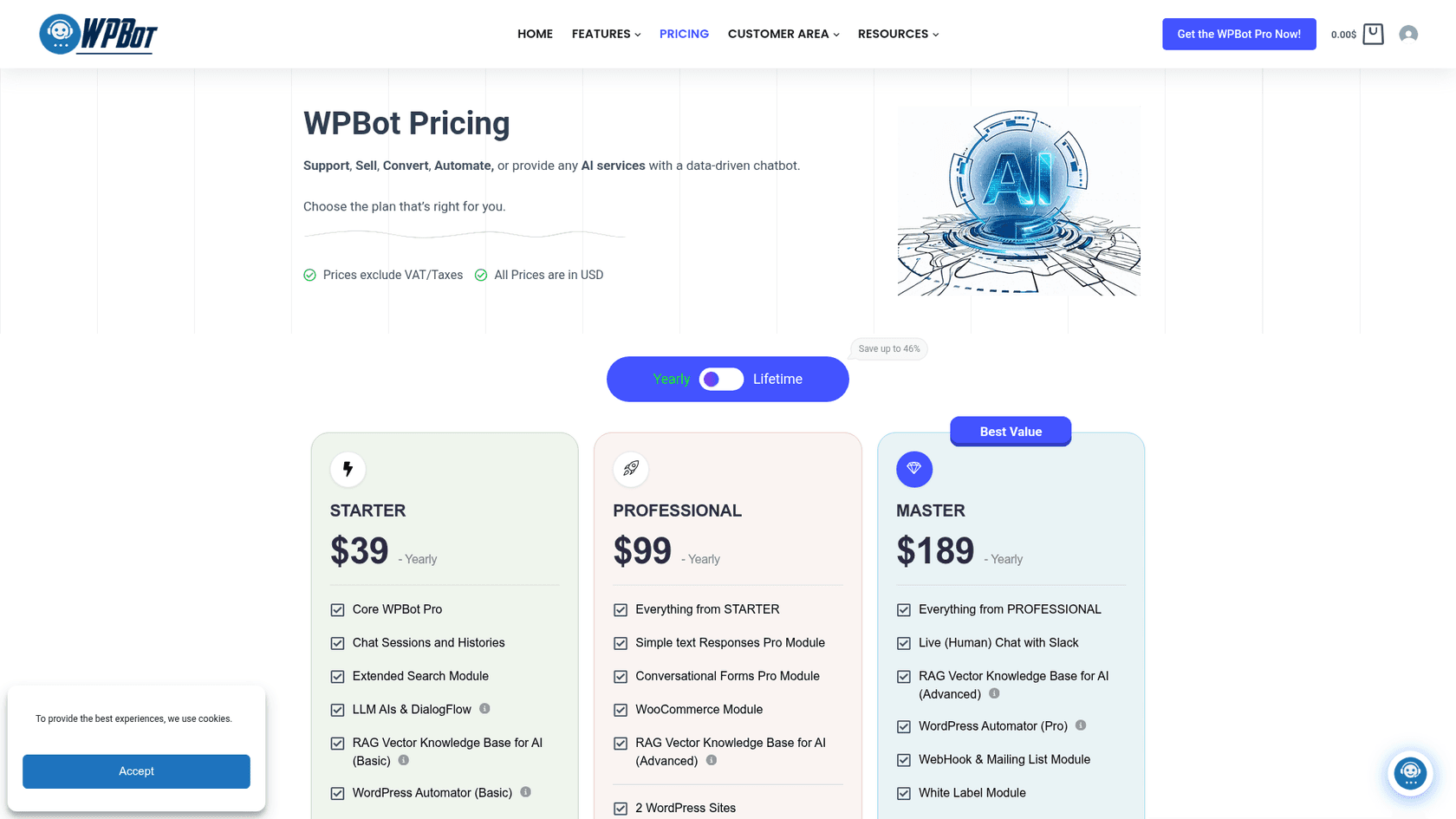
WPBot sells three Pro plans, each on a yearly or lifetime license. The plans differ by modules and by how many WordPress sites one key covers.
| Plan | Yearly price | Sites (yearly) | Lifetime price | Sites (lifetime) | Support | Best for (per WPBot) |
|---|---|---|---|---|---|---|
| Free (WordPress.org) | $0 | No limit | n/a | n/a | WordPress.org forum | Testing, simple FAQ bots |
| Starter | $39 | 1 | $149 (listed $230) | 5 | Premium | Personal websites or blogs |
| Professional | $99 | 2 | $279 (listed $480) | 10 | Premium | Business and ecommerce sites |
| Master | $189 | 5 | $369 (listed $680) | 50 | Priority | Power users and agencies |
A few details sit in the fine print of the pricing page:
- Lifetime prices are shown as discounts. The page shows the $230, $480 and $680 list prices struck through, marked 35%, 41% and 46% off. It doesn't say how long those lifetime prices hold.
- Lifetime includes "Product Lifetime Updates". The yearly plans don't list it.
- There's no free trial of Pro. WPBot's FAQ points you to the free version or the live demo instead. The same page offers a 14-day money-back guarantee.
- Yearly licenses don't auto-renew. Per WPBot's renewal doc, your card isn't charged again. To renew, you buy a new license and paste the new key in.
That last point is unusual and pretty friendly. There's no subscription to forget about and cancel.
What each WPBot plan includes
The plans stack: Professional includes everything in Starter, and Master includes everything in Professional. Here's what each tier adds, straight from the plan cards.
Starter ($39 a year or $149 lifetime) gets you the core WPBot Pro plugin, chat sessions and histories, the Extended Search module, LLM AIs and DialogFlow, a basic RAG knowledge base, the basic WordPress Automator and a free chatbot theme. It's the "AI on my blog" plan.
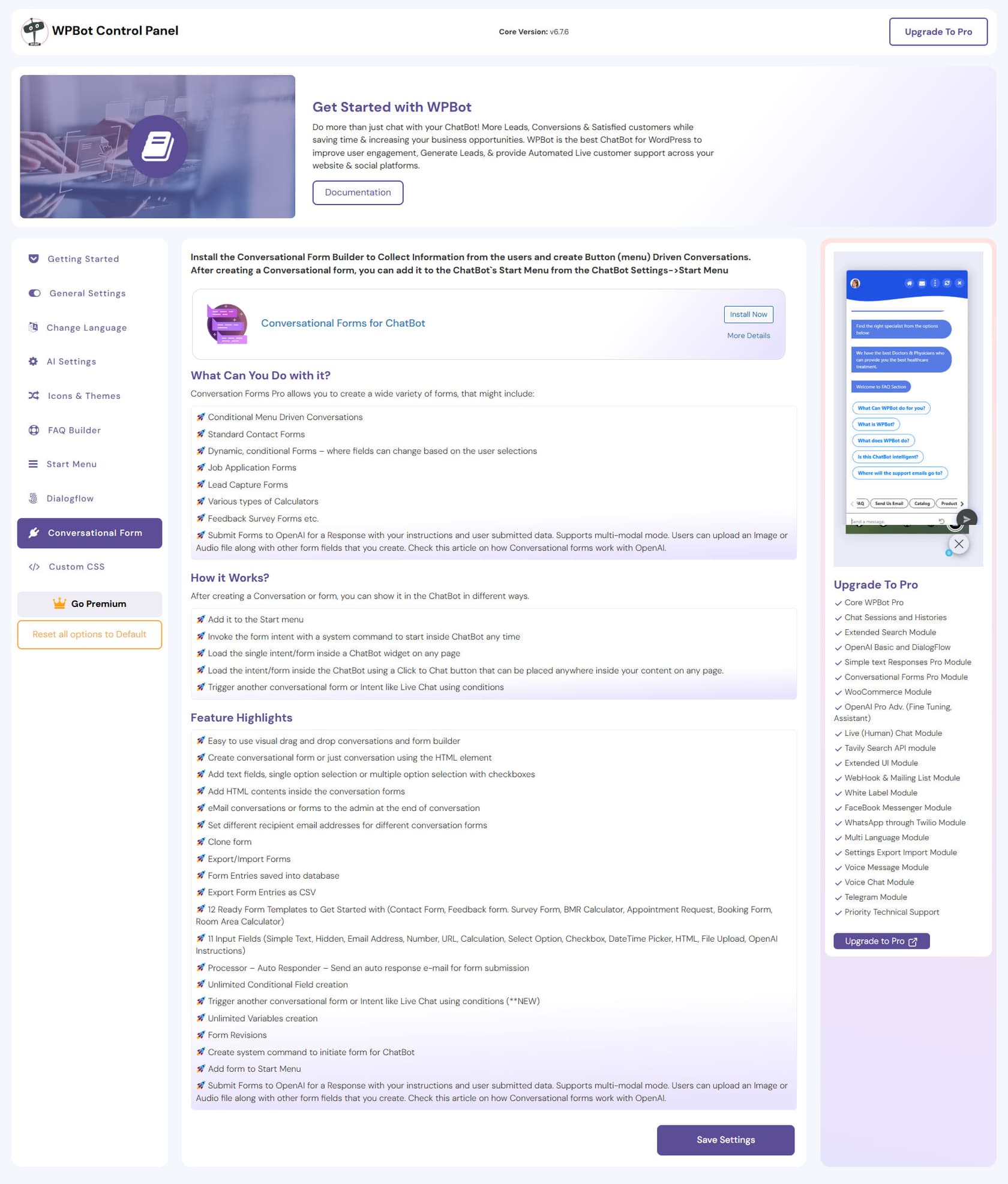
Professional ($99 a year or $279 lifetime) adds Simple Text Responses Pro, Conversational Forms Pro, the WooCommerce module and the advanced RAG knowledge base. The WooCommerce module lets shoppers search products, see details and add to cart from the chat, and shows order history. If you run a store, this is the realistic floor, and my guide to AI for WooCommerce covers what else stores usually need.
Master ($189 a year or $369 lifetime) adds the long list: live human chat through Slack, the Pro Automator, webhooks and mailing lists, white label, multi-language, Messenger, Instagram, WhatsApp through Meta or Twilio, Telegram, voice messages, voice chat, the AI-powered support ticket module, Extended UI, settings export and import, and the Tavily Search API module.
Two rules from WPBot's own FAQ on the WordPress.org listing are worth knowing before you pick:
- Multi-language is Master only. A bilingual site can't stop at Professional.
- GPT Assistants and fine tuning need Professional or Master. OpenAI itself works on every package, including free.
Where WPBot's own pages disagree
I found three places where WPBot's pages don't line up. None are deal-breakers, but they're worth checking before you pay.
- The homepage comparison table shows older prices. The table on the WPBot homepage lists WPBot at "49$/Yr" and "379$" lifetime. The pricing page says $39 a year for Starter and $369 for Master lifetime. I'd treat the pricing page as current.
- RAG on Starter. The Starter card lists "RAG Vector Knowledge Base for AI (Basic)". The WordPress.org FAQ says training an OpenAI model on your data, by fine tuning or RAG, requires Professional or Master, and the upgrade doc suggests at least Professional if you want AI trained on your content. If RAG is the reason you're buying, ask before you pick Starter.
- Sites per license depend on billing. The yearly Master covers 5 sites; the lifetime Master covers 50. The WordPress.org listing only talks up the 50-site lifetime deal, so it's easy to assume yearly works the same.
The second bill: your AI provider
This is the part most WPBot pricing summaries skip. WPBot is the plugin; the AI is someone else's. The Starter AI doc puts it plainly: you bring your own API key from OpenAI or another supported platform and pay them for usage.
How much? WPBot's AI cost doc gives a rough estimate of about $2 per thousand responses with GPT 4o or 4.1 mini, and says the exact cost depends on response length. That's cheap. A site with 1,000 AI replies a month adds about $24 a year. Bigger models cost more per LLM token, and my OpenAI API pricing breakdown has the current per-model rates.
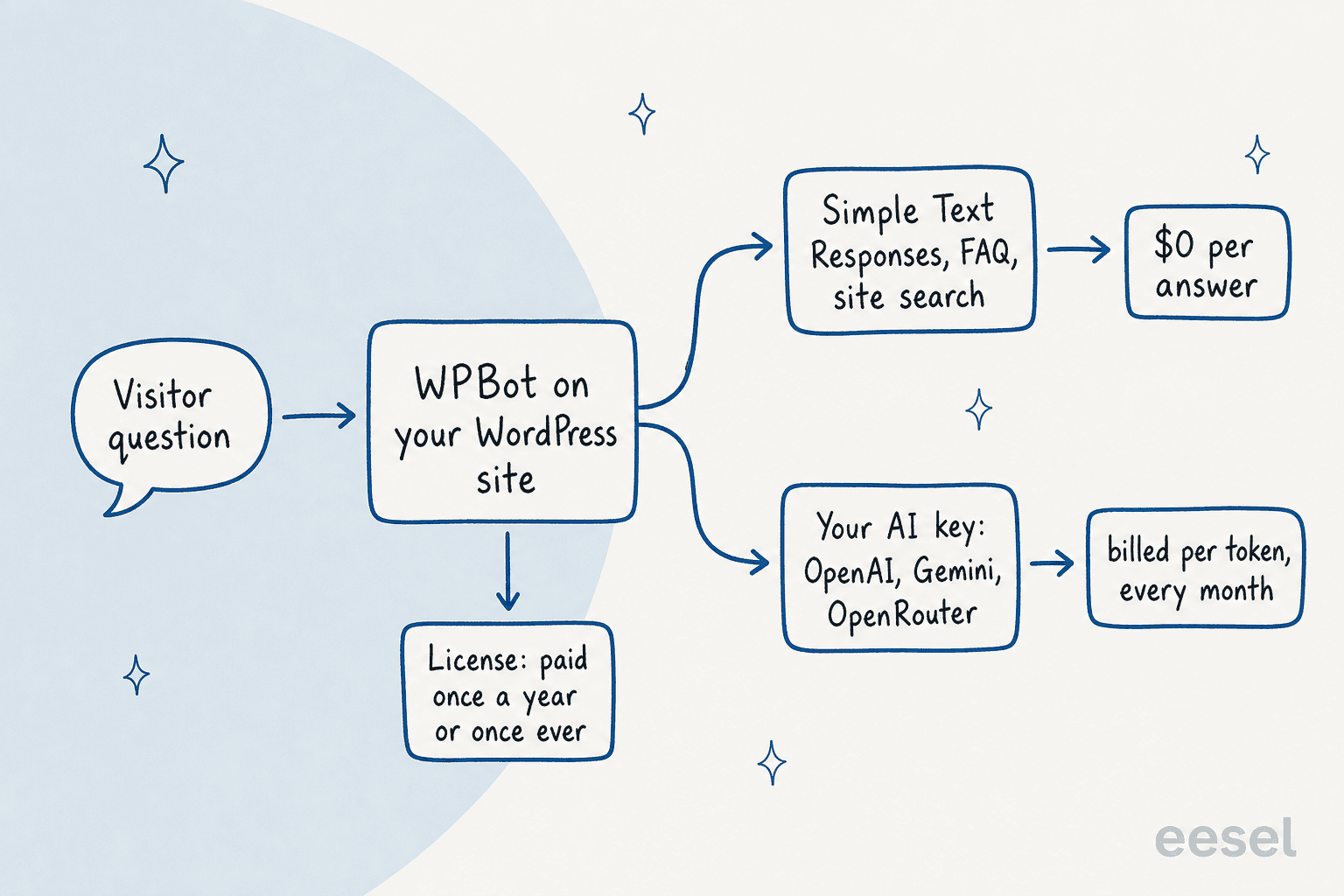
The good news is that WPBot is built to keep that second bill down. Per its cost-saving guide, Simple Text Responses use MySQL full-text search, and when one matches, the bot doesn't call OpenAI at all. It only goes to the AI when no saved answer fits. There's also a GPT Rate Limit setting, documented in the AI usage doc, that caps AI queries per user role over a 24 or 48 hour window.
A few more API bills can show up depending on the modules you turn on:
- AI Insights. The Chat Sessions module emails a daily summary of conversations, which is an AI call too. WPBot calls the cost "extremely inexpensive vs the value it provides".
- Voice Chat. It uses Google Cloud Text-to-Speech and Speech-to-Text, per the modules page, billed by Google.
- WhatsApp. It runs through Meta or Twilio, who charge for messages on their side. My guide to AI WhatsApp support covers how those fees work.
- Live chat. On Master, human live chat runs through Slack or the WordPress dashboard, and Slack's own plan limits apply.
One reviewer's experience with AI Insights is a useful warning to set a rate limit and watch the provider dashboard in your first month:
"4 times in a day the bot sends a chat session summary request to open AI exhausting all your tokens."
In its reply on that thread, QuantumCloud described AI Insights as a daily summary of the last day's chats and defended the cost as small. Either way, the fix is the same: set a usage limit on your OpenAI account, which WPBot's own docs also recommend.
Yearly vs lifetime: when does lifetime pay off?
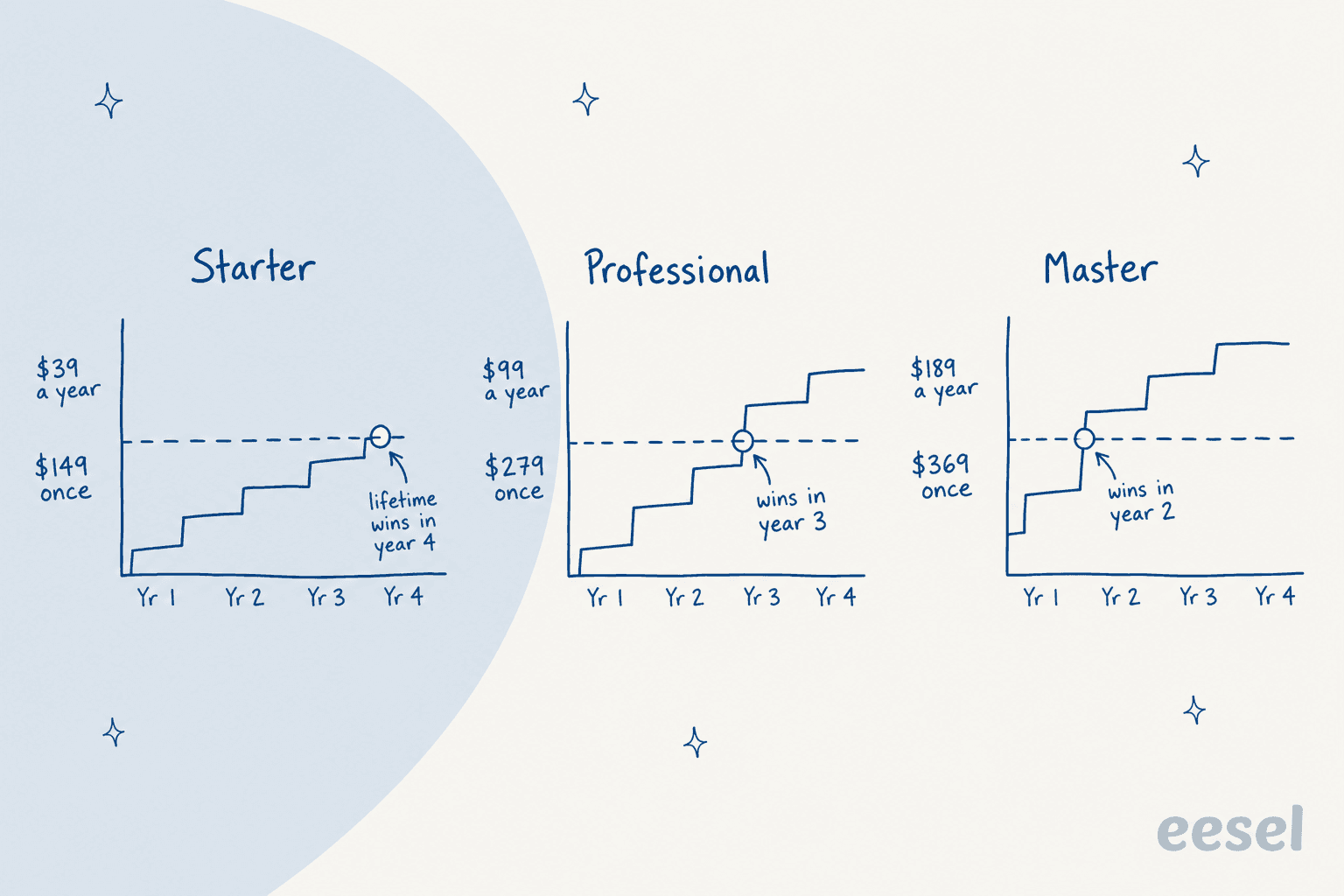
Because yearly licenses don't auto-renew, the comparison is simple: how many years will you keep paying? Here's the running total against the one-time price.
| Plan | Year 1 | Year 2 | Year 3 | Year 4 | Lifetime | Lifetime cheaper from |
|---|---|---|---|---|---|---|
| Starter | $39 | $78 | $117 | $156 | $149 | Year 4 |
| Professional | $99 | $198 | $297 | $396 | $279 | Year 3 |
| Master | $189 | $378 | $567 | $756 | $369 | Year 2 |
The site counts tilt it further. Lifetime Master covers 50 sites; yearly Master covers 5. An agency running chatbots on 20 client sites would need 4 yearly Master licenses at $756 a year, or a single $369 lifetime key. WPBot's agency doc pitches exactly that deal, with white labeling and a dashboard to manage active sites.
The case for yearly is shorter but real. If you aren't sure WPBot will stick on your site, $39 or $99 is a cheap way to find out, and the 14-day money-back window is short. A refund months later is unlikely: in the Pat thread above, QuantumCloud said it couldn't refund a purchase made five months earlier.
Work out your own WPBot cost
Plug in your site count, the features you need and your expected AI volume. The calculator checks all six licenses and adds your AI provider bill.
Three real WPBot budgets
Here's what the math looks like for three common setups, using WPBot's $2 per 1,000 replies estimate for the AI bill.
A blog or brochure site. One site, mostly FAQ answers, about 500 AI replies a month for the questions your saved answers miss. The free plugin may be enough. If you want chat histories and the basic RAG knowledge base, Starter yearly is $39 plus about $12 a year in AI. Roughly $4 a month all in.
A WooCommerce store. One store, product questions and order lookups, 2,000 AI replies a month. You need Professional for the WooCommerce module. Yearly: $99 plus about $48 in AI, so $147 a year. Over three years, lifetime ($279 plus $144 in AI, so $423) edges out yearly ($297 plus $144, so $441). If you're comparing store tools, my roundup of AI for WooCommerce support has the hosted options.
An agency with 20 client sites. White label puts you on Master. Lifetime Master is $369 once for up to 50 sites. Each client's AI bill runs on whatever key you configure on their site, so pass that cost through or put it on the client's own key. Past 50 sites, WPBot's extra licenses doc says it gives 30% off additional licenses if you email them.
Two smaller discounts are also on offer by email. WPBot says it will credit your previous purchase when you upgrade from Starter to a higher plan, and its non-profit doc promises "a good discount" for non-profits.
The costs that aren't on the pricing page
Price is only part of the cost of a self-hosted plugin. Before you commit, budget for these:
- Setup time. Social channels need a Meta app, WhatsApp needs Meta or Twilio, and RAG needs your content pointed at the vector database. Modules are also off by default and have to be switched on in the Module Manager, per the modules doc.
- Your server. Everything runs on your WordPress host. The upside, per WPBot's privacy doc, is that chat data stays in your database and never goes to QuantumCloud.
- Answer quality work. A bot trained on thin content gives thin answers. Writing Simple Text Responses for common questions saves money and improves accuracy, but it's ongoing work. My guide to AI hallucinations in support covers what to watch.
- The handover. WPBot's live chat runs in Slack or the WordPress dashboard, not inside a helpdesk. If your team works in Zendesk, Freshdesk or Gorgias, plan how a chat becomes a ticket. My chatbot escalation guide walks through the options.
What WPBot users say about the price
Reviews on WordPress.org lean very positive, and most of the praise is about support speed. The pricing-related comments are more mixed. Here's a reviewer who's happy with what they use:
"I don't pretend that I use all the advanced features; for the scope of my sites they are not needed; however what I use is running as advertised and I do get folks actually interacting with the bot a lot."
And a store owner on what the upgrade from free bought them:
"The free version was good at finding products, but the Pro version is packed with great, customizable features. Customers can check order status, use the FAQ section to get answers to frequent questions, etc. This saves us time responding to email messages."
The main pricing complaint, from a 2023 review, is the no-trial model: you can't test Pro modules without buying first. QuantumCloud's reply argued its Pro versions are "5-10 times cheaper" than ad-free premium tiers of free competitors. Both points are fair. The free plugin and the live demo are the only ways in before you pay, so use them properly.
Is WPBot worth the money?
For a single WordPress site, yes, it's hard to beat on price. $39 to $99 a year, plus a few dollars of AI, gets you a bot that answers from your content, captures leads with forms and, on Professional, sells from your WooCommerce catalog. If you compare it with hosted tools like Tidio or Chatbase, the license math favors WPBot at almost any volume.
What you're buying, though, is a toolkit you run. You manage the API key, the usage limits, the modules and the plugin updates on your own server. That's a fine trade for a site owner who likes WordPress and has a few hours to tune it. It's a worse trade when the chat is a real support channel that has to feed tickets into a helpdesk and get tested before it talks to customers.
I'd pick WPBot if:
- You run one to a few WordPress sites and want AI on your own key at the lowest possible cost.
- You're an agency that can use the 50-site lifetime Master license.
- Your questions are mostly FAQ-shaped, so Simple Text Responses can answer most of them for free.
I'd look elsewhere if your support team lives in a helpdesk, if you need the same agent on email and chat, or if nobody has time to watch an API dashboard. My lists of WordPress AI plugins and AI live chat software cover both camps.
How WPBot compares to similar WordPress chatbots
WPBot isn't the only WordPress plugin built on your own AI key. Here's how it sits next to others I've priced recently:
| Tool | How you pay | AI model cost | Where to read more |
|---|---|---|---|
| WPBot | $39 to $189 a year, or $149 to $369 lifetime | Your own key | This post |
| AI Puffer | Free, or $9.99 to $29.99 a month per site | AI credits from the plan allowance | AI Puffer pricing |
| Meow AI Engine | $69 to $179 a year, or $499 to $1,699 lifetime | Your own key | AI Engine pricing |
| WPZOOM Connect | $0 to $99 a month for AI Chat, by conversations | Included in the plan | WPZOOM Connect pricing |
| eesel chat bubble | Monthly credits, 1 credit per chat | Included | eesel pricing |
If you're still deciding between building on a plugin and buying a hosted agent, my take on build vs buy goes deeper on the trade-off.
Try eesel when the chat is a support channel
If your WordPress chat needs to behave like a member of your support team, eesel is the other way to do it. eesel is an AI helpdesk teammate: the same agent answers in a website chat bubble on your WordPress site and works the tickets in your helpdesk, learning from your pages, help center and past tickets. There's no API key to manage, because the model cost is in the price.

SamCart runs one eesel agent on its website chat bubble and another on Freshdesk tickets, both answering from about 280 help center articles, and the chat agent collects a name and email before it answers so the team can follow up. IC Intracom runs one agent per brand on two web stores, answering product, stock and compatibility questions from about 2,100 catalog records and handing sales and technical questions to the right team with the transcript attached.
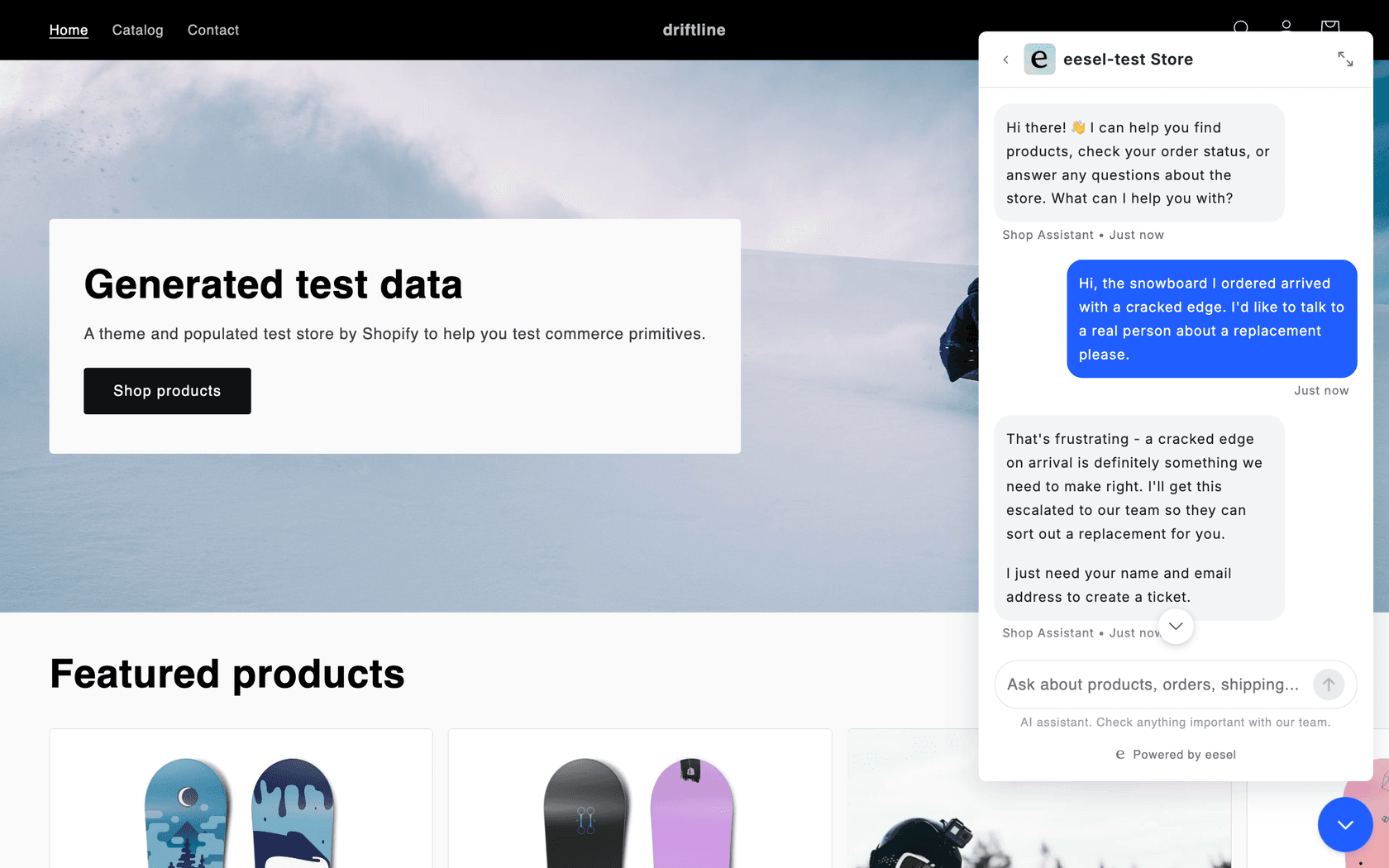
The price model is different from WPBot's, and I'll be straight about it. Per eesel's pricing page, the free plan gives you 100 credits to try it, and paid plans start at $299 a month for 500 credits, up to $1,749 for 5,000. One ticket or one chat is one credit however long it runs, with no seat fees. For a blog that gets a handful of questions a week, that's more than you need, and WPBot is the better buy. For a store or SaaS where chat feeds a helpdesk, you're paying for an agent that also works the queue, and you can test it against your past tickets before it goes live.
Want an AI that answers WordPress visitors and hands the tricky ones to your team inside your helpdesk? Try eesel free with 100 credits, or see how the AI helpdesk agent works first.
Frequently Asked Questions
How much does WPBot cost?
Per WPBot's pricing page, WPBot Pro costs $39, $99 or $189 a year for Starter, Professional and Master, or $149, $279 or $369 once for a lifetime license. The free plugin on WordPress.org is $0. Your AI provider bill is extra, which is why my guide to chatbot cost is worth a read before you budget.
Is WPBot free?
Yes. The free WPBot plugin on WordPress.org includes FAQ answers, site search, Simple Text Responses, DialogFlow and OpenAI support on your own key. WooCommerce, live chat, WhatsApp, multi-language and white label need a paid license. My list of free AI chatbots covers other no-cost options.
Does WPBot pricing include OpenAI or ChatGPT?
No. WPBot pricing covers the plugin only, and you bring your own OpenAI, Gemini or OpenRouter key and pay that provider for usage. WPBot's docs estimate about $2 per 1,000 replies on small models. My OpenAI API pricing breakdown has current per-model rates.
Is the WPBot lifetime license worth it?
Usually, if you'll keep WPBot more than a year or two. Lifetime beats yearly in year 2 on Master, year 3 on Professional and year 4 on Starter, and it covers 5, 10 or 50 sites instead of 1, 2 or 5. For agencies it's the clear pick; my WordPress AI plugins roundup compares other options.
Which WPBot plan do I need for WooCommerce?
Professional, at $99 a year or $279 lifetime. That's the first plan with the WooCommerce module, which lets shoppers search products, add to cart and see order history in the chat. My guide to AI chatbots for WooCommerce covers what else a store needs.
Does WPBot auto-renew?
No. WPBot's docs say yearly licenses don't auto-charge your card; to renew you buy a new license and paste the new key into the plugin. That makes WPBot pricing easy to stop, but put a reminder in your calendar. For comparison, see how Tidio pricing bills monthly.
Can I get a discount on WPBot?
WPBot offers a few by email: credit for your previous purchase when you upgrade from Starter, 30% off additional Professional or Master licenses when you outgrow your site limit, and a discount for non-profits. If cost per chat is your real question, my cost per ticket benchmarks help frame it.
Is there a WPBot alternative with AI costs included?
Yes. Hosted tools bundle the model cost into the price. eesel's chat bubble charges one credit per chat with no API key to manage, from $299 a month for 500 credits per eesel pricing, and hands cases to your helpdesk. It costs more than WPBot for a small site, so it fits support teams, not blogs.