

How WPZOOM Connect pricing works
Most people who search for "WPZOOM Connect pricing" have already installed the plugin, or are about to, and really want to know one thing: what does the AI Chat button cost? I've spent two years watching how search terms map to buying questions, and this one is a good example of a keyword hiding a different question. The plugin has a price, the AI has a price, and they come from two different companies' checkouts.
WPZOOM Connect is the new name of the Social Icons Widget by WPZOOM, a free plugin with 90,000+ active installs. Version 4.7.0 added AI Chat, which is "powered by Yamidoo, a WPZOOM product". Yamidoo is a hosted service with its own account, its own dashboard and its own bill. I went through all of this in my WPZOOM Connect review; this post is only about the money.
| Layer | What you pay | Billed by | What it buys |
|---|---|---|---|
| Free plugin | $0 | Nobody | Click to Chat (WhatsApp, Telegram, Messenger, Viber), social icons, share buttons |
| AI Chat | $0 to $99/month, or $0 to $990/year | Yamidoo | AI answers from your pages, human handoff, inbox |
| Social Icons PRO | $39 to $79/year | WPZOOM | Floating share bar, AI share buttons, share counts and analytics |
You can run any combination. A site that only wants WhatsApp buttons pays nothing. A site that wants AI answers pays Yamidoo and never needs PRO.
Yamidoo AI Chat plans and limits
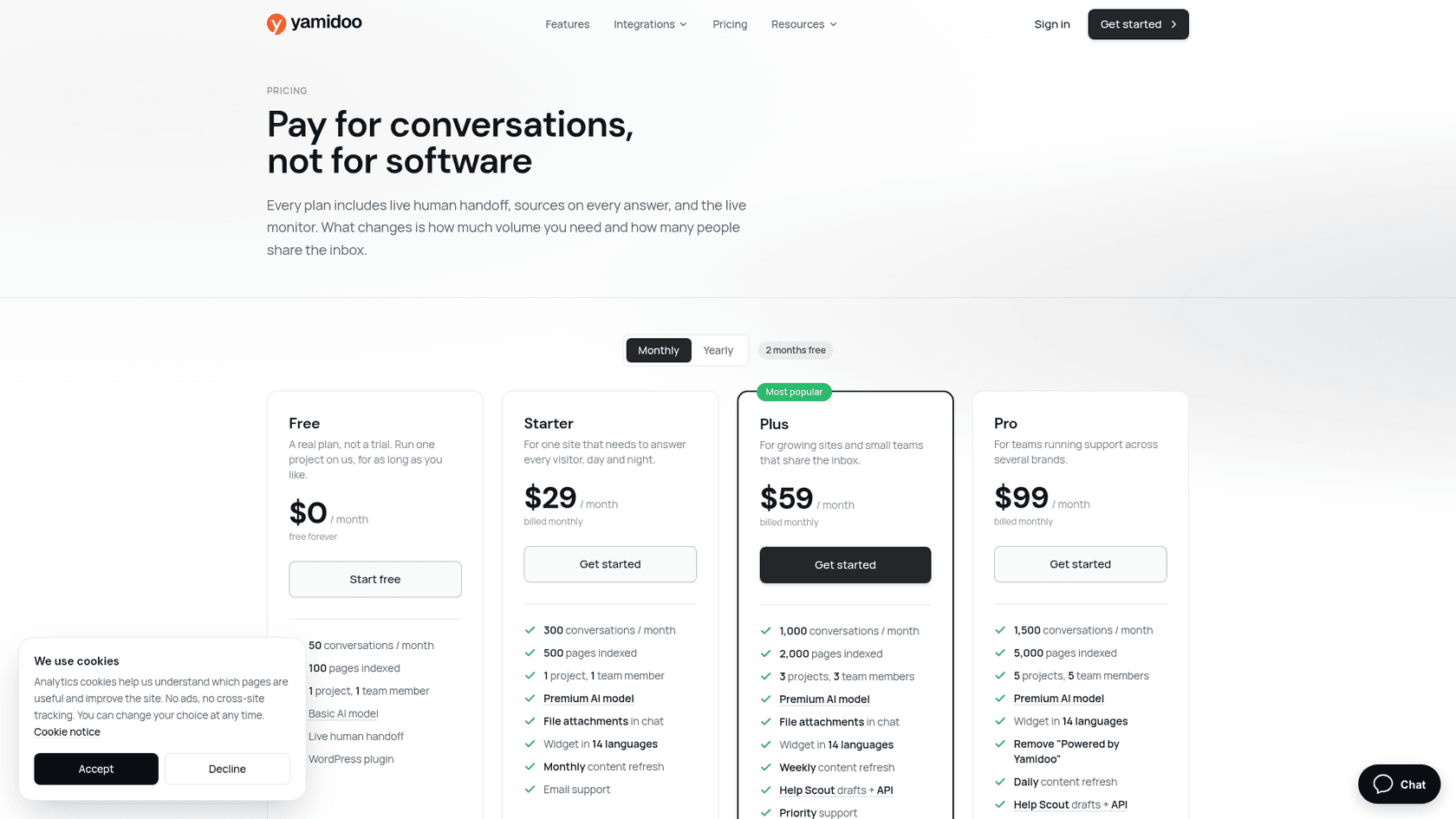
All prices below come from Yamidoo's pricing page, checked October 22, 2026. They're in USD and exclude VAT; EU customers are charged in EUR.
| Free | Starter | Plus | Pro | |
|---|---|---|---|---|
| Monthly | $0 | $29 | $59 | $99 |
| Yearly | $0 | $290 (about $24/mo) | $590 (about $49/mo) | $990 (about $83/mo) |
| AI conversations / month | 50 | 300 | 1,000 | 1,500 |
| Pages indexed | 100 | 500 | 2,000 | 5,000 |
| Websites (projects) | 1 | 1 | 3 | 5 |
| Team members | 1 | 1 | 3 | 5 |
| AI model | Basic | Premium | Premium | Premium |
| Sources per type | 1 | Unlimited | Unlimited | Unlimited |
| Scheduled content refresh | Manual only | Monthly | Weekly | Daily |
| File attachments (PDF, PNG, JPG up to 10 MB) | No | Yes | Yes | Yes |
| Widget text in 14 languages | English only | Yes | Yes | Yes |
| Help Scout drafts + API | No | No | Yes | Yes |
| Remove "Powered by Yamidoo" | No | No | No | Yes |
| Support | Community | Priority | Priority |
Every plan, Free included, gets live human handoff, sources under every answer, the live visitor monitor, answer ratings, analytics with CSAT and the WordPress plugin. The widget's own buttons and notices are English-only on Free, but the AI answers in the visitor's language on every plan, which matters if you're weighing multilingual customer support on a budget.
The billable unit: one conversation
Yamidoo defines a conversation as "one chat session with one visitor, no matter how many messages it contains". A visitor who returns after a day of inactivity starts a fresh one. If you want the wider live chat picture, the unit is what separates these tools. Only AI-answered conversations count, so if you take over a chat yourself, that's free. Compare that with tools that charge per resolution or per message and you'll see why the unit matters more than the sticker; my chatbot cost guide walks through the common billing units.
Add-ons: one more seat or site
Any paid plan can add a team member for $19 a month or another website for $20 a month. You don't buy these in a checkout: you email hello@yamidoo.ai from your account and Yamidoo's team attaches them to your next invoice. The Free plan can't take add-ons.
Where the money actually goes
Here's where a plan grid stops being enough. I ran the numbers on every plan at full use, and three things stood out that the pricing page doesn't spell out.
Plus is cheaper per conversation than Pro
Divide each plan's monthly price by its conversation limit and the ladder isn't a ladder. Starter is 9.7 cents a conversation, Plus is 5.9 cents and Pro is 6.6 cents. On yearly billing the order is the same: about 8.1, 4.9 and 5.5 cents.
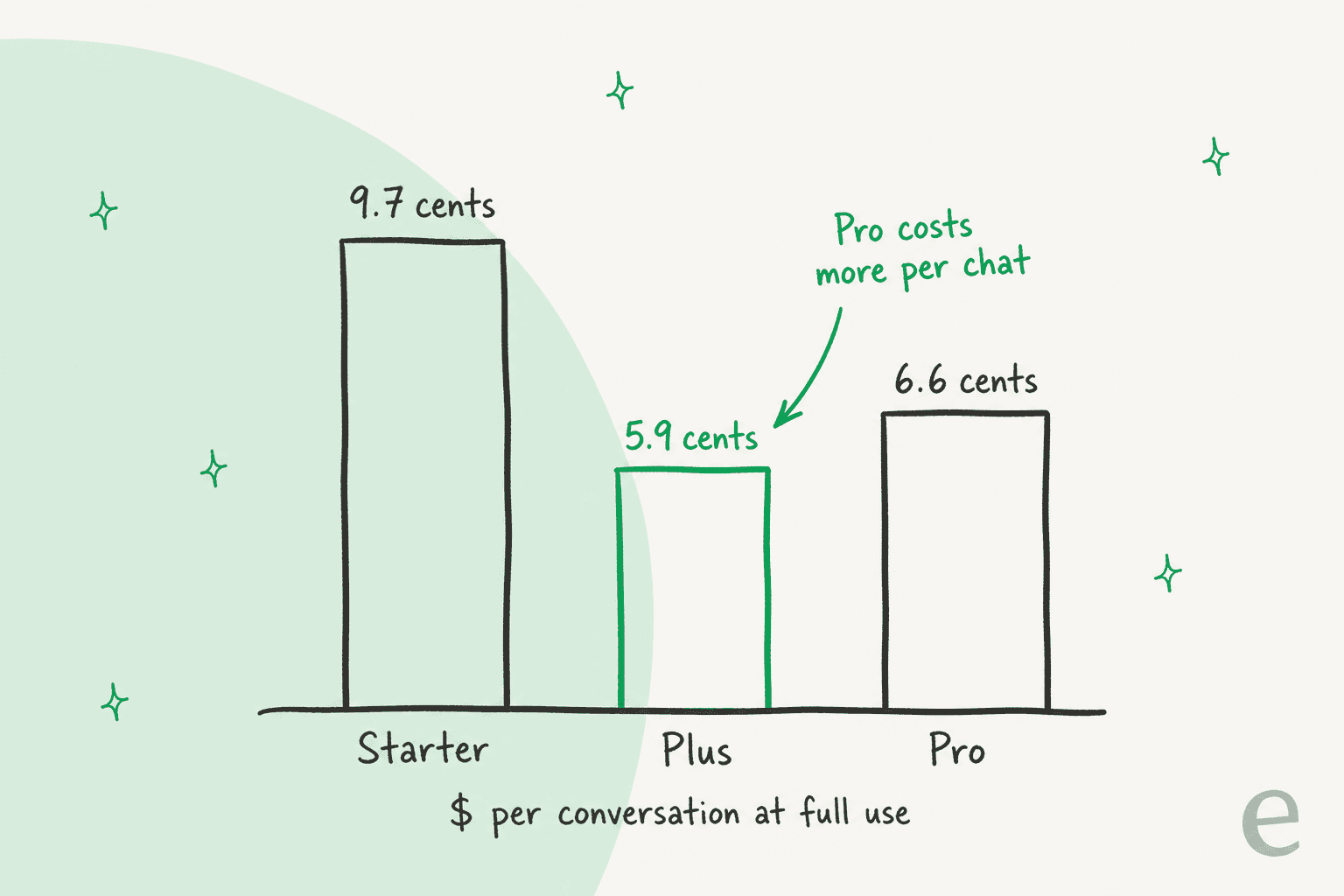
So Pro's extra $40 a month buys 500 more conversations plus things that aren't volume: 5 sites instead of 3, 5 seats instead of 3, 5,000 indexed pages, daily refresh and the option to remove the "Powered by Yamidoo" credit. If you only need more chats, Pro is a fair deal. If you need the branding off a client site, it's the only plan that does it.
Upgrading often beats add-ons
The add-on prices look small until you stack them. A business with three websites on Starter pays $29 plus two extra sites at $20, which is $69 a month for 300 conversations. Plus costs $59, includes three sites and gives you 1,000 conversations.
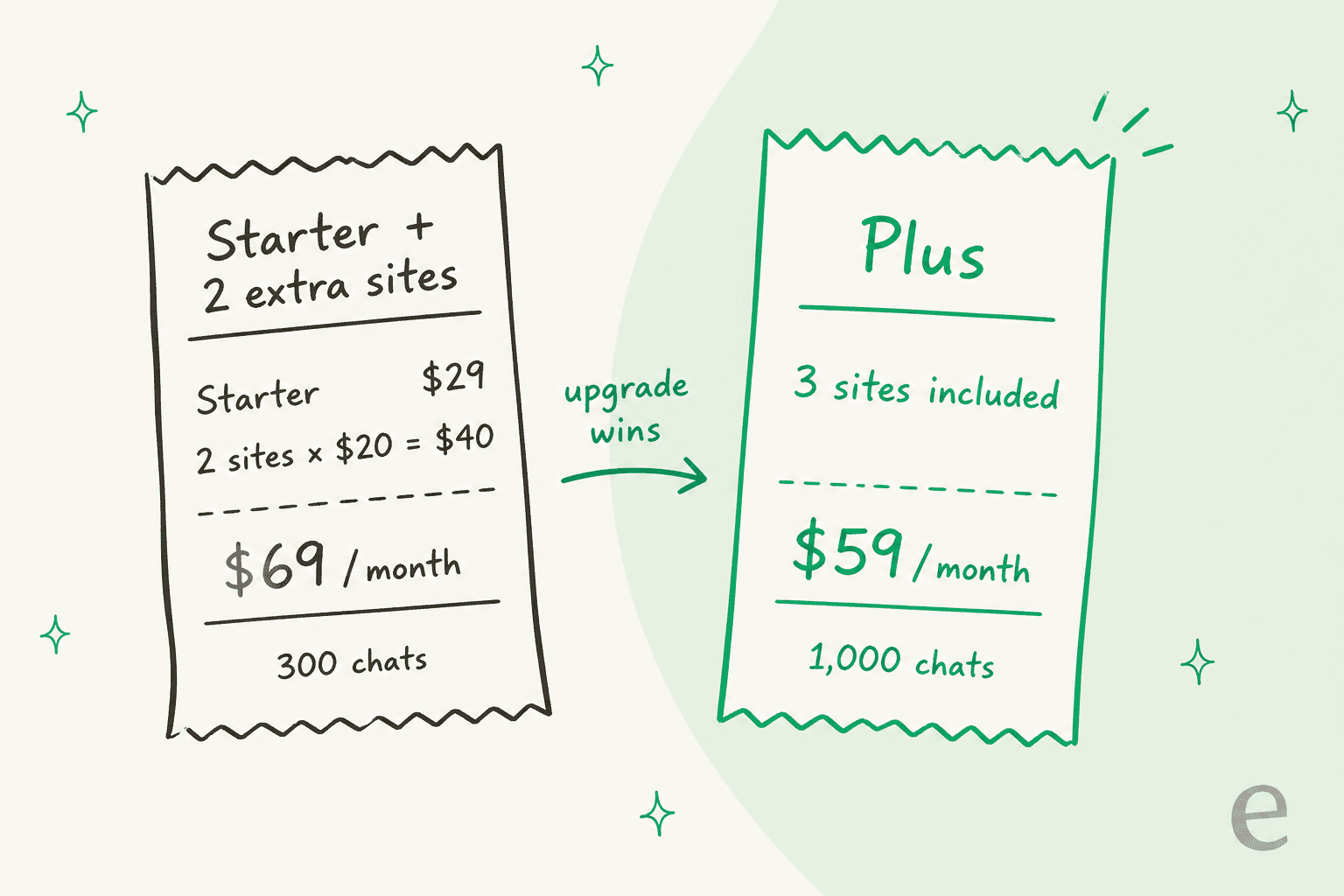
Seats work the same way. Starter plus two team members is $29 + $38 = $67, still more than Plus with three seats built in. One extra seat or site on Starter ($48 or $49) is the only case where the add-on wins. The calculator below picks whichever is cheaper for you.
The limit pauses AI, it doesn't bill you
At 75%, 90% and 100% of your monthly limit Yamidoo sends an email, then pauses AI answers on new conversations until the period resets or you upgrade. Per the Yamidoo FAQ, "the widget keeps collecting messages so you can follow up. There is never a surprise bill."
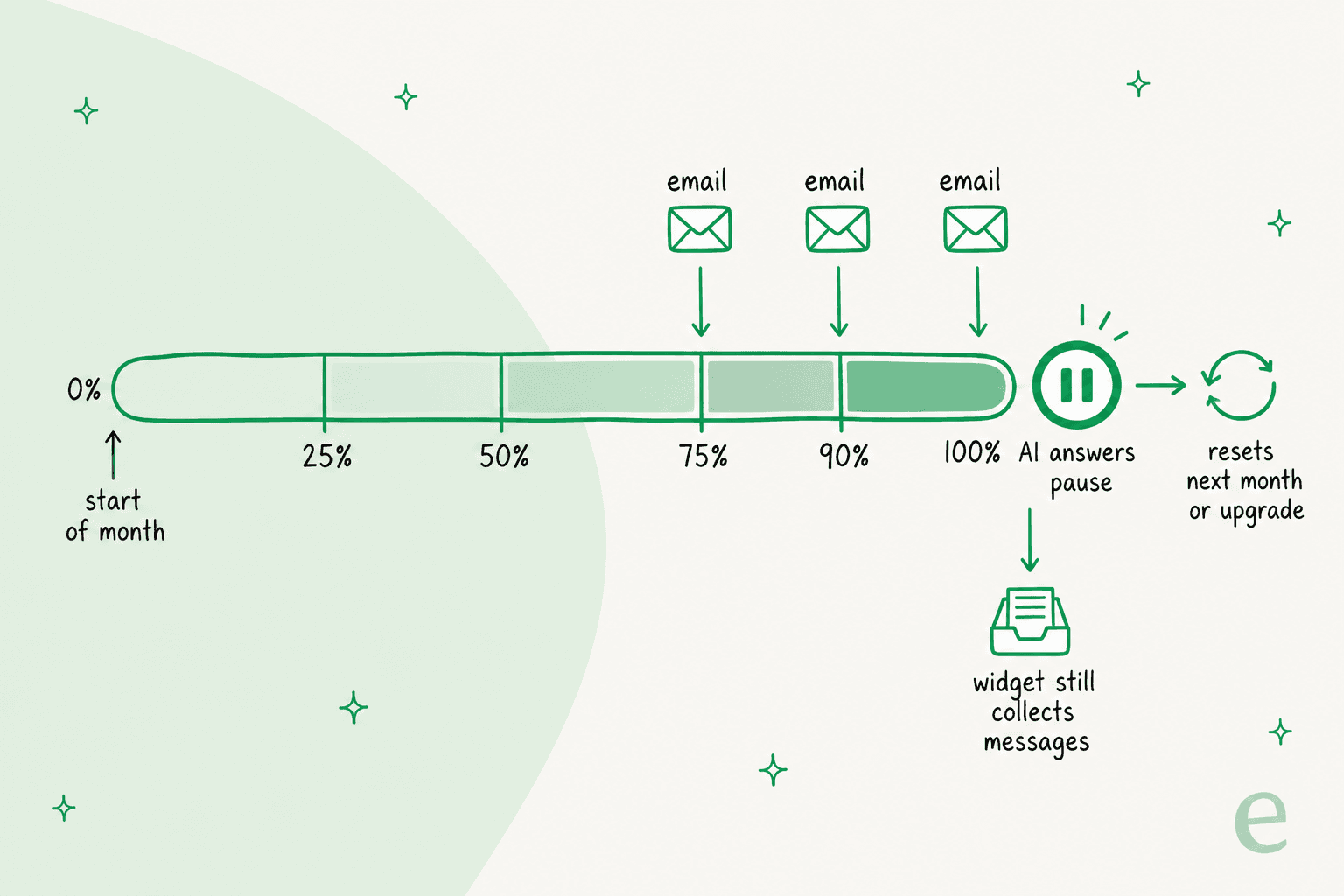
I like this design for a small site. A chatbot that bills overage can turn a viral post into an invoice, and I walked through one in my Chatty pricing breakdown. The trade is that a busy month becomes a quiet failure: visitors who arrive after the cap get their message collected, not answered.
Volume also sneaks up on people. One self-serve eesel customer had a bot that quietly handled more than 1,500 messages a month before he hit his plan's limit, at which point he upgraded "no hesitation". With Yamidoo's pause, a busy week can use the rest of your month by the 20th, so pick the plan with headroom, not the one that fits your average.
Social Icons PRO pricing
The PRO license is sold on WPZOOM's plugin page and has nothing to do with AI Chat. It adds the floating share bar, AI share buttons (share to ChatGPT, Claude and Perplexity), a Like button with share counts, a share analytics dashboard, Pinterest image hover pins and custom SVG icon uploads.
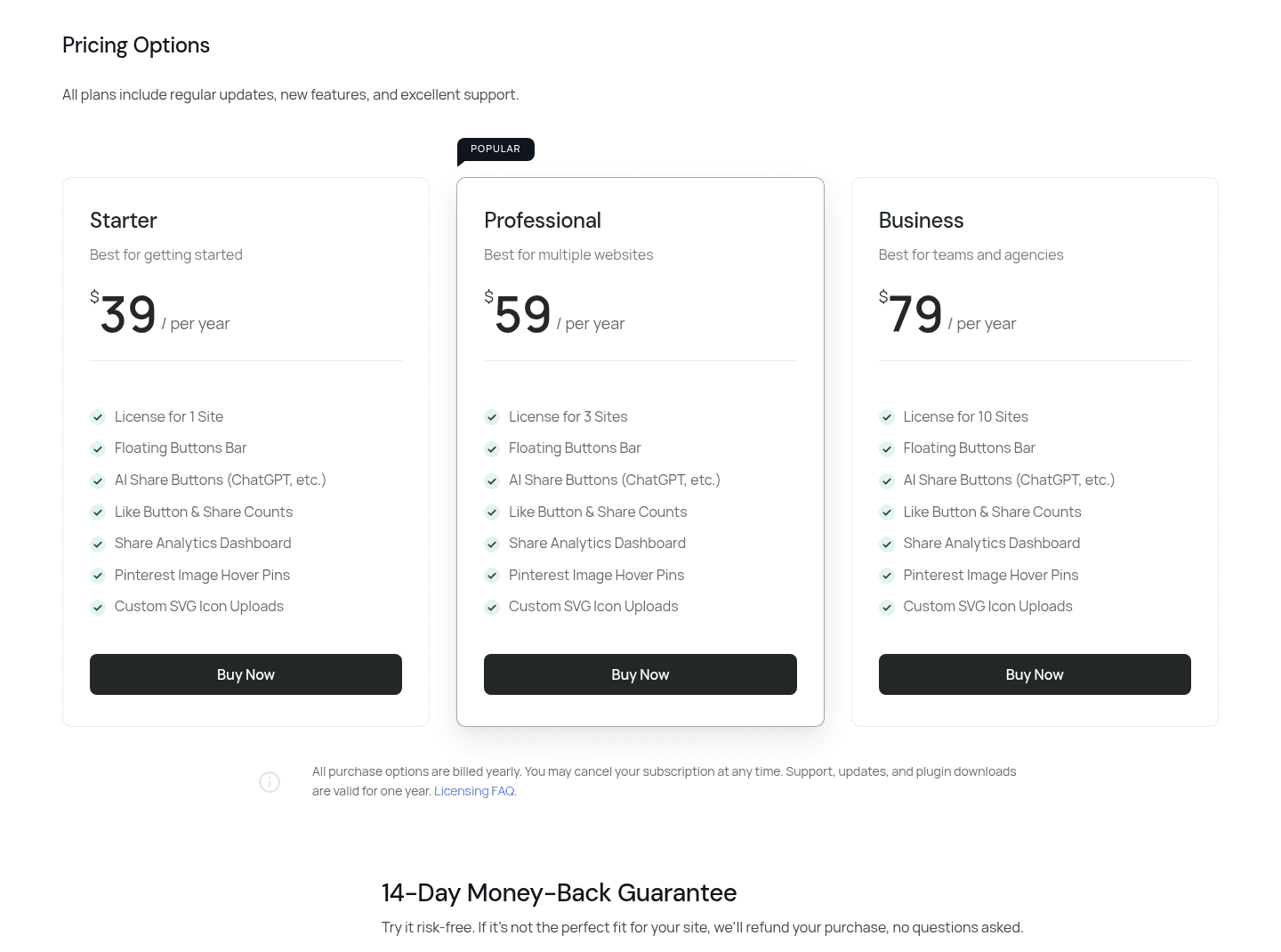
| Plan | Price | Sites | Features |
|---|---|---|---|
| Starter | $39/year | 1 | All PRO features |
| Professional | $59/year | 3 | All PRO features |
| Business | $79/year | 10 | All PRO features |
All three are billed yearly, and support, updates and downloads last one year, so it's a subscription rather than a one-time license. There's a 14-day money-back guarantee. The only difference between plans is the site count, which makes Business at $7.90 a site the obvious pick for agencies.
The founding offer and yearly billing
Two discounts can lower year one. Yearly billing is ten months for the price of twelve, so Starter drops from $348 to $290 a year, Plus from $708 to $590 and Pro from $1,188 to $990. Upgrades apply straight away and are prorated; downgrades wait until the end of your paid period.
The second is in the plugin itself. WPZOOM's own screenshot of the AI Chat settings tab shows a "WordPress founding offer" of 50% off any Yamidoo plan for the first year when you connect from the plugin. It isn't listed on the public pricing page, so I'd treat it as something to confirm at checkout rather than bank on.
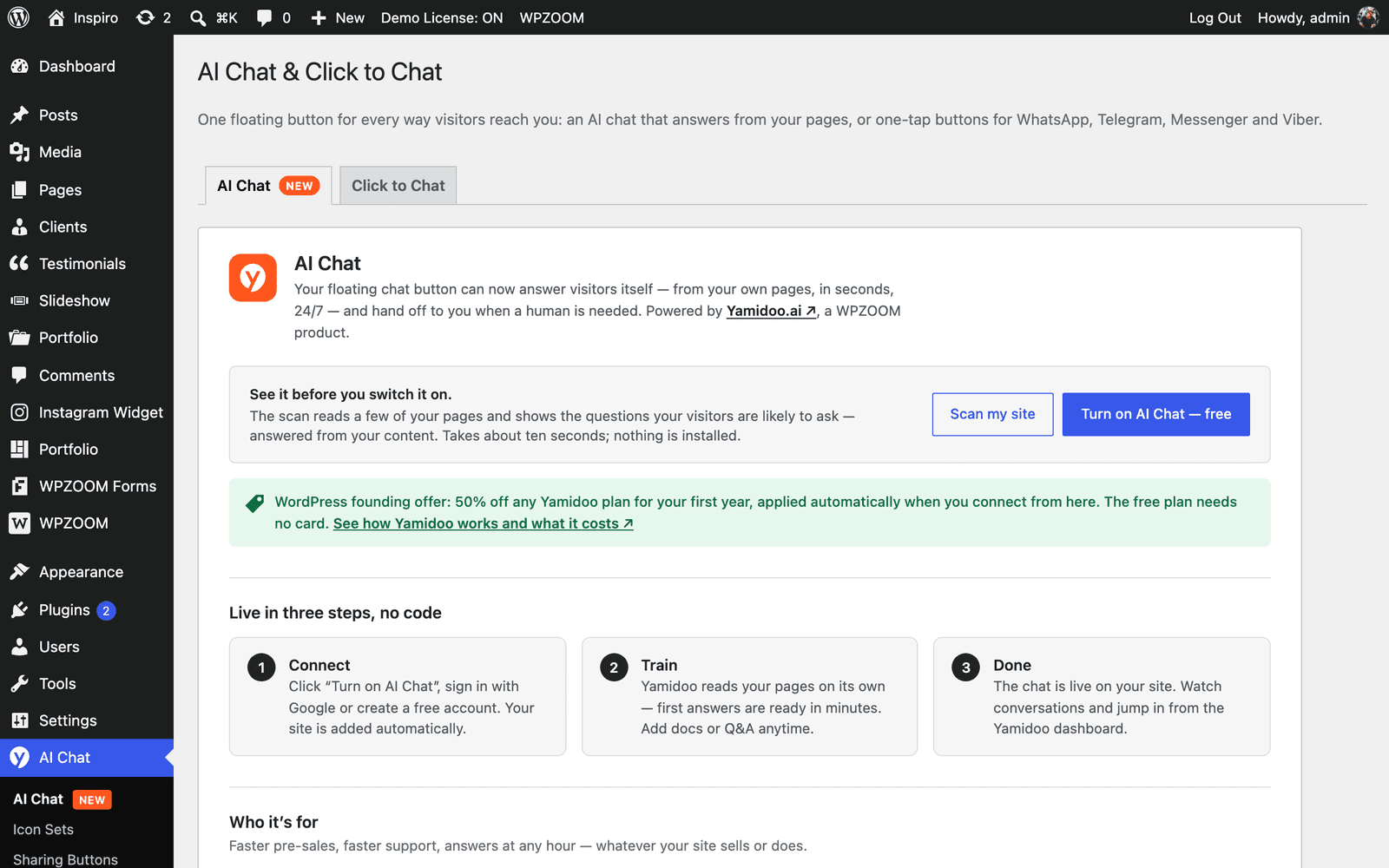
Before you pay anything, run the free Support Readiness Scan on that same screen. It reads up to 14 of your public pages and shows which visitor questions your site can and can't answer, which is a better input for choosing a plan than a guess. My guide on adding an AI agent to a website covers the same prep in general.
What would WPZOOM Connect cost you?
Plug in your volume and needs. The calculator picks the cheapest Yamidoo setup, including whether add-ons or an upgrade wins, then adds the PRO license if you want it and shows year one and year two.
Worked examples at four sizes
Here's what real setups cost on list prices, before any founding discount.
| Setup | Cheapest plan | Monthly | Yearly billing | Per chat |
|---|---|---|---|---|
| Solo blog, 40 AI chats/month, 1 site | Free | $0 | $0 | $0 |
| Small WooCommerce store, 250 chats, 1 site | Starter | $29 | $290 | 11.6 cents |
| Two brands, 700 chats, 2 people, Help Scout | Plus | $59 | $590 | 8.4 cents |
| Agency, 5 client sites, 1,400 chats, no branding, 7 people | Pro + 2 seats | $137 | $990 + $456 = $1,446 | 9.8 cents |
The agency row shows how seats creep in: Pro includes five, and each extra person adds $19 a month whatever the billing period. If those client sites also want the PRO share features, add $79 a year for the Business license.
For the store row, it's worth knowing what that money covers. With WooCommerce or Easy Digital Downloads active, AI Chat can show a customer's orders, licenses and subscriptions to your team, and answer a logged-in customer's own account questions once you switch that on. My guide to an AI chatbot for WooCommerce compares that with other store setups, and my list of WooCommerce support AI goes wider.
How it compares with other WordPress chat pricing
I've broken down pricing for a run of WordPress and small-site chat tools this month, and Yamidoo is at the cheap end per conversation. Here's how the entry paid plans line up, each from the vendor's own page via my breakdowns.
| Tool | Entry paid plan | What you're billed on | My breakdown |
|---|---|---|---|
| WPZOOM Connect (Yamidoo) | $29/month | AI conversations, pause at cap | This post |
| AI Engine (Meow Apps) | $69/year Pro | License, plus your own AI provider key | AI Engine pricing |
| AI Puffer | $9.99/month | Plan allowances | AI Puffer pricing |
| Chatway | $39/month | Plan, plus $0.50 per AI resolution | Chatway pricing |
The big difference is who pays the AI provider. Plugins like AI Engine ask you to bring your own model key, so the license is cheap and the usage bill comes separately. Yamidoo folds the model into the conversation price, which makes the cost predictable. For wider context, my AI live chat software list covers the hosted chat tools. If you're comparing hosted chat, read my Tidio pricing post first, then the Crisp pricing one.
The cost that isn't on the pricing page
The per-chat prices are low, and for a site where you answer chats yourself, that's the whole story. For a support team it isn't, because the expensive part of a chat is what happens after the AI hands it off.
When a visitor asks for a person, the conversation goes to the Yamidoo dashboard, where you reply live, or to email or WhatsApp. On the Yamidoo pricing page, the only helpdesk integration is Help Scout, on Plus and up. If your team works in Zendesk, Freshdesk or Gorgias, that's a second inbox, and the handoff is where answers slip. The AI also learns only from your pages, sitemap, pasted text and Q&A pairs through retrieval, not from the replies your agents have already written in a helpdesk.
That's the gap I'd weigh against the low sticker price. A team that already pays for helpdesk seats (see my Zendesk pricing breakdown) is usually better served by AI that works inside that queue, and my post on helpdesk AI layers explains the trade.
"I need an AI who is only handling the tickets that it's confident to handle and all the other ones, leave them alone."
A support lead said that on a call with eesel, and it's the right test for any chat AI, cheap or not. Before you pick a plan, test the agent against real questions your site gets.
Is WPZOOM Connect worth the price?
For a solo WordPress site, yes. The free plan is a standing plan, not a trial, Starter at $29 covers 300 conversations, and the pause at the limit means you'll never get a surprise bill. If you're on Starter with a second site, check the add-on math: one extra site is fine, two means Plus is cheaper.
For a store or a team, Plus is the sweet spot: cheapest per conversation, three sites, three seats and Help Scout drafts. Go to Pro for the branding removal or five sites, not for cheaper chats. And if you expect to cross 1,500 conversations a month, or your handoffs need to land in a helpdesk other than Help Scout, price that in now rather than after the AI pauses on a busy Friday.
Try eesel for WordPress chats that reach your helpdesk
If the handoff is what you're really paying for, that's the job eesel is built for. eesel is an AI helpdesk teammate: the same agent answers on your WordPress site through the chat bubble (one script tag), learns from your pages, docs and past tickets, and hands real cases into Zendesk, Freshdesk, Gorgias or Help Scout with the conversation attached.
It also looks up orders through the WooCommerce integration and answers inside WhatsApp itself.
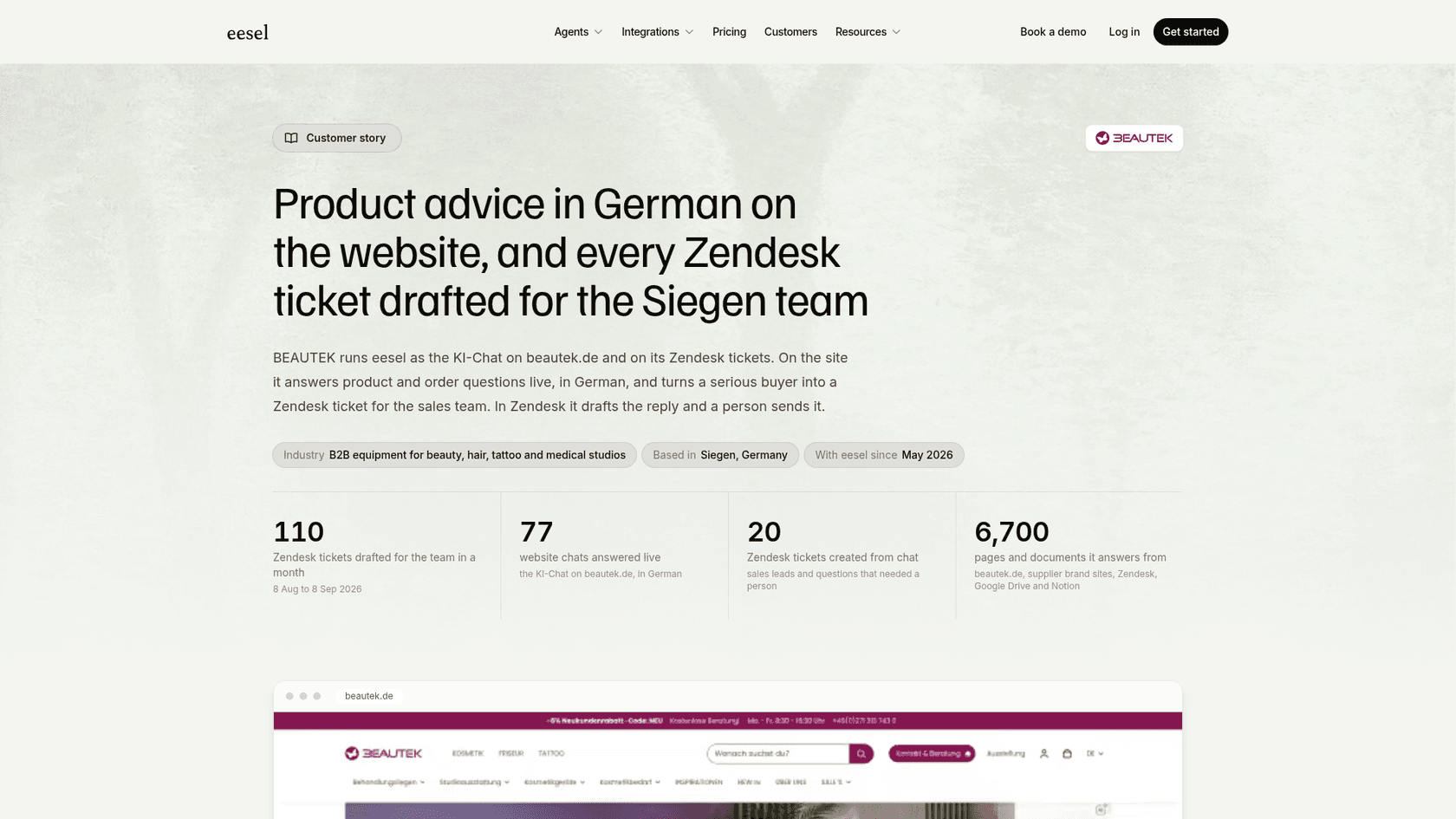
BEAUTEK, a German beauty equipment supplier, runs eesel as its website chat: in one month it answered 77 chats live in German, drafted 110 Zendesk tickets and turned 20 chats into tickets for sales. Nordbutiker runs one bot per brand across four countries, each trained on its own store's site and Zendesk tickets, and koffer.ch has a small team sending Freshdesk drafts in four languages.
On price, I'll be straight: eesel isn't the cheap option per chat. eesel pricing starts with 100 free credits, then $299 a month for 500 credits, where a chat or a ticket is 1 credit however long it runs. That's about 60 cents a chat against Yamidoo's 6 to 10 cents, and what it buys is the ticket work after the chat. At 1 credit each, BEAUTEK's month of chats and drafted tickets comes to under 200 credits.
If your WordPress chats need to land in your helpdesk, try eesel free, no card needed, and test it on your own past questions first.
Frequently Asked Questions
How much does WPZOOM Connect cost?
The plugin itself is free on WordPress.org, including Click to Chat, social icons and share buttons. AI Chat is billed by Yamidoo: Free for 50 conversations a month, then $29, $59 or $99 a month. The optional Social Icons PRO license is $39 to $79 a year. My WPZOOM Connect review covers what each part does.
Is WPZOOM Connect AI Chat free?
Yes, up to 50 AI-answered conversations a month on Yamidoo's Free plan, with no card and no expiry. The Free plan uses the basic AI model, one source per type and an English-only widget. For other free options, see my list of free AI chatbots.
What counts as a conversation in WPZOOM Connect pricing?
One chat session with one visitor, however many messages it takes. A visitor who comes back after a day away starts a new one, and only AI-answered conversations count, so your own replies are free. This is a different unit from a resolution, which I explain in deflection vs resolution rate.
What happens when I hit my Yamidoo conversation limit?
Yamidoo emails you at 75%, 90% and 100%, then pauses AI answers on new conversations until the period resets or you upgrade. The widget keeps collecting messages, so nothing is lost, but nobody answers them until you do. My guide to chatbot cost compares this with overage billing.
Is yearly WPZOOM Connect AI Chat billing cheaper?
Yes. Yamidoo's yearly billing is ten months for the price of twelve: $290, $590 or $990 a year, which works out to about $24, $49 and $83 a month. Add-on seats and sites are listed as monthly prices on top. For a wider comparison, see my chatbot ROI breakdown.
What if I need more than 1,500 conversations a month?
There's no listed plan above Pro's 1,500 conversations, and the add-ons only cover seats and websites, so you'd need to ask Yamidoo. At that volume, it's worth comparing a tool that hands chats to your helpdesk, like the eesel chat bubble, where a chat is 1 credit on eesel pricing.