
What Vellum AI pricing looks like in 2026
I want to start with the thing that trips people up, because it will colour everything below: Vellum is not the company most people think it is.
Until 2026, vellum.ai was an LLMOps platform for prompt engineering, evaluations, and workflow orchestration, the kind of tooling that sits under a custom AI build. It pivoted. The product it sells today is an always-on personal AI assistant, and the old product pages redirect to the homepage. The docs subdomain still carries the old platform's documentation in full, which is why a search for "Vellum pricing" can surface two companies wearing the same name. One practitioner put the confusion plainly on X:
"vellum is a dev/eval platform, different category entirely"
@physicsbyelena, X - 15 August 2026
Everything in this post is about the assistant, which is what vellum.ai/pricing prices today.
Here is the whole rate card in one place, pulled from the pricing page and the pricing docs.
| Plan | Price | Machine | Storage | Credits included | Platform fee | Email + subdomain |
|---|---|---|---|---|---|---|
| Base (free forever) | $0 | Small, 1 vCPU / 2 GiB | 6 GiB | None, pay as you go | Not included | No |
| Mighty | $30/mo | Small, 1 vCPU / 2 GiB | 10 GiB | $25 | Not included | No |
| Super | $100/mo | Medium, 2.5 vCPU / 5 GiB | 30 GiB | $45 | Included | Yes |
| Ultra | $200/mo | Large, 4 vCPU / 8 GiB | 60 GiB | $115 | Included | Yes |
| Custom | From $50/mo | Medium, Large, or XL | 10 to 120 GiB | Optional, $10 to $200 | Included | Yes |
| Self-hosted | $0 to Vellum | Your hardware | Yours | Bring your own keys | None | Your own |
Two things are worth noticing before we go further. There is no seat anywhere in that table, and there is no annual discount. Vellum prices one assistant package, billed monthly, and that is the whole model.
The free plan that isn't on the pricing page
I re-scraped vellum.ai/pricing while writing this, twice, on two URL variants, and the result was the same both times: the page begins at the Mighty card. There is no Base card, no $0 column, and no "start free" hero. What the page does do is reference Base twice inside its own FAQ, in answers to other questions. The computer-sizes answer on the pricing page says "Base includes Small (fixed)". The credits answer says they are "pay-as-you-go on both Base and Pro".
So the page assumes you know about a plan it never shows you.
The docs are unambiguous where the marketing page is silent. The pricing docs call Base "free, forever", and it includes a Small machine, 6 GiB of persistent storage, pay-as-you-go credits with no monthly minimum, and managed LLM credentials, which means Vellum covers the model API keys rather than making you bring your own. For a category where the usual free tier is "clone the repo and go find a VPS", that last item is a real thing to give away, and it saves you standing up an OpenAI API account just to get started.
Which makes the omission strange rather than sinister. My read is that it's a page that got rebuilt around the paid packages and never got its entry tier put back. But the practical effect is that a lot of people are going to land on a $30 starting price for a product they could have tried for nothing.
And once you put Base next to Mighty, the $30 tier gets harder to justify:
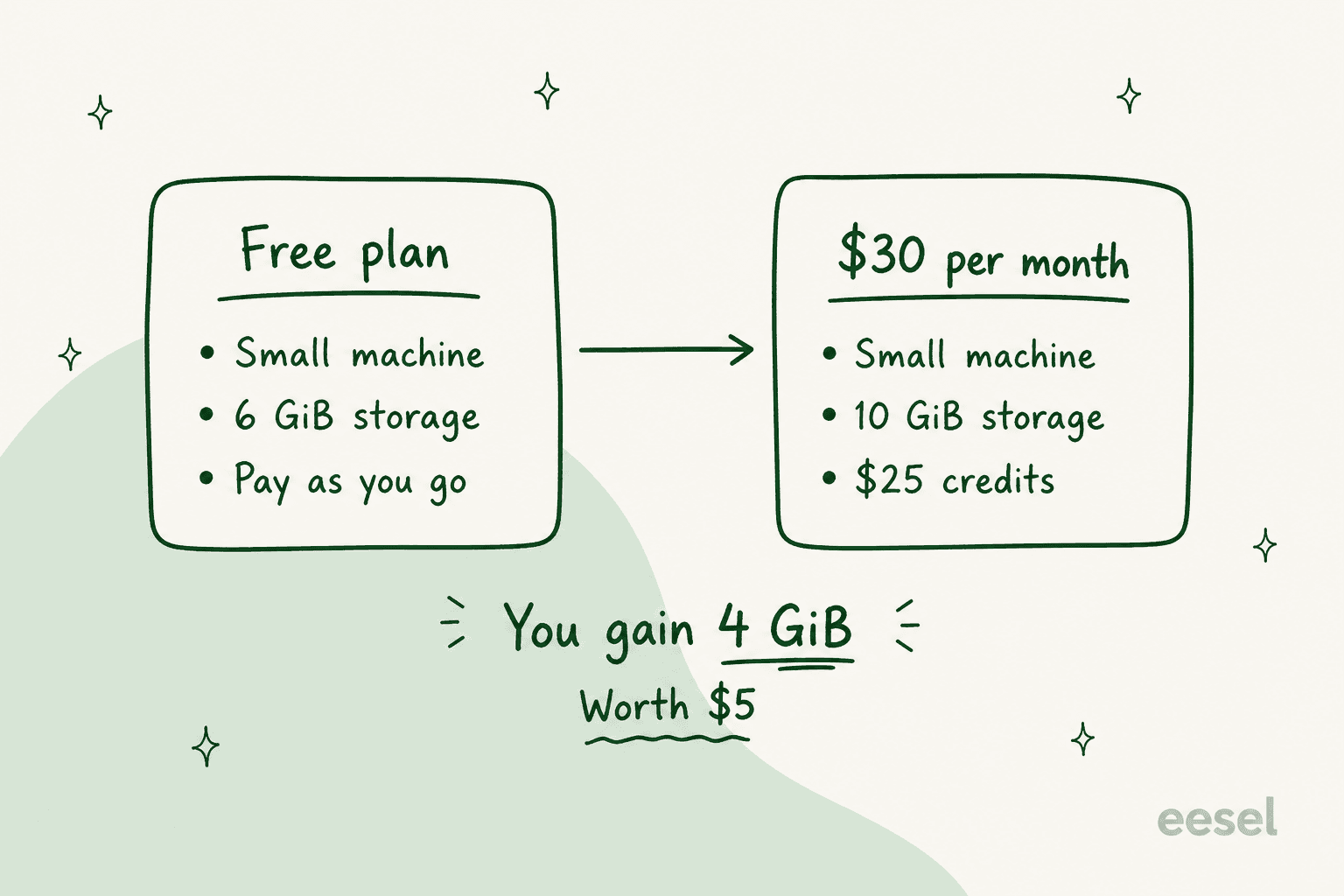
Same machine. Four more GiB of disk, which Vellum's own rate card prices at $5. And $25 of credits, which is money you were going to spend on tokens anyway. Mighty is a $5 product upgrade with a $25 gift card stapled to it. If you're on Base and burning more than $25 of credits a month, moving to Mighty costs you $5 and buys you disk. If you're not, it costs you $30 to prepay for something you won't use.
The packages carry no discount, and here's the arithmetic
This is the part I did not expect. Vellum publishes an à la carte rate card in its docs: a $10/mo platform fee, machine tiers at $35, $60, and $125, storage tiers from $5 to $30, and optional credit bundles from $10 to $200. Normally a vendor publishes both a bundle and its components so you can see the bundle is cheaper.
Run the sums and the bundles are not cheaper. They are identical.
| Package | Platform fee | Machine | Storage | Credit bundle | Sum | Headline price |
|---|---|---|---|---|---|---|
| Mighty | $0 | Small, included | 10 GiB, $5 | $25 | $30 | $30 |
| Super | $10 | Medium, $35 | 30 GiB, $10 | $45 | $100 | $100 |
| Ultra | $10 | Large, $60 | 60 GiB, $15 | $115 | $200 | $200 |
Three for three, to the dollar. The packages are presets, not deals. Vellum's docs are upfront that this is the design, describing each package as "a starting point" you can adjust, at which point your plan silently converts to a Custom configuration. There's no penalty for leaving a package and no reward for staying on one.
I actually think this is the fair way to do it, and I'd rather see it than a fake 20% "bundle saving" computed against a list price nobody pays. But it changes how you should shop. There is no plan to pick. There is a machine, a disk, and a prepaid balance, and the only question is how much of each you want.
Which brings us to the thing the headline prices hide:
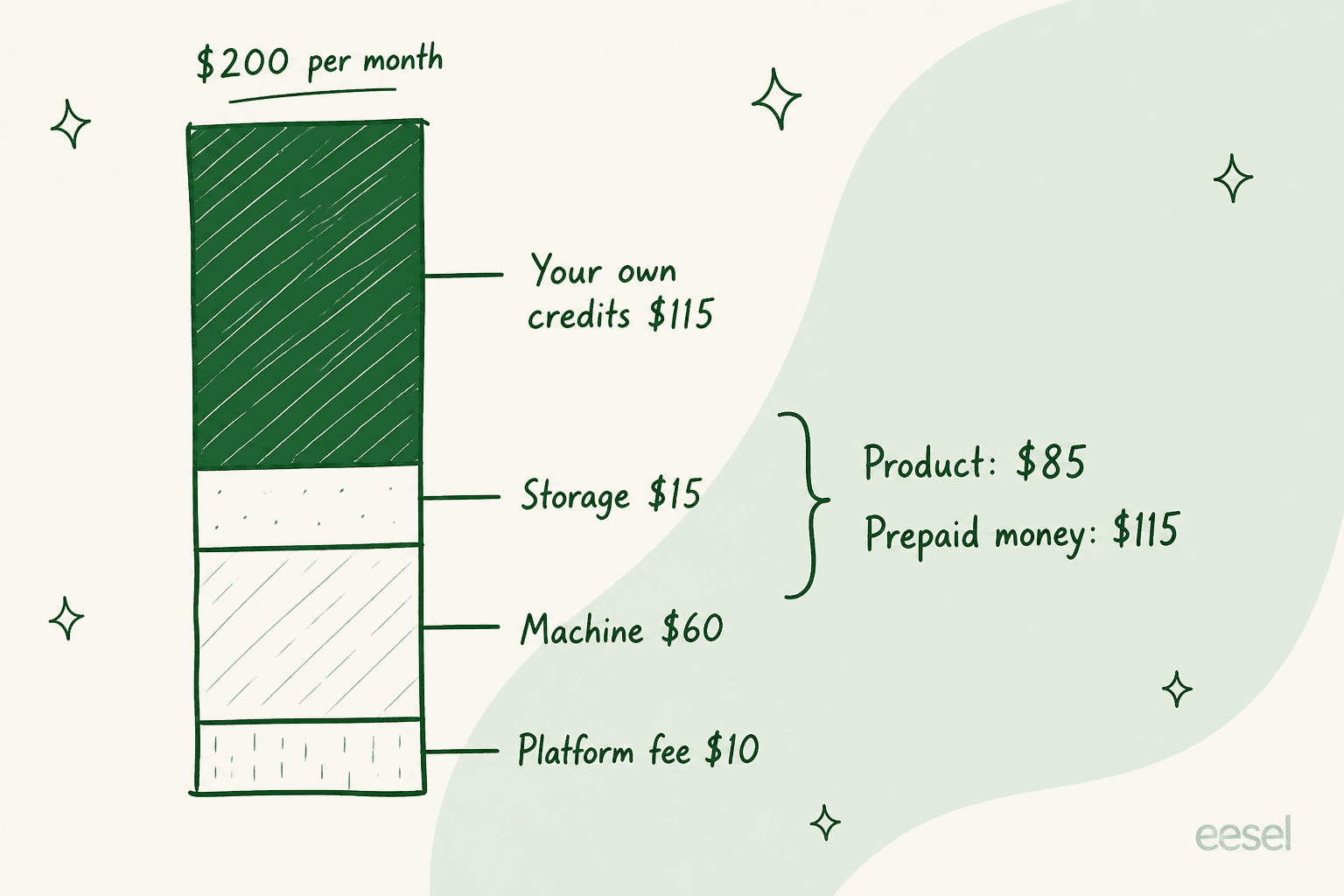
On Ultra, $115 of the $200 is your own spending money held in escrow. The infrastructure you're renting is $85. On Super it's $55 of product against $45 of credits. On Mighty it's $5 against $25. So the tiers are not really "small, medium, large assistant". They're "small, medium, large prepayment", with a bit of extra compute attached as you climb.
That reframe matters for comparison shopping. When you put Ultra's $200 next to a $200 competitor, you are comparing $85 of compute against $200 of product, unless that competitor also front-loads your token spend. Most don't. It's the same trap that makes Manus pricing awkward to line up side by side with anything else. Viktor pricing has the same shape. Do the subtraction before you conclude anything.
Build your own: the full à la carte rate card
If the packages are just sums, the components are the real price list. Here's every published line.
Platform fee, $10/mo. Buys a custom subdomain, a static IP address, and priority support. Included on Super and Ultra, absent on Mighty and Base, and mandatory on any Custom configuration.
Machine tiers:
| Tier | CPU | RAM | Price |
|---|---|---|---|
| Small | 1 vCPU | 2 GiB | Included on Base and Mighty |
| Medium | 2.5 vCPU | 5 GiB | +$35/mo |
| Large | 4 vCPU | 8 GiB | +$60/mo |
| XL | 4 vCPU | 16 GiB | +$125/mo |
Storage tiers:
| Size | Price |
|---|---|
| 6 GiB | Included on Base |
| 10 GiB | +$5/mo |
| 30 GiB | +$10/mo |
| 60 GiB | +$15/mo |
| 120 GiB | +$30/mo |
The 250 GiB and 500 GiB tiers still exist but are closed to new subscriptions, grandfathered for people who already have them.
Credit bundles run $10, $25, $50, $100, or $200 a month, charged as a recurring line item, and they buy exactly their face value in credits. A $50 bundle costs $50 and gives you $50 of credits.
There's one trap in the Custom configurator worth flagging. The minimum Custom plan is $50/mo, because Custom forces the $10 platform fee and its cheapest machine is Medium at $35, plus $5 of storage. Small is not offered on Custom. So if what you wanted was the free tier's Small machine plus a custom subdomain and a static IP, that combination cannot be bought. Your cheapest route to the platform fee is $50 a month, and $40 of that is compute you didn't ask for.
Here's a calculator that runs Vellum's published rate card so you can see what any configuration costs, and how much of it is product versus prepayment:
Credits: what one is, and the 15 things that spend it
A credit is a dollar. Vellum's pricing FAQ says so directly: "$1 = 1 credit, and you only pay for what you use". Credits are spent on inference, web search, image generation, and paid third-party APIs you reach through Vellum's managed OAuth. Because the models underneath are the usual ones, the rates you would see on Claude pricing are what land on your balance.
Vellum's stated philosophy here deserves credit, and I mean that without hedging. The pricing docs say the company "passes through model provider costs at cost" with no margin or markup on token usage, so a dollar of credits is a dollar to the model provider. That is a genuinely unusual thing to publish, and it means the credit line is not a profit centre. It also explains the shape of everything above: if tokens are sold at cost, the infrastructure line is where the business lives, which is why the machine and storage tiers are priced the way they are.
Now for the part that decides your actual bill. Vellum's docs enumerate the actions that consume credits, and there are 15 of them:
| Group | Actions | Runs when |
|---|---|---|
| Conversation | Main agent, Inference | Main agent is you chatting; Inference is skills and utilities |
| Memory | Memory consolidation, Memory extraction, Memory retrieval, Recall | Mostly background |
| Conversation polish | Conversation summarization, Conversation title, Conversation starters, Empty-state greeting, Context compactor | Background |
| Autonomy | Heartbeat agent, Filing agent, Notification decision | Background |
| Other | Unknown Task | Untagged calls Vellum is still attributing |
Read that table again and count what's actually driven by you. One row. Everything else is the assistant maintaining itself.
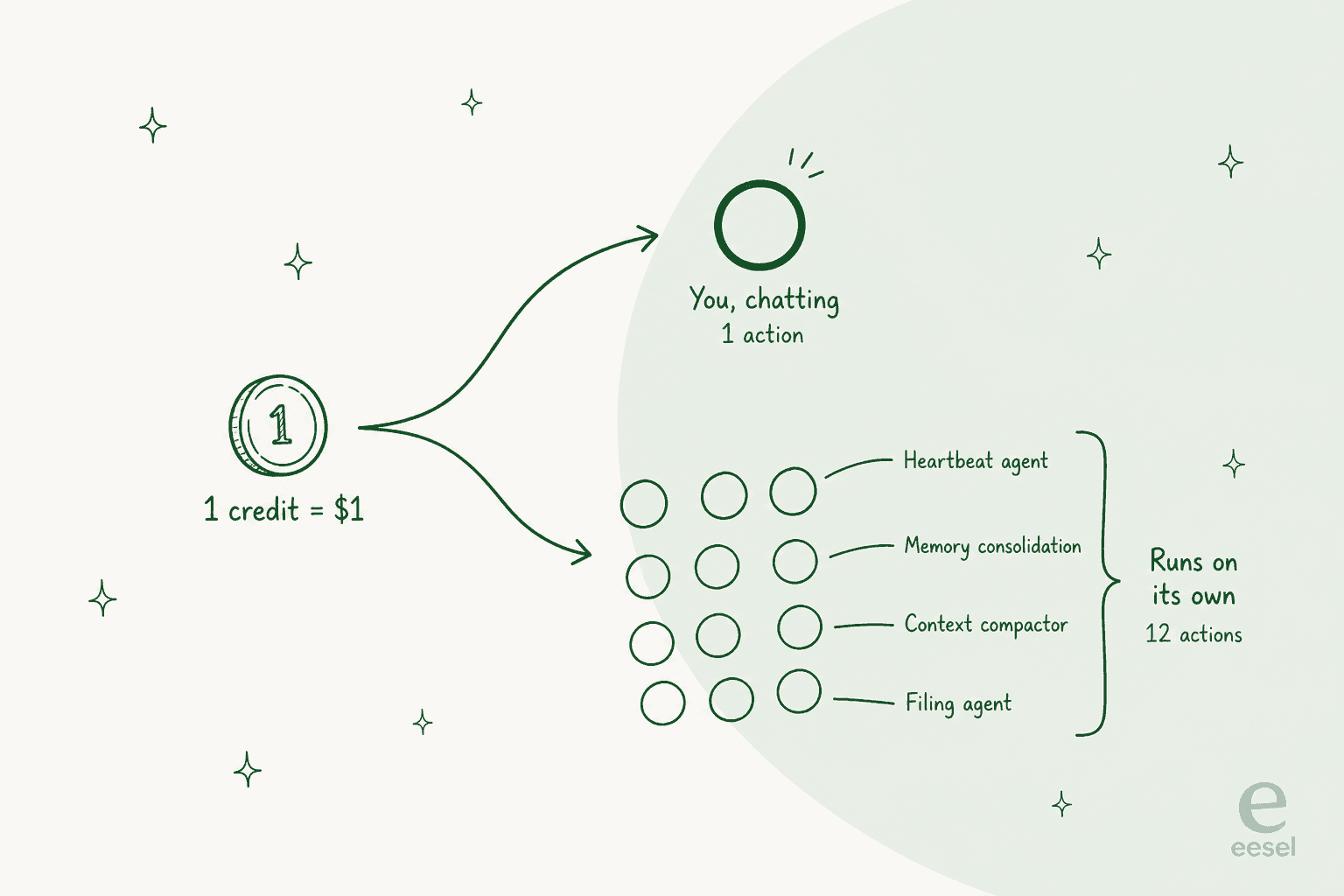
Some of these are cheap. Generating a conversation title is one small call. But others are not: the heartbeat agent is described as "periodic check-ins where your assistant reflects, plans, and decides whether anything needs your attention", and the context compactor fires on long conversations, which are exactly the conversations already carrying the most tokens. Memory consolidation and extraction run over your history rather than over your last message, which is the same retrieval-shaped work an AI knowledge base does, except billed continuously.
The community has been circling this exact cost shape for a while, in the wider always-on assistant category:
"OpenClaw's heartbeat burns tokens 48 times a day asking 'anything new?' on your most expensive model. Hermes has no heartbeat at all and its cron system is so locked down it breaks on the first two attempts. One approach wastes money. The other wastes time. Neither just works."
u/ShabzSparq, Reddit - r/better_claw, 30 May 2026

And on the memory side specifically:
"Unlimited memory sounds like the obvious win until the context bloat means you're sending 15,000 tokens of stale conversation with every new message and paying frontier model rates for it."
u/Lower_Assistance8196, Reddit - r/better_claw, 2 June 2026
To Vellum's credit, the docs don't hide any of this, and they say background work is tunable: you can ask the assistant to reduce heartbeat frequency or memory compaction, or to run those on a cheaper model. The docs also admit outright that the company is "actively working on making background spend more visible and easier to control", which is an honest thing to write on your own pricing page.
But "tunable by asking the assistant nicely" is not the same as a budget you set. And the thing being tuned is the thing you bought the product for. Turning down the heartbeat on an always-on assistant is turning down the always-on part.
Auto-Reload, and where a credit bill gets away from you
Credits are prepaid. When they run out, the app shows a "You've run out of credits" message and paid actions pause until you top up. That hard stop is the best budget-safety feature in the whole model, and I'd take it over silent overage billing any day.
Auto-Reload is the feature that removes it. It takes three settings:
| Setting | Range | Default |
|---|---|---|
| Reload when balance drops below | $1 to $100 | $100 |
| Amount added per reload | $10 to $500 | $10 |
| Monthly spending cap | $25 to $10,000 | Optional, empty by default |
Look at the interaction between those three. The default trigger is a $100 balance and the default top-up is $10, so out of the box Auto-Reload fires the moment you dip under $100 and adds a tenth of that. It will keep firing. Meanwhile the one setting that actually bounds your month, the spending cap, is the one that ships empty, and empty means unlimited.
None of that is hidden and all of it is adjustable in Settings. But the safe configuration is not the default one, and on a product where 12 of 15 billable actions run without you, the default matters more than usual. If you turn Auto-Reload on, set the monthly cap in the same sitting.
This is not a Vellum-specific failure, for what it's worth. I've watched buyers misjudge a usage meter in a single afternoon. One of ours, at an email-security company evaluating on Freshdesk, burned through 200 interactions on their first test day and immediately called to ask what that meant at their real volume of roughly 9,000 a month. They weren't wrong to ask. Test-day usage on any AI tool is a terrible predictor of steady state, in both directions, and the honest answer is that you cannot know until you've run a month. It is the same trap teams hit when they first model AI support costs. What you can do is make sure the ceiling exists before you find out.
What Vellum costs in practice
Three worked examples, using Vellum's published components. Credit spend is genuinely unknowable in advance because Vellum publishes no per-action rate, so I've flagged where the number is a configuration total rather than a bill.
The curious individual. You want to see what the fuss is about. Base plan, $0/mo, and you top up $10 of credits to play with. You get a Small machine, 6 GiB, and Vellum's own model keys. Real cost: $10, once. This is the right starting point for almost everybody, and it's the one the pricing page doesn't offer you.
The daily driver. You've used it for a month, you like it, and you're burning around $40 of credits. Mighty gets you $25 of that plus 10 GiB for $30, and you top up the remaining $15, so you're at $45/mo. Or you skip the package, stay on Base, and pay $40 in pay-as-you-go credits with 6 GiB of disk. The package saves you nothing and costs you $5 for four extra GiB. Pick it if you want the disk; skip it if you don't.
The power user. You want the XL machine and 120 GiB, because you're keeping a large document store on the box. That's the $10 platform fee plus $125 plus $30, so $165/mo of infrastructure before a single credit. Add a $200 credit bundle and your subscription line is $365/mo, which is the practical ceiling of Vellum's published pricing. Anything past that is pay-as-you-go top-ups at $100 a transaction.
For context on where that lands, $165/mo of infrastructure is real money for a personal tool, and it's most of the way to a seat of something team-shaped like an AI ticketing system.
If you're evaluating this for work rather than for yourself, Sierra pricing is the closer comparison. If you're staying personal, put it next to OpenClaw pricing instead.
What buyers actually say about the cost
I'll be straight about the evidence base here, because it's thin. Vellum's assistant launched around 17 March 2026 and has almost no organic community footprint: no Show HN, no G2 or Capterra listing for the assistant, and several of the highest-ranking "Vellum vs" Reddit threads read as vendor-seeded, with one answered "Nice ad 👌 saw your launch video on Twitter." There is a G2 profile at 4.8/5, and I'm not citing it, because its newest review predates the assistant's launch and at least one review is clearly about an unrelated book-formatting app of the same name.
What's left is small but real. The sharpest one-liner is also the most on-topic:
"I think cost is the downside for vellum, it has everything else going for it"
u/ImagineAbimanyu, Reddit - r/AI_Agents, 16 July 2026
That's a compliment wrapped around a complaint, and it matches my read of the product. The longest-tenured user I could find, about a month in, was positive on the thing the credit meter is mostly funding:
"I've been using it for about a month now. I think it's easy but it has its own headaches. I connect to a lot of web services via Composio and that connection breaks easily and has to be reset. Training it on my own data has been pretty easy and it seems to have excellent memory."
u/Cooperman411, Reddit - r/AI_Agents, 17 June 2026
"Excellent memory" is worth pausing on, because memory is precisely what four of the fifteen credit-burning actions exist to produce. The feature people rate most highly is the feature quietly spending the most in the background. That's not a criticism so much as the trade the product is making.
The only substantive Hacker News comment on the assistant in 2026 is a comparison that landed in an unrelated thread:
"I didn't have good experience with Hermes. Vellum.ai was better, but unfortunately it had a bug where opencode go providers failed to work for a time, so I instead starting writing my own. (Now it is working)"
gf000, Hacker News - 1 August 2026

Better than Hermes, good enough to be missed when it broke, not sticky enough to survive one provider bug. That's about where a five-month-old product should be.
What the price card doesn't buy you
Every honest pricing post needs this section, and Vellum's gaps are unusually clean to list because they're gaps of youth rather than of design.
- No seats, and no team anything. Vellum prices one assistant package. There is no per-user line, no shared workspace, no admin console in the pricing. Five people means five subscriptions and five separate memories that never meet, which is the structural gap that AI teammates exist to close.
- No published compliance. No SOC 2, ISO 27001, GDPR, or HIPAA line appears anywhere on the pricing page or in the pricing docs. If your procurement process has a security questionnaire, budget time for it.
- No hosted uptime SLA. The word SLA appears exactly once in Vellum's pricing material, in the self-hosting section, where it says you control your own. The hosted plans publish none.
- No annual discount. Every price renders as a flat monthly figure. If an annual toggle exists, it isn't published, which is unusual next to Decagon pricing and most enterprise tiers.
- No published per-credit rates. You know a credit is a dollar. You do not know what a heartbeat costs, so you cannot model a month before running one. Contrast that with a published token card like ChatGPT pricing.
- macOS and iPhone only. Windows and Android are on the roadmap, not shipped. If cross-platform matters, Claude Cowork pricing is the closer substitute.
Set against that, the things Vellum does give you at $0 are not nothing: managed model credentials, an MIT-licensed codebase, a self-host path, and a hard stop when credits run out. For a personal tool, that's a defensible package. For anything with a procurement team attached, the list above is the conversation.
Self-hosting: the $0 tier with a different bill
Vellum assistant is open source, and the pricing page ends with the offer: deploy it on your own hardware, a VPS, or a private cloud, with "no platform fee, no computer tier charges", per the pricing page. You bring your own model keys, so the credit meter disappears entirely and you pay OpenAI or Anthropic directly.
If you're going to run it yourself, price the whole thing honestly. Vellum's hosted Small machine is 1 vCPU and 2 GiB, which is a cheap VPS. Their Large is 4 vCPU and 8 GiB, which is not free but is well under the $60/mo Vellum charges for it. On raw infrastructure, self-hosting wins comfortably.
The line that doesn't show up on any invoice is your time. When I wrote up the Vellum alternatives shortlist, the sharpest number in the whole piece came from a competing ecosystem's own cost calculator: it output $535/mo for a self-hosted setup, of which $455 was the operator's own time at a $30/hour slider. Strip the labour and the same box was about $80. Same software, roughly a hundredfold spread, and the entire gap was a person.
A measured two-week comparison in r/better_claw put concrete hours on it, finding setup times of 4 hours for one self-hosted runtime and 2 for another against 8 minutes for a managed option, with upkeep across the same two weeks running 3 to 4 hours versus 15 minutes. The author's summary was blunt:
"The ugly: I was spending 30-40 minutes a week on maintenance. Checking logs. Pruning memory files. Restarting the gateway after DNS blips killed the Telegram listener. My agent was useful but I was slowly becoming its sysadmin."
u/ShabzSparq, Reddit - r/better_claw, 18 June 2026
So the honest framing is this. Self-hosting doesn't remove the bill, it moves it from your card to your calendar. If your evenings are worth less to you than $85 a month, self-host. If they aren't, Ultra's infrastructure line is fairly priced.
That same maths shows up across open source AI agents generally. It's the reason a runtime like ZeroClaw competes on footprint rather than on features.
How Vellum AI pricing compares
Vellum is priced like a computer rental. Most things people compare it against are priced like software, and a few are priced like work. Those are three different meters and lining them up needs care.
| Tool | What you're billed for | Entry price | Free tier | Spend cap |
|---|---|---|---|---|
| Vellum | Machine, storage, and credits | $0 (Base), $30 (Mighty) | Yes, undocumented on the pricing page | Optional Auto-Reload cap |
| OpenClaw | Self-hosted, you supply everything | $0 plus your infrastructure | Open source | Your own provider limits |
| Claude Cowork | Bundled into an Anthropic subscription | Included with a paid plan | No | Plan-level usage limits |
| Lindy | Managed tasks and credits | Paid tiers | Limited | Plan-level |
| Manus | Credits per task | Paid tiers | Limited | Plan-level |
| eesel | Tickets and chats handled | $0.40 per task handled | $50 of free usage | Hard monthly cap |
The distinction that matters isn't the number, it's what the number is attached to. Vellum's meter tracks how busy your assistant is. A work-based meter tracks how much got done. One of those you can forecast from your own operational data, and one of those you can only observe after the fact.
That's not a knock on Vellum, because a personal assistant has no unit of work to bill against. It's just why the two shapes are hard to compare, and why a $200 personal subscription and a $200 team bill mean completely different things. The same mismatch shows up against Chatbase pricing, which meters conversations rather than compute.
If you're weighing this for a team rather than for yourself, our Vellum alternatives post is the better read, alongside the wider best AI employee roundup.
Try eesel
I've spent the last few years building and running AI on live support queues, which is a very different problem from running one on your laptop. The thing that shows up over and over in those rollouts is that a usage meter is only useful if you can forecast it, and you can only forecast it if the unit is work you already count.
That's the whole basis for how eesel is priced. You pay $0.40 per ticket or chat handled, and a conversation counts once no matter how many replies it takes. Dashboard lookups are free. Unlike Zendesk pricing, there's no platform fee, no per-seat charge, and no monthly minimum, so your bill is your ticket volume times forty cents, which is a number you can pull from your helpdesk right now.
The other half is testing before you commit. Simulation replays your own past tickets and scores what the AI would have said against what your team actually sent, so you see the gaps before a customer does. It is the step most support ticket automation rollouts skip. That matters more than it sounds: I've watched a confident-sounding bot quietly give wrong answers, which is exactly why we run history first rather than flipping a switch and watching the queue.
We ran a cost analysis for one prospect at around 1,000 tickets a month who was comparing per-resolution vendors. At 80% resolution their bill would have been $792/mo, and a Black Friday spike to 4,000 tickets took it to $3,168. The uncomfortable part of per-resolution pricing is that it charges you more for working better, and more again for a month you didn't choose. Flat per-task pricing keeps November looking like March.
It's free to start, with $50 of usage and no card, and there's a hard monthly spend cap if you want one. It plugs into Freshdesk and seven other helpdesks. If you're evaluating an AI assistant for a shared queue rather than a personal one, try eesel and point it at a month of your real tickets.
Frequently Asked Questions
How much does Vellum AI cost?
Does Vellum AI have a free plan?
What is a Vellum credit and what does it pay for?
Is Vellum AI pricing good value compared to the alternatives?
What is Vellum's pricing for a small team?
Can I cap what Vellum spends each month?
What happens if I run out of Vellum credits?


Article by
Kira
Kira is a writer at eesel AI with a Computer Science background and over a year of hands-on experience evaluating AI-powered customer service tools. She focuses on breaking down how helpdesk platforms and AI agents actually work so that support teams can make better buying decisions.