

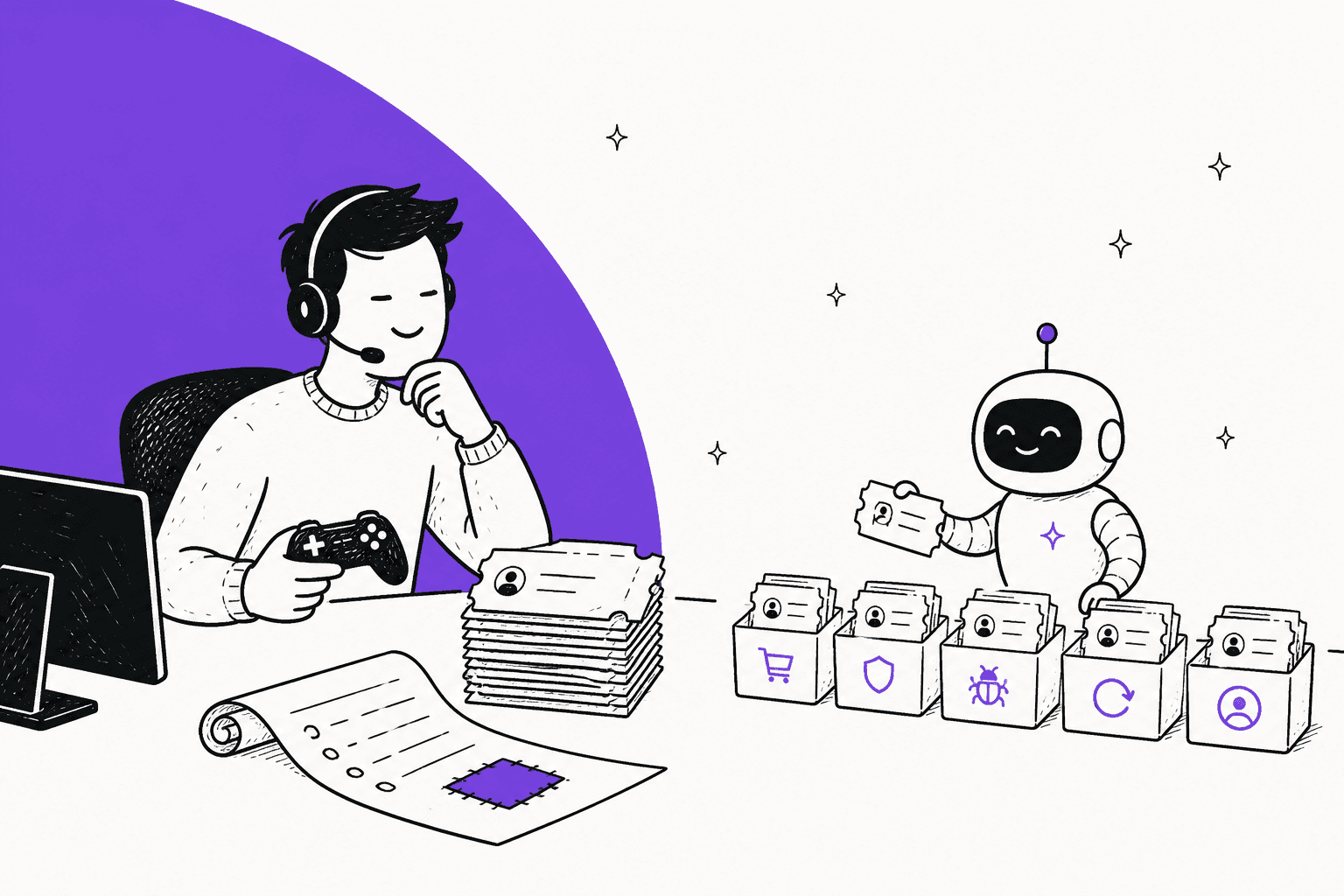
AI for gaming customer support works when you let it answer from patch-versioned notes, draft the bug and login replies, and keep bans, account takeovers and safety reports with a person. Of the five tickets that fill a player queue (lost purchases, bans, bugs, refunds, login problems), AI can answer the "how do I restore" and "is this a known bug" parts on its own, draft replies for the rest, and should never decide a ban or hand an account to someone who only asks nicely.
Two things most gaming AI pitches skip. First, the store that took the payment owns the refund: Apple, Steam and PlayStation decide theirs, and Google Play sends refunds after 48 hours back to you. Second, the game version on the ticket decides the right answer, so a known-issue note without a version number is a wrong answer waiting to happen.
eesel's AI helpdesk teammate runs this pattern inside Zendesk, Freshdesk, HubSpot and Gorgias. MentorShow has eesel read about 1,200 tickets and conversations in a month, write 432 drafts, and flag refunds and account changes for a person straight away. Plans start at $299 a month.
Why does player support spike after every patch?
Because a patch changes what thousands of players see on the same day, and every change creates a fresh question your help center hasn't answered yet. A new build breaks a login flow on one platform, an item disappears from an inventory, a store listing shows the old price, and the same ticket arrives 400 times before lunch.
I build eesel's integrations, and in the years eesel has run AI on live support queues the pattern is the same: the first hour after a release is not hard questions, it's one question asked many times with slightly different words. That is the sort of work a well-grounded AI is good at, and the sort of work a tired agent is bad at, because by ticket 60 they are retyping the same workaround.
Before writing this I asked ChatGPT the question a player support lead would send: we get flooded with tickets about lost purchases, account bans, bugs, refunds and login problems, and it spikes after every patch, can AI handle some of this and what should stay with a person? It read helpdesk vendor gaming pages from Helpshift, Zendesk and Ada, plus an AWS guide for game developers. The answer was sensible: AI handles information and processes, people handle judgment, exceptions and accountability. What none of those pages did was look at the store refund rules the answer depends on, or show what a patch-versioned knowledge base looks like. That is the gap I'm filling here.
Players feel the cost of getting this wrong in a specific way. One commenter on a Hacker News thread about automated bans put it bluntly:
"Algorithmic customer support “decisions” should always be appealable to a human audience."

That sentence is the design rule for the rest of this guide: automate the answers, never the verdicts.
Which player tickets can AI answer, draft or leave to a person?
Sort every ticket by one question: is the answer a fact you can look up, a draft someone should check, or a judgment about a person? Facts the AI can read in your docs get answered. Anything that needs an order, an account or a log gets a draft that a person sends. Verdicts, safety and money exceptions stay human.
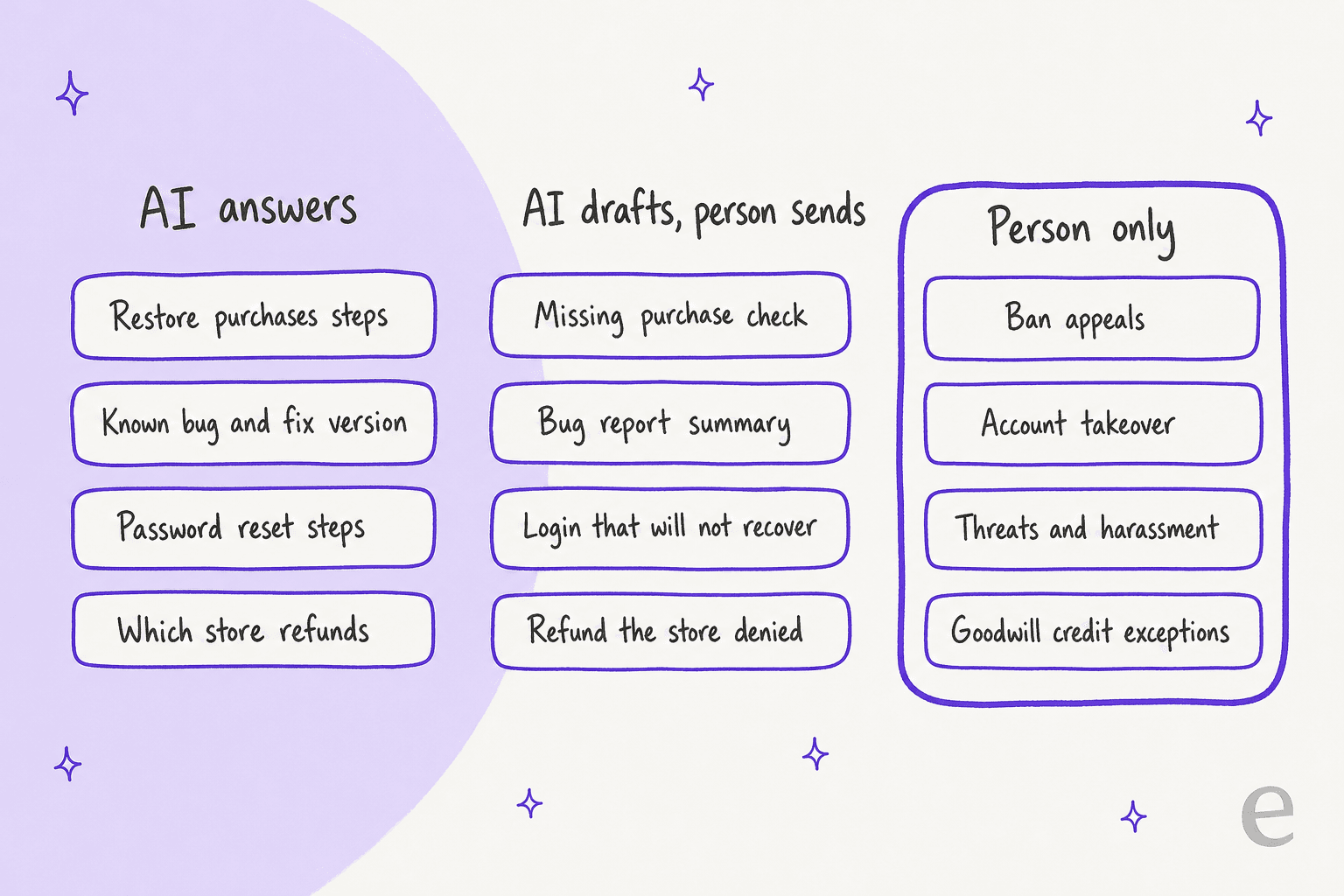
Here is the split for the five tickets every player queue shares:
| Ticket type | AI answers on its own | AI drafts, a person sends | A person only |
|---|---|---|---|
| Lost purchases | How to restore purchases on each store, where the receipt lives | "My item is missing" with the order and platform pulled in | Purchases from an account that may not be the player's |
| Account bans | Where the rules and the appeal page are | A summary of the ban reason and account history for the reviewer | Every decision to confirm, lift or change a ban |
| Bugs | Known issue, affected version, workaround, fix version | A structured bug report (platform, build, steps) for QA | Lost saves, corrupted data, anything new and serious |
| Refunds | Which store owns it, its window, how to request | A reply when the store said no or the request falls to you | Disputed or large refunds, goodwill credits outside the rules |
| Login problems | Reset steps, which platform account is linked | Lockouts that the standard recovery didn't solve | Ownership disputes and suspected takeovers |
The right-hand column isn't there because AI writes badly. It's there because those are the messages where a wrong reply costs a player their account or costs you money. My guides to AI for account recovery and AI for fraud-related support cover the verification side in more depth.
One more split worth making early is who the player is. A parent writing about a child's purchase, a streamer with a ban and a player with a corrupted save are all "tickets", but they carry different risk. If a message mentions a minor, a threat or self-harm, it skips the sorting table and goes to a trained person. More on that below.
Try it on the five types:
Pick a ticket type to see who should own it
Why does the game version decide the answer?
Because "the shop is broken" means one thing on build 2.4.0 and another on 2.4.1, and an AI that doesn't know the build will quote the wrong workaround. The version, the platform and the store are the three fields that turn a vague message into a routable ticket.
Here is the minimum I'd put on every player ticket before an AI touches it:
| Field | Why it matters | Where it comes from |
|---|---|---|
| Platform (iOS, Android, PC, console) | Fixes differ per platform and so do refund rules | Player form, in-app help SDK, or device header |
| Game version or build | Decides which known-issue note applies | In-app help SDK, or ask the player once |
| Purchase store | Decides who owns the refund and where the receipt lives | Order record or receipt number |
| Player or account ID | Lets AI pull history without asking again | In-game support button |
| Language | The reply should come back in it | Detected from the message |
Players rarely type these. That is why the in-game help button matters: it can attach the build, platform and player ID automatically, and the AI then triages on facts rather than guesses. A help SDK built for games, like the one Helpshift ships, can attach them natively, and in other helpdesks you can pass the same fields as custom ticket fields. A G2 reviewer of Helpshift described the cost of getting there honestly:
"There's a lot of manual work that has to happen to set up all the automation tags, custom fields, and everything."

That is an honest limit worth planning for: the fields are the work, whatever tool you use. A good auto-triage setup reads those fields to route, and my guide to AI ticket triage tools compares options.
What does a patch-versioned knowledge base look like?
It looks like release notes your AI can read, with the version number and date attached to every entry. Studios already publish these. Dota 2, for example, keeps a page for each gameplay update with a version selector, so 7.41f is a different document from 7.41e.
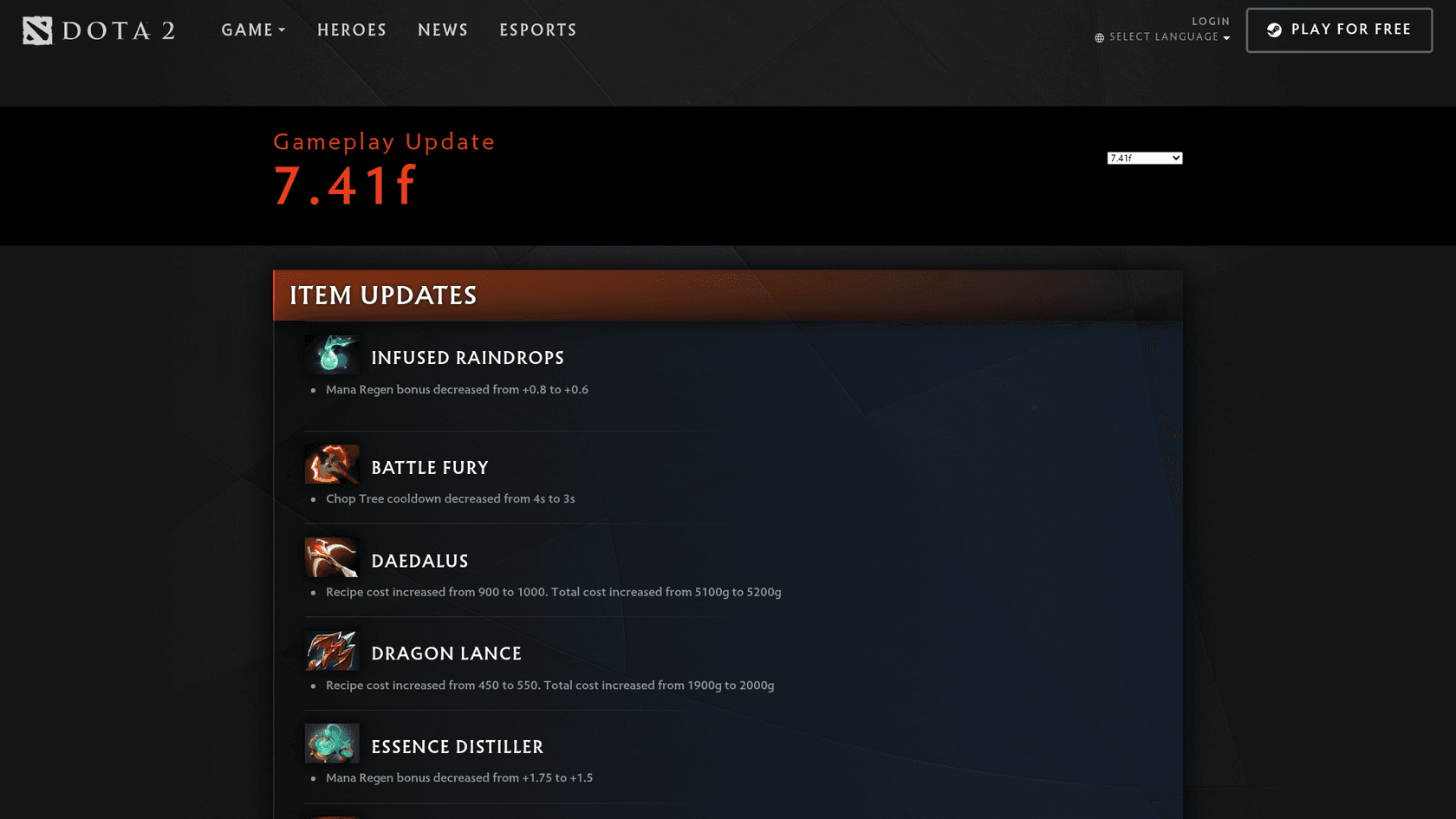
Copy that habit into your help center. Each known issue gets four lines: the symptom in player words, the builds it affects, the workaround, and the build that fixes it. The AI then answers "my purchase didn't show up after the update" with the note for the player's build, and says "this is fixed in 2.4.2" only when the player is not yet on it. If the build isn't known, it should ask, not assume. Notes written this way work with plain RAG, and they keep an AI from quoting last month's workaround, a risk I explain in stopping AI hallucinations.
How do you survive the ticket spike after a patch?
Cluster first, answer once, update once. When the release goes out, the AI groups incoming tickets by game version and symptom, so 400 messages become four problems. You write one known-issue note per problem, the AI answers from it, and when the fix ships you change that one note.
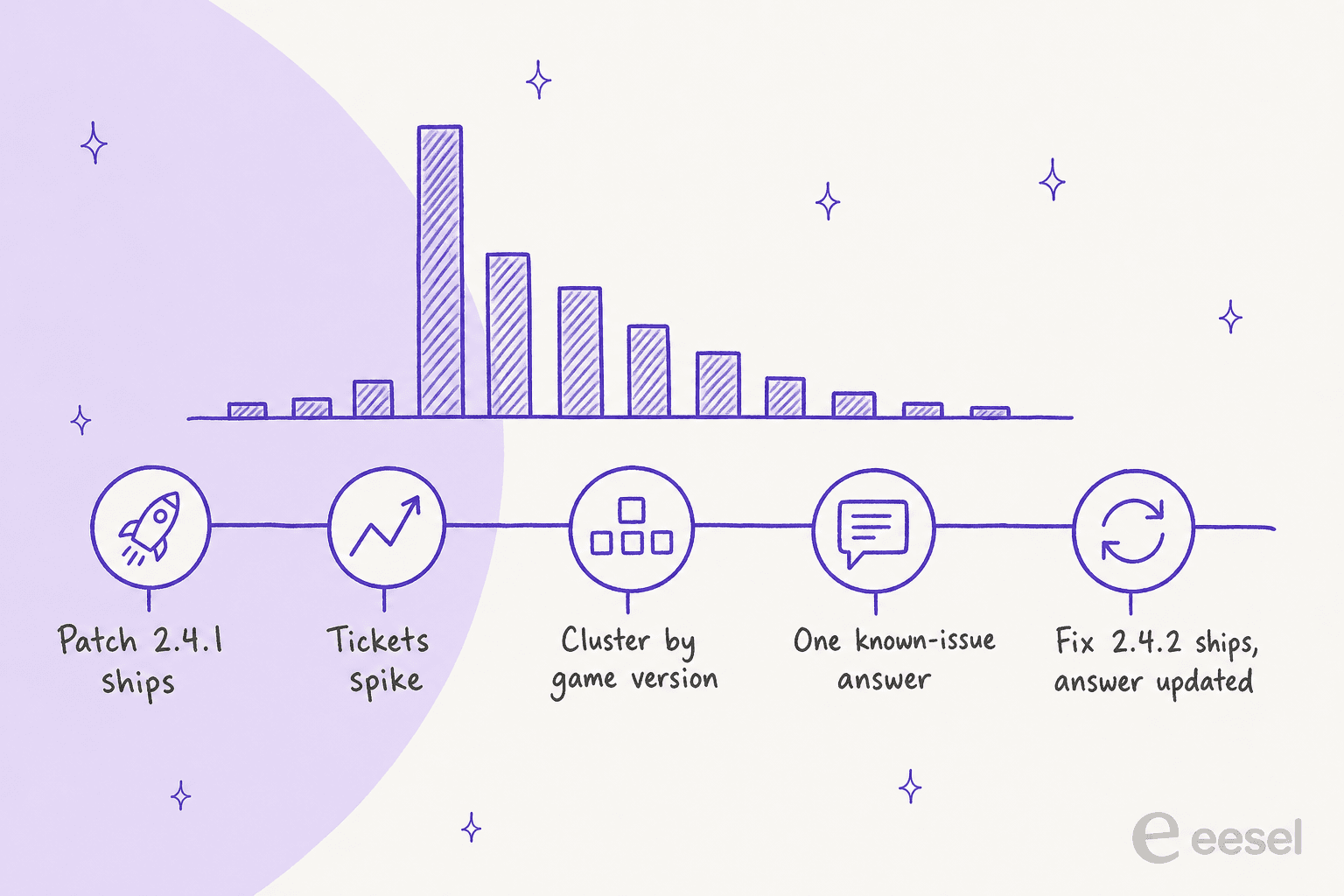
The steps I'd run on release day:
- Before the patch: brief the team and the AI on what changed. Paste the patch notes into the knowledge base, version-tagged.
- First hour: watch the incoming tickets for new clusters. My guide to AI ticket deduplication shows how to link duplicates to one incident.
- Write the known-issue note: symptom, builds, workaround, fix build. A person approves it.
- Let the AI answer from it, and keep sending anything outside the note to a person. Tell players what is going on on your status page too, so fewer of them write in.
- When the fix ships: update the note, and the AI stops quoting the workaround. For serious outages, the wider playbook is in AI for major incident communication.
Vendors that sell to studios point to results here, and they're worth reading with the usual caution that they are vendor-reported. Helpshift's pricing page shows case studies such as SYBO's Subway Surfers reaching a 77% automation rate and a 4.3 CSAT in under three months, and Zynga handling 185% more tickets. These are a vendor's own numbers on its own platform, and I'd treat them as proof that gaming queues automate well, not as a number your studio will hit.
Bug tickets deserve their own lane, because "it crashed" is the start of a QA conversation, not a support reply. I cover that handoff in AI for bug report triage and AI for bug triage. The rule is simple: the AI collects platform, build and steps, and a person decides whether it is new.
Who owns a refund, you or the store?
Usually the store. When a player buys through Apple, Google Play, Steam, PlayStation or Xbox, the store took the money and the store's rules govern the refund. Your support team explains where to go and fixes whatever was actually broken.
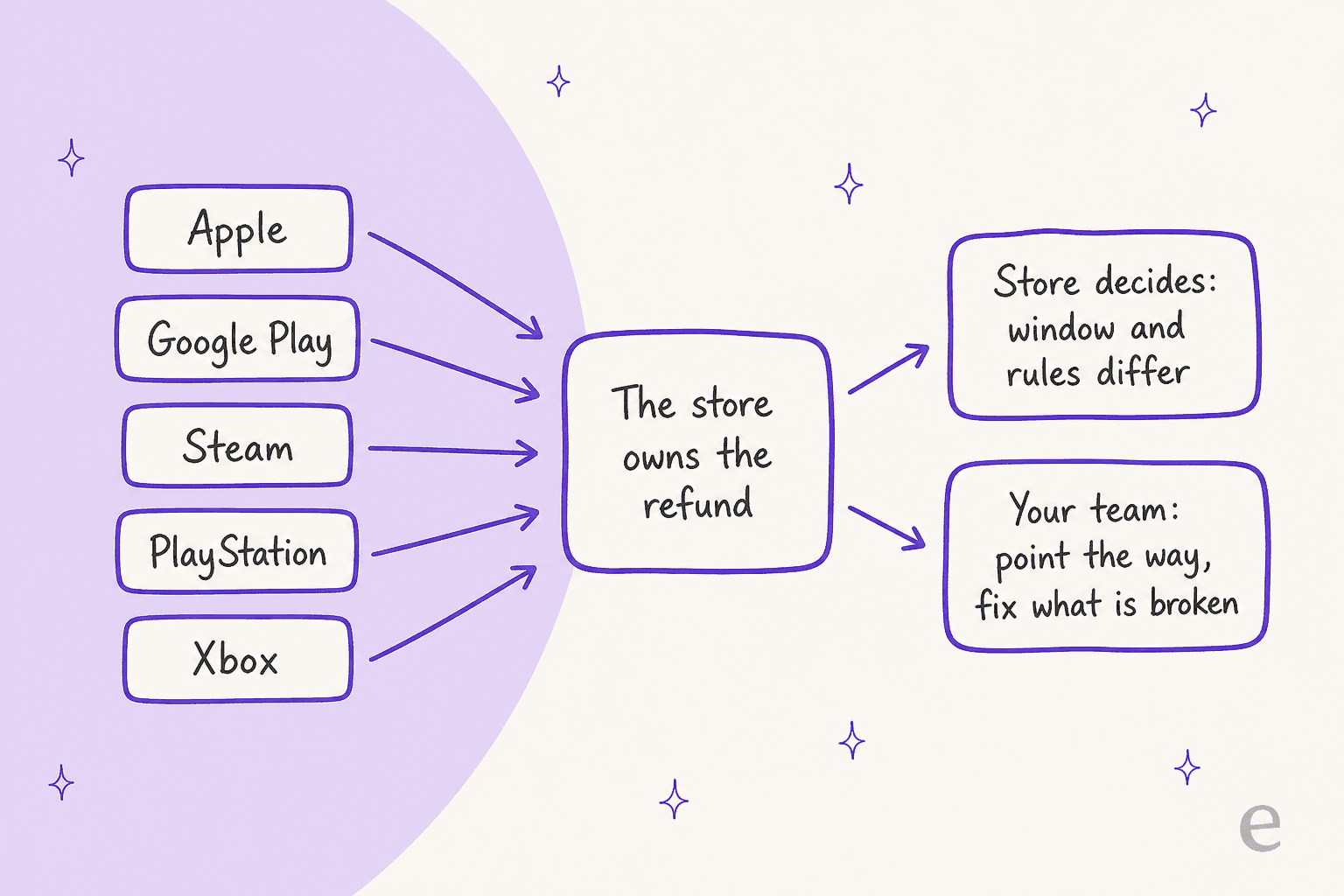
I read each store's own policy page for this. The rules differ more than most support macros admit:
| Store | What its policy says | Who handles it |
|---|---|---|
| Apple | Request a refund on reportaproblem.apple.com; Apple says to wait 24 to 48 hours for an update. Eligibility varies by country. | Apple |
| Google Play | Within 48 hours you may be able to request a refund from Google. After 48 hours, contact the developer, who can process refunds under its own policy. | Google, then you |
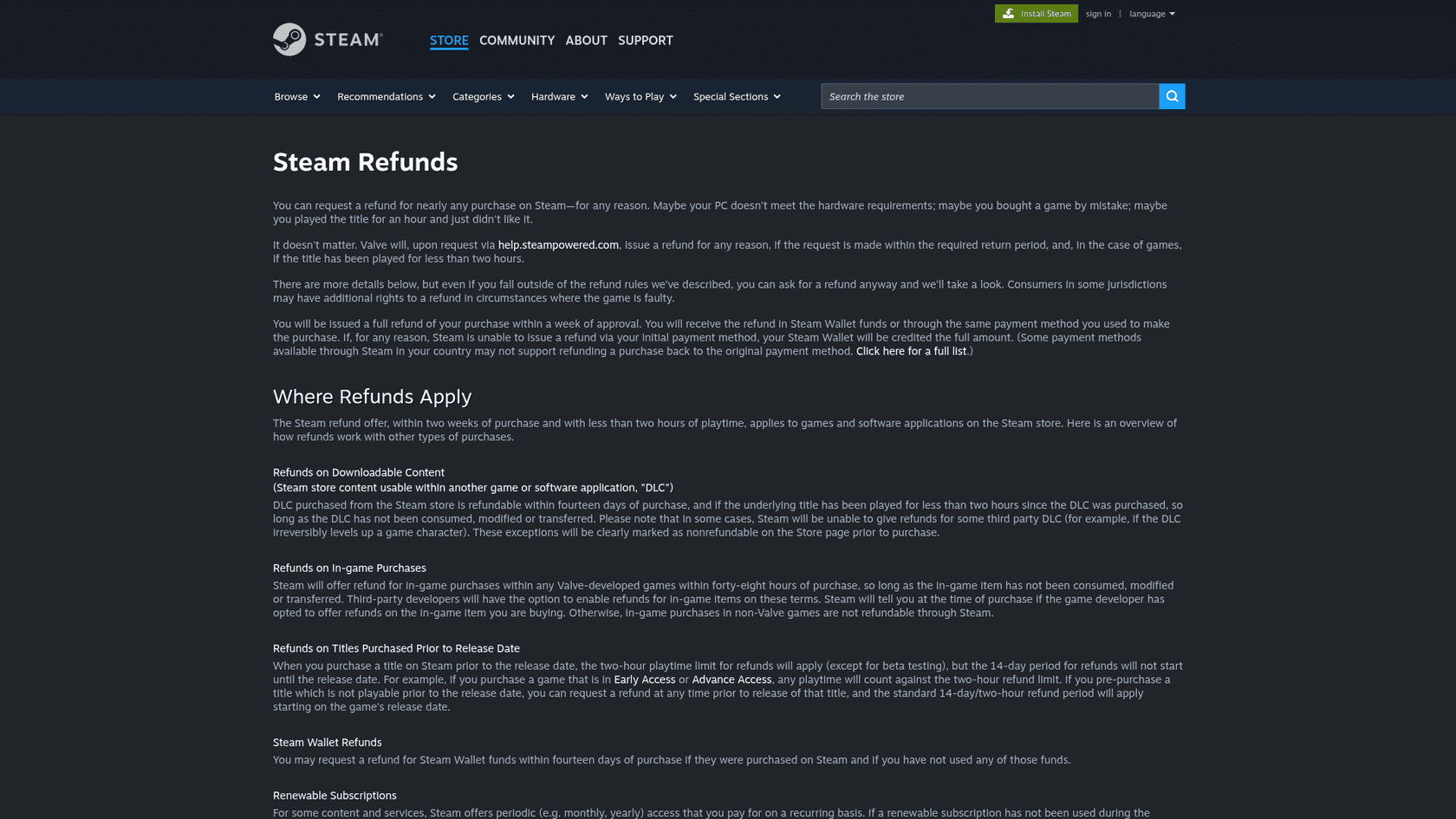
| Steam | Refund within 14 days and under 2 hours of play for games. In-game items in non-Valve games are refundable only if the developer opts in. | Valve, plus your opt-in |
| PlayStation | Games can be cancelled within 14 days if not downloaded or streamed. In-game consumables bought during play are delivered immediately and aren't refundable unless faulty. | Sony |
| Xbox | Microsoft says digital goods aren't refundable unless the offer or applicable law says so, with a separate Xbox refund request page for console games. | Microsoft |
Two details change how you'd configure an AI. On Google Play, refunds after 48 hours are your call, which means those tickets need a written rule and a person to apply it. And on Steam, whether a player can refund an in-game purchase depends on a setting you control as the developer, so your answer has to match it.
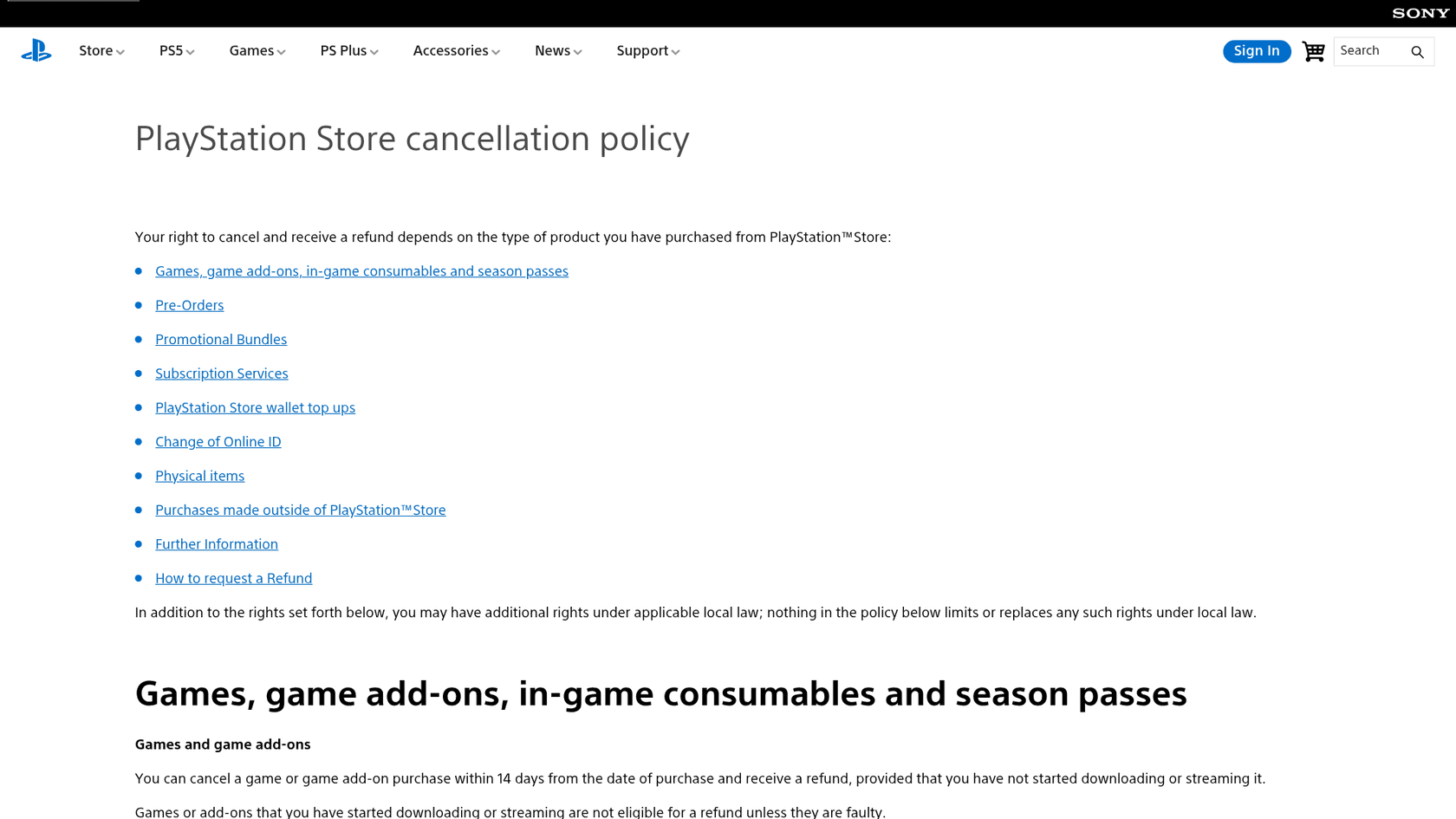
So the AI's job is a routing answer: "You bought this on PlayStation, which handles refunds for digital purchases within 14 days if the game hasn't started downloading, here is how to request it." It should never promise a refund the store hasn't granted. If the store has said no and the player still thinks it's your fault, the draft goes to a person. The same logic applies to chargebacks and payment disputes, and my general guide to AI for refund requests has the wording.
Lost purchases are the cousin of refunds. Apple's App Review Guidelines tell developers to provide a restore mechanism for restorable in-app purchases and say purchased in-game currency may not expire. So the first answer to "my purchase vanished" is a restore step, and an AI can give it every time.
Why do ban appeals and account takeovers stay with a person?
Because both are judgments about a human being with evidence you can't fully verify in a chat. A ban is a verdict. A takeover claim is two people each saying the account is theirs. An AI can help gather the facts and still shouldn't be the one who decides.
Valve is blunt about the first. Steam Support says VAC bans are permanent, can't be appealed, and aren't removed by Steam Support; a ban found to be wrong is removed automatically. That is a policy a studio can set, but it shows how a ban reply should read: a clear statement of what the policy says, written by someone accountable for it. A bot that sounds certain about a ban is a risk, and the Hacker News thread above, about automated anti-cheat bans, is full of players describing appeals that went nowhere.
Account recovery is where vendors disagree. Helpshift argues in its account recovery post that AI agents can resolve most recovery and purchase requests end to end by weighing purchase receipts, device history and linked accounts, and that a human steps in as risk climbs. I think that is a reasonable design when the evidence is strong. My rule is stricter: the AI may collect and check the evidence, and a person approves any step that gives an account to someone else. A wrong "yes" hands a player's purchases to a stranger, and a wrong "no" costs a few hours. The asymmetry is the whole argument. More on the evidence side in AI for account recovery support.
What the AI can do on both lanes is the preparation:
- Pull the ban reason, date and account history into a short summary.
- List what the player has already tried and what the standard recovery returned.
- Draft a calm, accurate reply that states the policy and the next step.
- Tag the ticket and set the right queue, with an escalation note a reviewer can act on in one read.
This is the same shape I described in my guide to AI for tier 2 support: the AI is the investigator that saves the reviewer ten minutes, not the judge.
I've heard the objection in eesel sales calls in almost the same words. A CX lead at a DTC supplements brand on Gorgias and Shopify, with about 7,000 tickets a month, told us the AI would never answer everything, so what he needed was one that handles only the tickets it is confident about and leaves the others alone. Gaming queues need the same switch, and a confidence score plus a list of ticket types the AI must never touch is how you build it.
What about threats, harassment and player safety?
They go straight to a trained person, with no AI reply in between. A player who writes about self-harm, a threat against another player, or harassment from a teammate is not asking a support question. The wrong automated reply there does damage no refund can repair.
Set three rules before launch. First, a short list of trigger phrases and categories that route to a person on sight (threats, self-harm, child safety, doxxing). Second, an instruction that the AI sends no reply on those tickets, only an internal flag. Third, an on-call owner outside office hours, because games run on weekends and nights. My guides to AI for weekend support coverage and AI for customer complaints help here, and so does a human-in-the-loop review of what the AI flagged.
Privacy matters too: player tickets carry emails, device IDs and sometimes age. If your players are in the EU or UK, route data requests through the process in my AI for GDPR requests guide, and review the vendor against your security checklist.
What does AI for game support cost?
It varies from a quote-only studio platform to a published monthly price, and the units are not the same, so compare per ticket. Here is what I could read on each vendor's own pages:
| Option | Price on the vendor's page | Billable unit |
|---|---|---|
| Helpshift | Not published. "Request Pricing", based on volume, solutions, capabilities and languages | Customized per studio |
| Zendesk AI agents | $1.50 per automated resolution committed, $2.00 pay-as-you-go | Automated resolution |
| eesel | $299 a month for 500 credits, up to $1,749 for 5,000; free plan of 100 credits | A ticket or a chat is 1 credit |
For one stated buyer, say a studio with 2,000 tickets and chats a month: eesel's 2,000-credit plan is $849, or about $0.42 each. On Zendesk, if the AI fully resolved all 2,000 at the committed rate you'd pay $3,000 for resolutions alone, and that is before agent seats, so the real comparison depends on your resolution rate. See my Zendesk AI pricing breakdown and the AI vs human agent cost maths.
One honest limit on my side: eesel doesn't plug into Helpshift or an in-game SDK. If your whole queue lives there, look at the Helpshift alternatives and Helpshift AI review before deciding. If you run Zendesk, Freshdesk, HubSpot or Gorgias, it works inside the helpdesk you have, as in my guides to AI for Zendesk and AI for Freshdesk.
How would you set this up in a week?
Start with one platform and one ticket type, with the AI drafting in internal notes and answering nothing alone for the first days. Then switch on the answers that your test runs prove safe.
- Day 1: connect the helpdesk and the knowledge base. Add the patch notes with versions and dates.
- Day 2: write the five-ticket table above as written rules, including the list of tickets the AI must never reply to.
- Day 3: replay your last patch's tickets as a test. My simulation testing guide shows how; this is how eesel checks every rollout against historical tickets before it goes live.
- Day 4 to 5: AI drafts, your agents send. Read the drafts and fix the notes.
- Week 2: let the AI answer the "restore", "known issue" and "which store" tickets directly, and keep everything else as a draft.
Three eesel customers show the pieces, none of them a game studio, so read them as patterns:
- MentorShow, an online learning subscription, has eesel read each new HubSpot ticket, write an analysis and a draft in the member's language, and flag refunds, billing checks and account changes for a person. In one month it drafted 432 replies across about 1,200 conversations and tickets. That is the lane for your lost-purchase and login drafts.
- ClutchLoop, a phone accessories brand, sends returns and refunds to its returns portal and answers product questions directly. In a month it replied directly to 180 of 230 Gorgias tickets, about seven in ten. That is your "the store owns the refund" pattern.
- SamCart, which sells software for digital products, runs one eesel agent on Freshdesk tickets and another on website chat, each answering from the same help center and stopping when a person takes over. That is your email and in-game chat split.

If you also staff a community side, my guide to AI community support automation and the help center search piece cover the places players ask before they open a ticket. And if your team is small and the patch-day load is mostly peaks, the support staffing and reducing handle time guides show where the hours go. For the developer-facing tickets that bleed into support, see AI for developer support.
Try eesel for player support
If your tickets live in Zendesk, Freshdesk, HubSpot or Gorgias, eesel's AI helpdesk teammate joins that queue like a new hire who has read your patch notes. It answers known-issue and restore questions from version-tagged notes, drafts bug and login replies with the platform and build filled in, and hands bans, takeovers and safety reports to your team. You can test it on last week's tickets before it answers a single player: try eesel free or book a demo.