


AI for major incident communication works when you keep one verified incident record and let every channel answer from it: the status page, the ticket replies, your agents' macro, the emails to big accounts, and the internal channel. AI drafts each update, a named person (your incident lead or comms owner) approves anything public, and an update goes out every 30 minutes, the target incident.io sets for major incidents.
The AI that answers tickets on its own should only touch tickets matched to a declared incident, and only with words copied from the last approved update. No invented ETAs, no root cause guesses, no "your data is safe". Then plan for the second wave after you resolve: "is it really fixed?" replies, report requests, and SLA credit asks.
I build eesel's helpdesk integrations, and the AI helpdesk teammate I work on does this inside Zendesk, Freshdesk and Gorgias: it tags outage tickets, drafts replies from the approved update, and hands outages and data loss straight to a person, the way Qontro runs it on Freshdesk. Plans start at $299 a month for 500 credits.
Why do customers hear different things during an outage?
Because each person answers from what they know right now, and they all know different things. An agent on ticket #4012 read the status page ten minutes ago. An account manager heard something in a Slack thread. An engineer told a big customer "should be fixed in an hour". The status page itself hasn't moved since the first post. None of them are lying. They're just answering from different snapshots.
Freshdesk's own help center describes it well. In its linked tickets guide, it notes that during downtime different customers get updates at different intervals, "based on the persistence of the customer and the workload of the agent." The customer who emails four times gets four updates. The one who emails once gets silence.
The slow first update makes it worse. incident.io's good incident management report found that companies with 250 to 1,000 employees took a median of 33 minutes from declaring a major incident to their first status page post, slower than both smaller and larger companies. That half hour is when the tickets pile in and the stories split.
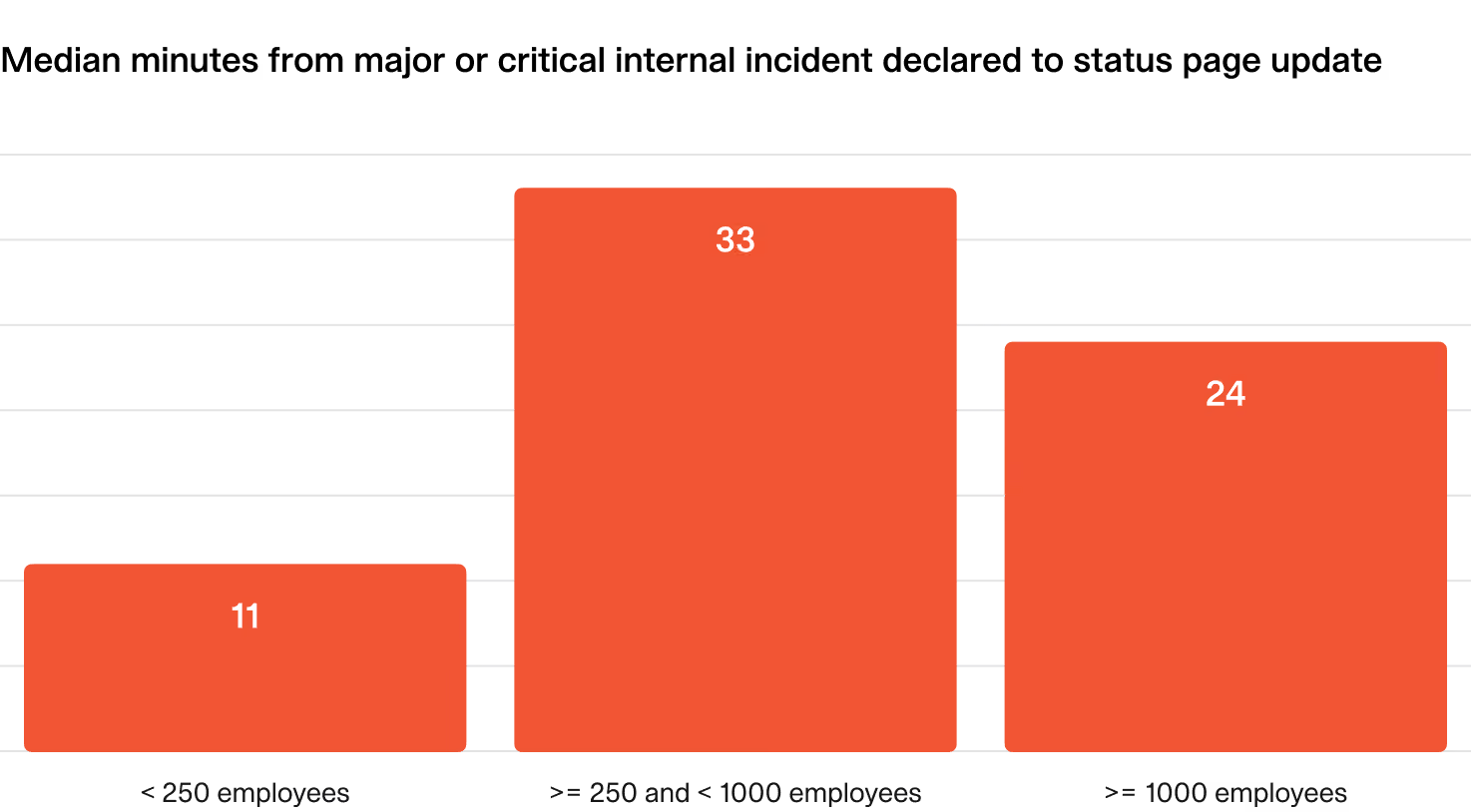
The people running the incident feel it from the inside too. One SRE asked Reddit for help with exactly this:
"When stuff is finally resolved, I have to parse through slack to see what happened when, ignore the "what's the status" slacks sent by 15 different random people, build a timeline with my investigation steps, etc."

So the fix is not "write faster". It is giving everyone one place to read from, and letting AI do the rewriting for each audience. I'd also read my guide to AI support during SaaS outages alongside this one: that post covers the ticket flood, my guide to AI for status page updates covers the status page itself, and this one covers what you say on every channel and who says it.
What should every channel answer from?
One incident record, written in plain words, that a person owns and updates. Not the engineering Slack channel, not the war-room call, not someone's memory. Keep it to four fields:
- What's affected: the product areas, regions, or customer groups, in your customers' words ("checkout on the web app"), not service names ("payments-api-v2").
- Verified facts: only what engineers have confirmed. "Some card payments fail" is a fact. "A bad deploy caused it" is a guess until someone confirms it.
- What we're doing: one line. "Rolling back the 14:10 release" is enough.
- Next update at: a clock time, every time.
That record can live in your incident tool (incident.io, PagerDuty, Jira Service Management) or on the status page itself. Where it lives matters less than the rule that every message to anyone gets rewritten from it, never from a side conversation.
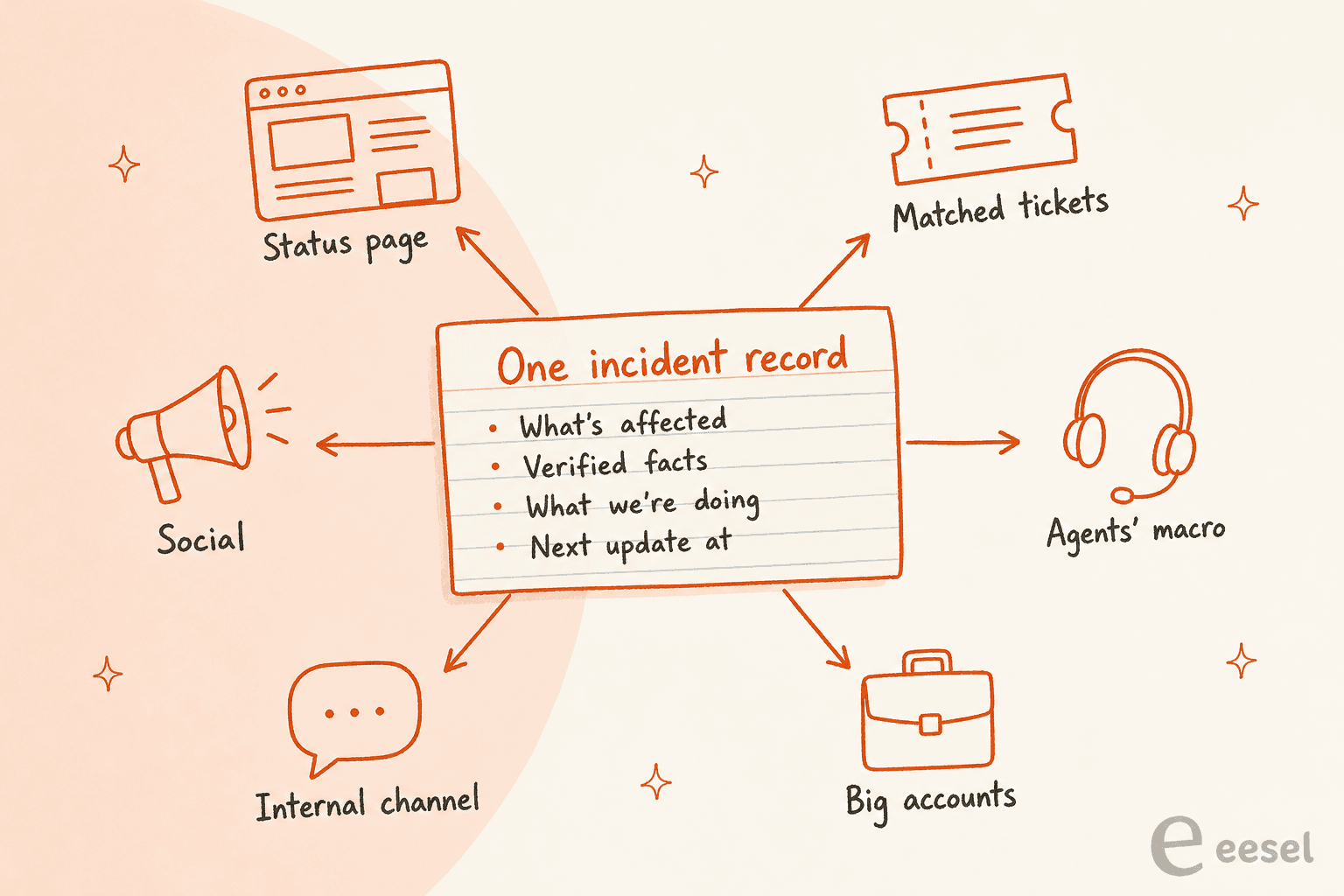
The arrows only point outward on purpose. If a customer on a ticket reports something new ("it's also broken on mobile"), that goes to the comms owner, who checks it and adds it to the record. It doesn't jump straight into another customer's reply. That one rule is what keeps channel number six from drifting away from channel number one.
Who owns incident comms, and where does AI fit?
A person who is not fixing the problem. Engineers debugging production should not be wordsmithing an apology. This came up again and again when I read through how operators handle it:
"Someone not directly working the incident owns comms. gets updates from the team, tracks timelines, and updates the dedicated status page/notification channels."
incident.io's report gives the same advice in plainer terms: "Assign communications roles," so it's clear who owns status page updates. The AI fits in below that person, not beside them. It turns the record into five versions for five audiences, and the comms owner reads and approves. That is human in the loop in its simplest form, and incident.io's own communication guide draws the same line: AI should assist with drafting rather than send external messages without a person reviewing them.
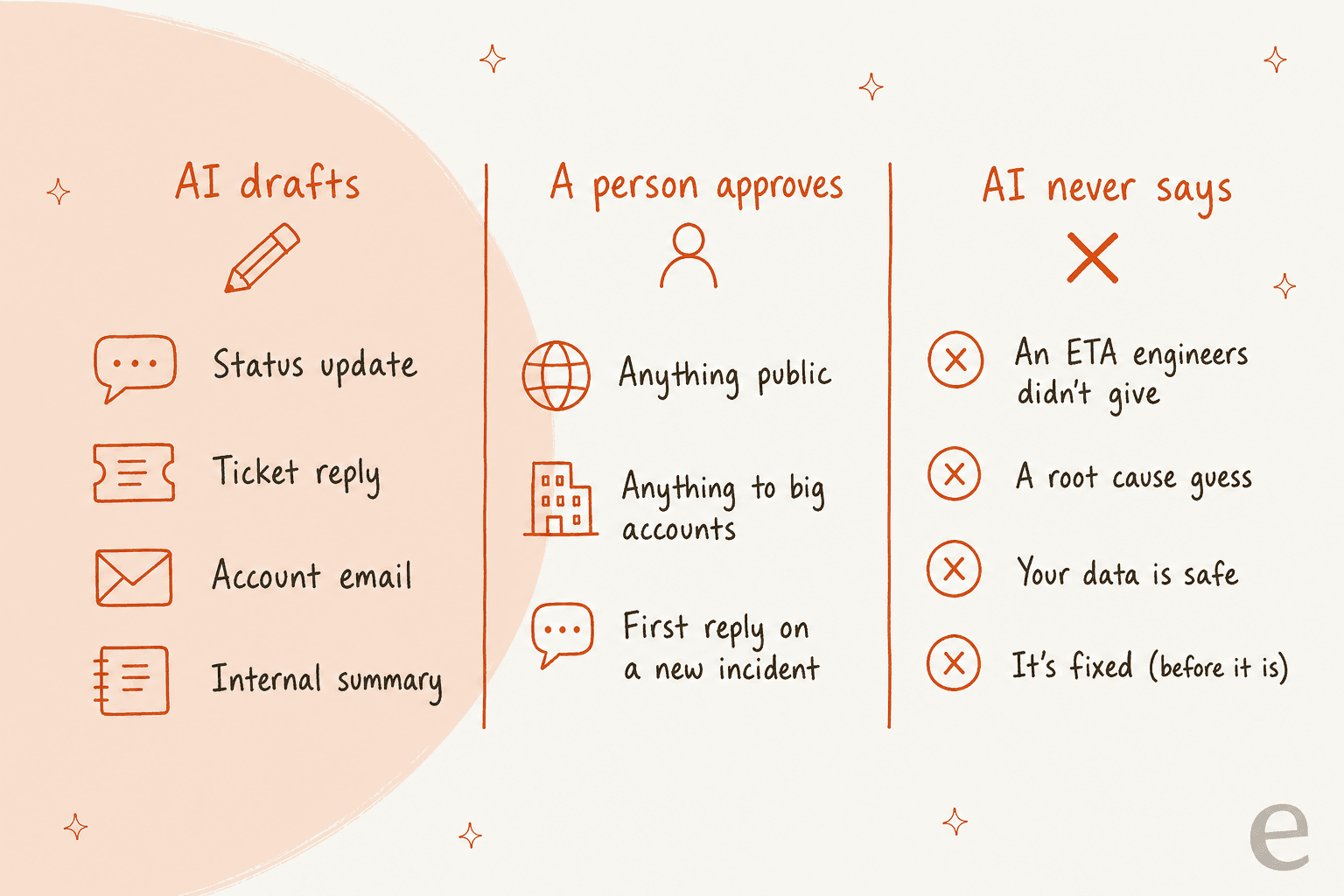
The right column is the part I'd print out. Each of those four lines is a sentence a language model will happily write if the prompt nudges it, because they are exactly what an anxious customer wants to hear. An AI hallucination in a normal ticket costs one customer. The same sentence in an incident reply goes to hundreds of people at once, and it's the line they screenshot later.
How often should you send incident updates?
Every 30 minutes for a major incident, even when nothing has changed. That's the target in incident.io's report, which says to "aim to share status page updates every 30 minutes during major and critical incidents." Its data shows most teams land close to it.
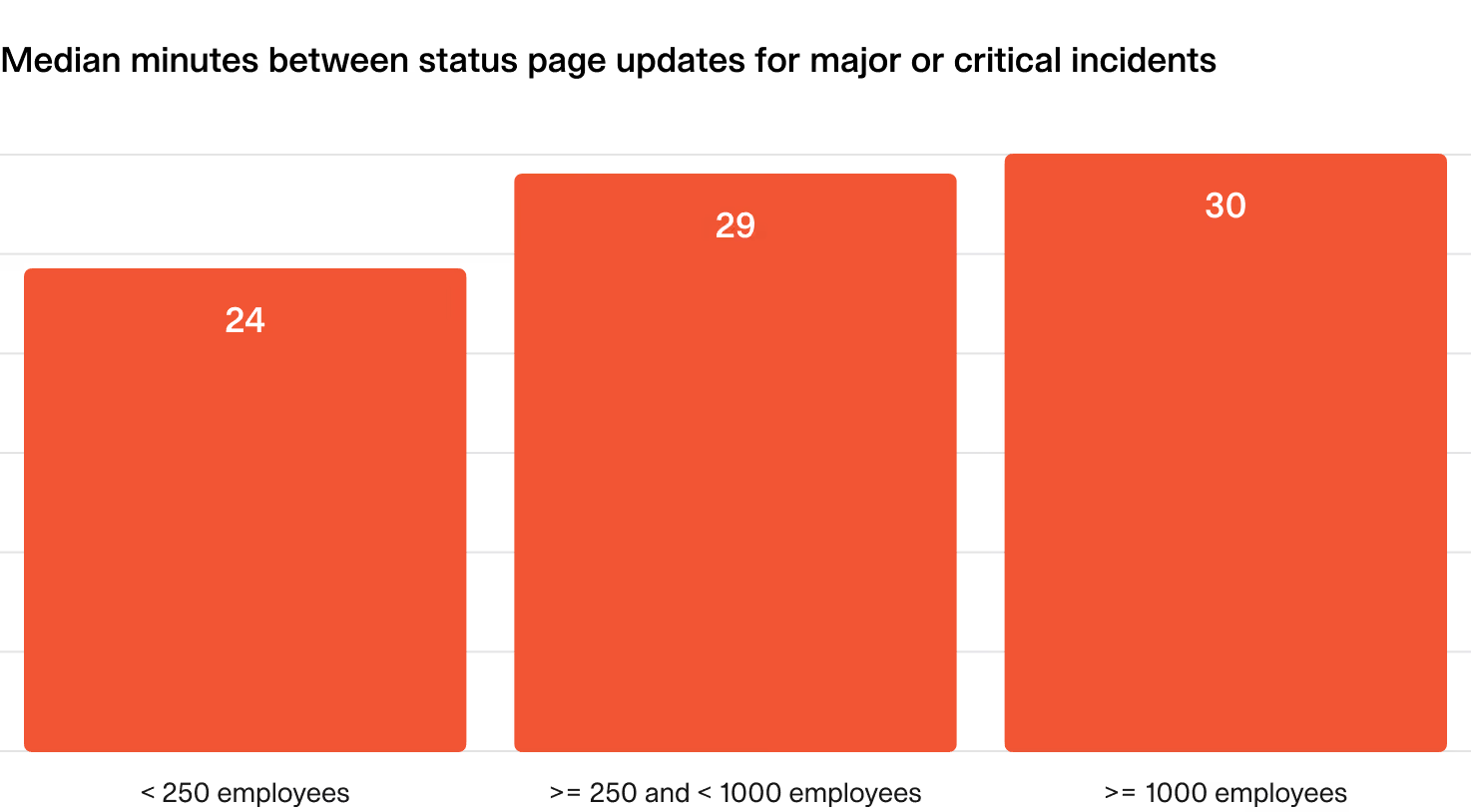
incident.io's guide calls the empty update the "heartbeat" rule: "We're still investigating. No new information. Next update in 30 minutes." It reads like nothing, but it does real work. A customer who knows the next update lands at 15:30 doesn't open a ticket at 15:20. Its communication guide suggests scaling the rhythm by severity: every 20 to 30 minutes for a SEV1, every 4 hours for a SEV2, and business-hours updates for a SEV3.
This is the easiest job to give AI. The heartbeat update is boring, it's the one people forget at minute 45 of a bad incident, and it carries almost no risk because it says nothing new. Let AI draft it from the record and nudge the comms owner when it's due. The plan below shows what each severity needs, so you can agree on it before the next incident instead of during it.
How do you keep agents and the AI on the same script?
Give the support desk the same words the status page uses, and make it easy to find every ticket about the incident. Both big helpdesks already have the plumbing for the second part. What they each do with it is worth knowing in detail, because I've seen teams assume more than the feature actually does.
Zendesk problem and incident tickets. In Zendesk's docs, you create one problem ticket for the outage, set every related ticket's type to incident, and link them. When you solve the problem ticket, every linked incident ticket is solved, and the comment you write on the problem ticket is added to the incident tickets that are still open. Two catches from the same page: "Customers are not notified using the messaging channel," and "AI agent tickets can't be linked to problem and incident tickets." So if half your outage traffic comes through Zendesk's own bot, the bulk close won't reach it. My walkthrough of incident and problem tickets covers the setup, and bulk status updates fill the gaps.
Freshdesk linked tickets. Freshdesk links related tickets to a master ticket called a tracker. Comments on the tracker go to every linked ticket as a broadcast, but the setup guide says the "internal broadcast message will be visible only to agents of the helpdesk." Customers don't see it. Each agent still sends the actual reply. And resolving the tracker doesn't resolve the linked tickets by default. Linked tickets need the Pro or Enterprise plan.
That's the gap AI fills well. The helpdesk feature gives you a list of every ticket about the outage. AI turns the latest approved update into a reply on each one, in the customer's language, without anyone copy-pasting 300 times. Tagging matters here too: one operator on r/sre summed up the basic move.
"support tools like zendesk allow you to add tags to tickets related to the same issue via a "master" ticket"
A tag like incident-2026-10-30-checkout on every matched ticket is what lets you close them all later, count them for the post-incident report, and spot the customers who wrote in three times. If you haven't set up AI ticket tagging yet, an outage is a painful place to discover you need it. The same goes for ticket deduplication, since outage tickets arrive in bunches from the same people.
Update the macro your human agents use at the same time as the status page. An AI macro that still says "we're investigating" an hour after the fix shipped is how a customer gets two different answers in one afternoon.
When should the AI reply on its own during an incident?
Only when three things are true: someone has declared the incident, the ticket clearly matches it, and the reply uses wording a person has already approved. If any one is missing, the AI drafts and a person sends. That's the whole rule, and it covers almost every case.
Here's how I'd sort incoming tickets during a major incident:
| The ticket | What the AI does | Why |
|---|---|---|
| Matches a declared incident | Replies with the latest approved update and the next update time, tags it, links it | The words were already checked once |
| Looks like an outage, nothing declared yet | Leaves an internal note and flags it to the on-call team, doesn't confirm anything | It might be the first sign of a real incident, or one customer's Wi-Fi |
| From a big account or names a contract | Hands it to the account owner with a summary | These customers expect a person, and an escalation path |
| Reports data loss, a security worry, or money taken twice | Straight to a person, no reply | One wrong line here is a legal problem |
| Not about the outage | Normal queue | Don't let the incident swallow everything else |
Two of these come straight from real setups. Qontro, an ERP company on Freshdesk, drafts a reply on every new ticket (190 in a month) but sends outages, data loss and billing questions straight to a person, and when a ticket doesn't have enough in it to answer confidently, the agent says so instead of guessing. SE Ranking runs eesel across 4,650 Zendesk conversations a month and tags every ticket it touches with ai_handled, so the team can count exactly what the AI did. Its handover rule also fits incident days well: the agent tells customers to expect a reply in one or two business days and never says someone is joining now.
That last point is a scar for me. I've watched a bot tell customers it was handing them to a person when the transfer never actually happened, at a web-hosting company on Zendesk. During an outage, that kind of empty promise doubles the anger. So whatever your AI says about next steps has to be something your system really does. My handoff best practices post covers how to test that before you need it, and simulation testing lets you replay last quarter's outage tickets against new rules first.
One more trap: incident replies from the AI should stop the moment a person takes over the thread. ClutchLoop runs its agent on Gorgias with exactly that rule, if a team member is already replying in a thread, the agent stays out. For big accounts with an account manager on the ticket, that's the behavior you want.
What do the incident and helpdesk tools' AI actually do?
Most of the AI in incident tools is aimed at the engineers: summaries, timelines, post-mortems. Fewer features touch customer messages, and the ones that do are drafting tools with a person reviewing. Here's what each vendor's own pages say, with their prices.
| Tool | AI for incident comms | Status page | Price (vendor page) |
|---|---|---|---|
| Atlassian Statuspage | None listed on the pricing page | Yes, the core product | Free (100 subscribers), Hobby $29, Startup $99, Business $399, Enterprise $1,499 a month |
| incident.io | AI features including Scribe and Suggestions, plus an AI-native post-mortem editor on Pro and Enterprise | 1 public page on Basic, Team and Pro, customer pages on Enterprise | Basic free, Team $19 per user a month, Pro $25, plus on-call $10 to $20 per user |
| PagerDuty | AI Status Updates drafts internal and external updates, responders review before sending | External page on Professional (250 subscribers) and up | Professional $21 per user a month annual, AI as an add-on; Starter $2,800 a year with 1,000 AI actions |
| Jira Service Management | Rovo agents from Standard; AI incident creation and post-incident review drafts on Premium | Enterprise plan only | Standard $21.50, Premium $55.28 per agent a month |
| Zendesk | Copilot (summaries, merge suggestions, similar tickets), AI agents billed per automated resolution | No | Suite Team $55, Professional $115 per agent a month annual; Copilot $50 per agent a month |
| Freshdesk | Freddy AI Agent (500 sessions included, then $49 per 100), Copilot $29 per agent a month | No | Growth $19, Pro $55, Enterprise $89 per agent a month annual |
| eesel | Drafts or sends replies inside your helpdesk, tags and links tickets, approvals per action | No, reads yours | $299 a month for 500 credits, one ticket is one credit |
A few details that matter more than the price column. PagerDuty's docs say AI Status Updates can draft external updates only from Slack; in Microsoft Teams and the web app it's internal updates only. In Jira Service Management, "incident stakeholder communication" (inviting and emailing internal and external stakeholders) is a Premium feature, so the Standard plan doesn't include it. More on that in my JSM pricing breakdown and the post on AI post-incident reviews.
On the helpdesk side, neither Zendesk Copilot nor Freddy AI knows about your incident unless someone tells it. They work from tickets and help articles, and your incident record lives in a different tool. Wiring the two together is the actual job.
Full plan details are in my Zendesk pricing and Freshdesk pricing guides.
How do you wire the incident record into the helpdesk?
Send every status update from your incident tool to the AI that answers tickets, as data. This is the part I spend my days on, so here's the plain version of how it works.
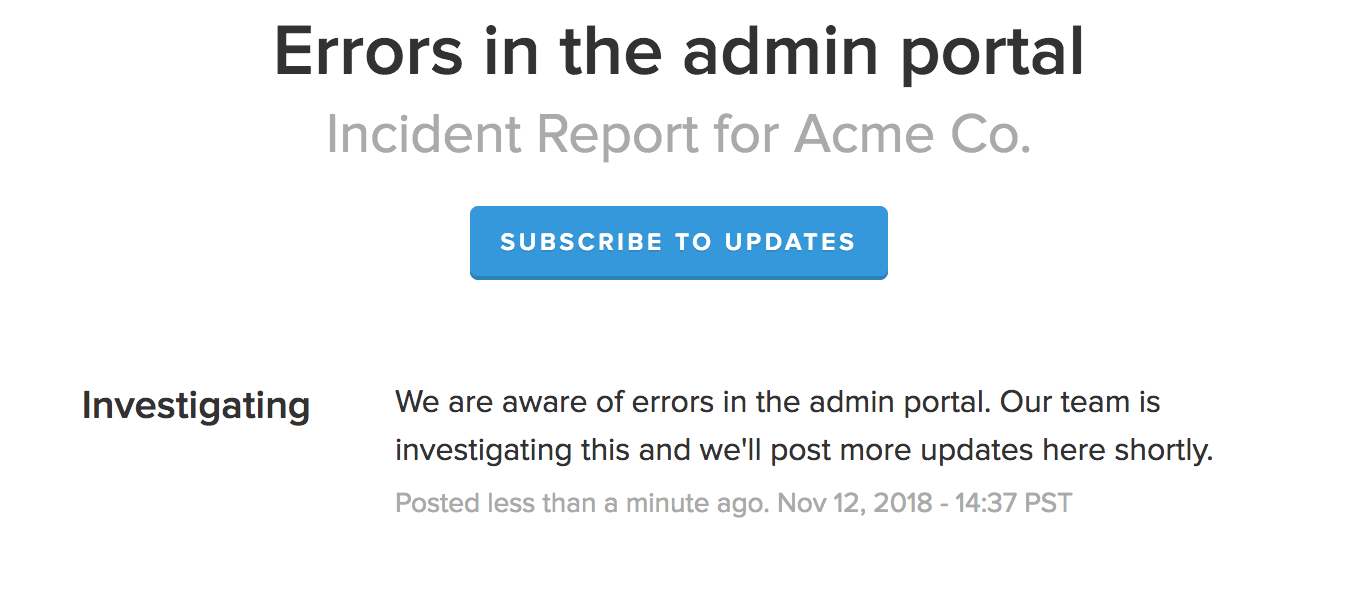
Statuspage can send each incident update to a URL. Its webhook notifications are HTTP POST requests carrying the incident or component update, and they're available from the Startup plan ($99 a month) up. Here's the kind of update those payloads carry:
On the eesel side, a webhook automation gives you a private URL that any service can POST JSON to, and the agent wakes up with that data and follows the instructions you wrote for it. So you point the Statuspage webhook at that URL, and tell the agent: "When an incident update arrives, save the latest approved text as the current incident status. On new tickets that match it, reply with that text and the next update time, add the incident tag, and leave everything else for a person." The same works from incident.io or PagerDuty through their own webhooks or Zapier. eesel doesn't have a native Statuspage integration, so the webhook is the route.
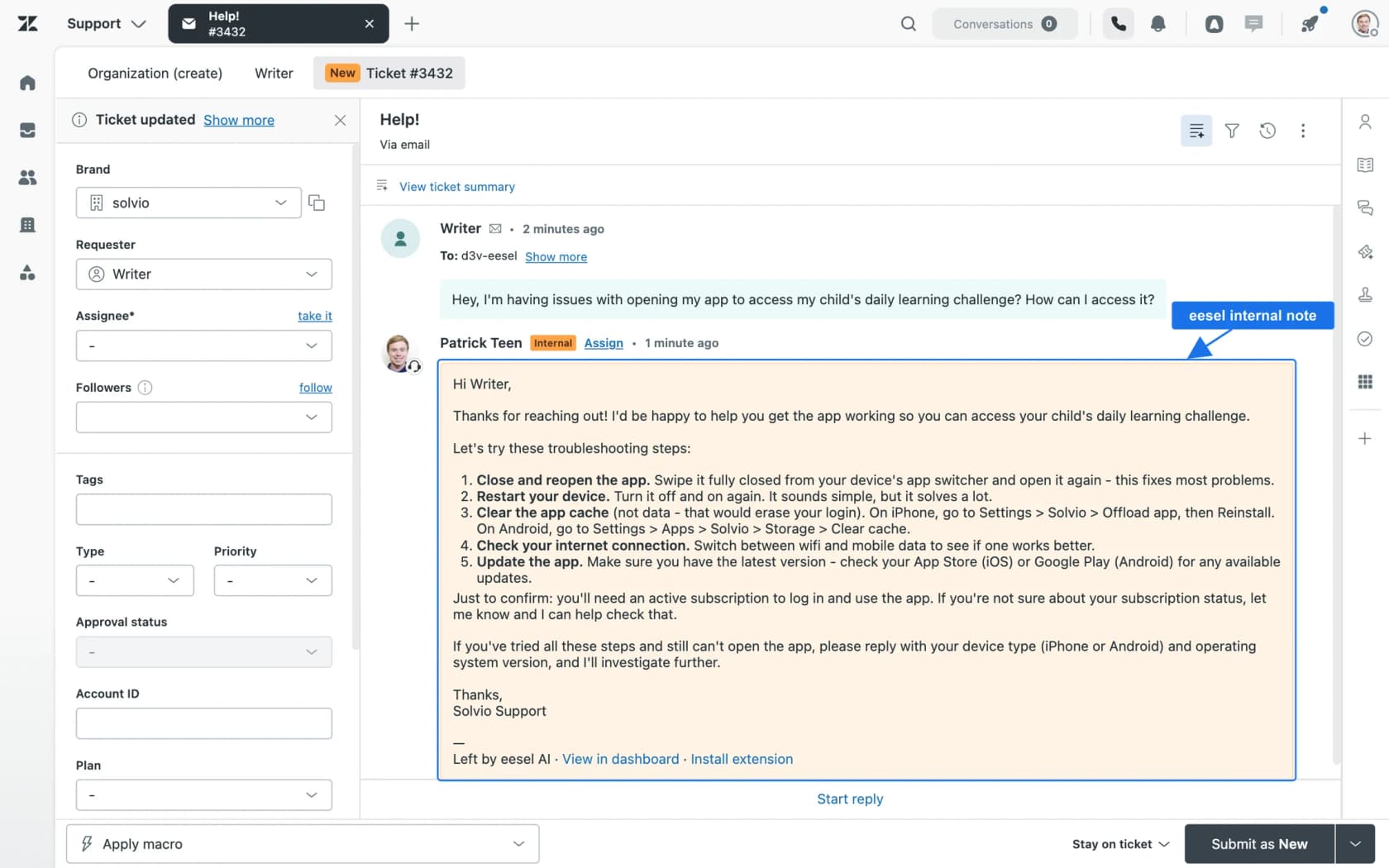
Inside Zendesk, the eesel actions that matter on an incident day are: draft ticket reply (held until a person approves), leave internal note, add tags, search tickets, and update fields like status or priority. Each action can be set to run on its own, need approval, or be off. On day one I'd put "Send ticket reply" on approval and "Add tags" and "Leave internal note" on auto.
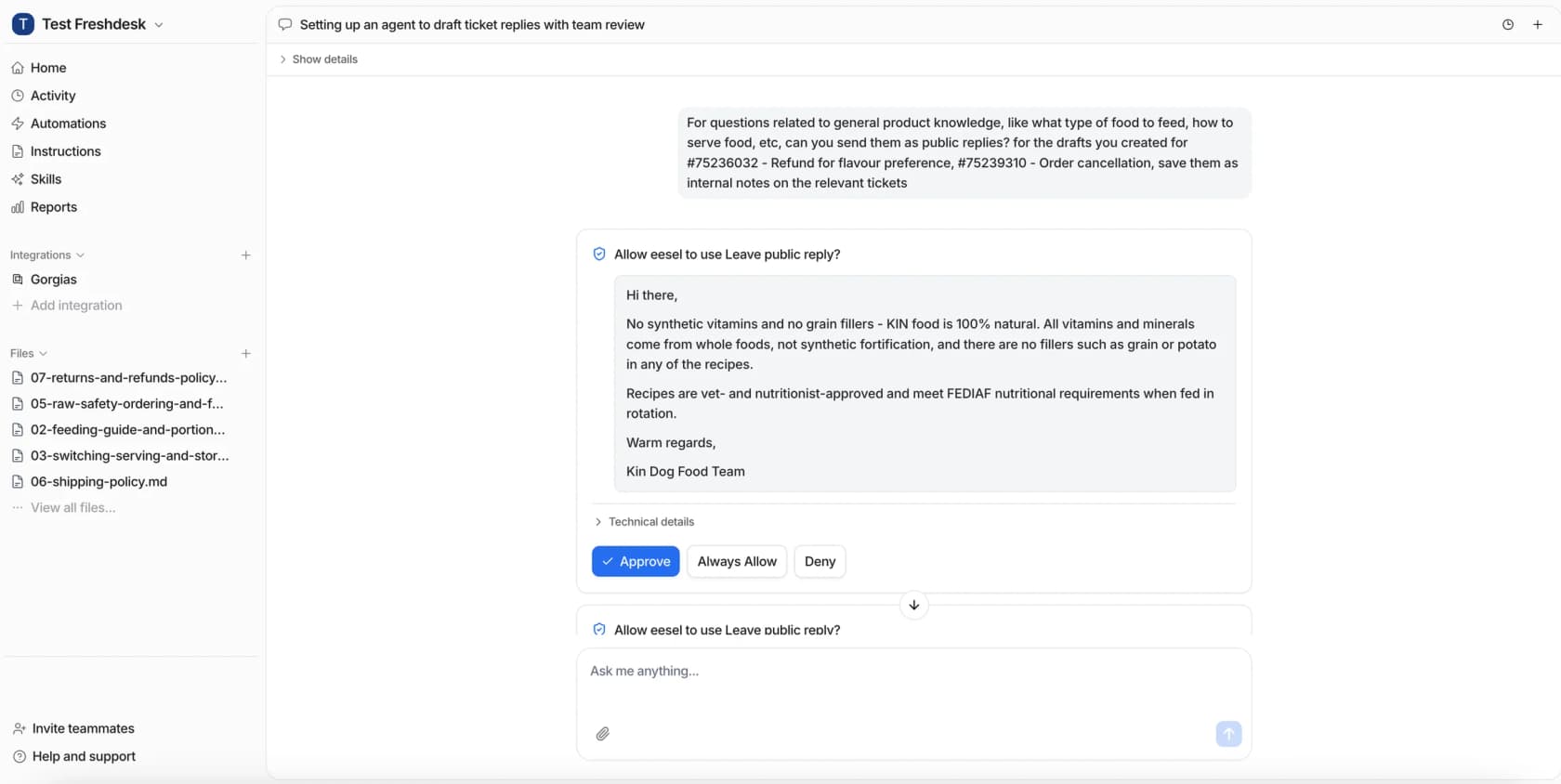
Approvals don't have to happen in the dashboard. If the run started from Slack, the approval card lands in that thread, so your comms owner can approve replies from the same channel they're already watching. If your incident lead lives in a terminal, the eesel CLI does the same job: eesel approvals lists what's waiting, and eesel approvals approve <id> sends it. That also means a coding agent like Claude Code or a script in your incident runbook can check the queue for you. Nothing about the agent changes between the dashboard, Slack and the terminal. It's the same teammate with the same permissions.
What happens after the incident is resolved?
A second wave of tickets, and most teams don't plan for it. The status page flips to resolved and everyone exhales, and then the inbox fills with a different kind of message.
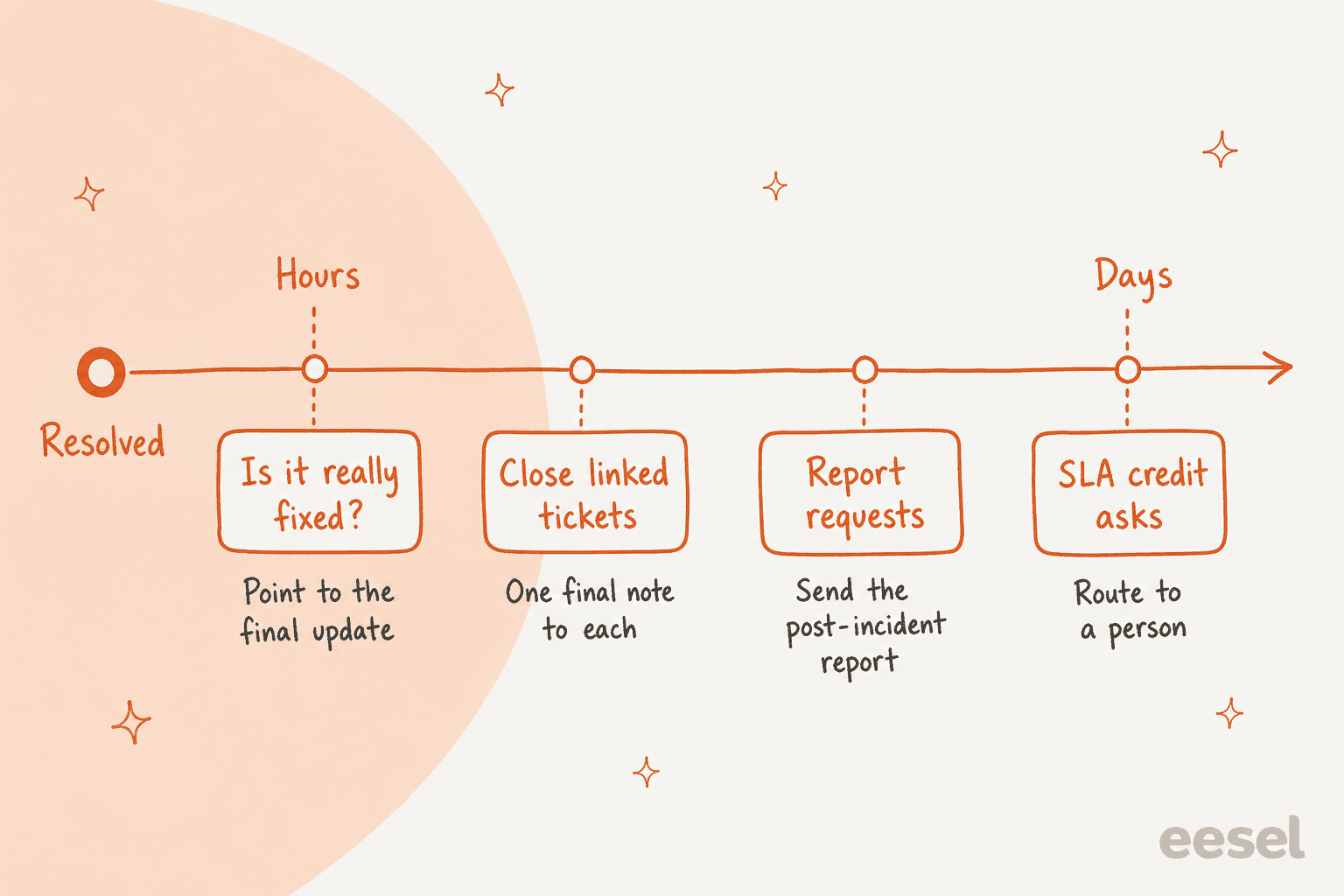
Here's what comes in, roughly in order:
- "Is it really fixed?" These arrive within hours, often from customers who never saw the resolved post. The AI can answer them with the final update text and a line inviting them to reply if they still see the problem. A real "still broken for me" goes to a person, since it might mean the fix didn't reach everyone.
- Closing every linked ticket. Send one final note to every ticket tagged with the incident, not only the ones still open. In Zendesk, solving the problem ticket does most of this. In Freshdesk, you resolve the linked tickets yourself or have the AI post the final note on each. Watch your reopen rate for the next few days, since it tells you if the "fixed" message landed.
- Post-incident report requests. Bigger customers ask for the write-up, often for their own compliance. Keep a list of who asked during the incident (the tag makes this easy) and send the report to all of them when it's published. Don't let the AI summarize root cause before your engineers publish it.
- SLA credit asks. These are contract questions with money attached. Route them to a person with the customer's plan and the incident's start and end times attached, the same way I'd handle billing disputes.
The wave is also where you learn the most. Count the tagged tickets, how many came before the first status post, and how many asked "any update?". Those three numbers tell you whether your first post was slow, whether your cadence held, and where to start next time. AI support reporting can pull them for you.
Getting this right matters past the day itself. As one founder on r/SaaS put it:
"if you wait until an outage to figure this out it’s already chaos, so even a simple status page plus a prewritten we’re investigating template and one owner for updates goes a long way because trying to debug while replying to tickets in real time is how small issues turn into trust problems fast"
Trust is also why I'd connect this to your churn work. The customers who wrote in during an outage are the ones most likely to be weighing a switch afterwards, and a personal follow-up from their account manager a week later costs very little.
How do you set it up before the next outage?
Do it on a quiet Tuesday, not at 2am. Here's the order I'd go in:
- Name the comms owner rota. One person per shift who isn't on engineering duty. Write it next to your on-call schedule.
- Write the incident record template. The four fields: what's affected, verified facts, what we're doing, next update at.
- Pre-approve the wording. "Investigating", "identified", "monitoring", "resolved" posts, plus a ticket reply and an account email for each. incident.io's report recommends pre-approved templates for common incidents for exactly this reason.
- Turn on ticket linking. Problem and incident tickets in Zendesk, or linked tickets in Freshdesk, plus one tag format for every incident.
- Connect the AI with approvals on. Set public replies to need approval, tags and internal notes to auto, and connect the status page webhook. Review a week of drafts on real tickets before moving any reply to auto.
- Run a drill. Fake a SEV2 in a test brand. Check the first post goes out inside your target, the heartbeat fires, the macro updates, and every tagged ticket gets the final note.
If your team works across shift changes or covers weekends thinly, step 1 matters most. An outage at 3am with nobody on the comms rota is how the status page sits on "investigating" for four hours.
Try eesel for your incident days
If your support queue runs on Zendesk, Freshdesk or Gorgias, eesel's AI helpdesk teammate joins it like a new agent who already read your help center and past tickets. On an incident day it tags every outage ticket, replies on matched tickets with the update your comms owner approved, and hands big accounts, data loss and billing straight to a person, the setup Qontro runs on Freshdesk. Connect your status page through a webhook and every reply stays on the same story as the status page.
It's free to start with 100 credits, then $299 a month for 500, with one ticket counting as one credit however many updates it gets. Set it up on Zendesk or Freshdesk before your next outage, not during it.