

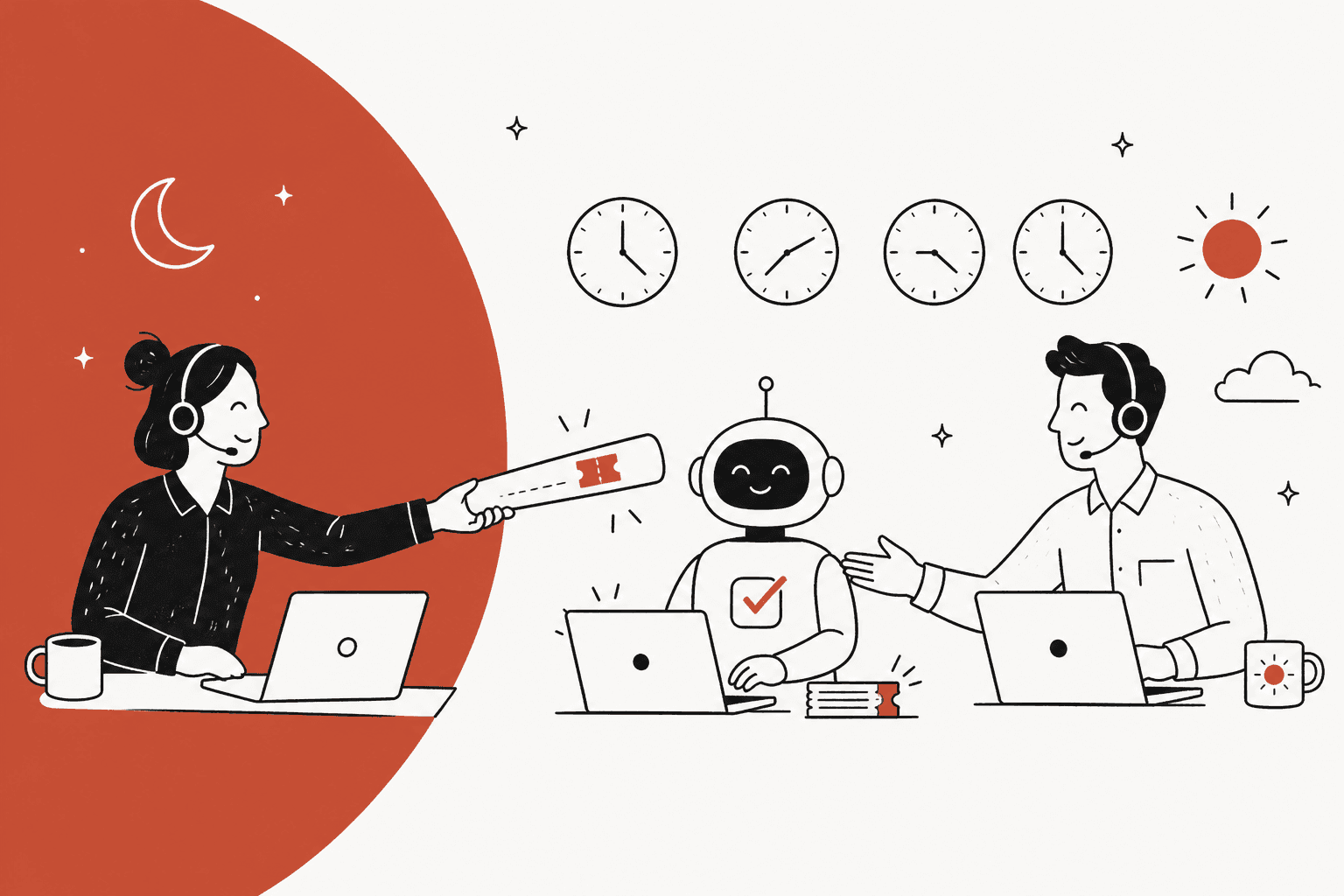
AI helps with support shift handovers in two ways, and the second matters more. The obvious one is writing better handover notes: summarizing each open ticket and flagging the ones with an SLA or a promised update due. The one most teams miss is that an AI agent working the queue between shifts never changes shift itself, so fewer tickets cross the line, and every ticket it does pass to a person arrives with a note written at the moment of escalation, not at 5:55pm from memory.
What actually gets lost at shift change is rarely the context. It's the commitment: "I told her we'd update by 14:00 UTC", the owner of the next step, and the fixes already tried. A good handover note carries five things (what the customer wants, what was tried, what was promised and by when, who owns it next, what evidence was found), and native helpdesk summaries in Zendesk, Freshdesk and Help Scout cover the first two well and the rest only if an agent types them in.
An AI teammate like eesel does this inside your existing helpdesk. At SE Ranking, a Zendesk team spread across 16 countries and every time zone, it handed about 1,260 chats to people in one month, each with the customer's name and email attached, and left about 2,600 internal notes on tickets. Plans start at $299 a month for 500 credits.
Why do things fall through the cracks at shift change?
Because a handover is the one moment where a ticket has no owner. The outgoing agent is mentally clocked off already, the incoming agent didn't read in yet, so anything that lived only in the outgoing agent's head is just gone. I work eesel's support queue every day, and the tickets that hurt are almost never the hard ones. They are the easy ones, where somebody made a small promise and then nobody wrote it down.
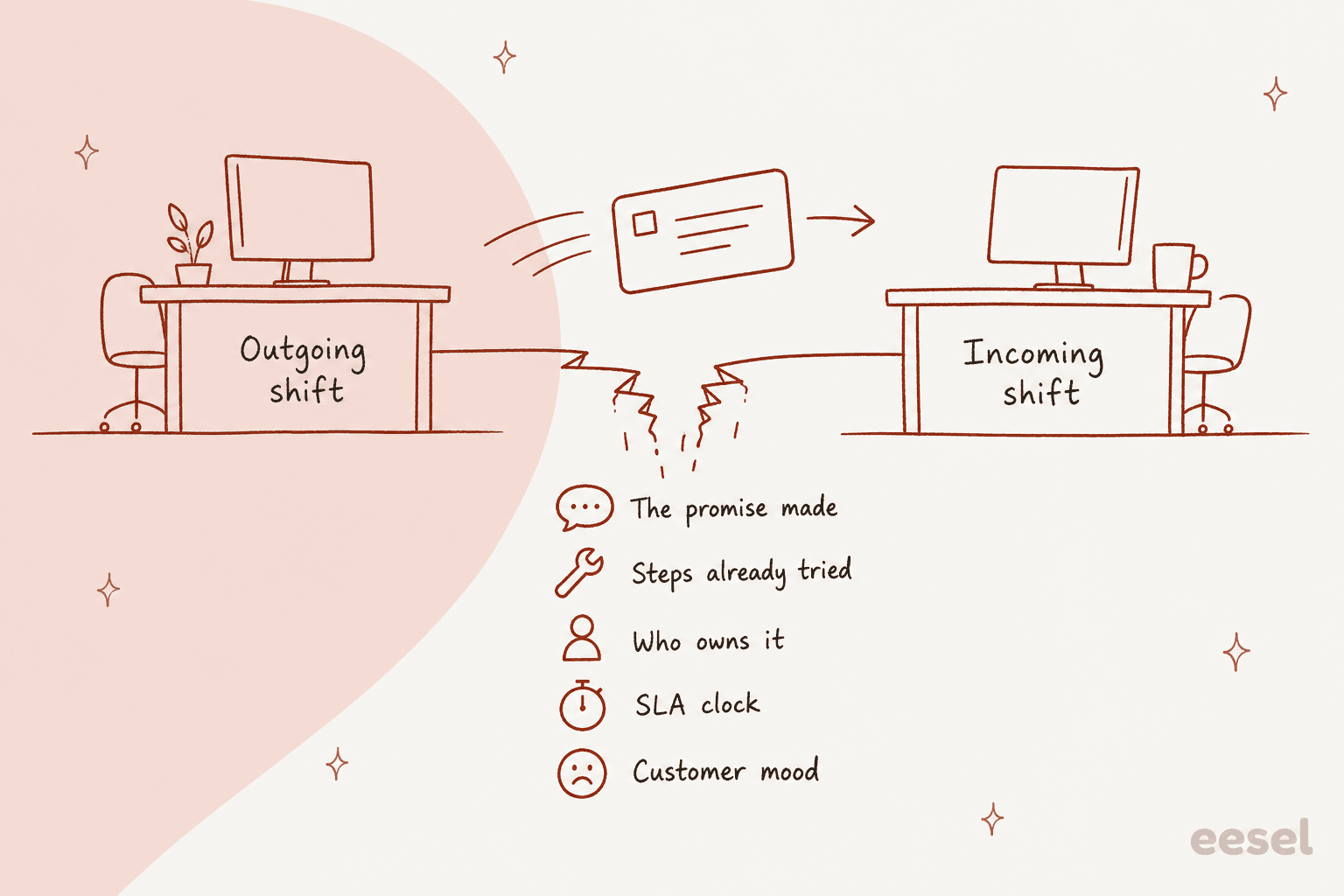
Here is what tends to fall through, more or less in order of how much damage each one does:
- The promise. "I'll check with billing and get back to you by end of day." The ticket looks like any other pending ticket, but there is a customer now waiting on a specific time.
- What's already been tried. Without it the next agent asks the customer to clear the cache again, and customer notices it.
- Who owns the next step. Escalated to engineering? Waiting on the customer? Sitting with a teammate who has gone home?
- The SLA clock. A ticket that breaches at 9:15am belong on top of the next shift's list, not somewhere in the middle.
- The customer's mood. A third contact from an annoyed customer reads very differently from a first contact.
Customers feel this from outside too. One engineer on Hacker News described how a cloud vendor's support looked like when a ticket bounced between the regions:
"...instead they keep sending tickets back for "more info", inevitably followed by a hand-off to another team in a different time zone. We have spent days trying to convince them there was an issue before, which just seems unacceptable."

That is the cost of a thin handover, the next team starts the diagnosis from zero. It's also not a niche problem, another commenter put the follow-the-sun model in quite plain terms:
"It can absolutely work, given the right async workflows, but it can also absolutely fail. I'm inclined to believe failure is the default mode of operation."
"The right async workflows" is basically the whole game. Most teams try fixing it with a shared doc or a Slack thread at end of each shift. Those works for a week or so, then the doc goes stale, because writing it is the last thing a tired agent does before logging off.
How can AI help with support shift handovers?
AI can do four jobs here, and only the first one is what most of the articles describe. Here they are in the order I would switch them on.
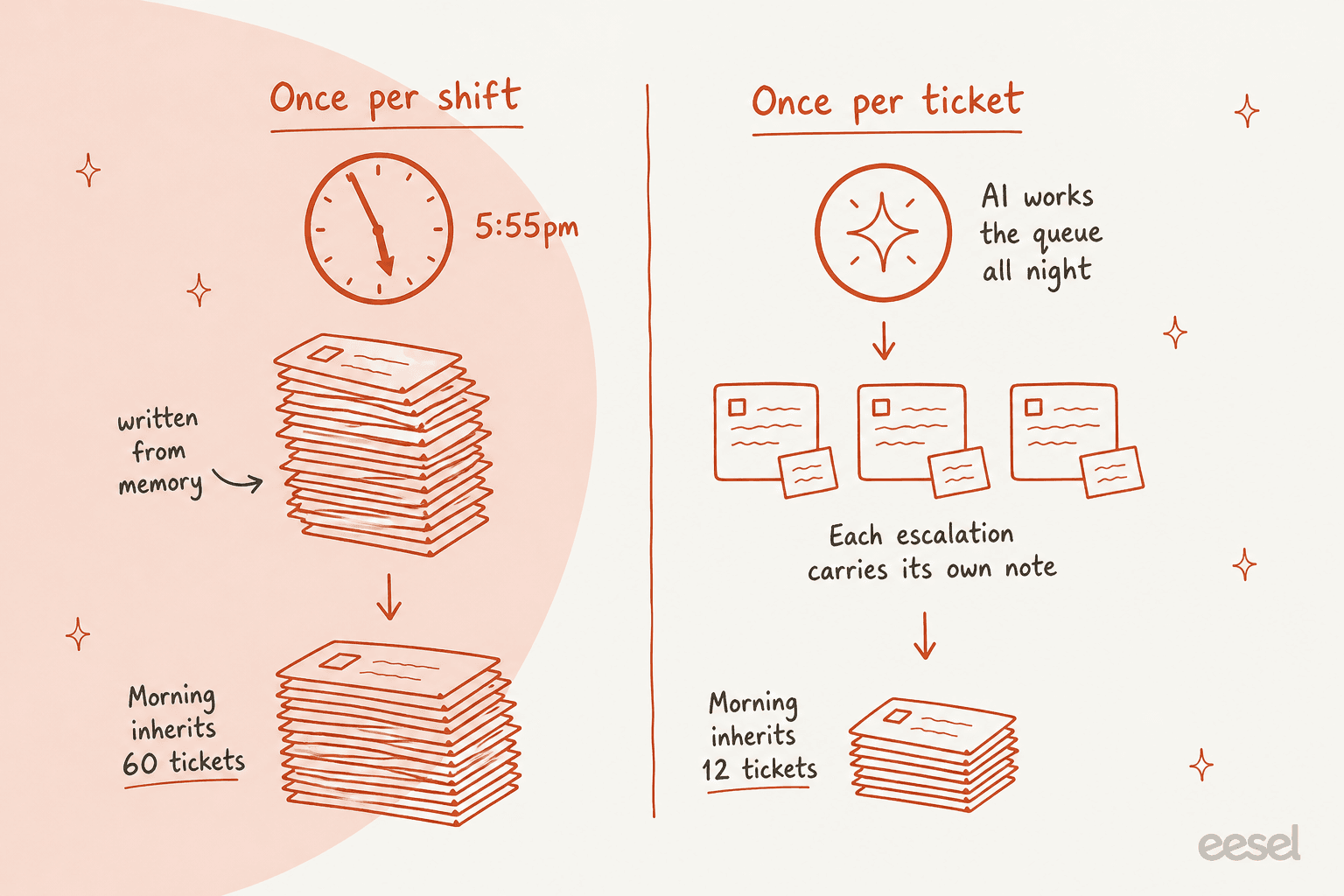
The ticket counts in this sketch are illustrative. Plug your own numbers into the calculator further down.
1. Summarize the open tickets. This is the version ChatGPT and most vendors pitch: AI reads each ticket and writes a recap, so the incoming agent doesn't have to scroll through 20 replies. It does help, and most helpdesks already has it (more on that below). My guide to ticket summarization goes deep on how good those summaries are.
2. Flag the risky tickets. Sort the handover by the risk and not by age: SLA due in the next hour, a promised callback, a repeat contact or an outage report. A summary list of 40 tickets in date order is hiding the few that actually matter.
3. Shrink what crosses the line. This is the job that changes the math. An AI helpdesk agent that answers and resolves tickets doesn't log off at 6pm. Order status, how-to questions, returns links: if the AI closes those while the outgoing shift wraps up and before the incoming shift arrives, they never become handover items in the first place. The cheapest handover is the one that never has to happen.
4. Write the note at the moment of escalation. When the AI can't close a ticket, it hands it to a person. That handoff is a handover by itself, and it happens on every single ticket at the moment when the context is freshest, rather than once per shift. So the handover stops being an end-of-shift chore and becomes a property of the ticket.
Jobs 3 and 4 are the reason I think "AI writes a better handover doc" is underselling it. A better doc still assume the same pile of tickets moves from one desk to the next one. An agent working the queue between shifts makes the pile smaller, and the notes on what's left were written by something that never got tired at the end of a shift.
What should a good handover note contain?
Five fields, per ticket. If a note have these, the next person can act on the ticket without reading the thread. If it's missing any of them they will read the thread anyway, and then the note saved nothing.
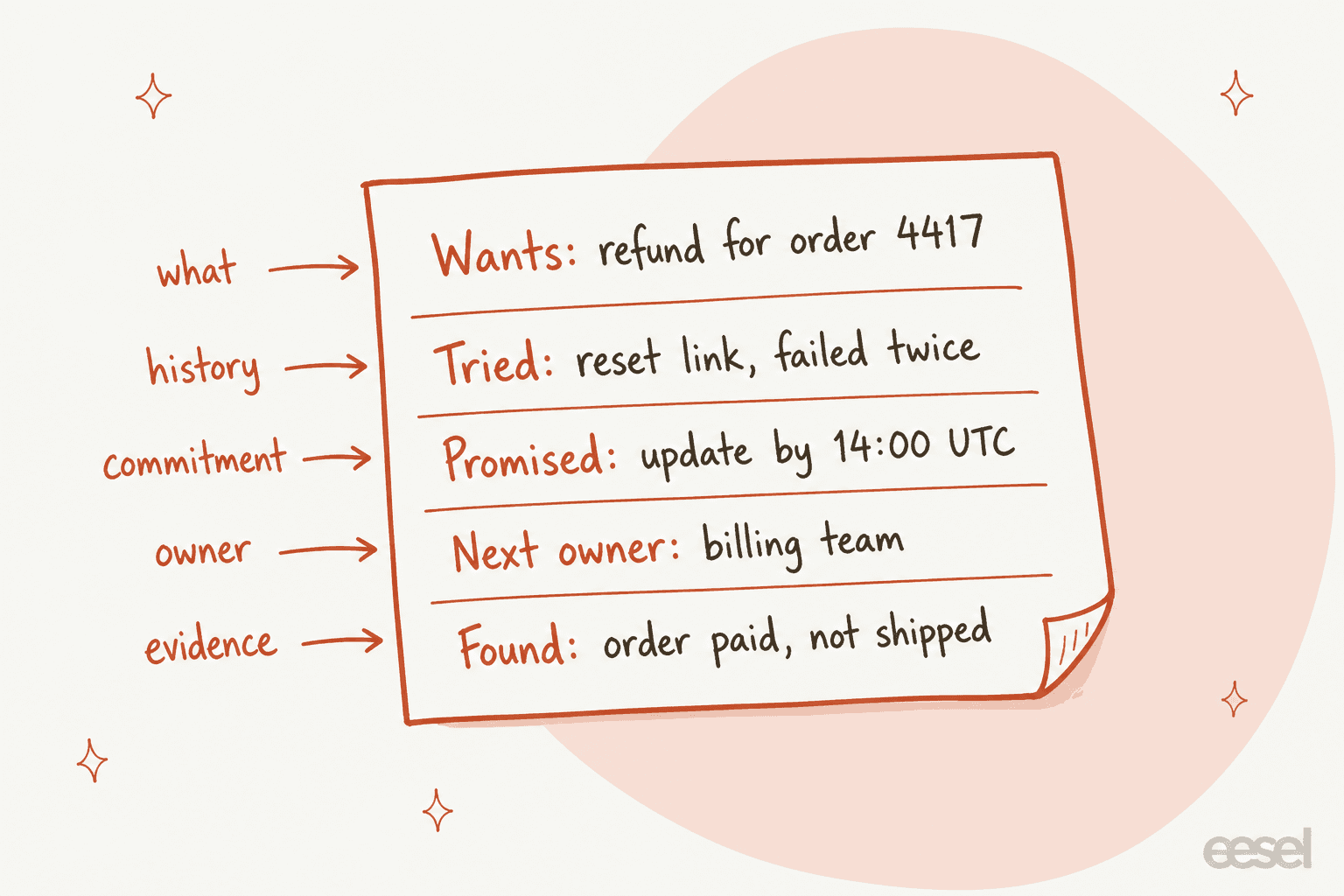
| Field | Example | Who should fill it in |
|---|---|---|
| What the customer wants | Refund for order 4417 | AI, from the conversation |
| What's been tried | Reset link sent twice, failed | AI, from the replies and internal notes |
| What was promised, and by when | "Update by 14:00 UTC" | AI drafts it from the replies, a person confirms |
| Who owns the next step | Billing team | A person, or a routing rule the AI applies |
| Evidence already found | Order paid, not shipped | AI, from a lookup in Shopify, the CRM or the billing tool |
The pattern in that last column is the thing worth to notice. AI is very good at the first two and at the last one, since those are facts sitting in the ticket or in a connected system. The promise and the owner are where a person should still sign off, because they're commitments, and a wrong commitment in a handover note is worse than none. My human handoff in chat guide covers the customer-facing side of the same moment.
Two rules is what make these notes trustworthy across time zones:
- Link back to the source. Every claim in the note should be checkable in the ticket. "Customer is angry" is an opinion; "third contact in 48 hours" is a fact the next agent can verify.
- Separate what was found from what was guessed. "Order shipped on 28 Oct" (from Shopify) and "probably a courier delay" (a guess) should never read the same way.
What do Zendesk, Freshdesk, Help Scout and Gorgias already do?
Most helpdesks can summarize a ticket on demand by now, and that covers the "what happened" part of a handover. None of them out of the box keeps a running list of what was promised and who is owning it. Here's what each one does, from the vendors' own docs, checked on October 30, 2026.
| Helpdesk | Native handover-related AI | What it covers | Plan and limits |
|---|---|---|---|
| Zendesk | Ticket summaries in Agent Workspace | Recaps public comments; internal notes only if an admin enables it | Suite and Support Professional and above, with a monthly usage allowance; part of the Copilot add-on |
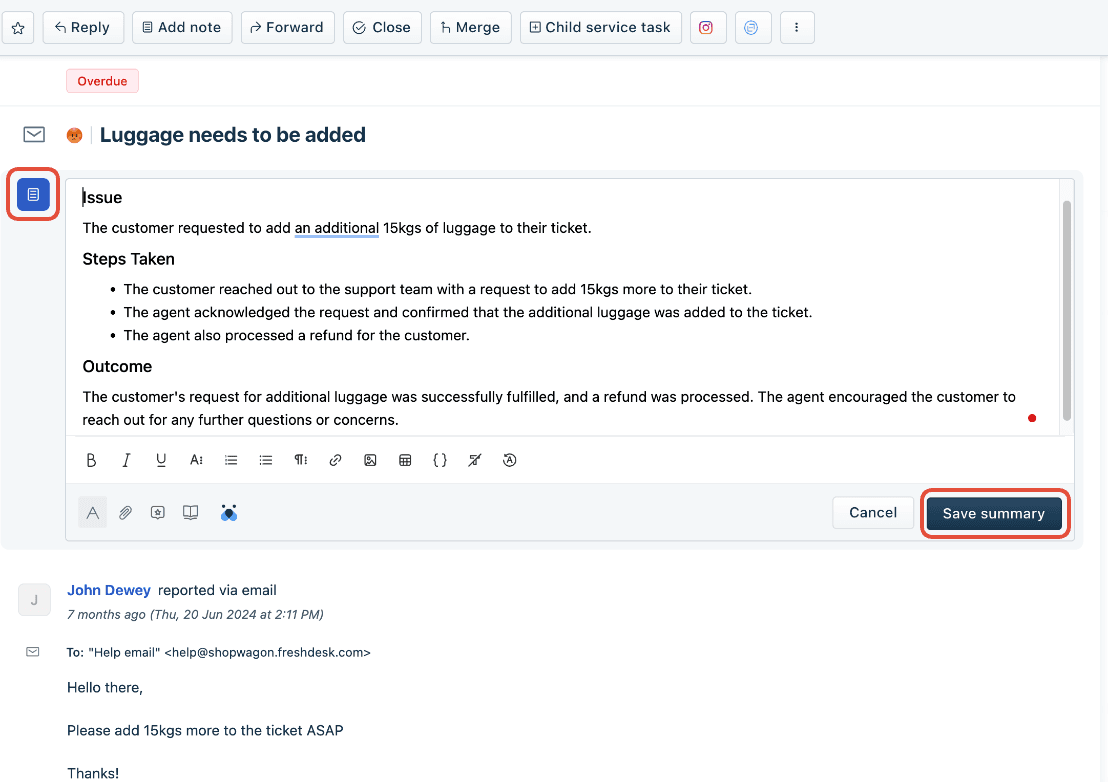
| Freshdesk | Freddy AI Summarize | Issue, Steps Taken and Outcome, including private notes | Under Freddy AI Copilot's Ticket content assist, admin must enable it |
| Help Scout | AI Summarize | One-click conversation summary | Plus and Pro plans; summary is always in English |
| Gorgias | AI Agent handover settings | Handover topics, and separate messages for when chat is online or offline | Part of Gorgias AI Agent |
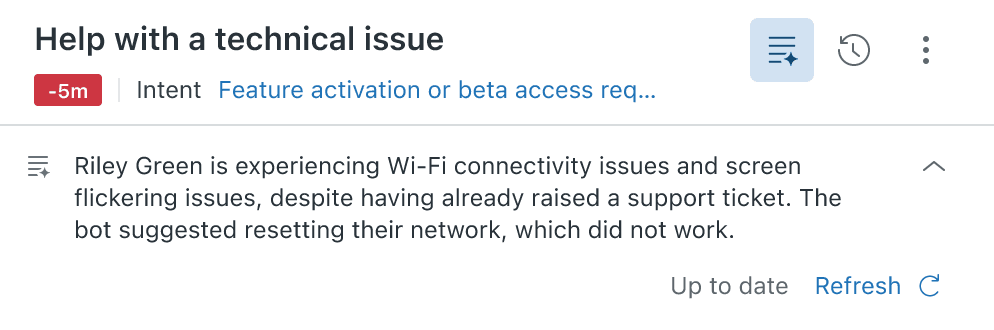
Zendesk ticket summaries
Zendesk's version sits as a banner under the ticket header. Its docs say it recaps "the public comments that have been added to a ticket so far," and internal notes are included only if your admin turns that on. For a handover this setting matters a lot, because internal notes are where the outgoing agent usually wrote what they tried. Summaries can be manually refreshed every five minutes to pick up new comments. More detail in my post on Zendesk Copilot ticket summaries.
Freddy AI Summarize in Freshdesk
Freshdesk's summary is the closest one to a handover note out of the box, because it comes structured: an Issue section, a Steps Taken section that includes private notes, and an Outcome. Agents can edit and save it, and Freshworks suggests adding summaries to private notes for team reference. It don't update itself when new replies arrive, you regenerate it. My walkthrough of Freddy's summaries has the setup.
People using it describe pretty much the handover benefit you would hope for:
"Freddy makes our tickets easy to understand for all agents. The need for explanation has decreased, as agents can find the Freddy summary at the top of the ticket."

Help Scout AI Summarize and Gorgias handovers
Help Scout is the only vendor whose docs name the handover use case directly: its AI Summarize is "useful for handing off a conversation to another teammate." Two limits are worth to know for a team across time zones: the summary is always written in English whatever the conversation's language, and it doesn't refresh on its own; you click Update Summary when new replies come in. More in my Help Scout AI overview.
Gorgias comes at it from the other direction. Its AI Agent handover settings let you write separate handover instructions for when chat is online and when it's offline, share business hours in the offline message, and collect the shopper's email so the next shift can follow up. That is a handover from AI to the team rather than shift to shift, but it's still the same moment. I covered it in my Gorgias handover guidance post.
The gap across all four: summaries are pulled on demand and they describe the past. They don't sort the queue by who is owed what, also they only exist on the tickets someone thought to open. For a quiet queue that's fine. For a team doing two or three shift changes a day, the handover note needs to already be there when the next person arrives.
How does this look in production?
Here is three eesel customers whose setups solve the handover problem each in a different way. All numbers are from their published stories and cover 8 August to 8 September 2026.
SE Ranking: the handover rules written down. SE Ranking runs support for three products on Zendesk, from a team across 16 countries covering all time zones. That's the shape of a follow-the-sun team, and the handover rules are written down. When a chat needs a person (a refund, a trial extension, the same question asked twice, or a customer saying their screen doesn't match), eesel hands it over with the customer's name and email. If it had been troubleshooting, it hands over with a note on what it already told the customer. Tier 2 issues become a ticket with the evidence attached first: the domain, the audit link or a connector screenshot. And it never tells a customer that someone is joining now; it says to expect a reply in one or two business days. In that month it handed about 1,260 chats to the team and left about 2,600 internal notes, most of them drafts for a person to send.
That last rule is the one I'd copy for any team over multiple time zones. A bot which promises a live agent at 3am creates exactly the kind of commitment that dies at the handover.
Amagency: the note format that saves a read-in. Amagency runs support for four consumer brands from one Gorgias account. eesel never replies to customers there. Instead, every internal note puts the full customer reply at the top, ready to copy, and underneath it a short section with the order details it found and anything it flagged. That is a handover note in everything but the name, whoever picks the ticket up next sees the evidence and the proposed answer without opening the thread. It left about 900 internal notes and 460 draft replies on about 350 tickets in the month. It also runs a short review of the workspace every weekday at 9am Sydney time and emails a note to the team, which works as a start-of-shift briefing.
Swiftreg: the night shift that isn't one. Swiftreg, a UK number plate seller on Zendesk, gets most tickets in the working day, but the story notes that the ones arriving overnight get the same treatment as daytime ones. Of about 2,100 tickets in the month, eesel sent 1,494 public replies and left 1,055 internal notes where the next step belonged to staff. Whoever opens the queue in the morning find the overnight tickets either answered or with a note on them.
A rule from a customer setup shows why written-down rules beat handover docs. A support admin configuring the agent put it like this:
"I have a rule in CS where we do not address a cancel or refund request when there is an issue attached to it."
Rules like that one usually live in a senior agent's head and travel from shift to shift by word of mouth. Once written into the agent's instructions they apply the same way at 2pm and at 2am, no matter who is on shift. It's a quiet benefit of AI for the multi-shift teams, the policy stops depending on who's working that day.
How much time does your handover cost you?
Plug in your own numbers. The defaults assume two shift changes a day, 40 tickets still open at each one, and 6 minutes for the next agent to read into a ticket with no note against 1.5 minutes with a proper note. Tick what your current handover reliably captures and the checker lists the gaps.
Read-in time today scales with how many of the six fields your notes already capture. "With an AI agent" assumes the agent closes the share you set before the handover and leaves a full note on everything else.
Two things usually jumps out. First, the read-in time is bigger than people expect, because you pay it at every shift change, every day: 80 tickets at 4.5 minutes each is 6 hours of new-shift time spent catching up, before anyone answers a customer. Second, the note is doing more of the work than the deflection. Even at 0% on the slider, a full note on every ticket cuts the read-in by about two thirds at the defaults. If the number that worries you is the queue size itself rather than the read-in, my posts on clearing a ticket backlog and reducing handle time cover that side.
What should AI hand over, and what should stay with a person?
AI should carry the facts and the routine tickets, people should own the commitments and the judgement calls. Here's how I would split it for a team that runs two or three shifts:
| At shift change | AI handles it | A person handles it |
|---|---|---|
| Routine tickets (order status, how-to, returns) | Answers and closes them before and after the handover | Spot-checks a sample at the start of the shift |
| Summary of each open ticket | Writes it on every ticket it touches | Reads it, flags anything wrong |
| Steps tried and evidence found | Pulls them from replies, notes and lookups | Adds anything done off-ticket (a call, a Slack thread) |
| Promised updates and deadlines | Drafts them from the replies, flags ones due soon | Confirms the promise and keeps it |
| Owner of an escalation | Applies your routing rules | Accepts ownership, especially for engineering or billing |
| Outages and security issues | Pages whoever is on call | Owns the incident and the customer updates |
| Angry or repeat customers | Flags them at the top of the handover | Writes the reply |
The guardrails for making the AI side safe are short. It should never silently close or reassign a ticket that another shift owns. Every handover note it writes should link back to the ticket it came from. And it should never promise a live person that the schedule can't deliver, which is the SE Ranking rule again. For the wider design, see my post on AI handoff best practices.
How do you set up AI-assisted handovers in your helpdesk?
Five steps. The first two is helpdesk housekeeping that any handover process needs, with AI or without.
Step 1: make the five fields real ticket fields
A handover note in a free text gets skipped. Add custom fields or tags for next owner and promised by (a date-time), and make sure your SLA due time shows in the ticket view. Once they are fields, people and the AI both can fill them, then you can build a view sorted by "promised by".
Step 2: set business hours per region
Your helpdesk needs to know who is online when, otherwise SLA timers and the "chat is offline" messages will be wrong at every shift change. Zendesk supports multiple schedules on Enterprise, Freshdesk supports multiple business hours on Pro and above, Gorgias has business hours on every plan from Basic, and Help Scout has company hours with custom inbox hours on Plus and Pro. I walked through the menu paths for each in my weekend coverage guide. For SLA design itself, see SLA best practices.
Step 3: connect an AI agent and give it a handover note template
Connect the agent to your helpdesk and help center and past tickets, plus the systems it needs for lookups (Shopify, your billing tool). Then write the handover rule in plain words, the way you'd brief a new hire: "When you hand a ticket to a person, leave an internal note with what the customer wants, what you've tried, anything you promised and when, who should own it, and what you found." In eesel that's just text in the agent's instructions; it applies on every escalation, around the clock.
Step 4: schedule a start-of-shift brief
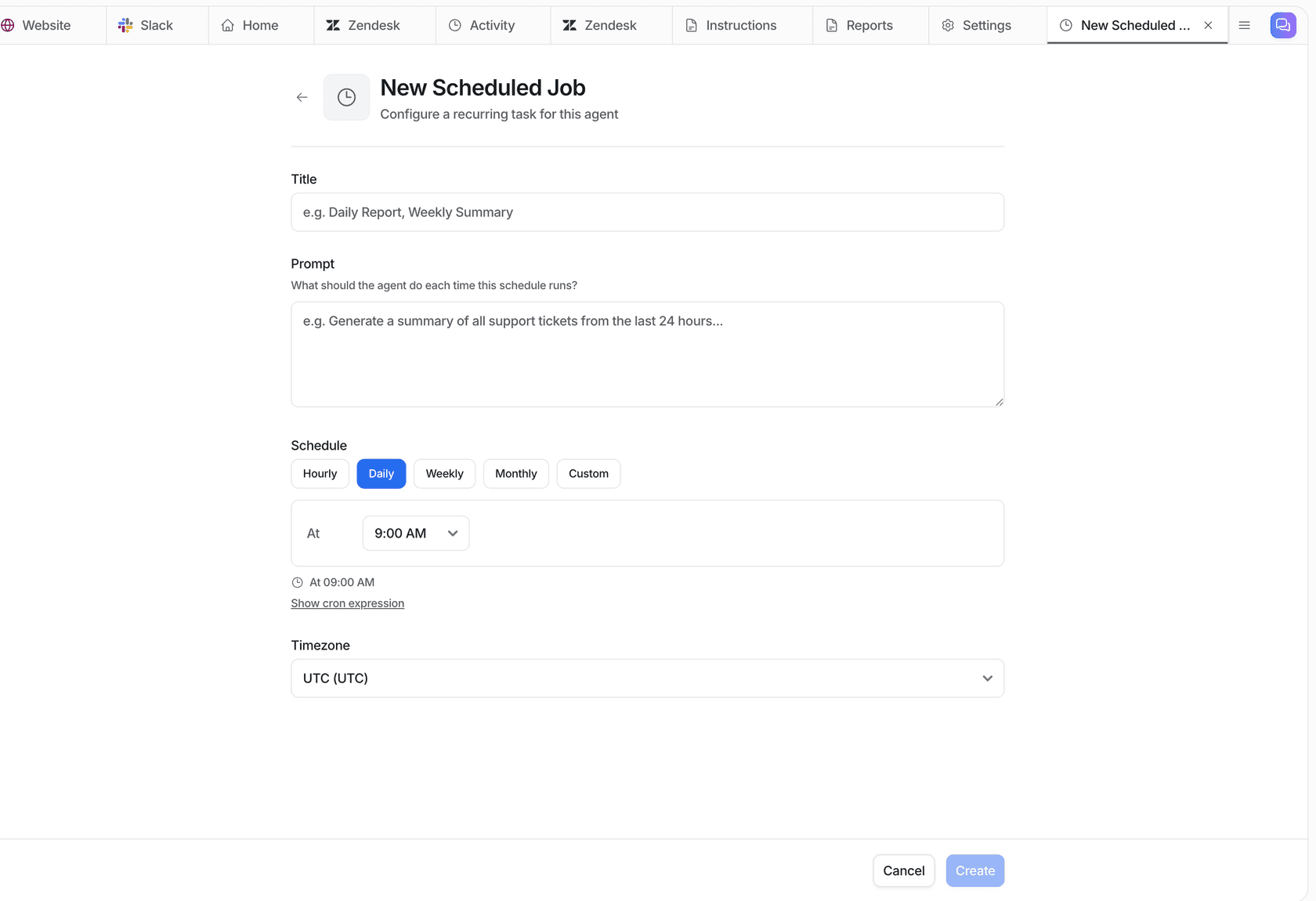
Have the AI post a short brief when each shift starts: tickets with an SLA due in the next two hours, tickets with a promised update today, repeat contacts, anything escalated since the last shift. Send it where your team already looks: Slack, Microsoft Teams or email. In eesel this is a scheduled job: a prompt, a time, and a time zone, so the APAC brief and the Europe brief can each land at 9am local.
Step 5: run two weeks with drafts only, then widen
Start with the AI writing notes and drafts, not sending replies. At each shift change ask the incoming agent one question, could you act on this ticket from the note alone? Fix the template wherever the answer is no. Then let the AI close your top two or three routine topics on its own. I've watched eesel put AI agents on live support queues for years, and every new setup runs against real past tickets first, because confident-sounding answers go wrong in ways you only see on your own data. My list of AI implementation mistakes covers the usual traps.
How do you know your handovers are working?
Measure the handover itself and not only the queue. Four numbers tells you most of what you need:
- Missed commitments. Tickets where a promised update time passed with no reply. This is the number the whole exercise exists to drive to zero.
- SLA breaches in the first hour of a shift. If breaches cluster right after shift change, the handover is losing the clock.
- Time to first action after shift start. How long before the incoming shift replies to its first carried-over ticket. Good notes make this minutes, not an hour.
- Tickets crossing each shift change. The count the calculator above estimates. It should fall as the AI takes more routine volume.
Tag everything the AI touches so you can separate its tickets from the team's. SE Ranking asked for an ai_handled tag on every ticket eesel works, plus helpful and not-helpful tags, so containment is counted in Zendesk instead of guessed. My posts on AI customer service metrics and escalation quality go further, and AI for support reporting covers building the report itself.
Where eesel isn't the right call: if you run a single shift with one or two agents, a five-line handover template in your helpdesk plus the native summary button will do the job fine. And if your problem is that nobody is online for long stretches, rather than the moment between shifts, read my after-hours support guide or look at staffing options in AI for support staffing.
Try eesel for shift handovers
If your support team works in shifts and the morning starts with a pile nobody wrote up, eesel works like a teammate who never changes shift. It joins your existing queue in Zendesk, Freshdesk, Gorgias or Help Scout, answers what your help center and past tickets already cover, and leaves an internal note with the facts, the draft and the evidence on every ticket it passes to a person. A scheduled brief can land in Slack or Teams at the start of each region's shift.
That's how SE Ranking runs one queue across 16 countries, and how Amagency gets a ready-to-send reply on Gorgias tickets before the team opens them. Plans are a fixed monthly batch of credits: one ticket or chat is one credit, from $299 a month for 500, and the free plan's 100 credits let you see the notes on your own tickets first.
Try eesel on tonight's handover, or see how it compares in my roundup of the best AI agents for customer service.