
Long ticket threads are a time sink. You open a support request and it's 20 replies deep, with multiple agents, internal notes, and a customer getting increasingly frustrated while they wait for you to catch up. This is where Zendesk Copilot ticket summaries come in. They use generative AI to recap conversations so agents can get up to speed fast.
But how do they actually work? What are the limitations? And how much does this feature cost? Let's break it down.

What is Zendesk Copilot ticket summary?
Zendesk Copilot ticket summary is an AI-powered feature that generates concise recaps of ticket conversations. It's part of Zendesk's broader Copilot add-on, which is designed to help agents work faster by automating routine tasks and providing contextual assistance.
The summary feature analyzes all the public comments in a ticket (and optionally internal notes) and distills them into a digestible overview. In October 2025, Zendesk enhanced this feature significantly. The word limit expanded from 50 to 100 words, and summaries now capture more context including the core problem, customer expectations, actions taken, outcomes, current status, and explicitly stated next steps.
This isn't just about saving reading time. When a ticket gets escalated to a senior agent or handed off at shift change, the receiving agent needs to understand what happened without scrolling through pages of back-and-forth. The summary provides that context instantly.
For teams already using eesel AI's Zendesk integration alongside Zendesk, ticket summaries complement our autonomous AI agent capabilities. While Zendesk helps agents understand tickets faster, eesel AI can handle frontline resolution entirely, escalating only what needs human attention.

How Zendesk Copilot ticket summaries work
The summary appears as a banner below the ticket header in the Zendesk Agent Workspace. It stays pinned when you scroll through comments, so the context is always visible.
Here's what the AI captures:
- The customer's main problem or request
- Actions already taken by previous agents
- Current status of the issue
- Explicitly stated next steps
- Root cause and business impact (when mentioned)
- Customer sentiment
- Key details from internal notes (if enabled)
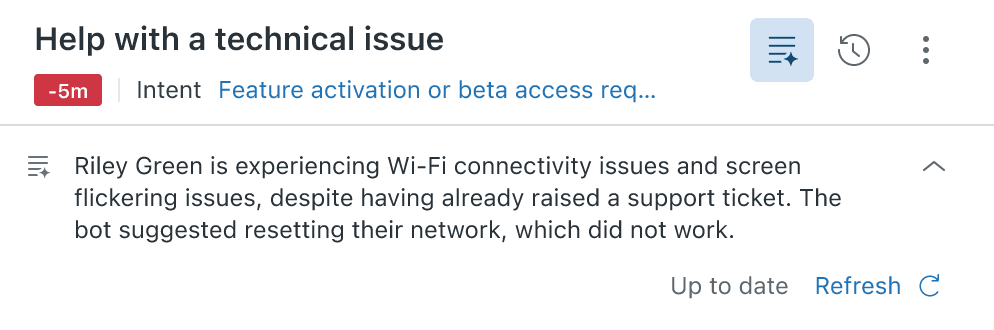
The feature works for messaging and chat tickets too, but only after the transcript has been added to the ticket when the conversation ends or becomes inactive.
Agents interact with summaries in a few ways:
- View: The summary appears automatically when available
- Refresh: Agents can manually update the summary to include new comments (with a 5-minute cooldown between refreshes)
- Collapse/expand: The banner can be minimized to save screen space
- Hide/show: Agents can completely hide the summary if they prefer
One important detail: summaries aren't automatically updated as new comments come in. An agent needs to manually refresh to pull in the latest information. This keeps the human in control but means you'll need to refresh to stay current.
How to enable and configure ticket summaries
Getting started requires two things: a qualifying Zendesk Suite plan and the Copilot add-on.
Prerequisites:
- Suite Team, Growth, Professional, or Enterprise plan
- Copilot add-on purchased ($50 per agent/month)
- Admin permissions to configure settings
To turn on ticket summaries:
- In Admin Center, click AI in the sidebar
- Select Agent copilot > Translations
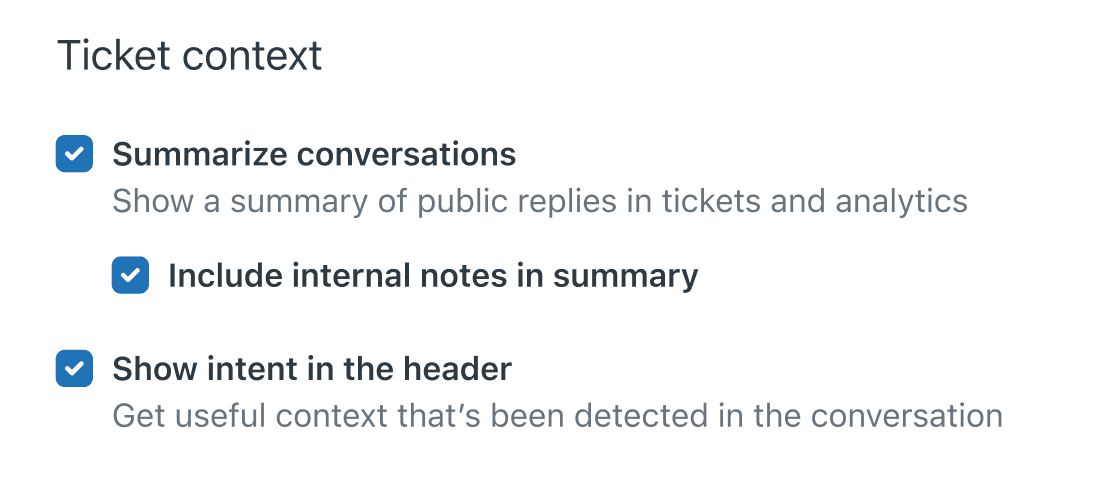
- Under Ticket context, select Summarize conversations
- Click Save
Including internal notes:
By default, summaries only include public comments. To add internal notes:
- Follow steps 1-2 above
- Make sure Summarize conversations is turned on
- Select Include internal notes in summary
- Click Save
This is useful when key troubleshooting details, escalation updates, or investigation actions are documented in internal notes rather than public replies.
Using summaries in views and reports:
Since summaries are stored in ticket fields, you can:
- Add summary columns to your ticket views
- Include summaries as attributes in reports and dashboards
- Use them as placeholders in macros and triggers with syntax like
{{ticket.ticket_field_<field ID>}} - Retrieve them via the Ticket Fields API
One caveat: summaries aren't stored for closed tickets. If you need summary data for reporting on resolved issues, agents must generate summaries before tickets are closed.
Pricing and plans
Zendesk Copilot is not included in base Suite plans. It's a paid add-on that costs $50 per agent per month when billed annually.
Here's how the math works out:
| Plan | Base Cost (per agent/month) | Copilot Add-on | Total Cost |
|---|---|---|---|
| Suite Team | $55 | Not available | N/A |
| Suite Growth | Contact sales | $50 | Variable |
| Suite Professional | $115 | $50 | $165 |
| Suite Enterprise | Custom (sales) | Included | Custom (sales) |
What's included beyond ticket summaries:
The Copilot add-on includes several AI-powered features:
- Intelligent triage (intent detection, sentiment analysis)
- Suggested macros with confidence scores
- Enhanced writing tools (expand, adjust tone, simplify)
- Auto assist for guided workflows
- Generative search for help centers
Automated resolutions:
Zendesk also charges for automated resolutions separately from the Copilot add-on:
- Included: 5-15 automated resolutions per agent per month (varies by plan)
- Pay-as-you-go: $2 per resolution
- Committed rate: $1.50 per resolution
For teams evaluating costs, our eesel AI pricing takes a different approach. Instead of per-agent fees, we charge a flat monthly rate based on AI interactions. This can be more predictable for growing teams.

Use cases and benefits
Ticket summaries solve real problems in day-to-day support operations:
Agent handoffs and escalations:
When a ticket moves from a tier-1 agent to a specialist, or from one shift to the next, the receiving agent gets immediate context. No need to read 15 back-and-forth messages to understand what's happening.
New agent onboarding:
New hires can review past tickets with summaries to quickly see how issues were handled. It's an effective way to absorb company knowledge and understand common resolution patterns.
QA and reporting:
Managers doing quality assurance can read summaries instead of entire ticket threads. For reporting, summaries provide context that generic intent tags like "order status inquiry" miss.
Call recording summaries:
For teams using Zendesk Talk, the AI transcribes calls and generates summaries. This helps managers review calls efficiently and agents recall specific details without listening to entire recordings.
CSAT surveys:
Some teams add summaries to customer satisfaction survey emails to remind customers what they're rating. This can improve response quality, though the third-person perspective ("The user reported...") can feel odd to customers.
For teams that want to go beyond summaries and actually automate responses, our AI Copilot drafts replies that agents can review and send. It works well alongside Zendesk's summarization.
Limitations and considerations
Ticket summaries are helpful, but they're not automatic. Here are the key limitations to understand:
Agent-driven process:
Summaries require a manual trigger. An agent must click to generate or refresh a summary. This ensures accuracy and keeps humans in control, but it also means summaries won't exist unless someone creates them.
No auto-generation for solved tickets:
If no agent generates a summary before a ticket is solved, you can't create one afterward for closed tickets. This limits their usefulness for post-resolution reporting unless your team is diligent about generating summaries before closing.
Refresh restrictions:
Summaries can only be regenerated once every 5 minutes. If a conversation is moving quickly, the summary may lag behind.
Limited to ticket context:
The AI only analyzes the ticket conversation. It doesn't pull in information from your help center, Confluence, Google Docs, or other knowledge sources. If the solution to a problem exists in documentation but wasn't mentioned in the ticket, the summary won't capture it.
API limitations:
Summaries are stored in custom ticket fields with unique IDs per Zendesk instance. Retrieving them via the Ticket Fields API requires parsing custom field arrays rather than accessing a simple ticket.summary property. The summary fields are also read-only via standard API calls.
Requires Zendesk Suite:
Copilot only works within the Zendesk ecosystem. If you're not already using Zendesk Suite, you'll need to migrate your support operations to access these features.
For teams hitting these limitations, eesel AI offers autonomous ticket handling that doesn't require manual triggers. Our AI agent can resolve tickets end-to-end, escalating only when necessary.
Getting more from your Zendesk setup
Zendesk Copilot ticket summaries are a solid tool for agent productivity. They help agents understand conversations faster, which means quicker responses and better customer experiences.
But summaries are just one piece of the puzzle. The most effective support teams in 2026 combine agent-assist tools with broader automation. That's where we come in.
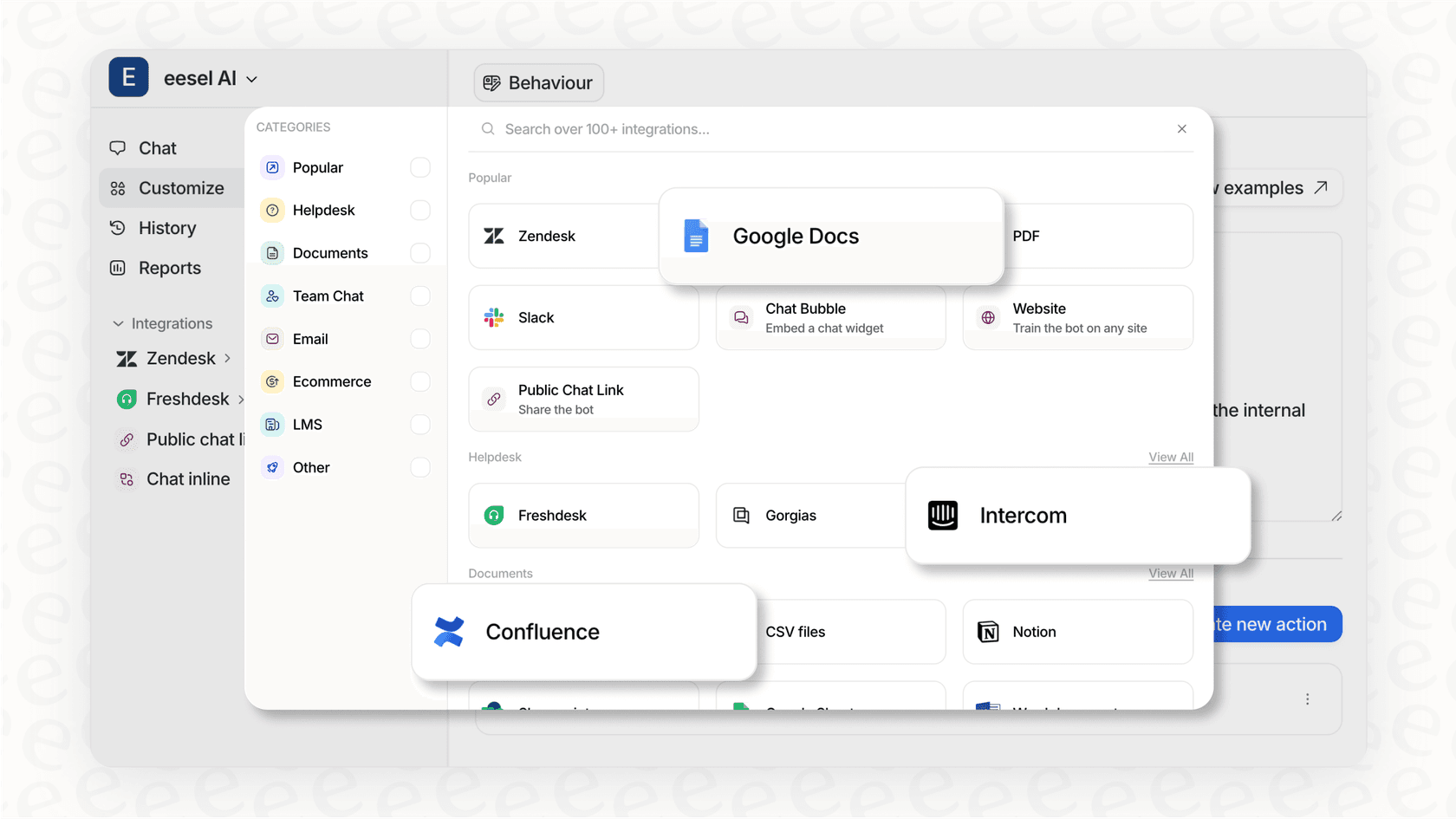
eesel AI works alongside Zendesk to provide autonomous resolution capabilities. While Zendesk helps agents work faster, eesel AI can handle frontline support entirely, learning from your past tickets, help center, and connected documentation to resolve issues without human intervention.
Key differences in approach:
- Zendesk Copilot: Agent-assist tool that helps humans work faster
- eesel AI: Autonomous AI teammate that handles tickets end-to-end
Our Zendesk integration plugs in with one click. You can run simulations on past tickets to see potential automation rates before going live, then gradually expand the AI's scope as it proves itself.
If you're already using Zendesk and want to explore what autonomous AI can add to your workflow, try eesel AI free for 7 days or book a demo to see it in action.