


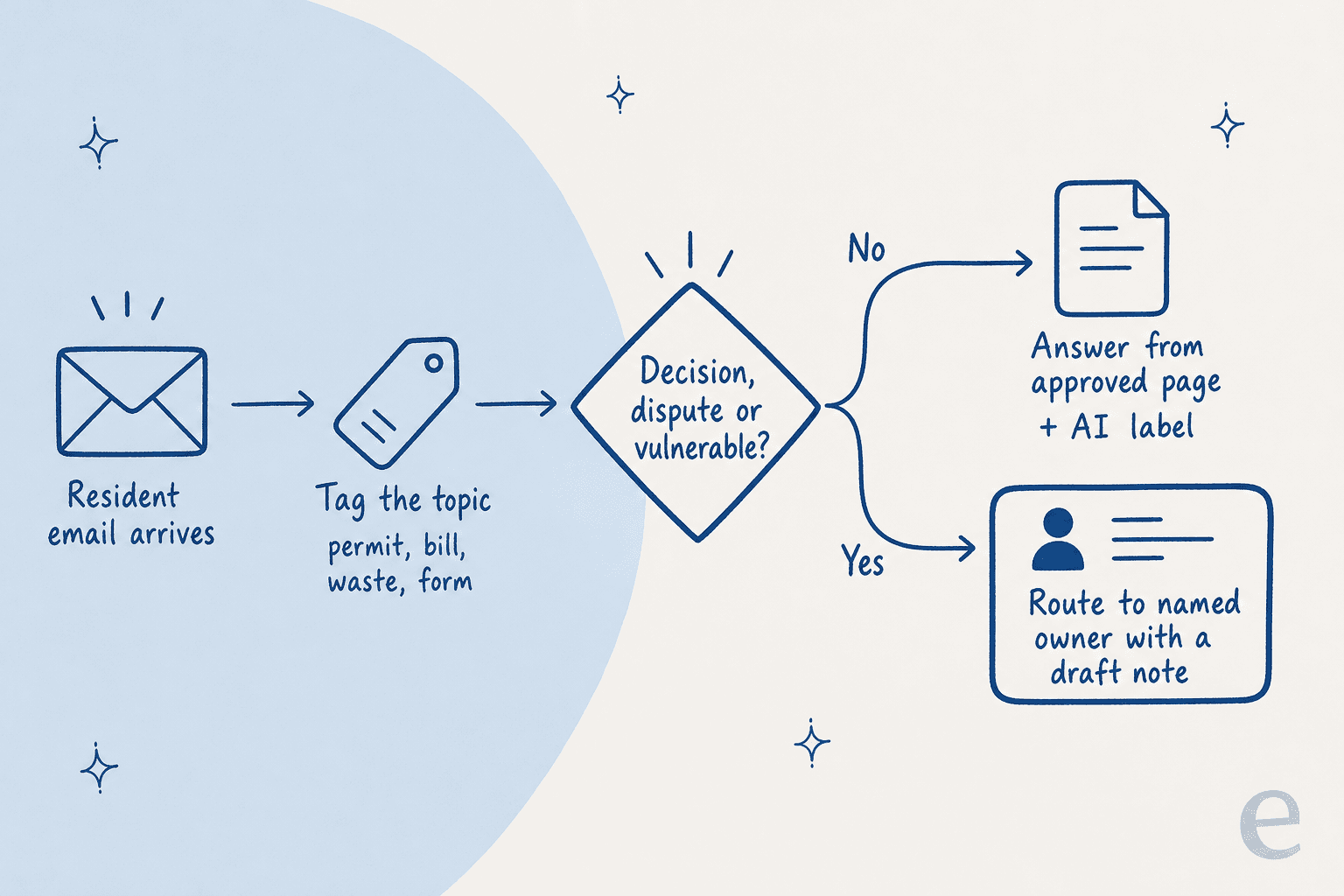
AI for government customer service works when you let AI answer only from approved pages, let it draft anything that needs a record, and keep every decision with a named person. Bin days, missed pickups, "which permit do I need" and "where is the form" can be answered by AI from your own website. Bill questions and permit status need the case record, so AI drafts and staff send. Permit decisions, disputed bills, appeals, vulnerable residents and policy exceptions stay human.
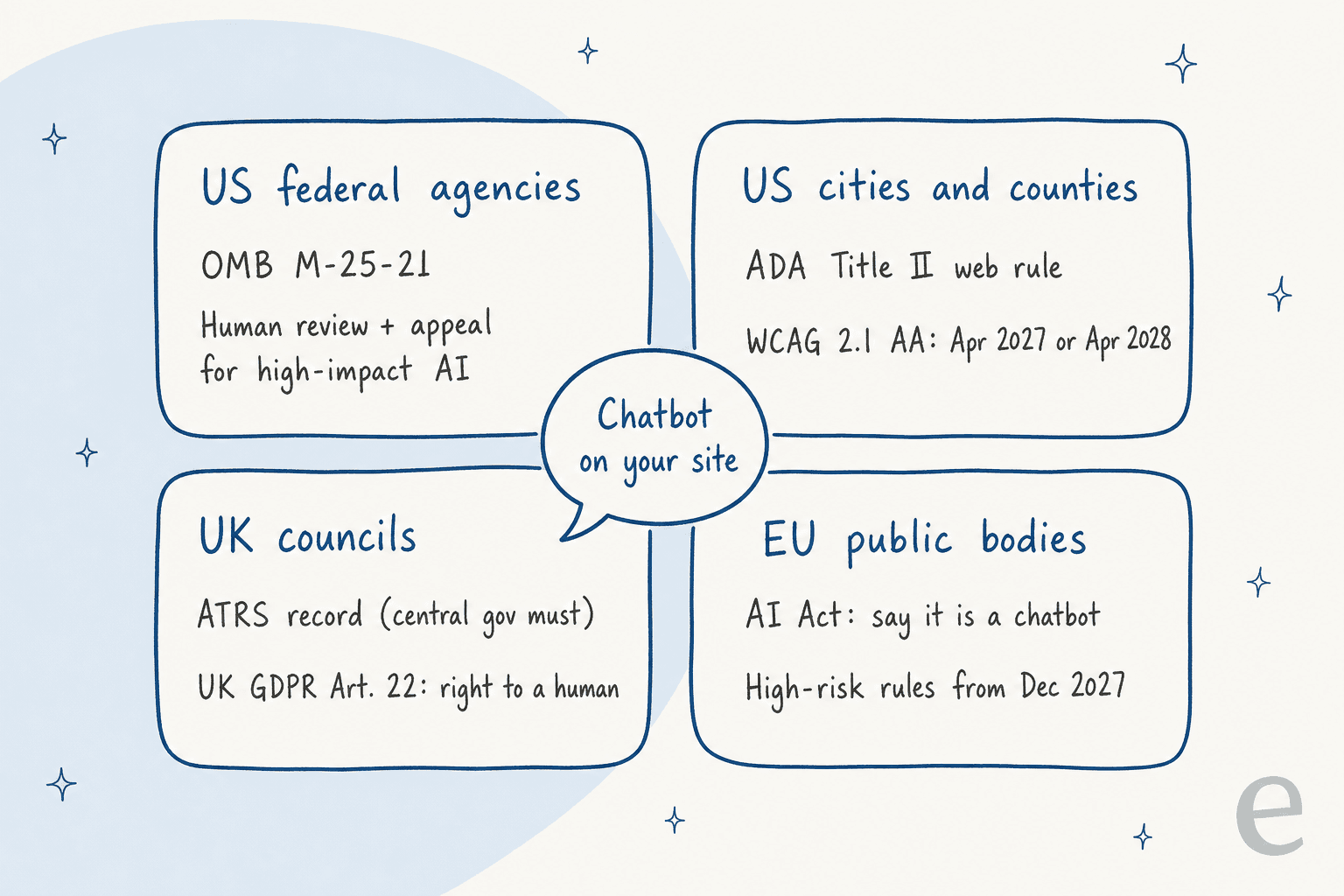
The rules point the same way. US federal guidance (OMB M-25-21) treats AI that is the main basis for a decision about access to government services as high-impact, with human review and appeal. In the US, the chatbot itself must meet WCAG 2.1 AA under the ADA web rule, by April 26, 2027 for places of 50,000+ people. In the EU, the AI Act has required chatbots to say they are AI since August 2026.
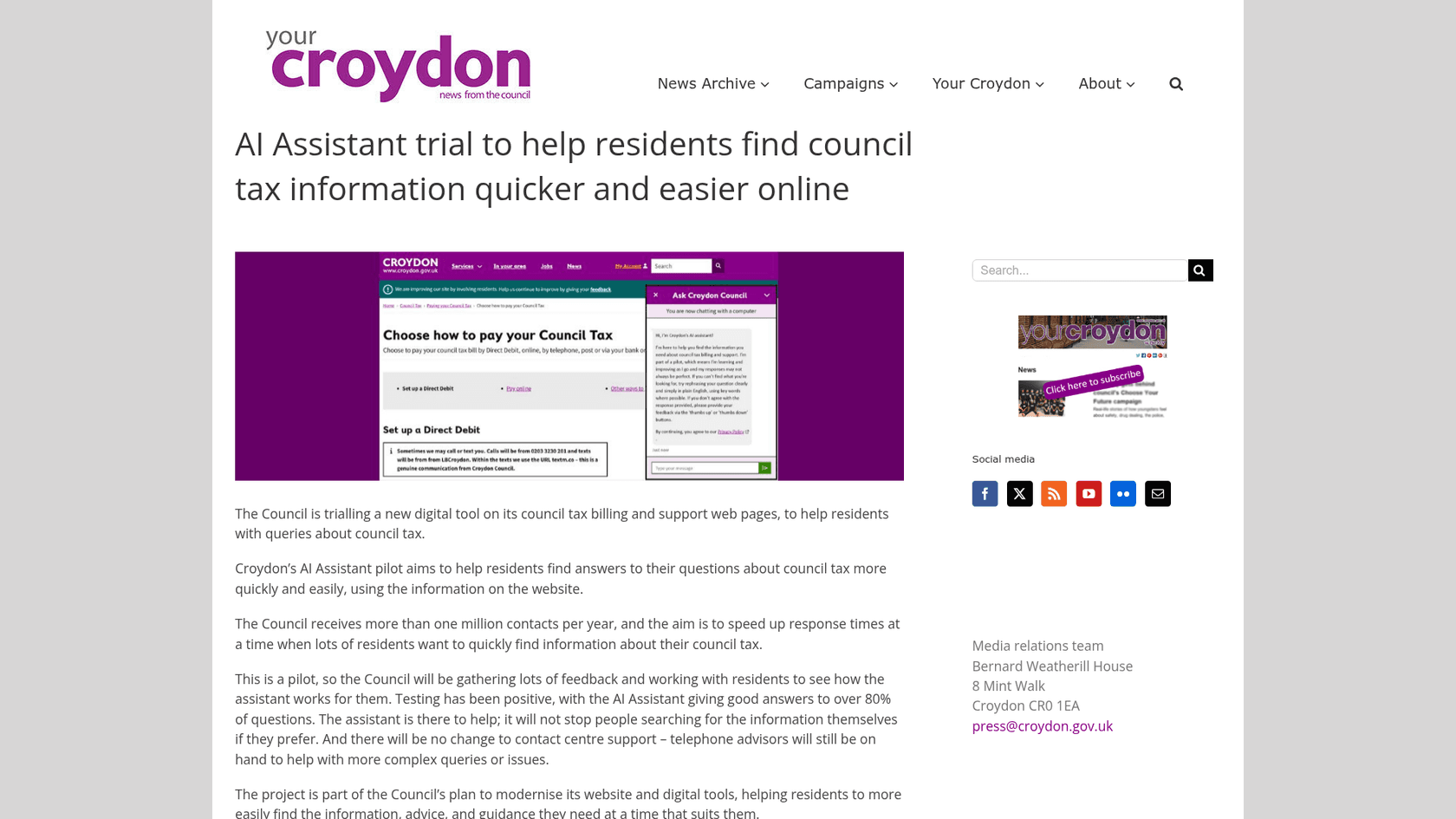
Councils are already doing this in public: Barnet piloted a chatbot on council tax, waste and housing benefit pages with a human handoff, and Croydon reported good answers to over 80% of test questions. eesel's AI helpdesk teammate runs the same pattern inside Zendesk and Freshdesk: Dokument 24 gets a draft on every new ticket, and Swiftreg labels every AI reply as AI-written. Plans start at $299 a month.
Why does a council inbox fill up with the same questions?
Because most of what residents ask is already answered somewhere on your website, just not where they look. Croydon Council says it receives more than one million contacts a year. Barnet's chatbot pilot was planned for 30,000 chats in six months, limited to five topics: council tax, housing benefits, waste and recycling, schools and pest control, according to its published transparency record. Those five topics are the spine of almost every local government queue.
I write about search for a living, so before drafting this I asked ChatGPT the question a citizen services lead would ask: we're flooded with the same permit, bill, trash and form questions by phone and email, what can AI take, and what stays with a person? It came back with frameworks (NIST, the GOV.UK ethics framework, an OECD report) and one council press page. Useful, but nobody told that lead what to switch on in their actual inbox on Monday. That's the gap this guide fills.
The pattern I see over and over is that the answer exists but is written for the wrong reader. On one sales call, a support manager told the eesel team their entire knowledge base was written for admins while the tickets came from end users, so the AI's first answers were accurate and still confusing. Council pages have the same problem: the waste page explains the collection contract, the resident wants to know why their green bin wasn't emptied on Tuesday.
eesel has been putting AI agents on live support queues for years, and the public sector shows up in eesel's own pipeline too. One was a public-sector IT services firm supporting town halls, running about 3,000 tickets a month on Freshdesk with a 10,430-document knowledge base. Their worry wasn't the bot. It was that two senior agents were leaving that year and they wanted that knowledge captured before it walked out the door. That's the honest case for AI in government service: not replacing the desk, but keeping the answers consistent when the people who know them move on.
What can AI answer, what should it draft, and what stays with a person?
Sort every message by one question: does the answer depend on a decision about this resident? If not, AI can answer from approved pages. If it depends on a record but not a decision, AI drafts and staff send. If it needs a decision, a judgement or care, a person owns it.
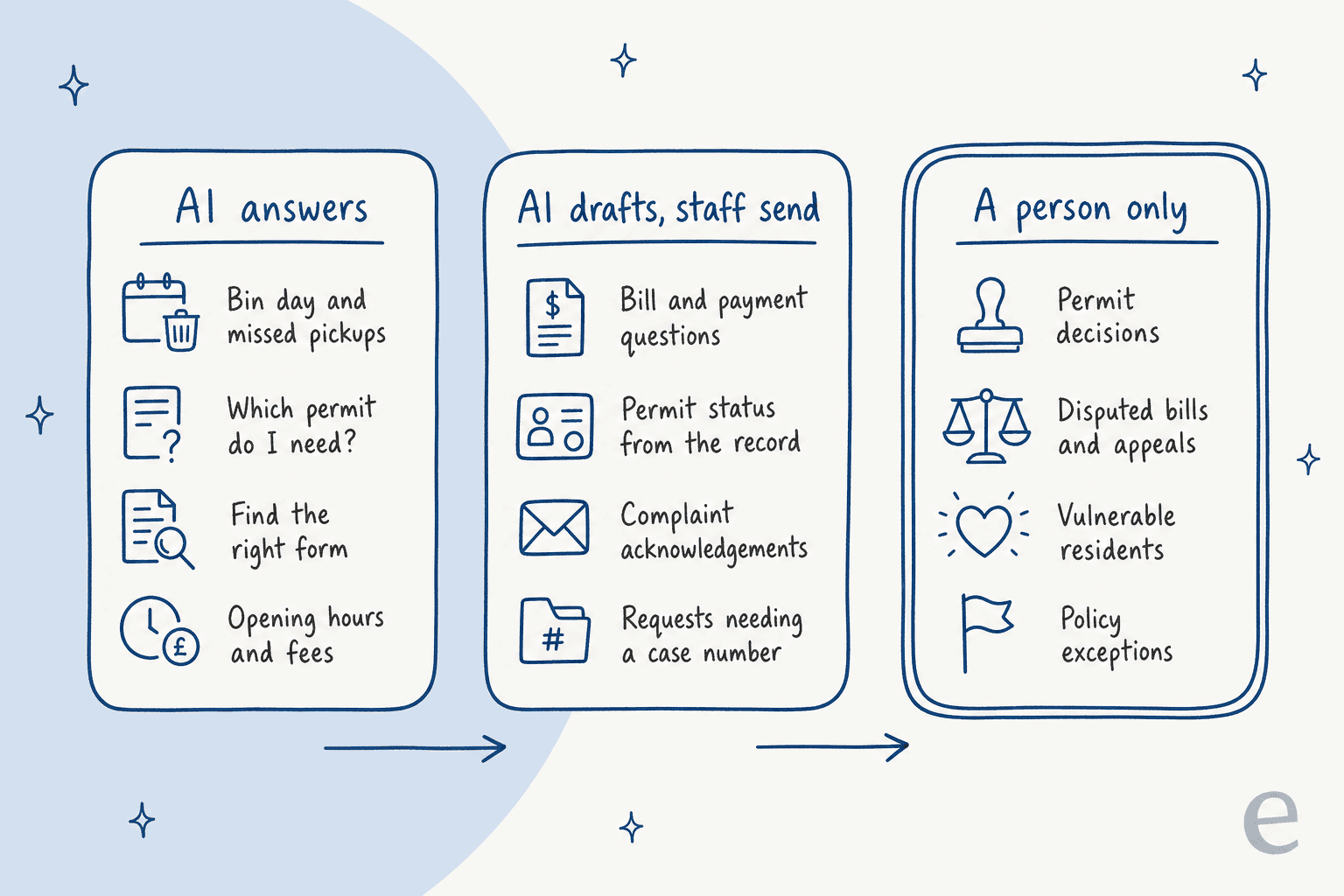
Here's how that plays out across the four topics that fill most city and council inboxes:
| Topic | AI answers on its own | AI drafts, staff send | A person only |
|---|---|---|---|
| Waste and recycling | Collection day for an address, what goes in which bin, how to report a missed pickup | Repeat missed pickups on the same street (needs the crew log) | Assisted collections for disabled or elderly residents |
| Permits and licences | Which permit a job needs, fees, documents to attach, where to apply | Status of a submitted application, from the case record | Approving, refusing or attaching conditions to any permit |
| Bills, council tax and fees | How to pay, due dates, how discounts work in general | "Why is my bill higher?" with the account figures pulled in | Disputes, payment arrangements, write-offs, hardship |
| Forms and general questions | Which form, where it lives, opening hours | Requests that need a case number or a named department | Complaints about staff, appeals, anything a resident flags as urgent |
The right-hand column isn't there because AI writes badly. It's there because those messages are where a wrong answer costs a resident money, a home or a legal right, and where they're entitled to a human. The US federal memo M-25-21 calls AI "high-impact" when its output is the principal basis for a decision with a legal, material or significant effect on someone's access to critical government resources or services. A chatbot telling someone their bin day isn't that. A chatbot telling someone their fee waiver was declined is.
Two lanes need extra care because they hide inside friendly-looking messages. A "quick question about my bill" can turn into "I've lost my job and can't pay", which is a hardship case, not a billing question. And "can you waive the late fee just this once?" sounds like a FAQ but is a policy exception. Your routing rules should catch the words, not the topic. My piece on AI escalation management has more examples of trigger phrases.
Try it on a few real-sounding messages:
Pick a message from a city or council inbox
Lane: AI answers
AI reads: your collection calendar and missed-bin page.
AI does: confirms the collection day for that street, explains the report window, links the missed-collection form.
Person: only if it's the third miss in a month or an assisted collection.
Lane: AI answers
AI reads: your permit guidance page for fences and walls.
AI does: explains when a permit is needed, the fee and the documents, links the application.
Person: any question about whether a specific plan will be approved.
Lane: AI answers
AI reads: your forms index.
AI does: sends the right form link and the eligibility line from the page.
Person: not needed.
Lane: AI drafts, staff send
AI reads: billing help pages, plus the account figures if your system allows a lookup.
AI does: drafts a reply with the actual numbers as an internal note.
Person: checks and sends. A formal dispute goes to billing.
Lane: AI drafts, staff send
AI reads: the case status in your permitting system, if connected.
AI does: drafts the status update. Never predicts the outcome.
Person: sends it, and owns any timeline promise.
Lane: A person only (policy exception)
AI reads: nothing it should act on.
AI does: tags it, routes it to the fees team, tells the resident a person will reply. Promises nothing.
Person: decides, and records why.
Lane: A person only (vulnerable resident)
AI reads: nothing it should act on.
AI does: flags it urgent, routes it to the hardship or council tax support team, shares the support page and phone line.
Person: owns all of it, including any payment arrangement.
What are councils and cities actually running today?
The best evidence isn't in vendor brochures. UK councils publish detailed records of their AI tools on GOV.UK's transparency record search, and those records answer the exact questions a citizen services lead would ask: what does it read, who can it hand off to, and what does it never do.
| Organisation | What it is | What it reads | Handoff to a person | Scale noted |
|---|---|---|---|---|
| Barnet Council | Website chatbot pilot, run by Capita with supplier Ami | Designated Barnet web pages only | Yes, in staffed hours, with the transcript passed to the agent | 30,000 chats planned over 6 months |
| Leeds City Council | Money Information Centre chatbot on AWS Bedrock, built by Kainos | The public Money Information Centre website | No escalation; council phone number shown up front | Site gets around 50,000 hits a year |
| Croydon Council | Council tax AI assistant pilot on Microsoft Copilot | Council tax pages on the website | Contact centre unchanged for complex queries | Good answers to over 80% of test questions |
| Newcastle City Council | Agent assist in its Amazon Connect contact centre | Approved knowledge sources | AI only suggests; "all decisions remain with council staff" | In production |
A few details from those records are worth stealing for your own setup.
Barnet chose the boring model on purpose. Its supplier can run generative models, but for Barnet it uses only "prescriptive models as the requirement is for precise and reliable responses." The bot cannot pull content from outside the council's website, can't direct anyone off it, and makes no formal decisions. Residents can stop or ask for a human at any point. That is the "AI answers" lane, written down.
Leeds tells people there's no human. The record says guardrails keep the bot on topic and "warn against the potential misconception of there being a human on the other side of the conversation." It's also explicit that the chatbot is not designed to give financial advice. For a money and debt page, that line matters more than any accuracy number.
Croydon kept the phone line. The council framed its assistant as an addition, saying there will be no change to contact centre support and that telephone advisors stay on hand for complex queries.
The US has a cautionary tale too. New York City's MyCity business chatbot gave answers that contradicted city law, and when the new administration moved to take it down in early 2026, the most useful comment in the Hacker News thread wasn't about AI at all. It was about testing:
"They see a good result once and say "that's it, ship it!" I'm sure they QA'd it, but QA was probably "does this give me good results" (almost certainly 'yes' with an LLM), not "does this consistently not give me bad results"."

That's the lesson for a city desk. Test for the bad answers on purpose, especially on legal questions, before residents ever see a reply. I'll come back to how in the setup steps. If you want the wider failure modes, my guide to preventing AI hallucinations covers them.
Which rules apply to AI in government customer service?
It depends on where you are, but four sets of rules cover most readers, and they agree more than they differ: tell people it's AI, keep a human route open, make it accessible, and don't let the AI make decisions about people on its own.
US federal agencies: OMB M-25-21
M-25-21, dated April 3, 2025, applies to federal agencies, not cities. I still recommend local teams read it, because its definition of high-impact AI is the clearest line anyone has drawn. Its list of uses presumed high-impact includes the ability to apply for, or adjudication of, requests for critical federal services and benefits, and decisions on continued eligibility for benefits.
For high-impact uses, agencies had 365 days to put minimum practices in place: pre-deployment testing, an AI impact assessment, human oversight, and a duty to "ensure that individuals affected by AI-enabled decisions have access to a timely human review and a chance to appeal." Agencies must also give the public a way to send feedback on the use case. Swap "agency" for "city" and that's a sensible bar for any resident-facing tool.
The NIST AI Risk Management Framework, released January 26, 2023, is the voluntary companion. NIST added a Generative AI Profile (NIST AI 600-1) on July 26, 2024, which is the part most relevant to a chatbot that writes replies.
US cities and counties: the ADA web rule
This one has real deadlines and it covers your chatbot. The DOJ's Title II web rule makes WCAG 2.1 Level AA the technical standard for state and local government web content and mobile apps. On April 20, 2026, an interim final rule pushed the dates back a year: April 26, 2027 for governments covering 50,000 people or more, and April 26, 2028 for smaller ones and any special district government.
The detail that matters for AI: content posted by a government's contractor or vendor is not exempt. The fact sheet's own example is a parking app run by a private company that still has to meet WCAG 2.1 AA. A chat widget your vendor drops onto your site is your web content. Ask for its accessibility conformance report before you sign, and test it with a keyboard and a screen reader yourself.
UK councils: ATRS and Article 22
The Algorithmic Transparency Recording Standard is mandatory for central government departments and for arm's-length bodies that deliver public services or deal directly with the public. Its scope policy puts tools in scope if they influence a decision with public effect or directly interact with the general public, and its own example of an in-scope tool is a website chatbot that answers queries and points people to content.
Councils aren't required to publish yet (the policy states an intent to extend it), but Barnet, Leeds and Newcastle did anyway. That's the move I'd copy: a published record answers the "is this a machine deciding about me?" question before a councillor or a journalist asks it.
On data protection, the ICO's guidance on automated decision-making says Article 22 of the UK GDPR adds protections when a decision with legal or similarly significant effects is solely automated, including simple ways for people to request human intervention or challenge a decision. Keep the AI out of decisions and you stay well clear of it. My guide on AI for GDPR requests covers the subject-access side.
The Local Government Association's agentic AI playbook, published October 9, 2026, adds a useful sorting tool from North East Derbyshire District Council. Personal drafting help is tier 1 (low risk). Team knowledge assistants and triage are tier 2. Resident-facing tools are tier 3, high risk, needing formal corporate approval. It also tells councils to define the agent's purpose, data sources, escalation route and human owner before deployment, which is the best four-line spec I've seen.
EU public bodies: the AI Act
The European Commission's AI Act page says the transparency rules came into effect in August 2026, and that people using AI systems such as chatbots "should be made aware that they are interacting with a machine." Certain AI uses that give access to essential private and public services are on the high-risk list, and the rules for those sensitive areas apply from 2 December 2027. A chatbot that answers questions isn't deciding access. A tool that scores eligibility is.
How do you set up AI on a city or council support desk?
Most citizen services teams already have the hard part: an inbox, a helpdesk or a 311 queue, and years of staff replies. You don't need a new platform to start. You need the AI working inside the tools you have, with tight boundaries. My guide to adding AI to an existing helpdesk goes deeper on the mechanics; here is the government version.
- Count your top 20 questions. Export 90 days of emails or 311 cases and tag them by topic. You'll usually find a small set of questions carrying most of the volume. Automatic ticket classification can do the first pass for you, and my post on ticket deduplication helps when one missed collection creates 40 near-identical emails.
- Fix the pages before you point AI at them. If the waste page is written for the contract manager, rewrite it for the resident first. The AI can only be as clear as the approved page it reads. A knowledge base audit finds the stale and missing articles, and better help center search fixes the "it's there but nobody finds it" problem.
- Write the job description. Use the LGA's four lines: purpose, data sources, escalation route, human owner. Name the sources (the website, the forms index, the fees schedule, past staff replies), and name what it can't read.
- Start with drafts, not answers. Have the AI write each reply as an internal note so staff see it, edit it and send it. Dokument 24 runs exactly this in Zendesk: about 670 draft replies left as internal notes in a month, and when nothing in its sources covers the question, the note says so instead of guessing. Once a topic's drafts go out unedited week after week, let that topic answer on its own. If your desk is a shared mailbox rather than a helpdesk, my guides for Outlook inboxes and Gmail inboxes cover that setup.
- Label every AI reply. Swiftreg's public replies end with a footer saying an AI support assistant wrote them and may contain errors. For a public body, that footer is your disclosure, your EU compliance line and your trust signal in one sentence.
- Hard-route the right-hand column. Write rules for words, not topics: "appeal", "refused", "waive", "can't pay", "eviction", "disabled", "carer", "complaint about". Those go to a named team with the AI's summary attached, never an AI reply. My handoff best practices post shows how to pass the context so residents don't repeat themselves.
- Test on last quarter's tickets, then try to break it. Run the AI against a few hundred real past emails and compare with what staff sent, topic by topic. Then send it the bad ones on purpose: fee waivers, legal questions, distress. That's the HN commenter's point about QA. My simulation testing guide covers how many tickets per topic you need.
- Publish a short record and a feedback route. Say what the tool does, what it reads, who owns it and how to reach a person. The ATRS template is a good free model even if you're not required to use it, and M-25-21 asks for a public feedback option for the same reason.
- Measure answer accuracy, not just volume. Track the share of AI replies sent unedited, the escalation rate, wrong-answer reports and staff hours back. A support reporting setup that tags AI-handled tickets makes this a filter, not a project.

On channels: start with email and web forms, then chat, then phone. Email gives staff time to review drafts, and it's where most councils' written backlog sits. Voice is the hardest channel to get right for residents who are elderly or in distress; if you're weighing it, read my take on whether AI can answer phone calls first.
Seasonal peaks matter too. Council tax bills land in the spring, waste rounds change at holidays, and storms bring floods of reports. Norden-Frisia, a German ferry operator with the same kind of public timetable questions, planned for 10,000 interactions a month in high season and scales back down from October to March. My guide to seasonal support spikes covers sizing, and after-hours support covers the evening email backlog.
What does AI for government customer service cost?
If you already run a helpdesk, AI is priced per unit of work, and the unit differs by vendor. All prices below come from each vendor's own pricing page.
| Option | Billing unit | Price | What's included |
|---|---|---|---|
| Zendesk AI agents | Automated resolution (only when resolved without a human) | $1.50 each committed, $2.00 pay-as-you-go | 5 per agent a month on Support Team and Suite Team, 10 on Suite Professional |
| Freshdesk Freddy AI Agent | Session (an email session is a 72-hour window) | $49 per 100 sessions | First 500 sessions free, once per account |
| eesel | Credit (one ticket or chat, however long) | From $299 a month for 500 credits; 2,000 credits for $849 | No per-seat fee, unlimited seats; free plan with 100 credits |
A worked example: a county service desk gets 2,000 repeat emails a month about bins, permits, bills and forms.
- eesel: 2,000 credits is $849 a month, covering drafts and direct answers alike, with every department's staff on it at no extra seat cost.
- Freshdesk: 2,000 Freddy sessions is $980 a month once the one-time 500 free sessions are used, on top of Freshdesk seats from $19 per agent.
- Zendesk: if 1,000 of those are fully resolved by AI, that's $1,500 at the committed rate before included resolutions (50 with 10 Suite Team agents), on top of seats from $55 per agent. Drafting for staff uses Copilot, which has no public price on the page.
The cheapest option on paper isn't the whole story for a public body. Procurement rules, data residency and audit reports usually decide first. eesel's pricing page lists SOC 2 Type II as underway, so if your procurement needs a finished audit report today, check that before anything else. My security review guide and vendor evaluation checklist help structure the questions, and the RFP template is ready to adapt for a public tender.
For the per-vendor detail, see my Zendesk AI pricing and Freshdesk AI pricing breakdowns.
Try eesel for your city or council inbox
If your citizen services team is answering the same bin, permit and form questions every day, eesel works like a new hire that joins the helpdesk or inbox you already use. It learns from your website and past staff replies, answers the safe questions with an AI label on every reply, drafts the record-based ones as internal notes for staff to send, and routes appeals, disputes and vulnerable residents to the person who owns them.
That's the setup Swiftreg runs on DVLA-linked number plate orders: about 2,100 Zendesk tickets a month, live lookups instead of memory, some things that always go to people, and a footer on every AI reply.
Norden-Frisia runs its passenger questions from 346 Zendesk knowledge items across three channels, and Dokument 24 gets a draft in the right language on every new ticket. eesel works inside Zendesk and Freshdesk, and you can run it against your own past tickets before a single resident sees a reply.
Try eesel free with 100 credits on real emails, or book a demo to walk through your top 20 questions.