


An AI email agent for Gmail is AI that automatically replies to your Gmail, triages it and labels it, without you opening each email. It starts when a new email arrives, reads the thread, answers from your docs or past mail, then drafts a reply for review or sends it. That is the line between an agent and a writing assistant: an assistant waits for you, an agent starts on its own.
Gemini in Gmail is mostly the assistant kind. Help me write, summaries and Suggested Replies are free for US personal accounts, but Google says it never labels, archives or deletes mail until you confirm. For a personal inbox, Fyxer, Superhuman and Jace pre-draft replies for $20 to $40 a month.
For a shared business inbox (support@, orders@, a founder's inbox full of customer questions), eesel is the one I'd pick. It triggers on new mail, answers from your help center docs, and sends the reply itself or leaves a draft. It has 100 free credits, then from $299/month for 500 credits.
What is an AI email agent for Gmail?
An AI email agent for Gmail is software that watches your inbox and acts on each new email without a prompt. The work it does is the work you would do: read the message, look up the answer, reply or file it.
Most "AI for Gmail" is not that. Help me write, Smart Compose and summary cards are helpers. They make you faster once you are already in the email. You still open every message, decide what it needs and press send.
The difference shows up at volume. A writing assistant saves you a minute per email. An agent takes the email off your plate, or hands you a finished draft before you look.
| Writing assistant | AI email agent | |
|---|---|---|
| Who starts the work | You open the email and ask | A new email arrives |
| Where the answer comes from | Mostly the thread you are in | Your docs, help center, past replies, other tools |
| What it produces | Suggested text | A draft, a sent reply, a label, an archived thread |
| Works while you are away | No | Yes |
| Examples | Help me write, Smart Compose, Grammarly | eesel, Fyxer, Superhuman Auto Drafts, Jace |
I build integrations at eesel, including the Gmail one, and a question I hear a lot is "can't Gemini already do this?" For drafting, mostly yes. For handling mail you never opened, no. The next section is why.
Can Gemini in Gmail automatically reply to emails?
Not on its own. Gemini in Gmail drafts, summarizes and cleans up when you ask, and it waits for your confirmation before it changes anything. Google's help page says: "Your emails are never deleted, archived, labeled, or marked read or unread until you explicitly confirm to Gemini that you want to process the action," and that "you can't create new Gmail labels with Gemini" (Google support).
Here is what Gemini does well in 2026:
- Free basics. Since January 8, 2026, Help me write, AI Overview thread summaries and Suggested Replies are free for personal Google accounts in the US (Google blog).
- Workspace plans include it. Business Starter is $7 per user a month on annual billing, Standard $14 and Plus $22 (Workspace pricing). The old Gemini add-ons were withdrawn from sale in January 2025. My Google Workspace pricing breakdown has the rest.
- AI Inbox. Since October 2026, paid Workspace users in the US are getting an AI Inbox that pulls out to-dos and offers draft replies. Google's help page calls it "currently in beta", and it only reads the Primary tab (Google support).
The piece that gets closest to an agent is Google Workspace Studio, launched to all domains on March 19, 2026. You describe a flow in plain words and Gemini builds it, with templates like "Label emails with action items". Since September 2026, a flow can also "Reply to email: Automatically send email replies within existing threads" (Workspace Updates).
So the honest answer: if you live in Google Workspace and your rules are simple, try a Studio flow first. It is included in every Business plan. Where it gets thin is knowledge. A flow that replies to customers needs your refund policy, your shipping times and the answer you gave last week, and that lives in your help center, Notion or Shopify, not in Gmail. My Gemini for Google Workspace post covers the rest of the suite.
Which AI tools automatically reply to Gmail emails?
I compared seven tools on the jobs an agent has to do: start without you, answer from real knowledge, draft, send, and file. Prices are for one buyer: a single inbox for one user, billed yearly where that is cheaper.
| Tool | Starts on new mail by itself | Answers from your docs | Drafts | Sends on its own | Labels or files mail | Outlook too | Free plan | Price for one inbox |
|---|---|---|---|---|---|---|---|---|
| eesel | Yes (3 Gmail triggers) | Yes: help center, docs, helpdesk, Shopify and more | Yes | Yes, or held for approval | Yes: labels, archive, create labels | Yes | 100 credits | From $299/mo for 500 credits, no per-seat fee |
| Gemini in Gmail | Summaries only; Studio flows for more | Drive and Gmail context | Yes, on request | Only through a Studio flow | On request, after you confirm | No | Basics free for US personal accounts | Workspace from $7/user/mo |
| Fyxer | Yes, on Pro | Your past emails and tone | Yes | No | Yes, fixed categories | Yes | Yes, no auto drafts | $37/user/mo yearly ($49 monthly) |
| Superhuman | Yes, on Business | Knowledge base listed on plans | Yes (Auto Drafts) | Not documented | Yes, six fixed Auto Labels | Yes | No | $33/user/mo yearly ($40 monthly) |
| Jace | Yes | Your email history | Yes | Yes, opt-in per label | Yes | Yes | 7-day trial | $20/mo yearly ($25 monthly) |
| Lindy | Yes | 1,500+ integrations | Yes | Only with approval | Yes | Yes | $50 in credits for 7 days | From $29.99/user/mo |
| Shortwave | AI filters on new mail | AI memory, integrations | Via Tasklet | Not documented | Yes, AI filters | No | Yes, per its docs | From $30/seat/mo (Business) |
The table shows the shift I want you to take away. For one person's inbox, the personal tools are cheaper and fine. They learn your voice from your sent mail. For an inbox where the answer lives in company knowledge, and where one bad reply costs a customer, you want the agent that reads your docs and lets you decide, per action, what it may do alone.
The 7 best AI email agents for Gmail in 2026
Each entry follows the same shape: best for, what it does in Gmail, pros, cons, pricing, and my take.
1. eesel
Best for: shared business inboxes where the answer lives in your docs, help center or store.
What it does in Gmail. You connect one Gmail mailbox and describe the mail you want handled in plain words. The agent picks a trigger: New email received, New email matching search (a Gmail search like label:support -from:me), or New labeled email, so a person can label a thread and hand it over (eesel docs). On each email it reads the full thread, looks up the answer in your help center, files, helpdesk or Shopify, then sends a reply in the thread or saves a draft for a person. It can add and remove labels, create nested labels like Clients/Acme, archive and bulk archive.
It also works outside Gmail. Mention it in Slack and ask what is new in the inbox, and it lists the newest mail and replies from the connected account. Your team can also forward a thread to the agent's own email address and get an answer back, and the same agent can run on a helpdesk like Zendesk or Gorgias, and Microsoft Teams.
Pros
- Starts on new mail with no prompt, and you choose which mail with a Gmail search.
- Every action (send, draft, label, archive) can run alone or wait for a person to approve.
- Answers from company knowledge, not just your sent folder.
- The same agent works in Outlook, Slack and your helpdesk.
Cons
- One mailbox per connection, and it sends as that account.
- New Gmail mail arrives on a polling interval, so replies follow after a short delay, not instantly.
- Priced for business inboxes. For a personal inbox, the tools below cost less.
- On some older workspaces, Gmail shows "Contact us" instead of Connect, and the team switches it on.
Pricing. Free plan with 100 credits, no card. Then one fixed monthly price: 500 credits for $299, 1,000 for $499, 2,500 for $999, 5,000 for $1,749 (eesel pricing). A ticket or chat is 1 credit however long, every integration is included, and there is no per-seat fee. Pay a year upfront and you get two months free.
My take. Pick eesel when the inbox is a team's job, not a person's. The same jobs run on helpdesk queues today: Rúngne has one eesel agent that tags every ticket, one that leaves a draft and one that answers plain questions itself, across 2,100 tickets in a month. Question Beauty lets eesel send 960 replies a month and passes refunds and complaints to a person. Gmail gives you that same agent on a plain inbox.
2. Gemini in Gmail (and Workspace Studio)
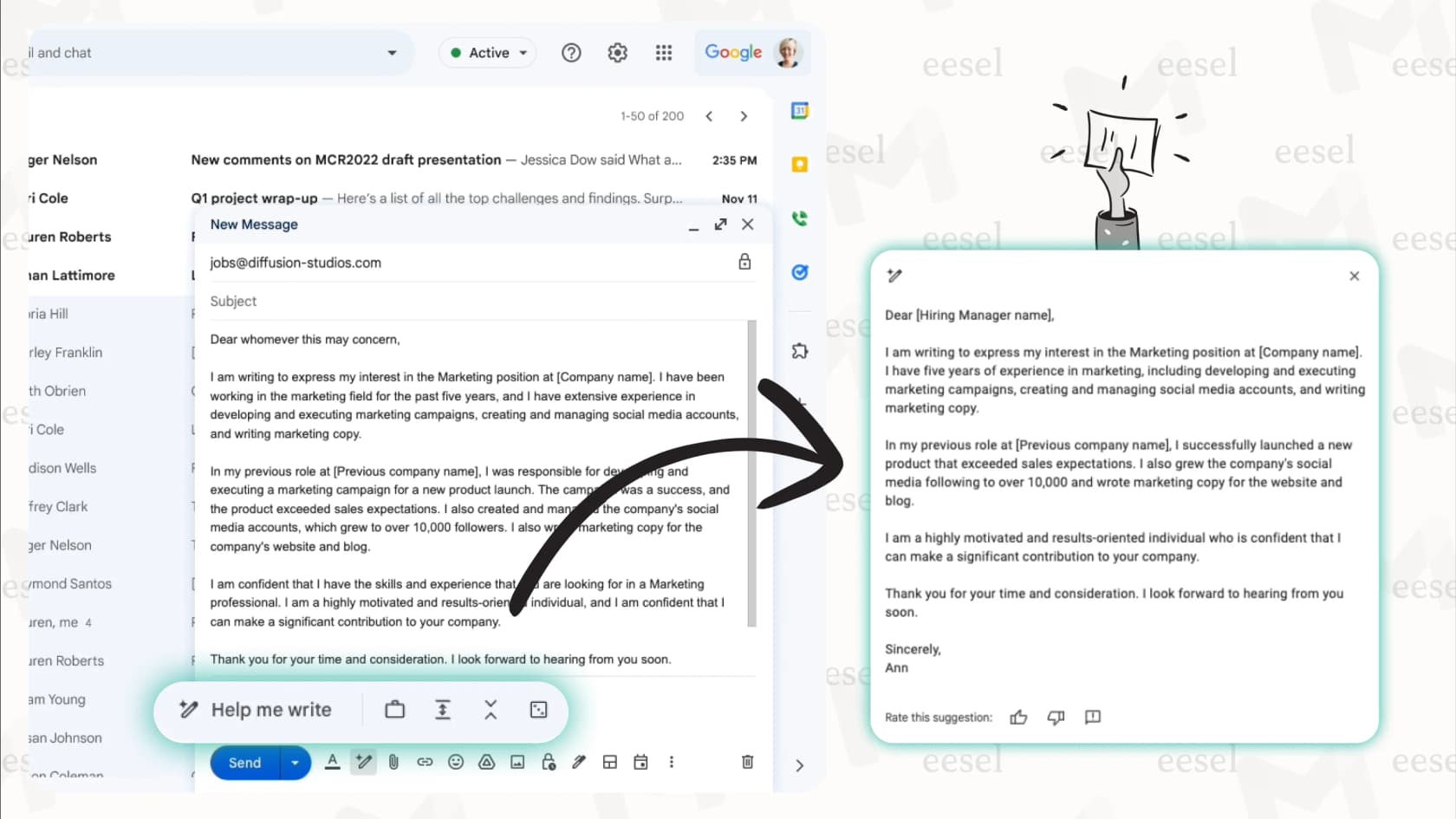
Best for: anyone already paying for Google Workspace who wants help writing and catching up, plus simple automations.
What it does in Gmail. Gemini in Gmail writes drafts, refines them (Formalize, Friendly, Shorten, or your own instruction), summarizes threads and suggests replies. The side panel can archive, delete, label and star mail on request, with a 60-second undo. Workspace Studio flows add triggers and steps that run on their own, including auto-labeling and, since September 2026, replying in a thread.
Pros
- Built in, nothing to install, and free basics for US personal accounts.
- Studio is included in every Business and Enterprise Workspace plan.
- Admins can require approval before a flow shares data outside the organization.
Cons
- Gemini in Gmail itself waits for your confirmation, and it cannot create labels.
- Studio limits rise only with the AI Expanded Access add-on, which has no public price.
- Knowledge outside Google (your helpdesk, store, wiki) needs extra connectors to reach the reply.
Pricing. Workspace Business Starter $7, Standard $14, Plus $22 per user a month on annual billing, or $8.40, $16.80 and $26.40 monthly (Workspace pricing). Personal accounts: Google AI Plus is $4.99 a month and Google AI Pro $19.99 (Google AI plans).
My take. Try a Studio flow before you buy anything else, especially for labeling. Move to a dedicated agent when replies need knowledge Gmail cannot see.
3. Fyxer
Best for: busy professionals and executives who want their own inbox sorted and pre-drafted.
What it does in Gmail. Fyxer sorts mail into categories "like To respond, FYI or Marketing" and offers "Replies drafted in your tone" in Gmail or Outlook. It also takes meeting notes and keeps a follow-up list (Fyxer pricing).
Pros
- Works inside Gmail and Outlook, one seat even if you link both.
- Lists SOC 2 Type II, ISO/IEC 27001 and GDPR, with HIPAA on Enterprise.
- Says your data "is never used to train third-party models".
Cons
- It never sends. Its FAQ: "Can Fyxer send emails on my behalf? No."
- "Automatic labeling starts with Pro; the Free plan doesn't sort your inbox for you."
- Learns from your mail, not from a help center or business systems.
Pricing. Free plan with 400 credits a month. Pro $49 per person a month, or $37 on annual billing. Team $99, or $64 yearly. My Fyxer pricing breakdown covers the credits.
My take. The best fit for a person who wants to open Gmail to finished drafts. It is not built to answer customers from company docs. See Fyxer alternatives if that is your gap.
4. Superhuman
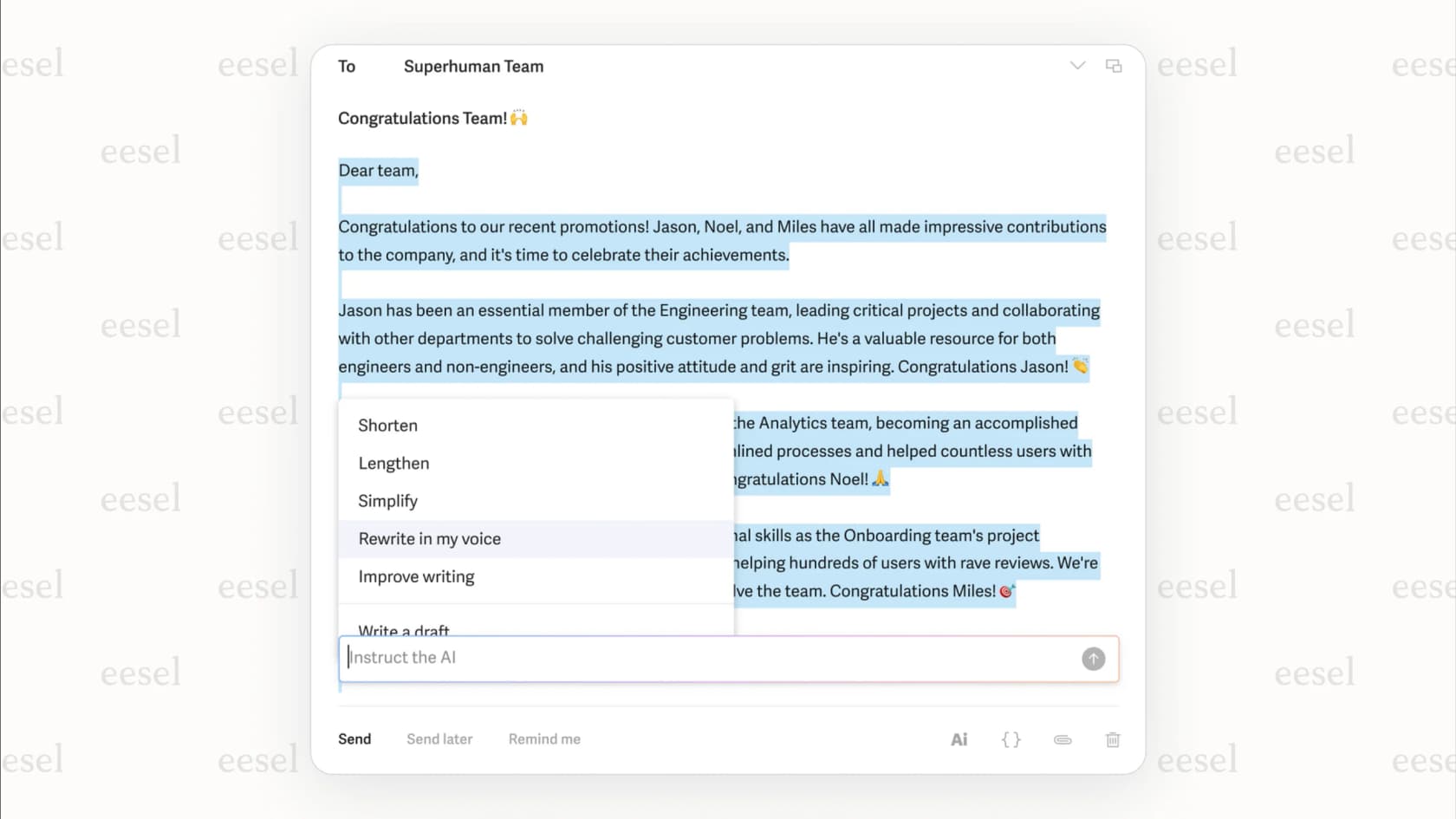
Best for: people who want a fast email client and AI drafts in the same place.
What it does in Gmail. Superhuman Mail works with Gmail and Outlook. Its Email Assistant brings "Auto Labels, Auto Archive, Auto Drafts, and Auto Reminders directly into your existing [Gmail] inbox" (Superhuman help). Auto Drafts write follow-ups and responses "in your voice". Superhuman is now the name of the company formerly called Grammarly, which renamed itself in October 2025.
Pros
- Drafts are waiting when you open the inbox.
- Auto Labels sort every email into Respond, Waiting, FYI, Notifications, Promotions or News.
- The Business plan adds HubSpot and Salesforce context.
Cons
- Auto Drafts, Ask AI and custom labels need the Business plan.
- The six Auto Labels are fixed: "you can't disable, rename, or replace them individually."
- No free trial for the suite, per its billing FAQ.
Pricing. Starter $30 a month or $25 on annual billing; Business $40 a month or $33 yearly (Superhuman plans).
My take. Great if you want a new client anyway. If you want to keep plain Gmail and hand off whole categories of mail, an agent fits better.
5. Jace
Best for: people who want drafts by default and auto-send for a few safe categories.
What it does in Gmail. Jace connects to Gmail and Outlook and promises "Drafts ready when you open your inbox", plus auto-labels and custom rules. Auto-send exists, but Jace says it is "opt-in, not default. Jace can send emails automatically, but only if you explicitly enable it per label with warnings" (Jace blog).
Pros
- Auto-send is per label, so you can limit it to safe mail.
- Chat with one to three years of email history depending on plan.
- 7-day trial and a 30-day money-back guarantee.
Cons
- Knowledge comes mostly from your email history; custom integrations are on Pro.
- Its site lists a SOC 2 Type 1 examination, not Type 2.
Pricing. Plus $25 a month or $20 billed yearly (2 inboxes); Pro $50 or $40 yearly (8 inboxes) (Jace pricing).
My take. The cheapest way to try auto-send on a personal inbox, as long as you keep it on a short leash.
6. Lindy
Best for: people who want an email agent that also runs other workflows.
What it does in Gmail. The Lindy email agent triages mail and drafts replies: "Wake up to an inbox with drafts ready for your review, written in your voice." It links Gmail or Outlook and has 1,500+ integrations (Lindy email).
Pros
- One agent for email, scheduling and other tasks.
- SOC 2 and GDPR, with HIPAA and a BAA on Enterprise.
- Approvals built in.
Cons
- It asks before sending: "Anything with outside impact waits for approval such as sending an email."
- Credits don't roll over, and you build more of the setup yourself.
Pricing. Free $50 in credits for 7 days, then Team from $29.99 per active user a month for 3,000 credits (Lindy pricing).
My take. Good for a builder. For more options, see my Lindy alternatives.
7. Shortwave
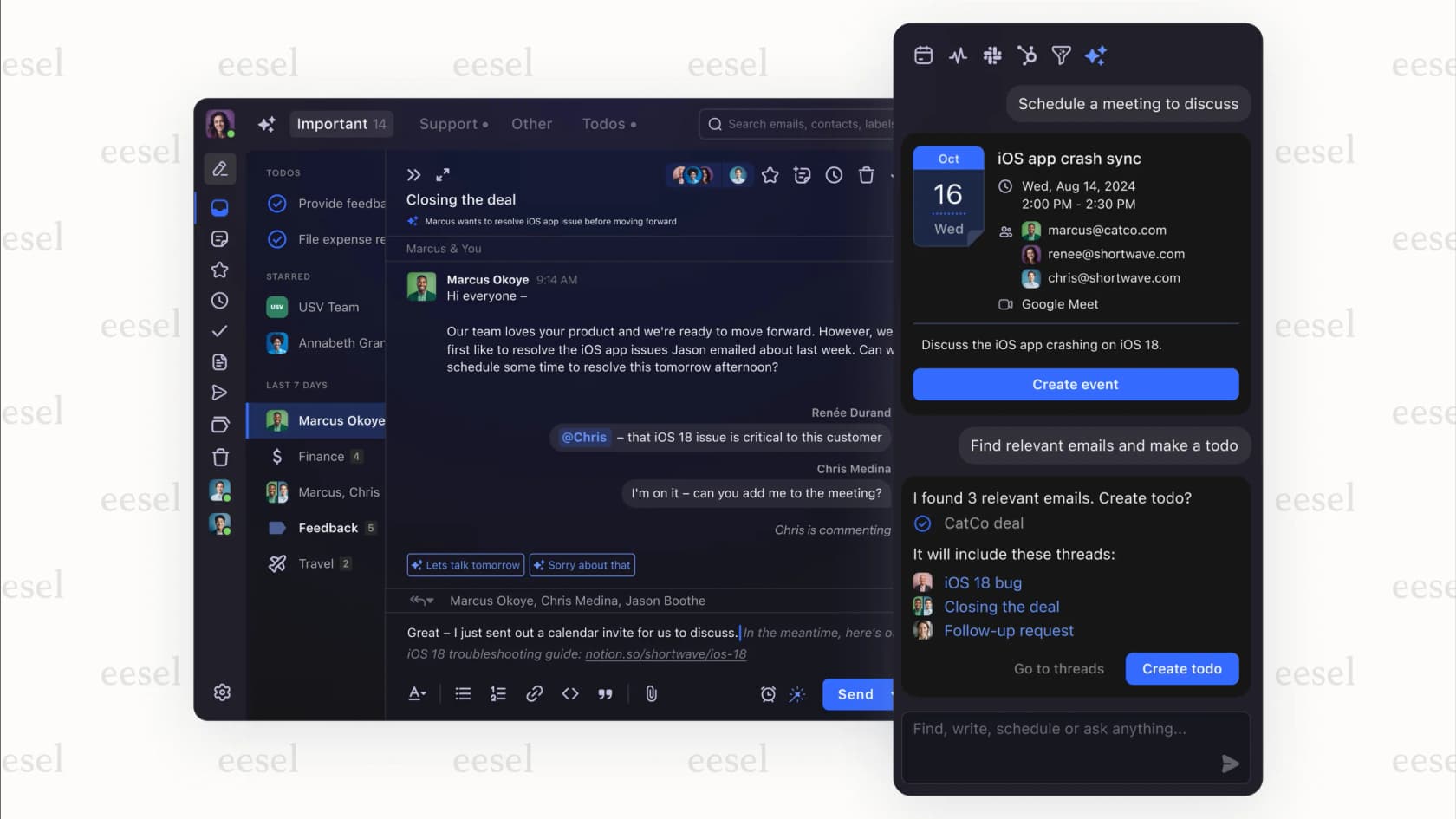
Best for: Gmail power users who want an AI-first client.
What it does in Gmail. Shortwave replaces the Gmail interface. Its "AI filters" can "automatically take action on new emails based on a custom AI prompt, including labeling, archiving, deleting, starring". Automatic draft replies come through its sister product Tasklet (Shortwave pricing).
Pros
- AI filters act on new mail without you.
- Strong AI search over your mail history.
Cons
- Gmail and Google Workspace only. Microsoft 365 and Exchange are "not supported at this time".
- Auto-drafting needs a second product.
Pricing. Business $30, Premier $45, Max $120 per seat a month, with a 14-day trial. Its docs still describe a free plan.
My take. A good client with agent-like filters. Pick it for yourself, not for a shared inbox.
Can AI answer customer emails from a shared Gmail inbox using your help center docs?
Yes, and this is where an agent earns its price. The agent needs three things: a trigger on the shared inbox, read access to your help center and docs, and rules for what it may send alone.
With eesel, you connect the shared Gmail account (say support@) and add your help center, Google Drive or helpdesk as sources. Each reply is written from those sources, not from the model's general knowledge. When it cannot find the answer, your instructions tell it to leave a draft or label the thread for a person instead of guessing. The personal tools in this list learn from your sent mail, which works for your own inbox but not for a policy question three teammates answer differently.
How do you set up eesel as an AI email agent in Gmail?
It takes about ten minutes, and nothing runs until you turn an automation on.
- Connect Gmail. Open Integrations > Gmail in your eesel dashboard and select Connect. Sign in with Google and accept the mail permissions. The page then shows Connected with the account.
- Connect the knowledge. Add your help center, docs, Google Drive or helpdesk as sources, so replies come from your answers.
- Describe the job. In the dashboard chat, say which mail to handle and what to do, for example "reply to questions about delivery times, label refund requests Refunds and leave them for me". The agent picks the trigger, writes the instructions and switches the automation on.
- Choose draft or send. Set Send Email to need approval at first. Approve or deny from the dashboard until you trust it, then let it run alone.
- Test it. Email the mailbox from another address and check the thread in Gmail for the reply and label.
One thing to know from the docs: the send and draft actions do not work out the recipient from the thread, so your instructions should say "reply to the sender".
Should your Gmail agent draft or send?
Start with drafts, then let it send on the mail it gets right every time. That is how I'd roll out any agent.
The reason is simple. A draft that is wrong costs you ten seconds. A sent reply that is wrong costs a customer. So I let the agent send on narrow, routine mail first: order status, opening hours, "where is my invoice". Anything with money, a complaint or a judgement call stays a draft, or goes to a person with a note.
That split is what Question Beauty runs on its helpdesk: eesel replies itself on routine questions and hands refunds and complaints to the team. For the wider playbook, see email response automation and AI email triage.
Try eesel as your AI email agent for Gmail
If you want AI to handle the email, not just help you write it, connect eesel to Gmail. It starts when mail lands, answers from your docs, and sends, drafts or labels on the rules you set, with any action held for approval until you trust it. The free plan has 100 credits and needs no card, so you can watch it work your real inbox first. Try eesel.

Using Outlook as well? The AI email agent for Outlook guide covers Copilot and the alternatives, and best AI apps for Gmail lists the writing helpers.