

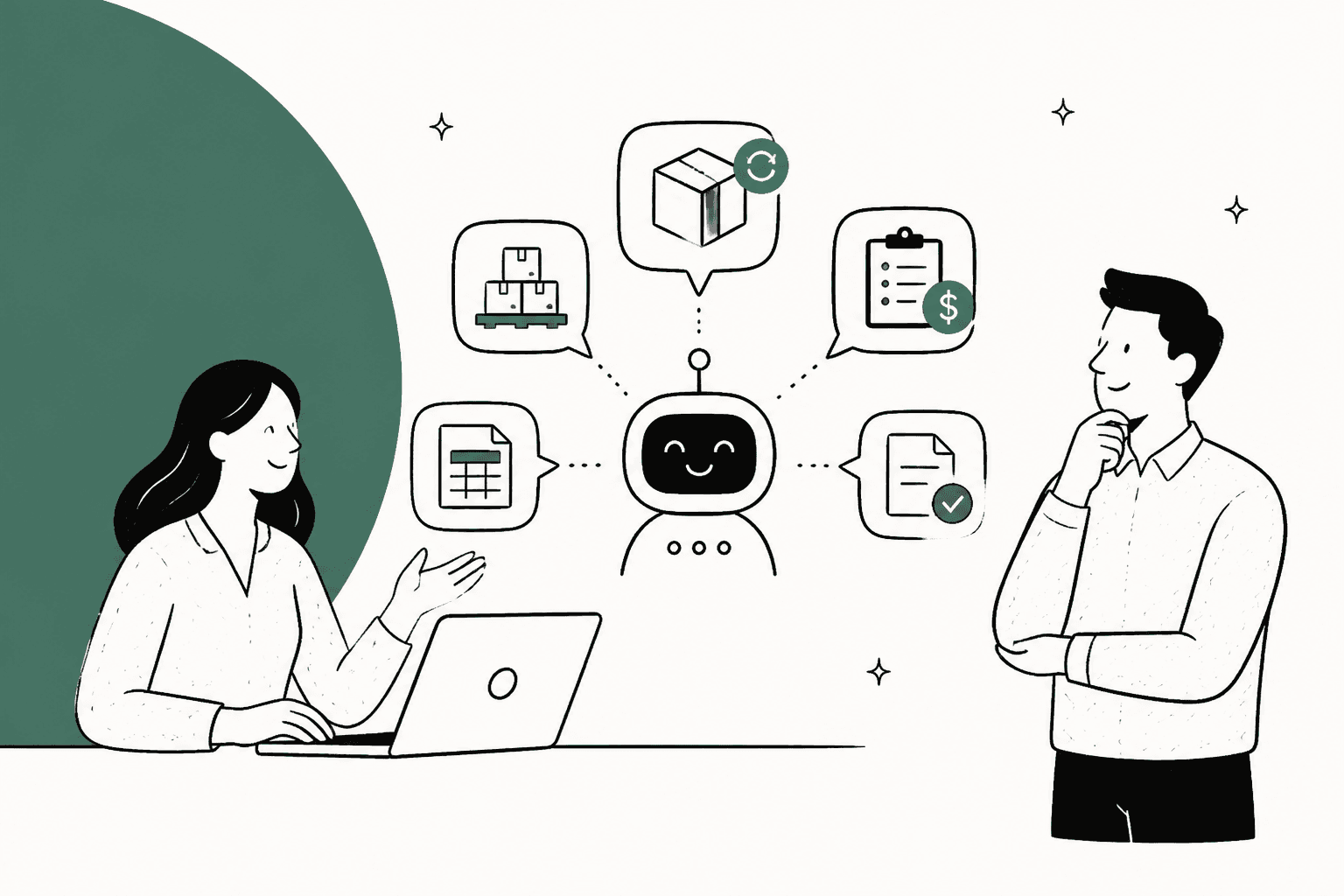
AI for wholesale B2B orders works when it does three jobs and knows which is which: it answers and closes lookups, prepares orders for a person to confirm, and hands credit, discounts and disputes to your team. Order status, case packs, minimums, invoice copies and a buyer's own catalog price are lookups. Reorders and order changes are drafts. Net terms, credit limits and special pricing are decisions.
Two rules matter more than any tool choice. The AI must know which retailer is asking before it shares anything about an account, and it must read prices from that account's catalog or price list, never work them out. Wholesale pricing has too many overrides for arithmetic to be safe.
eesel is set up for exactly this split. BEAUTEK, a German B2B supplier to beauty and medical studios, has its agent run an identity check before it reads an order, answer status questions live, and turn quote and large-order requests into Zendesk tickets for sales.
What does AI for wholesale B2B orders actually do?
AI for wholesale B2B orders is an AI agent in your support inbox that answers retailers' order questions by reading their account, their orders and your price rules, then replies, drafts an order for a person to confirm, or hands the ticket over with the facts attached.
I build the integrations that lets an AI read stores and order systems, and wholesale inboxes are some of the more interesting ones I have looked at. The questions sound routine, but the answer for almost every one depends on who is the one asking. A consumer asking "how much is this?" gets the price on the page. A retailer asking the same thing has a price that belongs to their account, a minimum they have to hit, and terms that decide when they pay.
Here is what lands typically in a wholesale inbox:
- "Can you send the same order as last month, but 20% more of the candles?"
- "Where's PO 4471? We need it before the weekend."
- "What's my price on the 500 ml bottle now?"
- "Do I have to buy the mugs in sixes?"
- "Can you resend invoice 1092? Accounts can't find it."
- "We'd like to move to net 60. Is that possible?"
- "Half the pallet arrived crushed."
Most guides on this topic list question types like these and then stop there. What they skip is that the same question can be safe or it can be risky, depending on whose account it touches. "What's my price?" is a two-second lookup for a verified buyer and a data leak for a stranger who guessed an email address. Rest of this post is about drawing those lines.
Which wholesale questions can AI close, and which go to a person?
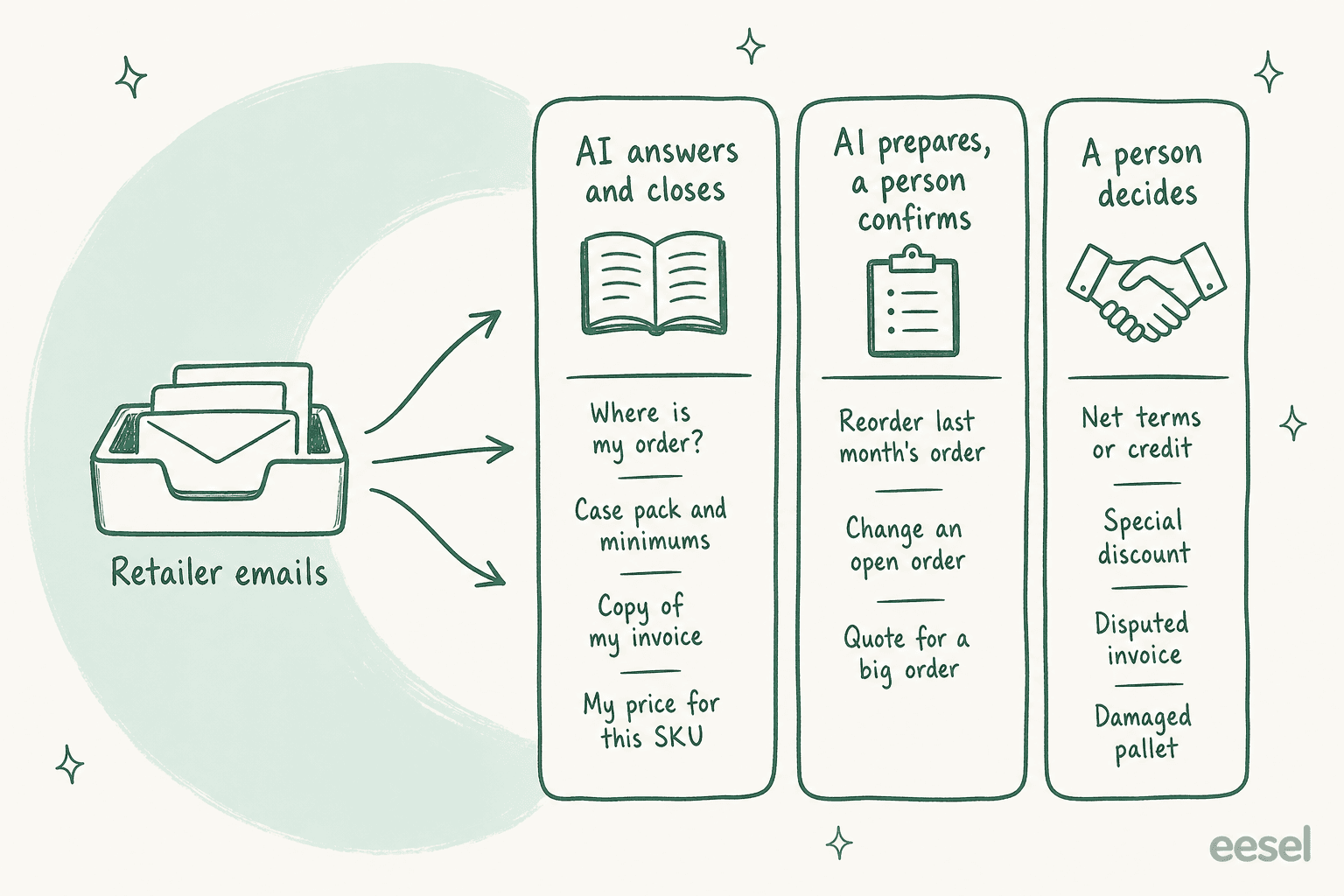
Sort by what the answer depends on. If the answer is a fact that already sits in your systems, the AI can close it. If it creates or changes an order, the AI prepares it and a person confirms. If it changes what a customer owes you or what they're allowed, a person decides.
| Lane | Typical wholesale questions | What the AI does |
|---|---|---|
| AI answers and closes | Order status, tracking, case pack and minimum rules, invoice copies, a verified buyer's own catalog price | Reads the record and replies |
| AI prepares, a person confirms | Reorders, quantity changes on open orders, quotes for large orders | Builds the draft and a note, then waits |
| A person decides | Net terms or credit, special discounts, price matches, disputed invoices, damaged or short pallets | Acknowledges, collects facts, hands over |
This matches with how eesel customers who have trade buyers set things up. Rúngne, a Norwegian climbing apparel brand on Gorgias and Shopify, runs a triage agent that tags a ticket B2B "if the customer is a partner," and B2B tickets never reach the agent that answers customers publicly. Question Beauty has its agent tell wholesale buyers a teammate will help, assign the ticket and leave a note with what it found in Shopify.
Those are both a cautious starting points, and I think that is right for the week one. Once you trust the lookups the first lane can open up for B2B buyers also, as long as the account check below is in place.
Here is a quick sorter for your own inbox. Pick the question that is closest to the ticket in front of you:
Which lane is this wholesale question?
Pick the closest match. Each card shows the lane, what the AI reads, what it may do, and the line it never crosses.
- Lane
- AI answers and closes
- Reads
- The order for this account: status, fulfillment, tracking, and whether it's still waiting for your review.
- May do
- Quote the status and tracking exactly as the record shows them.
- Never
- Promise a delivery day the carrier hasn't shown, or describe an order on another account.
- Lane
- AI answers and closes, for a verified buyer only
- Reads
- The price this account's catalog or price list holds for that exact variant, plus any volume breaks.
- May do
- State that price and the next break, and link to their logged-in portal.
- Never
- Work a price out from a percentage, or quote one buyer's price to another.
- Lane
- AI answers and closes
- Reads
- The increment, minimum and maximum set on that variant for this account.
- May do
- Explain the rule and suggest the nearest valid quantities.
- Never
- Tell a buyer they can mix variants to hit a minimum when the rule is per variant.
- Lane
- AI answers and closes, to a known contact
- Reads
- The invoice or order on this account, and who is allowed to see it.
- May do
- Send the copy or the payment link to an email already on the account.
- Never
- Send account documents to a new email address someone asks it to use.
- Lane
- AI prepares, a person confirms
- Reads
- This location's last order, current stock, and the quantity rules.
- May do
- Build a draft order at the account's catalog price and flag anything that breaks a case pack.
- Never
- Place the order or charge a saved card on its own.
- Lane
- AI prepares, a person confirms
- Reads
- Whether the order has been fulfilled yet and what changed since it was placed.
- May do
- Write up the requested change for a person to apply.
- Never
- Edit a shipped order, or re-price lines on an invoice that's already gone out.
- Lane
- A person decides
- Reads
- The account's current terms, open balance and any overdue orders.
- May do
- Acknowledge, say who handles terms, and leave that history in a note.
- Never
- Agree to new terms, a higher limit, or a waived deposit.
- Lane
- A person decides
- Reads
- The order, the delivery scan and what the buyer reported.
- May do
- Ask for photos and the delivery note, then hand over with a summary.
- Never
- Offer a credit note, refund or replacement before a person reviews it.
The middle lane has the most moving parts, so reorders get their own section below. For the money conversations in the last lane, eesel's guide to billing disputes goes deeper. If a buyer has already gone to their bank, read the payment disputes guide next.
How does the AI know which retailer is asking?
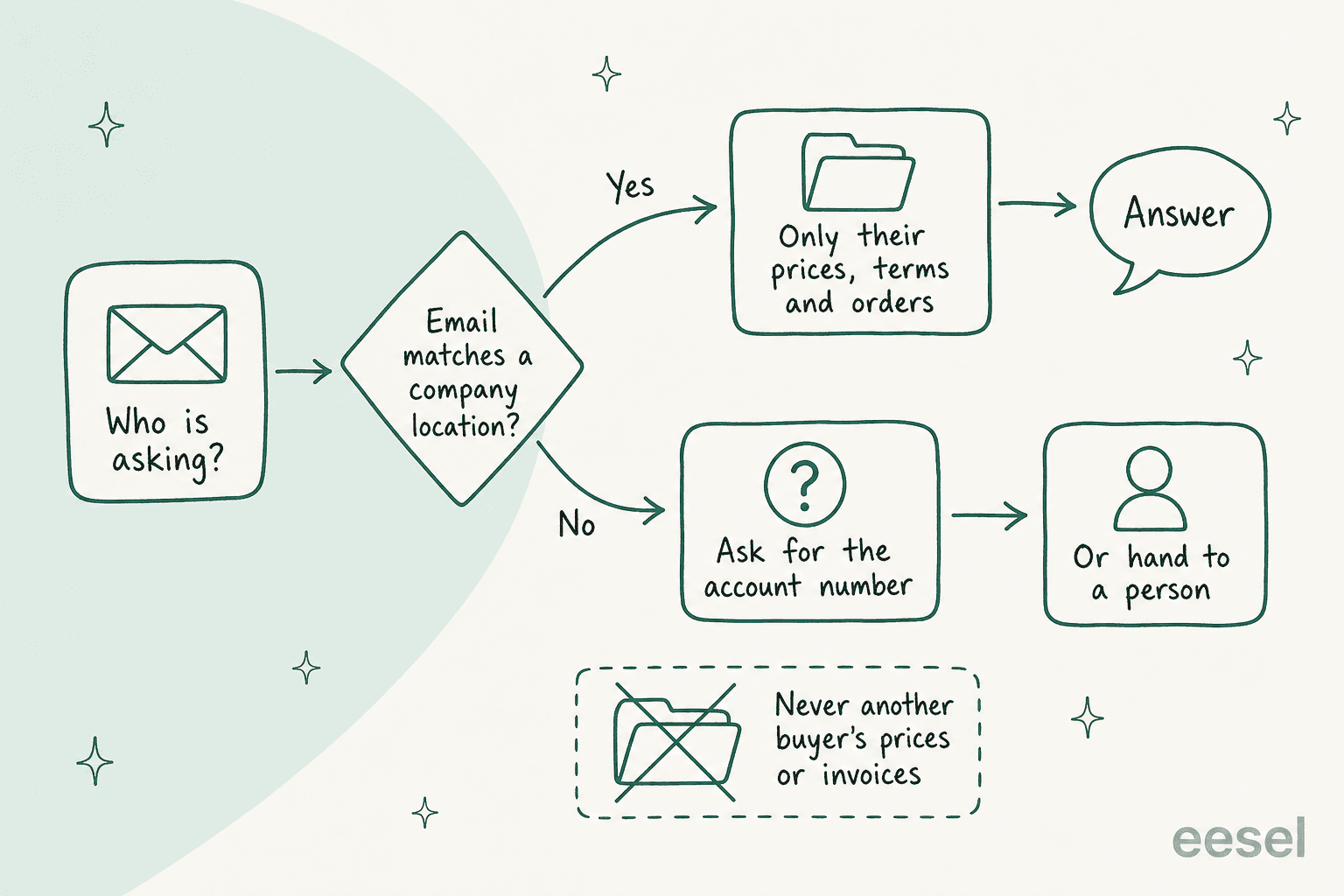
It matches the sender to a company account before it reads anything about that account, and treats an unmatched sender as unknown. Everything else in wholesale support, from prices to invoices to terms, hangs off that match.
Shopify's B2B model gives a good picture on what the AI has to respect. In Shopify B2B, every trade buyer belongs to a company, and the business you actually sell to is a company location. Per Shopify's companies guide, each location "can have its own tax ID, tax exemptions, shipping address, billing address, pricing, payment terms, and contacts." A company can have up to 10,000 locations, and each location up to 50 customers and 25 catalogs.
Contacts also has different permissions. A contact with Ordering only can buy for the location and see the orders they placed. A Location admin can see the orders everyone placed for that location and update its addresses.
That gives a simple rule which I would write into the AI's instructions word for word: never tell a buyer anything their own login wouldn't show them. If a purchasing assistant with ordering-only access asks about an order that a colleague placed, the AI shouldn't describe it either, it can say the order exists under another contact and then offer to loop them in.
In practice the check is looking like this:
- Match the sender's email to a contact on a company account.
- If there's no match, ask for the account or customer number, or hand the ticket to a person. Don't guess from the email domain alone, because a store's owner might write from a personal address and a former employee might still have a company one.
- If the match is ambiguous (one email on two company locations), ask which store the question is about. Shopify does the same thing at login, prompting buyers with access to several locations to choose one.
- Never send account documents to a new address. "Send the invoice to my personal email instead" is a classic social-engineering line, and it's a person's call. The account recovery guide covers why.
BEAUTEK is the most clean example I have seen of this in production. It's a B2B supplier in Siegen, Germany, selling treatment couches, chairs and studio equipment since 2006. When a studio owner asks about an order in the website chat, eesel asks for their email address, runs a short identity check, then reads the order from BEAUTEK's own order system: "order number, date, status, tracking number, ship date, and whether payment is still open." Between 8 August and 8 September 2026 it answered 77 website chats and drafted about 110 Zendesk tickets, all in German.
Where should the AI get wholesale prices from?
From the price the account already has: the company's catalog, a tiered price list, or your ERP's customer price. The AI should read that number and quote it, never calculate one from a discount percentage or a rule of thumb.
This is the part of wholesale support that most AI demos skips, and it is where I would spend most of the setup time. Wholesale price rules stack in ways which make "just apply the discount" wrong more often than you expect. Shopify's catalog pricing docs show three of them:
- Fixed prices beat percentage adjustments. Shopify's own example: candles sell at
$10, a B2B catalog takes20%off everything, but one candle has a fixed price of$9. An AI that calculates "20% off $10" quotes$8for that candle. The right answer is$9. - The lowest price wins across catalogs. If a location has two catalogs with the same product at
$9and$7, the buyer sees$7. An AI reading only one catalog quotes the wrong one. - Volume breaks follow the cheapest catalog. The quantity rules and price breaks shown come from the catalog with the lowest price for that variant.
Volume pricing has also its own trap. Shopify's quantity and volume pricing guide allows up to 10 price breaks per product, and they apply per variant. Here's Shopify's own example:
| Quantity of one variant | Unit price |
|---|---|
| 1 or more | $20 |
| 20 or more | $18.50 |
| 50 or more | $17.75 |
| 100 or more | $16 |
"Customers need to meet the required quantity for each variant to qualify for the price break," the guide says. So 10 blue hats and 10 gray hats is two lines of 10 at $20, not one line of 20 at $18.50. A retailer who asks "if I order 20 hats, do I get the better price?" deserves the right answer, an AI reading the rule gets it right in the place where an AI doing arithmetic often don't.
Now the uncomfortable point, in terms of engineering. Check which price your AI actually sees. Many AI connections to a store read the product variant's own price, which is usually your retail price, not the B2B catalog price the buyer pays. If that is what your setup reads, the AI will quote retail to a wholesale buyer with a total confidence. eesel's Shopify connection, for example, reads products with "variants, stock keeping unit codes, pricing and descriptions." Before you let any AI quote a trade price, ask it for a price you already know on a B2B account and compare the two.
If the buyer's price lives somewhere the AI can't read, there is two honest options:
- Give it the price list as knowledge, tagged by tier. Poseidon Animal Health, which sells horse supplements in the US, Australia and New Zealand from one Gorgias inbox, tags each ticket retail or wholesale and by region. eesel reads the tag and uses only that region's material, and "wholesale customers are handled as wholesale."
- Point the buyer to their own portal. IC Intracom, a networking hardware company, has its agent send anyone asking about business pricing to the dealer or business account sign-up page instead of quoting a number.
Either one beats a confident wrong price. A wrong wholesale price is not a typo, it's a margin problem on every case in the order, and the buyer who was quoted $8 will hold you on it.
Can AI handle reorders and order changes?
Yes, as drafts. The AI can find the last order, apply the buyer's change, check it against the quantity rules, and build a draft at the account's price. A person confirms it before anything is charged or shipped.
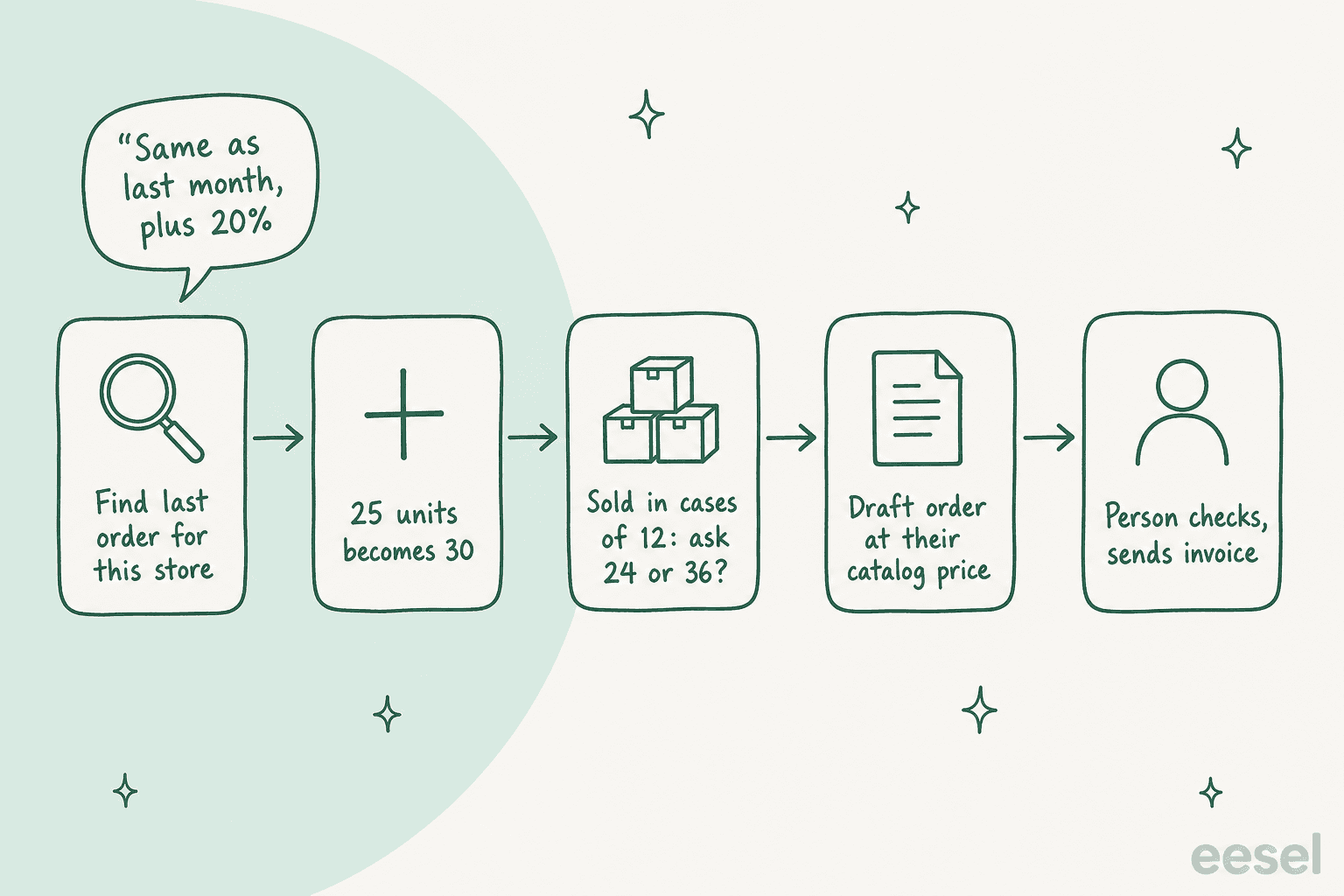
Reorders are the request I would automate first in middle lane, since they are common and the inputs are on file already. Take "same as last month, plus 20% on the candles." Last month's line was 25 candles. Plus 20% is 30. But candles are sold in cases of 12, so 30 isn't a valid quantity.
Shopify is enforcing this at checkout. Under increment quantity rules, "if your products are boxed in multiples of 10, then you can set your increment rule to 10 so customers must purchase 10, 20, 30, products at a time." Minimums and maximums work the same way, per variant.
The AI shouldn't do the rounding for the buyer. It should ask: "Candles come in cases of 12, so 30 isn't available. Would you like 24 or 36?" That one question saves a back-and-forth after the draft fails at checkout, or worse, after somebody at the warehouse changes the quantity quietly..
Once quantities are valid, the draft order is the right container for it. Shopify's B2B draft orders pick up the company's prices, payment terms and checkout options automatically when a company location is assigned. Sending an invoice or checkout link locks the prices by default, so a later price change doesn't move a quote the buyer already has. If a person needs to quote a negotiated price they set a custom price on the line, that part stays human.
In eesel, the Shopify actions include Create Draft Order, described as "left for a person to confirm," plus Get Order History and Search Orders to find the last one. Checkout stays in Shopify, so the buyer pays through your normal invoice or payment link.
Order changes follows the same pattern, with one more check: has it shipped? eesel's Update Shipping Address and Cancel Order only work on orders that haven't been fulfilled. For a wholesale account I'd still put both of them behind an approval. A changed delivery address on a $4,000 pallet is worth the ten-second look of a person.
One more thing worth to check before you promise a status: Shopify lets you set a company location to "Submit all orders as drafts for review." Those buyers see a Submit for approval button at checkout instead of placing the order. If the AI reads that order as "not shipped yet" without saying it's waiting on your review, then the buyer goes chasing the warehouse instead of your sales team.
What should AI say about invoices, net terms and credit?
It can tell a buyer what's already true: the terms on their account, when an invoice is due, whether it's paid, and where to pay. It should never change any of those things. Granting terms, raising a limit, waiving a deposit or writing off a balance are decisions for a person.
Terms are simple for reading and expensive for getting wrong. In Shopify, B2B payment terms can be no terms (pay now), net 7, 15, 30, 45, 60 or 90, due on fulfillment, or a fixed date on a draft order. Net terms "start from the day the order is placed." A buyer on net 30 who ordered on 2 October owes by 1 November, and the AI can say exactly that.
A few details from the same doc that changes what the AI should say:
- Buyers can pay early. During the term, they can log in and click Pay now on the order. After the due date they can still pay, but the order shows as Overdue. A "how do I pay invoice 1092?" ticket is a lookup with a link, not a handoff.
- Payment isn't captured automatically at the due date. If a buyer saved a card, someone has to charge it in the admin. So "you'll be charged automatically on the 30th" is the wrong thing for the AI to say unless your own setup does that.
- Deposits change the first answer. A location can require a percentage deposit at checkout, such as
20%, with the rest on terms. The order then shows Partially paid.
Now comes the risky part. A broad sentence in your knowledge base turns into a promise. On one eesel sales call, a B2B technical support team described their bot confirming support for car brands that weren't in their database, because the knowledge base said "we support all models." Wholesale has exactly the same trap. If your FAQ says "trade accounts get net 30 terms," an AI will offer net 30 to a retailer who was approved for card-on-order only. Write the rule as it really is: "Net terms are set per account after a credit review. The AI can read existing terms, not offer them."
The other thing I would write into the instructions is even more plain, it comes from an ecommerce support admin's feedback to eesel about an AI agent that was overpromising:
"stop promising customer things we cant do. we cannot guarantee this customer's order to them by friday"
Same applies for money. The AI shouldn't say "I'm sure we can do net 60 for you" or "I'll take that off your next invoice." It should say who decides, and hand the ticket over with the account's current terms, open balance and order history in the note. That turns a ten-minute lookup into one-minute decision for your finance or sales person.
If some of your wholesale orders comes through a marketplace, check who owns the payment there before the AI answers. On Faire, retailers pay Faire, not the brand. They choose payment on shipment or Net 60, which retailers "must apply and receive approval from Faire to use." Faire tells brands that if a retailer contacts them about payment, they should "direct them to contact our team." So a Faire retailer asking about their invoice gets pointed to Faire, and your AI should not quote your own terms at them.
What does the AI need to connect to?
The helpdesk where retailers write, the system that holds orders, and whatever holds each account's prices and terms. Tracking and invoicing fill in the rest. If prices or terms live somewhere the AI can't read, that lane stays with a person until they do.
| System | What the AI reads | Why it matters for wholesale |
|---|---|---|
| Helpdesk (Zendesk, Gorgias, Freshdesk) | The ticket, past tickets from the account | Spots an order already being handled, or a promise a rep made |
| Store or order system (Shopify B2B, BigCommerce, WooCommerce, your ERP) | Company, location, contacts, orders, draft status | The account match and order status come from here |
| Catalog or price list | Each account's price, quantity rules, volume breaks | The only safe source for "what's my price?" |
| Invoicing or accounting tool | Invoices, due dates, payments | Answers "is 1092 paid?" and "send me a copy" |
| Shipping and tracking | Fulfillment, carrier, scans | Answers "where's my PO?" without guessing |
| Your written rules | Who gets terms, what counts as damage, cut-off times | Keeps the AI from turning a broad FAQ line into a promise |
The store side is usually the most easy one to connect. eesel's Shopify integration looks up orders, fulfillment and product variants live. Its order lookups cover an order by number, a customer's order history by email, and a search by product code, status, date or tag. On the helpdesk side, eesel works inside your existing Zendesk setup, Gorgias or Freshdesk rather than replacing it.
If you sell wholesale on another platform, the BigCommerce support roundup covers the options there. WooCommerce stores have their own roundup.
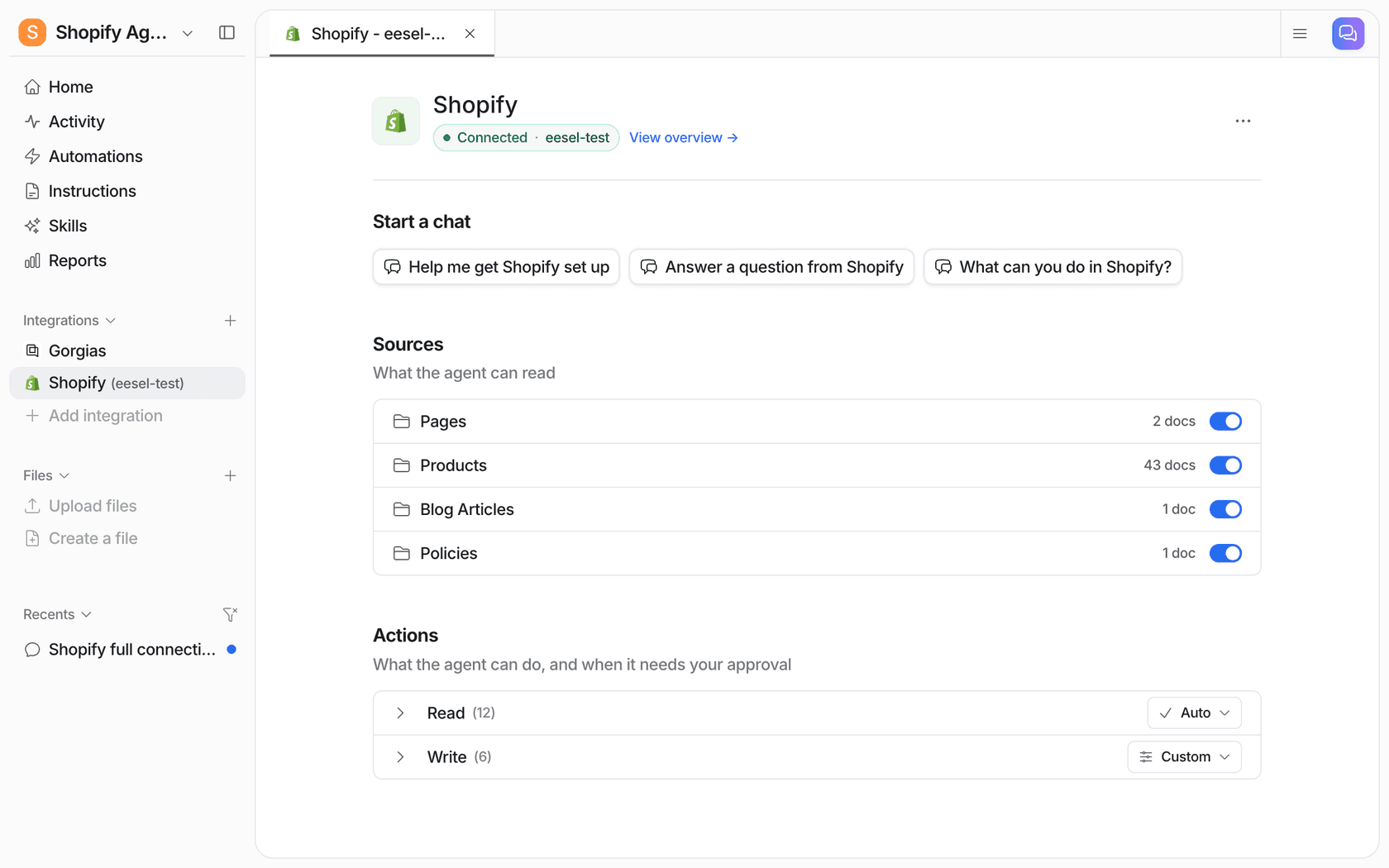
The shipping half is overlapping with consumer support, so the order tracking guide and the post on shipping delay notifications apply almost unchanged. Difference for wholesale is the PO number. Retailers quote their own purchase order and not your order number, so make sure the PO lands somewhere searchable, like an order tag or note, or the AI can't find "PO 4471."
How do you set it up without risking a bad quote?
Start with the AI drafting and a person sending, open the lookup lane first, keep every write action behind an approval, and test against your own past wholesale tickets before any reply goes out on its own. eesel's own rollouts take 2 to 8 weeks from connecting to trusting the first lane on its own.
- Pull 200 to 500 past wholesale tickets and sort them into the three lanes. You'll learn your real mix fast, and that mix tells you which lane is worth opening first.
- Write the rules down, as rules. Who counts as a verified buyer, where prices come from, what the AI must never do (grant terms, change prices, send documents to new emails), and who gets each handoff. eesel's guide to handoff best practices has wording that works.
- Tag wholesale tickets on arrival. Rúngne's triage agent tags from a fixed list, B2B included, before anything else happens. Tags let you route B2B to its own agent, its own knowledge, or a person. More on this in AI ticket tagging for ecommerce.
- Set write actions to Needs approval. In eesel's Actions and Approvals, each action is Auto, Needs approval or Disabled. With Needs approval, the agent prepares the draft order or reply and a person sees exactly what it wants to do, then picks Approve, Always allow or Deny, from the dashboard, Slack or the terminal.
- Replay last month's tickets before going live. eesel lets you run an agent against historical tickets and read what it would have said, which is where you catch a retail price quoted to a trade buyer. The simulation testing guide covers sample sizes.
- Open the lookup lane first. Order status, case packs and invoice copies for verified buyers. Move reorders to drafts once the lookups are clean, and keep the last lane human for good.
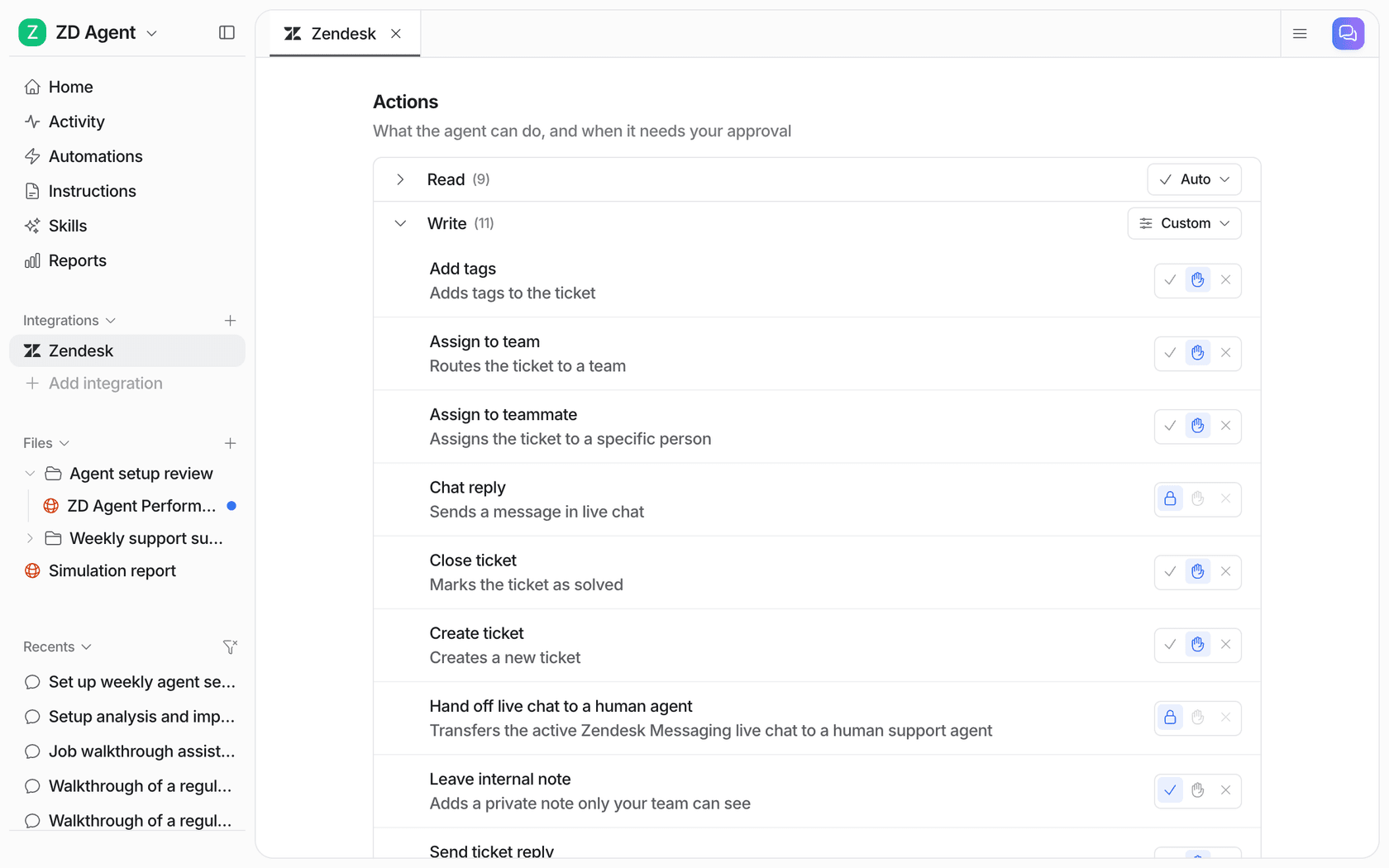
BEAUTEK's setup shows how that looks like a few months in. Its website chat answers product and order questions live. In Zendesk, every ticket gets a draft reply and an internal note, and a person sends it. When someone wants a quote, a consultation or a bigger order, eesel takes their details and opens a Zendesk ticket tagged as a sales lead. It created 20 Zendesk tickets from chat in one month, most of them sales leads. That last flow is the B2B version of "AI prepares, a person confirms," and it is the one I'd copy first.
If you want a fuller rollout plan, the implementation timeline guide breaks it down by week, and customer support approval workflows covers who signs off on what.
How do you know it's working?
Measure the price accuracy and wrong-account answers before you measure deflection. A wholesale AI that closes a lot of tickets but quotes the wrong price on some of them is costing you money, not saving it.
The numbers I would track, in this order:
- Price accuracy. Every price the AI quoted in a sample of tickets, checked against the account's catalog. The target is all of them.
- Wrong-account answers. Any reply that touched an account other than the sender's. The target is zero, and one is a reason to pause.
- Draft acceptance rate. How often a person sends the AI's reorder or reply without edits. This tells you when a lane is ready for less review.
- Resolution rate on the lookup lane. Order status, case packs and invoices closed without a person. eesel's guide to AI resolution rate explains how to count it honestly.
- Time to first reply for retailers. Wholesale buyers often are placing orders for weekend trading, so an answer on Friday afternoon matters more than a Monday one.
If you're comparing tools for the job, start with eesel's roundup of the best AI for B2B support. Shopify-only stores can skip to the Shopify support roundup instead.
The consumer side of the same store uses the same lane approach. The guide to returns management splits returns by reason, and the one on pre-purchase questions covers shoppers who haven't bought yet.
Try eesel for wholesale order support
If your retailers write in about orders, prices and invoices, eesel works like a support teammate that plugs into your helpdesk and your Shopify store. It looks up their orders live, answers case pack and status questions, drafts reorders for your team to confirm, and hands terms and credit to a person with the account history attached. That's the setup BEAUTEK runs for studio owners across Europe, with quote requests landing in Zendesk as sales leads.
Plans start at $299 a month for 500 credits on the eesel pricing page, where a ticket or chat is one credit, and the free trial includes 100 credits to test it on your own wholesale tickets. Try eesel
Frequently Asked Questions
Can AI handle wholesale B2B order support on its own?
How does AI know which retailer is asking about a wholesale order?
Should AI calculate wholesale prices and volume discounts?
Can AI give a wholesale customer net 30 terms?
Can AI place reorders for wholesale customers?
What does AI for wholesale orders need to connect to?
How much does AI for wholesale B2B order support cost?
$299 a month for 500 credits, where a ticket or chat is one credit however long it runs, and there's a free trial with 100 credits. Full plan details are on the eesel pricing page.