


AI for shipping delay notifications works when it treats "delayed" as two different problems. An order that hasn't left your warehouse (including one stuck on "label created") needs a message with a new date and a free way to cancel, and in the US the FTC's Mail Order Rule requires exactly that, with penalties up to $53,088 per violation. An order that has shipped and is running late needs the last real carrier scan and the carrier's own new date, never a date the AI made up.
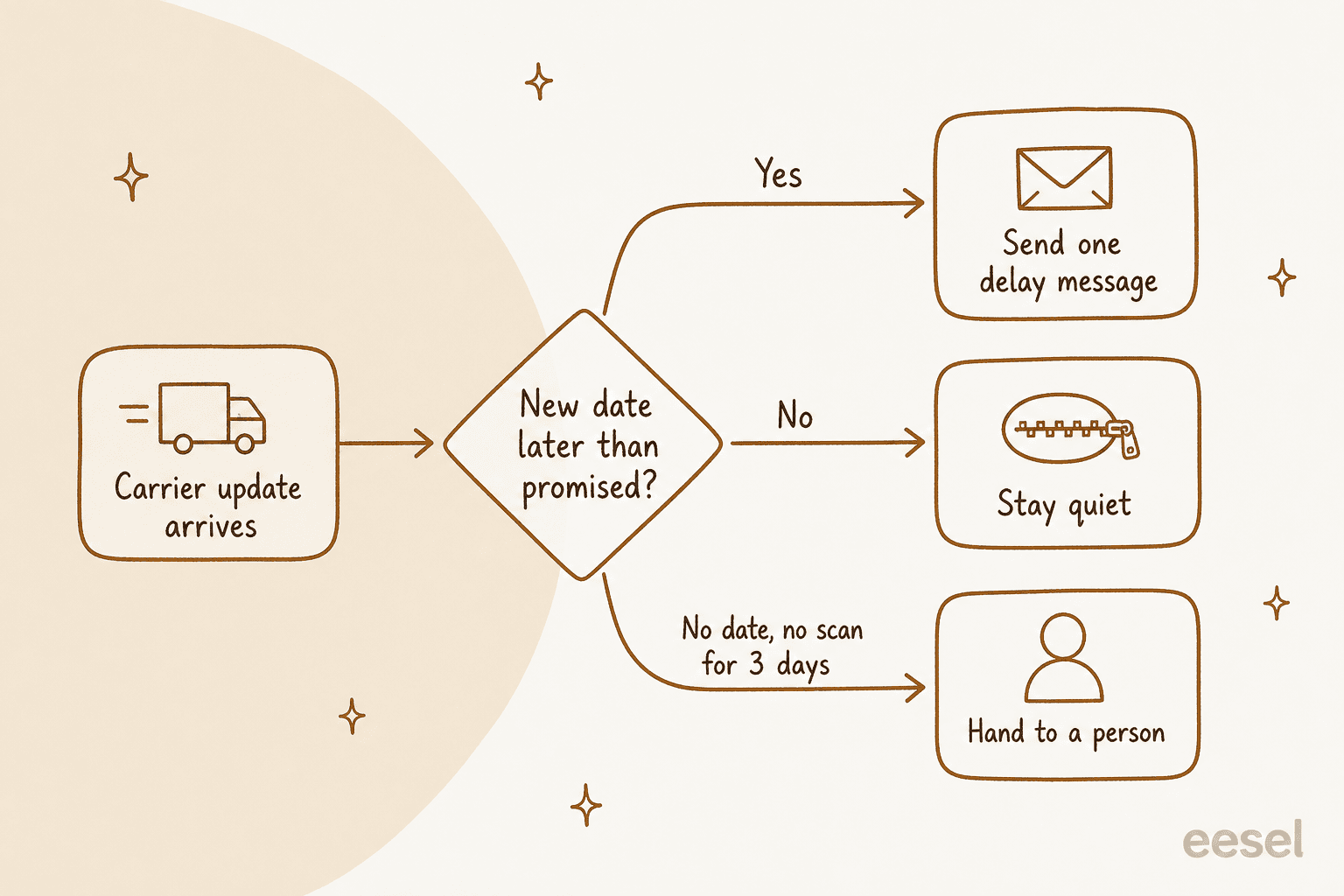
The trigger is not "the carrier posted an exception." It is "the new date is later than what we promised." Send one message when that flips, stay quiet when it doesn't, and hand anything with no scan for days, no date, or a lost or damaged parcel to a person.
eesel does this as an AI teammate in your helpdesk: it reads the Shopify order and the AfterShip scan, can be woken by a delay webhook, and holds cancels and refunds for approval. Question Beauty runs it on Gorgias, where it looked up 290 Shopify orders in a month before answering delivery questions and closed 280 tickets without a person.
Why do shipping delays flood the support inbox?
Because the customer learns about it from silence. They check the tracking link, it says the same thing as yesterday, and they write in, then they write in again.
"where is my order" emails, easily. a package sits on "label created" for 3 days and i've got the same customer in my inbox twice asking if we scammed them, and nothing i've tried has really fixed it

I build integrations at eesel, which means I spend a lot of time in the plumbing between a store, a carrier feed and a helpdesk. The pattern I see over and over is that teams automate the answer to "where is my order" (WISMO) and leave the delay itself unannounced. The reply bot gets faster, but the inbox stays full, because every late parcel still produce at least one ticket.
A merchant who switched to proactive messages put it well:
"The other thing that helped was sending a proactive "your order is running late" email when tracking shows a delay. Customers don't get mad about delays as much as they get mad about not knowing."
So the job for AI here is two-sided. Send the delay message before the customer has to ask, and answer the tickets that come in anyway with the same facts. The rest of this post is about getting the first half right, since that is where most setups go wrong. For the reply side on its own, my posts on AI for order tracking support and automating order tracking go deeper.
What are the two kinds of shipping delay?
There are two, and they each need a different message. "Delayed" covers both an order that has not shipped yet and a parcel that shipped and is now late in the carrier network. Most delay automations treat them as one, which is how you end up telling a customer "your package is on its way!" about a box that is still on your shelf.
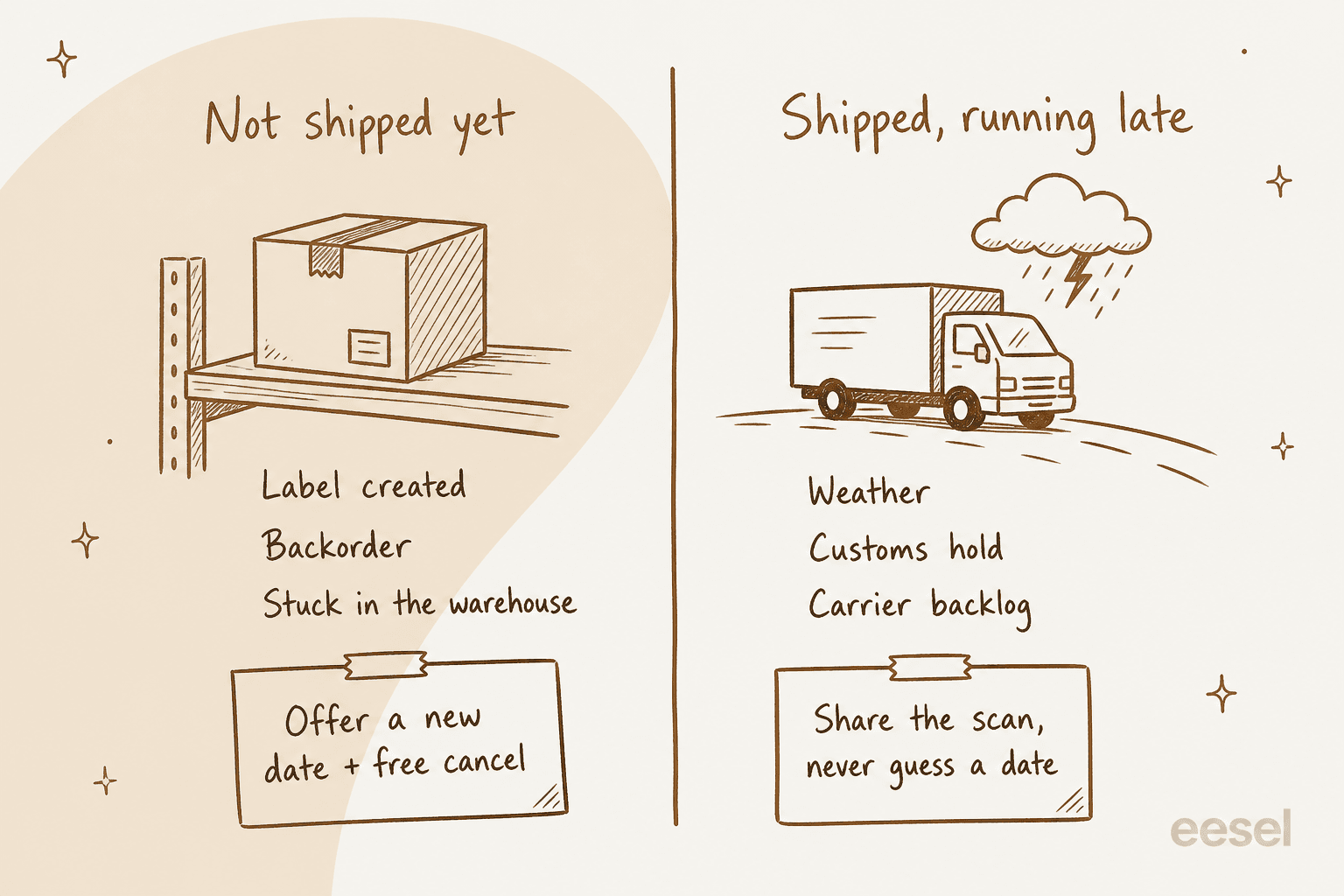
| Not shipped yet | Shipped, running late | |
|---|---|---|
| What it looks like | Backorder, warehouse backlog, "label created" with no carrier scan | Carrier exception, missed delivery date, no new scans |
| Whose problem it is | Yours | The carrier's, but the customer still blames you |
| Rules that apply (US) | FTC Mail Order Rule: delay notice with a cancel option | None on the shipping side; your own promise and policies |
| What the message must contain | New ship date or "we don't know yet", a full-refund cancel option, a free way to cancel | Last real scan, the carrier's new estimate if any, what happens next |
| Actions the AI may need | Cancel order, refund (with approval) | Look up tracking, open a carrier claim ticket, tag for a person |
The line between the two is sharper than it looks. The FTC's rule text defines shipment as "the act by which the merchandise is physically placed in the possession of the carrier." A printed label is not that. AfterShip even gives it its own status, Pending_003, described as processed and packaged "but not scanned at a shipping location yet." "Label created" is an unshipped order, and your AI should treat it as one.
What does the law say about shipping delay notifications?
In the US, a delay notice is not a courtesy for unshipped orders. It is required. The FTC's Mail, Internet, or Telephone Order Merchandise Rule (business guide) applies to most goods ordered online, and it says you must have a reasonable basis for any shipping time you state, or for shipping within 30 days if you state none. When you learn you can't make it, you have to ask the customer to consent to the delay or refund them.
The parts that matter for an AI writing the message:
| What the rule says | What it means for your delay message |
|---|---|
| Notify "reasonably quickly," and never later than the promised ship time or day 30 | The trigger is the moment you know, not the moment the customer complains |
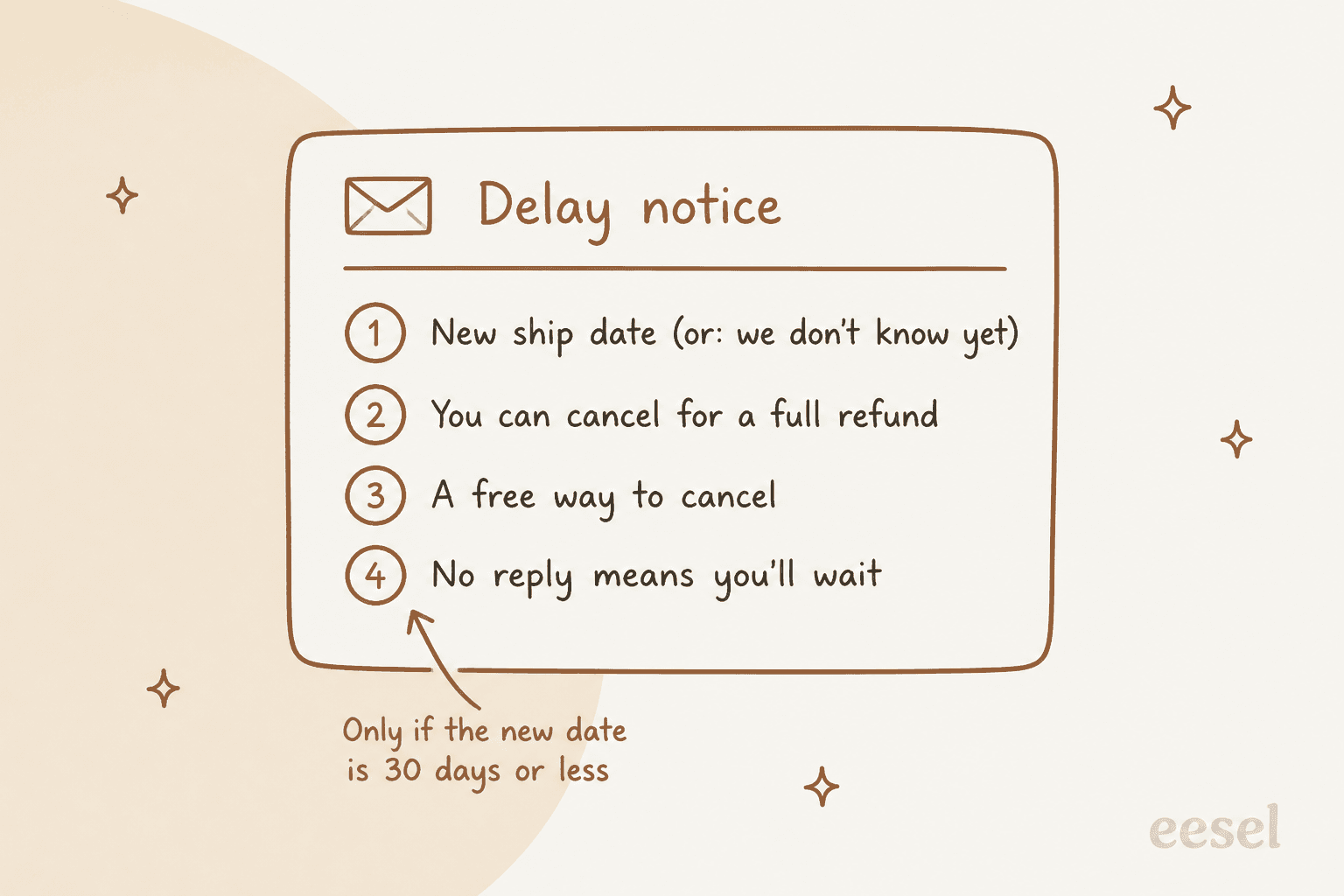
| The first notice must give a definite revised ship date, or say you can't give one | The AI can't write "soon." It quotes a date from your system or says it doesn't know |
| It must say the customer can cancel for a full and prompt refund | Every unshipped-delay message carries a cancel offer |
| It must give a way to cancel at your expense (toll-free number, website) | A link or reply-to-cancel that costs the customer nothing |
If the new date is 30 days or less past the original, say that no reply counts as agreeing | One extra sentence, only in this case |
If it is more than 30 days, or unknown, explain the reason and say the order cancels automatically if they don't reply | The AI needs the reason, so this case needs a person's input |
| A second notice can't treat silence as agreement | If you slip again, the order cancels unless the customer says "keep it" |
Refunds go out within 7 working days for most payment methods, and can't be swapped for store credit | A cancel request is a refund action, not a coupon |
The rule has a few listed exemptions (seeds and plants, subscriptions after the first shipment, and cash-on-delivery orders among them), and it doesn't cover services. Penalties run up to $53,088 per violation.
The UK draws the line in a different place. Section 28 of the Consumer Rights Act 2015 is about delivery, not shipping: unless you agreed a time, goods have to arrive within 30 days. If they don't, and the date was essential, the customer can end the contract; otherwise they can set a new deadline. So for UK customers, the carrier-side delay counts too.
I'm an engineer and not a lawyer, so please treat this as a map, not as legal advice. The practical point still stands: an AI that writes cheerful "slight delay, thanks for your patience!" emails about unshipped orders is missing the two sentences the rule cares about most.
When should AI send a delay notification?
When the new date is later than the date you promised, once. That one sentence replaces most of the threshold tables you'll find in delay guides.
Here's why I'd anchor on the promise rather than on the carrier event, because carrier exceptions are noisy. AfterShip's delivery sub-statuses list about 20 kinds of exception, from Exception_017 (extreme weather) and Exception_004 (customs clearance) to Exception_019 (late flight). Plenty of them resolve the same day. A parcel delayed by weather that still arrives inside your promised window doesn't need a message; telling the customer about it just creates a worry and then a ticket.
The reverse also happens: a parcel with no exception at all, just no new scans, can quietly drift past your promised date. So the AI should compare two dates, instead of watching one feed:
- The promise. The delivery estimate shown at checkout or in the shipping confirmation. It lives in your store or your shipping policy, which is why the AI needs to read your Shopify order, not just the tracking number.
- The current estimate. The carrier's or tracking platform's revised date. AfterShip fires an "estimated delivery date revised" event and attaches a reason code such as
extreme_weather,carrier_processingorcustoms_clearance.
If the current estimate is later than the promise, send. If there is no current estimate and no scan for three days, don't send a guess; send it to a person. Three days is my rule of thumb, not any standard, so tune it to your carriers.
Two more rules keep it from getting spammy. AfterShip's flow docs say notifications fire "only once as the status of the shipment changes," and your AI should hold the same line: one message per new date, not one per scan. And if the customer already wrote in about this order, reply on that same ticket instead of to start a second thread. My post on AI for ticket deduplication covers the merge side.
Which delay message do I send?
Pick the situation the order is in. The card shows what the message must say and who should send it.
Delay message picker
Where is the order right now?
- The new ship date from your order system
- "You can cancel for a full refund"
- A free way to cancel: a link or a reply
- "If we don't hear from you, we'll assume you're happy to wait"
AI sends, cancel and refund need approval
- The new date, or "we can't give a date yet"
- Why it's delayed (stock, supplier, warehouse)
- The order cancels and refunds on a set date unless they say "keep it"
- A free way to cancel now
AI drafts, a person approves
- The last carrier scan, with its time and place
- The carrier's new estimated date, quoted as theirs
- What you'll do if it stalls again
- Any compensation only if your written policy covers it
AI sends on its own
- No scan for 3+ days with no new estimate
- Lost (
Exception_013), damaged (Exception_012), returning to sender - "Delivered" but the customer says it isn't there
AI prepares, a person decides
US rule summary only, not legal advice. UK orders also count delivery within 30 days.
What should an AI-written delay message never do?
Make up a date. This is the failure that turns a delay into a complaint.
"Chat bot promised a guitar delivery by tomorrow, and they have not shipped yet. Phone support says they can't do that despite acknowledging the firm commitment promised by the chat bot."
That quote is the whole problem in two sentences, an unshipped order and a confident bot, plus a date nobody gave it. The fix is a rule and not a better model. The AI quotes dates that come from a system (your order record, the carrier's estimate) and says so, and when there is no date it says there is no date.
eesel's own AfterShip integration docs bake this in: the agent treats a scan as "the carrier's version of events, not the parcel's location," reports the latest checkpoint with its time and place, and "never invents a delivery date the carrier did not give." STIL Classics, a planner brand on Gorgias and Shopify, wrote the same thing into its instructions: no invented ship dates, delivery estimates or product specs, and if the order can't be found, flag it for the team instead of telling the customer something.
The other things on my never list:
- Don't call an unshipped order "on its way." Check fulfillment status first. "Label created" is not on its way.
- Don't promise compensation the policy doesn't cover. Quote the policy or hand it over. My guide to AI for refund requests covers how to write that policy so an agent can follow it.
- Don't guess on exceptions. A Shopify merchant's summary of the failure mode is worth pinning above your desk:
"Usually the failure mode is not the first reply, it is the edge cases. A bot that answers "where is my order?" fast but confidently guesses on delivery exceptions burns trust."
- Don't send the same delay twice. One message per new date. Duplicates read like a system that isn't paying attention.
- Don't treat "delivered" as the end. A "delivered but not here" reply goes to a person, every time. That's a complaint, not a tracking question.
What tools do you need for AI shipping delay notifications?
Three layers, and the AI sits on top of the other two.
| Layer | What it holds | Examples | What the AI reads from it |
|---|---|---|---|
| Store | The order, the promise, fulfillment status | Shopify, WooCommerce, BigCommerce | Was it fulfilled? What date was promised? Can it still be cancelled? |
| Tracking | Carrier scans, exceptions, revised dates | AfterShip, a 3PL or warehouse feed | Last scan, exception type, new estimate |
| Helpdesk + AI | The conversation and the message | Gorgias, Zendesk, Freshdesk with an AI agent | Writes and sends the message, handles the replies |
The store
Your store's own notifications cover events it controls. Shopify's store notifications are triggered by things like order placement, fulfillment and refunds, and they can be customised with Liquid variables. What the store doesn't see is what happens inside the carrier network after fulfillment, which is why the second layer exists. If you're on Shopify, my post on Shopify AI chatbots covers the reply side in the store chat.
The tracking platform
AfterShip is the most common pick for this layer, and its flow builder shows why: there are ready-made triggers for exception, estimated delivery date revised, and estimated delivery date missed.
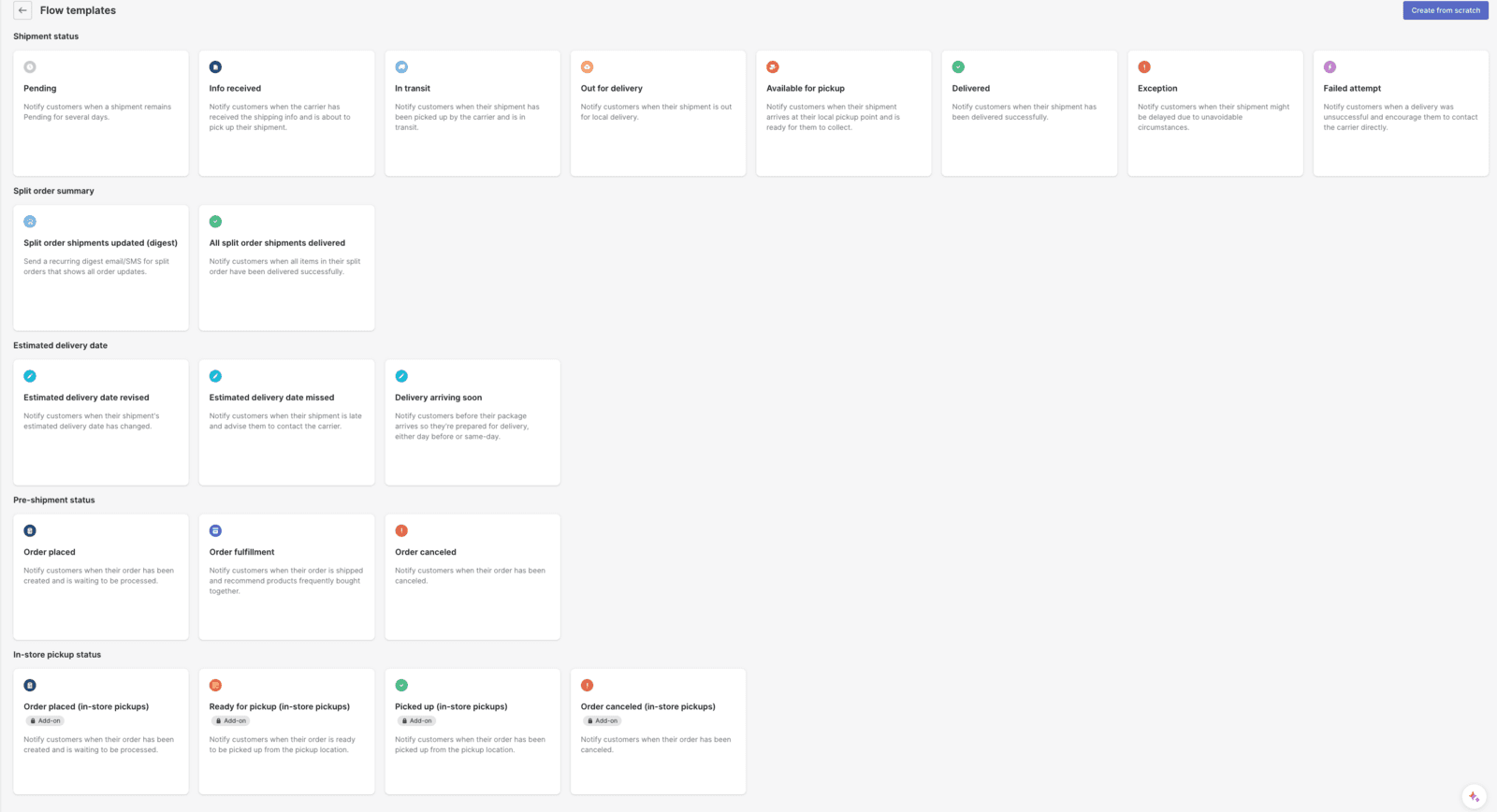
Which triggers you get depends on the plan, per AfterShip's notifications guide and pricing page:
| AfterShip Tracking plan | Price | Included shipments | Delay triggers | API and webhooks |
|---|---|---|---|---|
| Free | $0 | See pricing page | Not included | No |
| Essentials | From $29/month | 6,000 per year, then $0.08 each | Exception, info received | No |
| Premium | From $59/month | 6,000 per year, then $0.12 each | Adds estimated delivery date revised | Yes, 10 requests per second |
| Enterprise | Contact sales | Custom | Adds delivery arriving soon | Yes, custom limit |
AfterShip's own flows send templated emails and texts, and they're good at that. Where they stop is the reasoning: comparing the new date with the promise from your store, checking whether the order was ever fulfilled, or reading the customer's last ticket before writing. That's the job for the third layer.
The AI in your helpdesk
This is where the message gets written and the replies get handled. If you're comparing options, my roundups of the best order tracking chatbots and order status chatbots list the field.
Gorgias users can also look at its native setup in my posts on Gorgias AI order tracking and Gorgias delay thresholds.
How do you set up AI shipping delay notifications?
Here's the order I'd do it in. Each step is small, and you can stop after step 4 and already have most of the value.
Step 1: count your delay tickets
Pull last month's WISMO tickets and sort them into the two columns from earlier: not shipped yet, and shipped but late. Most stores I've seen are surprised by how big the first column is. Those are the tickets your warehouse caused, and they're the ones with legal strings attached in the US. If you want a structured way to do this, my post on AI for support reporting has a contact-reason breakdown.
Step 2: write the promise down where the AI can read it
The AI can't compare against a promise it can't see. Put your shipping times in a policy page or a short instructions doc: processing days and carrier windows by region, also what "express" means. Add the compensation policy, if you have one, in the same place, with exact numbers.
Step 3: connect the order and the tracking
Connect the store and the tracking platform to the AI agent so it reads both live. In eesel, the Shopify integration adds actions like Get Order Fulfillment (tracking number, carrier and shipment status), Cancel Order (for orders that haven't been fulfilled) and Refund Order. The AfterShip integration (switched on per workspace on request) adds Get tracking, which reads the carrier, the latest checkpoint, the history and any estimated delivery the carrier gave.
Step 4: wake the agent when a delay happens
Neither Shopify nor AfterShip wakes an AI agent on its own; eesel's docs are upfront that both integrations have no triggers. So you pick one of two patterns:
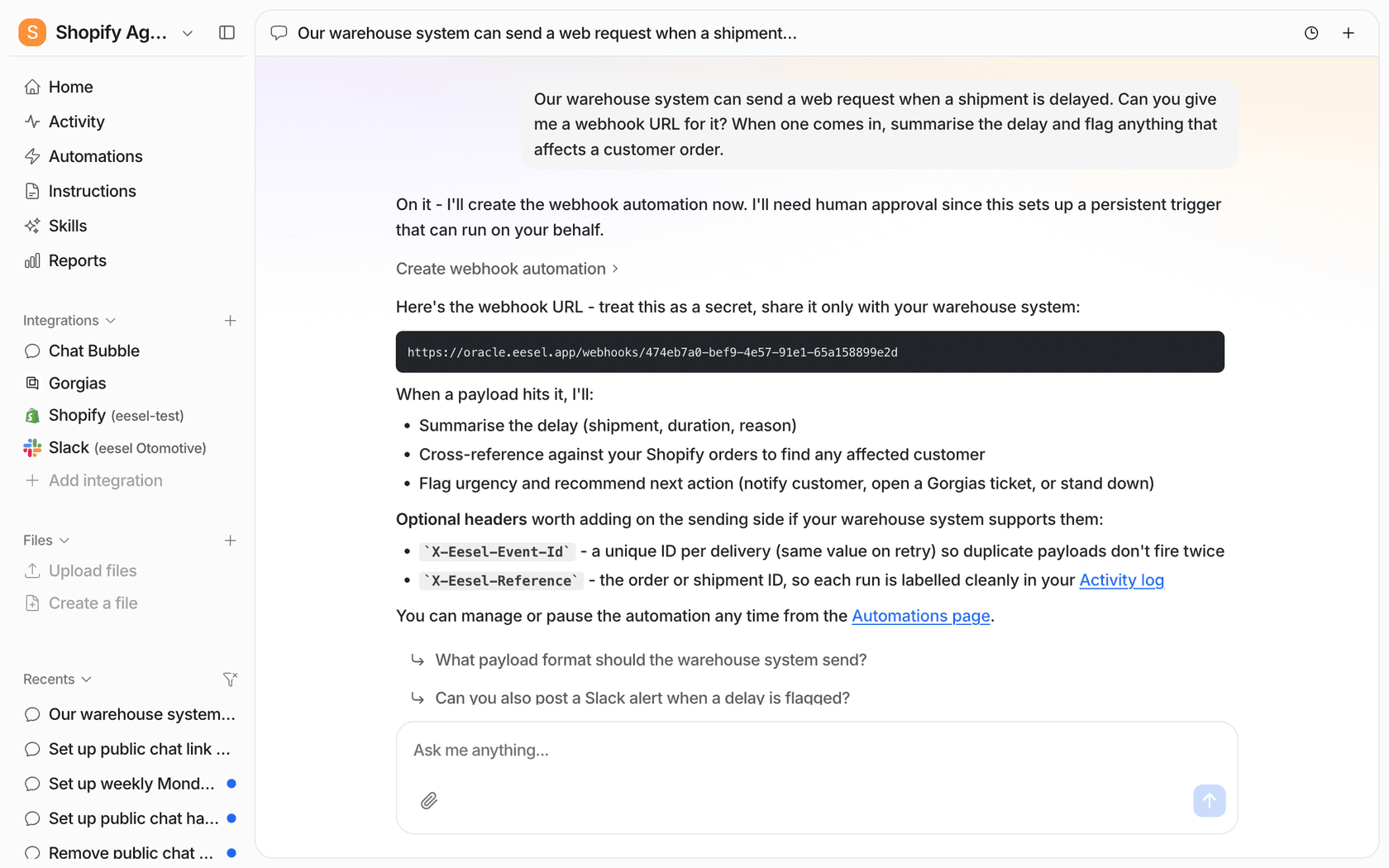
- A webhook. Your warehouse system, a Zapier step on an AfterShip event, or your own backend POSTs the delay to an eesel webhook automation. The agent wakes with that data and follows the instructions you wrote for it.
- A schedule. A morning run that checks open orders against their promised dates and sends what's due. Cape Coffee Beans uses scheduled sweeps for its Zendesk queue:
160scheduled checks in a month, each ending in a short email to the founder or no email when there's nothing to report.
The webhook route is the one in eesel's own docs, which use a warehouse shipment delay as the worked example. You ask for the webhook in chat and say what to do with each payload:
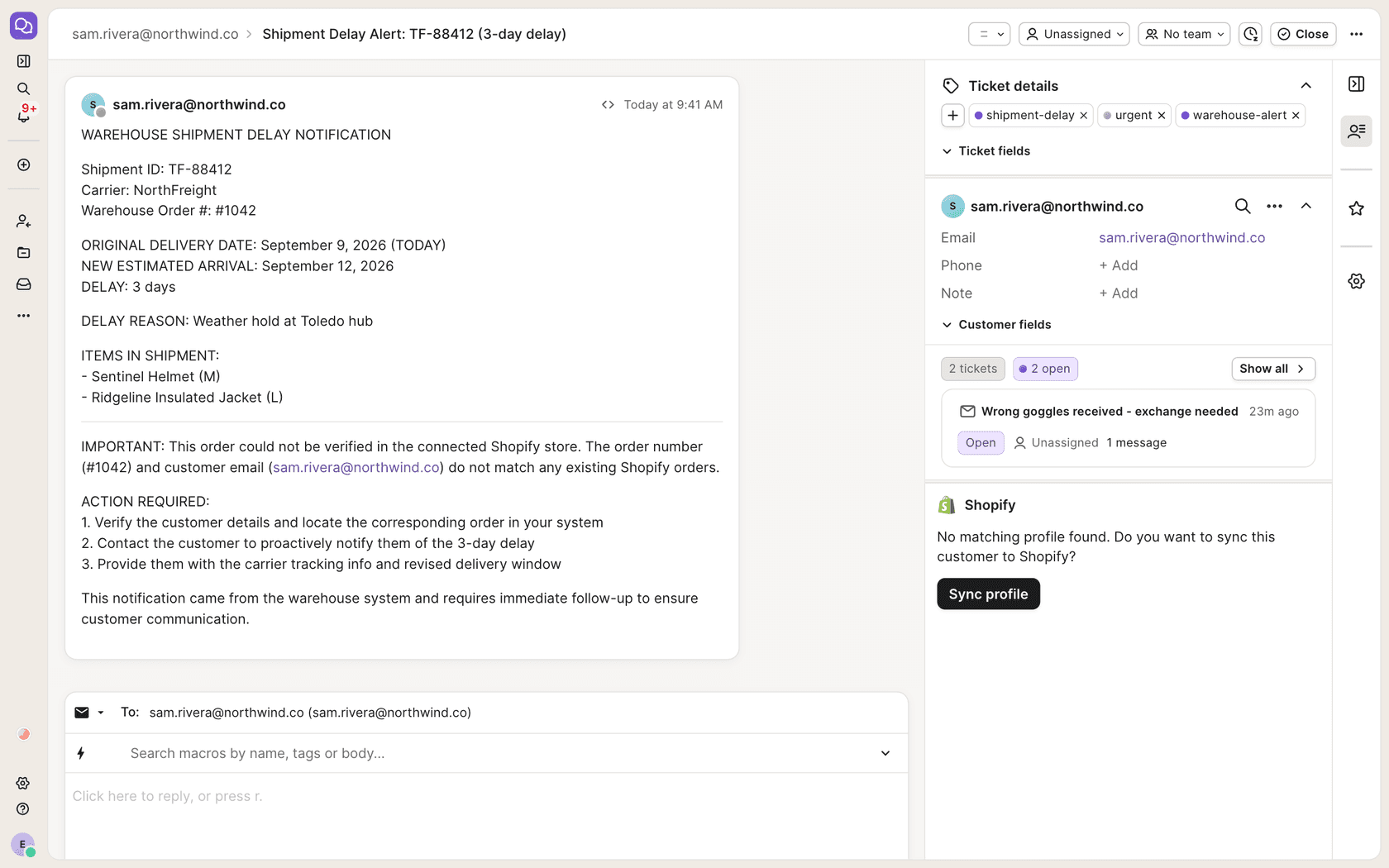
When a delay arrives, the agent checks it against Shopify and acts. In the docs example the order couldn't be matched, so instead of messaging anyone it opened a tagged Gorgias ticket for the team, which is exactly what you want when the data doesn't line up:
If you'd rather set this up from a terminal or a coding agent, the eesel CLI does the same work: eesel integrations connect aftership prints the connect link, eesel automations lists the webhook automation and whether it's on, and eesel approvals shows anything waiting for a person. Claude Code, Codex or Cursor can drive those commands too, which is handy when the webhook sender is your own backend and the same engineer is wiring both ends.
Step 5: put the risky actions behind approval
Sending a running-late update is low risk. Cancelling and refunding are not. In eesel, every action can run on its own, ask first, or stay off (actions and approvals), and held actions can be approved in the dashboard, in Slack, or with eesel approvals approve <id> in a terminal.
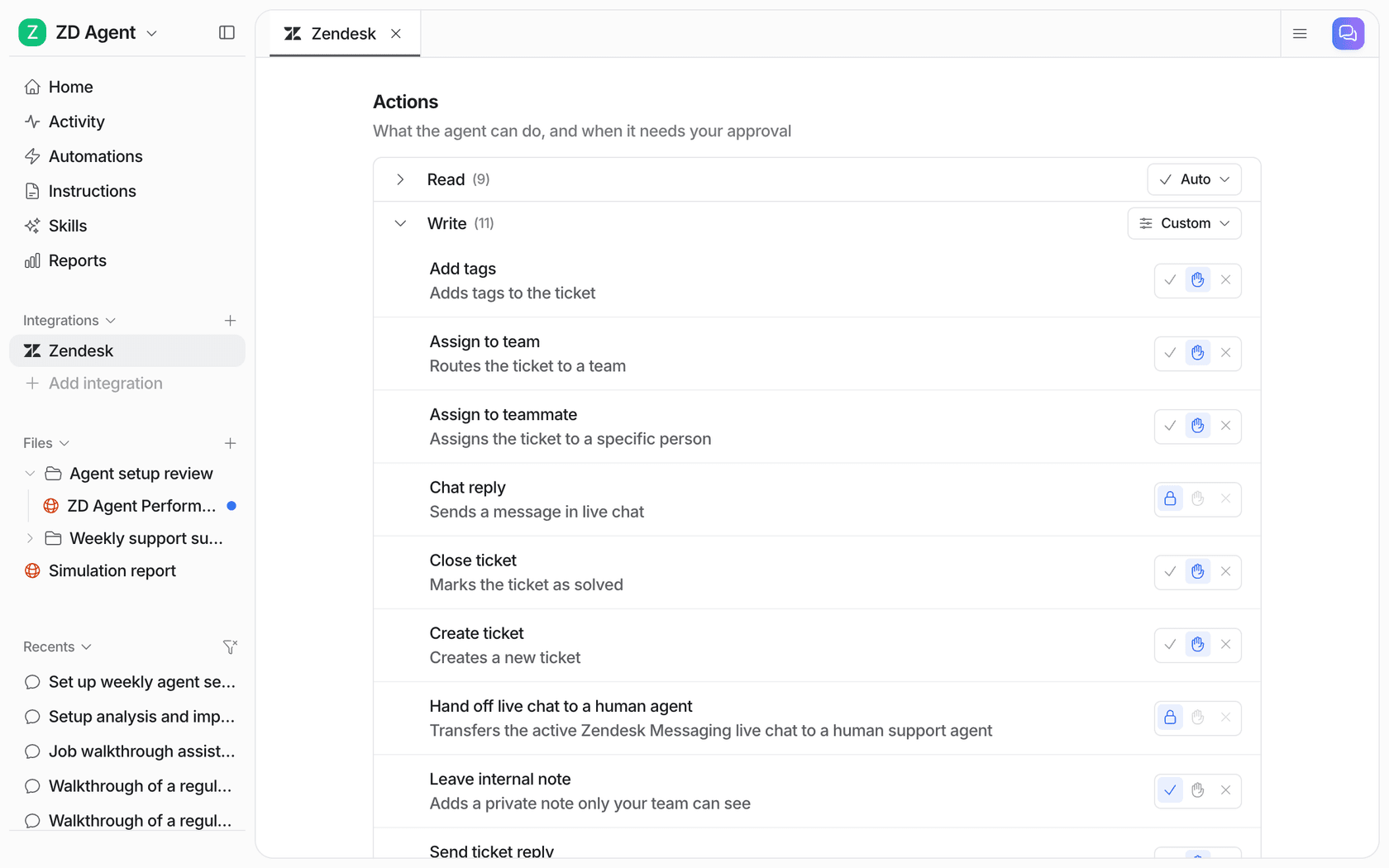
I'd start with cancel and refund on "ask first," then watch a couple of weeks of the decisions, then loosen what's boring. My post on customer support approval workflows goes through how to pick.
Step 6: test it on last month's late orders
Before anything goes to a customer, replay it. Take 20 to 30 late orders from last month, feed each one through, and read every message it would have sent. Check three things: did it pick the right column, did every date come from a system, and did it hold the cases it should have. My guide to AI support simulation testing covers sample sizes for this.
How does this look in a real store?
Three eesel customers handle shipping questions in ways worth borrowing.
Question Beauty sells vegan cosmetics through Shopify and runs support in Gorgias, much of it short messages from social and chat. For a delivery or order question, eesel finds the customer by email, checks the order and its fulfilment status, and answers with the tracking details. If the order is still being processed, or the tracking already answers the question, it says so and closes the ticket. In one month that was 990 Gorgias tickets handled, 290 Shopify orders looked up, and 280 tickets closed without a person.
Rúngne, a Norwegian climbing apparel brand shipping from Norway and a US warehouse, split the work across agents. A draft agent finds the order in Shopify, checks why it hasn't shipped, and leaves a reply for the team as an internal note; a separate helpdesk agent answers "where is my order" and shipping policy questions directly. Across 2,100 Gorgias tickets in a month, that meant 580 drafts for the team and 440 public replies. The "why hasn't it shipped" check is the unshipped column from earlier, done before anyone writes back.
STIL Classics is the one I'd point to for the never-guess rule. Its tickets often involve "a delivery scan that has not moved," and the agent looked up 230 Shopify orders in a month before drafting a single line, with no invented ship dates allowed.
None of these three is a pure "proactive delay email" setup, and I want to be straight about it. They are the reply side done carefully, which is the foundation, and the webhook and schedule patterns above are how you turn the same agent outward.
How do you measure whether it's working?
Watch four numbers, before and after:
| Metric | What it tells you | Where to get it |
|---|---|---|
| WISMO tickets per 100 late orders | Whether the proactive message is landing | Helpdesk tags + tracking platform |
| Repeat contacts on the same late order | Whether the message answered the question or just started a thread | Helpdesk |
| Cancels after a delay notice | Whether the new dates are believable (a spike means they aren't) | Store |
| Messages with a date that turned out wrong | The one that hurts trust; aim for zero AI-invented dates | Spot-check sample |
A quick note on the last one, a carrier's estimate being wrong is normal. The AI quoting the carrier and then the carrier missing is fine, but the AI producing a date that came from nowhere, that is the bug.
Common mistakes with AI shipping delay notifications
The ones I see most, roughly in order of how much trouble they cause:
- Treating unshipped orders like carrier delays. No cancel offer, no revised ship date, a cheerful "on its way." In the US that's the part of the message the FTC rule is about.
- Triggering on every exception. Weather blips that resolve the same day become worried customers. Trigger on the promise, not the scan.
- Letting the AI fill gaps. No date from a system means no date in the message. "We don't have a new date from the carrier yet" is a complete, honest sentence.
- Sending from a no-reply address. The customer's reply ("can I cancel?") is the most useful thing that can happen next. Send from the helpdesk so it lands on a ticket.
- Forgetting the ticket that already exists. If they wrote in yesterday, the delay message belongs on that thread.
- Automating the lost-parcel case. Lost, damaged and "delivered but not here" are claims and judgment calls. Draft and hand over; my guide to AI for warranty claims has the same handover pattern.
If your delays come in waves (holiday peaks, a carrier strike), my post on AI for seasonal support spikes covers how to keep the same rules under load, and AI for weekend support coverage covers the Saturday scan nobody's watching.
Try eesel for shipping delay notifications
If your store runs on Shopify and your tickets land in Gorgias, Zendesk or Freshdesk, eesel works as an AI teammate that already knows how to read the order and the carrier scan. Point a delay webhook at it, and it checks whether the order shipped, compares the new date with your promise, sends one honest update, and holds cancels and refunds for you to approve. Question Beauty closed 280 Gorgias tickets in a month this way without a person touching them.
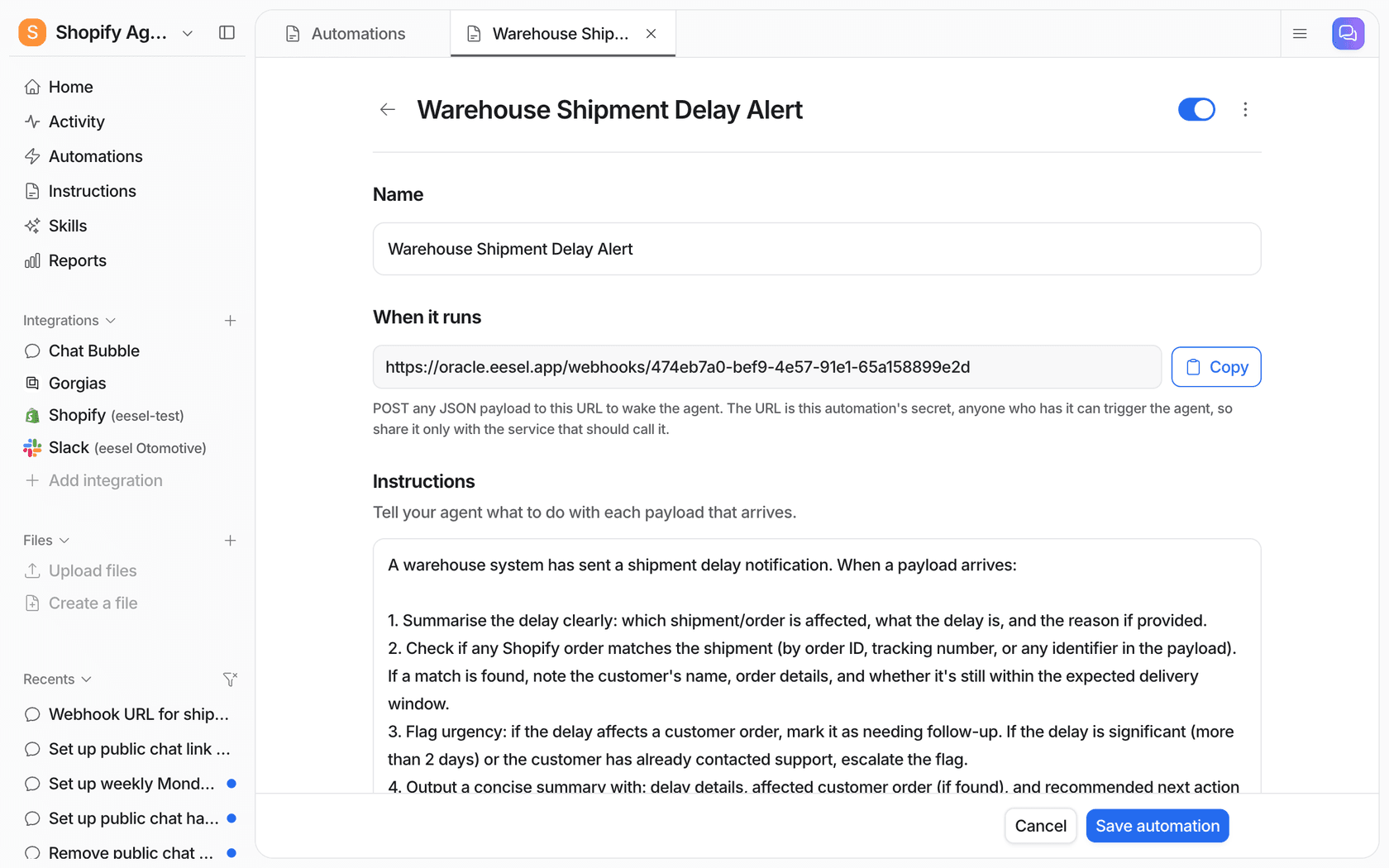
You can set it up from the dashboard chat or the CLI, test it on last month's late orders, and see plans on the pricing page. Try eesel free and see what it would have sent.