
What "automating order tracking" actually means
"Where is my order?" (the industry calls it WISMO) is the most repetitive ticket in any retail queue. It's high-volume, the answer is factual rather than judgment-heavy, and customers want it answered instantly. That combination is exactly what makes it the best possible candidate for AI customer service. It's also the ticket most "AI support" tools quietly fail at, and understanding why is the whole game.
Under the hood, most AI support tools are a retrieval system over your help center. Feed them your articles and macros and they handle policy questions well: return windows, shipping zones, sizing. Ask one "where is my order #10432?" and the best it can do is parrot the generic shipping policy, because that specific order doesn't exist in any document it was trained on. The status changes every few hours, it's different for every customer, and it lives in your order system, not your FAQ.
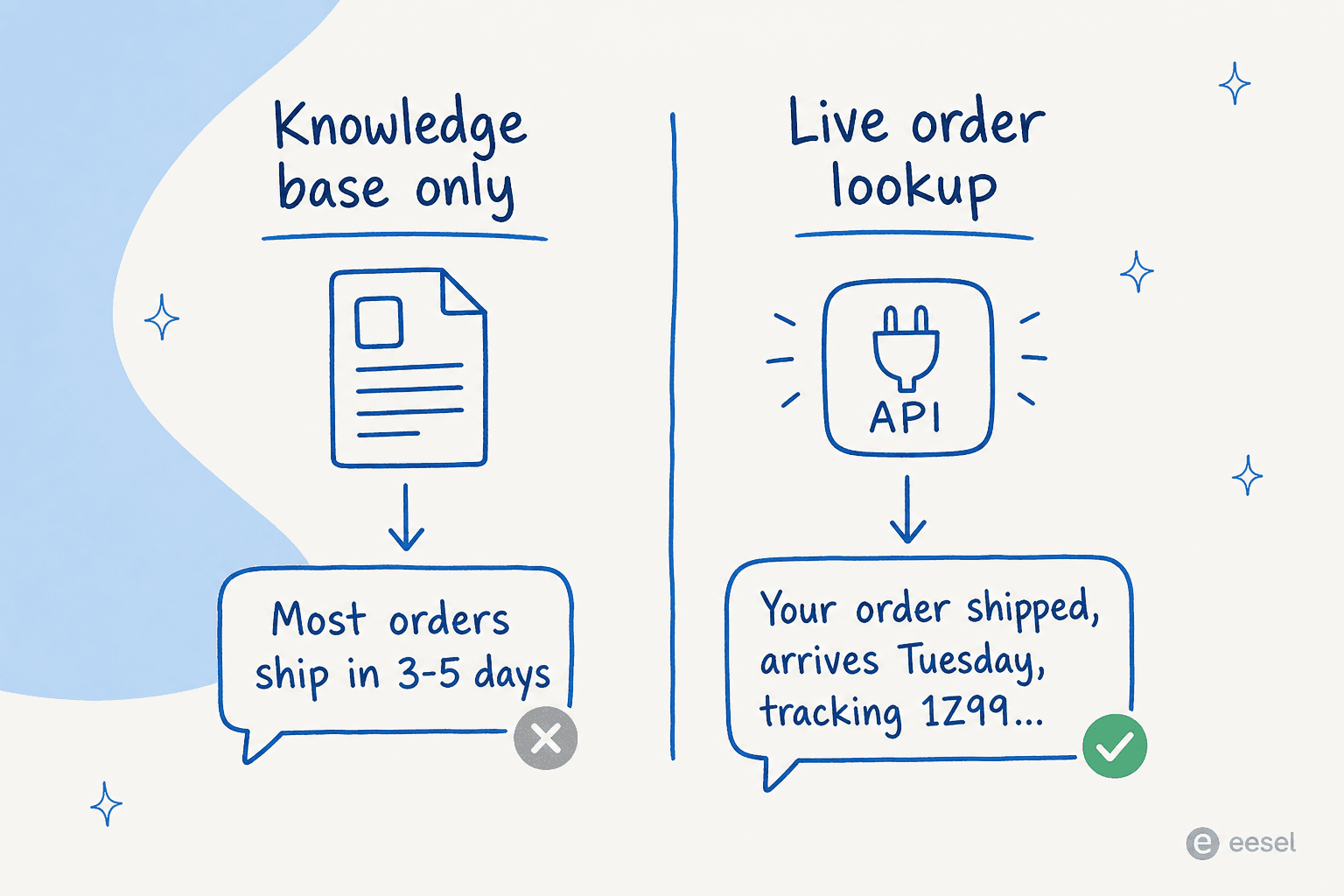
So when I say "automate order tracking," I don't mean point a chatbot at your docs and hope. I mean give the AI a live, reliable path to your order data so it can answer about this order, on this ticket. Everything below is about building that path.
Before you start: what you'll need
You don't need an engineering project, but you do need a few things in place before the AI can answer a single WISMO ticket. Think of this as the prerequisite checklist:
- A channel where the questions land. That's your existing helpdesk (Gorgias, Zendesk, Freshdesk) or a chat widget on your store. The AI layers onto what you already run rather than replacing it.
- Access to live order data. This is the non-negotiable one. The AI needs to reach your store or order system, usually the Shopify order-detail API, and a shipping API if you fulfil through a 3PL or carrier.
- A reliable identifier. Order number, email, or both, available in the message text or the ticket metadata so the AI knows which order to fetch.
- Your past tickets and docs. Old order-status replies and help articles teach the AI your tone and structure, which is what makes its answers sound like your team and lifts first-contact resolution.
- A human owner for escalations. Someone needs to catch the tickets the AI hands back. Automating order tracking is about clearing the easy volume, not firing the team.
The one I see teams underestimate is the second one. I once watched a customer lose their whole setup because their core order-status source was a Google Sheet that updated daily, and when the sync to it silently broke, the answers went stale. Order-tracking automation lives or dies on a live data connection that stays in sync, so treat that connection as the foundation, not an afterthought.
How to automate order tracking with AI, step by step
Mechanically, an order-tracking answer is an API call wrapped in a sentence. The way I model every integration when I build it is as three parts: sources (what the AI can read), triggers (when it wakes up), and actions (what it can do). Answering a doc question uses a source. Tracking an order uses an action, the AI calls out to your order system, gets live data back, and writes the reply from it.
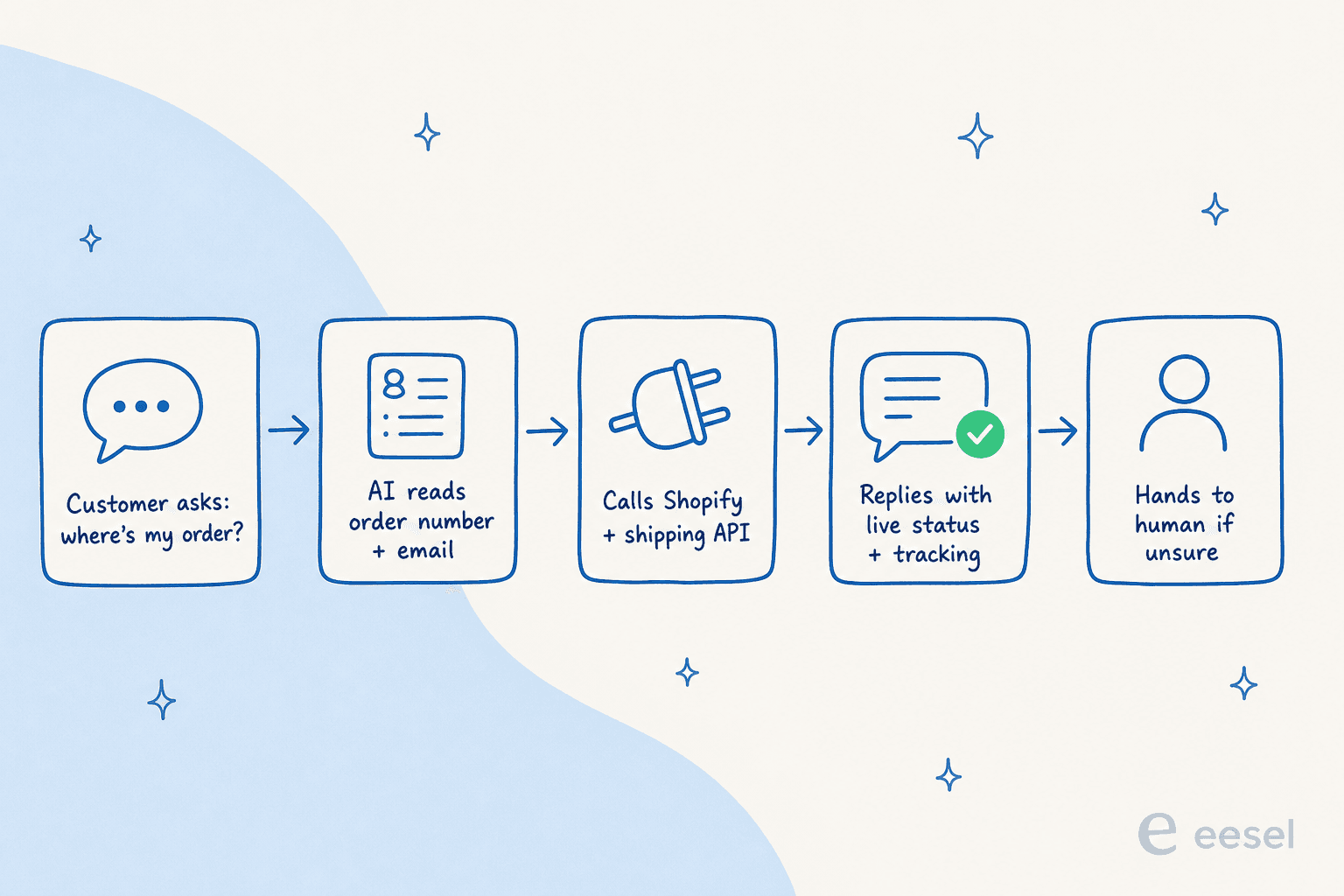
Here's the setup, in the order I'd actually do it:
- Connect your helpdesk and store. Point the AI at your helpdesk and your store so it has both the conversation and the order data in one place. The Shopify integration is the common starting point and needs no code.
- Wire up the order-lookup action. Map an action to your order API so the AI can fetch status, fulfilment, and tracking by order number or email. For a non-Shopify stack, this is where an order-detail endpoint or a 3PL API gets connected once.
- Train it on your real tickets and docs. Let it learn from past order-status replies and your help center so its phrasing matches how your team already answers. This is the most-requested capability I hear about, and it's what stops replies sounding robotic.
- Simulate before you launch. Run the AI against historical WISMO tickets to see what it would have replied, and set the confidence threshold there, in a safe rehearsal, not in production.
- Go live on a slice. Start with order-status only, in one channel, then widen to refunds, returns, and subscription changes once you trust it.

A note on the order-lookup action, since it's the part people assume is hard. One thing I found building these: for an order system without a pre-built connector, handing the AI an API key, the docs, and a reference script works better than waiting on a heavy vendor integration. That means the lookup can run against effectively any order or shipping API, not just the marquee ones. And because it's a real integration, the same action layer that fetches status can also tag the ticket, set status, and route it, the grunt work that piles up alongside WISMO.
A quick readiness check
Before you start wiring anything up, it's worth a gut check on whether your stack is ready for order-tracking automation. Tick the boxes that are true for you, the widget tells you where you stand.
Is your stack ready to automate order tracking?
Tick what's true today:
Don't let it guess: the one rule that matters
Here's the failure mode that should keep you up at night, and rightly so. An order-tracking bot that confidently invents a delivery date is worse than no bot at all, because the customer believes it. I've watched confident-sounding bots give wrong answers when the underlying data had no clean match, which is precisely why we now simulate every rollout against historical tickets before it touches a live customer.
The fix is selective automation: the AI should auto-reply only when the order lookup returns a single, clear, unambiguous answer, and quietly leave everything else for a human. A CX lead at a DTC brand doing around 7,000 tickets a month put the requirement to me about as sharply as anyone has, that the AI should only handle the tickets it's confident about and leave all the others alone, because an AI that answers "sorry, I don't know" on everything just creates a second pile of tickets to check. That's the bar: answer what you're sure of, escalate the rest cleanly.
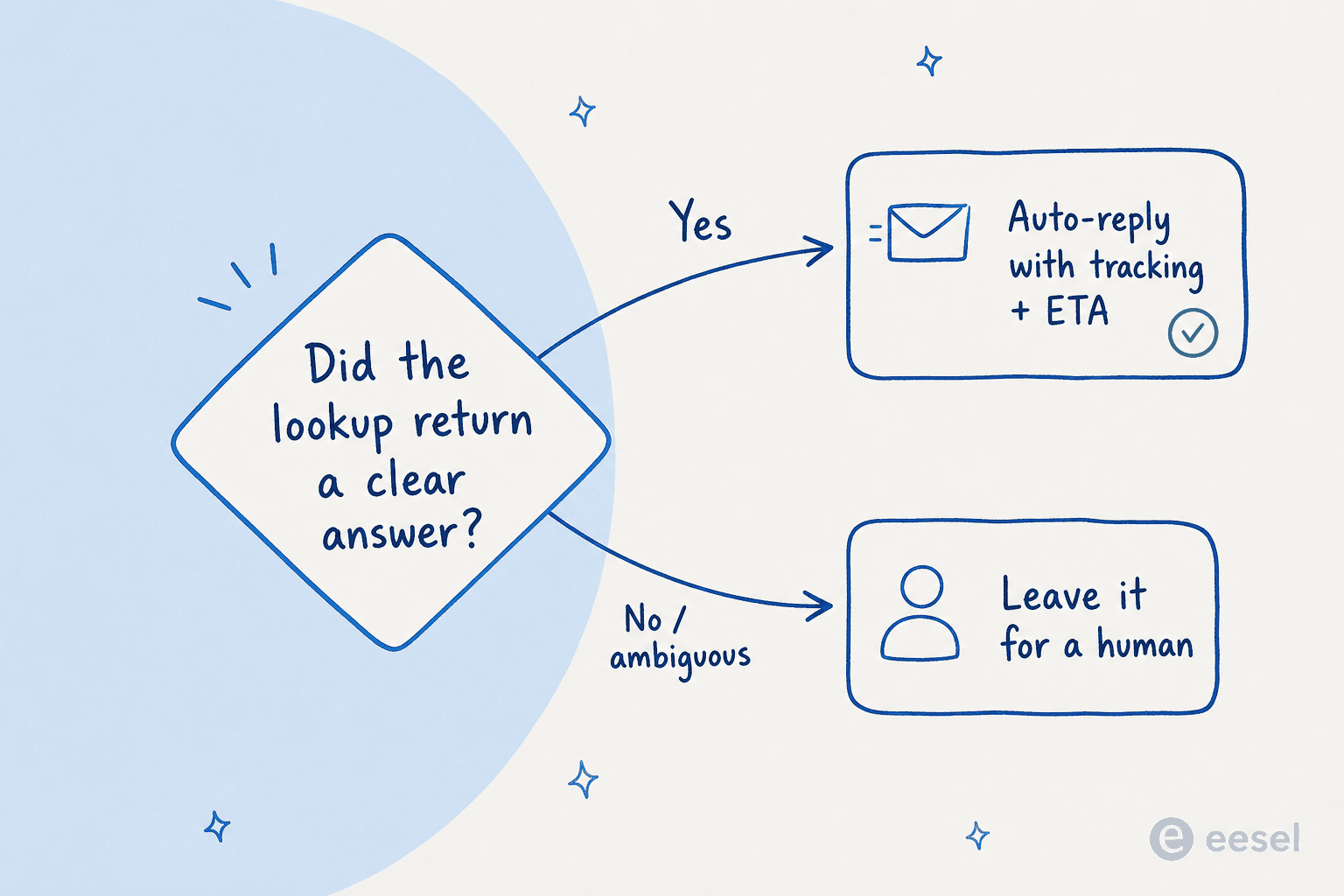
In practice that's a few guardrails: the AI handles a clean lookup (order found, single match, status returned) on its own; it hands off to a human when the order can't be matched, the customer is upset, or the question goes past status; and you watch it on past tickets first so you trust the accuracy before going live. The numbers back up how well order-status questions sit in that confident lane. On a real German jewelry retailer running about 1,000 tickets a month on Zendesk and Shopify, a live-traffic trial showed AI drafts that were 100% useful on refund-status questions and 93.8% on returns and refunds, with 93% triage accuracy. A gig-economy app on Zendesk resolved 73% of tier-1 requests in its first month:
"In the first month, eesel is resolving 73% of our tier 1 requests... Our team implemented and achieved results quickly during our 7-day trial. The platform even includes automations for ticket tagging, assignment, and status updates!"
Kim Simpson, Gridwise (review on G2)
Common mistakes that derail an order-tracking rollout
Most order-tracking projects don't fail on the language model, they fail on setup. These are the ones I see most:
- Training on docs and stopping there. This is the big one. If the AI only reads your help center, it answers policy questions and bluffs on real orders. You need the live lookup, full stop, which is why a doc-trained bot makes a poor order tracking chatbot.
- Letting it auto-reply on everything. Skip the confidence threshold and you'll eventually send a wrong ETA. Gate auto-replies on a clean match and route the rest, the same discipline behind good hallucination prevention.
- Firing "shipped" the moment a label is created. A label isn't a pickup. If your status source updates before the warehouse actually hands the parcel over, the AI will tell customers something that isn't true yet, garbage in, garbage out.
- Launching without a simulation pass. Going straight to production means tuning on live customers. Rehearse against your past tickets instead, so you set the threshold where it's safe.
- Trying to automate everything on day one. Order tracking is the wedge, not the whole job. Prove it on order-status, then extend the same action to refund vs exchange intent, automatic RMA generation, and the order management flows around shipping issues.

What it costs (and the seasonal trap)
Pricing is where order tracking has a specific gotcha, because your volume isn't flat. A model that charges per resolution looks reasonable in March and then detonates your bill during Black Friday, exactly when WISMO volume spikes hardest. Some of those models also count auto-closing spam as a "resolution," which quietly inflates what you pay, on one real ecommerce inbox I looked at, 22% of tickets were spam.
eesel runs on usage-based pricing at $0.40 per ticket with no seat fees, so cost scales smoothly with volume instead of punishing you for a good resolution rate or a busy season. For an account handling roughly 700 tickets a week on Gorgias and Shopify, that worked out to about $1 per ticket all-in. Set against a human agent picking up the same repetitive WISMO question, the cost difference on tier-1 volume is where the ROI on automation actually shows up, and it's the cleanest place to start measuring.
Automate order tracking with eesel
If "where is my order?" is eating your queue, this is the exact problem eesel was built for. It plugs into your existing helpdesk and your Shopify store, looks up live order data through a real API action, and only auto-replies when it's confident, handing the rest to your team. The part I'd point any cautious support lead to first: you can simulate it against your own past tickets before it answers a single live customer, so you see the accuracy before you trust it with a delivery date.

It's free to try, and setup is measured in minutes, not a quarter. Connect Shopify, point it at order tracking, and watch how much of that repetitive volume disappears. Try eesel.
Frequently Asked Questions
How do I automate order tracking with AI?
Can I automate order tracking without code?
How do I stop automated order tracking from giving a wrong delivery date?
How long does it take to set up AI order tracking?
What else can AI automate besides order tracking?



Article by
Alicia Kirana Utomo
Kira is a writer at eesel AI with a Computer Science background and over a year of hands-on experience evaluating AI-powered customer service tools. She focuses on breaking down how helpdesk platforms and AI agents actually work so that support teams can make better buying decisions.