Why warranty claims eat your support team alive
Warranty tickets look simple from the outside and feel brutal from the inside. Every single one is the same handful of questions ("is my product still covered?", "I don't have my receipt", "how do I send it back?"), but each answer needs you to go dig: find the order, check the purchase date against the coverage window, confirm the fault is covered, then walk the customer through a return.
That's a lot of clicking for a ticket that rarely needs a human brain. And the volume is relentless. One DTC supplements brand I looked at was running around 7,000 Gorgias tickets a month and simply couldn't keep up, with the team needing to auto-resolve at least half of email volume just to breathe. Another multi-brand ecommerce operator described 500+ tickets a day of repetitive refund and order-tracking queries. Warranty claims sit right in that repetitive middle: high volume, low complexity, and death by a thousand lookups.
The other problem is that warranty claims are slow in a way customers hate. Someone whose product broke is already annoyed. If they wait a day for a reply that just asks for their order number, then another day for the actual return label, you've turned a covered repair into a bad review. This is classic WISMO territory, the "where is my..." pattern, except here it's "where is my replacement" and the stakes feel higher because something they paid for failed.
So the pain isn't that warranty claims are hard. It's that they're repetitive, data-heavy, and time-sensitive all at once. That's exactly the profile AI is good at.
What "AI for warranty claims" actually means
When people say "AI for warranty claims," they usually picture a chatbot that says "I'm sorry to hear that" and nothing else. That's not what I mean. A useful warranty AI runs the actual claim: it reads the incoming message, figures out what the customer bought and when, checks it against your policy, gathers whatever's missing, and produces the next concrete step.
Here's the flow I'd expect it to run, start to finish.
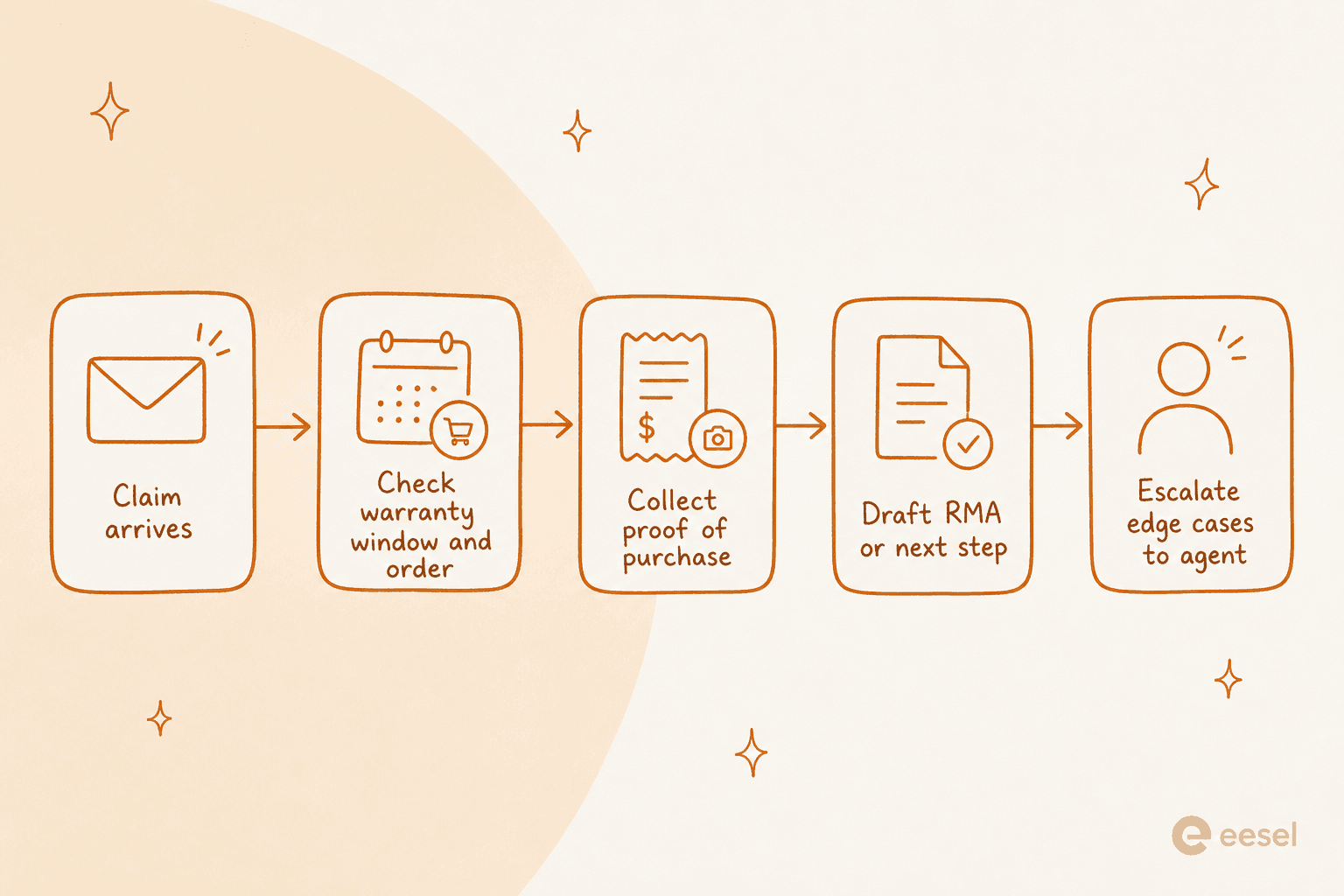
Walking through it:
- Claim arrives. A customer emails or opens a chat saying their product failed. The AI reads it and classifies it as a warranty claim, not a generic return or a product question. This ticket classification step is what routes it into the right flow.
- Check the warranty window. The AI looks up the order, finds the purchase date, and compares it against your coverage period. Connected to your store data, it can answer "you bought this 8 months ago, and your warranty runs 12 months, so you're covered" without asking the customer for anything.
- Collect proof of purchase. If the order isn't linked to the email address, or the item was bought through a reseller, the AI asks for the receipt or serial number, then reads it back. This is the step that usually stalls a manual queue for days.
- Draft the RMA or next step. Once eligibility checks out, the AI generates the return authorization, the shipping label instructions, or the replacement order, following your process. Tools that connect to your helpdesk can generate an RMA automatically from the conversation.
- Escalate the edge cases. Anything ambiguous, out of policy, or high-value gets handed to a human with the full context attached.
The whole point is that steps 1 through 4 are mechanical. They're lookups and document generation. A person doing them adds delay, not value. Step 5 is where a person actually earns their seat.
The parts AI should own, and the parts it shouldn't
This is the line that makes or breaks a warranty setup, so I want to be blunt about it. The failure mode isn't AI being too dumb to help. It's AI being handed decisions it has no business making, like approving a goodwill replacement on an out-of-policy claim because the customer sounded upset.
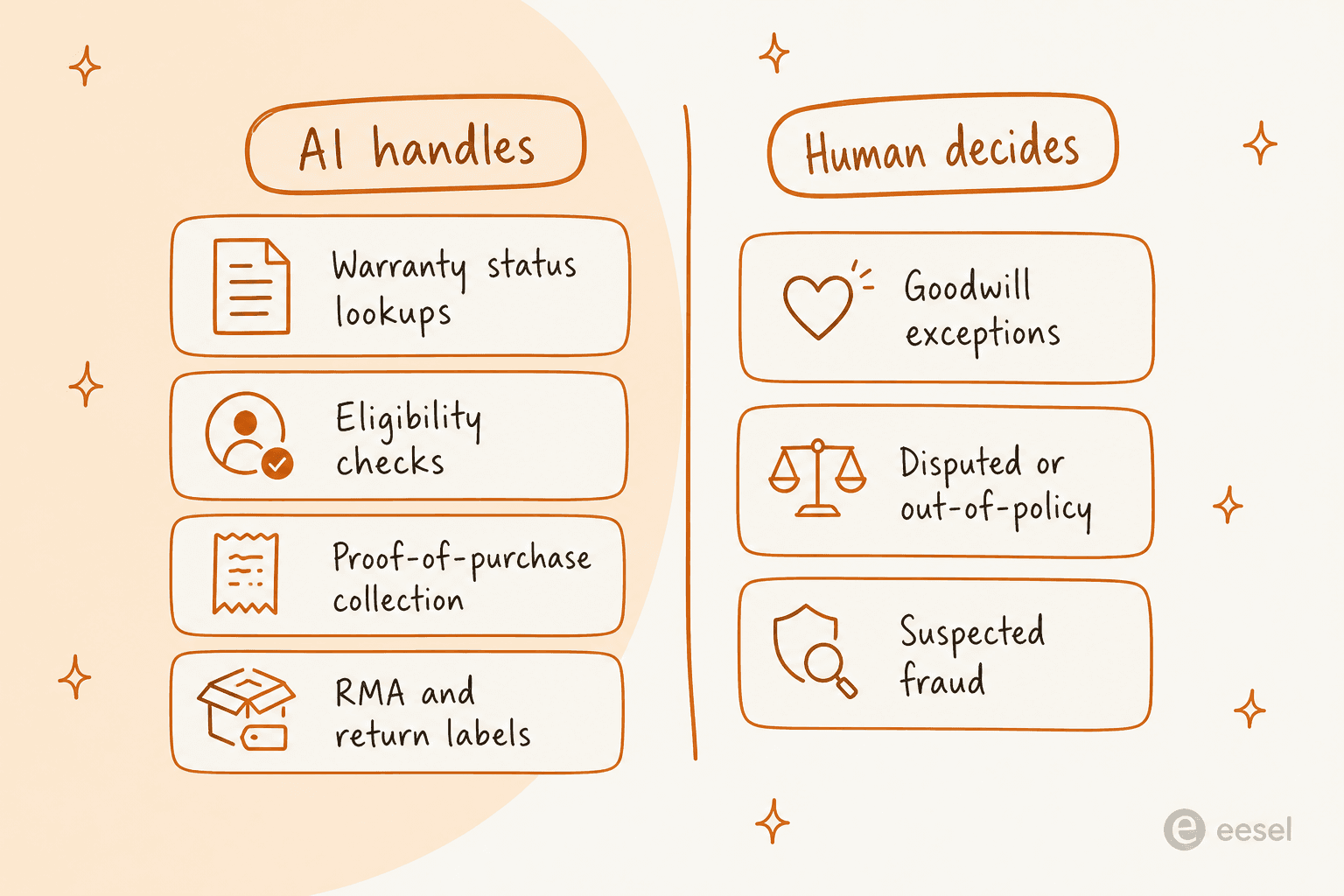
Keep AI on the left column: warranty status lookups, eligibility checks, proof-of-purchase collection, and RMA generation. These are rule-based and verifiable. The AI can show its work, and you can audit it.
Keep humans on the right: goodwill exceptions (the "technically out of warranty but let's take care of them" calls), disputed or out-of-policy claims, and anything that looks like fraud. These need judgment, sometimes a manager's sign-off, and always accountability. You do not want an AI unilaterally deciding to comp a $400 replacement.
The good news is you get to draw this line yourself. A decent tool lets you set escalation rules so the AI only acts inside the box you define, and hands off the moment a claim crosses it. That's the difference between "AI that helps" and "AI that creates a liability."
Does it actually work? What the numbers say
Fair question, and this is where I can stop hand-waving. We ran an AI teammate against real ticket traffic for a German online jewelry retailer doing about 1,000 tickets a month on Zendesk plus Shopify, across a 284-chat sample cross-validated against 100 tickets. We scored how useful the AI's drafts were by ticket category.
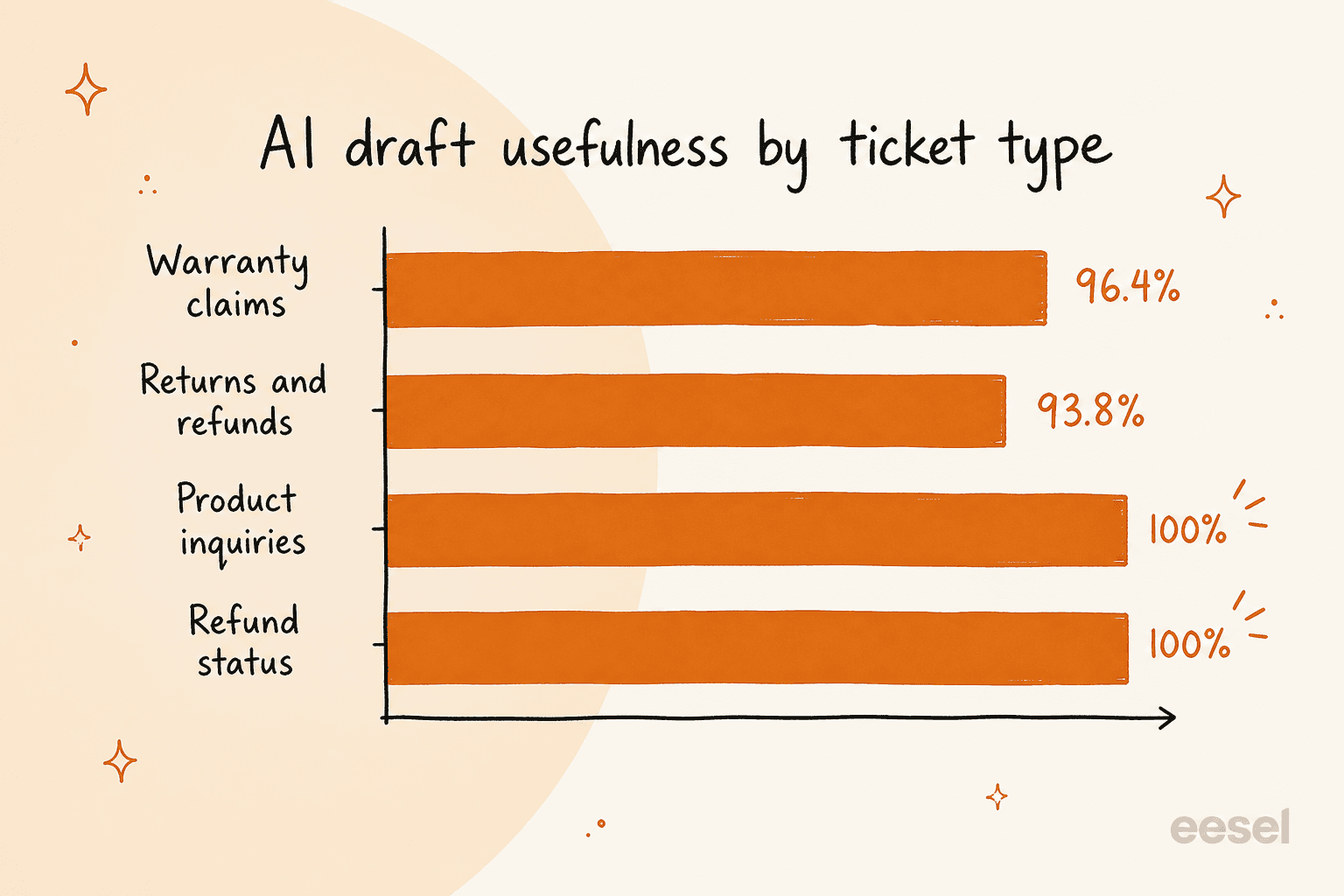
Warranty claims came out at 96.4% useful drafts, just ahead of returns and refunds at 93.8%, with product inquiries and refund status both hitting 100%. Warranty was one of the strongest categories in the whole account, which honestly matched my gut: these tickets are structured, so the AI has a lot to work with.
A couple of honest caveats, because I'd want them if I were reading this. "Useful draft" means an agent could send it with little or no editing, not that 96% went out untouched. In that same trial only 12% of drafts were sent completely as-is, and there was a 7% factual error rate, which is exactly why you keep a human reviewing at first and why the fraud and dispute cases never go out on autopilot. The number that matters isn't "how good is the AI in a demo," it's "how good is it on your tickets," and the only way to know that is to run it against your own history before launch.
That's also the strongest argument for simulating before you go live. We've watched confident-sounding bots quietly give wrong answers, which is why every rollout I trust gets tested against real past tickets first, so you see the accuracy and the coverage on your actual warranty volume, not a vendor's cherry-picked sample.
How to set up AI for warranty claims on your existing helpdesk
You don't need to rip out your helpdesk to do this. The approach I'd take is to layer AI onto whatever you already run, Zendesk, Freshdesk, Gorgias, or Help Scout, and wire it into your order data. Here's the sequence.
1. Connect your helpdesk and your order data
The AI needs two data sources to handle warranty claims: your tickets (so it lives where support already happens) and your store or ERP (so it can look up orders and purchase dates). Connecting your commerce platform is the step that makes eligibility checks automatic instead of a back-and-forth.

If you're on Shopify, this is where an AI built for Shopify support pays off, since it reads order records directly. Below is roughly what that order lookup looks like in action.
2. Feed it your warranty policy
An AI is only as good as what it knows. Point it at your warranty policy page, your help center, and any internal docs that spell out coverage windows, what voids a warranty, and your RMA process. This is the same knowledge base it'll use to answer the "how do I send it back?" questions, so the more precise your policy docs, the fewer mistakes downstream.
3. Set your escalation and action rules
Decide what the AI is allowed to do, not just say. Can it generate an RMA automatically, or only draft one for an agent to approve? At what claim value does it hand off to a human? Write these rules explicitly. This is where you enforce the AI-versus-human boundary from earlier, and where good tooling lets you scope actions tightly instead of flipping one big "autonomous" switch.
4. Simulate on your past tickets
Before it touches a live customer, run it against your historical warranty tickets. You want to see the actual resolution rate and read the actual drafts on your own volume. This is the step most teams skip and then regret. If the simulation shows the AI fumbling a specific claim type, you fix the policy doc or tighten a rule before anyone's affected.
5. Go live in stages
Start with drafts-only or a narrow slice (say, in-warranty claims with a linked order), watch it for a couple of weeks, then widen the scope as your confidence grows. Track your resolution and deflection numbers as you go. Warranty is a great first category to automate precisely because it's so structured, so it's a low-risk place to build trust in the system.
Common mistakes to avoid
A few things I've seen go wrong:
- Turning on full autonomy day one. Start with drafts. Earn the autonomy.
- Skipping the order-data connection. Without it, the AI has to ask every customer for their order number, which defeats the point.
- Vague policy docs. "Contact us for warranty support" tells the AI nothing. Spell out the window and the exclusions.
- No escalation path for disputes. If there's no clean handoff, the AI will eventually try to resolve something it shouldn't.
Try eesel for warranty claims
If you want to put this in place without a three-month project, eesel is the AI helpdesk teammate I'd point you to, partly because I use it. It plugs into the helpdesk you already run, trains on your past tickets and warranty docs, and looks up orders in Shopify so eligibility checks happen without pestering the customer.

Two things make it a good fit for warranty specifically. First, you simulate it on your own historical tickets before go-live, so you see how it'll handle your warranty volume, not a demo. Second, it bills a flat fee per ticket rather than charging you more every time it resolves a claim, so a busy warranty month doesn't turn into a surprise invoice. You can start free, point it at your warranty policy, and run a simulation the same afternoon.
Frequently Asked Questions
Can AI handle warranty claims on its own?
AI can handle most of a warranty claim end to end: checking the warranty window against the order, collecting a receipt or serial number, and generating an RMA. The judgment calls, goodwill exceptions, disputes, and suspected fraud, should still route to a person. The reliable pattern is AI for the lookups and paperwork, humans for the exceptions.
How accurate is AI for warranty claims?
In one real trial on live ecommerce tickets, AI drafts for warranty claims were rated useful 96.4% of the time, slightly ahead of returns and refunds at 93.8%. Accuracy depends on the AI having access to your warranty policy and order data, which is why you should test it on your own past tickets before going live.
What data does AI need to process a warranty claim?
Three things: your warranty policy (the coverage window and what voids it), order and customer records so it can verify the purchase, and your help center for how-to answers. Tools like AI for Shopify support pull order data directly so the AI can look up a purchase date without asking the customer.
How much does AI for warranty claims cost?
It varies by billing model. Some tools charge per resolution, which gets expensive on high volume. eesel bills a flat fee per AI ticket with no per-resolution surcharge, so a spike in warranty claims does not spike the bill. Always check whether a vendor bills per conversation, per resolution, or per ticket, since they are not the same.
What happens when AI cannot resolve a warranty claim?
A good setup escalates cleanly. When a claim is disputed, out of policy, or looks like fraud, the AI hands the full context to a human agent instead of guessing. You can set these escalation rules yourself, so the AI only acts inside boundaries you define.


Article by
Riellvriany Indriawan
Riell is a designer and writer at eesel AI with about two years of experience researching CX platforms, AI chatbots, and helpdesk software. She combines her design background with a sharp eye for how these tools actually look and feel in practice — making her comparisons unusually visual and user-focused.