


A good Amazon missing package response goes out within 48 hours of the buyer's first message and does four things: says what tracking shows, attaches the delivery photo or signature, tells the buyer you have opened a carrier trace, and names the date of your next update. The bigger call is who pays: on a Claims Protected Buy Shipping label scanned on time, let Amazon fund the refund through an A-to-z claim; otherwise refund before a claim lands. If these messages reach Gorgias, Zendesk or Freshdesk, eesel can draft that reply with the tracking facts and hold the refund for a person.
What should you reply when an Amazon buyer says their package is missing?
Reply with the facts you already have, a piece of proof, an action you have taken, and a date. That is the whole template, and it is shorter than most sellers expect.
I work eesel's support queue every day, and missing parcels are the ticket where a vague answer costs the most. The team at eesel has spent years putting AI on live support queues, and the lesson repeats: the reply that wins is specific, fast, and backed by something the buyer can check. If you want to set this up without clicking through a dashboard, the eesel CLI lets an AI coding agent upload your missing-package policy and saved replies, then ask test questions like "tracking says delivered but the buyer has nothing" and check the drafts before anything goes live. Connecting your helpdesk still needs an admin to approve it.
Here is the part most guides skip. By the time a buyer messages you, Amazon has already told them to check their address, look for the delivery photo, ask the neighbours, and wait 48 hours, because "packages may be marked as delivered before they arrive" per Amazon's missing package help page. So a reply that repeats those steps reads like you did not open the order. The buyer has done the checklist. They want to know what you are doing.
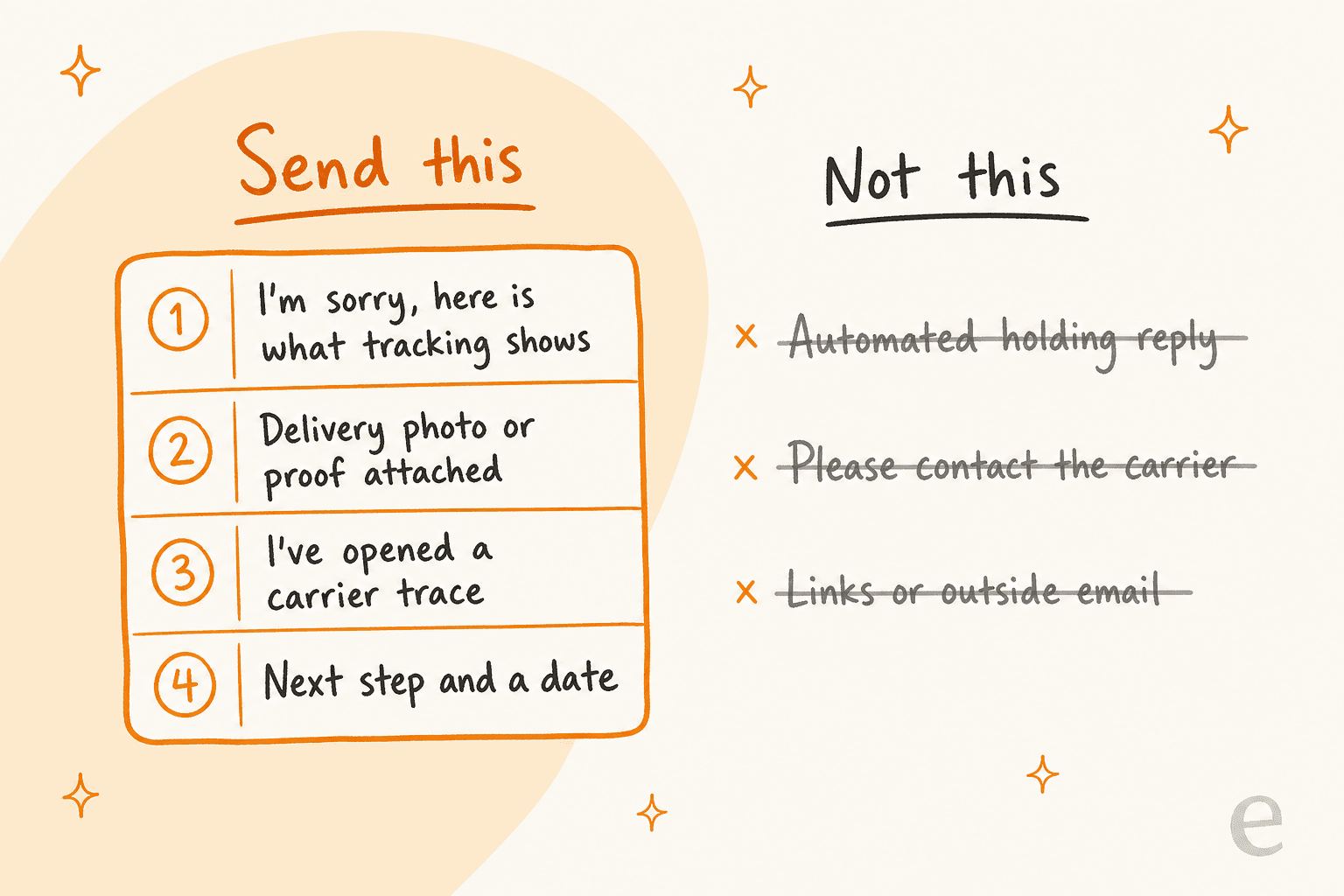
Amazon's own customer service guidance backs this up. Its "what not to do" list for sellers includes asking customers to "contact the carrier" when you can do it yourself, and it also names sending "automated reply emails to customers" as something to avoid, per the Customer Service Rating FAQ. That second point matters if you are thinking about automation. An instant "we got your message" note does not count as resolving anything, and it does nothing for the claim.
The four parts, in order:
- What tracking shows. Carrier, last scan, date and time. If it says delivered, say so plainly.
- Proof, attached. The carrier's delivery photo, GPS fix or signature, as a JPG, PNG or PDF. Amazon says a prompt reply with a signed proof of delivery or delivery photo makes a claim "less likely to be granted in the customer's favor" (Prevent an A-to-z claim).
- What you are doing. A carrier trace or missing package inquiry, opened by you.
- The next step and a date. "I'll update you by Thursday" beats "please be patient" every time.
One seller on Amazon's forums shared the version they send, and it hits most of these:
"I usually send something like this to the buyer: I am sorry you are having difficulty finding your package. I am working with the US Postal Inspector to find your package, so please give me 2 business days for them to find and deliver your package. If they are unable to help us, I will provide instructions on requesting a refund. Thank you for your patience!"
I would add the tracking facts and the photo to that, but the shape is right: sorry, action, a window, and what happens next. If you already keep canned responses for support, this is the one to rewrite first. It is also the most common flavour of WISMO ticket, just with more at stake.
Who handles a missing package: you or Amazon?
It depends on who shipped it. Check the order's fulfilment channel before you write a word.
| Order type | Who talks to the buyer | What your reply does |
|---|---|---|
| Fulfilled by Amazon (FBA) | Amazon Customer Service | Politely point the buyer to Amazon |
| Seller-fulfilled (you ship it) | You, through Buyer-Seller Messages | The full four-part reply above |
| Seller-fulfilled in Customer Service by Amazon | Amazon | Same as FBA |
For FBA, Amazon says it handles "fulfillment and customer service for your orders" (FBA customer returns policy), and its messaging FAQ tells sellers to "instruct customers to contact Amazon customer service for assistance with FBA orders" (Buyer-Seller Messages FAQ). On the buyer side, orders "shipped by Amazon" go to Customer Service within 30 days of expected delivery per Amazon's buyer help. Do not refund an FBA buyer yourself either: "Amazon won't reimburse you for any refund that you issue directly to a customer" (Customer return claims).
Our customer IC Intracom builds exactly this split into its eesel agent: return questions go to its own RMA form, with a reminder that purchases made on Amazon within 30 days go back through Amazon. Knowing which channel owns the order is half the answer. The rest of this guide is about seller-fulfilled orders, where the problem is yours.
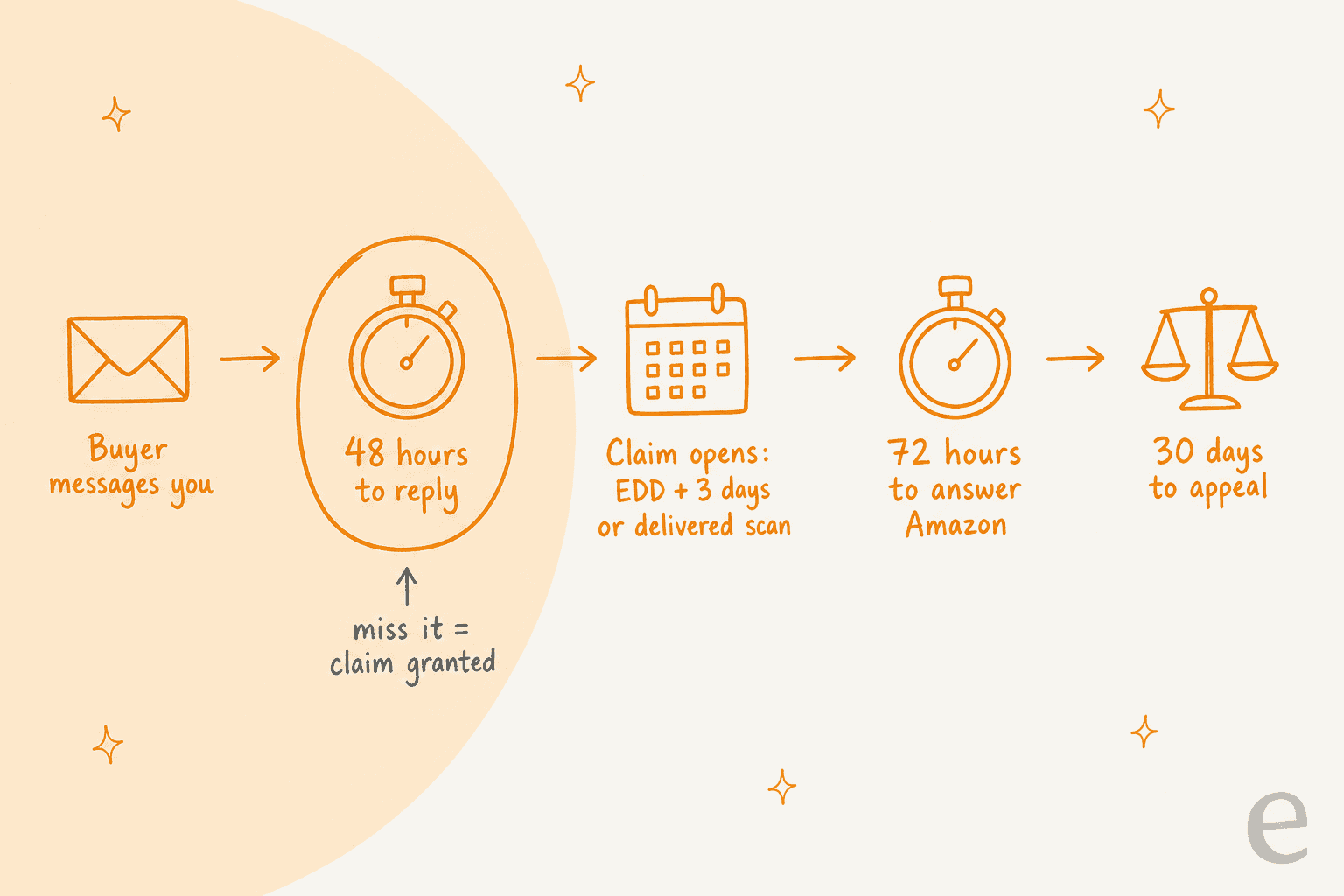
What clocks are you racing on an Amazon missing package?
Three, and the first one is the only one fully in your control.
| Clock | Length | What happens if you miss it | Source |
|---|---|---|---|
| Reply to the buyer | 48 hours from their first message | Claim granted automatically, counts against your Order Defect Rate | A-to-z claims |
| Buyer becomes eligible to file | 3 days past the latest estimated delivery date, or a delivered scan, whichever is sooner | Claim opens | A-to-z buyer page |
| Answer Amazon's request for information | 72 hours | "the claim will be granted in favor of the buyer" | Respond to a claim |
| Appeal a granted claim | 30 calendar days | The Order Defect Rate hit "cannot be reversed" | A-to-z claims |
| Buyer's claim window | 90 days from the last possible delivery date | Claim no longer possible | A-to-z buyer page |
Notice the "whichever is sooner" in the second row. A package marked delivered skips the three-day wait, so a delivered-but-missing buyer can file as soon as your 48 hours run out. That is why the delivered case is the urgent one, not the late one.
Amazon is also clear that time off does not pause anything: "You are responsible for responding to messages from customers within 48 hours" (Prevent an A-to-z claim). A Friday-night message on a long weekend is the classic way to lose a claim you would have won, and it is why first response time matters more on Amazon than almost anywhere else. This is the same pressure that hits during seasonal support spikes, only with a hard deadline.
The penalty for losing is your Order Defect Rate, which Amazon requires to stay below 1% over 60 days, counting A-to-z claims, 1 and 2 star feedback, and service chargebacks (Order Defect Rate). Above that, Amazon may suspend your seller-fulfilled selling.
Should you refund, reship, or send them to A-to-z?
Start from the uncomfortable truth: on a truly missing package, the buyer almost always gets their money back. The real question is who pays. One seller put it bluntly:
"Since Amazon cannot PROVE a package was actually received or stolen, Amazon WILL side with the Buyer in these matters. What this means is IF the Buyer claims INR (Item Not Received), the Buyer WILL receive a Refund. The ONLY question is: Who will Fund the Refund, you or Amazon?"
When Amazon pays
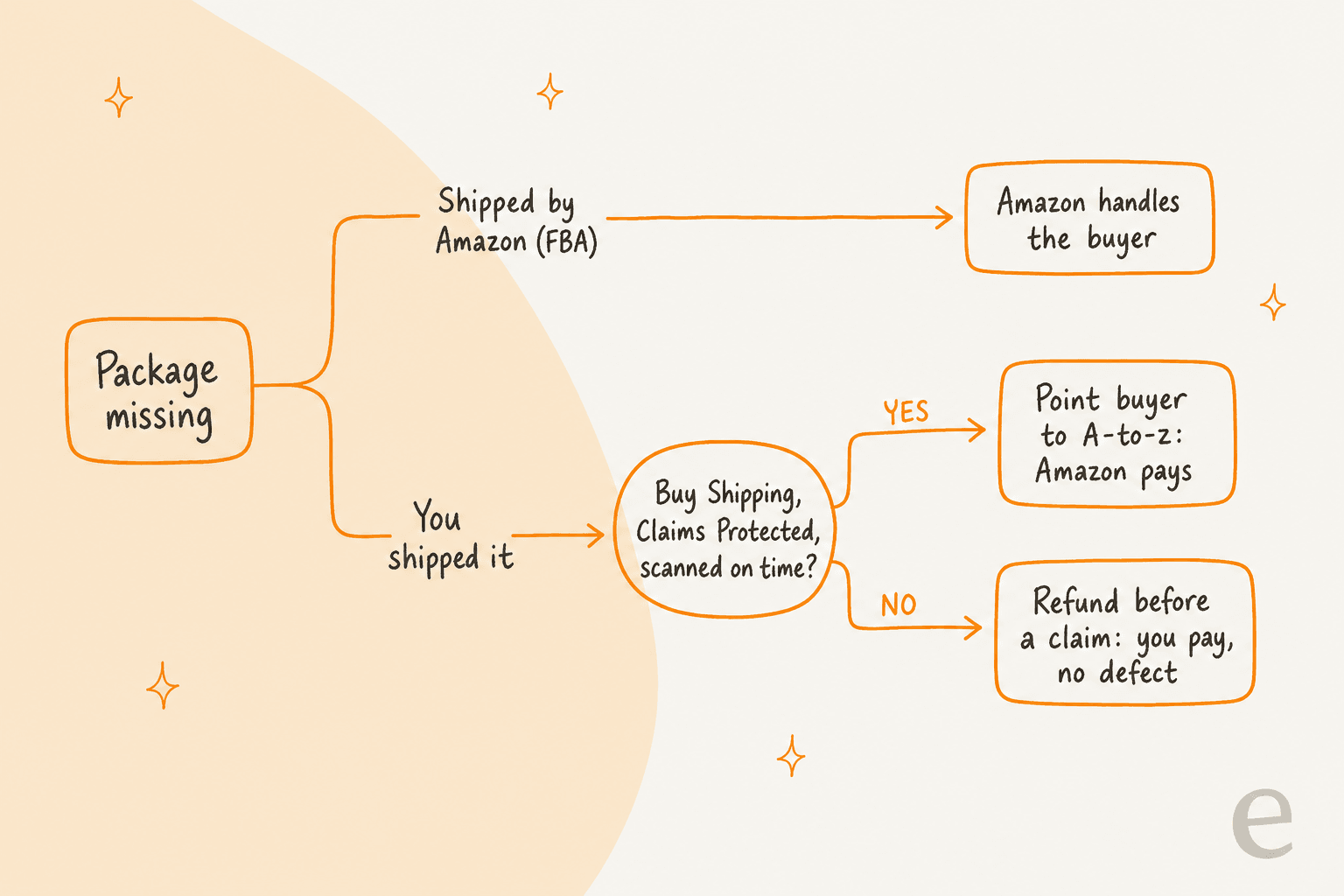
Amazon's Buy Shipping protections page lists three conditions, and all three must be true:
- The label was bought with Amazon Buy Shipping and carried the "Claims Protected" badge. "Late Delivery Risk" labels do not qualify.
- The order shipped on time, judged by "the carrier's first scan, not when you confirm shipment."
- Amazon, not you, reimbursed the buyer.
When they hold, "Amazon will fund the buyer reimbursement and the customer-reported claim will not be counted against your order defect rate." Condition three is the trap. Refund the buyer yourself on a protected label and you have paid for something Amazon would have covered; an Amazon staff member said so directly: "If you issue the order refund yourself, Amazon will not reimburse you" (KJ_Amazon, Seller Forums). So on a protected order, your reply opens the trace, and if the package does not turn up by your stated date, you tell the buyer how to file the claim.
A fair warning from the forums: protection does not always land cleanly. One seller got a decision that protected their metrics but charged them anyway, and an Amazon community manager replied that it "appears to be an error in how the protection was applied" (A-to-Z claim help thread). Read every claim decision. If it says "seller funded" on a protected label, appeal inside the 30 days.
When you pay
No Buy Shipping, a third-party label, or a late first scan means you fund the refund either way. Here the timing flips: refund before a claim is filed, because refunding after one still counts as a defect ("This will impact your order defect rate," per A-to-z claims). Amazon's own advice is to "refund customers proactively" so they never have to file. My guide to AI for refund requests covers who should approve these.
| Situation | Who pays | Order Defect Rate hit? |
|---|---|---|
| You refund after the buyer's message, before any claim | You | No |
| You refund after a claim is filed | You | Yes |
| Claim granted, you were at fault | You | Yes |
| Tracking shows undeliverable, refused, or returning | You (automatic) | No |
| Claims Protected Buy Shipping, on time, Amazon reimburses | Amazon | No |
What about sending a replacement?
Be careful. A reshipped item outside Amazon's system is a second parcel you paid for, with no order attached. One seller's rule: "Never, EVER ship a "Replacement" unless receiving an official "Replacement Order" through Amazon" (same thread). And if the original parcel turns up after you refunded, you cannot claw it back yourself: "Amazon cannot reverse a customer refund for seller-fulfilled orders, without the customer's affirmative consent" (A-to-z claims). The same judgement applies to returns management: decide on the record, not on goodwill alone.
Which reply fits this order?
Pick the situation that matches the order in front of you. Each one gives the action to take in Seller Central and a reply you can adapt. Fill in the brackets from the real tracking page; never guess a date the carrier did not give.
None of these templates include links, email addresses or emojis, which matters for the next section. If you want more starting points for the apology itself, my apology message examples translate well to Amazon's tone.
Does signature confirmation or a delivery photo win the claim?
It improves your odds; it does not decide the case. Amazon's wording is careful: proof makes a claim "less likely to be granted," and without it, the claim "is more likely to be granted to maintain a great customer experience" (Prevent an A-to-z claim). Note what is missing from that page: no order value above which signature is required. Figures like that circulate on third-party sites, but I could not find one on Amazon's own policy pages, so I would not plan around a specific threshold.
Sellers' experience matches the hedge. Here is one from 2026:
"Sadly, it's part of the cost of doing business. Sometimes carriers make mistakes, and other times customers take advantage of Amazon's customer-friendly policies."

The same seller's advice was to use Amazon Buy Shipping whenever possible, because in their experience signatures and delivery photos are not what decides these disputes.
And from Amazon's forums, a seller who lost a claim with "FedEx signature confirmation showing that the package, valued at over $2000, was delivered and signed for by the recipient" (Amazon forum thread).
So attach the proof every time, because it costs nothing and sometimes tips the call, but treat Buy Shipping as the real defence. Proof also plays a second role: it shows the buyer you checked. A UK seller described matching the Royal Mail delivery photo to the buyer's house on Google Earth and sending the image, the GPS fix and the tracking URL (u/Grouchy-Nobody3398, Reddit). Plenty of "missing" packages are found the moment the buyer sees which porch the photo shows. An angry buyer who thinks you are stalling is a customer complaint waiting to happen, so keep the tone warm even when you suspect them. If a pattern of repeat claimers emerges, that is a fraud-related support problem, and it belongs with a person, not a template.
What can't go in an Amazon reply?
More than you would think, and breaking the rules gets the message blocked, which then leaves you at the mercy of the 48-hour clock. From Amazon's communication guidelines:
- No http links. Only secure https links "necessary for order completion," or links to Amazon.
- No email addresses, and no phone numbers except warranty, carrier or manufacturer ones.
- No emojis, GIFs, tracking pixels, or logos that link to your site.
- No marketing, coupons, or review incentives.
- Refunds happen in Manage Orders, not as a promise of some outside process.
Attachments are allowed: up to 5 per reply, 10 MB in total, as PDF, JPG, PNG or XML (Send attachments). That is how the delivery photo travels.
Amazon also says delay notices are mandatory when a shipment will miss its date, which my guide to shipping delay notifications covers.
Two more rules trip up teams that answer from a helpdesk. Amazon relays every buyer through an anonymous address like @marketplace.amazon.com, and replies from any address not approved on your Messaging Permissions page are rejected (Buyer-Seller Messaging). And if a message needs no answer, the "No response needed" button removes it from your response-time numbers (Buyer-Seller Messages FAQ). If your team works from saved replies, check them against this list once, because Gorgias macros and similar saved replies often carry a signature with an email address that Amazon will strip or block.
How do Amazon messages get into your helpdesk?
Through a bridge app, in most setups. Gorgias, Zendesk and Freshdesk do not ship their own Amazon channel; all three point to ChannelReply in their own help centers and marketplaces, for example the Zendesk Marketplace listing. It turns each buyer message into a ticket and shows the Amazon order beside it.
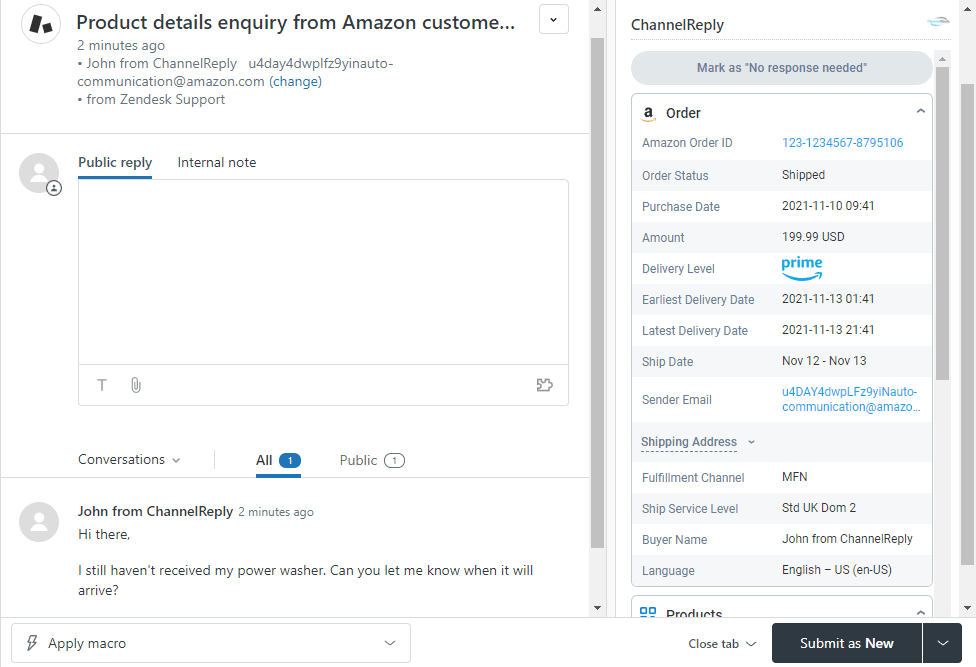
That sidebar is exactly what a missing-package reply needs: order status, the delivery window, and the fulfilment channel (MFN means you shipped it). What it does not do is the money side. ChannelReply's documented Amazon actions are "No response needed" and "Request a Review"; refunds and claim responses still happen in Seller Central. Gorgias's help center also notes that only buyer messages import, so a reply you send from Seller Central will not show up in the helpdesk: reply from the helpdesk to keep one record.
The other route is a helpdesk built for marketplaces. eDesk connects Amazon directly and can refund or cancel an Amazon order from the ticket (eDesk Amazon).
| Option | How Amazon connects | Amazon refunds from the ticket? | Price (vendor page) |
|---|---|---|---|
| Gorgias, Zendesk or Freshdesk + ChannelReply | Partner app, threaded tickets, order sidebar | No, done in Seller Central | ChannelReply from $39/month for 200 messages (pricing), plus your helpdesk plan |
| eDesk | Native Amazon connection | Yes, full or partial | $45 to $129 per agent per month billed yearly, plus $0.99 per AI outcome (pricing) |
| eesel on your helpdesk | Works the tickets ChannelReply (or similar) creates | No, a person refunds in Seller Central | From $299/month for 500 credits (one per ticket) (pricing) |
If you are still choosing the helpdesk itself, my roundup of ecommerce helpdesk software goes deeper. If ChannelReply itself is the sticking point, I also compared ChannelReply alternatives.
For the two most common hosts, my Gorgias review covers the ecommerce side. The Zendesk review covers larger multi-channel teams.
Where does AI help, and where should a person decide?
AI earns its keep on the reply, not on the verdict. The slow part of a missing-package ticket is the lookup: opening the order, reading the scan history, finding the delivery photo, working out whether the label was protected. Writing four sentences from those facts is quick once the facts are in front of you. The decision to refund, reship or route to A-to-z touches money and your Order Defect Rate, so a person should click that button.
That split is how I would set up eesel here, with one honest limit up front: eesel does not connect to Seller Central itself. Its documented e-commerce integrations are Shopify, Magento, BigCommerce, WooCommerce and AfterShip, among others. What it does is work the tickets in your helpdesk. Once ChannelReply drops an Amazon message into Gorgias, eesel can read it, follow your missing-package playbook, and leave the draft as an internal note for your team to send. The same works in Zendesk and Freshdesk.
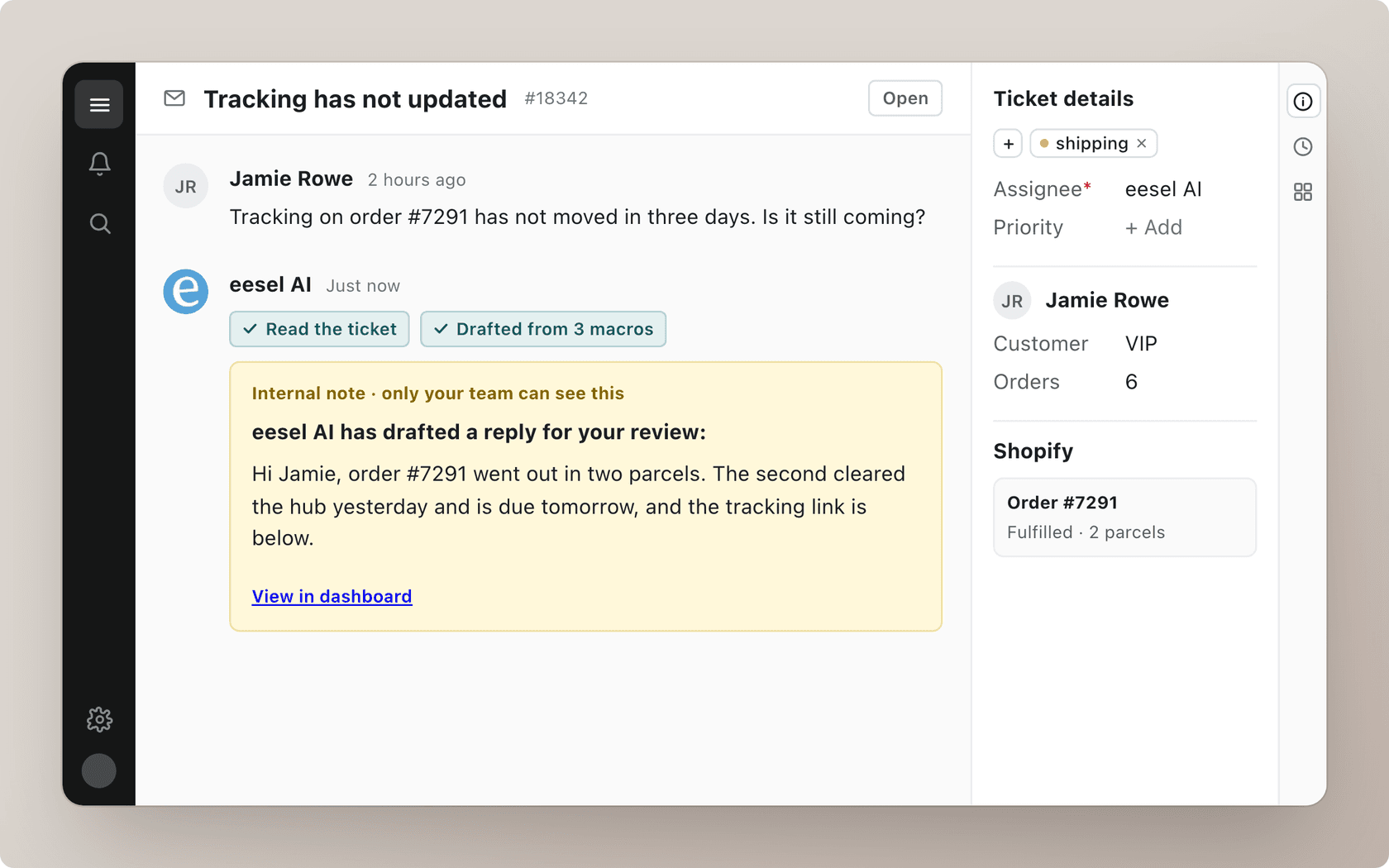
The behaviour that matters most is built into eesel's AfterShip integration: it treats a scan as "the carrier's version of events, not the parcel's location," knows a "delivered" scan sometimes lands before the parcel does, and never invents a delivery date the carrier did not give. A parcel that has not moved in days goes to a person, through a normal escalation. That is the instinct you want on Amazon tickets too, where a confidently wrong date becomes evidence in a claim. AfterShip works from the tracking number, so this applies to orders you shipped yourself and have the number for.
The pattern is already running on order questions for our customers, just not on Amazon:
- Question Beauty checks the order in Shopify first on delivery questions, looking up 290 orders in a month before answering, and sent 960 replies directly in Gorgias.
- STIL Classics gets every Gorgias ticket with the order already checked and a reply already written: 430 draft replies left as internal notes in a month, for a person to check and send.
The draft-and-approve version is the one I would start with on Amazon, because of the money attached. One ops lead at a direct-to-consumer brand doing about 7,000 Gorgias tickets a month told us their team simply could not keep up, and needed at least half of the order-status email answered without a person. Missing-package messages are the slice of that where speed matters most and mistakes cost most, which is why the draft goes to a human first. For the wider picture, see AI for order tracking support. If you are wondering whether to add AI without changing tools, start with AI for an existing helpdesk.
Try eesel on your Amazon messages
If your Amazon buyer messages already land in Gorgias, Zendesk or Freshdesk, eesel works like a new teammate on that queue: it reads the order and the carrier's tracking, writes the missing-package reply with the proof and a dated next step, and leaves it as a note so a person decides on the refund or the claim inside the 48 hours. It learns from your past tickets and macros, so the drafts sound like your team, not a template. Plans start at $299 a month for 500 credits, one per ticket, and the trial is free.
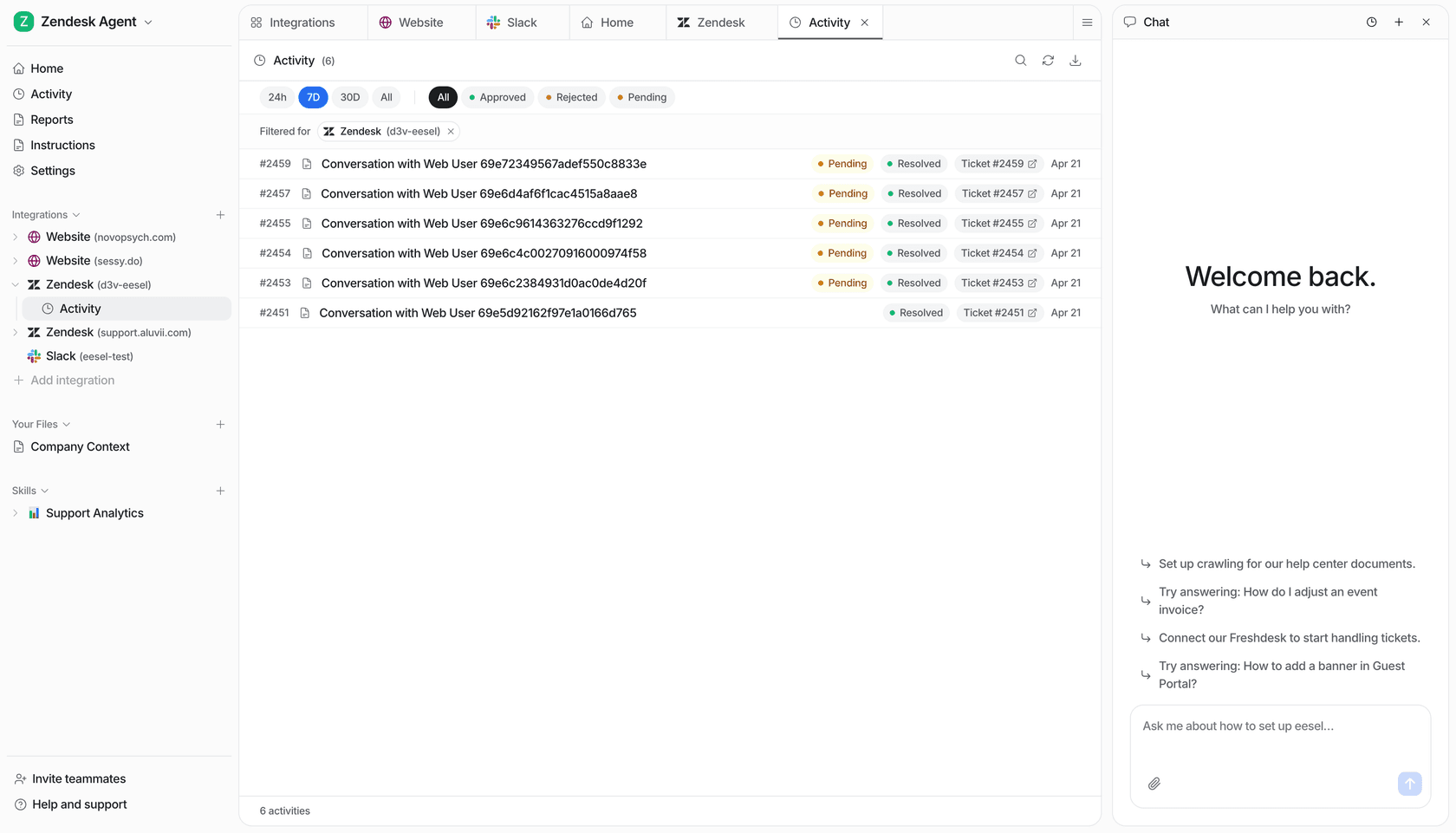
Try eesel on a test ticket first: paste in a real "tracking says delivered, but I have nothing" message and see what it drafts.