ChannelReply review 2026: a reliable marketplace pipe, rated 4/5

Rama Adi

Katelin Teen
Last edited October 27, 2026

I rate ChannelReply 4 out of 5. It does one job very well: it pulls Amazon, eBay, Walmart, Etsy, Back Market, Newegg and WooCommerce messages into your helpdesk as threaded tickets, shows the order beside each one, and posts your reply back through the marketplace so it counts toward rules like Amazon's 24-hour response time. Pricing starts at $39 a month for 200 messages, with unlimited seats.
What holds it back from a 5: it has no AI, so every reply is still written by a person or a rule, refunds and cancellations are much thinner on Gorgias and Help Scout than on Zendesk or Freshdesk, and the most recent reviews complain about support.
So the real question after you buy it is who answers the tickets. That's the job eesel's AI helpdesk teammate does inside the Zendesk or Freshdesk account ChannelReply feeds. Innr runs it on Freshdesk, where marketplace notifications are filtered out and real customer questions get a draft in the buyer's language.
What is ChannelReply?
ChannelReply is a connector that brings marketplace buyer messages into the helpdesk you already use. It has no inbox of its own: the ChannelReply FAQ says plainly that you must connect Zendesk, Freshdesk, Help Scout, Gorgias, Re:amaze, Zoho Desk, Kustomer or Onsite Support to answer anything. It's owned by Threecolts, which also sells the Onsite Support helpdesk.
I build eesel's helpdesk integrations, so when I review a connector like this I read past the homepage and into the help center, because that's where you find out what the marketplace APIs actually let it do. For this review I went through ChannelReply's FAQ, its setup and autoresponder guides, its pricing page, and its listings and reviews on Trustpilot, Capterra and the Zendesk, Freshworks and Shopify app stores.
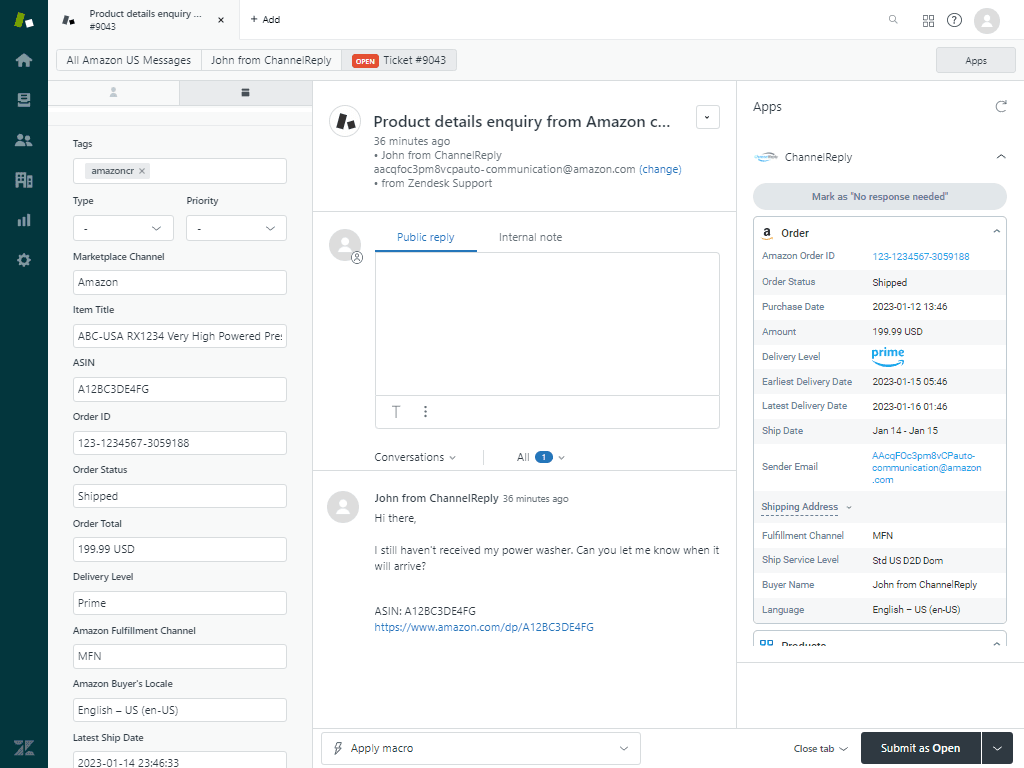
That screenshot is the whole product in one picture. An Amazon buyer asked where their power washer is. In plain Amazon Seller Central, an agent would read the message, open the order in another tab and copy the tracking number across. With ChannelReply, the order ID, status, ship date, delivery level and buyer language are already beside the ticket, and the reply box is a normal Zendesk reply box.
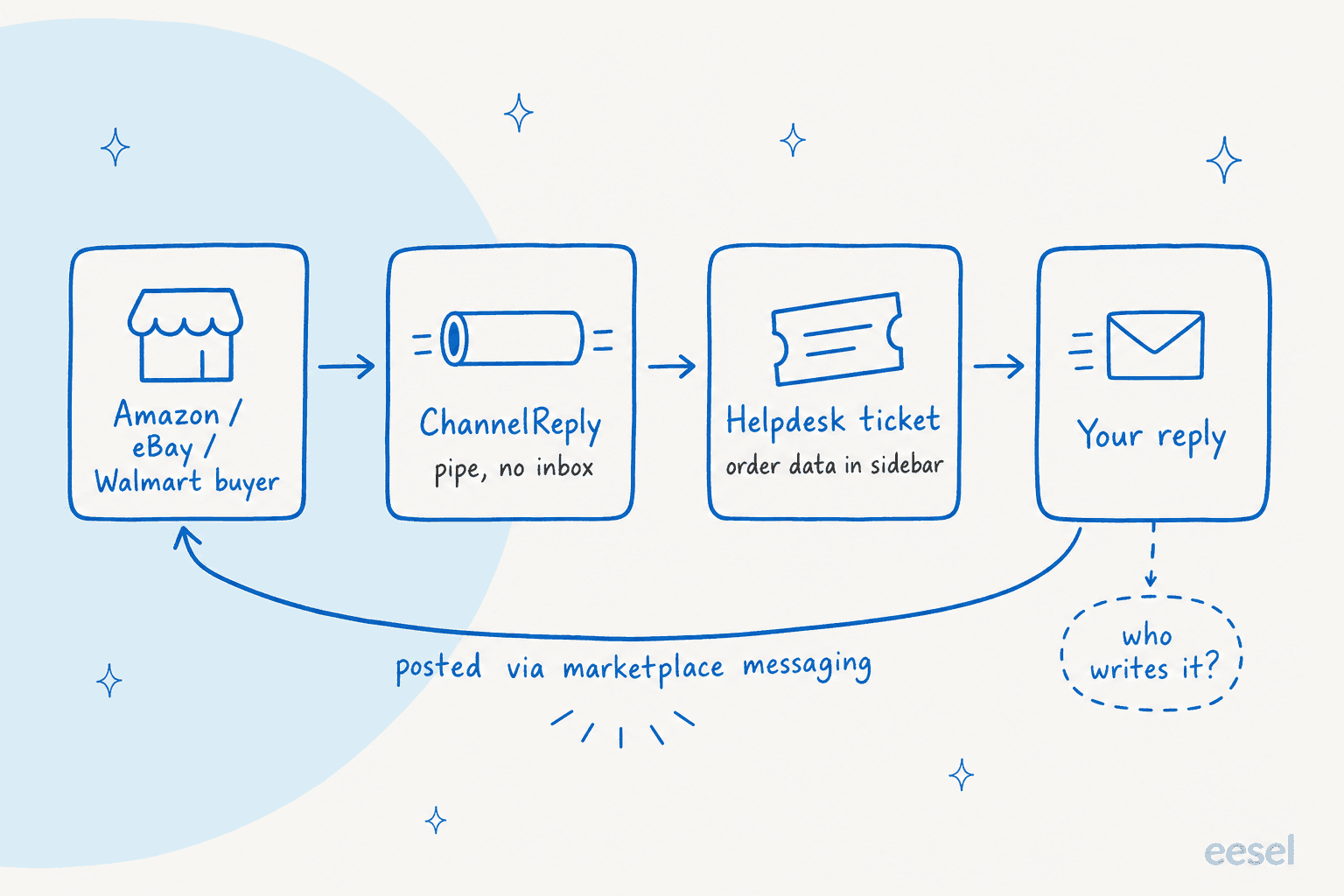
ChannelReply is the pipe, not the person answering. Keep that in mind through the rest of this review, because almost every strength and every gap comes back to it.
How does ChannelReply handle replies on each marketplace?
On Amazon, eBay, Newegg and Walmart, your reply is posted back through the marketplace's own messaging system, so it counts toward response-time rules like Amazon's 24-hour SLA, per the FAQ. That's the thing a plain email forward can't do, and it's the main reason to pay for a connector instead of forwarding notifications to your support address.
The other marketplaces work differently, and the differences matter if Etsy or Back Market is a big channel for you:
| Marketplace | How your reply is delivered | Worth knowing |
|---|---|---|
| Amazon | Amazon messaging | Counts toward the 24-hour SLA. Only buyer messages come through by default; other notices can be forwarded by email |
| eBay | eBay messaging | Virtually all eBay notifications arrive by default on accounts connected after March 29, 2022 |
| Walmart | Walmart messaging | Walmart Canada gets messaging only, with no order data or actions |
| Newegg | Newegg messaging | Supports Newegg, NeweggBusiness and Newegg Canada |
| Shopify | Not available if your helpdesk is Gorgias | |
| WooCommerce | Supported globally | |
| Etsy | Email, when ChannelReply knows the buyer's address | To count as an Etsy reply, use the "Reply on Etsy" link and answer inside Etsy |
| Back Market | To the Back Market agent on the case | Received every 5 minutes; everything else arrives immediately |
| TikTok Shop | From your helpdesk | US only |
| Mirakl, Octopia | From your helpdesk | Beta, not available with Gorgias or Help Scout |
The Etsy limit is an Etsy API rule, not a ChannelReply choice, and ChannelReply is upfront about it. Still, if Etsy is your main channel, a big part of your queue will need a click out to Etsy to keep your response-time stats clean.
Threading is the quieter win. Every message from a buyer lands in one conversation, so your team sees what was already said. A Freshdesk user on Trustpilot put it well:
"ChannelReply has worked great at filling out the missing functionality in Freshdesk and it's been a huge time saver having eBay messages in a threaded format so our reps can easily see the customer's previous replies as well as our responses."

What order data does ChannelReply show next to a ticket?
A lot, and this is where ChannelReply earns most of its rating. According to the FAQ, it shows more than 40 order details on Etsy order messages (and 60+ when a buyer writes from a listing page), more than 55 on Back Market and well over 50 on Newegg. On Amazon you get the order ID, ASIN, items, amount paid, buyer's language and a link to the order. On eBay you get the username, items, amount paid, shipping address, tracking ID and often the buyer's real name and email.
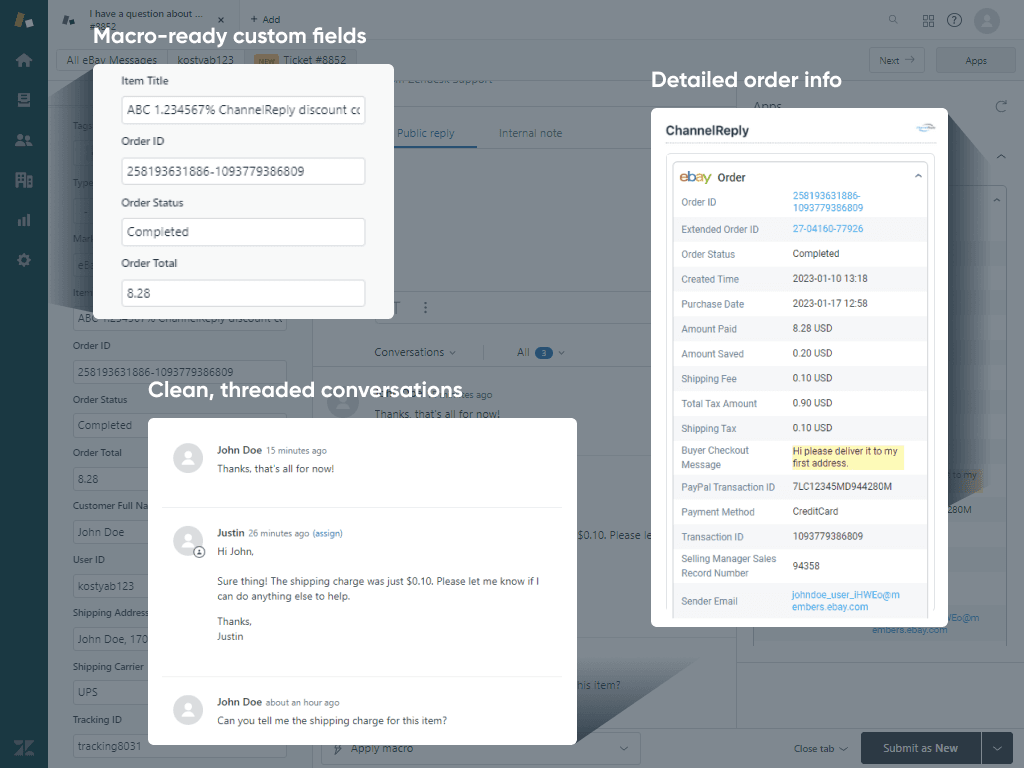
The data doesn't just sit in the sidebar. ChannelReply can write it into helpdesk custom fields, which means you can use it in canned replies, triggers and reports. On the Zendesk integration page, it lists 25+ Shopify placeholders for Zendesk macros, including item title and tracking ID. If you're new to that, my macros 101 guide covers the basics, and I've written up custom field reporting in Zendesk Explore separately.
Two details I liked as someone who builds these integrations:
- Per-account tags. Every marketplace account gets its own tag, and Amazon goes further with a tag per marketplace and brand, so "Amazon Brand 1 in Canada" can route to a different team than "Amazon Brand 2 in the US".
- The text remover. You can set rules that strip links, contact details and promotions out of your replies before they reach the marketplace, which matters on Amazon, where sharing outside contact info breaks the rules.
Which actions can you take without leaving the helpdesk?
This depends far more on your helpdesk than the marketing pages suggest. On Zendesk, Freshdesk, Re:amaze, Zoho Desk, Kustomer and Onsite Support, ChannelReply can refund and cancel orders on most marketplaces. On Gorgias and Help Scout, most of that is missing, which the FAQ attributes to API limitations.
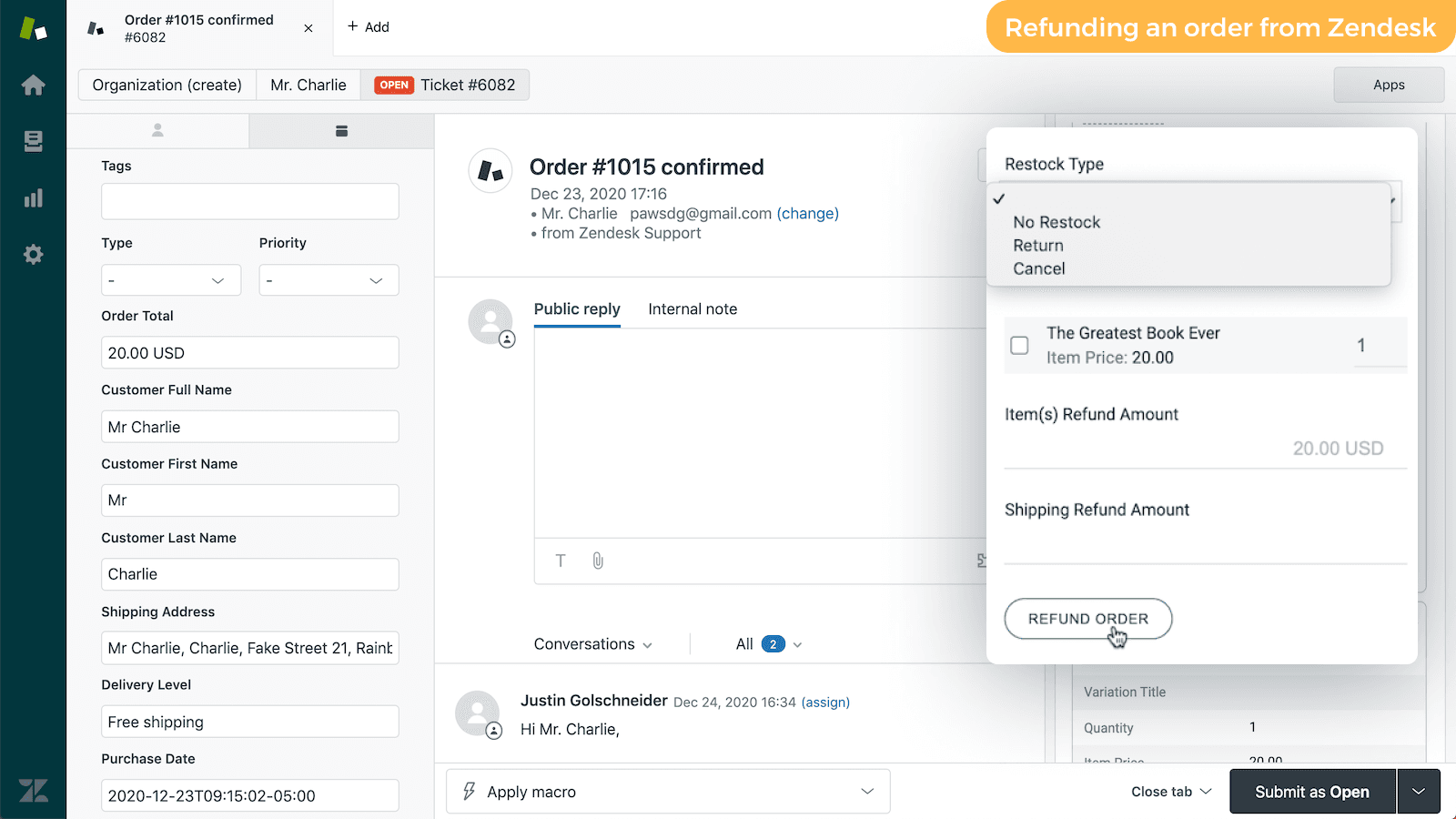
The part that surprised me most is Amazon. You can't issue refunds or cancel orders on Amazon tickets from any helpdesk, and A-to-z Guarantee claims and Amazon returns can't be solved in the app either. ChannelReply delivers those notifications with a link to the case, plus the "Mark as No response needed" and "Request a Review" buttons. For an Amazon-heavy seller, the value is the messages and the data, not the actions.
Pick your helpdesk and marketplace below to see exactly what ChannelReply supports for that pair.
Choose a helpdesk and a marketplace to see how replies are delivered and whether ChannelReply supports refunds and cancellations for that pair.
If refunds from the ticket are a big part of why you're shopping for a connector, this is the single most important check to run before you start the trial. For a Zendesk team, my guide to Zendesk ecommerce returns covers the wider returns workflow.
Does ChannelReply have AI or autoresponders?
ChannelReply has no AI features that I could find. Its help center has 71 ChannelReply articles across integrations, notifications and advanced setup, and none of them describes AI writing or suggesting replies. What it does have is a set of rule-based autoresponder guides, one per helpdesk, for Zendesk, Freshdesk, Gorgias, Help Scout and the rest.
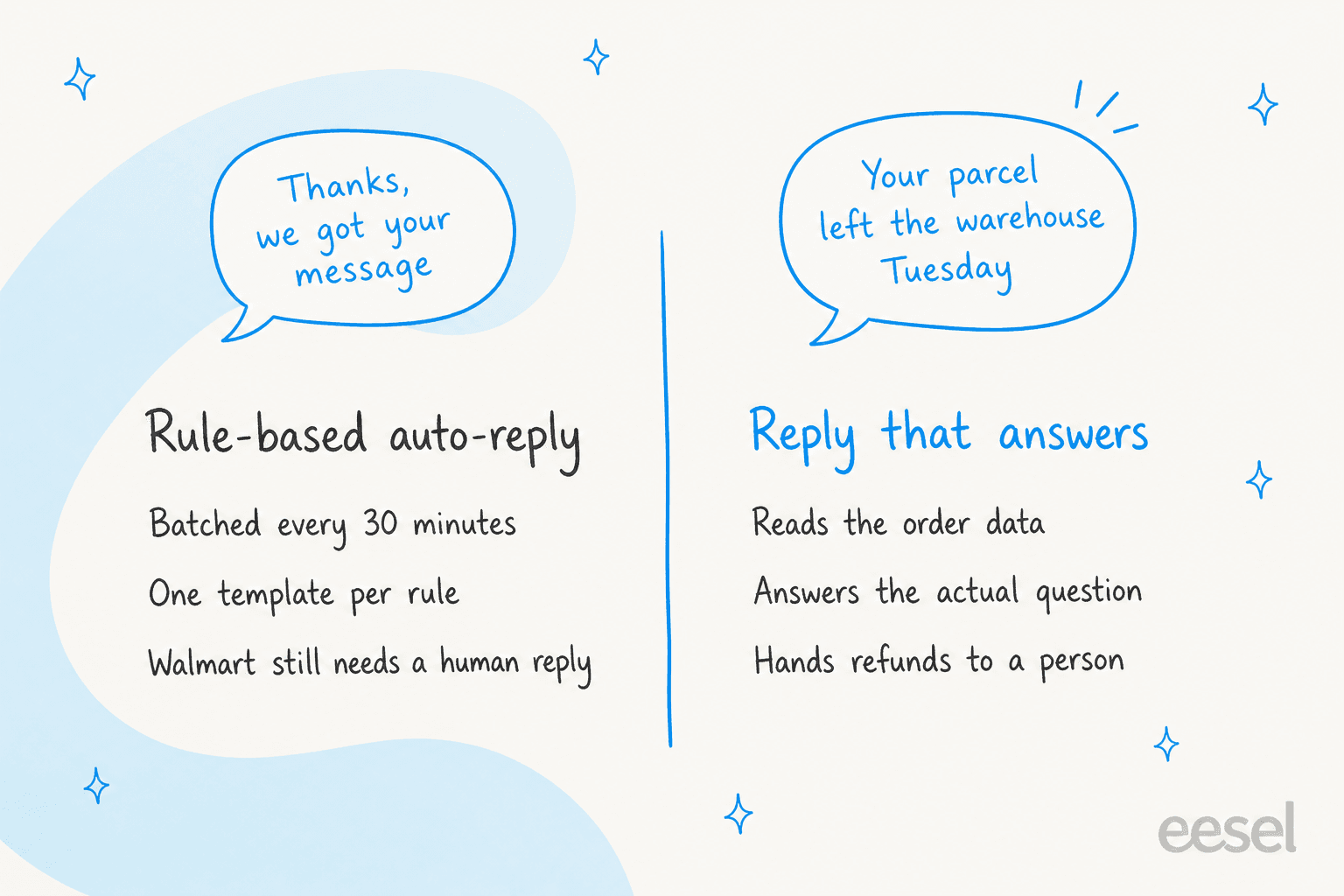
The Zendesk autoresponder is a good example of how this works in practice:
- It's batched. The guide says the system "generates messages once every half-hour", so an auto-reply can take up to 35 minutes to appear. If an agent replies first, ChannelReply cancels the auto-reply.
- Setup has two tiers. Quick Setup is a guided form. Advanced Setup has you create a Zendesk webhook and write JSON for the message.
- You have to stop double messages first. Zendesk's default "Notify requester" trigger has to exclude your ChannelReply tags, or buyers can get two auto-replies.
- It doesn't satisfy every marketplace. The FAQ says auto-replies aren't enough for Walmart's customer care rules, so a person still has to reply within 48 hours. It also doesn't recommend autoresponders on Back Market at all.
Because ChannelReply's order fields can go into custom fields, you can make those rules smarter than a plain "we got your message". The homepage shows a Zoho Desk workflow that alerts a supervisor when an Amazon ticket about a specific item is close to its response deadline.
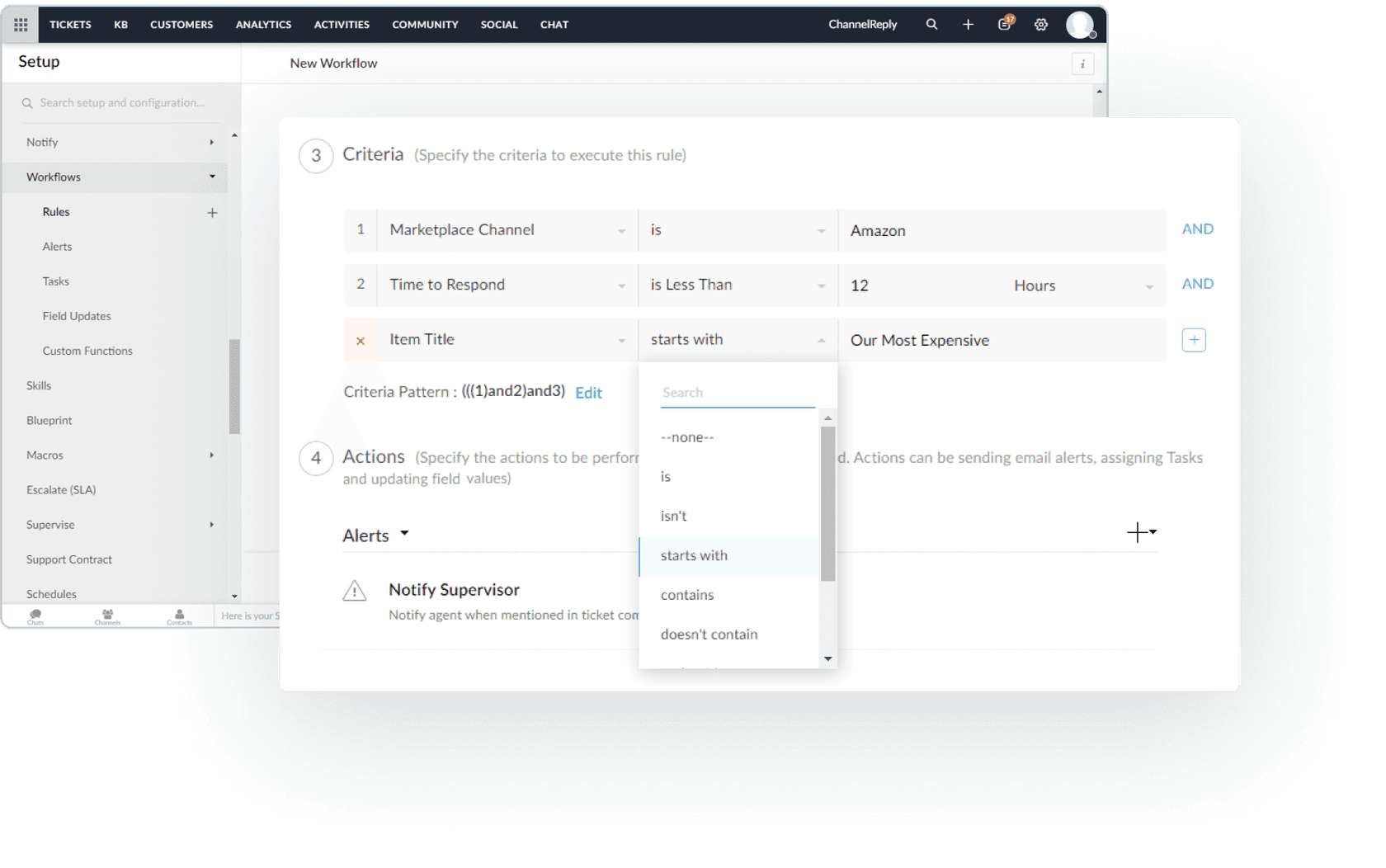
That's useful routing. It's still not an answer. A rule can tell a buyer you received the message or paste in their tracking number. It can't read "the tracking says delivered but it isn't here, and I'm away until Friday" and work out what to say. The rule-writing guides for each helpdesk are worth a read either way: I've covered Zendesk auto-replies, Freshdesk autoresponders and Gorgias auto-replies separately.
How long does ChannelReply take to set up?
ChannelReply says the helpdesk plus your first marketplace account takes about 15 to 20 minutes, and each extra account a few minutes. The Zendesk instructions back that up: sign in to both as an admin, install the free app from the Zendesk Marketplace, open any ticket, click "Activate ChannelReply" and allow access. Then you connect marketplaces from the ChannelReply dashboard, each with a built-in video tutorial.
The setup guides flag a few things that take longer than the headline number:
- Default triggers. You need to stop your helpdesk's own auto-replies firing on marketplace tickets, or buyers get duplicates.
- eBay addresses. If your eBay email is the same as your support email, you can get duplicate messages, so ChannelReply recommends keeping them separate.
- Notifications. eBay sends almost everything by default, and most eBay notifications count toward your message limit, so decide which ones your team acts on and switch off the rest.
- Plan minimums. Freshdesk needs Growth or above, Help Scout and Zoho Desk need Standard or above. Every Zendesk, Gorgias, Re:amaze, Kustomer and Onsite plan works.
Most reviewers found it quick. One Capterra reviewer, a director of channel sales who's used it across two businesses, wrote that "ChannelReply requires no thought. Set it up, and it runs in the background." But not everyone had that experience. The one 1-star review on Trustpilot says it took more than six weeks, with "multiple extensions of the free 14 days", to get Amazon and Zendesk working properly. That review is from January 2022, and ChannelReply replied publicly, but it's a reason to book the free setup call it offers instead of going it alone on a complicated account.
How much does ChannelReply cost?
ChannelReply costs $39, $79 or $199 a month for 200, 1,000 or 4,000 customer messages, and I checked the pricing page again on 2026-10-28. You pay for messages you receive, never for your replies, and every plan includes unlimited users and marketplace accounts.
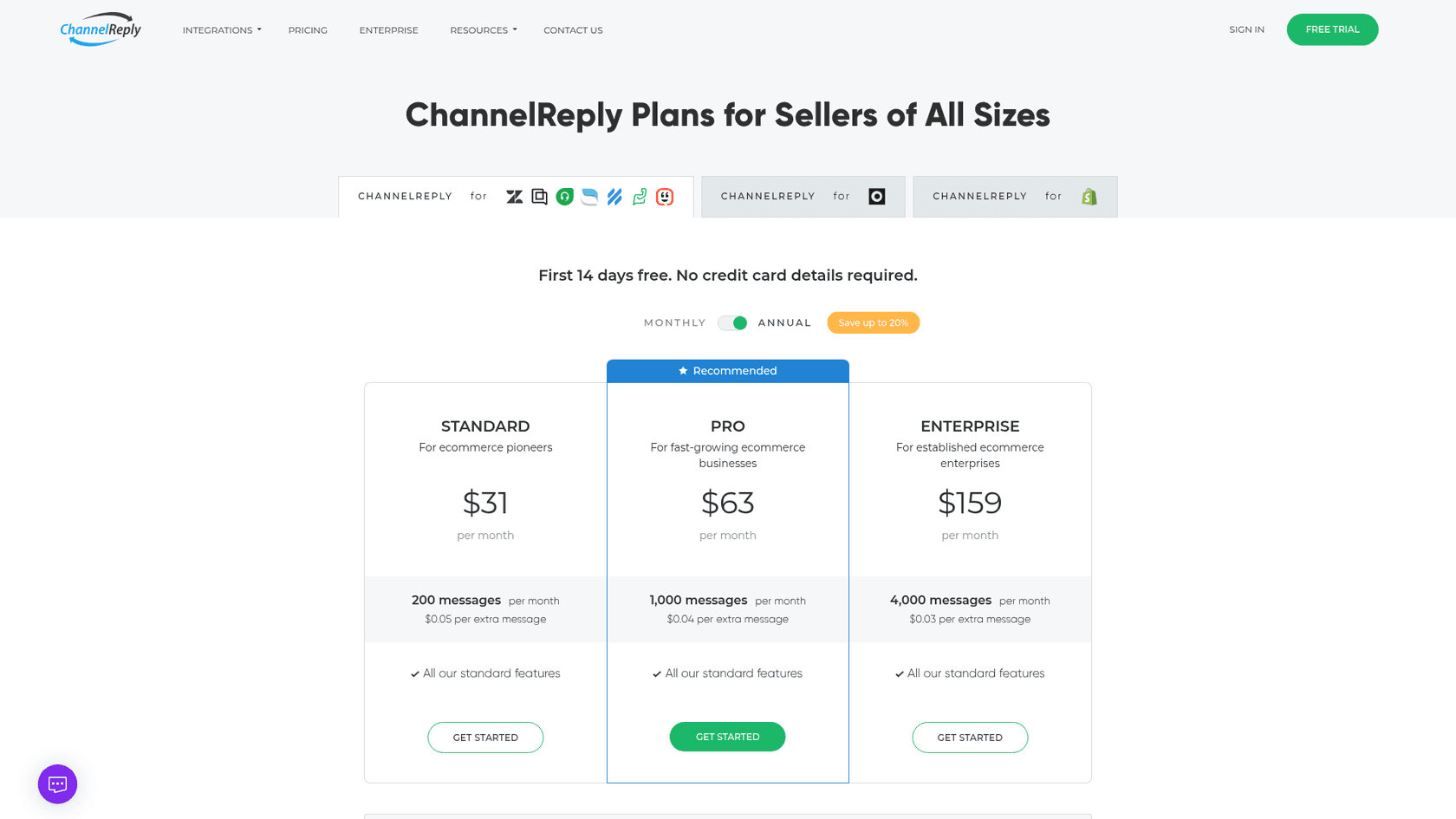
| Plan | Monthly | Annual (per month) | Messages a month | Extra message |
|---|---|---|---|---|
| Shopify Only | $0 | $0 | Unlimited Shopify messages only | n/a |
| Standard | $39 | $31 | 200 | $0.05 |
| Pro | $79 | $63 | 1,000 | $0.04 |
| Enterprise | $199 | $159 | 4,000 | $0.03 |
| Custom | Contact sales | Contact sales | 10,000+ | Custom |
There's a 14-day free trial with no card and unlimited messages, and a 30-day money-back guarantee on top. The helpdesk is billed separately, so the full cost includes your Zendesk pricing or Freshdesk seats. I've done the plan-by-plan maths, the overage crossover points and a calculator in my ChannelReply pricing breakdown, so I won't repeat it here.
On value, the one recurring complaint is the entry tier. A Capterra reviewer running a small consumer goods business said:
"Pricing is a bit expensive for the lowest tier."
I see why. Standard works out to about 19.5 cents per message at its 200-message limit, while Pro is under 8 cents at 1,000. If your volume is anywhere near a few hundred messages, Pro is the better buy.
What do users say about ChannelReply?
The reviews are strongly positive, but they're old. ChannelReply holds 4.6 from 21 reviews on Trustpilot, with none in the last 12 months, and 4.9 from 18 reviews on Capterra, most from 2022. Its G2 page is no longer active.
| Where | Rating | Reviews | What stands out |
|---|---|---|---|
| Trustpilot | 4.6 | 21 | Mostly 2022; one 1-star about a long setup |
| Capterra | 4.9 | 18 | Reliability and support praised; entry price the main con |
| Freshworks Marketplace | 4.2 | 12 | 300+ installs |
| Zendesk Marketplace | 4 stars | 4 shown | 1000+ installs; the two most recent reviews are about support |
| Shopify App Store | 5.0 | 1 | Free listing for the Shopify Only plan |
The older reviews praise the support team by name and describe it as fast. The two newest reviews on the Zendesk listing say the opposite:
"App works fine, but issues on the ChannelReply side. Also very bad support, issues going on for months without getting proper replies or resolving it."
The other recent one, from about a year ago, simply reads "Goodluck with support." Two reviews isn't a trend, and I'd weigh them against years of positive ones. But support is worth testing during the trial, because a connector is the kind of tool you only notice when it breaks. I've learned that one the hard way at eesel too: a mid-market customer who left us for a cheaper tool, after a data sync of ours failed and support was slow to fix it, told our founder, "we probably would have stayed if support was faster and better." Integrations break; how fast the vendor answers is what you're really buying.
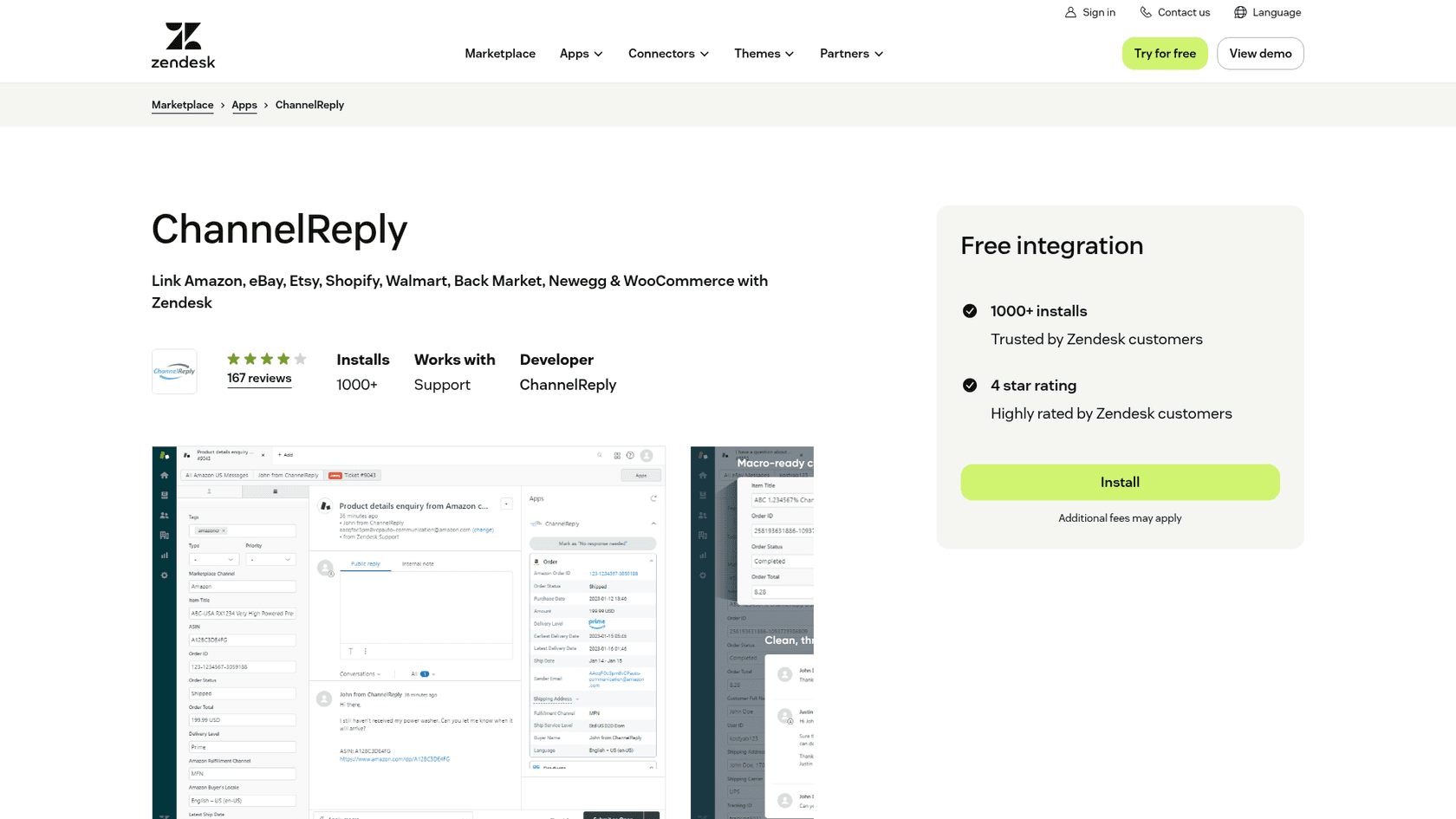
A few of ChannelReply's own listings also disagree with each other, which is worth knowing if you're comparing them:
- Support channels. Capterra's listing shows phone and chat support. The FAQ says email support, Monday to Friday, plus setup calls on request.
- Helpdesk count. The Capterra description names six helpdesks; the FAQ and homepage list eight, including Kustomer and Onsite Support.
- Shopify compatibility. The Shopify App Store headline names Zoho Desk and Help Scout, but its "Works with" list shows only Freshdesk, Kustomer, Onsite Support, Re:amaze and Zendesk.
ChannelReply pros and cons
| Pros | Cons |
|---|---|
| Replies go through Amazon, eBay, Walmart and Newegg messaging, so they count toward SLAs | No AI; every reply is written by a person or a rule |
| Deep order data (50+ fields on several marketplaces) beside each ticket and in custom fields | Refunds and cancellations are limited on Gorgias and Help Scout |
| Unlimited users and marketplace accounts on every plan | No Amazon refunds, cancellations or A-to-z claim handling from the ticket |
| Works with eight helpdesks, including Zendesk, Freshdesk and Gorgias | Autoresponders are batched (up to 35 minutes on Zendesk) and need setup |
| Quick setup with video tutorials and free setup calls | Recent Zendesk reviews complain about support |
| Clean pricing ladder with a 14-day unlimited trial | Etsy replies only count as Etsy replies if sent from Etsy |
How does ChannelReply score?
Here's how I scored it, on the job it's built for: getting marketplace messages into a helpdesk and making them easy to work.
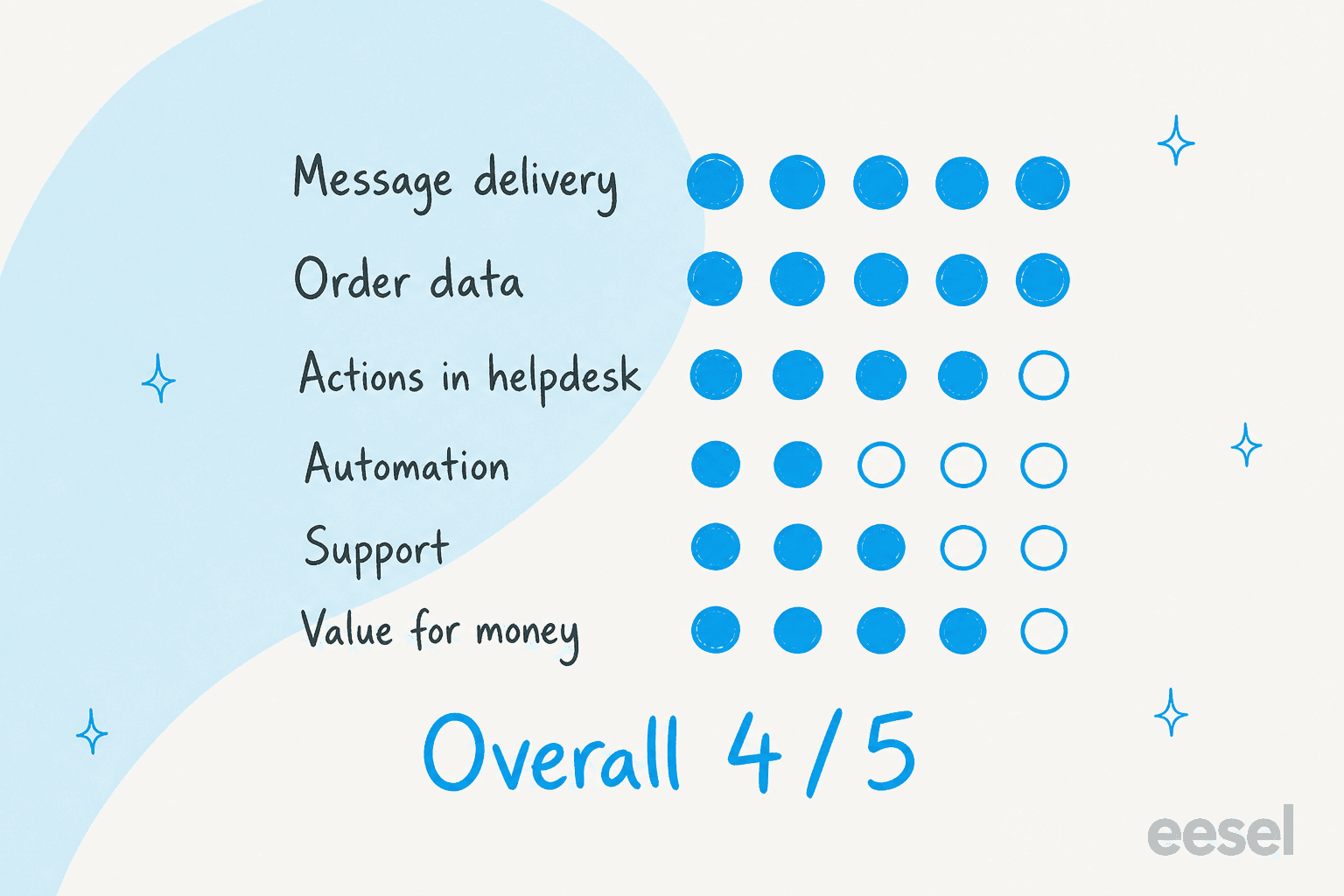
- Message delivery, 5/5. Replies go back through the marketplace, conversations thread properly, and most channels sync immediately.
- Order data, 5/5. Dozens of fields per ticket, usable in macros and reports. I couldn't ask for more here.
- Actions in helpdesk, 4/5. Excellent on Zendesk, Freshdesk, Re:amaze, Zoho Desk and Kustomer. A 2 on Gorgias or Help Scout.
- Automation, 2/5. Rule-based autoresponders only, batched, and not accepted by Walmart as a reply.
- Support, 3/5. Years of praise, but the two most recent reviews are negative and email support is weekdays only.
- Value for money, 4/5. Pro at $79 for 1,000 messages with unlimited seats is fair; Standard is pricey per message.
Overall: 4 out of 5. If ChannelReply wrote first drafts of the replies, or offered the same actions on every helpdesk, it would be close to a 5.
Who should use ChannelReply?
ChannelReply is a strong pick for a seller on two or more of Amazon, eBay, Walmart, Back Market or Newegg who already works out of Zendesk, Freshdesk, Re:amaze, Zoho Desk or Kustomer. That's the setup where every feature in this review works, and where the time saved by not switching tabs is largest. If that's you, start the trial, connect your busiest marketplace first and watch the message counter for two weeks.
I'd think harder in three cases:
- You're on Gorgias. Marketplace messages work, but you lose ChannelReply's Shopify integration, cancellations and most refunds. Gorgias's own Shopify strengths cover part of that, so check whether the marketplace messages alone justify the cost.
- You're on Help Scout. You need the Standard plan, and actions stop at eBay returns, eBay cancellation approvals and Back Market refunds. My Help Scout review covers the rest of that helpdesk.
- You sell almost only on Shopify. Use the free Shopify Only plan, or look at native options in my list of Shopify customer service apps.
If you haven't picked a helpdesk yet, start with that decision, not the connector. My ecommerce helpdesk guide and the Zendesk review and Freshdesk review are good places to start.
Who writes the replies once ChannelReply delivers the tickets?
Your team does, unless you add an AI layer inside the helpdesk. This is the gap I'd plan for before buying, because ChannelReply makes it easy to get every marketplace into one queue, and that queue is mostly the same few questions. On one of eesel's sales calls this year, a multi-brand ecommerce operator described handling 500+ tickets a day, dominated by refund requests, unsubscribes and order tracking. Marketplace queues skew the same way.
That's the job eesel's AI helpdesk teammate does. It joins the Zendesk, Freshdesk, Gorgias or Help Scout account that ChannelReply already feeds, learns from your past tickets, macros and help center, and either leaves a draft as an internal note or replies itself on the ticket types you trust it with. The ChannelReply order fields on the ticket are context it can read.

Three published eesel customers show what that looks like on an ecommerce helpdesk:
- Innr, a smart lighting brand, runs eesel on Freshdesk. Marketplace notifications, courier updates and sales pitches are filtered out before anything runs, and real questions get a draft in Dutch, German, English or French. In a month it prepared 190 tickets and wrote 180 draft replies.
- Koffer.ch, a Swiss luggage store, has eesel draft Freshdesk replies from its own macros and policy pages in four languages, for a small team to read and send.
- Cape Coffee Beans runs eesel on Zendesk and Shopify. Every morning it sweeps the queue for tickets that slipped through, and during the day the team @mentions it in an internal note to look up products and past tickets.
If you want to start with drafts rather than sent replies, my walkthroughs for Zendesk draft replies and Freshdesk draft replies show the setup.
For the wider picture, see my guides to AI for marketplaces and WISMO automation.
Where eesel isn't the fit: if your helpdesk is Zoho Desk, Kustomer, Re:amaze or Onsite Support, check eesel's integrations list first, because ChannelReply supports helpdesks eesel doesn't cover today.
eesel for ChannelReply tickets in Zendesk and Freshdesk
ChannelReply puts your Amazon, eBay and Walmart buyers in one Zendesk or Freshdesk queue with the order beside every ticket. eesel's helpdesk teammate answers that queue: it reads the ticket, drafts the reply from your past tickets and macros, and sends it itself only on the ticket types you allow, the way Innr skips marketplace noise and drafts the real questions. Plans start at $299 a month for 500 credits on the eesel pricing page, a ticket is one credit however many messages it holds, and you can start free with 100 credits.
Try eesel on your marketplace tickets this week.
Frequently Asked Questions
Is ChannelReply worth it?
For a seller on two or more marketplaces who already runs Zendesk, Freshdesk, Re:amaze, Zoho Desk or Kustomer, yes. In my ChannelReply review I rate it 4/5: message delivery and order data are excellent, unlimited seats keep the cost flat, and Pro is $79 a month for 1,000 messages. It loses points for having no AI and for thinner actions on Gorgias and Help Scout. My ChannelReply pricing breakdown covers the cost side in full.
What does ChannelReply do?
ChannelReply connects marketplaces like Amazon, eBay, Walmart, Etsy, Back Market, Newegg, WooCommerce and Shopify to a helpdesk. Buyer messages arrive as threaded tickets with order data in a sidebar, and your replies go back through the marketplace's own messaging system. It has no inbox of its own, so it always sits inside a multi-channel help desk.
Does ChannelReply use AI to answer customers?
No. ChannelReply publishes rule-based autoresponder guides for each helpdesk, but nothing in its help center describes AI that writes replies. If you want AI on those tickets, it has to come from the helpdesk side, for example eesel on Zendesk or Freshdesk, which drafts or sends replies from your past tickets.
How much does ChannelReply cost?
ChannelReply costs $39 a month for 200 messages, $79 for 1,000 and $199 for 4,000, or $31, $63 and $159 a month billed annually. You pay per customer message received, replies are free, and Shopify Only is $0. The full plan-by-plan maths is in my pricing breakdown.
Which helpdesks does ChannelReply work with?
Zendesk, Freshdesk, Help Scout, Gorgias, Re:amaze, Zoho Desk, Kustomer and Onsite Support. Freshdesk needs Growth or above, Help Scout and Zoho Desk need Standard or above, and every Zendesk and Gorgias plan works. Check your plan against my Freshdesk pricing or Help Scout pricing guides first.
Can I issue refunds from my helpdesk with ChannelReply?
On Zendesk, Freshdesk, Re:amaze, Zoho Desk, Kustomer and Onsite Support you can refund most eBay, Shopify, WooCommerce, Walmart return and Back Market tickets. Gorgias only gets Back Market refunds, Help Scout gets Back Market and eBay returns, and Amazon refunds aren't available on any helpdesk. For the bigger picture, see my guide to refund automation.
How long does ChannelReply take to set up?
ChannelReply says connecting your helpdesk and first marketplace takes 15 to 20 minutes, and each extra account a few minutes more. Budget extra time to adjust your helpdesk's default Zendesk triggers so buyers don't get duplicate auto-replies, and to build autoresponders if you want them.
Is ChannelReply a good fit for Gorgias users?
Partly. Amazon, eBay, Walmart and the other marketplaces work, but ChannelReply's Shopify integration isn't available on Gorgias, Mirakl and Octopia aren't supported, cancellations aren't possible and refunds only work on Back Market tickets. If you're on Gorgias, compare it with what Gorgias does natively in my Gorgias review.