


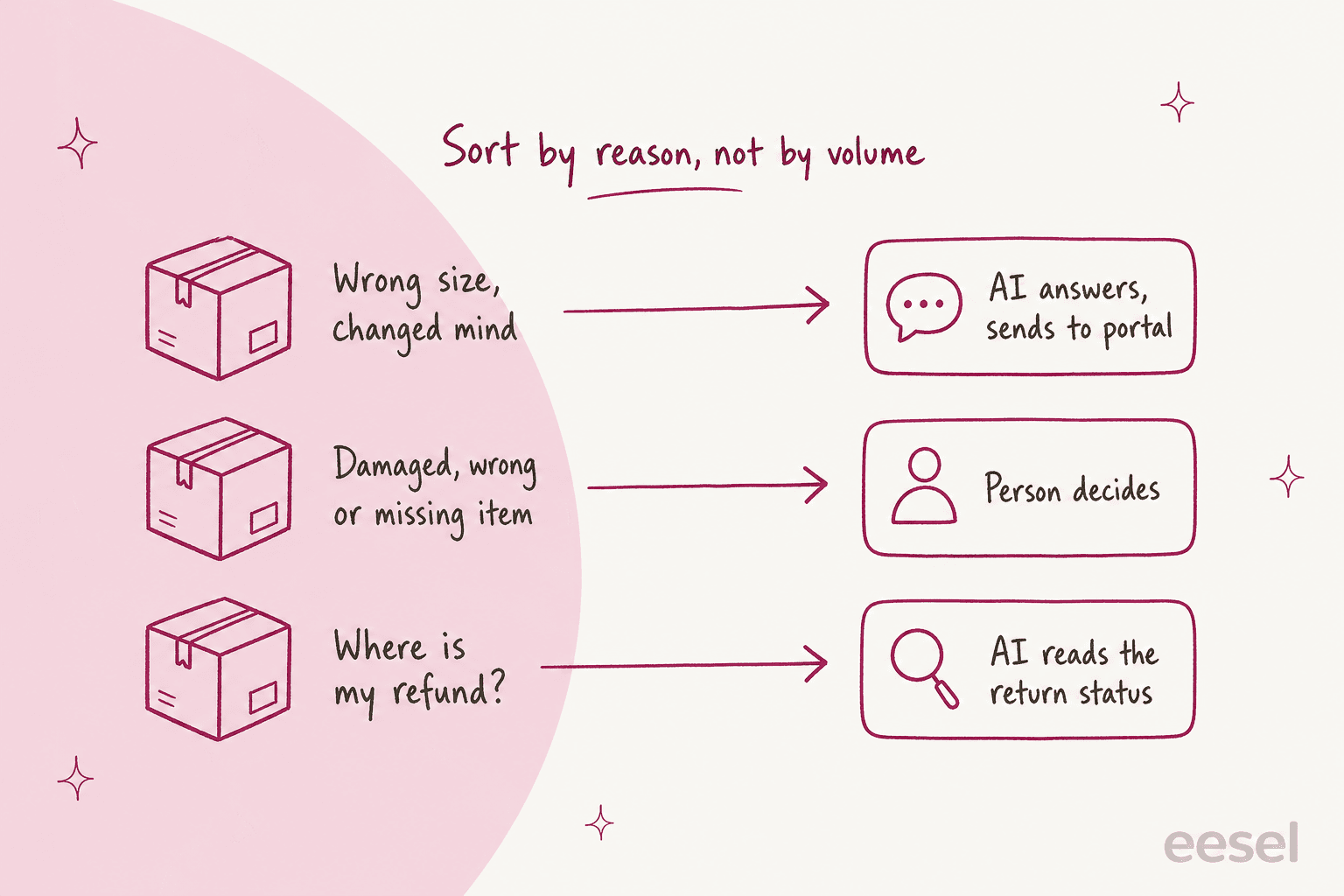
AI for returns management works best when it sorts return tickets by reason, not by volume: wrong-size and change-of-mind returns, eligibility questions and "where is my refund?" go to the AI, and damaged, wrong or missing items go to a person. The AI answers from the live order and your return rules, sends customers to your returns portal, and prepares refunds for someone to approve.
The part most guides skip: your returns app stays the system of record. The AI is the front desk that reads it. In a real-traffic trial eesel ran on an ecommerce store's Zendesk inbox, return and refund drafts were useful 93.8% of the time and refund-status drafts 100%, because those answers live in data the AI can look up.
If you run Shopify with Gorgias, Zendesk or Freshdesk, eesel does exactly this split. ClutchLoop lets its agent answer returns and send customers straight to the portal, and the team only steps in for everything else.
What does AI for returns management actually do?
AI for returns management is an AI agent that answers return and exchange tickets in your helpdesk by reading the order, your return rules and the return's status, then either replies, starts the return in your returns tool, or hands the ticket to a person with the facts attached.
I work a support queue every day, and what surprised me most about return tickets is how few of them say "I'd like to return this." Once a store has a returns portal, the easy requests mostly go there by themselves. The inbox gets whatever is left over:
- "Can I still return this? I got it three weeks ago."
- "The sleeve is torn. Do I have to pay for the return?"
- "I sent it back ten days ago, where is my refund?"
- "Can I swap the medium for a large instead?"
- "Your portal says this item can't be returned."
Each of those has an answer sitting in some system. The order date and delivery date live in your store, while the window and the final-sale list sit in your return rules. Whether the parcel came back shows up in the returns app or the carrier scan. A person working these tickets spends most of the time opening tabs rather than deciding anything, and that is the part AI is good at.
I'd describe the job as three parts, and keeping them separate makes setup easier:
| Job | What the AI does | Example |
|---|---|---|
| Route | Sends a clear return request to the right place | "Here's our returns portal, your order qualifies until 14 November" |
| Answer | Reads live data and replies with what it says | "Your return was received on 28 October, the refund goes back to your card" |
| Prepare | Collects facts for a decision a person makes | "Customer reports a torn sleeve, photo attached, order #10482, 12 days since delivery" |
Most online answers to "can AI handle returns?" jump straight to the AI approving and refunding everything. That is the last step, not the first, and plenty of good teams never take it. More on that below.
Which return tickets should the AI close, and which go to a person?
Split by the reason for the return. Change-of-mind returns, size swaps, eligibility questions and refund-status checks are policy and lookup work, so the AI can close them. Damaged, wrong or missing items need judgment, photos or a carrier claim, so a person decides.
This isn't just theory, since real stores on eesel have set it up this way. Rúngne, a Norwegian climbing apparel brand on Gorgias and Shopify, split its agent into three after the first week. The public-facing one only receives "policy questions, tracking, stock, pre-orders, sizing and change-of-mind returns." Cancellations, damaged or missing items, lost parcels, complaints and customs disputes never reach it. They get tagged RETURN/EXCHANGE by a triage agent and drafted for a person instead.
This split works because the two groups fail in different ways. If the AI gets a change-of-mind return wrong, the worst case is a slightly wrong portal link, and the customer notices in a minute. Get a damaged-item claim wrong and you've either refunded a customer who should have filed with the carrier, or told an upset customer "no" with no human in the loop. Those mistakes cost money and reviews.
A quick way to sort your own queue:
Which lane is this return ticket?
Open the first question that matches the ticket. Each answer says what the AI does and who finishes it.
Do they want to send back something that's fine, just not right for them?
Do they want a different size or colour instead of money back?
Have they already sent it back and want to know where the refund is?
Is the item damaged, faulty, wrong or missing?
Are they arguing with the policy, or mentioning their bank?
For more depth on the two hand-off lanes, I'd read the eesel guides to AI for warranty claims and chargeback inquiries. Both are close cousins of the damaged-item ticket.
What does the AI need to read to answer a return correctly?
It needs the order (date, items, fulfillment and delivery), your return rules as they stood on the order date, the return's current status, and where relevant the return parcel's tracking. Without the order and the rules, the AI is guessing from your policy page, and policy pages leave out the exceptions.
Here is what each system contributes:
| System | What the AI reads from it | Why it matters |
|---|---|---|
| Helpdesk (Gorgias, Zendesk, Freshdesk) | The ticket, past tickets from the same customer | Spots a return already in motion or a promise a teammate made |
| Store (Shopify, WooCommerce) | Order date, items, fulfillment, delivery | The return window usually starts at delivery, not purchase |
| Return rules | Window, final sale items, fees, overrides | Decides eligibility per item |
| Returns app (Loop, AfterShip Returns) | Return request, label, received, refunded | Answers "where is my refund?" |
| Carrier tracking | Return parcel scans | Proves the customer sent it |
| Payment system | Refund issued, to which method | Confirms money actually moved |
The rule part is where I see stores get caught out, because return rules are more specific than they look. Shopify's own return and cancellation rules are a good example, and they show exactly why the AI must read the rules rather than paraphrase your policy page:
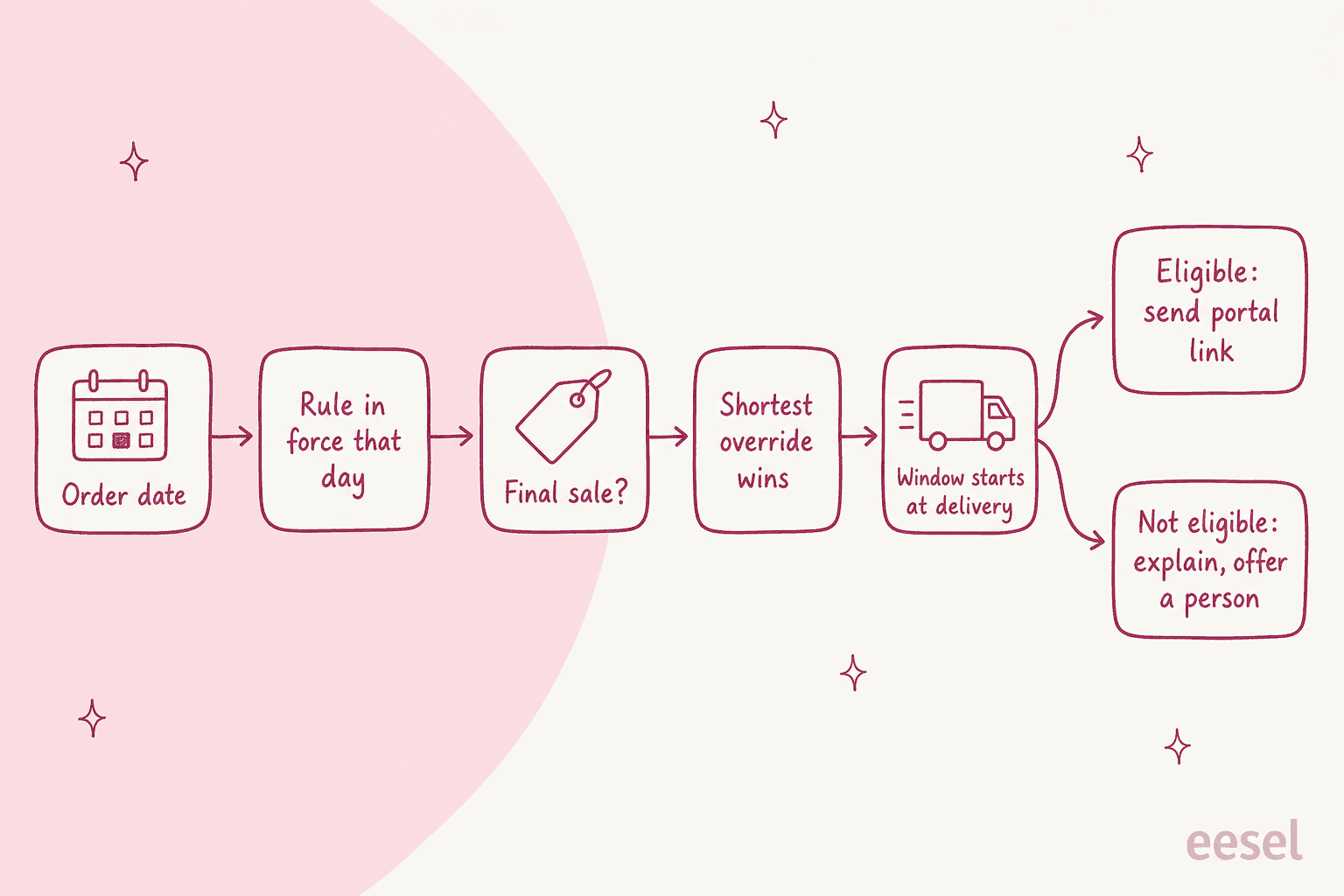
- The window starts at delivery. You can start it from each item's delivery or from the last item in the order. If the delivery date is missing, Shopify uses the fulfillment date plus a transit buffer.
- Rule changes only apply to future orders. If you shortened your window from
90to30days last month, an order placed before that still gets90. An AI reading today's policy page would wrongly refuse it. - The shortest override wins. A product in both a
14-day clearance collection and a90-day furniture collection gets14days. - Final sale beats everything. Shopify lists "perishable, custom, or personal care items" as typical final sale examples.
- Rules can differ per market, so a UK customer and a US customer can have different windows on the same product.
- Return fees aren't deducted automatically. Shopify says it plainly: "Return fees aren't automatically deducted from refunds."
That last point is the one I'd tape to the monitor. Say you let an AI issue refunds on its own while you charge a restocking fee or a flat return shipping fee: the refund goes out in full unless someone, or something, takes the fee off. Small amounts, but they add up quietly.
STIL Classics, a planner brand on Gorgias and Shopify, handles this well. Before drafting anything, the agent looks up "order and fulfilment status, line items, the 30-day return window, live inventory for the exact variant." It never states a fact it hasn't looked up, and over one month it checked 230 Shopify orders before writing a line.
Another common rule depends on where the item was bought. Amagency runs support for four brands (Hoover Australia, Hoover New Zealand, Cubii Australia and Peacehive) from one Gorgias account. For a return or warranty request, the agent checks where the product was bought and how long ago, and points retailer purchases back to the retailer first. IC Intracom does the same for Amazon: purchases made on Amazon within 30 days go back through Amazon, and everything else gets the RMA form.
How should AI answer "where is my refund?"
It should read the return's status and tracking, quote only what the record shows, and know the legal deadline the customer is entitled to. It is the most automatable return ticket there is, since the answer is a fact and not a judgment.
The failure I'd watch for is the AI filling a gap with a typical timeline. "Refunds usually take 5 to 10 business days" sounds helpful, yet if the parcel hasn't been scanned at all, the warehouse can't keep that promise. A better pattern is the one Swiftreg wrote into its agent: live facts win, and it never reports a refund or a timescale that a lookup hasn't confirmed.
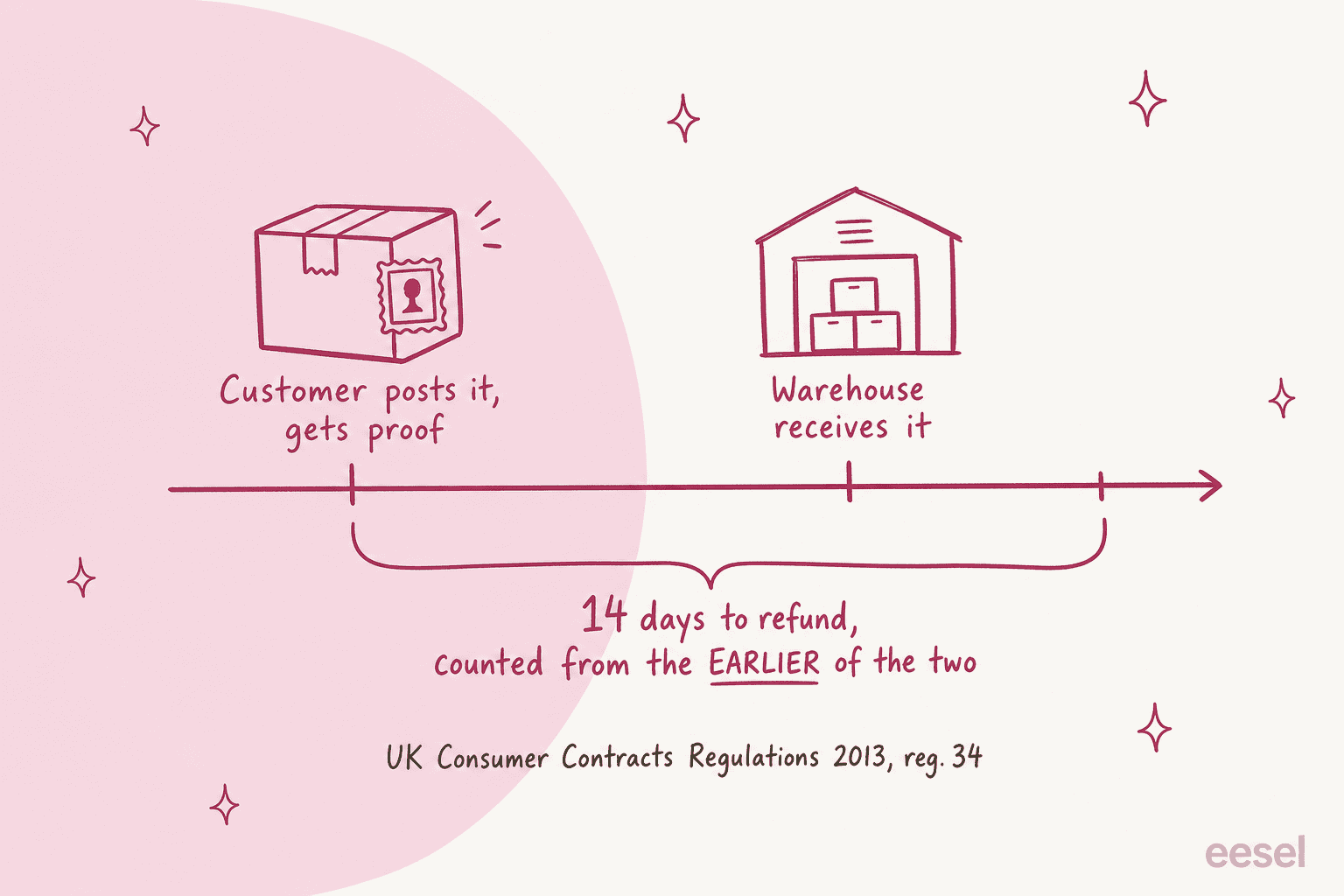
The law matters here as well, and it is more specific than most stores realise. Under the UK's Consumer Contracts Regulations 2013, when a customer cancels a distance sale and you haven't offered to collect the goods, the refund is due within 14 days of whichever comes first:
- the day you receive the goods back, or
- the day the customer supplies evidence of having sent them back.
A return tracking number counts as evidence, so the 14-day clock can start before the parcel reaches your warehouse. The same regulation says the refund goes back on the same payment method unless the customer agreed otherwise, that you can't charge a fee for refunding, and that you must refund the original standard delivery charge.
In the EU, the Your Europe guidance sets the cooling-off period at 14 days from delivery for goods, with no reason needed. The customer usually pays return postage for a change of mind, but the trader pays to return a defective product. Shopify tells EU sellers to set a return window of at least 14 days starting from delivery of the last item.
What this means for the AI's instructions:
- If the return has a carrier scan but no "received" status, the AI should treat the scan date as the start of the refund clock for UK orders, not the warehouse date.
- If the clock has run past your deadline, the AI shouldn't explain or apologise its way around it. It should hand to a person with the dates in the note.
- If the customer says the item was faulty, the free-return rule changes, so that's a person's ticket.
Here AI for returns management overlaps with order tracking support and WISMO automation, which use the same lookup skill pointed the other way.
Should the AI start returns and issue refunds itself?
Once you've checked its accuracy, let it start returns or send the portal link on its own. Refunds should stay behind an approval, at least until you've watched it get them right for a while, since starting a return is reversible and a refund isn't.
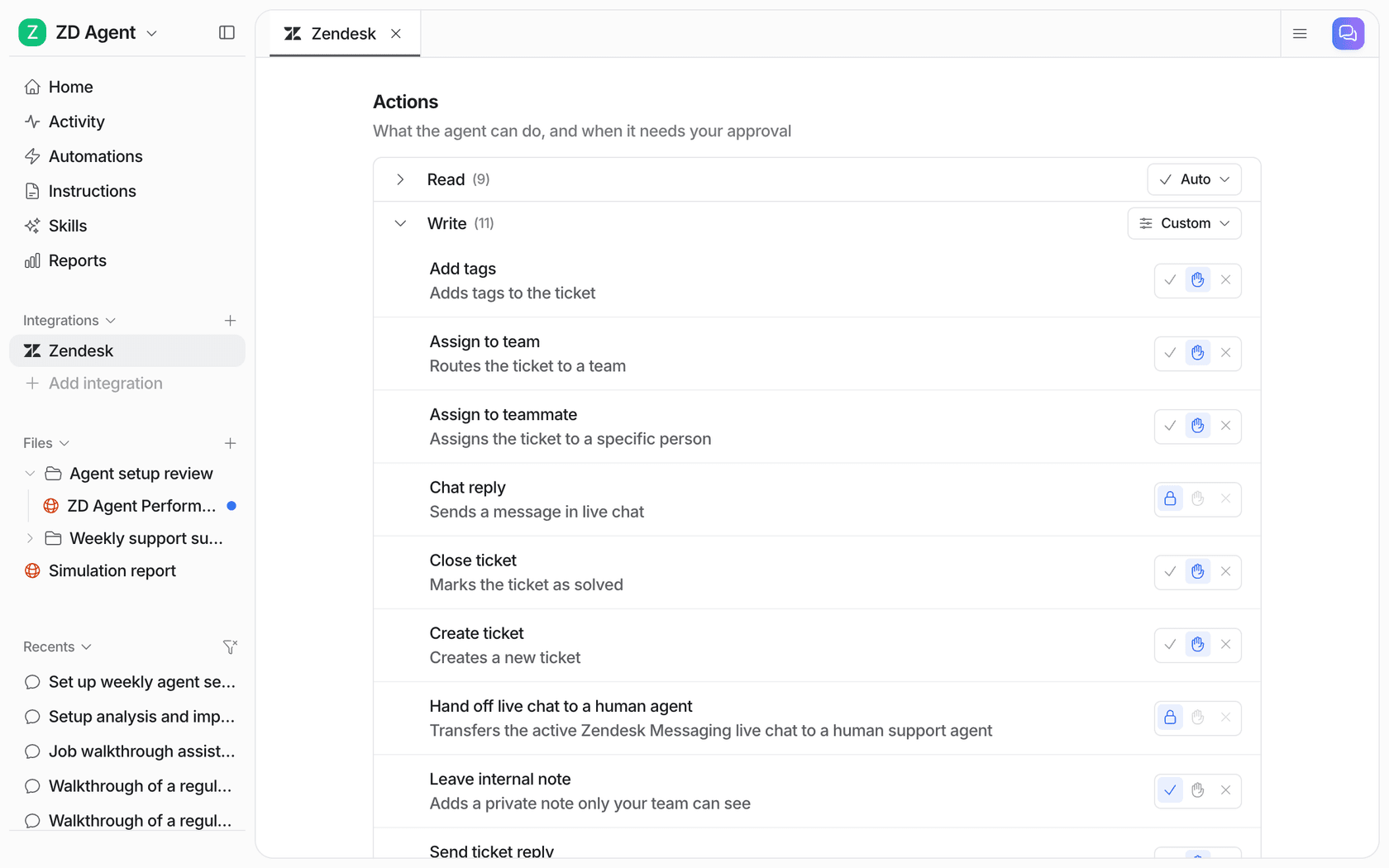
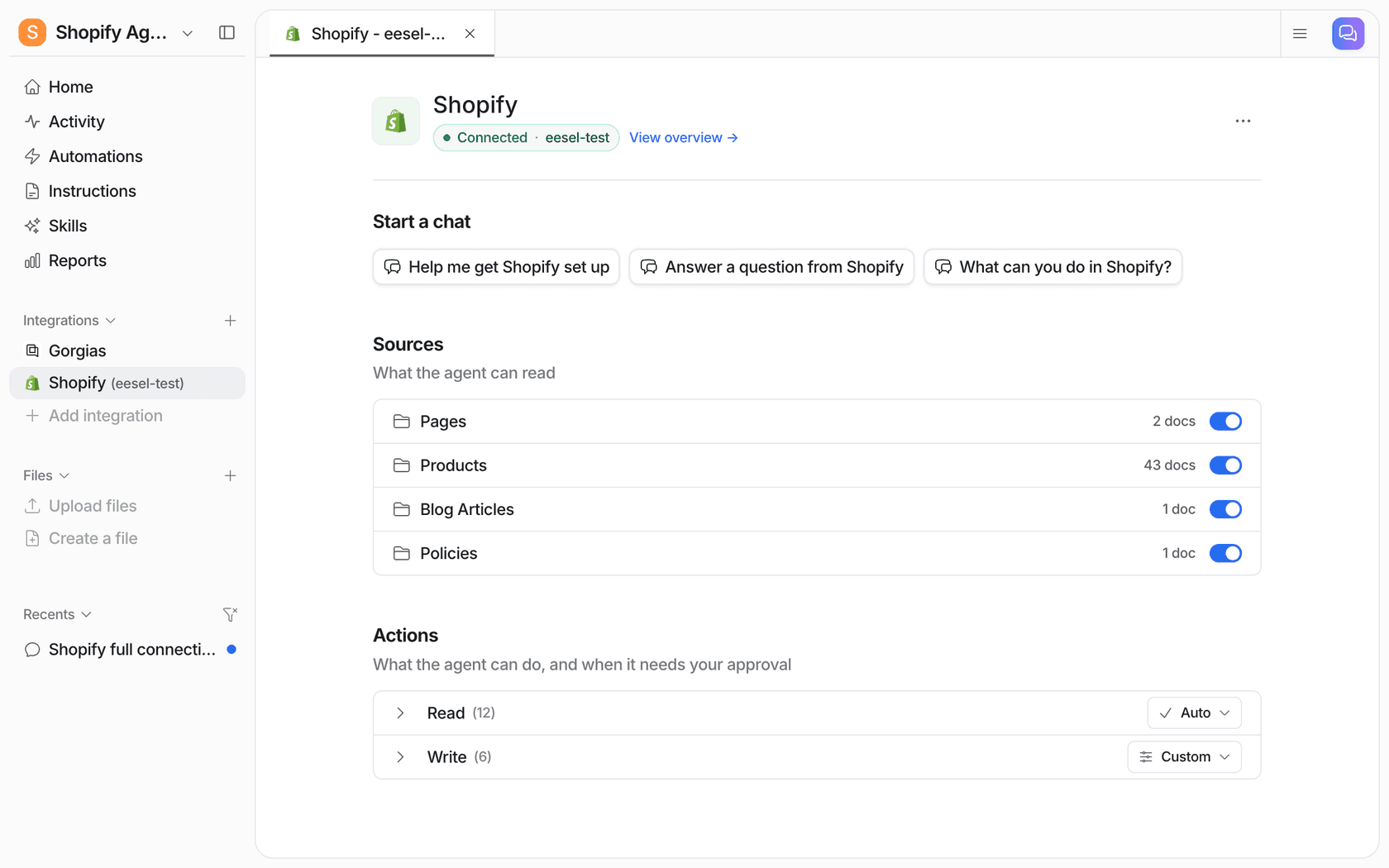
In eesel, the Shopify actions include Create Return, Refund Order and Cancel Order (unfulfilled orders only). Every action has three settings in Actions and Approvals: Auto, Needs approval, or Disabled. With Needs approval, the agent prepares the refund and a person sees the exact amount before anything happens, then clicks Approve, Always allow, or Deny. You can do that from the dashboard, a Slack thread, or the terminal with eesel approvals.
The setup I'd start with:
| Action | Setting to start | When to loosen it |
|---|---|---|
| Look up orders, fulfillments, stock | Auto | Already safe |
| Reply with portal link or eligibility | Needs approval for week one | When drafts are right on a sample of 50 or so |
| Create Return | Needs approval | When it never picks the wrong items |
| Refund Order | Needs approval | Maybe never, or only under a set amount |
| Cancel Order | Needs approval | Only for unfulfilled orders under a set amount |
Some teams never let the AI send money at all, which is a perfectly fine end state. STIL Classics' agent writes its draft "as if the refund or replacement has already been processed, because the person sending it will have done that first." The person clicks the refund in Shopify, reads the draft, and sends. The AI still does the lookup and the writing, and that is most of the time spent on the ticket. Question Beauty works the same way: refund and return decisions go to a person with an internal note saying what the customer asked and what eesel found in Shopify.
If you want a framework for when to raise those limits, the refund approval matrix and approval workflows posts go deeper.
Do you need a returns app and an AI agent?
Usually both once you're past a few dozen returns a month, since they do different jobs. The returns app runs the return: labels, warehouse routing, inspection, exchange orders. The AI agent answers the questions customers send about it in your inbox. Neither replaces the other.
Here's what the returns side costs, from each vendor's own pricing page:
| Returns tool | Plan | Price | Includes |
|---|---|---|---|
| Shopify self-serve returns | Built into Shopify admin | Part of your Shopify plan | Order status page requests, return rules, you approve or decline |
| AfterShip Returns | Essentials | From $16/month | Under 100 returns a month, $0.50 per extra return, automatic approval rules |
| AfterShip Returns | Premium | From $99/month | 100 to 400 returns a month, $1.00 per extra return, returns webhooks and API, warranty portal |
| AfterShip Returns | Enterprise | Custom | 400+ returns a month, custom workflows, SSO |
| Loop Returns | Returns | From $340/month | Up to 1,000 returns, Instant Exchange, Bonus Credit, fraud prevention |
| Loop Returns | Checkout+ | Free for qualifying merchants | Returns software plus US and Canada return labels, based on order and return volume |
AfterShip prices are the monthly rates; it lists an 18% discount for annual billing.
A few notes after reading those pages. AfterShip's Essentials plan pitches automatic approval rules for "the 80% of returns you'd approve anyway," which tells you the returns app already makes the eligibility call for the clean cases. The AI's job isn't to redo that but to deal with the customer who writes in anyway. AfterShip's Premium plan adds returns webhooks and an API, which is what you'd want if your AI agent needs to read return status directly.
ClutchLoop is the cleanest example of the two working together. It's a phone accessory brand on Gorgias and Shopify. When a US customer asks for a return, refund or replacement, the agent, named Loopy, replies straight away pointing them to ClutchLoop's returns portal, where the request is handled. In a month it handled 230 Gorgias tickets and sent 180 replies directly, about seven in ten conversations with no person needed.
If you're still choosing tools, the best AI for returns roundup compares eight of them, and Shopify pricing covers what's in each Shopify plan.
How do you set up AI for returns management?
Write down your rules, connect the order data, sort tickets by reason, test on past return tickets, then go live on the lookup lane first. Most teams can do this in a couple of weeks, and the implementation timeline guide has real examples.
1. Write your return rules in one place. The window and where it starts, final sale items, fees, per-country differences, retailer and marketplace purchases, and who pays return postage for faulty goods. One eesel customer, a director at an ecommerce brand on Gorgias and Shopify, had to correct the agent over several rounds on day one before the self-serve exchange and portal flow came out right. Writing the portal flow down first would have saved most of that.
2. Connect the helpdesk and the store. The AI needs to read orders live, not from a copy of your policy page. In eesel that means connecting Shopify and your helpdesk, whether that's Gorgias, Zendesk or Freshdesk. Note that Shopify has no triggers of its own, so the run starts from the helpdesk ticket or the chat bubble.
3. Tag tickets by reason before anything replies. Change of mind, exchange, refund status, damaged, wrong item, missing. Rúngne's triage agent uses a fixed tag list for exactly this. Tags are what let you route the lanes, and they give you the reporting to see which lane is growing. More on AI ticket tagging.
4. Test on last month's return tickets. Before going live, run the agent against real past tickets and read what it would have sent. Look hardest at the date maths: delivery date, window start, overrides, rules that changed. The guide to simulation testing covers how many tickets you need per topic.
5. Go live on the lookup lane first. Refund status and eligibility questions are the safest start because the answer is in the data. Add the portal-link replies next. Leave refunds behind an approval.
If returns spike for you after the holidays, plan the go-live ahead of January rather than during it. The post on seasonal support spikes has the timing.
What should you measure?
Measure how many return tickets close without a person, how many of those were right, and how fast refund-status questions get answered. Speed without accuracy is the trap here, because a wrong "yes, you can return it" turns into a refund you didn't owe.
| Metric | What it tells you |
|---|---|
| Return tickets closed by AI, by reason | Whether the lookup lane is actually working |
| Wrong eligibility answers | The number to keep near zero, check it weekly |
| Refunds sent over the correct amount | Catches the return-fee problem early |
| Time to first reply on "where is my refund?" | The question customers ask most often after sending a return |
| Handoffs with a complete note | Whether people can act without re-reading the thread |
| CSAT on return tickets | Whether customers felt helped, not just answered |
For the wider picture, the AI customer service metrics and resolution rate posts explain how to count these without flattering yourself.
Try eesel for returns management
If your store runs on Shopify and your tickets land in Gorgias, Zendesk or Freshdesk, eesel joins your queue as an AI teammate that reads the order, your return rules and the return status before it writes a word. It answers eligibility and "where is my refund?" tickets on its own, sends return requests to your portal, and holds every refund for your team to approve. That's how ClutchLoop replies to about seven in ten conversations without a person, and how Rúngne keeps damaged and missing items with its team.
You can set it up from the dashboard chat or the eesel CLI, run it against last month's return tickets first, and see plans on the pricing page. Try eesel free and see what it would have sent.
Frequently Asked Questions
Can AI handle returns management on its own?
What does AI for returns management need to connect to?
Should the AI approve refunds automatically?
Do I still need a returns app if I use an AI agent?
How does AI answer "where is my refund?" tickets?
What return tickets should always go to a person?
How much does AI for returns management cost?
$16/month on AfterShip Returns Essentials to $340/month and up on Loop, and the AI agent is priced separately. eesel's pricing page lists its plans, and you can test it on your past return tickets before paying.