


Why logistics support breaks in ways other support doesn't
Before the how-to, it's worth naming why logistics is its own beast. A SaaS support team fields nuanced, one-off questions. A logistics team fields the same questions thousands of times, and the answers change by the hour as a package moves.
Support queries in this space are punishingly repetitive: tracking, delivery exceptions, and claims dominate the volume. That's the good news and the bad news. Good, because repetitive questions are the easiest thing on earth to automate. Bad, because the "right" answer to "where's my shipment?" depends on a scan event that landed ten minutes ago, so a bot trained only on your help docs will get it wrong in a way customers really don't forgive when their delivery is already late.
Three things make logistics support specifically hard to automate, and each one shapes a step below:
- The volume is spiky. A storm, a carrier delay, or holiday peak triples your inbox overnight. Humans can't scale that fast; automation can.
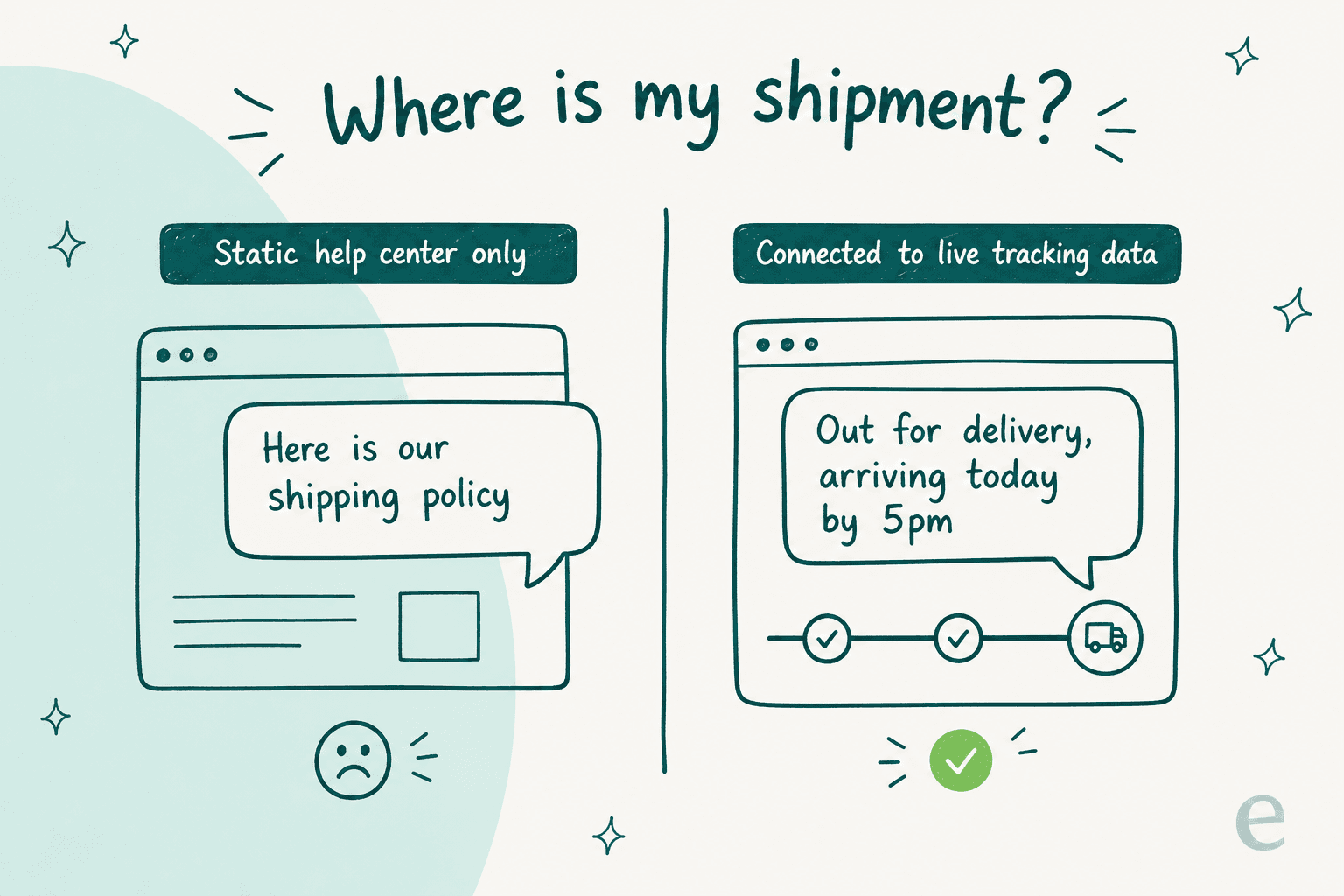
- The answers are live. WISMO ("where is my order") and delivery-status questions need real tracking data, not a policy page.
- The systems are fragmented. Tracking lives in a TMS or the carrier's API, claims live in another tool, and the customer is emailing your helpdesk. The answer has to reach across all of it.
Keep those three in mind. Now let's build the thing.
Step 1: Find the tickets worth automating
Don't start by asking "can AI handle this?" Start by asking "what am I answering over and over?" The goal of step one is a ranked list of your highest-volume, most-repetitive ticket types, because that's where automation pays back fastest and risks the least.
For almost every logistics operation, four categories sit at the top:
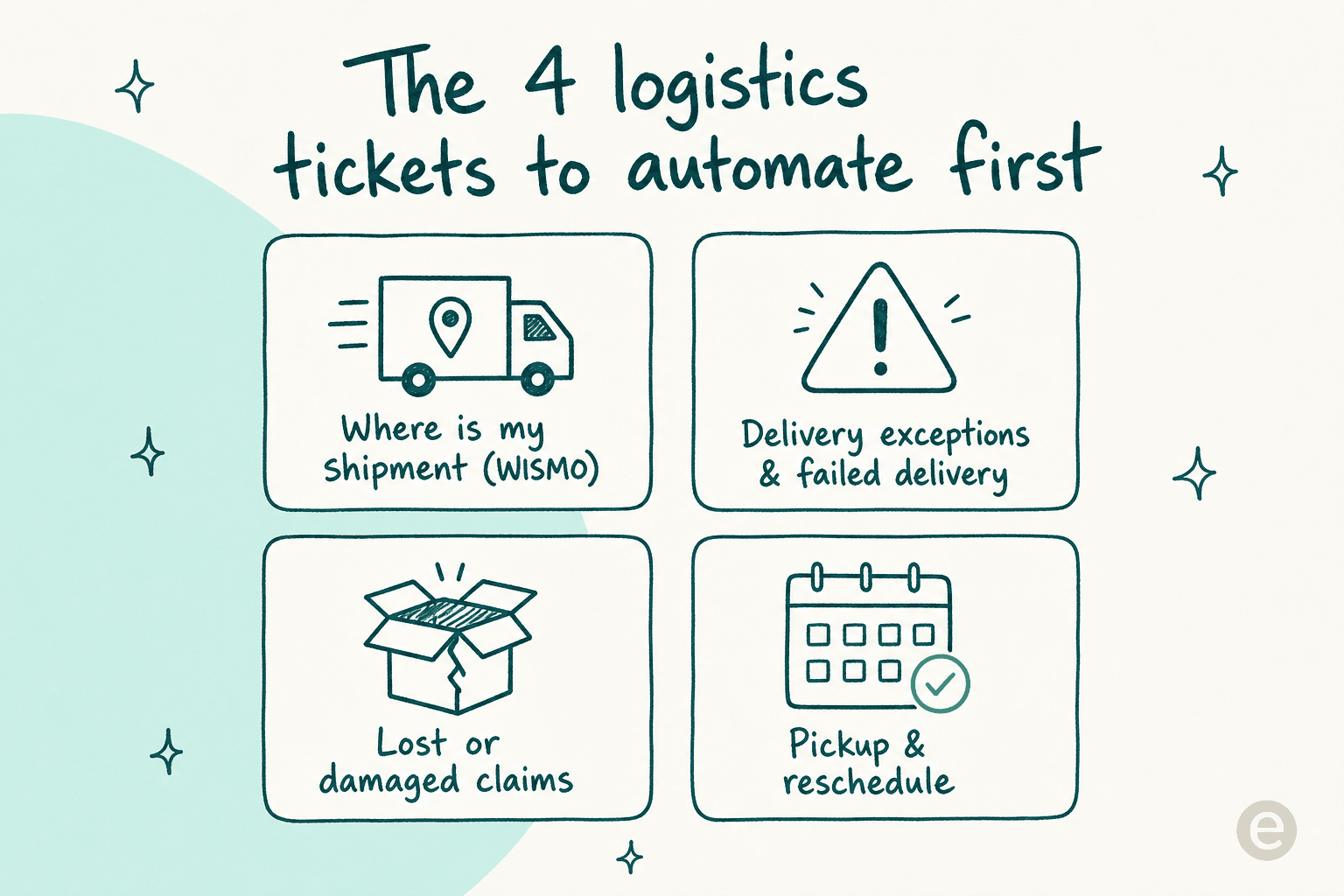
- Where is my shipment (WISMO) - usually the single biggest bucket. See AI for order tracking.
- Delivery exceptions - failed delivery, wrong address, missed windows, "held at depot." High emotion, clear next steps.
- Lost or damaged claims - repetitive intake, clear rules, a lot of status-chasing that AI can own.
- Pickup and reschedule - book, change, or cancel a collection; update a delivery window.
You don't have to guess the split. Pull the last few months of tickets and let a theme analysis group them for you. Across the ecommerce and delivery teams I've seen run this, the boring, repetitive tracking and status questions are exactly the ones AI is best at, and they're the bulk of the queue.
The mistake to avoid here: trying to automate the hard 10% first (the furious "your driver left it in the rain" escalation, the multi-leg freight dispute) to "prove" the AI. Do the opposite. Automate the easy 50% and give your humans their time back for the hard 10%.
Step 2: Connect your knowledge, and your live tracking data
This is the step that separates logistics automation that works from the demos that embarrass you. Your AI needs two kinds of knowledge, and most tools only give it the first.
Static knowledge is your help center, your macros, your policy docs, your past resolved tickets. That's how the AI learns your tone and your rules ("claims are filed within 14 days of the scan").
Live knowledge is the shipment record itself: has it been picked up, where was it last scanned, what's the estimated delivery. This changes constantly, and it's the whole answer to WISMO.
Here's why this matters more than it sounds. We once lost a customer whose core data source was a daily-updated order-status spreadsheet. Their integration silently broke, the bot kept answering from stale data, and they churned. In their own words:
"We probably would have stayed if support was faster and better."
The lesson stuck with us: for logistics, a static knowledge base is table stakes, but a reliable, live connection to your tracking system is the actual product. And it has to answer in real time. As one buyer told us when he rejected a tool that only did retrospective monthly reports, customers need a confident answer now, not an analytics dashboard next month. When you evaluate tools, the question isn't "can it read my help center" (they all can). It's "can it look up this specific shipment, right now, and will that connection stay up during peak."
With eesel, that means connecting your helpdesk and your systems together. The AI trains on your knowledge base and past tickets for tone and policy, and pulls the live shipment status through your existing tools or a custom API action.
Step 3: Set it up inside the helpdesk you already use
A rule I'd tattoo on every support lead: don't rip out your helpdesk to add AI. The whole point of automation is less work, and migrating platforms is the most work there is.
Good automation layers on top of your existing stack. Your agents keep the same Zendesk, Freshdesk, Gorgias, or Front inbox they know, and the AI works inside it, drafting and sending replies on the same tickets. Setup is connecting accounts, not re-platforming.

One nice side effect: because the AI reads your existing macros, it starts useful on day one. One team drove 56 resolved tickets from just 9 synced macros on Zendesk, and the setup was still running daily more than a month after their trial expired. You don't need a giant knowledge base to start. You need the one you already have, connected.
If a lot of your questions arrive on WhatsApp or a website chat bubble (common for last-mile and B2C delivery), the same agent can sit on those channels too and hand over to a human the moment someone asks for one.
Step 4: Simulate on past tickets before you go anywhere near a customer
This is the step teams skip, and it's the one that saves you from a public mistake. Before the AI touches a single live customer, run it against tickets you've already resolved.
A simulation replays hundreds or thousands of your past tickets through the AI and shows you what it would have said, next to what your team actually said. You get a real coverage number ("it would confidently handle 47% of these") and, more usefully, a map of where it's weak, so you can fill those gaps before launch instead of finding them in your reviews.

I cannot oversell how much confidence this buys you. Instead of "let's flip it on and hope," you walk into launch already knowing the number, having seen the drafts, and having patched the gaps. One team's trial showed 93% triage accuracy and 100% spam detection on a real inbox that was 22% spam, before it ever went live. Simulation is how you know that, not hope it. For logistics that matters double, because the cost of a wrong tracking answer during peak is a flood of angry follow-ups.
Step 5: Start supervised, then hand over the easy tickets
Now you go live, but gently. The safe rollout has stages, and you control how fast you move through them.
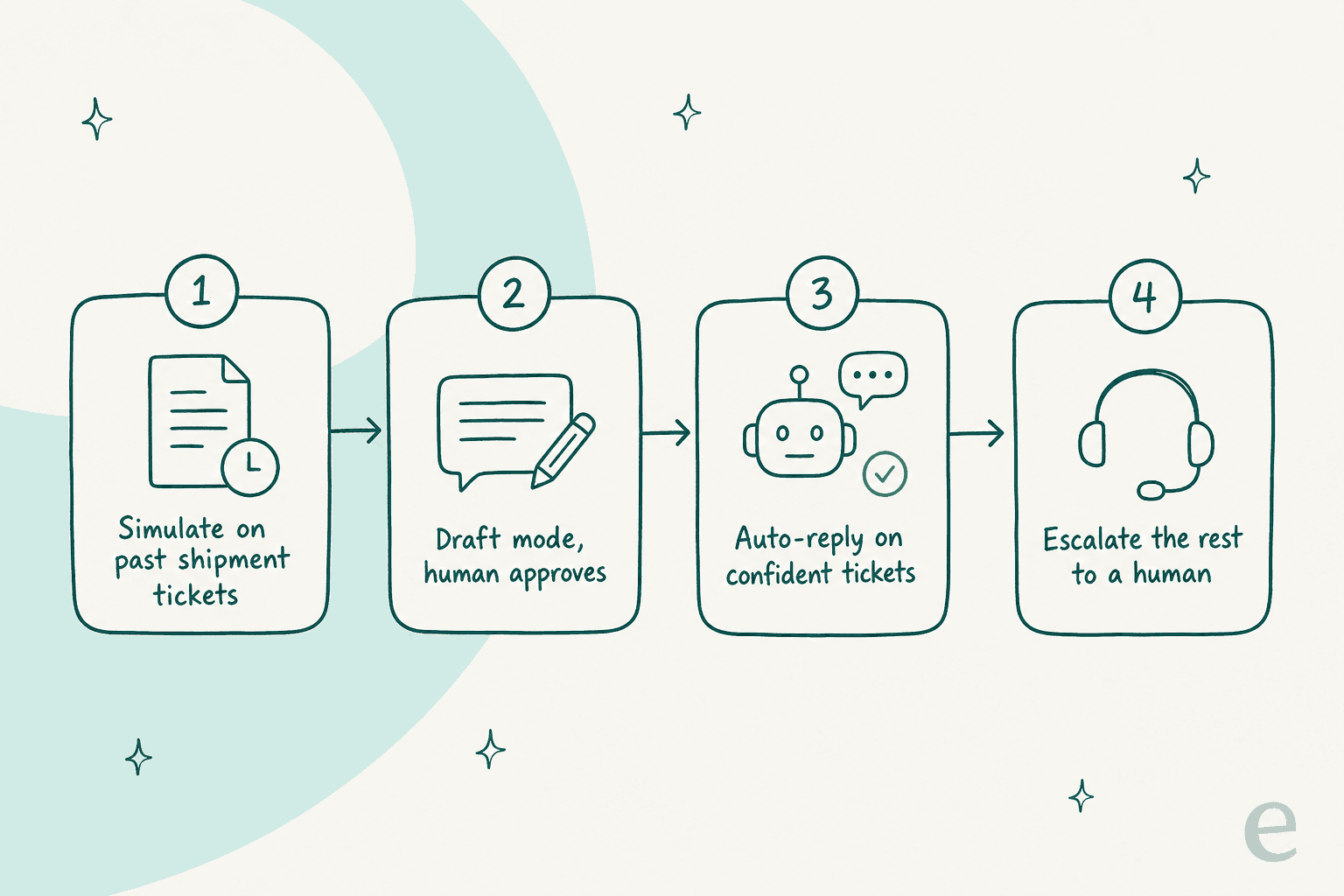
- Draft mode. The AI writes the reply; a human reads it and hits send. You're still fully in control, and every edit teaches it.
- Auto-reply on the confident, easy stuff. Once you trust its WISMO and delivery-status answers, let it send those automatically.
- Escalate everything else. Anything it isn't confident about, or anything a customer explicitly wants a human for, goes straight to your team.
The reason this works is confidence-based routing. The AI only auto-handles tickets it's sure about and quietly leaves the rest alone. One CX lead at a 7,000-ticket-a-month brand put the requirement perfectly:
"I need an AI who is only handling the tickets that it's confident to handle and all the other ones, leave them alone."
That's the bar. An AI that answers everything (including the things it should not) is worse than no AI, because now you're auditing thousands of replies you didn't write. An AI that handles the safe half and hands over the rest is a genuine teammate. This is also the honest limit of automation: it should never be trying to close the emotionally-charged, one-off, "my freight is three days late and the client is furious" ticket. That's still your team's job, and it always will be.
Step 6: Watch the numbers and keep coaching it
Automation isn't set-and-forget. The teams that get the most out of it treat it like onboarding a new hire: check its work, correct the misses, and it gets better.

Watch a small set of metrics: resolution rate (what share the AI closed on its own), escalation rate (what it handed off), and customer satisfaction on AI-handled tickets. When you spot a category it's fumbling, you don't retrain a model; you correct it in plain language, the same way you'd coach a person. Every edit your team makes to a draft becomes a lesson.
One gig-economy app on Zendesk saw the AI resolve 73% of tier-1 requests in the first month, and got there during a 7-day trial. That's the compounding payoff: the more it runs, the more of your repetitive tracking volume it quietly absorbs, and the more your humans get to focus on the tickets that actually need a person.
Common mistakes that sink logistics support automation
I've watched a lot of rollouts. The failures almost always trace back to one of these:
- Automating from docs alone. No live tracking lookup means wrong WISMO answers. Connect the shipment data (step 2).
- Going live without simulating. You find the gaps in front of customers instead of in a test. Don't (step 4).
- Letting it answer everything. Confidence routing exists for a reason. An over-eager bot erodes trust faster than a slow human, especially on a delayed delivery.
- Ripping out the helpdesk. You don't need a new platform, you need AI on your stack.
- Treating it as done at launch. The best chatbot KPIs trend up over months of coaching, not on day one.
Get those five right and automation stops being a risk and starts being the reason your team isn't buried every time a storm hits or peak season lands.
Try eesel for logistics support
If you want the setup from this guide without the integration headache, that's what eesel does. It connects to your existing helpdesk (Zendesk, Freshdesk, Gorgias, Front) and your tracking systems, trains on your past tickets and help docs, and handles the repetitive WISMO, delivery-exception, and claims questions, in 80+ languages if you ship across borders.
The differentiator that matters for logistics teams: you can simulate it on your real ticket history before going live, so you see the coverage number and the actual drafts up front instead of gambling on peak. Pricing is one fixed monthly price (from $299/month for 500 credits, 1 credit per ticket, no per-seat fees) that you size to your volume instead of your headcount, and you can move up or down any time. You can try it free with 100 credits and have it drafting replies in your inbox in a few minutes.
