What is Sendbird AI?
Sendbird started life as the communications infrastructure company: the chat, calls, and messaging APIs that power conversations inside other companies' apps. In 2026 it repositioned the whole company as "the AI customer experience platform," putting an AI concierge story out front and the communications stack underneath.
That heritage is the most important thing to understand about Sendbird AI, because it shapes everything else. This isn't a helpdesk that bolted on a bot. It's a messaging platform that scaled to billions of conversations and then built an AI agent on top of that pipe. The scale claims are real and worth quoting: Sendbird's own product diagram lists 6 billion+ end users, 7 billion+ monthly messages, and 145,000+ developers.
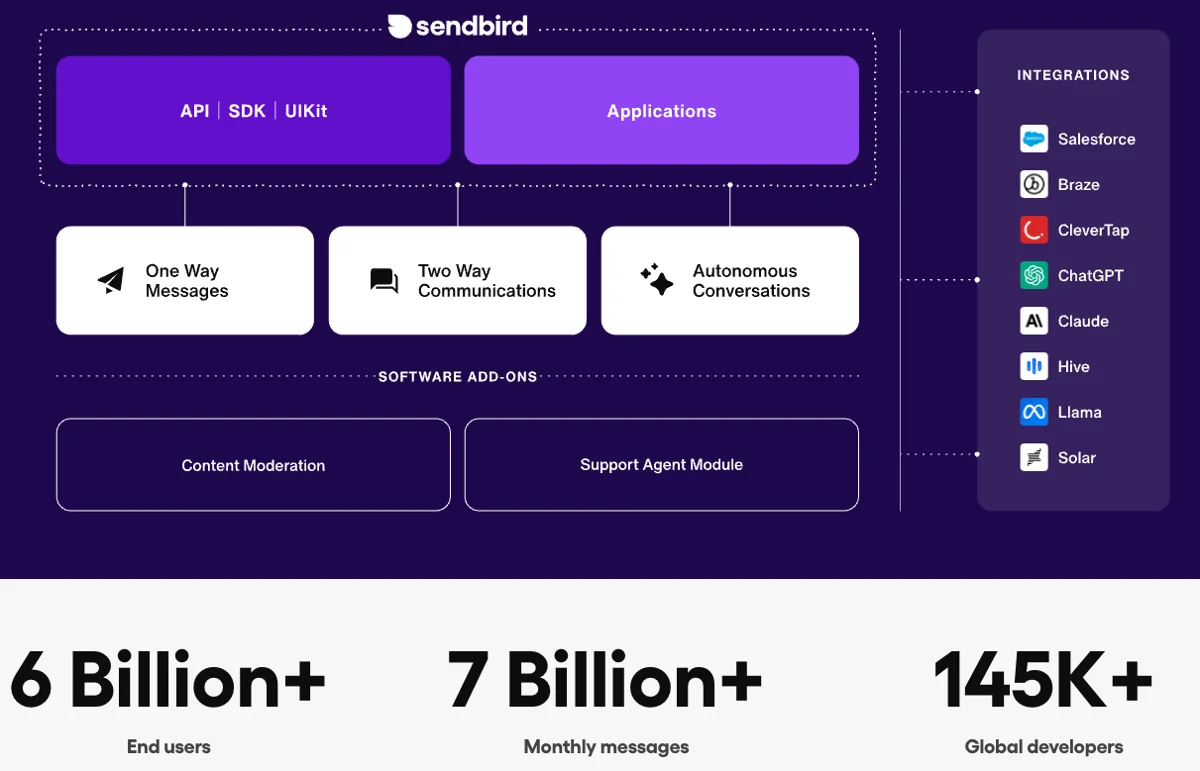
The AI Agent itself is pitched beyond conversational AI: rather than the rule-based chatbot approach of rigid scripts and decision trees, Sendbird says its agents "understand intent, hold context, take action, and adapt over time," and escalate when they're out of their depth. That's the standard agentic framing across the category now, and Sendbird leans on its own AI agent vs chatbot explainer to draw the line.
If you want the wider category map before zooming in on Sendbird, our roundup of the top customer service AI platforms and our AI agent examples post both put this kind of tool in context.
The delight.ai rebrand: what actually changed
This trips people up, so let's be clear about it. Sendbird's AI Agent has been rebranded to delight.ai. Visit sendbird.com/ai-agent and you get a 301 redirect straight to the delight.ai domain, where the agent is positioned as a separate brand built "on a communication platform that powers 7 billion conversations each month."
It's the same vendor and the same product lineage, just under a new name, with a few newer pieces clustered around it: Omnipresence (an always-on connection layer), Trust OS (a responsible-AI foundation for keeping agents accountable), and the Agent Memory Platform (AMP), which Sendbird calls "the intelligence layer that gives your AI agents a living memory and a business brain."
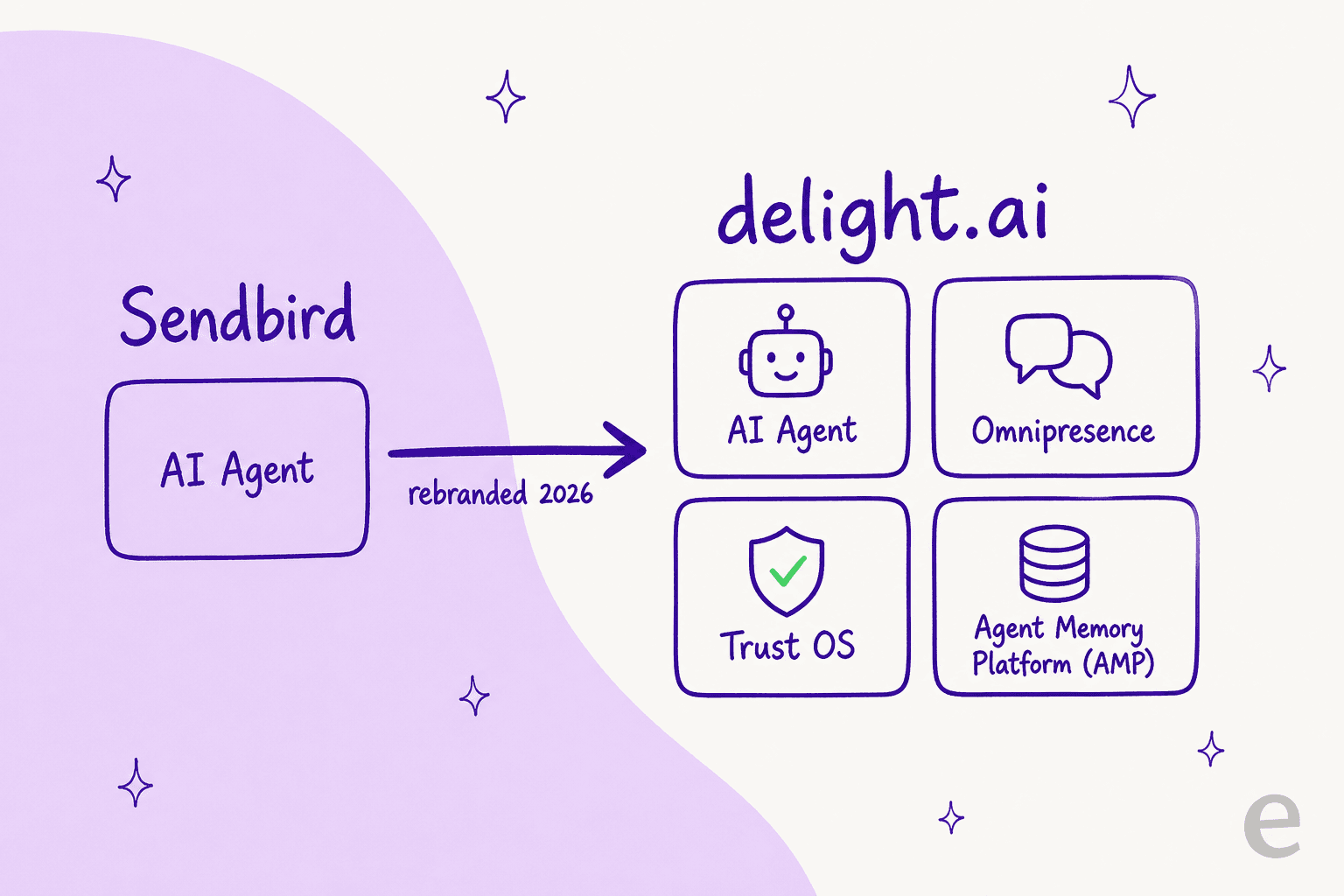
For most buyers the practical takeaway is simple: when you read "Sendbird AI agent" and "delight.ai" in the wild, they're the same thing. The split mostly matters when you're hunting for docs or pricing, because the product links increasingly point to delight.ai while the legacy communications products (Chat, Calls, Business Messaging) stay on sendbird.com.

How Sendbird AI works: build, test, deploy, evaluate
This is the part I find most useful to judge any AI agent on, because it's where the marketing meets the actual day-to-day of running the thing. Sendbird structures the work into a loop: build the agent, test it in simulation, deploy it across channels, then evaluate and refine.
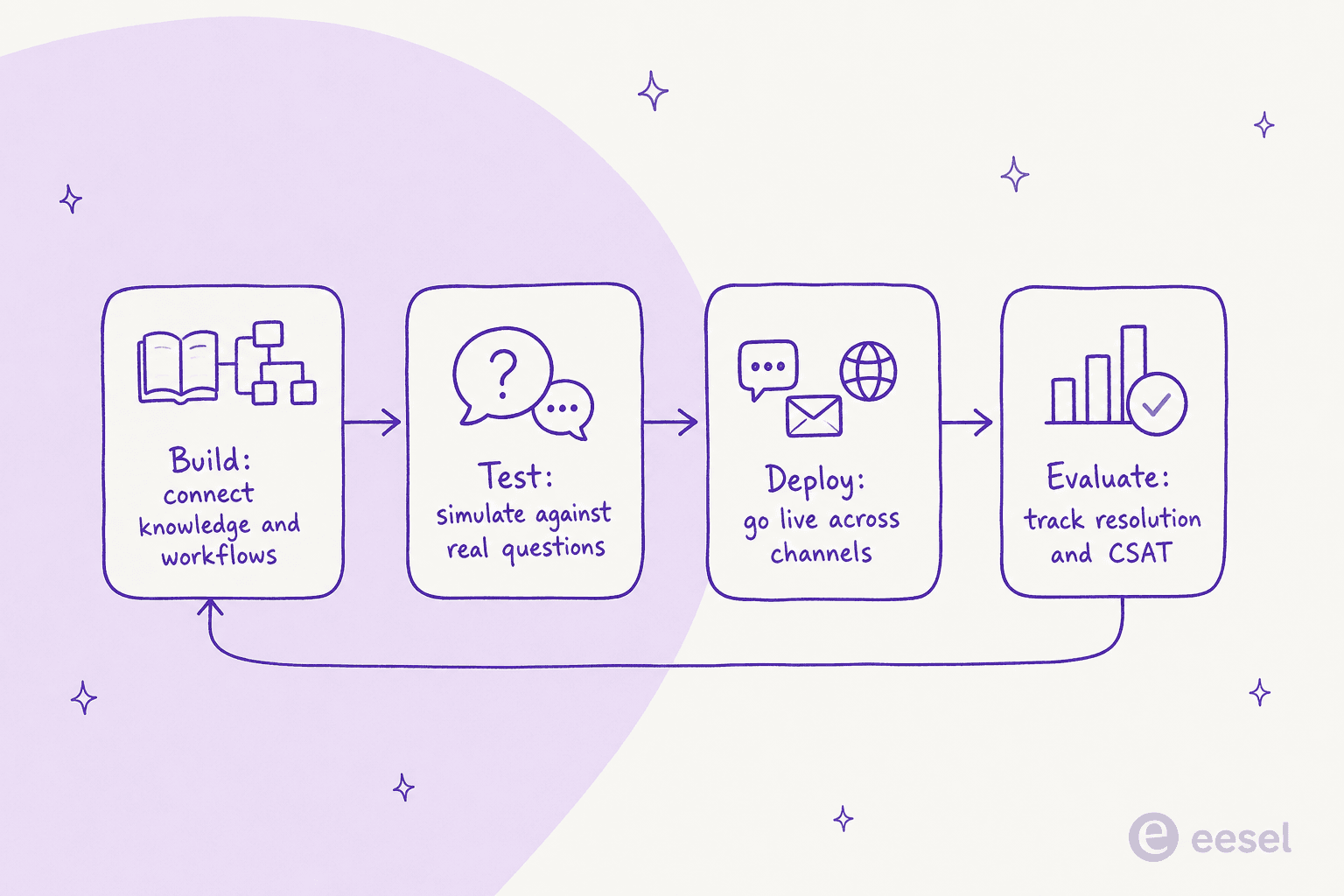
Build: connect knowledge and workflows
You "onboard your AI agent like a new team member," transferring knowledge and defining workflows through a supervisor dashboard. In the builder you add knowledge sources (a website, a file, a snippet) and write the agent's reasoning as manuals it can reference, pulling in external content from connectors like Salesforce, Confluence, and Zendesk.
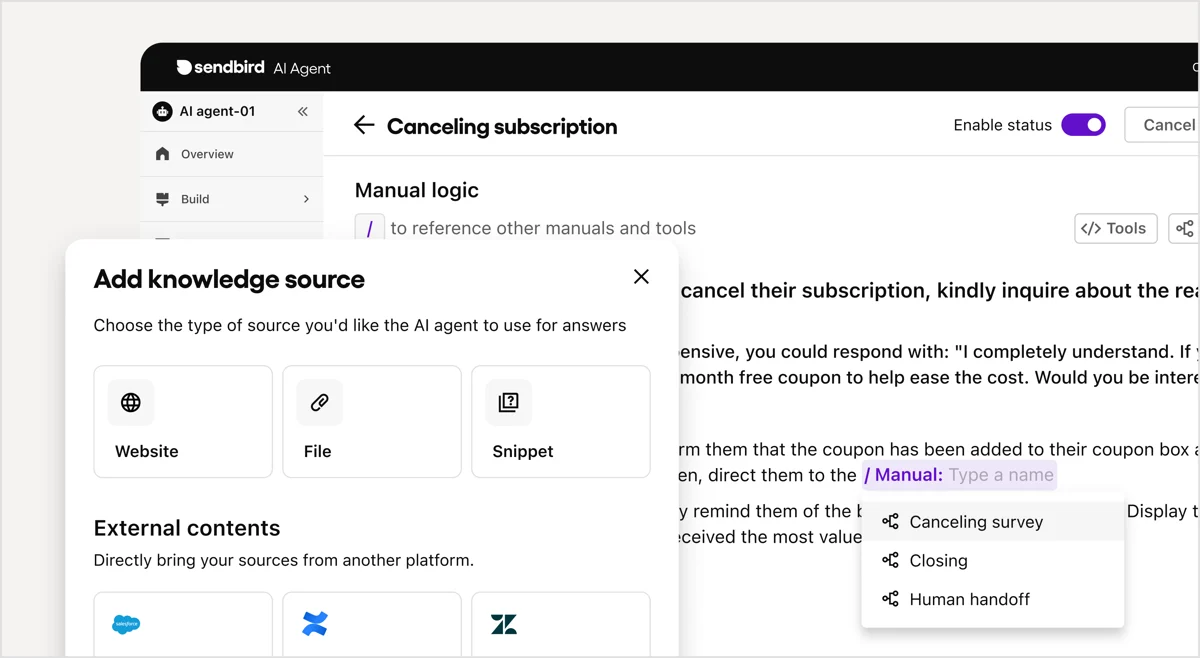
The model of writing manuals the agent can reference is sound, and it's the same idea behind training AI on your knowledge base. Most of the best AI knowledge base tools work this way. Whether it feels fast depends on how much of your knowledge already lives in connected tools versus how much you have to author by hand.
Test: simulate before you go live
Sendbird's simulation step is the feature I most want every AI vendor to have. You run the agent against a set of questions and it scores each answer, marking the response as accurate or inaccurate and the run as success or fail, so you can see where the agent is confidently wrong before a real customer does.
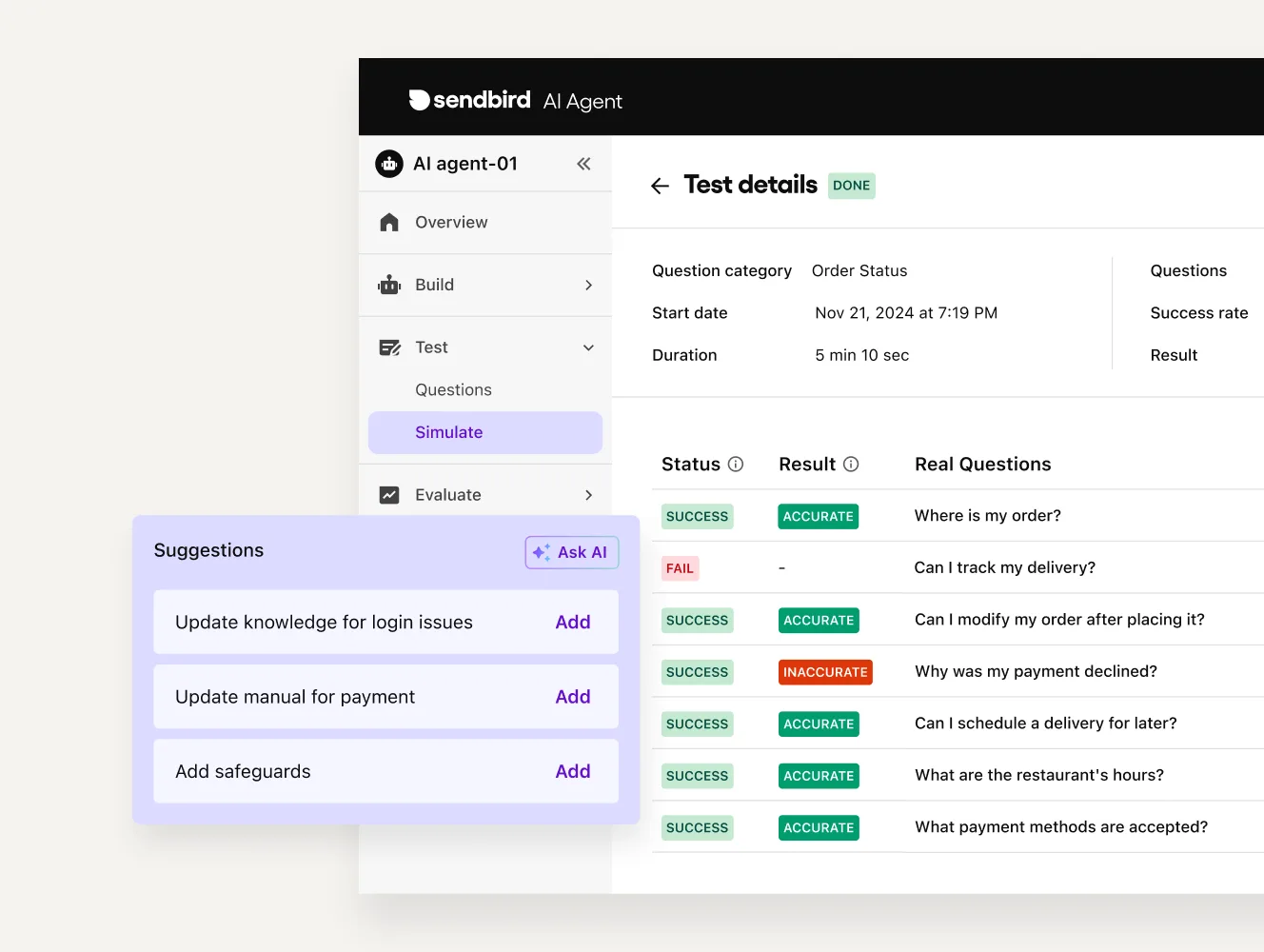
Here's where my own experience makes me want to push on it. Simulating against a list of sample questions is good; simulating against your real, historical tickets is far better. We learned this the hard way at eesel: a confident-sounding bot can sail through a tidy test set and then fall apart on the messy, half-finished, multi-language tickets your queue actually contains. That gap between "passes the demo" and "survives the queue" is exactly why we test rollouts against thousands of past conversations, and it's the number I'd ask Sendbird's sales team to show you with your own data, not theirs. If you want the deeper version of this argument, our piece on AI resolution rates and the idea of a confidence threshold covers it.
Evaluate: track resolution and CSAT
Once live, the agent reports into a conversations dashboard with resolution rate, resolution time, CSAT, and human-handoff metrics, plus a breakdown of AI-resolved versus AI-unresolved volume.
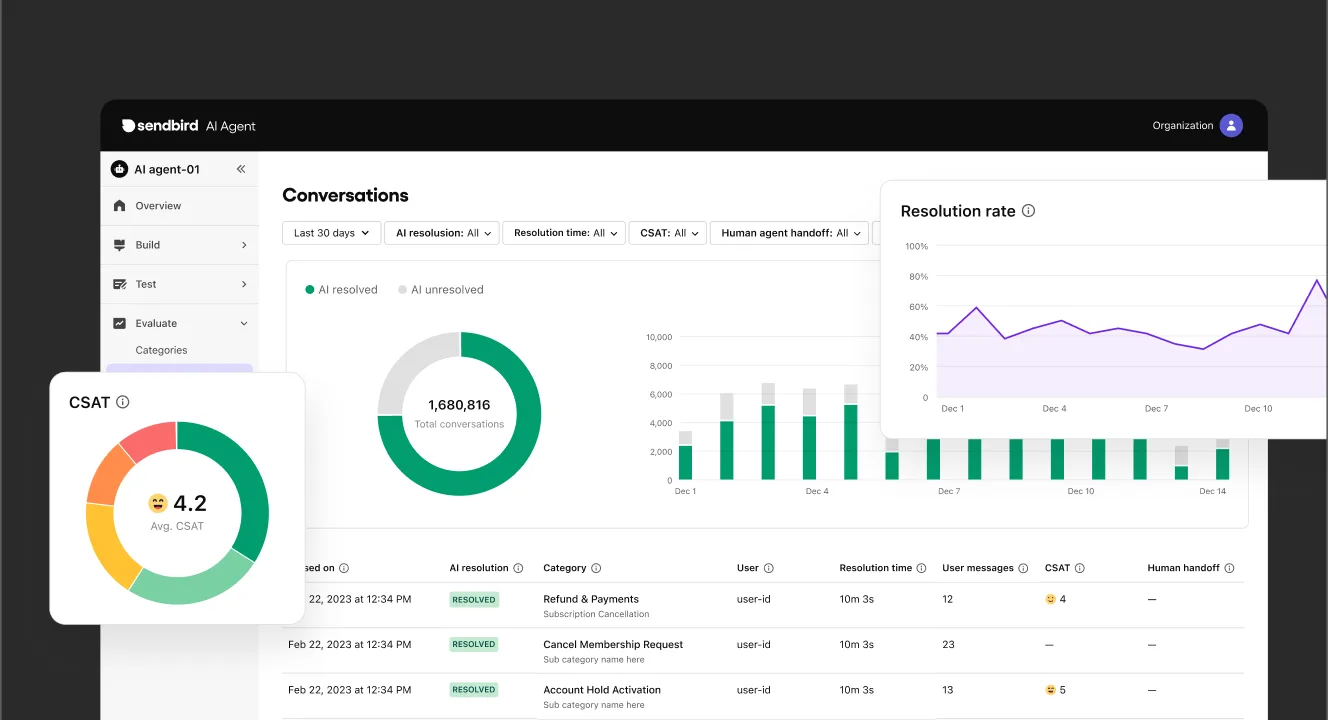
This is a clean analytics surface, and the metrics it tracks are the right ones. One honest note: Sendbird talks about "record resolution rates" qualitatively and publishes no specific deflection or resolution percentage, so you'll want to read those numbers from your own dashboard rather than the marketing page. For how those metrics translate into money, our AI agent cost breakdown is the one I'd hand a finance team.
Channels, integrations, and handoff
Omnichannel is the real strength here, and it's where the communications heritage pays off. The Sendbird AI agent meets customers across in-app chat, web, email, SMS, WhatsApp, and social messaging, and because every interaction shares the same memory layer, customers don't have to repeat themselves when they switch channels.
For escalations, the agent hands off to a human inside Zendesk, Salesforce, and Freshworks, and it can pull from third-party knowledge bases so it surfaces the right answer in real time. A clean transfer to human is worth testing in your own stack before you trust it in production.
On the compliance side, Sendbird claims SOC 2 Type II, HIPAA/HITECH, ISO 27001, and GDPR, with PII protection and region-specific storage, which is the table-stakes set for selling into enterprise. If data handling is top of mind, our AI agent data privacy guide is a useful checklist.
If WhatsApp is your lead channel, it's worth comparing Sendbird against the dedicated options in our best WhatsApp chatbot roundup before committing.
What does Sendbird AI cost?
This is the section most people came for, and the honest answer is short: Sendbird doesn't publish a price for its AI Agent.
Sendbird says it charges per conversation and argues against per-resolution (outcome-based) pricing, but it lists no dollar rate, no tiers, and no volume schedule. Both sendbird.com/pricing and delight.ai/pricing return a 404. The only button is "contact sales." The one product family with public list prices is the legacy communications stack: Sendbird Chat is billed per monthly active user (Starter from $399/month, Pro from $599/month at 5,000 MAU), and Calls runs on per-minute prepaid credits. None of those is the AI agent's price.
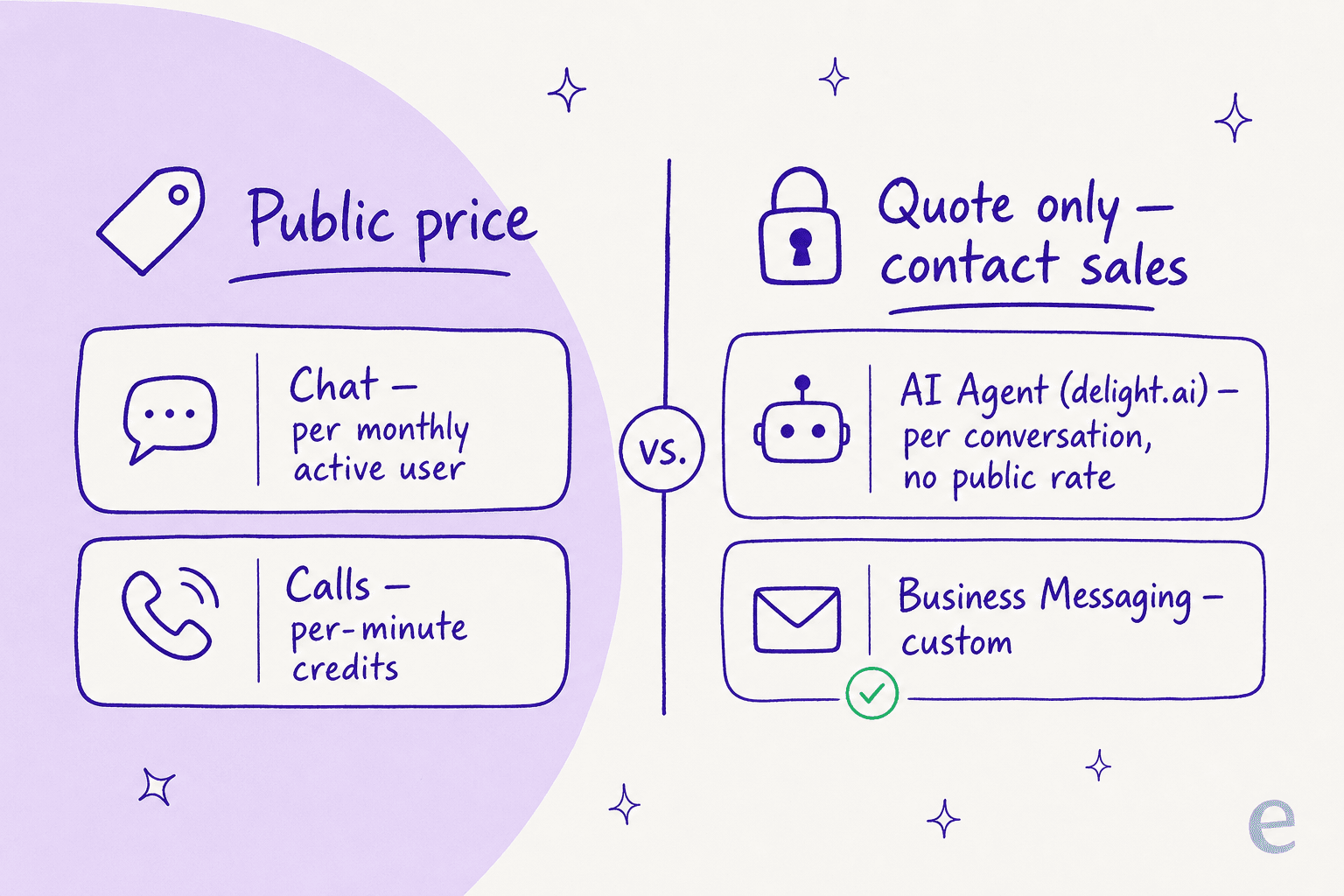
I wrote a full Sendbird AI pricing breakdown if you want the per-conversation logic, the MAU tiers, and the hidden costs in one place. The short version for budgeting: assume a sales call, a custom quote, and a per-customer rate, which several reviewers say varies from one buyer to the next.
What users actually say
Sendbird scores well overall, 4.6/5 across 124 reviews on G2, with praise for ease of integration and reliable performance. The negative themes cluster almost entirely around one thing: cost. Across those reviews, cost-related tags (Expensive, Cost, Cost Limitations) are the single largest complaint category, and G2's own summary notes pricing "can be high, especially for startups."
A common, specific gripe is that features are gated into higher tiers, so your bill scales with the feature set you want, not just usage:
"Sendbird is an enterprise solution and the pricing reflects this. Features are bundled into different packages, so you may need to upgrade your subscription to get a particular feature... This means that cost depends not only on usage but also on desired feature set." Sendbird review on G2
The sharpest reviews are about billing rather than the product. On Capterra (4.2/5), where Value for Money is the lowest sub-score, one startup describes a refund fight:
"Absolutely terrible. We ended up cancelling our subscription, and asked for a partial refund for the unused portion of the costs. They refused... We are a B2C startup and every dollar counts." Capterra review
To be fair, there's a strong counter-theme from long-tenure enterprise customers who credit Sendbird with stable, flat pricing over many years and a CS team that helped them find savings during budget cuts. The pattern is consistent: Sendbird earns its keep at enterprise scale, and the friction concentrates at the small-team end. That tracks with the wider companies that use AI chatbots picture, where the big deployments and the scrappy ones want very different things.
Is Sendbird AI right for you?
Rather than a verdict paragraph you have to translate to your own situation, here's a quick way to read it. Pick the line that sounds most like you.
Try eesel
If the friction points above sound familiar, here's where I'd point you. eesel is an AI support agent you can plug into Zendesk, Freshdesk, Salesforce, and your help center in a few minutes, train on your past tickets and docs, and actually try for free, with per-ticket pricing published on the page, no sales call to get a number.
The differentiator that matters most against Sendbird's simulation step: eesel runs your agent against thousands of your real historical tickets before it ever touches a live customer, so the resolution rate you see in the simulation is the one you can trust on day one. It's the same instinct behind that confident-but-wrong problem one ops lead at a DTC supplements brand (running ~7,000 tickets a month) put perfectly to us: "I need an AI who is only handling the tickets that it's confident to handle, and all the other ones, leave them alone." That confidence-based control is the whole point.

If you're weighing the field, our guides to the best customer service AI and the best AI agent assist tools are built to help you choose, not just to point at us.
And if you're coming from a specific helpdesk, our write-ups on the Freshservice AI agent, the Gorgias AI agent, and the Zendesk AI agent go integration by integration.
You can try eesel and have an agent answering test tickets before lunch.
Frequently Asked Questions
What is Sendbird AI?
Is Sendbird AI the same as delight.ai?
sendbird.com/ai-agent now redirects there. It's the same vendor and the same product family sitting on Sendbird's communications stack, joined by newer pieces like Omnipresence, Trust OS, and an Agent Memory Platform. For the broader category, see our guide to AI agents versus rule-based chatbots.How much does Sendbird AI cost?
What channels does the Sendbird AI agent support?
How do you test a Sendbird AI agent before going live?
Is Sendbird AI good for small teams?
What's the best Sendbird AI alternative?


Article by
Alicia Kirana Utomo
Kira is a writer at eesel AI with a Computer Science background and over a year of hands-on experience evaluating AI-powered customer service tools. She focuses on breaking down how helpdesk platforms and AI agents actually work so that support teams can make better buying decisions.