The 9 best Respond.io alternatives in 2026

Kurnia Kharisma

Katelin Teen
Last edited August 28, 2026

Why teams leave Respond.io in the first place
Let me start where these searches usually start, because Respond.io is a genuinely good product and the reasons people leave are specific, not "it's bad."
Respond.io does the omnichannel thing well. It's a WhatsApp Business Solution Provider, it consolidates every messaging channel into one thread, and it lists names like Toyota, McDonald's, and British Airways on its homepage. On G2 it sits at 4.8 stars across roughly 530 reviews, and the praise is consistent: it's easy to use and it keeps a whole team working out of one place.
"Respond.io is known for their reliability and great support. Since you are running Click to Chat Ads to WhatsApp, make sure to implement..."

So why the churn? Three things come up again and again.
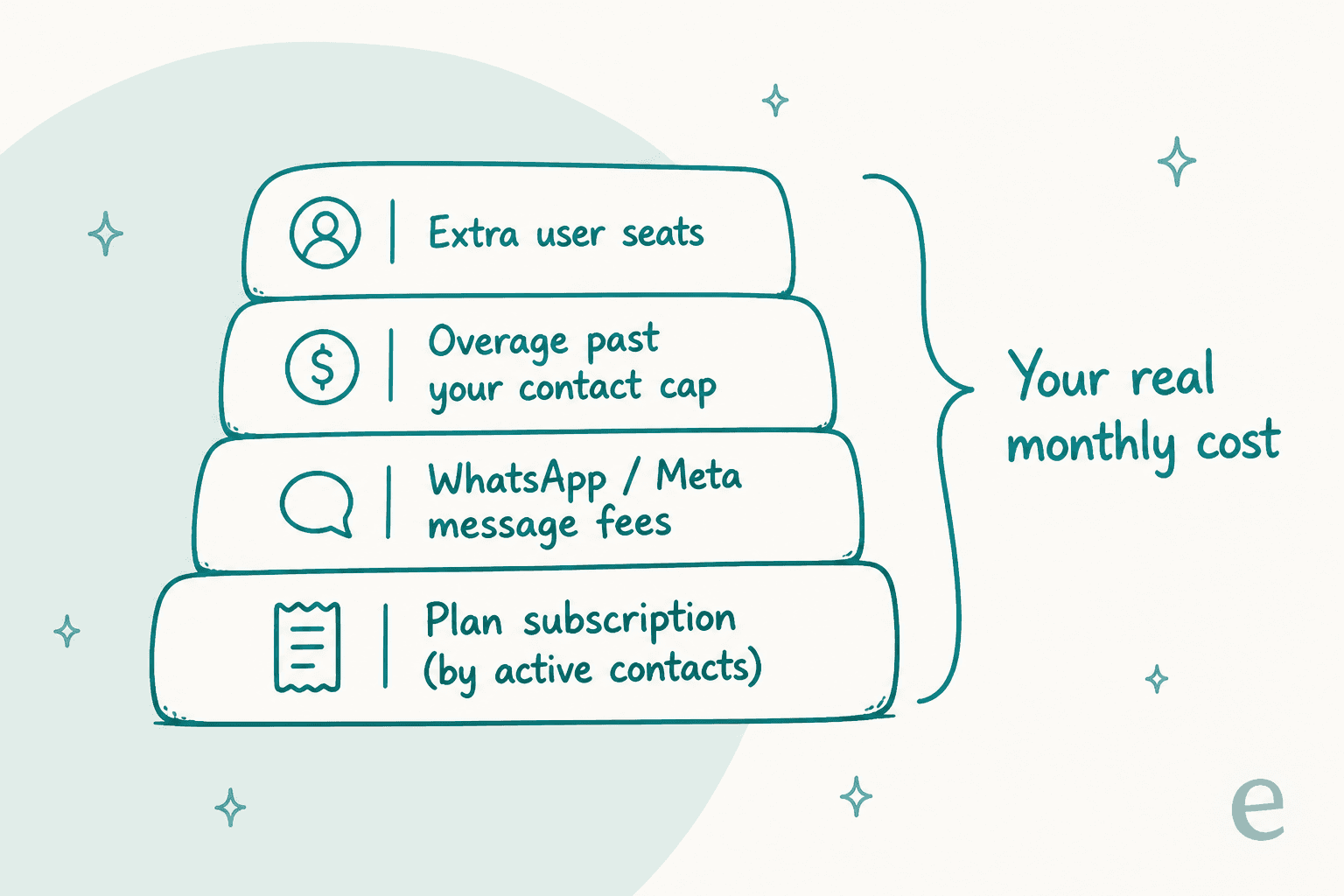
The bill is a stack, not a sticker. Respond.io's pricing headline is "pay only for the contacts you talk to," which sounds lean until you add up every layer. The plan is one line. WhatsApp and Meta conversation fees are a second line, billed separately. Overage past your contact cap is a third, at $12 per 100 contacts on Growth and $15 per 100 on Advanced. Extra user seats are a fourth. None of those are hidden, exactly, but the plan price you compared against is rarely the number that lands on the invoice.
The AI is gated. AI Agents are a Growth-plan feature and up. Starter only gets "AI Prompt" and "AI Assist," which are writing aids, not an autonomous agent. If AI automation is the reason you're shopping, the entry plan doesn't do it, so your real starting price is $159/mo before contacts and messages.
Some teams don't need the inbox at all. This is the one most people miss. Respond.io is a messaging inbox with AI on top. If you already run support through Zendesk, Freshdesk, Gorgias, or a shared email inbox, and what you actually want is smarter customer service automation, buying a second inbox to get the AI is backwards. You'd be paying for a channel layer you already have.
That third reason is why this list isn't just "eight other WhatsApp inboxes." Some of these are like-for-like swaps. One or two are a different shape entirely.
How I picked these
A quick note on method, because it changes how you should read the verdicts. I've spent the last few years building and running AI on live support queues, so I read these tools through one lens above all: when the AI answers a real customer, does it get it right, and can you find out before it goes live? I pulled current pricing from each vendor's own page, checked the billing unit (per contact, per seat, per conversation, and per resolution are all different animals), and read what real users say on G2, Capterra, Reddit, and TrustRadius. Where a tool has a free tier or a genuine WhatsApp API, I've said so plainly.
One framing that helps before you read a single price: these nine tools fall into three buckets, and mixing them up is the most common way to overpay.
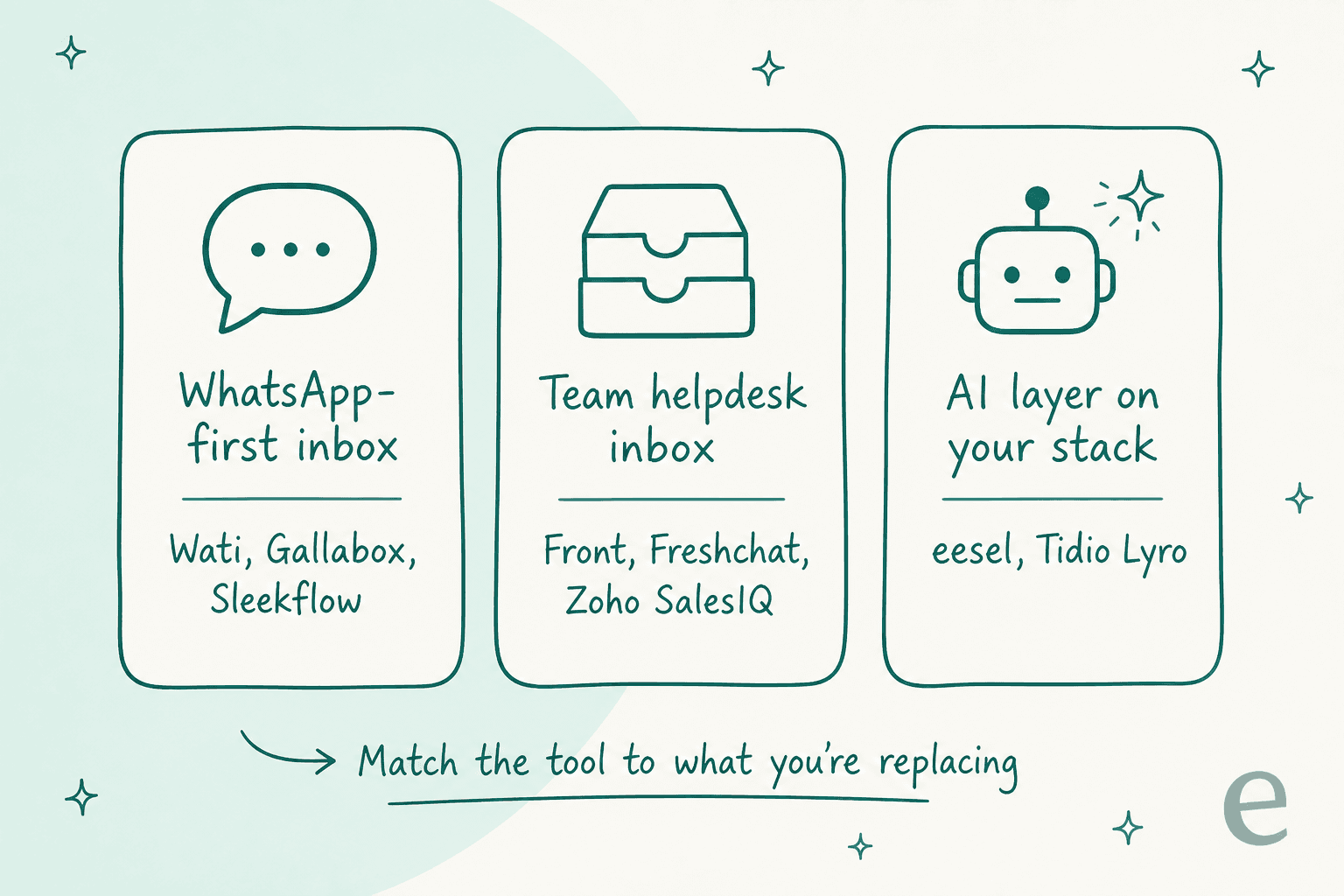
The best Respond.io alternatives at a glance
| Tool | Best for | Billing unit | Entry price | AI approach | WhatsApp API | Free tier |
|---|---|---|---|---|---|---|
| eesel AI | AI on your existing helpdesk | Credits (1 per ticket or chat) | From $299/mo (500 credits) | Learns from solved tickets, simulates first | As a channel | 100 free credits |
| SleekFlow | B2C omnichannel messaging | Monthly active contacts | US$119/mo | AgentFlow AI agents | Yes (BSP) | No (7-day trial) |
| Trengo | European ecommerce inbox | Users + conversations | €299/mo | AI + €0.25-0.30/AI conv. | Yes (partner) | No |
| Wati | Cheapest WhatsApp API entry | Per seat + messages | $59/mo | Astra AI agents | Yes (BSP) | No (7-day trial) |
| Gallabox | WhatsApp + AI voice | Workspace + credits | ~$112/mo | AI credits, AI voice | Yes (BSP) | No (7-day trial) |
| Tidio | Website live chat + AI | Per conversation | $24.17/mo | Lyro AI, $0.50/conv. | As a channel | Yes |
| Front | Complex cross-team ops | Per seat | $25/seat/mo | Autopilot add-on | Yes (channel) | No |
| Freshchat | Freshworks-stack teams | Per seat + sessions | Free tier | Freddy AI, 60+ langs | Yes (channel) | Yes |
| Zoho SalesIQ | Budget live chat + bots | Per operator | $7/op/mo | Zobot chatbots | Add-on | Yes |
Prices are entry rates from each vendor's pricing page, checked August 2026; WhatsApp and Meta message fees are extra on every platform that connects the WhatsApp API. Now the detail.
1. eesel AI
Best for: teams that like their current helpdesk and channels but want much stronger, safer AI on top, without buying a second inbox.
I'll be upfront about the bias: I build eesel AI. But it earns its spot here precisely because it answers the "some teams don't need the inbox" problem from earlier. eesel isn't a WhatsApp Business Solution Provider and it won't run your outbound broadcast campaigns. It's an AI helpdesk teammate that plugs into the stack you already run, Zendesk, Freshdesk, Gorgias, Slack, a WhatsApp number, your help center, and answers from your own content.
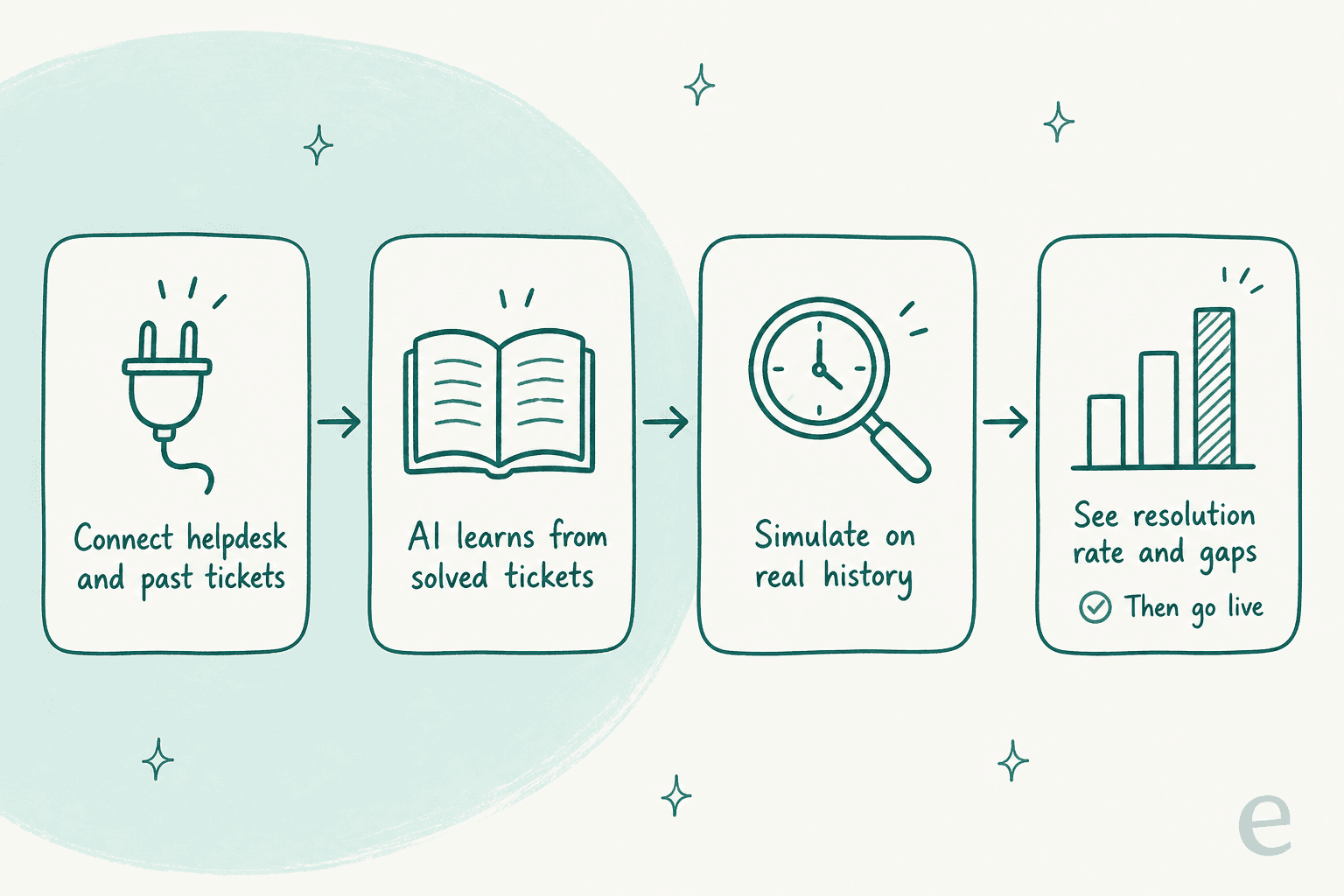
The part that matters most, and the reason I'd trust it on a live queue: eesel learns from your actually solved tickets, not just your help center articles, and you can run a simulation over your ticket history so you see the resolution rate before it ever replies to a customer. You get a resolution-rate estimate and a list of gaps, you fill them, you re-run, and you flip to autonomous only when the number looks right. Most support AI asks you to trust a demo and a switch; this shows you the outcome on your own data first.
On results, the published numbers are concrete: Gridwise resolved 73% of tier-1 tickets in the first month, and Smava runs a fully automated agent handling over 100,000 tickets a month entirely in German. That's the payoff of good live-chat deflection: the routine questions stop reaching a human at all.
Pros
- Sits on your existing helpdesk and channels; no inbox migration.
- Learns from past tickets, and lets you simulate before go-live.
- Transparent fixed monthly pricing: from $299/month for 500 credits (1 credit per ticket or chat), no per-seat fee.
- Connects a WhatsApp number directly and answers in 80+ languages.
Cons
- Not a WhatsApp BSP, so it won't replace Respond.io's broadcast/campaign tooling on its own.
- It's an AI teammate, not a full messaging CRM, so lead-pipeline features live in the tool you connect it to.
Pricing: one fixed monthly price, from $299/month for 500 credits (1 credit per ticket or chat, however long), with no platform fee and no per-seat fee. Accounts start with 100 free credits, and paying a year upfront gets you two months free. SSO and MFA are an add-on from $199/month, and HIPAA is available on request.
Our take: if the reason you're leaving Respond.io is AI quality or a per-contact bill that keeps climbing, and your support already flows through a helpdesk, eesel is the highest-leverage swap on this list because you keep everything you have and only upgrade the automation. If you genuinely need to be the WhatsApp inbox and run campaigns, pair it with one of the messaging tools below rather than expecting it to replace them.
2. SleekFlow
Best for: B2C brands that want the closest like-for-like Respond.io swap, an omnichannel messaging inbox with a CRM and AI agents.
SleekFlow is the most direct match on this list. It's built on the WhatsApp Business API and extended across Instagram, TikTok, Facebook, Telegram, email, and voice, with a shared inbox, a built-in CRM, a Flow Builder, and broadcast campaigns. Its AI layer, AgentFlow, is pitched as an "AI GTM workforce" rather than a chatbot, with role-scoped agents that qualify leads and resolve requests. Like Respond.io, it bills by monthly active contacts, so the pricing shape will feel familiar (for better and worse).
"What I appreciate most about SleekFlow is its ability to centralize all my messages in one convenient location. Managing conversations from WhatsApp, Instagram, and Facebook becomes effortless, as I no longer need to switch between different apps."
Ahsan Y., Customer Account Manager, G2

Pros
- True omnichannel messaging with a native CRM and broadcasts.
- WhatsApp BSP with an official Meta partnership.
- Strong SEA/Hong Kong/Singapore footprint and 4.6 on G2 across 205 reviews.
Cons
- The pricing stack is dense: three plans times an AI toggle times billing interval times four regional tiers.
- The headline AI results (80% handled, 2x leads) are customer-marketing numbers with no stated methodology.
Pricing: Pro starts at US$119/mo (annual, no-AI), rising to US$199/mo billed monthly with AI on; Premium starts at US$299/mo; Enterprise is quote-only. Pro includes 500 contacts and 3 seats; a one-off US$499 dedicated onboarding is the main add-on.
Our take: if you want to stay in the "WhatsApp messaging platform with AI" category and just move off Respond.io, SleekFlow is the swap that changes the least about how you work. Go in with a spreadsheet, though, because the plan matrix takes real effort to price accurately for your contact volume.
3. Trengo
Best for: European ecommerce, travel, and hospitality teams that want an omnichannel inbox with EU data residency.
Trengo is a Netherlands-based, AI-first shared inbox that unites WhatsApp, email, live chat, Instagram, Facebook, and voice into one workspace. It leans into an ecommerce angle (cart recovery, driving sales) and prices in euros by default. Its AI Agents claim to resolve up to 80% of repetitive conversations in 70+ languages, and it's an official WhatsApp Business Partner cited as trusted by 9,000 businesses.
The billing model is worth understanding: plans bundle a fixed user count and a conversation allowance, and AI is included but metered by a surcharge of €0.25 to €0.30 per AI-handled conversation on top. So the AI isn't free even though it's "included."
Pros
- Genuinely omnichannel, with a strong European/EU-data story.
- Bundled user seats and conversation allowances suit steady-volume teams.
- AI Journeys add multi-step, no-code automated flows.
Cons
- No free plan and no cheap 1-2 seat starter tier.
- The per-AI-conversation surcharge means heavy automation carries a real running cost.
- G2's auto-summary flags that customer support can be inconsistent (4.3/5 across 246 reviews).
Pricing: Boost is €299/mo annual (10 users, 6,000 conversations/year), Pro €499/mo annual (20 users, 18,000 conversations/year), and Enterprise is custom. Extra conversations run €15-18 per 100; the AI surcharge is separate.
Our take: Trengo is the pick if EU data residency and a euro-priced, ecommerce-tuned inbox matter to you. Just model the AI surcharge into your total before you commit, since that's where the "included AI" line gets a footnote.
4. Wati
Best for: SMBs, especially in India and emerging markets, that want the cheapest credible way into the WhatsApp Business API.
Wati is a WhatsApp-first platform aimed squarely at SMBs. It bundles a shared team inbox, broadcast and campaign tooling, no-code chatbots, click-to-WhatsApp ads, and an AI layer (Wati AI, with Copilot and Astra AI Agents). It's WhatsApp-first but also handles Instagram, Messenger, RCS, and TikTok, with self-serve onboarding as its core wedge. It cites 16,000+ customers and 4.6 on G2. If a chatbot on WhatsApp is your real goal, it's worth reading up on WhatsApp chatbots before you commit to a BSP.
Its entry price is the lowest real WhatsApp-API option here, which is the whole point. The tradeoff shows up on the automation side once your workflows get complex.
"Sometimes it feels limited in automation options and not flexible enough for complex workflows, and it can take time to set up properly."
Sulimam A., Design, Capterra

Pros
- Cheapest genuine WhatsApp Business API entry on the list.
- Fast self-serve setup, "first AI agent in under 5 minutes."
- Broadcasts, catalog, and Shopify tooling built in.
Cons
- Automation can feel shallow for complex, branching workflows.
- WhatsApp per-message costs are billed separately on Wati's rate card.
- Seat add-ons get pricey ($39-$89/user depending on plan).
Pricing: Growth is $59/mo annual (3 users, no add-on seats), Pro $119/mo (5 users, Astra AI Agents start here), and Business $279/mo (multiple numbers, dedicated CSM). WhatsApp/Meta message fees are passed through on top.
Our take: if budget is the deciding factor and WhatsApp is 90% of your world, Wati is the honest cheapest door in. Push it hard on your actual automation flows during the trial, because that's where it hits its ceiling first.
5. Gallabox
Best for: WhatsApp-led sales teams in India and the Middle East that also want AI voice.
Gallabox is a WhatsApp-first conversational sales and support platform (WhatsApp API, Instagram DMs, a website widget, and AI voice) sold by MangoLeap. It prices in INR, USD, and AED side by side, and its differentiator versus Wati is the AI voice option on higher tiers and a full-funnel automation pitch for revenue teams.
One quirk to know going in: there's no month-to-month billing. The shortest commitment is a quarter, and the real savings come on the annual tab.
Pros
- WhatsApp + Instagram + web widget with AI voice on higher plans.
- Multi-currency pricing tuned for India/MENA buyers.
- Generous AI credit allowances (2,000/mo on Essential, 8,000/mo on Advanced).
Cons
- No monthly billing; quarterly minimum commitment.
- The entry Basic plan can't buy extra seats at all, upgrading is the only way past three users.
- AI agents on WhatsApp and Instagram only start on the Essential plan, not Basic.
Pricing: billed annually, Basic is roughly $112/mo, Essential $248/mo, and Advanced $474/mo (quarterly rates run higher). WhatsApp fees are passed through, and an AI Solutions Engineer setup runs $499 one-time on Advanced.
Our take: Gallabox is a close cousin to Wati with a sharper revenue-team and AI-voice angle. If you're in its home markets and want voice in the mix, it's worth a look, but the quarterly commitment and the seat cap on Basic mean you should size your plan carefully upfront.
6. Tidio
Best for: ecommerce and SMB teams whose center of gravity is website live chat, not WhatsApp, and who want a strong AI agent bolted on.
Tidio is a customer service platform that bundles live chat, ticketing, no-code Flows, and an AI agent called Lyro. Notably, Lyro is powered by Claude plus Tidio's own models, answers only from your knowledge base to limit hallucinations, and posts a 67% average resolution rate with a money-back guarantee if it doesn't reach 50%. You can even buy Lyro standalone and bolt it onto Zendesk, Salesforce, or any help desk, which makes it a rare "AI layer" option in a mostly-inbox list.
"For our company, the choice fell on the Artificial Intelligence Agent since it proved capable of, after being properly 'fed' with content, answering practically all the questions..."
Paulo S., CEO, Retail, Capterra
Pros
- Genuine free tier, plus a Claude-powered AI agent that's clear about pricing.
- Per-conversation billing: unlimited AI replies inside one conversation count as one.
- Lyro sells standalone at $0.50/conversation, so you can add AI without switching helpdesks.
Cons
- Website live chat first; WhatsApp is a channel, not the core.
- The pay-per-resolution guarantee only kicks in on the top Premium tier.
- Bigger deployments jump to a $749/mo Plus tier.
Pricing: Free ($0, 50 conversations), Starter $24.17/mo annual, Growth from $49.17/mo; Lyro AI standalone from $32.50/mo (at $0.50/conversation). Plus starts at $749/mo and Premium is quote-only.
Our take: if your customers reach you on your website more than on WhatsApp, Tidio is a stronger fit than any BSP here, and Lyro is one of the better SMB AI agents going. For a deeper comparison, we keep a running list of Tidio alternatives too.
7. Front
Best for: teams doing complex, multi-step, cross-department customer work who want a collaborative inbox rather than a WhatsApp campaign tool.
Front takes a different shape from most of this list. It's a shared inbox that looks like email but works like a collaborative helpdesk: email, chat, SMS, social, WhatsApp, and voice all land in shared inboxes where a whole team can assign, comment, and resolve together. Its 2026 pitch is pointed, "AI for simple support is everywhere; complex customer operations demand Front," and it targets high-stakes industries like logistics, manufacturing, and financial services. Front AI's Autopilot markets resolving up to 70% of requests.
"Front is just a very well organized platform. From being able to customize tags, archiving, and just navigating through the application, everything is super easy to achieve."
Verified user, Front reviews, TrustRadius
Pros
- Excellent for cross-team collaboration on threads that touch multiple departments.
- Omnichannel and human-in-control, with AI sold as stackable add-ons.
- Trusted by 9,300+ companies, strong on complex workflows.
Cons
- Per-seat pricing means costs scale with headcount, not usage.
- AI features like Copilot and Smart QA are add-ons unless you're on Enterprise.
- A reported two-seat minimum, and it's not a WhatsApp-campaign tool.
Pricing: Starter $25/seat/mo (up to 10 seats), Professional $65/seat/mo, Enterprise $105/seat/mo (all billed annually). Autopilot is an add-on from $0.05/conversation; Copilot and Smart QA are $20/seat/mo each, bundled into Enterprise. If Front's your stack, we also cover the best AI for Front.
Our take: Front and Respond.io barely compete, which is exactly why it's here. If your real problem is coordinating complex conversations across teams (not blasting WhatsApp campaigns), Front is a better home for that work, and you can add AI on top when you're ready.
8. Freshchat
Best for: teams already in the Freshworks ecosystem, or anyone who wants messaging as part of a full helpdesk suite.
Freshchat is Freshworks' messaging product, positioned as the conversational front end of the broader Freshdesk Omni suite. It handles web chat, email, voice, and digital messengers (WhatsApp, Messenger, Instagram, SMS, LINE, Google Business Messages), and its AI layer is Freddy AI. Freshworks claims Freddy AI Agent resolves up to 80% of queries and can speak 60+ languages, and it's trusted by 74,000+ businesses.
The reason to pick it is rarely Freshchat alone, it's that you get ticketing, knowledge base, and voice from the same vendor. The catch is that social and messaging channels start on the Growth plan, not Free.
Pros
- Free plan for website chat and email to start.
- Part of a full helpdesk suite (Omni), so you can grow into ticketing and voice.
- Freddy AI Agent handles 60+ languages natively.
Cons
- Social/messaging channels require Growth or higher, not Free.
- Freddy AI Agent is session-metered, so heavy AI volume carries a usage cost regardless of plan.
- The 80% and 60+ languages figures are vendor self-claims, not independently benchmarked.
Pricing: a free tier covers website chat and email; paid plans add channels and Freddy features, with AI Agent sessions metered on top. Freshworks consolidated its messaging URLs in 2026, so pricing now lives under the live chat software page. If you're weighing the suite, see the best AI for Freshdesk.
Our take: Freshchat makes the most sense if you want messaging as one piece of a bigger helpdesk, or you're already paying Freshworks. As a standalone Respond.io swap it's less focused on WhatsApp campaigns, so match it to the suite story, not the channel story.
9. Zoho SalesIQ
Best for: budget-conscious teams, especially existing Zoho customers, who want live chat plus basic bots without a big monthly commitment.
Zoho SalesIQ is Zoho's live chat and visitor-engagement tool, with Zobot chatbots for automation. It's the cheapest paid option here by a wide margin, and it has a real free tier. It's strongest as part of the wider Zoho suite (CRM, Desk, and the rest), so if you're already a Zoho shop the integration story is the reason to choose it. If you want smarter automation on that stack, we cover the best AI for Zoho Desk separately. WhatsApp comes as an add-on channel rather than a native BSP relationship.
Pros
- Free plan, then $7/operator/mo, by far the lowest entry cost.
- Deep integration with Zoho CRM and Zoho Desk.
- Bot chat sessions scale generously (25k-200k/mo depending on plan).
Cons
- Live chat and bots first; not a WhatsApp-campaign platform.
- WhatsApp and extra brands are paid add-ons ($16/brand/mo, $8/chatbot/mo).
- Zobot is more scripted bot than autonomous AI agent.
Pricing: Free ($0), Basic $7/operator/mo, Professional $12.75/operator/mo, Enterprise $20/operator/mo (all billed annually). Add-ons include $16/month per extra brand and $8/month per additional chatbot.
Our take: for a Zoho-stack team or anyone whose priority is "cheap live chat with some automation," SalesIQ is unbeatable on price. It's not the tool if WhatsApp broadcasts and revenue conversations are your core, but it was never trying to be.
A worked cost example
Abstract pricing is easy to hand-wave, so here's a concrete one. Say you're a growing B2C brand: 3,000 monthly active contacts on WhatsApp, a support team of 5, and you want AI answering the routine questions.
On Respond.io, you're on Growth (AI Agents live here) at 3,000 contacts, plus WhatsApp/Meta message fees, plus any overage in busy months, plus seats past the 10 included. Call the platform line alone comfortably into the low hundreds per month before a single WhatsApp fee.
On eesel, you don't buy contacts or seats at all. If those 3,000 contacts generate, say, 1,500 support tickets a month, that's 1,500 credits, which is the $699/mo plan, flat, with the WhatsApp connection included as a channel and no per-seat charge. If your ticket volume is lower than your contact count (it usually is), a plan sized to tickets often lands cheaper than per-contact once AI is doing the deflection.
The point isn't that one number always wins. It's that the billing unit decides who's cheaper. Per contact, per seat, per conversation, and per ticket all reward completely different usage shapes. Match the unit to how your volume actually behaves before you compare sticker prices.
How to choose in one minute
If you strip away the branding, the decision is short:
- You want to keep your helpdesk and just fix the AI → eesel AI. Layer it on, simulate on your tickets, done.
- You want a like-for-like WhatsApp inbox with AI → SleekFlow (fullest) or Wati (cheapest).
- You're in Europe and want EU data → Trengo.
- Your customers live in your website chat → Tidio (see the best AI live chat software for more).
- You coordinate complex work across teams → Front.
- You want it inside a bigger suite → Freshchat (Freshworks) or Zoho SalesIQ (Zoho).
- You want the lowest possible price → Zoho SalesIQ.
The single most useful question is still the first one: are you replacing the inbox, or the AI? Answer that, and this list gets a lot shorter.
Try eesel for AI on the stack you already run
If your frustration with Respond.io is really about the AI, its quality, its price, or the fact that you had to buy an inbox to get it, that's the exact gap eesel AI is built for. It connects to the helpdesk and channels you already use, learns from your solved tickets rather than just your help center, and lets you simulate on your real ticket history so you can see the resolution rate before it answers a single customer. Pricing is a fixed monthly plan from $299/month for 500 credits, no seats, no per-resolution fee, and you start with 100 free credits. It's the closest thing here to keeping everything you like and upgrading only the part that's bugging you.