HubSpot help desk ticket merging: how it works, what survives, and what you can't undo

Riellvriany Indriawan

Katelin Teen
Last edited November 8, 2026

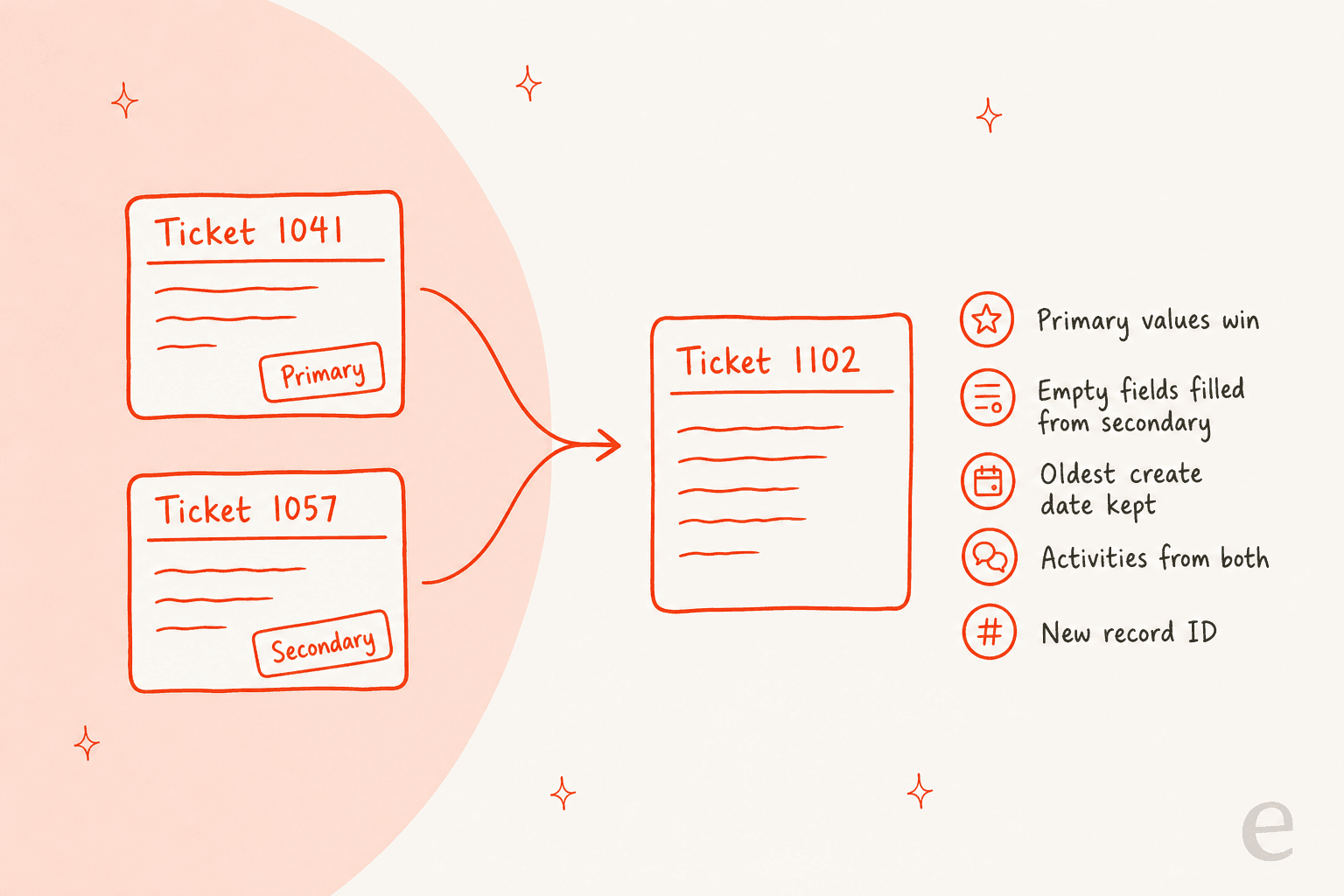
HubSpot's help desk merge combines two tickets into one new ticket record. You pick one as Primary, and its property values win, with the secondary filling any empty fields. Activities and associations from both are kept, the oldest create date is kept, and the new ticket gets a new ticket ID. The merged ticket keeps the primary's SLA. HubSpot says merged tickets cannot be unmerged, so I'd confirm the primary before every click. I'd merge only true duplicates and split instead when one ticket holds two issues. eesel can read a ticket next to the contact's past tickets and flag a likely duplicate for your team. With the eesel CLI, an AI coding agent can upload your approved merge policy as knowledge, then ask test questions and check the answers before anything goes live.
What does merging do in the HubSpot help desk?
Merging takes two tickets about the same thing and turns them into one. HubSpot's help desk documentation describes it as a way to consolidate related threads on the same customer or issue. The remaining ticket combines activities, associations, and most property values from both, as HubSpot's merge records guide explains.
I read both pages, HubSpot's SLA article, the developer reference for the merge endpoint, and the HubSpot Community threads on unmerging. I haven't run a merge in a live HubSpot account, so everything below is what HubSpot says it does, and I flag the spots where HubSpot says nothing. I'm writing this from the support-queue side, where a duplicate ticket is a daily annoyance and a wrong merge is a long afternoon.
Duplicates are common in any email ticketing system because customers write twice. They follow up on a new email address, answer a notification instead of the original thread, or open a form after emailing. My ticket deduplication post covers why that happens, and the CRM ticketing system guide shows where HubSpot sits among them.
How do you merge two tickets, step by step?
You merge from inside one ticket, and you choose which ticket survives as the base. HubSpot's steps are:
- Go to Service > Help Desk and click the name of a ticket in any list view.
- In table or split layout, click Actions > Merge ticket. In board layout, click the three vertical dots in the upper right and choose Merge ticket.
- In the dialog, use the Search dropdown to pick the other ticket.
- Select the Primary radio button under the ticket whose property values should be used for the new record.
- Open What happens when you merge two tickets to review the effects. If you use SLA goals, HubSpot points to a separate section on SLAs.
- Click Merge.
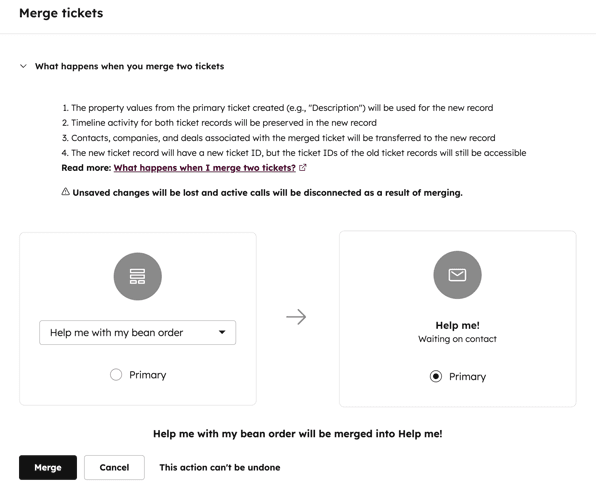
The dialog itself holds details the article leaves out. It states that unsaved changes will be lost and active calls will be disconnected as a result of merging, and it ends with the line This action can't be undone. Finish any note you're typing before you click.
One more thing from the steps: by default, the conversation shown in the thread is the one most recently associated with the ticket, so the newest message might not appear first. The Conversation dropdown in the right panel switches between threads. That tells me a merged ticket holds more than one conversation, not one flattened thread.
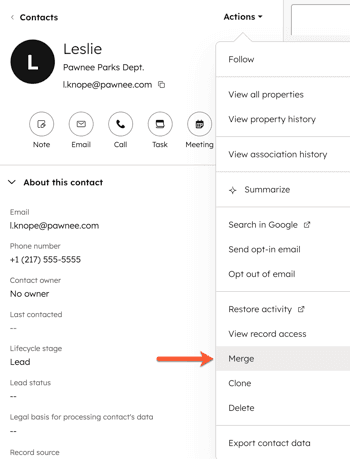
The same Actions > Merge pattern exists on CRM records outside the help desk, shown above on a contact. HubSpot's merge records guide lists tickets under CRM > Tickets as another way in, and the permission and limit rules in that guide apply to both routes.
What does the Primary ticket decide?
Almost everything. HubSpot's merge records guide lists what happens by default, and the infographic below sums it up.
| What | What HubSpot says happens |
|---|---|
| Property values | The primary's values are prioritized. If the primary has no value for a property, the secondary's value is used |
| Create date | The value of the oldest record is kept |
| Property history | The full history from both records is combined |
| Property value timestamps | When a merge updates a value, the timestamp shown is the merge time, not the original date |
| Activities | All timeline activities of both tickets appear on the new record |
| Associations | Associated records from both appear on the new record |
| Ticket ID | A new ticket ID is created. The merge dialog says the old IDs stay accessible |
| Ticket owner | Exception: with several associated conversations, the owner of the most recently updated conversation is kept |
| Segment membership | The secondary record is removed from all static segments |
Source: HubSpot merge records. Two rows deserve a second look. The new ticket ID means any report, saved link, or integration keyed on the old ID can break, and a HubSpot Ideas thread, Archiving Ticket IDs when merging, asks for original IDs to stay searchable. HubSpot's page also describes a public beta, Primary ID Preservation for Merged Records, that keeps the primary record's ID so APIs and webhooks don't break. I'd check whether your account is in it before you merge anything an integration depends on.
The owner exception is the one that surprises people. If you merge an old ticket owned by Priya into a newer one owned by Sam, you might expect the primary's owner to win. HubSpot says that when a ticket has multiple associated conversations, the owner of the most recently updated conversation is kept instead. The article doesn't say how this plays out for tickets with a single conversation, so I'd test it once.
Which plan, seat, and permission do you need?
Merging needs a plan that includes the help desk and a user permission, and HubSpot is silent on a Service Seat. The help desk article is marked as available with Service Hub Professional and Enterprise, and it says Service or Sales Access permissions are required to view, edit, and respond to tickets. The merge records guide adds that the Merge records permission or Super Admin is required to merge.
Splitting is stricter. The same article says a Service Seat is required to split tickets, and it doesn't repeat that line under the merge steps. So a rep without a paid seat may be able to merge but not split, which I'd verify in your own portal. My HubSpot pricing post covers seat costs, and the HubSpot review looks at the plans in practice. If your tickets also feed a customer portal, check who sees the merged record.
| Requirement | What HubSpot's docs say |
|---|---|
| Plan | Service Hub Professional or Enterprise for the help desk article |
| Permission to merge | Merge records, or Super Admin |
| Permission to work tickets | Service or Sales Access |
| Service Seat for merging | Not stated. Required for splitting |
| Workflow enrollment from merges | Requires a Professional or Enterprise subscription |
What are the limits of a merge?
There is no undo, a lifetime cap, and a few ways for a merge to fail. HubSpot's guide lists all three:
- No unmerge. Once merged, records cannot be unmerged. The Merged [record] IDs property shows which records were folded in, who did it, and when.
- Merge limit. You can't merge records that have been included in a combined total of 250+ merges. After that, HubSpot says to create a new record or edit manually.
- Association limit. The merge can fail if the result would exceed your configured association limits, in which case you review and remove associations first.
- Delay. HubSpot says it can take up to 30 minutes for all the records' activities to sync after you merge.
The HubSpot Community thread unmerge a ticket is blunt about the first one. A user merged three tickets and needed the third back out. A community reply gave the same answer HubSpot's docs do:
"Merging is unfortunately permanent and cannot be undone"
The thread's workaround is manual: create a new ticket, copy the property values, then move each activity by associating it with the new ticket and removing it from the old one. A later poster in the same thread described moving contact, company, and deal associations across the same way. It works when it happens rarely, and it doesn't scale. A separate community thread, bulk merge request, shows users asking for it, and I found no bulk merge in HubSpot's docs, so I wouldn't plan around it.
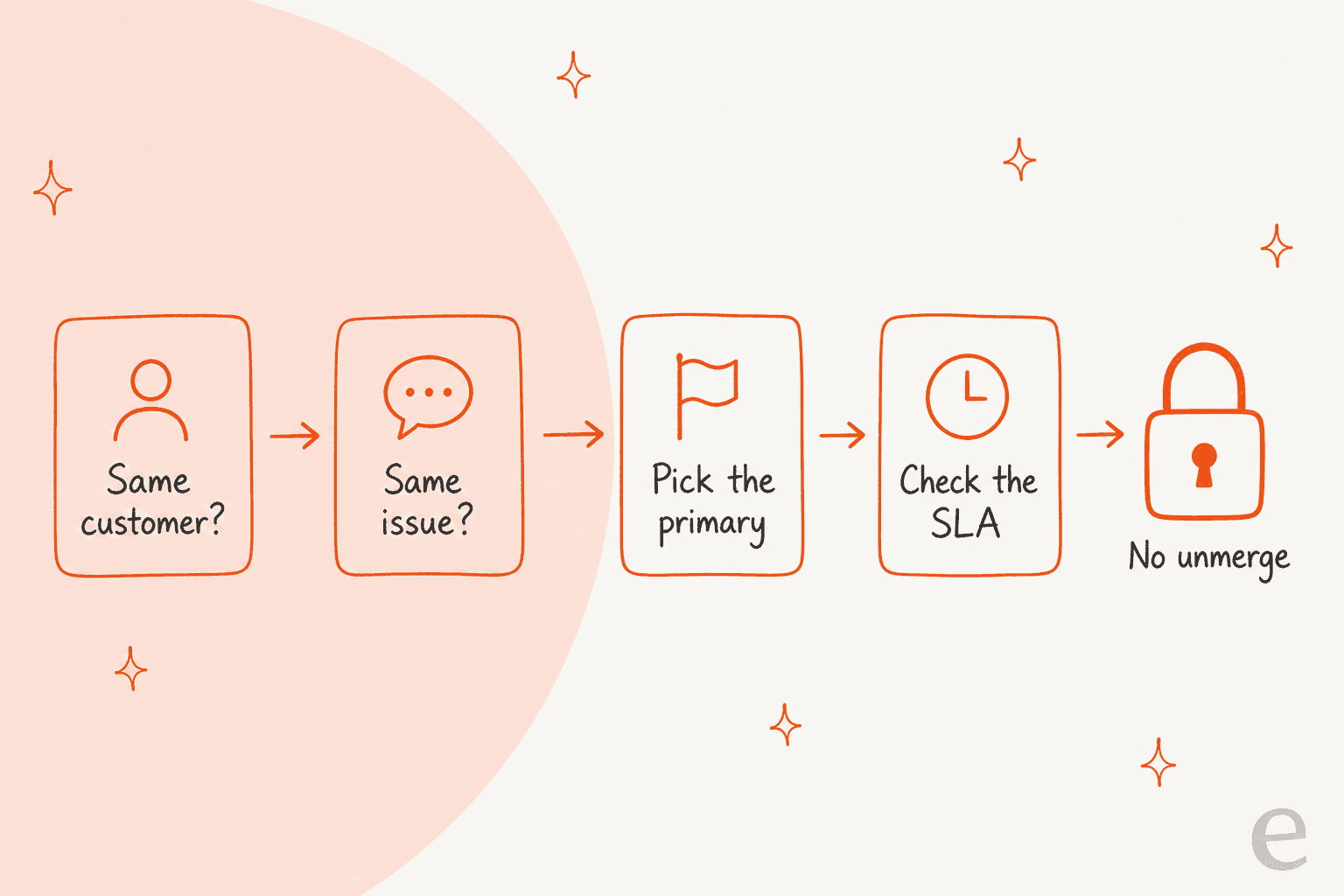
If you want a pre-merge habit, use that four-step row. It's what I'd print for a team. For queue habits more broadly, see my guide to shared queue management and the ticket swarming post.
Which ticket should be Primary?
The one whose properties you want to keep, which is usually the older, better-filled ticket. Because the primary's values win and the secondary only fills blanks, the choice shapes the merged ticket's name, description, priority, and SLA. Pick the one with the right description and priority, not the one that arrived first by default.
Use the picker below to see what each choice affects.
What do you most need to get right on the merged ticket?
How do merges affect SLAs and reports?
For SLAs, HubSpot is specific. The merged ticket's SLA is based on the primary ticket, not the secondary. HubSpot's SLA documentation adds two warnings: the create date shown may be earlier than the date used to calculate deadlines, and properties like Close date or Time to first response may take the secondary's values when the primary has none, so the SLA status may not match the ticket's current status.
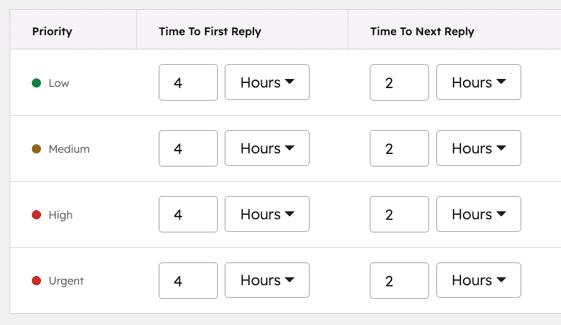
HubSpot's SLA goals can be keyed to ticket properties such as priority, as in the table above. Given that the primary's property values win, my reading is that the primary's priority decides which goal applies, but that is my inference and not a HubSpot statement. If you run strict targets, test one merge and watch the SLA fields on the result.
For reporting, plan for three side effects. Two tickets become one, so ticket counts drop and any metric built on volume shifts. The new ticket ID can break saved links and integrations. And property timestamps show the merge time for any value the merge changed. If you track volume carefully, my customer service KPIs guide covers which measures are safest, and cost per ticket benchmarks shows why duplicates inflate the number.
The AI customer service statistics roundup puts the wider picture in context, and AI resolution rate explains why merged tickets can skew it.
Can you merge tickets through the API?
Yes, and the call is simple. HubSpot's developer reference lists a tickets merge endpoint, a POST to /crm/objects/2026-09/tickets/merge with two required fields: primaryObjectId and objectIdToMerge. An older v3 route, /crm/v3/objects/tickets/merge, appears in HubSpot's legacy reference with the same two fields. I didn't test either call, and I didn't verify the current scope requirements for the versioned route, so check the reference before you build.
A script is the realistic way to clear a backlog, since the help desk only merges two tickets at a time. It also means a bad rule in a script can destroy data at scale with no undo, so I'd always log both IDs before each call. The old IDs stay in the merged record's Merged [record] IDs property per HubSpot's guide, which gives you a trail. My AI helpdesk API guide covers the same risk with other tools.
Merge, split, or leave the ticket alone?
Merge when two tickets hold one issue. Split when one ticket holds two issues. Leave it alone when the second message is a follow-up on the same problem. The difference that matters is reversibility: HubSpot documents no unmerge, and it documents no undo for a split either.
| Situation | Best move | Why |
|---|---|---|
| Same customer, two tickets, one problem | Merge | One thread, one owner, one SLA |
| One ticket, two unrelated problems | Split | Each problem gets its own status |
| Two tickets, related but different problems | Leave separate, cross-reference in notes | A merge can't be undone |
| Customer replied to a closed ticket with something new | Split | The reply reopens the closed ticket |
| Duplicate from a spam or auto-reply loop | Close or delete, not merge | Merging keeps junk in the history |
My HubSpot ticket splitting post covers the other side: splitting only works on email and form tickets, needs a Service Seat, and the docs are silent on SLA clocks for the new ticket. Merging's docs don't list a channel restriction either way, so test chat and WhatsApp tickets before you promise anything, and see my HubSpot chatbot post for the chat side. For how other helpdesks handle the same job, compare Freshdesk merge tickets.
Routing prevents many duplicates in the first place, so see my HubSpot ticket routing post and the multi-channel help desk guide for channel quirks.
Where does AI fit when two tickets are really one?
An AI teammate can spot the duplicate. It can't do the merge. eesel's documented HubSpot actions are replying, adding internal comments, creating tickets, changing priority, and updating ticket titles and descriptions (eesel HubSpot docs). Merging isn't on that list, which is the right call to me, given there's no undo. What the agent can do is read the ticket and the contact's record and leave an internal comment the customer can't see, such as "this looks like a duplicate of the ticket from Tuesday", so a person merges with the facts in front of them.
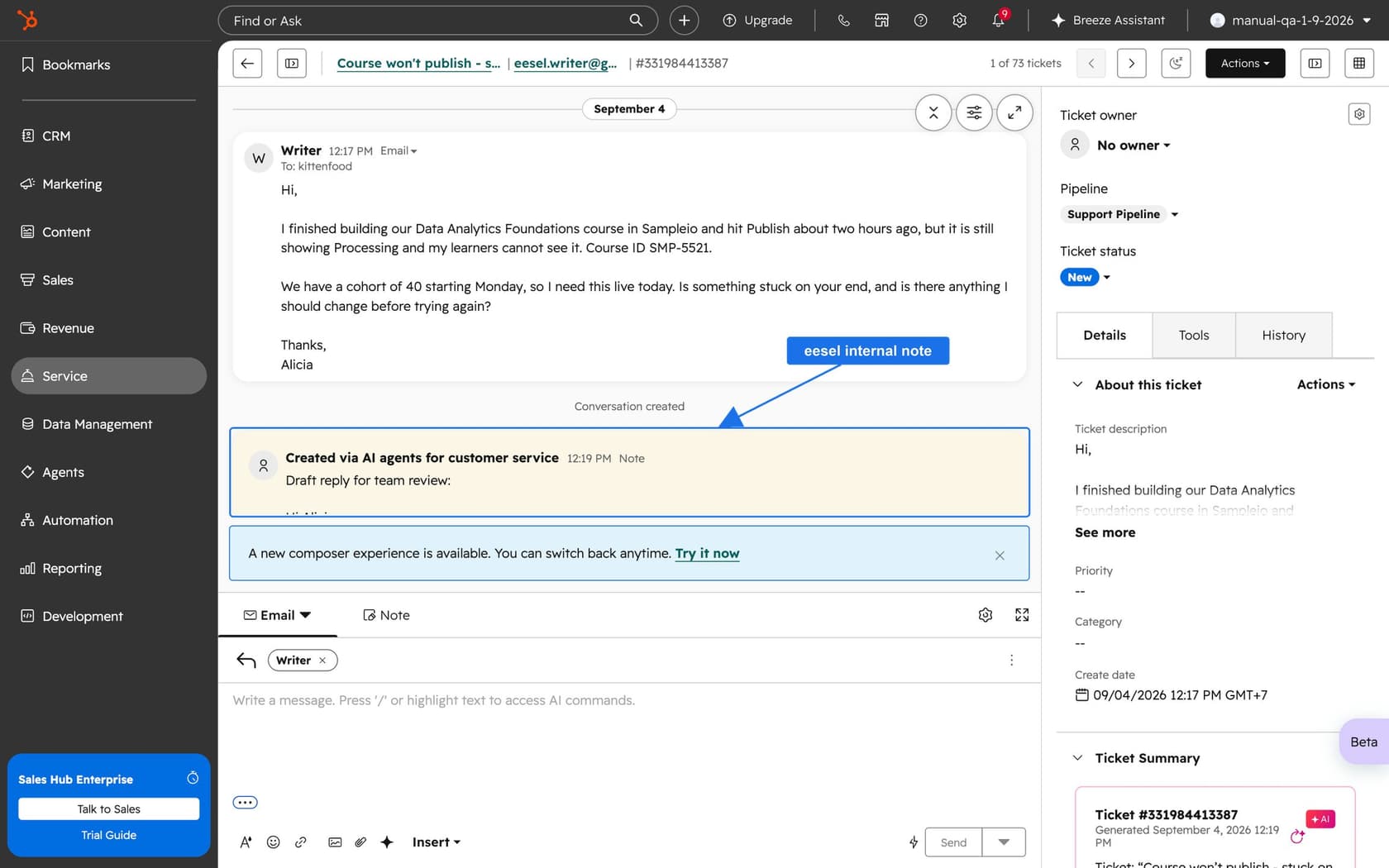
MentorShow, a French online learning platform, runs its whole support team in HubSpot and told eesel it gets between 5,000 and 13,000 tickets a month depending on the period. Its story notes that a webinar has a replay and a coaching session does not, and a reply that mixes them up creates a second ticket. eesel reads each conversation and ticket, and it pulls the member's subscription status, renewal date, and past tickets from the HubSpot contact before it writes. Between 8 August and 8 September 2026 it read about 1,200 HubSpot items and wrote 432 drafts, and a person reads, edits, and sends every one.
That past-ticket check is the part that matters for merging. A duplicate is only obvious when something compares the new ticket to the contact's history. You can write that into the agent's instructions, for example: flag any ticket that repeats an open one from the same contact, and name the older ticket in the comment. For more on the HubSpot side, see my AI for HubSpot Service Hub guide and the AI response for HubSpot post.
The complete HubSpot AI guide, the HubSpot AI agent post, and the Service Hub AI alternatives roundup widen the view.
What would I do with this in my own queue?
Here's the short version I'd hand a support lead:
- Write a one-line merge rule. "Merge only when two tickets are the same issue from the same customer" is enough.
- Pick the primary on content, not age. Its properties and SLA win, and there's no way back.
- Check the owner after the first merges. HubSpot's owner exception can hand the ticket to someone you didn't expect.
- Warn the team about the new ticket ID. Saved links, reports, and integrations keyed on the old ID can break, unless you're in the ID-preservation beta.
- Run one test merge on dummy tickets. Check the owner, SLA fields, associations, and which conversation shows first.
- Keep a log for scripted merges. Record both IDs before each API call.
For related automation, see my guides on automated ticketing, first response automation, and ticket classification.
To keep junk out of the queue before it needs merging, read about ticket prioritization, spam ticket filtering, and ticket summarization.
HubSpot's own Breeze escalation guardrails and Breeze customer agent posts cover its AI side.
Try eesel for your HubSpot help desk
If duplicate tickets are a symptom of a queue that's too busy to read carefully, eesel for HubSpot works like a new teammate in Service Hub. It learns from your HubSpot knowledge base and past tickets, reads each ticket with its contact record, and drafts replies as internal comments for your team to review and send. It doesn't merge tickets, but it can name the duplicate up front so your team merges the right pair. Compare options in my best AI for HubSpot roundup, or read the AI teammates overview.
If you're weighing HubSpot's own AI, my eesel vs HubSpot Breeze comparison is the place to start, and AI tools for HubSpot lists the wider field.
The eesel CLI lets Claude Code, Codex, or Cursor upload your approved merge-and-split policy as knowledge, adjust the agent's instructions, and ask test questions to check the answers before they go live. Connecting HubSpot itself still needs someone with the App Marketplace Access permission to approve it in the browser.
Frequently Asked Questions
How do I merge tickets in the HubSpot help desk?
Can I unmerge tickets in HubSpot?
Which HubSpot plan and permissions do I need to merge tickets?
What happens to the SLA when I merge two HubSpot tickets?
Is there a limit on how many times a HubSpot ticket can be merged?
Can I merge HubSpot tickets through the API?
/crm/objects/2026-09/tickets/merge. If you're building around it, my AI helpdesk API guide shows what to expect from other helpdesks.