Help Scout customer portal: setup, access and limits

Rama Adi

Katelin Teen
Last edited November 8, 2026
Help Scout's customer portal is a login-gated page where contacts see and reply to their own conversations, available only on the Plus and Pro plans. Customers sign in with a six-digit emailed code, and a company-level setting controls whether they see only their own threads, all company threads, or all except some inboxes. I would turn it on for B2B accounts and regulated teams, because Hide reply content keeps the reply text out of email entirely, but remember there is no self-registration and the portal only works for existing contact records. eesel can draft replies inside the mailbox for your team to review, and the eesel CLI lets a coding agent upload approved knowledge and test answers first, though a Help Scout admin still approves the connection.
What is the Help Scout customer portal?
It is a secure web page where your customers view and manage their support history instead of digging through email. Help Scout's portal setup guide describes it as "a secure, authenticated web experience" so users can "self-serve and track their conversation status in one centralized place".
Each portal lives at {slug}.helpscoutportal.com. Account Owners and Administrators configure it, and company-level access is governed by the Manage customer portal access permission, which they can grant to other roles.
It is easy to confuse with three other things Help Scout already has, so here is the split:
- Docs is your public knowledge base. No login.
- Beacon is the widget on your site. Its Previous Conversations list needs custom code to work across devices, via Secure Mode.
- The portal is a standalone page with a built-in login, and no coding on your side. It links back to Beacon for help articles and new conversations.
If you are still deciding on Help Scout as a whole, my Help Scout review covers the wider product.
Which Help Scout plans include the customer portal?
Plus and Pro. Standard does not have it. On Help Scout's pricing page, "Secure customer portal" is listed under Plus, which is $45 per user per month there, and Pro is $75. Standard is $25.
| Plan | Listed price per user per month | Customer portal |
|---|---|---|
| Standard | $25 | No |
| Plus | $45 | Yes |
| Pro | $75 | Yes (and HIPAA support) |
For a five-agent team, moving from Standard to Plus is $100 more a month at those listed prices ($225 versus $125). The pricing page also offers an annual toggle with a 16% discount, so check which billing view you are looking at. See my Help Scout pricing post for the full picture, including AI add-ons.
Pro matters here for one reason: Help Scout's HIPAA article says HIPAA support is only included in the Pro plan, and it requires signing a business associate agreement. If you run a healthcare support team, the portal and HIPAA support live on the same plan.
How do you set up the Help Scout customer portal?
You set it up from Settings > Customer Portal, in about six steps. The settings are global, and you override them per company afterwards.
- Turn it on. Open Settings (the gear icon), pick Customer Portal and toggle it on. Help Scout shows the portal address next to the toggle.
- Connect a Beacon. The portal's Get help and New Conversation buttons run through it, so pick the Beacon you want.
- Set default access. Choose all companies or only specific companies, then a default conversation visibility.
- Set email delivery. The Hide reply content toggle is covered below.
- Set the brand. Use the default company brand, or Custom with your own logo, favicon, touch icon and brand color.
- Save. Nothing takes effect until you do.

Since the Beacon is what lets a customer start a new conversation from the portal, it is worth tuning before launch. Help Scout's own next-step advice is to customize your Beacon so people can search your knowledge base from inside the portal. My notes on Beacon modes and Beacon form fields cover that side.
How do customers sign in to the portal?
With a six-digit code, not a password. A customer enters their email address on the sign-in page, Help Scout emails a single-use code, and they type it in. Per the docs, the code is valid for five minutes, and if a user enters a wrong code five times, the code is invalidated.
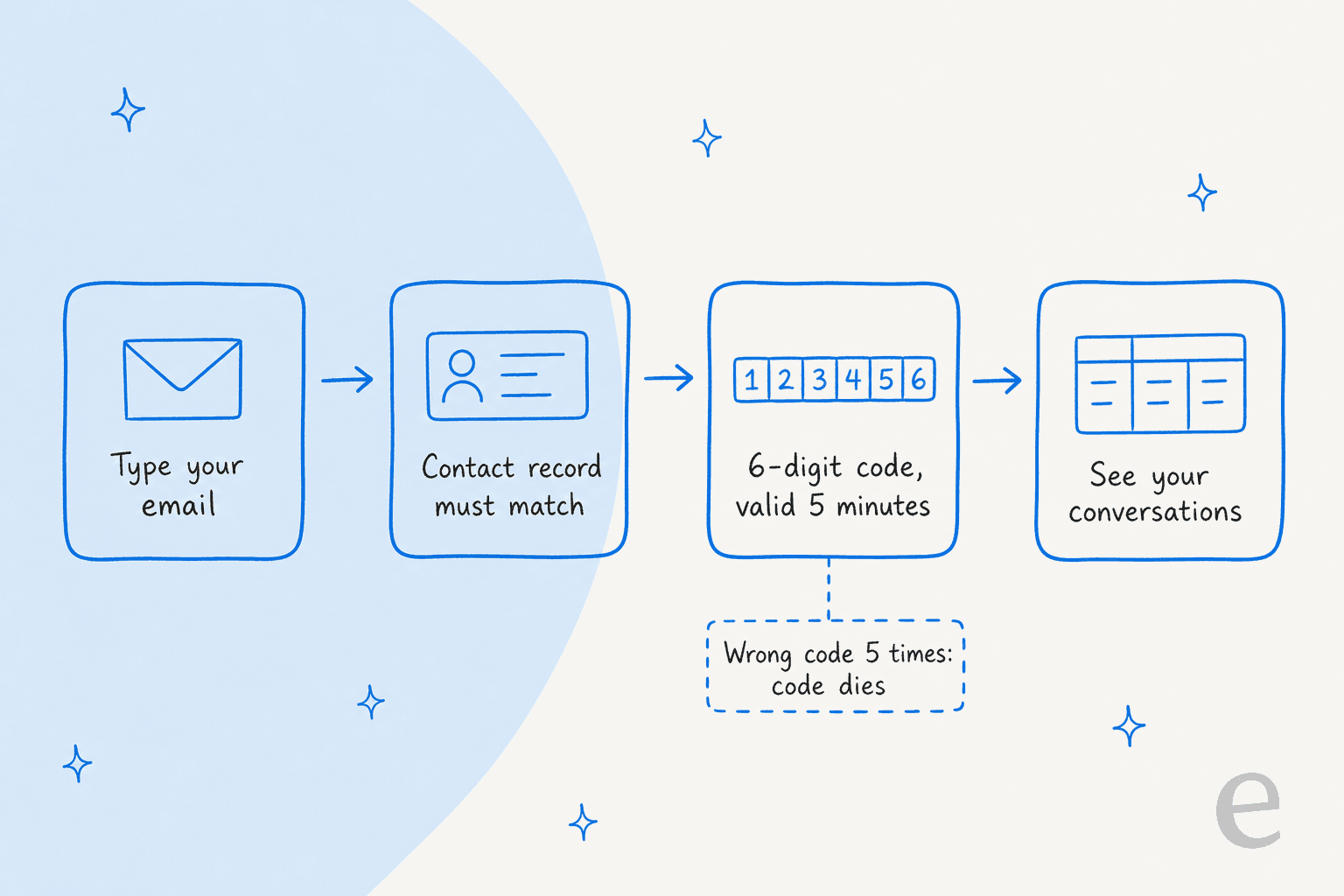
The catch is the second card in that picture. The docs say the customer's email address must match an existing contact record, and "there is no self-registration or request access flow" at this time. That shapes who the portal suits. It works for customers who have already emailed you, and for contacts you or your CRM sync have created. It does not work as a public sign-up page for strangers. My Help Scout customer properties post covers how contact data gets there.
Once inside, customers see a table of their conversations with two customer-facing statuses, New Response and Closed. They can reply and attach files to conversations they started. If a conversation is locked, the reply box becomes a New Conversation button.
Who can see which conversations?
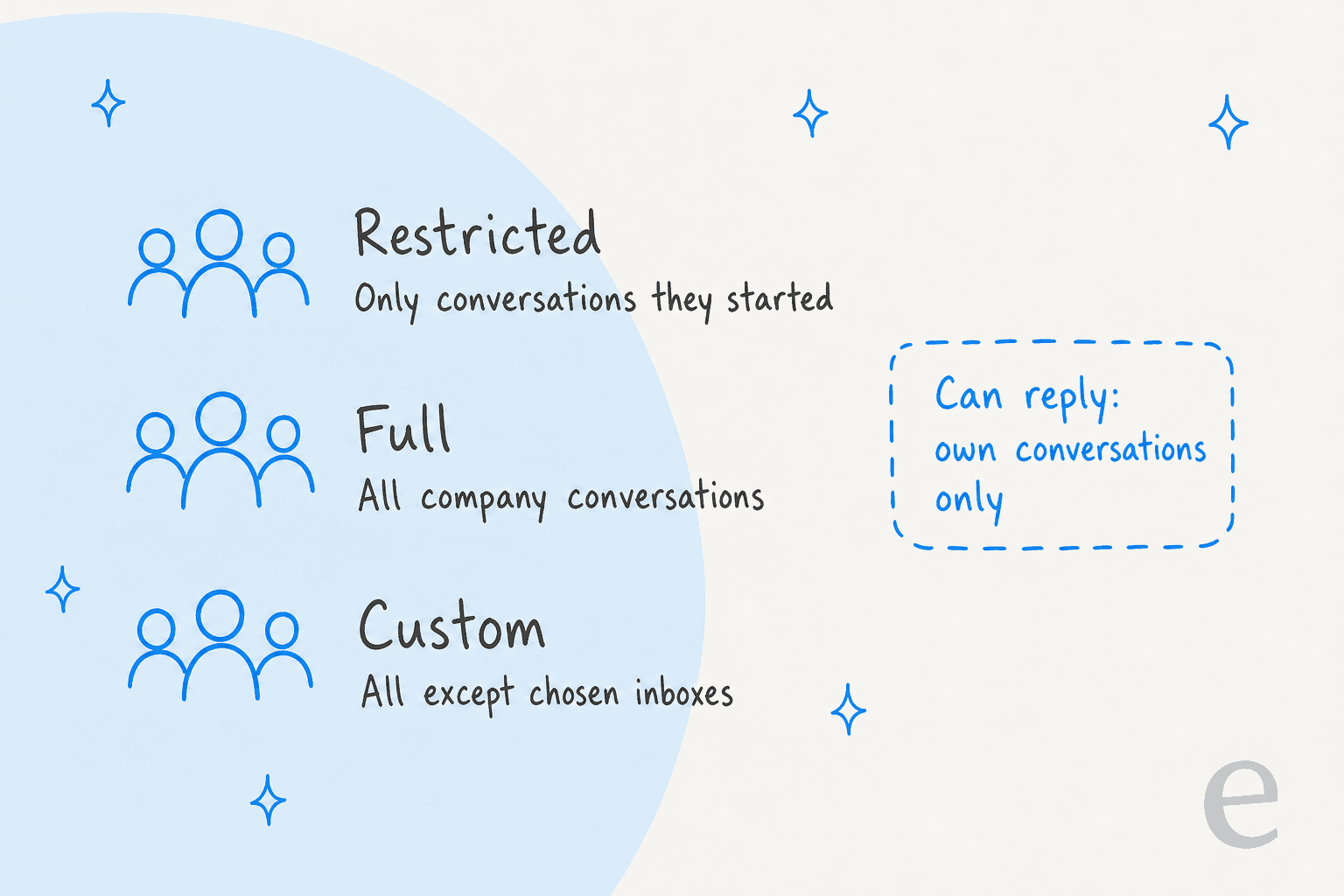
That is controlled by visibility, and it is the setting I would think hardest about. You pick a default globally, then override it on any company record. There are three levels.
| Visibility | What a contact sees | Good fit |
|---|---|---|
| Restricted | Only conversations they started | Consumers, or any account where staff should not see each other's tickets |
| Full | All conversations from their company, across all inboxes | B2B accounts that share one support history |
| Custom | All company conversations except selected inboxes | Companies where billing or HR threads need to stay private |
A contact can always see their own conversations, whatever you pick. Two details in the docs are worth knowing. People with company-level visibility can read colleagues' conversations but cannot reply to them. And a colleague's conversation from an excluded inbox stays hidden even with a direct link or conversation ID, though the contact who started it still sees it under My Conversations.
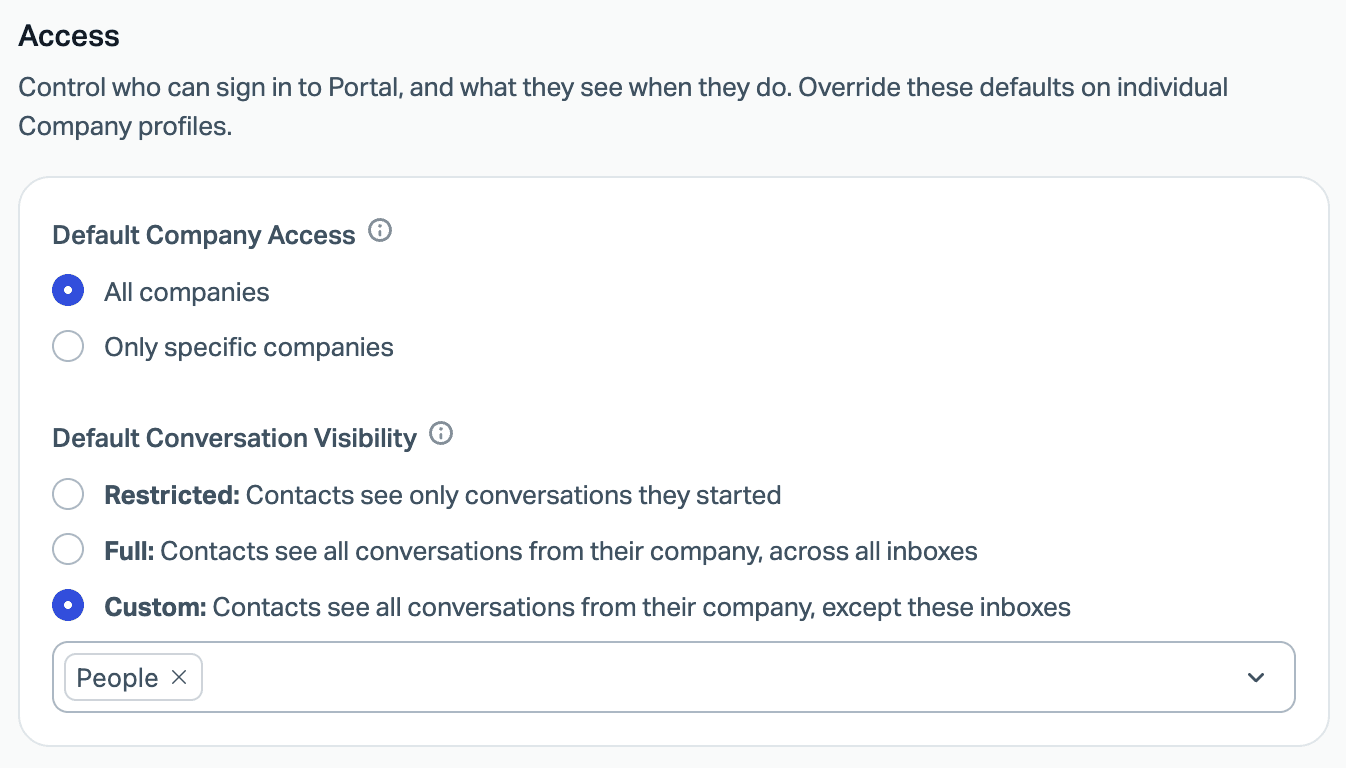
For per-company overrides, open Customers > Company, find the record and use its Customer Portal tab. You can switch the portal on or off for that company (the default depends on whether you chose all companies or only specific ones), change visibility, and use Enable custom access to limit the portal to chosen contacts when not every employee should get in. Plus also lists "Group conversations by company" as a feature, which is the same company record this relies on.
My own take: start with Restricted globally and widen it for the accounts that ask. Showing every colleague's conversation is a helpful default for a managed-services client and an awkward one for a company whose staff handle sensitive HR or finance threads.
What does Hide reply content do?
It keeps the text of your reply out of the customer's email inbox. Help Scout calls it Notification-Only Email mode. With it on, contacts with portal access get an email with a secure link to log in and read the reply and any attachments, rather than the reply itself.
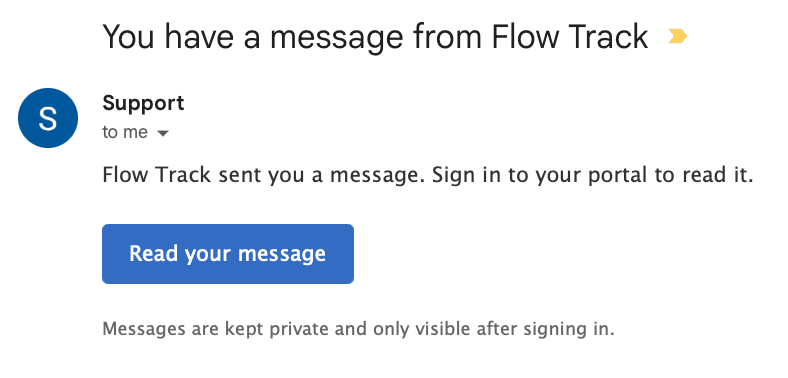
The docs recommend it for "healthcare, finance, and other compliance-sensitive organizations". You can set it globally or per company, and Help Scout says the portal gives regulated teams "a secure, login-gated path that keeps sensitive information off unencrypted email".
Three limits to plan for:
- Agent replies only. Notification-Only Email applies only to replies sent by agents. System auto-replies still send normal email content, so do not put anything sensitive in an auto-reply.
- It only hides replies to contacts with portal access. A customer who is not in a portal-enabled company still gets normal email.
- Your customer has to log in to read you. That is the point, but it adds a step to every reply. I would not turn it on for a general consumer inbox where speed matters more than secrecy.
Which teams should use the Help Scout customer portal?
I would reach for it in three situations, and skip it in a fourth.
- B2B support with account contacts. Full or Custom visibility gives a client's team one shared view of what is open, which cuts the "any update?" emails. This is the strongest use I can see.
- Healthcare, finance and legal teams. Hide reply content is the draw. Pair it with Pro's HIPAA support and the signed BAA if you handle protected health information, and remember Help Scout asks you to also sign its AI Feature Healthcare Addendum to use its AI features with HIPAA compliance.
- Teams tired of status chasers. Customers can check status without emailing, per the docs.
- Skip it for anonymous, one-off consumer support. No self-registration means people who have never emailed you cannot get in, and the code login adds friction to a single question.
I did not find published figures on how much the portal reduces inbound volume, so treat any deflection gain as something to measure. My deflection rate guide shows what to track, and CSAT will tell you whether the extra login step annoys people.
Where does an AI agent fit with the portal?
The portal decides where customers read replies. An AI agent decides who drafts them. Those are separate jobs, and a regulated team often wants both: careful drafts, delivered through a secure channel.
eesel is an AI helpdesk teammate that works inside the Help Scout mailbox. Per its Help Scout docs, it can draft or send replies, leave internal notes and add tags, answering from your Docs and past conversations. Honest limits: I found nothing in those docs about the customer portal, so I cannot tell you how eesel replies interact with Hide reply content. Test one conversation with the toggle on before you rely on it.
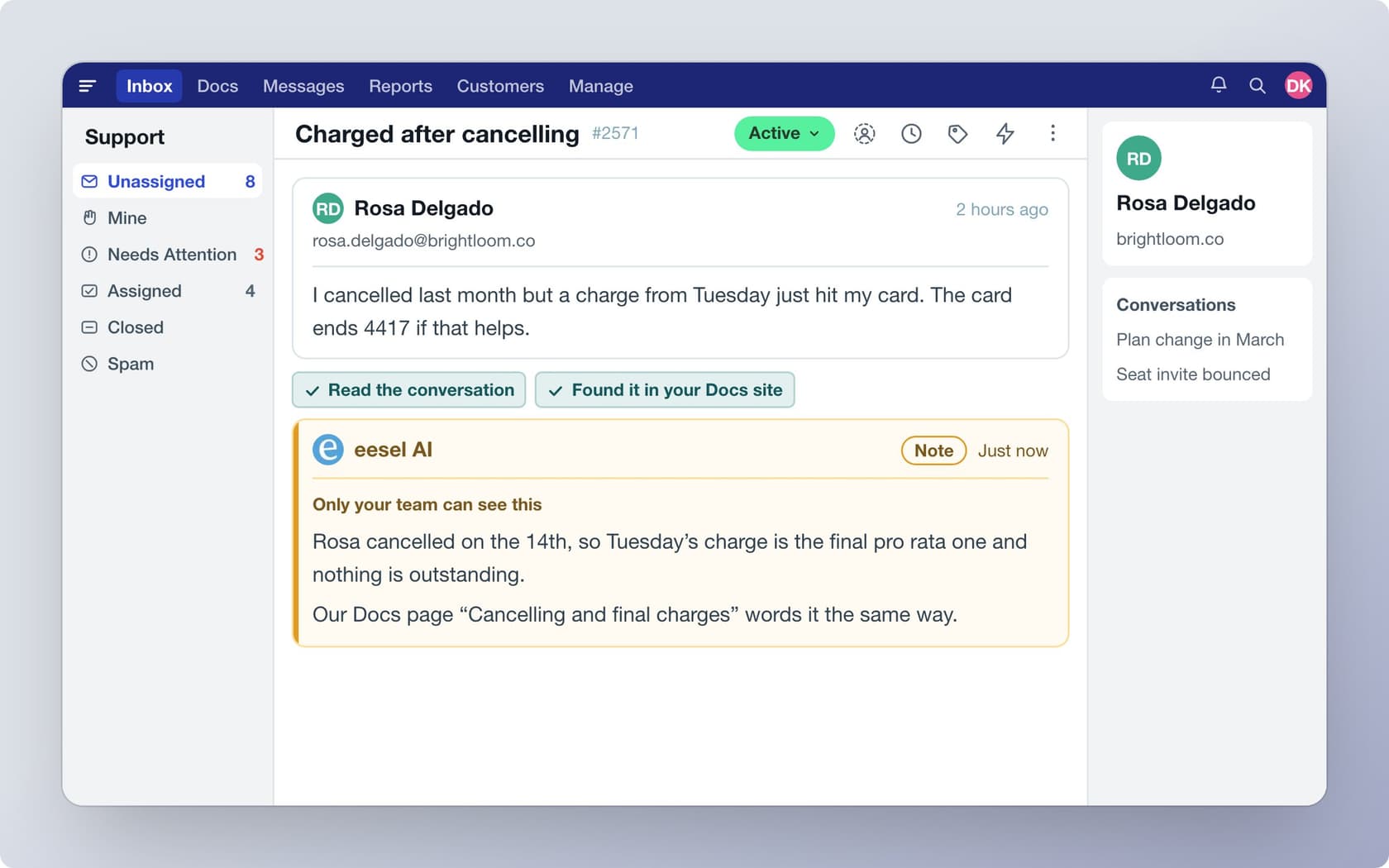
The closest real proof I have is from regulated finance on another helpdesk, so I will say so. smava, a Berlin loan comparison platform, runs three eesel agents on a shared Zendesk. In the month to 8 September 2026 eesel handled about 27,000 tickets and prepared about 15,300 draft replies, and agents approve each draft with an Approve button or ask @eesel for another macro. eesel never sends the customer-ready replies itself there. That draft-then-approve pattern is what I would copy for a Help Scout team using notification-only email: let the agent draft from approved macros, and keep a person in charge of what goes out.
For a coding agent, the eesel CLI can upload approved knowledge, such as exported Docs articles and saved replies, and eesel chat asks test questions so you can check answers before anything goes live. Connecting the mailbox still needs a Help Scout admin to approve it. For other automation choices, see my Help Scout workflows and saved replies posts, and the ticket deflection guide.
What mistakes should you avoid with the Help Scout customer portal?
- Defaulting to Full visibility. It shows every colleague's conversations, so one wrong default can expose sensitive threads. Start Restricted.
- Assuming auto-replies are hidden. Notification-only mode skips system auto-replies. Review what yours say.
- Expecting self-service signup. A contact must already exist, so import or sync contacts first.
- Forgetting the Beacon. The portal's help and new-conversation buttons run through it, so a neglected Beacon makes the portal feel half built.
- Turning it on without telling customers. Once replies are hidden, a customer who does not recognise the notification email may think it is spam. Say it is coming, in your last few replies.
- Overlooking escalation. Whoever answers behind the portal should know when to hand off. My notes on AI escalation cover it.
If you are comparing portals across tools, Zendesk's version is covered in my Zendesk customer portal guide, and Freshdesk's in the Freshdesk portal setup post.
Try eesel with your Help Scout mailbox
If the portal sends the right customers to your team, eesel for Help Scout is the next layer I would add. It reads your Docs site and past conversations and drafts replies inside the mailbox, so a person approves what goes out, which is the same care that makes hidden-reply email worth turning on. You can try eesel with 100 free credits for 7 days, then paid plans start at $299 a month for 500 credits (eesel pricing). For a wider comparison, see my best AI for Help Scout roundup.
Frequently Asked Questions
What is the Help Scout customer portal?
{slug}.helpscoutportal.com. Customers sign in with a one-time code sent to their email. My Help Scout features guide covers the rest of the product.