Claude for Help Scout: the official MCP server and its one big limit

Rama Adi Nugraha

Katelin Teen
Last edited August 12, 2026

Help Scout quietly did something Zendesk still has not
I build integrations at eesel, which means I spend an unreasonable amount of time reading other people's API docs, and the "Claude for X helpdesk" question has been landing in my inbox all year. Usually the answer is deflating. When I checked Claude for Zendesk in August, claude.com/connectors/zendesk was a 404 and Zendesk had shipped an MCP client rather than a server. The Freshdesk route is still gated behind an early access programme, and Gorgias has no marketplace listing for it at all.
Help Scout just shipped the thing. Its help center article, last updated on 6 August 2026, walks you through pointing Claude at a real Help Scout endpoint on Help Scout's own production domain. No wrapper, no marketplace middleman, no beta waitlist.
That is good, and I want to say so before I spend the rest of this post on the limit. A 12,000-company support platform choosing to expose its data to whatever AI its customers already use is not the obvious commercial move. Plenty of vendors would rather you used their own, and Help Scout has plenty of its own AI to sell you.
There is also a slightly awkward detail worth knowing before you read further: the MCP server is documented in the help center, at docs.helpscout.com, and nowhere on the developer portal at developer.helpscout.com. A site:developer.helpscout.com MCP search returns only the Docs API overview. No spec, no changelog entry, no reference page. If you went looking where a developer would normally look, you would conclude it did not exist.
The four ways to connect Claude to Help Scout
There are exactly four routes, and they trade off along one axis that matters more than any other: whether the thing can send an email to a customer.
| Route | Who runs it | Setup time | Reads | Sends a reply | Cost |
|---|---|---|---|---|---|
| Official MCP server | Help Scout | ~3 minutes | Conversations, customers, inboxes, workflows, reports, Docs | No | Free, plus Claude tokens |
| Community MCP server | Independent developer | ~30 minutes | 55 read operations | Yes, behind two flags | Free, plus Claude tokens |
| Zapier or Pipedream | Gateway vendor | ~15 minutes | Find-style lookups | Yes | Plan quota, 2 tasks per call on Zapier |
| Inbox API | You | Weeks | Everything | Yes | Engineering time, plus Claude tokens |
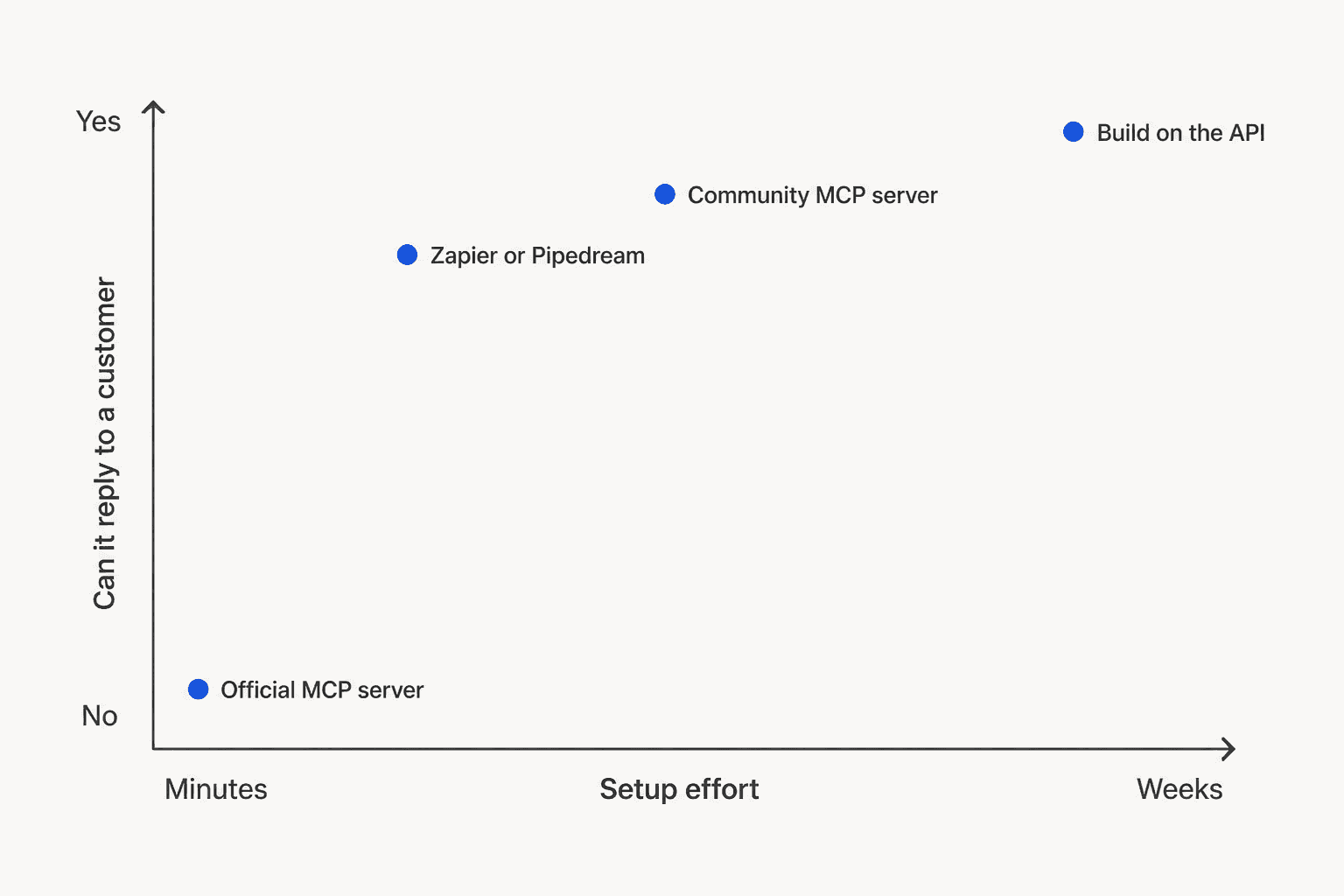
The shape of that chart is the whole story. The only route that is both instant and official is the one that cannot answer a customer. Everything that can reply either comes from someone other than Help Scout, or you build it.
Route 1: the official MCP server, start to finish
This is where most people should start, because the cost of trying it is three minutes and zero dollars.
Plan gate first. The connector works on Standard, Plus, and Pro, which is to say any plan that includes API access. The Free plan has no API access at all, so it is out. Report tools need Plus or Pro, because Help Scout's reporting endpoints are not on Standard either. If you are working out which tier you are on, our Help Scout pricing breakdown has the full grid.
On Claude Pro or Max, go to Customize, then Connectors, then Add custom connector. Name it Help Scout, set the remote MCP server URL to https://mcp.helpscout.net/mcp, and leave the advanced settings empty. The connector registers itself. Then you log in to Help Scout and approve.
On Claude Team or Enterprise, only a Claude Owner can add it, through Organization settings. Each teammate then connects with their own Help Scout login afterwards. That is Anthropic's rule for custom connectors, not Help Scout's.
The trap everyone hits: do not paste a Help Scout App ID or secret from My Apps into the OAuth fields. Help Scout warns explicitly that those credentials are for the Inbox API and will not work here. Leave the fields blank.
One extra credential is worth knowing about. Inbox tools connect automatically, but Docs tools need a separate Docs API key pasted into an optional field during authorization. It lives under Your Profile, then Security and Access, and needs the Docs create-and-edit permission. Skip it and Claude simply will not see your knowledge base, which is usually the first thing people want it to read.
Once you are connected, ask Claude to run the Help Scout health check. That is Help Scout's own documented way of confirming the tools loaded.
What the connector actually exposes
| Surface | What Claude can reach |
|---|---|
| Conversations | List, search, summarize, including threads, tags, custom fields, attachments |
| Customers | Profiles, emails, phone numbers, conversation history, organization details |
| Inboxes | Inboxes, folders, saved replies |
| Users and teams | Account users and team configuration |
| Workflows | Active workflows, view only |
| Reports | Company, conversation, productivity, happiness, with drill-down (Plus and Pro) |
| Docs | Search and read articles, sites, collections (needs the Docs API key) |
That is a lot of surface area. It is also, notably, everything a support leader wishes they could query and currently cannot without exporting a CSV.
What Claude is actually good at with read-only access
I want to be concrete here, because "AI that reads your inbox" sounds like a demo and the useful version is narrower than that.
The best use is the question your reporting tab cannot answer. Help Scout's analytics get described in reviews as basic, and the aggregated con on its G2 profile is a lack of advanced features and customization. With Claude on the connector you can ask things like "read every conversation tagged billing from the last quarter and tell me the five root causes ranked by volume" and get a real answer, because Claude is reading the actual thread bodies rather than a tag count. That is proper support ticket analysis, and it is the job the connector is best at.
It is also a fast way to audit your tagging. If Claude keeps finding shipping questions filed under billing, your taxonomy is drifting, which is the problem AI ticket tagging exists to fix.
The second good use is knowledge-gap hunting. Point Claude at your closed conversations and your Docs site in the same session and ask which recurring questions have no article. That is the single highest-leverage thing you can do before turning on any Help Scout AI agent, because AI Answers resolves from Docs, so a missing article is a guaranteed escalation. The compounding case for fixing that first is in our notes on a well-maintained knowledge base.
Third is quality assurance. Reading twenty resolved conversations and grading them against your own tone guide is tedious work that Claude does well, and it maps neatly onto AI support quality assurance as a workflow. Being read-only is a feature here, not a compromise. Nobody wants the QA bot to have send permissions. If you are grading for voice specifically, our brand voice guide is the rubric I would start from.
Where it stops being useful is the moment you want any of that to turn into action.
The wall: read everything, answer nobody
Here is the line, verbatim from Help Scout's docs: connections created today are read-only, so your AI agent can find and summarize information, but it cannot reply to customers, add notes, change tags, or edit Docs articles.
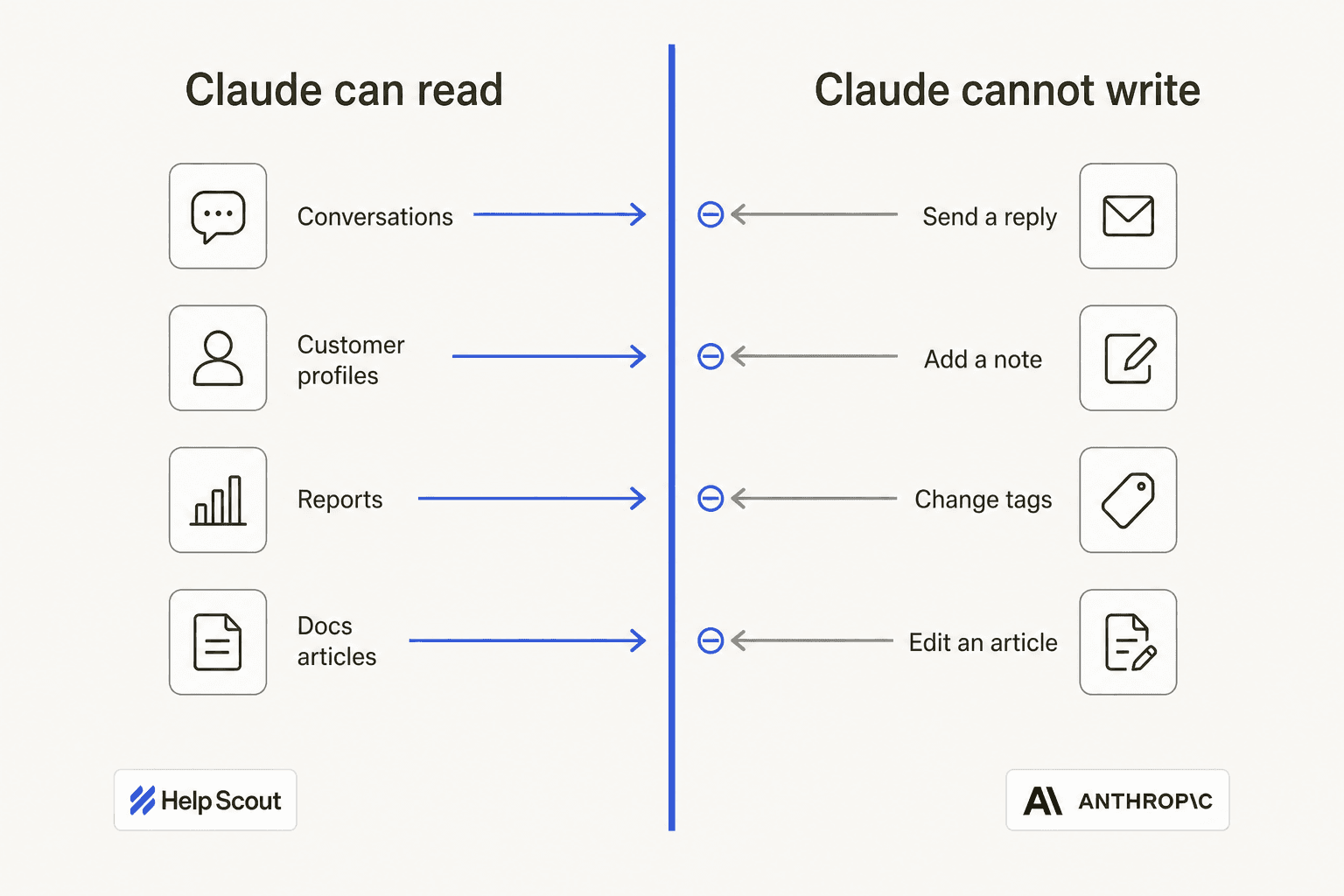
A handful of accounts from the original MCP beta kept their write tools when the connector went generally available. Everyone else gets reads. Help Scout describes writes for all accounts as on the roadmap, with no date to share.
That "add notes" exclusion deserves a second look, because it is the one that surprises people. An internal note is not customer-facing. It is the safest possible write in a helpdesk, the thing every "AI suggests, human decides" workflow is built on. Claude cannot do it. So the natural middle ground, where the AI drafts a suggestion into the ticket and a human sends it, is not available through the official route at all. That copilot pattern is what most teams mean when they ask about adding AI to Help Scout, and it is precisely the shape the connector rules out.
I do not think this is a bad decision on Help Scout's part. Shipping a read-only connector first is the conservative, defensible call, and I would probably make the same one. But it means the sentence "we connected Claude to our helpdesk" describes something very different from what the person hearing it usually assumes.
Route 2: the servers that can send a reply
If you need writes today, three options exist and none of them are Help Scout's.
The community server. drewburchfield/help-scout-mcp-server is the substantial one: MIT licensed, 46 stars, 191 commits, with v2.1.0 shipped on 30 July 2026. It is maintained by an independent developer who describes himself as a Help Scout customer, not by Help Scout staff. Its read surface is three consolidated tools covering 55 read operations across the Inbox and Docs APIs.
The write design is the interesting part, and honestly better thought through than most first-party integrations I have read. A default install is read-only. Setting HELPSCOUT_ENABLE_WRITES=true unlocks 11 operations, including draft replies, internal notes, status, assignment, tags, and snooze, none of which email anyone. Only a second flag, HELPSCOUT_ENABLE_CUSTOMER_VISIBLE_WRITES=true, unlocks sendReply and publishDraft, and each of those calls has to carry an explicit confirmation naming the operation and target or it is refused before it reaches Help Scout. Deletes are not exposed under any flag.
It ships as an npm package, a Docker image, and a one-click Desktop Extension, plus a Claude Code plugin skill.
Zapier and Pipedream. Zapier's Help Scout MCP exposes Add Note, Create Conversation, Create Customer, Find Conversation, and Send Reply, which Zapier flags as sending a real email unless the draft flag is set. Billing is task-based, and one MCP tool call burns 2 tasks. Pipedream's server covers 12 actions including its own Send Reply, with the same warning attached.
Both are real options for internal automation. Both mean your customer conversations route through a third gateway vendor, which is a conversation to have with whoever owns your security review rather than a footnote in a blog post. It is also worth being clear about what you are building here: a scripted action chain is closer to a rules engine than an agent, and the distinction is covered in AI agents vs chatbots.
Route 3: building it yourself, and the finding that changes the plan
This is where I expected to write "and it is straightforward," and then I read the docs properly.
The Inbox API is well built. OAuth2 with authorization code and client credentials flows, HAL-style responses with resource links, a clean error shape with a logRef you can quote at support. Reading is GET /v2/conversations, writing a customer-facing reply is POST /v2/conversations/{id}/reply, and writing an internal note is POST /v2/conversations/{id}/notes. The endpoint, not a field, is what makes a message customer-facing.
Then there is this: Help Scout has no scopes. The scopes page 404s, and the Overview nav on the Inbox API index has no scopes entry at all. Authentication, backward compatibility, content type, errors, HTTP methods, links, pagination, rate limiting, status codes, time. No scopes.
A token that can list conversations can also publish a reply to a customer. There is no way to mint a read-only credential. This is the opposite of how I would have advised testing an AI agent on a live inbox, and it is worth stating plainly because the usual safety advice does not apply here. On Front you can hand an agent a token with draft and comment permissions but not send, and the boundary is enforced by the platform. On Help Scout, the boundary has to live in your own middleware.
The practical substitute is the draft field on the reply endpoint. With draft: true the reply lands as a draft for a human instead of going out. It is a good flag. It is also a flag your code has to remember to set, on every call, forever.
A few more numbers that shape what is buildable:
- Rate limits are per account, not per token: 200 calls per minute on Standard, 400 on Plus, 800 on Pro, per Help Scout's API access table. Your agent shares that budget with every other integration the customer has installed.
- Writes count double. A
POSTcounts as 2 requests against the rate limit, so a read-then-reply cycle spends 4 units, not 3. On Standard that is an effective ceiling around 50 full cycles a minute. - Conversation pages are capped at 25, not the 50 everything else uses, and there is no
per_pageparameter in the pagination docs. A 100,000-conversation backfill is 4,000 page requests, roughly 20 minutes of a Standard account's entire API budget with nothing else running. - The default filter will silently lie to you. List Conversations defaults to
status=active. Forget?status=alland your agent never sees closed history, which is exactly the corpus you wanted. embed=threadstruncates Beacon chat threads by design. The one-call shortcut hands your retrieval pipeline partial transcripts.- 100 threads per conversation, then
412. Long back-and-forths become unwritable. - On v2 you cannot tell an AI reply from a human one. v2 normalizes
system_usertouser; only the v3 endpoints or webhooks withpayloadVersion: V3preserve it. Miss that and your agent can end up replying to itself.
None of these are dealbreakers. All of them are a week you did not plan for, and that engineering time is the line item missing from every build-versus-buy spreadsheet I have seen. Our breakdown of AI agent versus human cost is the closest thing I have to an honest model for it.
Can Help Scout's own AI run on Claude?
No, and the answer is unusually well documented.
Help Scout attributes every shipped AI feature to OpenAI by name. AI Drafts runs on GPT-5.1. AI Summarize is an OpenAI powered tool, AI Assist is powered by the OpenAI API service, and AI Answers is powered by OpenAI.
The AI Transparency Hub says Help Scout uses established foundation models from OpenAI plus its own LoRA adapters. And there is no model picker, no provider field, and no API-key field anywhere in the AI Agent settings, whose entire config surface is Knowledge, Basics, Test, and Connections.
Anthropic is on Help Scout's subprocessor list, with the purpose string "Machine learning", identical to OpenAI's. So customer data is authorized to flow to Anthropic. What for is never stated on any Help Scout page, and that list is stamped January 2025, more than a year behind the current feature set. I would not build an argument on it either way. The wider shape of how the vendor thinks about this is in our Help Scout AI approach writeup.
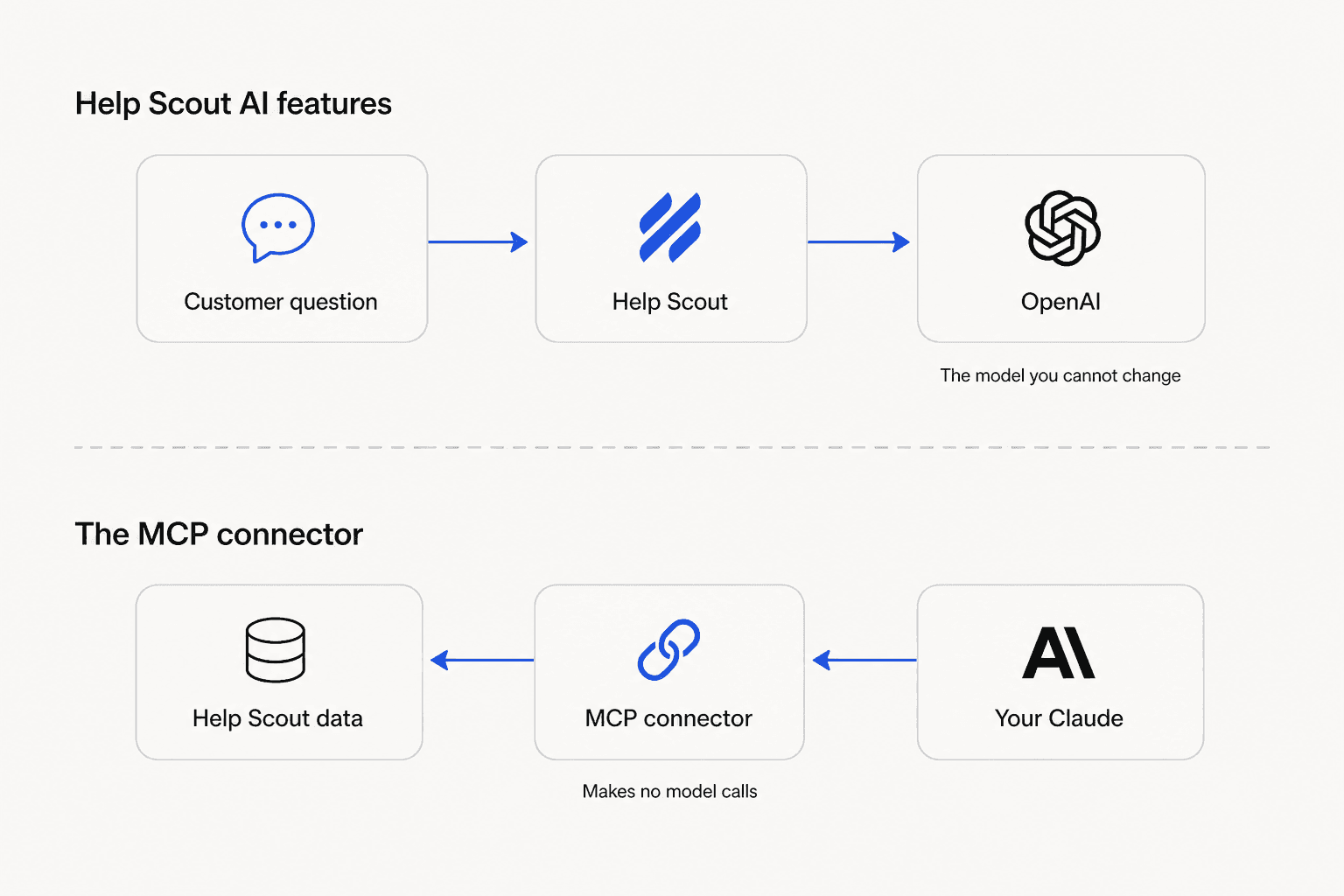
The connector does not change this, and Help Scout says so in one sentence that settles the whole question: the connector holds no AI provider credentials and makes no model calls of its own. MCP moves Help Scout's data outward to your Claude. It does not swap the model behind AI Answers.
One more thing worth knowing before you compare, because it is the detail that sends most teams looking at Help Scout AI alternatives. AI Answers trains on three things: your Docs sites, publicly available URLs, and hand-written Improvements. Past ticket history is not one of them. AI Drafts does learn from previous conversations, but it needs about 100 conversation replies before it generates anything at all. If your best answers live in closed tickets rather than published articles, that is the gap.
What this actually costs
The MCP connector is free. You pay Claude token rates, and those are lower than most people expect. A grounded reply on Claude Sonnet 5 at $2 per million input and $10 per million output, sending 20,000 input tokens and generating 1,000 output, is $0.05. With an 18,000-token system prompt and knowledge block served as cache hits at $0.20 per million, it drops to $0.0176.
Against Help Scout's $0.75 per AI Answers resolution, that is a 42x gap, and I understand why the arithmetic is seductive.
What one month of AI-handled conversations costs
Pick a monthly volume. Prices are the published rates as of August 2026.
The bottom row is model inference and nothing else. It excludes the retrieval pipeline, the draft-or-send guardrail, the escalation logic, rate-limit handling, and the engineer who maintains all of it. Help Scout seat costs apply on top of every row.
Now the part I would rather not write. We have lost customers to that bottom row. In our own churn analysis, three named accounts left to build in-house, and one of them went straight to the Claude API. Another one nearly did: a cosmetics brand on our $799/month plan told us paying that much did not make sense and they would build their own if we could not move, and we kept them by shifting to usage-based pricing at around $200/month. The build-versus-buy pull is real and I am not going to pretend otherwise.
But I have also watched the return trip. One builder assembling an IT-incident knowledge base put it plainly in our dashboard chat:
"Yes build an API for Aria to call, I already used claude but it's not free, and Gemini doesn't work correctly"
a builder assembling an IT-incident knowledge base, who tried the Claude API and Gemini first
That is what the $0.0176 leaves out. It is not the wrong number, it is the wrong unit. $0.75 buys a deployed, guardrailed, escalating agent that a support manager can turn off. $0.0176 buys one model call. Everything between those two things is the project, and on Help Scout specifically that project starts with writing your own permission layer, because the platform will not give you one. If you would rather compare finished products than build one, the shortlist lives in best AI for Help Scout.
The security detail almost nobody has checked
If you read one paragraph of this post, make it this one.
There is no Help Scout setting to turn MCP off account-wide. Help Scout states it directly: any user with a Help Scout login can connect their own AI agent. Not an admin. Any user. Central control has to happen on the AI platform side, where Claude Team and Enterprise Owners can allowlist or block connectors by URL, which does nothing about the agent on someone's personal Claude Pro account.
Three more details in the same docs that are worth reading before you decide how you feel about that:
- Revocation is loose. Removing the connector from your AI client does not reliably kill the credential. Without a revocation request, an access token stays valid for up to 2 hours and its refresh token for up to 30 days. The reliable cutoff is deactivating the Help Scout user, and a Docs API key survives even that until you revoke it separately.
- No outbound content filtering. The connector does not scan or filter what it sends. If a customer pasted a password into a ticket, it goes to the AI as-is.
- HIPAA does not travel. HIPAA is available on Pro with a signed BAA, but Help Scout is explicit that your BAA with Help Scout does not cover your AI provider. If protected health information could reach Claude, you need a separate agreement with Anthropic. And unlike an installed app, there is no admin visibility over who connected.
This is not a Help Scout problem so much as an MCP-wide one, and practitioners have been loud about it. From a Hacker News thread on MCP permissions:
"In an organisation we can't limit MCP access. It's all or nothing. Everything the user can touch, the MCP can touch."

The same commenter's follow-up is the version a support lead would recognise: a person with access to five client accounts can keep them straight in their head, and an agent with the same access might helpfully "fix" the same issue across all five. Help Scout's read-only default is a real mitigation against exactly that. It just is not a control you get to configure.
To be fair to Help Scout, none of this is hidden. It is all written down in the same article that tells you how to set it up, which is more candour than a lot of vendors manage. But "documented" and "your CISO knows" are different states, and the gap between them is where incidents live. Installed apps from the Help Scout integrations directory behave differently here, because an admin approves them once and can see them afterwards.
The practical move, if you are a support lead reading this: go ask your team whether anyone has already connected Claude to your inbox. The honest answer is that you currently have no way to find out from inside Help Scout.
What teams are actually saying
Community sentiment on Help Scout's AI splits cleanly. The features get credit for being simple. The pricing does not.
"ai answers sits in their widget and answers straight from your knowledge base, they claim around 73% resolution. also has ai drafts, tone ..."

That 73% is Help Scout's own published figure, and it is a fair number to quote as long as you remember what it is resolving from: Docs articles, not tickets.
The louder theme is cost predictability, and it predates the AI features. When Help Scout switched from per-seat to per-interaction pricing in 2025 and then reversed course, the trust damage stuck:
"HelpScout changed back to user-based pricing. Guess too many people cancelled including me... I'll still stay with Freescout anyways. Helpscout lost all trust with this flip-flopping on pricing."
That history matters for how the $0.75 add-on lands. A team that has already been burned by a billing-model change reads usage-based AI pricing with a particular kind of suspicion, and the Help Scout review threads bear that out. It is also the quiet driver behind most of the traffic to our Help Scout alternatives roundup and the Front comparison.
Where eesel fits in a Help Scout inbox
The official connector and eesel are solving different halves of the same problem, and I would rather say that plainly than pretend we compete with a read-only server.
Keep the MCP connector for analysis. It is free, it is first-party, and asking Claude to grade last week's conversations is a solid use of ten minutes.
eesel is for the half the connector will not do. It joins your Help Scout mailbox as a real AI helpdesk agent rather than a separate widget, connects through the Help Scout API from our dashboard with no code, and pulls in your Docs articles, your saved replies, and your past conversations automatically. That last one is the difference that matters most against AI Answers, which cannot read ticket history at all. It drafts and sends from your mailbox in your team's address, adds notes, updates tags, routes tickets to teammates, and respects your existing Help Scout workflows.
You can scope it to one mailbox or a single tag while you evaluate it, and you can run it in draft-only mode so a human sends every reply before you ever switch on automatic replies.
The rollout bit is the part I would actually pitch. Before it touches a live conversation, you simulate it against your own historical Help Scout tickets and see what it would have said. We built that because we have watched confident-sounding bots give wrong answers, and the only honest way to find out is to test against tickets you already know the answers to. Escalation follows the same logic we describe in agent handoff: when confidence drops, it routes back to a human instead of guessing. Pricing is $0.40 per conversation handled, with no platform fee and no per-seat charge.

If you want the short version: connect Claude for the reading, and bring something that can write for the writing. Try eesel free, or read the Help Scout chatbot breakdown first if you would rather see the mechanics before you connect anything.
Frequently Asked Questions
Is there an official Claude integration for Help Scout?
mcp.helpscout.net/mcp, documented in its help center and generally available on Standard, Plus, and Pro. It is not listed in Claude's connector directory, so you add it as a custom connector by URL. For the wider picture, see our Help Scout AI breakdown and the Claude overview.Can Claude reply to Help Scout conversations?
How much does Claude for Help Scout cost compared to AI Answers?
Can I make Help Scout's own AI run on Claude instead of OpenAI?
Can Claude be trained on my Help Scout conversation history?
What is the safest way to test Claude on real Help Scout data?
"draft": true on the reply endpoint and enforce it in your own middleware. Our notes on agent handoff cover the escalation side.Who can connect Claude to our Help Scout account?
Is Help Scout's AI enough, or do I need something else?


Article by
Rama Adi Nugraha
Rama is a software engineer at eesel AI with two years of experience writing about B2B SaaS, AI tools, and customer support technology. Based in Bali, Indonesia, he brings a developer's perspective to product comparisons — cutting through marketing copy to what the integrations and APIs actually do.