Help Scout is a big name in customer support, and for good reason. They've always been about human-centric service. So, as AI started changing the game, everyone knew they'd have to jump in. But what does their version of AI actually look like when you get under the hood?
If you're a support leader or an ops manager trying to figure out if Help Scout’s AI is the right move for your team, this guide is for you. We're going to give you a straightforward, no-fluff look at the Help Scout AI approach, breaking down its features, pricing, and, most importantly, the limitations you should know about before you sign on the dotted line.
What is the Help Scout AI approach?
Help Scout's philosophy on AI is pretty simple: it’s there to help humans, not replace them. Their goal is to build tools that give agents a boost by handling the repetitive, time-sucking tasks. This frees up your team to focus on the trickier, more personal conversations where a human touch really matters.
Their AI tools are built right into the platform, so they're designed to be easy to use with one-click features that don't require any coding or complicated setup. Help Scout says its AI Answers agent resolves 73% of requests on average, and they focus on three main areas:
-
Automated self-service with their chatbot.
-
Agent assistance using tools for drafting, editing, and summarizing replies.
-
Workflow efficiency to help agents find what they need faster.
Let's dig into what each of those actually does day-to-day.
A closer look at Help Scout's AI features
Help Scout’s AI toolkit is split into a few different features, each with a specific job. To really get a feel for their approach, you need to understand how they work on their own, and how they don't always work together.
AI Answers for automated self-service
AI Answers is Help Scout’s customer-facing chatbot. You can add it to your website using their Beacon widget, and it acts as a 24/7 first line of defense, dishing out instant answers to common questions.
It's powered by OpenAI and pulls all its information from your Help Scout Docs knowledge base. You can also point it to other public websites as extra knowledge sources. This makes it a solid choice for deflecting simple, repetitive questions that you've already documented well.
But here's the catch: The biggest downside is that AI Answers learns only from the sources you add to its AI Agent: Docs sites, public URLs (including PDFs and Office files), and improvements you write. Past support tickets aren't among the listed sources. This means if your help center is incomplete, out of date, or just doesn't cover a customer's specific question, the AI is completely stuck. You end up in a constant loop of manually updating articles just to keep the bot from falling behind.
AI Drafts for faster agent replies
AI Drafts is a tool for your agents that generates a reply to a customer's email with a single click. The idea is to give your team a running start on every conversation.
This feature came from Help Scout’s acquisition of SupportAgent.ai, and it learns from your team's past conversations and existing help articles to generate responses that sound like your brand. It's handy for speeding up replies to frequently asked questions, helping new agents learn the ropes by seeing what a good response looks like, and keeping your team's tone consistent.
One thing to note, though: it's a premium feature. Unlimited AI Drafts are only included in the Plus and Pro plans, so it isn't an option for teams on their Standard plan.
AI Assist for polishing agent communication
Think of AI Assist as a real-time writing coach built right into the reply editor. It’s less about generating entire replies and more about refining what an agent has already written.
Here's what it can do:
-
Fix spelling and grammar mistakes.
-
Make text longer or shorter.
-
Adjust the tone to be friendlier or more professional.
-
Translate text into more than a dozen languages.
An agent just highlights their text, clicks the AI Assist icon, and picks the action they need. It's especially useful for quality control or for teams where not everyone is a native English speaker.
AI Summarize for quick conversation context
AI Summarize is a straightforward tool that does exactly what its name suggests: it boils down long email threads into a few key bullet points. With one click, an agent can get the gist of a conversation's history.
This is great when you need to hand a ticket off to another agent, for a manager doing a quick quality check, or for anyone who needs to get up to speed without reading a novel's worth of back-and-forth emails.
It's not perfect, though: While it's useful, the tool has a few quirks. First, the summary is always in English, even if the conversation was in Spanish or French. Second, it doesn't update automatically when new replies come in; you have to remember to click "Update Summary." Finally, Help Scout even mentions that the summaries can sometimes be inaccurate. That means agents might have to read the full thread anyway just to be safe, which kind of defeats the purpose.
Understanding Help Scout's AI pricing
How you pay for Help Scout's AI really depends on which tools you use. The pricing is a bit fragmented, which can make budgeting tricky if you're not paying close attention.
AI Answers pricing
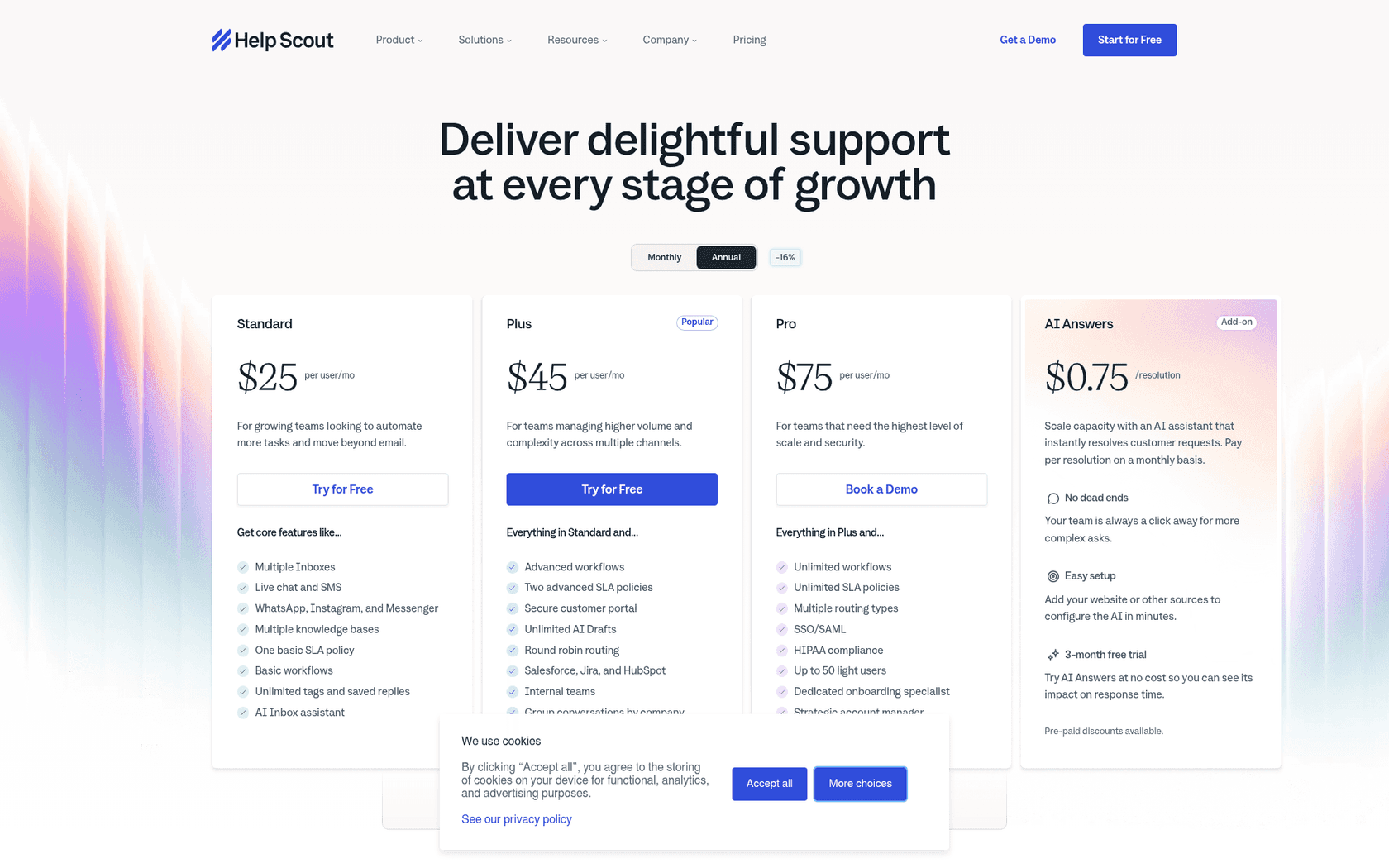
Their chatbot, AI Answers, uses a pay-as-you-go model. It costs $0.75 per resolution. A "resolution" is when the AI successfully handles a conversation without needing to escalate to a human. If the customer says they still need help, you don't get charged.
Help Scout gives you a three-month free trial with unlimited resolutions to get you started. To keep you from getting a surprise bill, they also have a spending cap feature that lets you set a maximum monthly budget. Once you hit that limit, AI Answers turns off for the rest of the month.
AI Drafts, Assist, & Summarize pricing
These agent-facing tools aren't separate add-ons; they're bundled into the main Help Scout plans.
-
AI Assist: Included in the Standard, Plus, and Pro plans.
-
AI Drafts & AI Summarize: Unlimited access is only available on the more expensive Plus ($45/user/mo) and Pro ($75/user/mo) plans.
Here’s a simple table to break it all down:
| Feature | Standard Plan ($25/user/mo) | Plus Plan ($45/user/mo) | Pro Plan ($75/user/mo) | AI Answers Add-on |
|---|---|---|---|---|
| AI Assist | Included | Included | Included | N/A |
| AI Summarize | Not Available | Included (Unlimited) | Included (Unlimited) | N/A |
| AI Drafts | Not Available | Included (Unlimited) | Included (Unlimited) | N/A |
| AI Answers | Add-on | Add-on | Add-on | $0.75 per resolution |
Key limitations of Help Scout's AI
While Help Scout's AI tools are genuinely useful for certain tasks, their separated and documentation-heavy nature creates some real challenges for teams looking for smarter, deeper automation.
1. Disconnected knowledge sources This is probably the biggest hurdle. The knowledge that AI Answers uses (your Docs site) is totally separate from the knowledge that AI Drafts uses (your past conversations). It feels like the left hand doesn't know what the right is doing. Your chatbot can’t learn from your best agents' replies, and your draft tool can't pull from your carefully written help articles in real time. This split approach means you're always playing catch-up, manually writing new documentation to fill the gaps in your chatbot's knowledge.
2. Unpredictable "per-resolution" costs The spending cap for AI Answers is a necessary safety net, but it points to the real issue with a pay-per-resolution model. Budgeting becomes a guessing game. A busy month could have you hitting your cap early, shutting down your chatbot right when customers need it most. This puts you in a tough spot, forcing you to choose between a surprise overage bill and turning off a key support channel.
3. No testing on your past tickets Help Scout's Test tab lets you simulate conversations you write with the AI Agent, but you can't replay how AI Answers would have performed on your past tickets before you let it talk to live customers. That makes it harder to guess what its resolution rate will be or find knowledge gaps you didn't think to test.
4. Limited workflow customization Beyond guardrails that tell the AI Agent which topics to hand to your team, there isn't a powerful workflow builder that lets you define exactly which tickets the AI should handle, what custom actions it can take (like automatically pulling up order info from Shopify), or how it should escalate a ticket based on your team's unique rules. You get what they give you, with very little room to tailor it to your specific needs.
A more flexible alternative to the Help Scout AI approach: eesel AI's integrated platform
If the limitations of a siloed, documentation-dependent AI are giving you pause, an alternative like eesel AI offers a more connected and powerful approach. eesel is built to be a smart AI layer that plugs into the helpdesk you already use, whether that's Help Scout, Zendesk, or Intercom, to provide automation that actually feels unified.
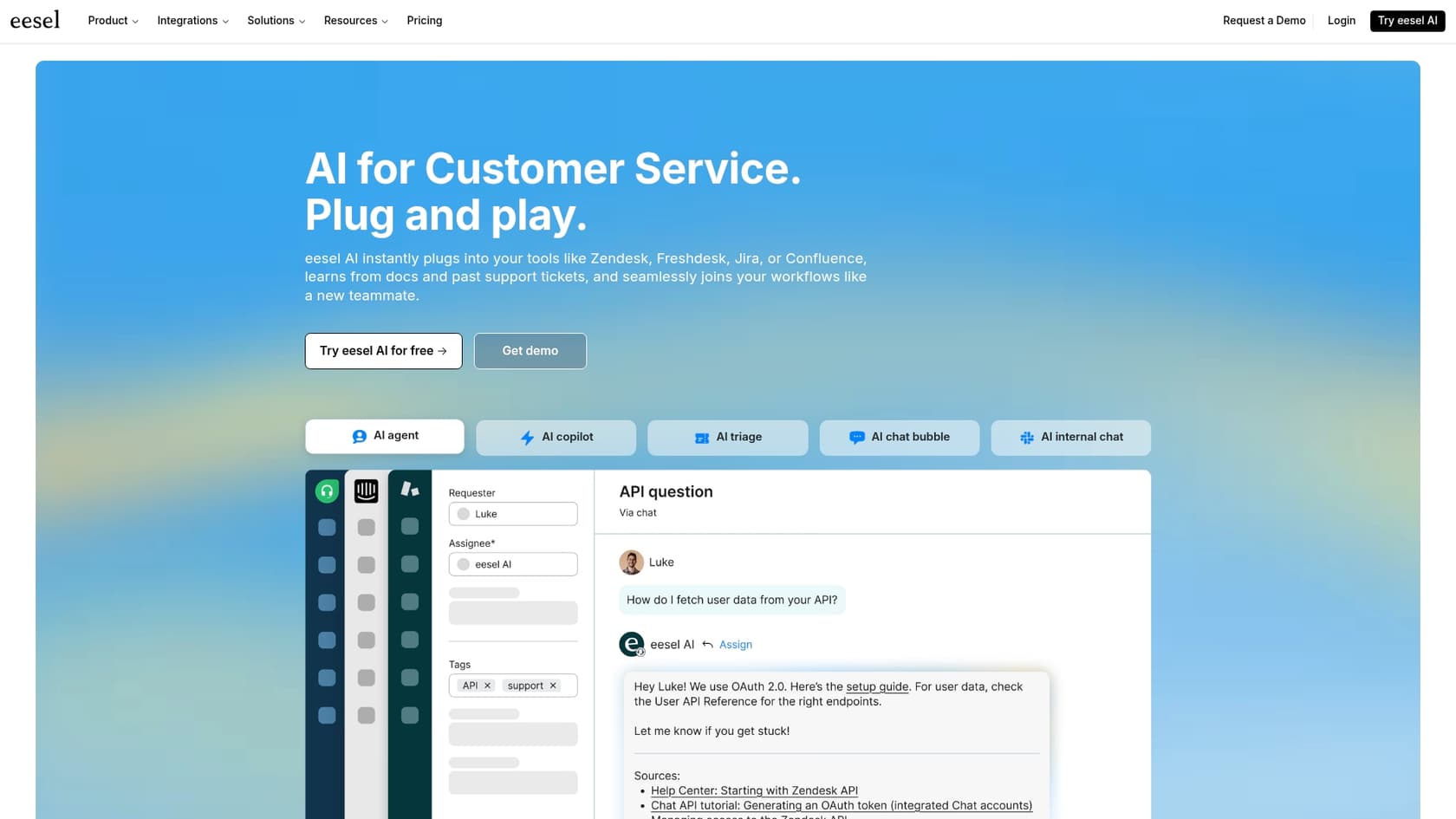
The heart of the platform, eesel's AI Agent, is designed to solve the very challenges found in Help Scout's model.
Unify all your knowledge, automatically
Unlike Help Scout, where the chatbot and agent tools learn from different places, eesel's AI Agent learns from all your knowledge sources at once.
It trains on your historical support tickets, which means it automatically learns from your best agents' work without you having to do anything. This drastically cuts down on the need to constantly write and update knowledge base articles. On top of that, it connects with one click to tools like Confluence, Google Docs, and your internal wikis, creating one single source of truth for your AI.
Test with confidence and go live in minutes
eesel AI comes with a powerful simulation mode that replays real history, which Help Scout's scenario-based Test tab doesn't. Before the AI ever talks to a customer, you can run it on hundreds of your past tickets. It scores its answers against what your team actually sent, surfacing knowledge gaps and showing exactly how it will respond, so you can fine-tune its performance without any risk. And because the platform is designed to be self-serve, you can set it up and run these simulations in minutes, no sales call required.
Transparent and predictable pricing
Forget about counting resolutions. eesel AI uses transparent credit-based pricing: monthly plans from $299 for 500 credits, one credit per ticket or chat, with no per-seat fees. Overage is optional and a spend cap you set keeps your bill from spiking after a busy month, so your costs stay easy to budget and scale.
Is the Help Scout AI approach right for your team?
The Help Scout AI approach offers a solid set of tools, especially for teams looking to give their agents a hand and deflect basic questions. If you have a perfectly maintained and complete knowledge base, a feature like AI Answers can be a real asset. And the agent-assist tools are practical and well-integrated for making your team more efficient.
However, its reliance on manual documentation, separated features, and a potentially unpredictable pricing model can be a major roadblock for teams that want smarter, more seamless automation.
For teams that need a more powerful, integrated, and controllable AI platform, eesel AI presents a clear alternative. It works with your existing tools to automate support by learning from all of your company's knowledge, not just a help center. It gives you the power to test everything with confidence and the peace of mind that comes with predictable, fixed monthly pricing.
Ready for an AI that works out of the box? Try eesel AI's AI Agent and see how you can automate support by connecting all your knowledge sources in minutes.
Frequently asked questions
What is the core philosophy behind the Help Scout AI approach?
Help Scout's core philosophy is to augment human agents, not replace them. Their AI aims to handle repetitive tasks, freeing up agents to focus on complex or personal customer interactions. This makes support more efficient while maintaining a human touch.
How does the Help Scout AI approach facilitate automated self-service for customers?
The Help Scout AI approach uses "AI Answers," a customer-facing chatbot powered by OpenAI. It provides instant answers by pulling information from your Help Scout Docs knowledge base and other public websites, helping to deflect common queries 24/7.
What agent-facing tools are part of the Help Scout AI approach to boost efficiency?
The Help Scout AI approach includes "AI Drafts" for generating full replies, "AI Assist" for refining written text (grammar, tone, translation), and "AI Summarize" for quickly understanding long conversation threads. These tools are designed to streamline agent workflows.
How does the pricing work for the different features within the Help Scout AI approach?
AI Answers is priced at $0.75 per successful resolution, with a spending cap feature. AI Assist is included in all main plans, while unlimited AI Drafts and AI Summarize are available only on the more expensive Plus and Pro plans.
What are the main limitations to consider with the current Help Scout AI approach?
Key limitations include disconnected knowledge sources (chatbot and agent tools learn from different places), potentially unpredictable "per-resolution" costs for AI Answers, and testing that runs on conversations you write rather than on your past tickets. Workflow customization is also limited.
Can I test how effective the Help Scout AI approach will be before fully implementing it?
Help Scout has a Test tab where you simulate conversations you write with the AI Agent, and those tests don't count toward billed resolutions. It doesn't replay your past tickets, so predicting resolution rates or finding knowledge gaps still depends on the scenarios you think to test.