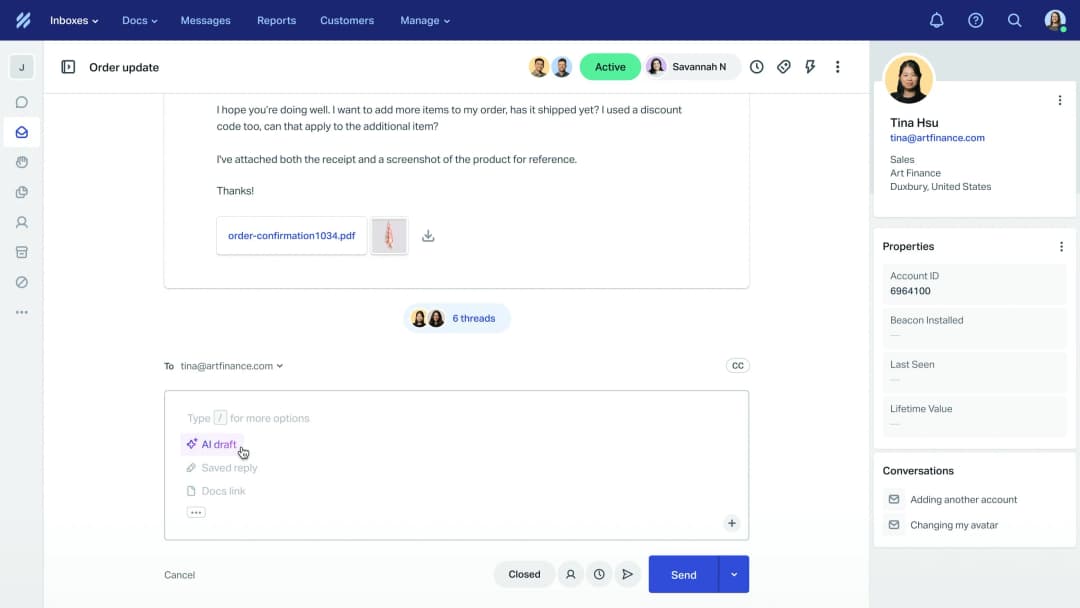
AGO vs eesel AI for Help Scout: setup, controls and pricing compared

Rama Adi

Katelin Teen
Last edited September 24, 2026
Why I'm writing this comparison
A prospect recently asked an AI assistant which reply tools work with Help Scout. It listed DocsBot, AGO, Twig and Botpress. eesel came up late. That's fair. The assistant rewarded what it could verify, and nobody had written down the specifics.
The prospect's questions were sharp:
- How is it configured?
- Can we control tone?
- Can we stop it replying to certain email addresses or topics?
- What analytics do we get on answered conversations?
- What does it cost?
- How native is it to Help Scout, and how long is setup? (They did not want hours or days.)
- Can it draft instead of sending?
I'm a software engineer at eesel, and I work on our helpdesk integrations. So this post answers each question for both tools, with sources. Where eesel is weaker, I say so. You should be able to check every claim here.

The two tools in brief
Before comparing features, it helps to know what each product thinks it is. They start from different places.
What AGO is
AGO calls itself "the Customer Agent OS". Its main pitch for Help Scout is a widget on your website. On its Help Scout page, AGO says it "sits in front of Help Scout". Customers ask the AGO widget first, and what it can't answer goes to Help Scout with context attached. That is a ticket deflection play more than an inbox tool.
It also has a second mode that matters more for email teams. The Help Scout channel docs describe auto-replies to customer emails inside a mailbox. That second mode is what this post compares.
AGO has real strengths. It is SOC 2 Type II and GDPR compliant, per its pricing page. It has an SDK for in-product actions like refunds. Its Mirakl case study reports 23k conversations a month at 96% CSAT, per AGO's case studies.
What eesel AI is
eesel AI gives you AI teammates for specific jobs. The one relevant here is the helpdesk teammate. It joins your existing Help Scout mailbox and works beside your team. It reads your past conversations and your Docs site first. Then it drafts, sends, tags or adds notes, depending on what you allow.
There is no widget in front of Help Scout. Everything happens in the mailbox your team already uses. If you want the longer backstory on Help Scout's own AI, see our Help Scout AI overview. For what an AI agent in Help Scout can take on, that guide goes deeper.
Side by side: every question the prospect asked
Here is the whole comparison in one table. The sections below explain each row, with sources.
| Question | AGO | eesel AI |
|---|---|---|
| How it connects | You register your own Help Scout OAuth app, plus webhooks | One OAuth authorize click, no app to build |
| Help Scout app directory | Not listed | Not needed; standard OAuth approval |
| How you configure it | AGO agent, prompt templates, per-mailbox settings | Plain-language automations, created in chat |
| Learns from | Help Scout Docs (API key, full re-import), plus connectors like Notion and Confluence | Past Help Scout conversations, your Docs site, other connected tools |
| Tone control | Prompt templates with versions, A/B tests, tone scoring | Plain-language instructions; fix a draft in chat and save it as a rule |
| Skip a topic | Prompt instructions or a router agent; no documented filter | Yes, in automation instructions, checked before the agent runs |
| Skip a sender address | Not documented; per-mailbox on/off only | No hard blocklist; Help Scout Workflow tag plus a skip instruction |
| Draft vs auto-send | One switch per mailbox: Prepare draft or Reply to user | Separate draft and send actions; Auto, Needs approval or Disabled each |
| Analytics | Performance Dashboard: threads, escalation rate, evaluation score, topics, export | Task volume, trigger events, approvals, review times, per-task activity log |
| Replies show as | The Help Scout user who authorized OAuth | The Help Scout user who authorized OAuth ("You") |
| Price | €0.50 per conversation, €500/month minimum | From $299/month for 500 credits (1 credit per conversation) |
| Free trial | None; demo or contact form | Free plan with 100 credits, no card |
| Setup time | Sales-led; wiring is 30 to 60 min (my estimate) after provisioning | Median about 29 min from connect to first live task (n=11) |
| Website chat in front | Yes, its headline feature | No Beacon live chat support |
| Security | SOC 2 Type II, GDPR, EU hosting | SSO and MFA add-on; HIPAA on request |
How each one connects to Help Scout
This is the biggest practical difference. It decides whether setup is an afternoon job for a support lead or a small project. Our Help Scout integrations guide covers the other ways tools plug in.
AGO: your own OAuth app plus webhooks
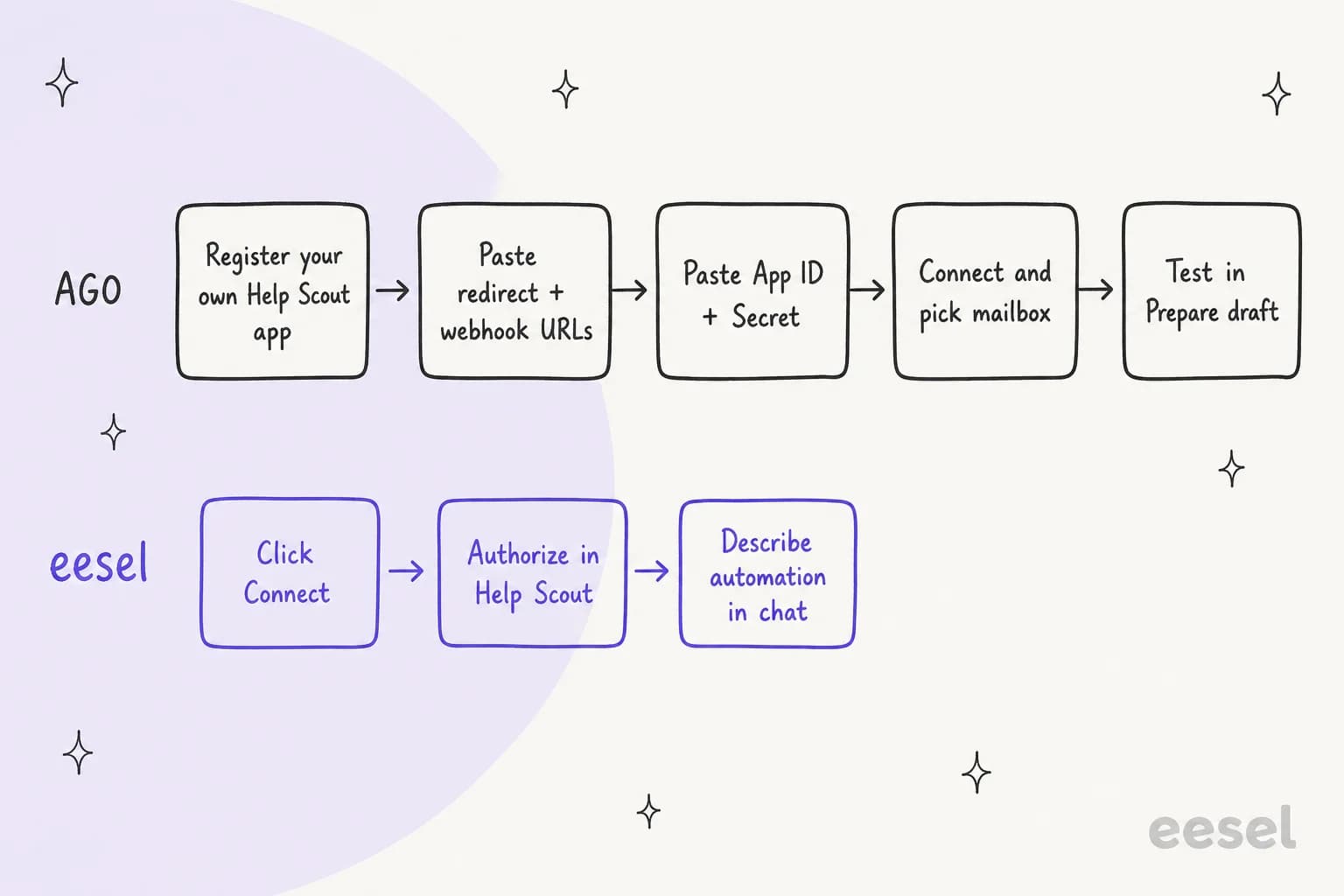
AGO is not in Help Scout's app directory. Instead, per AGO's setup docs, you build the link yourself on the Help Scout API:
- In Help Scout, go to Your Profile > My Apps and create an app.
- Set the redirect URI to
https://<your-subdomain>.api.useago.com/public/helpscout/oauth/callback. - Set the webhook URL to
https://<your-subdomain>.api.useago.com/public/helpscout/webhook, with the events Conversation created and Customer replied. - Paste the App ID, App Secret and optional Webhook Secret into AGO under Channels > Help Scout.
- Click Connect Help Scout, then pick a mailbox and an AGO agent.
- Turn on "Automation enabled" with Response mode set to "Prepare draft", send a test email, then switch to "Reply to user" when you're ready.
You need admin access to the mailbox. You also need an AGO agent that is already built. Note the <your-subdomain> part. AGO has to provision your workspace before any of this works.
AGO handles a few edge cases well. It ignores teammate replies, private notes and conversations a Help Scout user created. It posts a private note if the agent errors. It has loop prevention.
AGO's Help Scout Docs sync is a separate connector. Per the knowledge connector docs, it needs an API key, and "every sync is a full re-import". I found no documented import of past Help Scout conversations.
eesel: one authorize click
eesel's Help Scout docs show the whole flow. Open Integrations, click the Help Scout tile, click Connect, click Continue, then click Authorize in Help Scout. eesel uses Pipedream to handle that approval. You don't need a Pipedream account.

The connection acts as the Help Scout user who approved it. So the agent sees what that user sees, and nothing more. Pick that user on purpose.
Past conversations then sync on their own. By default that is closed conversations from the last 30 days, and you can limit it to specific mailboxes. Your public Docs site is crawled once you enter its URL. Nothing is crawled before that.

Connecting does nothing on its own. The agent only acts once you create an automation. An automation is one Help Scout trigger plus plain-language instructions. You can ask the dashboard chat to write it for you. If you'd rather work from a terminal, the same setup runs through the eesel CLI.
One honest note. Both tools post replies as the Help Scout user who authorized the connection. AGO's docs say "the reply is signed by the Help Scout user who authorized the OAuth connection". In eesel, the draft shows as "You". Help Scout gives neither tool a way to label a reply as AI.
How long setup really takes
The prospect said they did not want hours or days of setup. Here is what the numbers look like.
eesel. I pulled every eesel workspace that connected Help Scout and then ran a live Help Scout task. For 11 of them I could time it cleanly. The median from connecting Help Scout to the first live task was about 29 minutes. Seven of the 11 were live within 35 minutes. The slowest quarter took 9 hours or more.
Read that number with its caveats:
- It is an upper bound on effort. It includes waiting for the first real customer email after the automation was switched on.
- The sample is small, just 11 setups.
- "Connected" is a proxy: the time the first Help Scout document synced. On the two setups where I could check, that landed 1 to 4 minutes after connecting.
- I can't tell how many of those teams had hands-on help from the eesel team.
AGO. AGO's quickstart says you can get a first agent answering "in 5 minutes". That assumes you already have an AGO instance. There is no self-serve signup. "Get started" on the pricing page goes to a contact form. The Help Scout channel also needs your own AGO subdomain.
My estimate, and it is only an estimate: the Help Scout wiring takes 30 to 60 minutes once you have a workspace. End to end, with a demo, a contract and the €500 monthly commitment, expect days to a few weeks.
Can you control reply tone?
Yes, in both. The mechanism is different.
AGO sets tone through prompt templates. They define "personality, response style, and task boundaries", with version history and rollback. The platform page adds A/B testing of prompts and tones, and automatic scoring of every conversation for "accuracy, helpfulness, and tone". You can pick the model too. There is no Help Scout-specific tone setting. Tone comes from the agent's prompt.

eesel uses plain-language instructions. You write things like "Keep replies to 2-3 short paragraphs", "Match the customer's language" or "Never use 'I apologize for any inconvenience'". There is no tone slider. It is all text.
Two details make this work better than it sounds:
- It learns from your past replies. eesel syncs your past Help Scout conversations as knowledge. So it picks up how your team actually writes, not just what the prompt says.
- You can correct a draft in chat. Ask for the change in plain words. The agent rewrites the draft and offers to save the fix as a standing rule.
Core instructions apply to every automation. An automation's own instructions add to them and never replace them.
AGO wins on tooling here: versioned prompts and A/B tests are more than eesel offers. eesel wins on source material, because it reads your real Help Scout history. AGO's Help Scout connector imports Docs articles only.
Can you stop it replying to certain addresses or topics?
This was the prospect's trickiest question. Neither tool has a hard sender blocklist for Help Scout. Here is what each can do.
Topics
AGO documents no topic filter for the Help Scout channel. Your options are prompt instructions ("task boundaries"), knowledge scoping, tool permissions, or a Router Agent that sends intents to specialist agents, per its platform page.
eesel handles topics in the automation's instructions, the same way it handles ticket triage. Write "skip anything about refunds" and two layers apply it. First, a small classifier model reads the new message, the thread and the conversation's tags, mailbox ID and subject before the agent runs. If it skips the conversation, no task is created and no credit is used. Second, the agent gets the same rule and applies it again.
You can also ask for approval by topic. For example: "ask before replying to anything about refunds", even when sending is set to Auto.
A specific sender or domain
AGO documents no sender exclusion. Its Help Scout docs only list what is ignored by design: teammate replies, notes and user-created conversations. AGO acts on every new conversation and customer reply in the connected mailbox. So the control is all-or-nothing per mailbox. You could route those senders into a different Help Scout mailbox first. That is my inference, not something AGO documents.
eesel also has no hard blocklist. The honest detail: the classifier that runs first cannot see the customer's email address. You can write "don't reply to anyone at example.com" in the instructions, and the agent may honour it. But the gate can't check it, so those conversations still reach the agent and use a credit. I also can't show you from production data that the agent always follows a sender rule.
The reliable method uses Help Scout itself:
- In Help Scout, create a Workflow (see our Help Scout tagging guide) with the condition "Customer Email ends with @example.com" (or equals, contains, or a regex). Add the action Add Tag, for example
no-ai. - In the eesel automation, write "skip anything tagged no-ai".
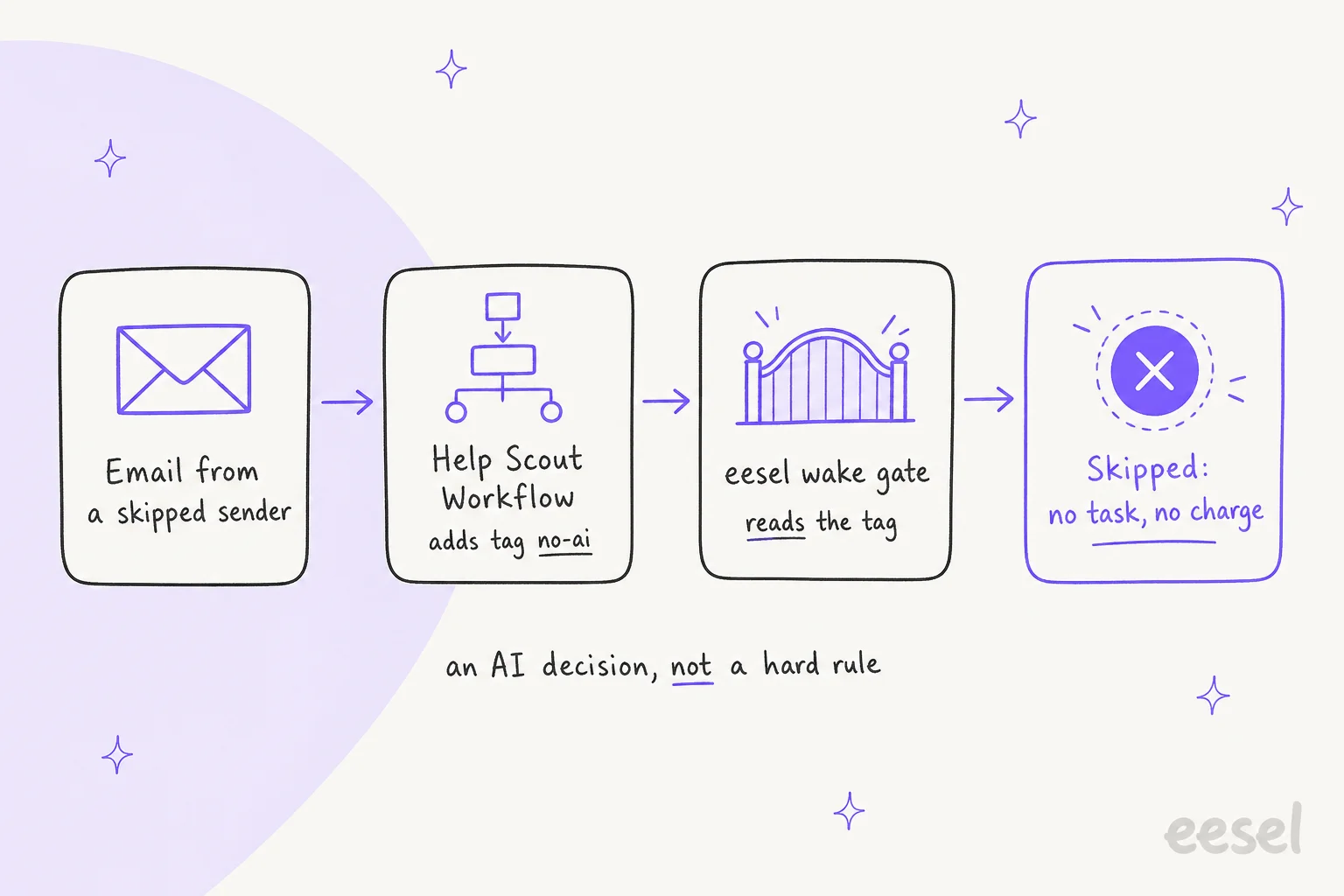
Tags are visible to the classifier, and eesel re-reads live tags from Help Scout before it decides. That matters because Help Scout Workflows can apply tags just after the new-conversation event fires.
Two caveats. This is still an AI decision, not a hard rule. The classifier works to a confidence threshold, 0.7 by default. And if the Workflow hasn't tagged the conversation by the time eesel checks, the tag can be missed. I don't have a measure of how often that happens.
Skipped conversations show on the eesel Activity page, with the reason. That log only keeps a day of skips, up to 200 per automation. So check it soon after you change a rule.
Draft vs auto-send
Both tools can draft or send. The difference is how fine the control is.
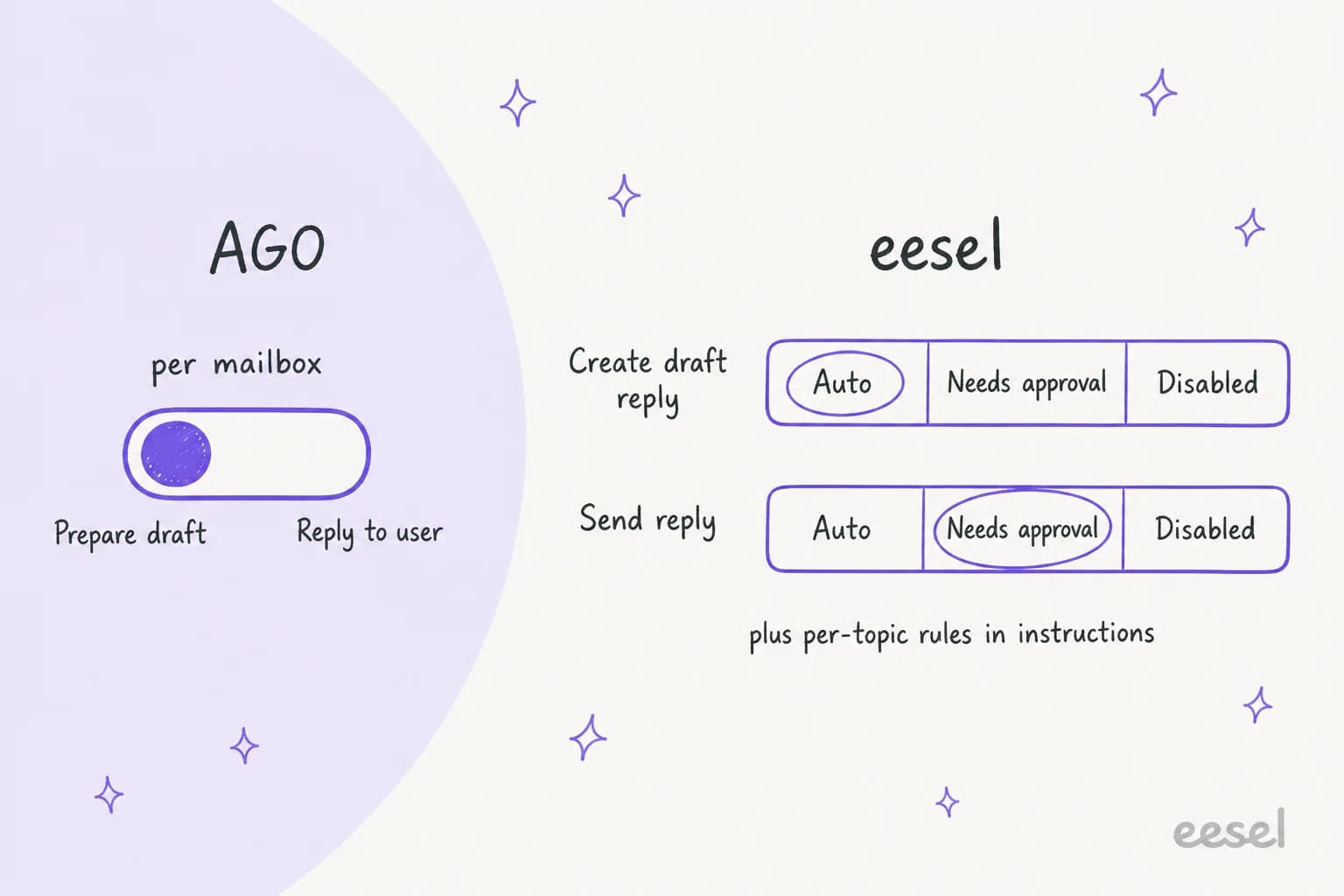
AGO has one Response mode per mailbox: "Prepare draft" or "Reply to user". The docs recommend starting with drafts. The marketing page talks about auto-sending "when the rules you set are met". The setup docs only show the per-mailbox switch, with no per-rule or confidence settings.
eesel treats drafting and sending as two separate actions, per its actions and approvals docs:
- Create draft reply saves the reply unsent in Help Scout's reply box. It defaults to Auto, because the customer sees nothing.
- Send reply always sends and can't be recalled. It defaults to Needs approval.
Each action can be Auto, Needs approval or Disabled. Approvals show up in the eesel dashboard, in Slack if the run started there, or in the CLI. The choices are Approve, Always allow or Deny. Nothing auto-runs after a timeout.

In practice, Help Scout teams on eesel mostly draft. Over the last 30 days, about half of eesel's Help Scout tasks created a draft. At most 3% even touched the Send reply action. That's a sensible way to start. Your team edits and sends from Help Scout, and you watch the drafts improve before you let it send. Our Help Scout auto-reply guide and auto-reply rules post cover when to flip that switch.
Analytics on answered conversations
This is where AGO is ahead, and I'd rather say so plainly.
AGO has a Performance Dashboard with eight tabs: Overview, Evaluation (CX Score), Knowledge, Feedback, Tickets, Topics, User Analytics and MCP. The Overview shows number of threads, number of users, escalation rate and positive evaluation rate. It supports period comparison and CSV or PDF export. I found no Help Scout-specific reporting, like how often drafts were accepted or edited.

eesel's Reports page shows:
- total tasks
- trigger events by type
- approvals and rejections per action
- approval efficiency and review times
- the approval trend over time
The Activity page is the more useful part day to day. Every task shows the Help Scout conversation link, the trigger, the sources the agent searched, each action it took and who approved it, and its reasoning. You can also ask the agent for a written report, on demand or on a schedule, for example a ticket-trends review.
What eesel does not give a Help Scout email team today: a resolution-rate card or CSAT on answered conversations. If a dashboard of those numbers is a must-have, AGO is the better fit on this point.
Pricing
Both vendors publish real numbers, which is refreshing. The billing units look similar but behave differently at small volumes. If you're also paying for Help Scout's own AI, our Help Scout pricing guide lists those costs.
AGO, per its pricing page:
| Plan | Price | What's included |
|---|---|---|
| Pay per conversation | €0.50 per conversation, €500/month minimum | Unlimited agents and seats, full integration, 24+ languages, analytics, dedicated onboarding, SOC 2 Type II and GDPR |
| High volume (10,000+ conversations/month) | Custom quote | Volume discounts, success manager, custom SLA, priority support, forward-deployed engineers |
A conversation counts "when a customer starts an interaction", so escalated or unresolved ones still bill. There is no free trial.
eesel, per its pricing page and pricing docs:
| Item | Price |
|---|---|
| Teammate plan | From $299/month for 500 credits |
| Help Scout conversation handled | 1 credit, however long |
| Bigger batches | 1,000 for $499, 1,500 for $699, 2,500 for $999, 3,500 for $1,349, 5,000 for $1,899 a month; above 5,000, talk to us |
| Chatting with your agent in the dashboard | Mostly free |
| Platform fee, seat fee | None |
| Free plan | 100 credits, no card |
| Pay a year upfront | Two months free |
| Add-ons | SSO and MFA from $199/month, priority support from $299/month, data residency $500/month, HIPAA on request |
Three honest details about eesel's bill:
- Only conversations the agent picks up count. A conversation the agent works on uses one credit. Ones the classifier skips, like a topic or tag you told it to ignore, use none.
- One credit covers the whole conversation. It doesn't matter how many replies or actions it takes inside that conversation.
- Running out is your call. Agents pause until credits reset, or you turn on overage at $0.80 per extra credit with a monthly cap you set. Unused credits don't roll over, and you can move up or down a batch any time.
Here is what that looks like at common volumes. I have not converted currencies, since exchange rates move.
| Conversations / month | AGO | eesel |
|---|---|---|
| 200 | €500 (the minimum) | $299 (500 credits) |
| 500 | €500 (the minimum) | $299 (500 credits) |
| 1,000 | €500 | $499 (1,000 credits) |
| 2,500 | €1,250 | $999 (2,500 credits) |
| 10,000+ | Custom quote | Talk to us (above 5,000 credits) |
The €500 floor is the thing to notice. Below 1,000 conversations a month, you pay for 1,000 anyway. At 200 a month, that is €2.50 per conversation, which our AGO pricing breakdown covers in more detail. eesel has a floor too: the smallest paid batch is $299 for 500 credits, so 200 conversations work out to about $1.50 each. At 1,000 a month the two land close, €500 vs $499. Plug in your own volume below.
Where each one falls short
Every tool has gaps. These are the ones that matter for a Help Scout team.
AGO:
- Not a Help Scout directory app. You register and maintain your own Help Scout app and webhooks.
- No documented sender, tag or topic filter for which conversations get a reply. It's per mailbox.
- Help Scout knowledge is Docs articles only, as a full re-import. No past conversations.
- Pre-launch testing uses simulation against hand-written test cases, not your Help Scout history.
- No free trial, a €500 monthly minimum, and a sales-led start.
- Its Help Scout page quotes three different resolution figures: 40-60%, about 80% and up to 90%.
- Its G2 listing now reads "AGO is no longer valid", and I found no reviews on Capterra or Trustpilot.
eesel:
- No sender blocklist. Use the Help Scout Workflow tag method above.
- No Help Scout Beacon live chat. Beacon's email mode arrives as a normal conversation and works fine. If chat is the priority, see our Help Scout chatbot guide.
- No resolution-rate or CSAT dashboard for Help Scout email today.
- The classifier sees a mailbox's ID, not its name. A rule like "only handle the Billing mailbox" can miss. Use tags or the mailbox ID.
- The skipped-conversations log keeps only a day of history.
- Paid plans start at $299 a month even in a quiet month, and unused credits don't roll over.
Which should you pick?
Both are real options. The right one depends on what shape of help you want.
Pick AGO if you want an AI widget on your website that answers first and escalates into Help Scout. It also fits if you handle well over 1,000 conversations a month, so the €500 floor doesn't bite. And it fits if versioned prompts, A/B tests and an escalation-rate dashboard matter more to you than a fast start. Its SDK and in-product actions are a plus if you want the agent inside your own app.
Pick eesel if you're an email-first Help Scout team that wants drafts in the mailbox this week, not after a sales cycle. It suits teams up to 500 conversations a month, where the $299 plan sits well under AGO's €500 floor, and at 1,000 the two are close ($499 vs €500). That's most small support teams. It also suits teams that want the AI to learn from their own past Help Scout replies. And it suits teams that want separate draft and send permissions, with approvals in Slack or the dashboard.
If you're still weighing other tools, our best AI for Help Scout roundup covers the wider field. AGO alternatives lists other AGO-style options.
The other names from that AI assistant's list have their own reviews: Twig, DocsBot and Botpress.
Try eesel for Help Scout
If your team lives in the Help Scout mailbox, eesel for Help Scout is the quickest way to see AI drafts on your real conversations. Connect with one authorize click. Then tell it in plain words what to handle, like "draft a reply to every new conversation, skip anything tagged no-ai". It learns your tone from past conversations and runs on one fixed monthly price from $299, with 100 free credits to start.

Start with drafts, read a week of them, and only then decide what it should send. Try eesel with 100 free credits and no card.
Frequently Asked Questions
Which is better for Help Scout, AGO or eesel AI?
How much does AGO cost compared to eesel AI for Help Scout?
Is AGO a native Help Scout app?
Can AI in Help Scout skip certain email addresses?
Can AGO or eesel AI draft replies in Help Scout instead of sending them?
How long does it take to set up AI replies in Help Scout?


Article by
Rama Adi
Rama is a software engineer at eesel AI with two years of experience writing about B2B SaaS, AI tools, and customer support technology. Based in Bali, Indonesia, he brings a developer's perspective to product comparisons — cutting through marketing copy to what the integrations and APIs actually do.